



メールアドレスを収集するアプリケーションを構築する際、データ品質を維持し送信者の評判を保護するために、堅牢なメール検証が必要です。Node.js 開発者は、メール検証サービスをアプリケーションに統合するための強力なツールを利用できます。この包括的なチュートリアルでは、基本的なセットアップから本番環境対応の実装まで、Node.js でのメール検証 API 統合の実装方法を順を追って説明します。
メール検証統合に Node.js を選ぶ理由
Node.js は現代的な Web アプリケーションを構築するための好ましいランタイムとなっており、その非同期性により、メール検証のような API 統合に特に適しています。ユーザーがフォームを通じてメールアドレスを送信する際、ユーザー体験を遅らせない高速でノンブロッキングな検証が必要です。Node.js は複数の同時 API リクエストを効率的に処理することに優れており、リアルタイムの単一メール検証とバッチ処理シナリオの両方に理想的です。
npm エコシステムは、API 統合を簡素化する優れた HTTP クライアントライブラリを提供しています。組み込みの fetch API、axios、node-fetch のいずれを好む場合でも、Node.js でメールバリデーターを実装するには最小限のボイラープレートコードで済み、カスタマイズのための最大限の柔軟性を提供します。
Node.js プロジェクトのセットアップ
メール検証の実装に入る前に、開発環境が適切に設定されていることを確認してください。ネイティブの fetch API を活用するには Node.js バージョン 18 以降が必要ですが、以前のバージョンでは node-fetch をポリフィルとして使用できます。
依存関係のインストール
新しいプロジェクトディレクトリを作成し、npm で初期化します。package.json には HTTP リクエストと環境変数管理に必要な依存関係を含める必要があります。dotenv パッケージは、ソースコードに機密情報をハードコーディングするのではなく、環境ファイルから読み込むことで API 認証情報を安全に保つのに役立ちます。
// package.json
{
  "name": "email-verification-demo",
  "version": "1.0.0",
  "type": "module",
  "dependencies": {
    "dotenv": "^16.3.1"
  }
}
環境変数の設定
BillionVerify API キーを環境ファイルに保存します。API キーをバージョン管理にコミットしないでください。.env ファイルは認証情報をコードベースから分離し、すべてのメール検証サービスが推奨するセキュリティのベストプラクティスに従います。
# .env
BV_API_KEY=your_api_key_here
単一メール検証の実装
あらゆるメール検証統合の基礎は、個々のメールアドレスを検証する機能です。この機能は、ユーザー登録、お問い合わせフォームの送信、および即座のフィードバックが必要なあらゆるシナリオでのリアルタイム検証を実現します。
最初の API 呼び出しを行う
BillionVerify メール検証 API は、リクエストボディにメールアドレスを含む POST リクエストを受け付けます。レスポンスには、有効性ステータス、配信可能性評価、使い捨てメール、役割ベースアドレス、キャッチオールドメインの詳細なチェックなど、包括的な検証結果が含まれます。
// verify-email.js
import 'dotenv/config';

const API_BASE_URL = 'https://api.billionverify.com/v1';
const API_KEY = process.env.BV_API_KEY;

async function verifyEmail(email) {
  const response = await fetch(`${API_BASE_URL}/verify`, {
    method: 'POST',
    headers: {
      'Authorization': `Bearer ${API_KEY}`,
      'Content-Type': 'application/json'
    },
    body: JSON.stringify({ email })
  });

  if (!response.ok) {
    throw new Error(`Verification failed: ${response.status}`);
  }

  return response.json();
}

// Usage example
const result = await verifyEmail('user@example.com');
console.log(result);
レスポンスフィールドを理解する
検証レスポンスは、各メールアドレスに関する実用的な情報を提供します。これらのレスポンスフィールドを理解することで、メールアドレスをシステムに受け入れるかどうかについて情報に基づいた決定を下すことができます。
| フィールド | 説明 | ユースケース |
|---|---|---|
| is_valid | 総合的な有効性評価 | 承認/拒否の主要な決定 |
| is_deliverable | メールを受信できる | メールキャンペーンの適格性 |
| is_disposable | 一時的なメールサービス | 不正防止 |
| is_role_based | 汎用アドレス (info@、support@) | B2B ターゲティング |
| is_catch_all | ドメインがすべてのアドレスを受け入れる | リスク評価 |
| risk_score | 0-100 のリスク評価 | きめ細かなフィルタリング |
再利用可能なメールバリデータークラスの構築
本番アプリケーションは、メール検証ロジックを再利用可能なクラスにカプセル化することで恩恵を受けます。このアプローチは、一貫したエラー処理、自動リトライ、およびアプリケーションの残りの部分が利用するためのクリーンなインターフェースを提供します。
クラスアーキテクチャ
EmailValidator クラスは HTTP の詳細を抽象化し、一般的な検証シナリオのためのメソッドを提供します。API 認証、リクエストのフォーマット、レスポンスの解析を処理し、アプリケーションコードが API のメカニクスではなくビジネスロジックに集中できるようにします。
// EmailValidator.js
import 'dotenv/config';

class EmailValidator {
  constructor(apiKey = process.env.BV_API_KEY) {
    this.apiKey = apiKey;
    this.baseUrl = 'https://api.billionverify.com/v1';
    this.maxRetries = 3;
    this.retryDelay = 1000;
  }

  async verify(email) {
    let lastError;

    for (let attempt = 1; attempt <= this.maxRetries; attempt++) {
      try {
        const response = await fetch(`${this.baseUrl}/verify`, {
          method: 'POST',
          headers: {
            'Authorization': `Bearer ${this.apiKey}`,
            'Content-Type': 'application/json'
          },
          body: JSON.stringify({ email })
        });

        if (response.status === 429) {
          // Rate limited - wait and retry
          await this.sleep(this.retryDelay * attempt);
          continue;
        }

        if (!response.ok) {
          throw new Error(`API error: ${response.status}`);
        }

        return await response.json();
      } catch (error) {
        lastError = error;
        if (attempt < this.maxRetries) {
          await this.sleep(this.retryDelay * attempt);
        }
      }
    }

    throw lastError;
  }

  async isValid(email) {
    const result = await this.verify(email);
    return result.is_valid && result.is_deliverable;
  }

  async isHighRisk(email) {
    const result = await this.verify(email);
    return result.risk_score > 70 || result.is_disposable;
  }

  sleep(ms) {
    return new Promise(resolve => setTimeout(resolve, ms));
  }
}

export default EmailValidator;
自動リトライロジック
このクラスは、失敗したリクエストに対して指数バックオフを実装しており、これは本番環境の信頼性にとって不可欠です。メール検証サービスがレート制限エラーを返すか一時的な問題を経験した場合、クラスは試行間隔を増やしながら自動的にリトライします。
Express.js アプリケーションとの統合
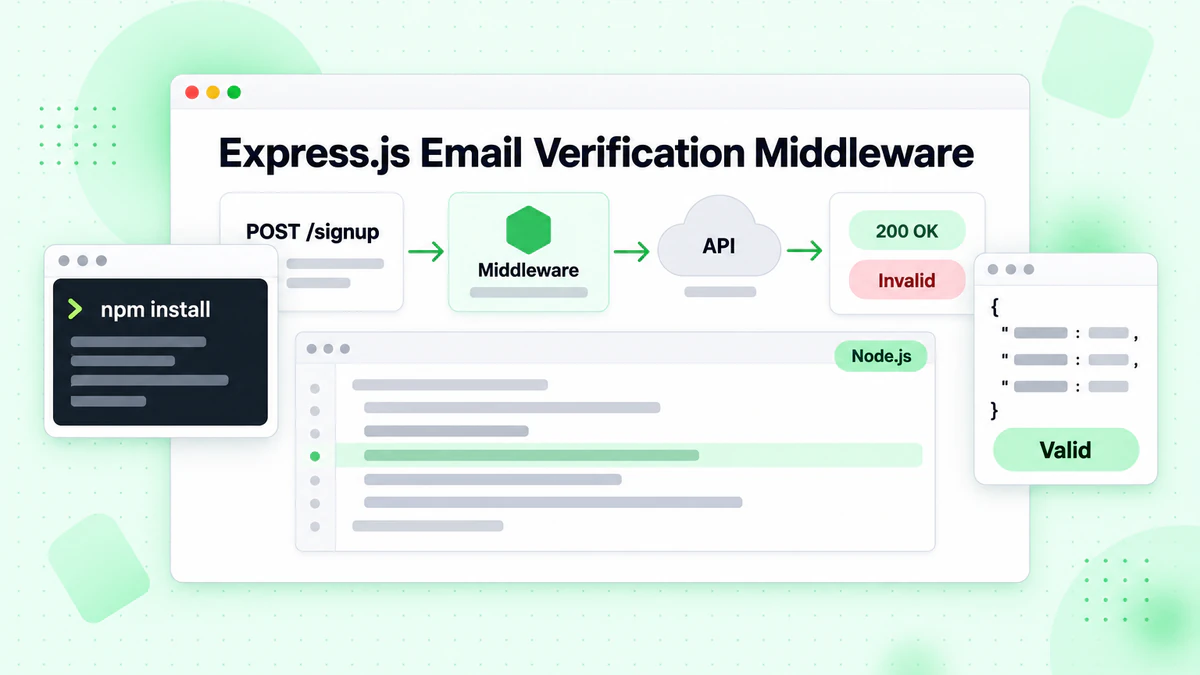
ほとんどの Node.js Web アプリケーションは Express.js または類似のフレームワークを使用します。メール検証を Express ルートに統合することで、フォーム送信時のリアルタイム検証が可能になります。ユーザーは無効なメールアドレスについて即座にフィードバックを受け取り、メールリストの品質を保護しながら登録体験を向上させます。
検証ミドルウェアの作成
ルートハンドラーに到達する前にメールアドレスを検証するミドルウェア関数を作成します。このアプローチは、検証ロジックをビジネスロジックから分離し、コードをより保守しやすくテストしやすくします。
// server.js
import express from 'express';
import EmailValidator from './EmailValidator.js';

const app = express();
const validator = new EmailValidator();

app.use(express.json());

// Middleware for email verification
const verifyEmailMiddleware = async (req, res, next) => {
  const { email } = req.body;

  if (!email) {
    return res.status(400).json({ error: 'Email is required' });
  }

  try {
    const result = await validator.verify(email);

    if (!result.is_valid) {
      return res.status(400).json({
        error: 'Invalid email address',
        details: result
      });
    }

    if (result.is_disposable) {
      return res.status(400).json({
        error: 'Disposable email addresses are not allowed'
      });
    }

    // Attach verification result for downstream use
    req.emailVerification = result;
    next();
  } catch (error) {
    console.error('Email verification failed:', error);
    // Allow request to proceed but flag as unverified
    req.emailVerification = { verified: false, error: error.message };
    next();
  }
};

// Registration endpoint with email verification
app.post('/api/register', verifyEmailMiddleware, async (req, res) => {
  const { email, name, password } = req.body;

  // Email is already verified by middleware
  // Proceed with registration logic

  res.json({
    success: true,
    message: 'Registration successful',
    emailVerification: req.emailVerification
  });
});

app.listen(3000, () => {
  console.log('Server running on port 3000');
});
検証結果の処理
ミドルウェアアプローチは、メール検証をどの程度厳密に実施するかについて柔軟性を提供します。一部のアプリケーションでは、すべての未検証メールを拒否することを選択する場合がありますが、他のアプリケーションでは、手動レビュー用の警告フラグ付きで受け入れる場合があります。リクエストオブジェクトに添付されたメール確認結果により、下流のハンドラーがきめ細かな決定を下すことができます。
リストクリーニングのためのバッチメール検証
リアルタイム検証は個々のアドレスを処理しますが、多くのアプリケーションは大規模なメールリストを検証する必要があります。マーケティングチームは定期的に購読者リストをクリーニングし、CRM システムは定期的に保存された連絡先を検証します。バッチ検証エンドポイントは複数のメールを効率的に処理し、API 呼び出しを削減してスループットを向上させます。
バッチジョブの送信
バッチ操作は単一検証とは異なる処理が必要です。ジョブの送信、ステータスのポーリング、結果の取得を別々の操作として管理する必要があります。この非同期パターンにより、メール検証サービスはタイムアウトすることなく大規模なリストを処理できます。
// batch-verify.js
import EmailValidator from './EmailValidator.js';

class BatchEmailValidator extends EmailValidator {
  async submitBatch(emails) {
    const response = await fetch(`${this.baseUrl}/verify/batch`, {
      method: 'POST',
      headers: {
        'Authorization': `Bearer ${this.apiKey}`,
        'Content-Type': 'application/json'
      },
      body: JSON.stringify({ emails })
    });

    if (!response.ok) {
      throw new Error(`Batch submission failed: ${response.status}`);
    }

    return response.json();
  }

  async getBatchStatus(jobId) {
    const response = await fetch(`${this.baseUrl}/verify/batch/${jobId}`, {
      headers: {
        'Authorization': `Bearer ${this.apiKey}`
      }
    });

    if (!response.ok) {
      throw new Error(`Status check failed: ${response.status}`);
    }

    return response.json();
  }

  async verifyBatch(emails, options = {}) {
    const {
      pollInterval = 5000,
      maxWaitTime = 300000,
      onProgress = () => {}
    } = options;

    // Submit the batch job
    const { job_id } = await this.submitBatch(emails);

    const startTime = Date.now();

    // Poll for completion
    while (Date.now() - startTime < maxWaitTime) {
      const status = await this.getBatchStatus(job_id);

      onProgress({
        processed: status.processed,
        total: status.total,
        percentage: Math.round((status.processed / status.total) * 100)
      });

      if (status.status === 'completed') {
        return status.results;
      }

      if (status.status === 'failed') {
        throw new Error(`Batch job failed: ${status.error}`);
      }

      await this.sleep(pollInterval);
    }

    throw new Error('Batch verification timed out');
  }
}

// Usage example
const batchValidator = new BatchEmailValidator();

const emails = [
  'user1@example.com',
  'user2@company.org',
  'invalid@fake.domain',
  // ... more emails
];

const results = await batchValidator.verifyBatch(emails, {
  onProgress: (progress) => {
    console.log(`Progress: ${progress.percentage}%`);
  }
});

// Process results
const validEmails = results.filter(r => r.is_valid);
const invalidEmails = results.filter(r => !r.is_valid);

console.log(`Valid: ${validEmails.length}, Invalid: ${invalidEmails.length}`);
結果のポーリング
バッチ検証の実装には進捗コールバックが含まれており、アプリケーションがユーザーに検証の進捗を表示したり、監視のためにログに記録したりできます。これは、完了に数分かかる可能性のある数千のメールアドレスを含むリストを処理する場合に特に有用です。
エラー処理と耐障害性
本番環境のメール検証統合は、エラーを適切に処理する必要があります。ネットワークの問題、API レート制限、サービスの利用不可は分散システムでは避けられません。適切なエラー処理を実装することで、検証サービスが問題を経験しても、アプリケーションが機能を維持できるようにします。
カスタムエラークラス
異なるエラータイプを区別する包括的なエラー処理戦略を作成します。レート制限のような一時的なエラーは再試行を行う価値がありますが、無効な API キーのような永続的なエラーは即座の注意とアラートが必要です。
// errors.js
class EmailVerificationError extends Error {
  constructor(message, code, retryable = false) {
    super(message);
    this.name = 'EmailVerificationError';
    this.code = code;
    this.retryable = retryable;
  }
}

class RateLimitError extends EmailVerificationError {
  constructor(retryAfter) {
    super('Rate limit exceeded', 'RATE_LIMITED', true);
    this.retryAfter = retryAfter;
  }
}

class AuthenticationError extends EmailVerificationError {
  constructor() {
    super('Invalid API key', 'AUTH_FAILED', false);
  }
}

// Enhanced validator with error handling
class RobustEmailValidator extends EmailValidator {
  async verify(email) {
    try {
      const response = await fetch(`${this.baseUrl}/verify`, {
        method: 'POST',
        headers: {
          'Authorization': `Bearer ${this.apiKey}`,
          'Content-Type': 'application/json'
        },
        body: JSON.stringify({ email })
      });

      if (response.status === 401) {
        throw new AuthenticationError();
      }

      if (response.status === 429) {
        const retryAfter = response.headers.get('Retry-After') || 60;
        throw new RateLimitError(parseInt(retryAfter));
      }

      if (response.status >= 500) {
        throw new EmailVerificationError(
          'Service temporarily unavailable',
          'SERVICE_ERROR',
          true
        );
      }

      if (!response.ok) {
        const error = await response.json();
        throw new EmailVerificationError(
          error.message || 'Verification failed',
          'API_ERROR',
          false
        );
      }

      return response.json();
    } catch (error) {
      if (error instanceof EmailVerificationError) {
        throw error;
      }

      // Network or parsing error
      throw new EmailVerificationError(
        error.message,
        'NETWORK_ERROR',
        true
      );
    }
  }
}

export { EmailVerificationError, RateLimitError, AuthenticationError, RobustEmailValidator };
グレースフルデグラデーションの実装
アプリケーションコードは、異なるエラータイプを適切に処理し、ユーザーに意味のあるフィードバックを提供し、運用チームに適切なアラートをトリガーできます。
パフォーマンス向上のためのキャッシュ実装
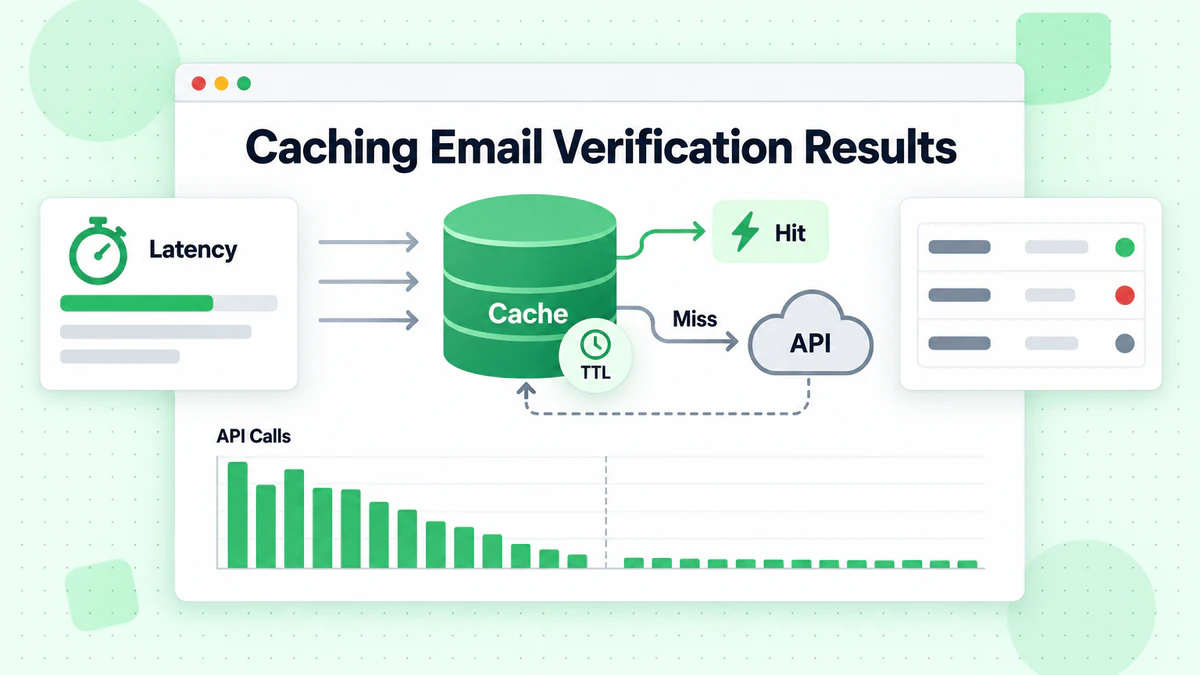
メール検証 API 呼び出しには、金銭的およびレイテンシーの両面でコストがかかります。キャッシュレイヤーを実装することで、同じメールアドレスの冗長な検証を削減しながら、レスポンス時間を改善します。適切に設計されたキャッシュは、メール有効性の動的な性質を尊重しながら、意味のあるパフォーマンス上の利点を提供します。
インメモリキャッシュ戦略
ユースケースに基づいて適切なキャッシュ期間を選択してください。メールの有効性は変化する可能性があります。メールボックスが削除され、ドメインが期限切れになり、キャッチオール設定が変更されます。ほとんどのアプリケーションでは、24 時間のキャッシュ期間がパフォーマンスと精度のバランスを取ります。
// cached-validator.js
class CachedEmailValidator extends EmailValidator {
  constructor(apiKey, cacheOptions = {}) {
    super(apiKey);
    this.cache = new Map();
    this.cacheTTL = cacheOptions.ttl || 24 * 60 * 60 * 1000; // 24 hours
    this.maxCacheSize = cacheOptions.maxSize || 10000;
  }

  getCacheKey(email) {
    return email.toLowerCase().trim();
  }

  getCached(email) {
    const key = this.getCacheKey(email);
    const cached = this.cache.get(key);

    if (!cached) return null;

    if (Date.now() > cached.expiresAt) {
      this.cache.delete(key);
      return null;
    }

    return cached.result;
  }

  setCache(email, result) {
    // Implement LRU eviction if cache is full
    if (this.cache.size >= this.maxCacheSize) {
      const oldestKey = this.cache.keys().next().value;
      this.cache.delete(oldestKey);
    }

    const key = this.getCacheKey(email);
    this.cache.set(key, {
      result,
      expiresAt: Date.now() + this.cacheTTL
    });
  }

  async verify(email) {
    // Check cache first
    const cached = this.getCached(email);
    if (cached) {
      return { ...cached, fromCache: true };
    }

    // Perform verification
    const result = await super.verify(email);

    // Cache successful results
    if (result && !result.error) {
      this.setCache(email, result);
    }

    return { ...result, fromCache: false };
  }

  clearCache() {
    this.cache.clear();
  }

  getCacheStats() {
    return {
      size: this.cache.size,
      maxSize: this.maxCacheSize
    };
  }
}

export default CachedEmailValidator;
キャッシュの無効化
大量を処理する本番アプリケーションでは、メモリ内キャッシュの代わりに Redis または Memcached の使用を検討してください。これらの外部キャッシュストアは、アプリケーションの再起動後も永続化され、クラスター化されたデプロイメントで複数のアプリケーションインスタンス間で共有できます。
メール検証統合のテスト
包括的なテストにより、メール検証統合がすべてのシナリオで正しく機能することが保証されます。単体テストは個々のコンポーネントを検証し、統合テストは適切な API 通信を確認します。単体テスト中は HTTP レイヤーをモックして、実際の API 呼び出しを避けます。
モックを使用した単体テスト
// validator.test.js
import { jest } from '@jest/globals';
import EmailValidator from './EmailValidator.js';

describe('EmailValidator', () => {
  let validator;

  beforeEach(() => {
    validator = new EmailValidator('test-api-key');
    global.fetch = jest.fn();
  });

  test('returns valid result for valid email', async () => {
    fetch.mockResolvedValueOnce({
      ok: true,
      json: () => Promise.resolve({
        is_valid: true,
        is_deliverable: true,
        is_disposable: false,
        risk_score: 10
      })
    });

    const result = await validator.verify('valid@example.com');

    expect(result.is_valid).toBe(true);
    expect(result.is_deliverable).toBe(true);
  });

  test('handles rate limiting with retry', async () => {
    fetch
      .mockResolvedValueOnce({ ok: false, status: 429 })
      .mockResolvedValueOnce({
        ok: true,
        json: () => Promise.resolve({ is_valid: true })
      });

    const result = await validator.verify('test@example.com');

    expect(fetch).toHaveBeenCalledTimes(2);
    expect(result.is_valid).toBe(true);
  });

  test('throws after max retries exceeded', async () => {
    fetch.mockResolvedValue({ ok: false, status: 500 });

    await expect(validator.verify('test@example.com'))
      .rejects.toThrow('API error: 500');
  });
});
エッジケースのテスト
ネットワーク障害、不正な形式のレスポンス、異常なメール形式などのエッジケースのテストを含めてください。メールチェッカーは、アプリケーションをクラッシュさせることなく、すべてのシナリオを適切に処理する必要があります。
モニタリングとロギングのベストプラクティス
本番環境のメール検証統合には、パフォーマンスの追跡、問題の特定、コストの最適化のための監視が必要です。検証結果、レスポンス時間、エラー率をキャプチャする構造化されたロギングを実装します。
構造化ロギング
// monitored-validator.js
class MonitoredEmailValidator extends EmailValidator {
  constructor(apiKey, logger = console) {
    super(apiKey);
    this.logger = logger;
    this.metrics = {
      totalRequests: 0,
      successfulVerifications: 0,
      failedVerifications: 0,
      cacheHits: 0,
      totalLatency: 0
    };
  }

  async verify(email) {
    const startTime = Date.now();
    this.metrics.totalRequests++;

    try {
      const result = await super.verify(email);
      const latency = Date.now() - startTime;

      this.metrics.successfulVerifications++;
      this.metrics.totalLatency += latency;

      this.logger.info({
        event: 'email_verification',
        email: this.maskEmail(email),
        is_valid: result.is_valid,
        latency_ms: latency
      });

      return result;
    } catch (error) {
      this.metrics.failedVerifications++;

      this.logger.error({
        event: 'email_verification_error',
        email: this.maskEmail(email),
        error: error.message,
        latency_ms: Date.now() - startTime
      });

      throw error;
    }
  }

  maskEmail(email) {
    const [local, domain] = email.split('@');
    const maskedLocal = local.charAt(0) + '***' + local.slice(-1);
    return `${maskedLocal}@${domain}`;
  }

  getMetrics() {
    return {
      ...this.metrics,
      averageLatency: this.metrics.totalRequests > 0
        ? Math.round(this.metrics.totalLatency / this.metrics.totalRequests)
        : 0,
      successRate: this.metrics.totalRequests > 0
        ? (this.metrics.successfulVerifications / this.metrics.totalRequests * 100).toFixed(2)
        : 0
    };
  }
}

export default MonitoredEmailValidator;
メトリクスの追跡
エラー率の上昇や、API の問題や不正使用の試みを示す可能性のある異常なパターンに対してアラートを設定します。監視ダッシュボードは、検証パターンを理解し、時間の経過とともに実装を最適化するのに役立ちます。
セキュリティに関する考慮事項
メール検証統合は潜在的に機密データを処理するため、慎重なセキュリティ検討が必要です。API キーを保護し、入力を検証し、不正使用を防ぐために独自のエンドポイントにレート制限を実装します。
API 認証情報の保護
BillionVerify API キーをクライアント側のコードに公開しないでください。すべての検証リクエストは、API 認証情報を安全に保持するバックエンドサーバーを経由する必要があります。これにより、悪意のあるアクターが自分の目的のために API クォータを使用することを防ぎます。
入力検証とレート制限
検証 API にメールを送信する前に、入力検証を実装します。自分の側での基本的な形式検証により、不要な API 呼び出しを削減し、明らかに無効な入力に対してより迅速なフィードバックを提供します。
// secure-validator.js
class SecureEmailValidator extends EmailValidator {
  constructor(apiKey, options = {}) {
    super(apiKey);
    this.rateLimiter = new Map();
    this.maxRequestsPerMinute = options.maxRequestsPerMinute || 100;
  }

  validateEmailFormat(email) {
    if (!email || typeof email !== 'string') {
      throw new Error('Email must be a non-empty string');
    }

    const emailRegex = /^[^\s@]+@[^\s@]+\.[^\s@]+$/;
    if (!emailRegex.test(email)) {
      throw new Error('Invalid email format');
    }

    if (email.length > 254) {
      throw new Error('Email exceeds maximum length');
    }

    return email.toLowerCase().trim();
  }

  checkRateLimit(clientId) {
    const now = Date.now();
    const windowStart = now - 60000;

    if (!this.rateLimiter.has(clientId)) {
      this.rateLimiter.set(clientId, []);
    }

    const requests = this.rateLimiter.get(clientId);
    const recentRequests = requests.filter(time => time > windowStart);

    if (recentRequests.length >= this.maxRequestsPerMinute) {
      throw new Error('Rate limit exceeded. Please try again later.');
    }

    recentRequests.push(now);
    this.rateLimiter.set(clientId, recentRequests);
  }

  async verify(email, clientId = 'default') {
    this.checkRateLimit(clientId);
    const sanitizedEmail = this.validateEmailFormat(email);
    return super.verify(sanitizedEmail);
  }
}

export default SecureEmailValidator;
まとめ
Node.js アプリケーションでメール検証を実装することは、高品質なメールリストを維持し送信者の評判を保護するための基礎を提供します。このチュートリアルで取り上げた技術(基本的な API 統合から、キャッシング、エラー処理、監視を含む本番環境対応パターンまで)は、任意の Node.js アプリケーションに堅牢なメールバリデーションを組み込むための装備を提供します。
BillionVerify のメール検証 API は Node.js とシームレスに統合され、リアルタイムの単一メール検証とバッチ処理機能を提供します。レスポンスデータにより、単純な有効/無効の判定から、洗練されたリスクベースのフィルタリングまで、メール受け入れに関するきめ細かな意思決定が可能になります。
基本的な実装から始めて API パターンを理解し、アプリケーションの要件が進化するにつれて、徐々にキャッシング、監視、エラー処理を追加してください。ここで示されたメールチェッカーパターンは、スタートアップの MVP から数百万の検証を処理するエンタープライズグレードのアプリケーションまでスケールします。
ユーザー登録システムを構築する場合でも、マーケティングリストをクリーニングする場合でも、お問い合わせフォームの送信を検証する場合でも、適切なメール検証はメール配信可能性を保護し、メッセージが実際の受信者に届くことを保証します。BillionVerify アカウントにサインアップして、今日から Node.js アプリケーションにメール検証を統合する第一歩を踏み出しましょう。
Instantly や Smartlead を使うチームは、キャンペーン前に BillionVerify でリストをクリーニングすることで到達率を大幅に改善できます。
認証プロバイダーを選ぶ前に、精度と速度の面で BillionVerify と ZeroBounce を比較してみてください。