



构建收集电子邮件地址的应用程序需要强大的邮箱验证功能,以维护数据质量并保护您的发件人声誉。Node.js 开发者拥有强大的工具来将邮箱验证服务集成到他们的应用程序中。本综合教程将指导您完成 Node.js 邮箱验证 API 集成的实现,从基本设置到生产就绪的实现。
为什么选择 Node.js 进行邮箱验证集成
Node.js 已成为构建现代 Web 应用程序的首选运行时,其异步特性使其特别适合邮箱验证等 API 集成。当用户通过表单提交电子邮件地址时,您需要快速、非阻塞的验证,而不会降低用户体验。Node.js 擅长高效处理多个并发 API 请求,使其非常适合实时单个邮箱验证和批量处理场景。
npm 生态系统提供了出色的 HTTP 客户端库,简化了 API 集成。无论您喜欢内置的 fetch API、axios 还是 node-fetch,在 Node.js 中实现邮箱验证器都只需要最少的样板代码,同时为自定义提供了最大的灵活性。
设置您的 Node.js 项目
在深入邮箱验证实现之前,确保您的开发环境配置正确。您需要 Node.js 版本 18 或更高版本才能利用原生 fetch API,尽管早期版本可以使用 node-fetch 作为 polyfill。
安装依赖
创建一个新的项目目录并使用 npm 初始化。您的 package.json 应包含 HTTP 请求和环境变量管理所需的依赖项。dotenv 包通过从环境文件加载 API 凭据而不是在源代码中硬编码敏感信息来帮助保持 API 凭据安全。
// package.json
{
  "name": "email-verification-demo",
  "version": "1.0.0",
  "type": "module",
  "dependencies": {
    "dotenv": "^16.3.1"
  }
}
配置环境变量
将您的 BillionVerify API 密钥存储在环境文件中。永远不要将 API 密钥提交到版本控制。.env 文件将凭据与代码库分离,遵循每个邮箱验证服务推荐的安全最佳实践。
# .env
BV_API_KEY=your_api_key_here
实现单个邮箱验证
任何邮箱验证集成的基础都是验证单个电子邮件地址的能力。此功能为用户注册、联系表单提交以及任何需要即时反馈的场景提供实时验证。
发起首次 API 调用
BillionVerify 邮箱验证 API 接受带有请求正文中电子邮件地址的 POST 请求。响应包括综合验证结果,包括有效性状态、可送达性评估以及对一次性邮箱、角色类邮箱和全接收域的详细检查。
// verify-email.js
import 'dotenv/config';

const API_BASE_URL = 'https://api.billionverify.com/v1';
const API_KEY = process.env.BV_API_KEY;

async function verifyEmail(email) {
  const response = await fetch(`${API_BASE_URL}/verify`, {
    method: 'POST',
    headers: {
      'Authorization': `Bearer ${API_KEY}`,
      'Content-Type': 'application/json'
    },
    body: JSON.stringify({ email })
  });

  if (!response.ok) {
    throw new Error(`Verification failed: ${response.status}`);
  }

  return response.json();
}

// Usage example
const result = await verifyEmail('user@example.com');
console.log(result);
理解响应字段
验证响应提供了关于每个电子邮件地址的可操作情报。了解这些响应字段有助于您做出是否将电子邮件地址接受到系统中的明智决策。
| 字段 | 描述 | 使用场景 |
|---|---|---|
| is_valid | 整体有效性评估 | 主要接受/拒绝决策 |
| is_deliverable | 可以接收电子邮件 | 电子邮件营销活动资格 |
| is_disposable | 临时邮箱服务 | 欺诈预防 |
| is_role_based | 通用地址(info@、support@) | B2B 定向 |
| is_catch_all | 域接受所有地址 | 风险评估 |
| risk_score | 0-100 风险评级 | 细粒度过滤 |
构建可重用的邮箱验证器类
生产应用程序受益于将邮箱验证逻辑封装在可重用的类中。这种方法提供了一致的错误处理、自动重试以及应用程序其余部分使用的清晰接口。
类架构设计
EmailValidator 类抽象了 HTTP 细节,并为常见验证场景提供方法。它处理 API 身份验证、请求格式化和响应解析,使您的应用程序代码可以专注于业务逻辑而不是 API 机制。
// EmailValidator.js
import 'dotenv/config';

class EmailValidator {
  constructor(apiKey = process.env.BV_API_KEY) {
    this.apiKey = apiKey;
    this.baseUrl = 'https://api.billionverify.com/v1';
    this.maxRetries = 3;
    this.retryDelay = 1000;
  }

  async verify(email) {
    let lastError;

    for (let attempt = 1; attempt <= this.maxRetries; attempt++) {
      try {
        const response = await fetch(`${this.baseUrl}/verify`, {
          method: 'POST',
          headers: {
            'Authorization': `Bearer ${this.apiKey}`,
            'Content-Type': 'application/json'
          },
          body: JSON.stringify({ email })
        });

        if (response.status === 429) {
          // Rate limited - wait and retry
          await this.sleep(this.retryDelay * attempt);
          continue;
        }

        if (!response.ok) {
          throw new Error(`API error: ${response.status}`);
        }

        return await response.json();
      } catch (error) {
        lastError = error;
        if (attempt < this.maxRetries) {
          await this.sleep(this.retryDelay * attempt);
        }
      }
    }

    throw lastError;
  }

  async isValid(email) {
    const result = await this.verify(email);
    return result.is_valid && result.is_deliverable;
  }

  async isHighRisk(email) {
    const result = await this.verify(email);
    return result.risk_score > 70 || result.is_disposable;
  }

  sleep(ms) {
    return new Promise(resolve => setTimeout(resolve, ms));
  }
}

export default EmailValidator;
自动重试逻辑
此类为失败的请求实现了指数退避,这对于生产可靠性至关重要。当邮箱验证服务返回速率限制错误或遇到临时问题时,类会自动重试,尝试之间的延迟逐渐增加。
与 Express.js 应用程序集成
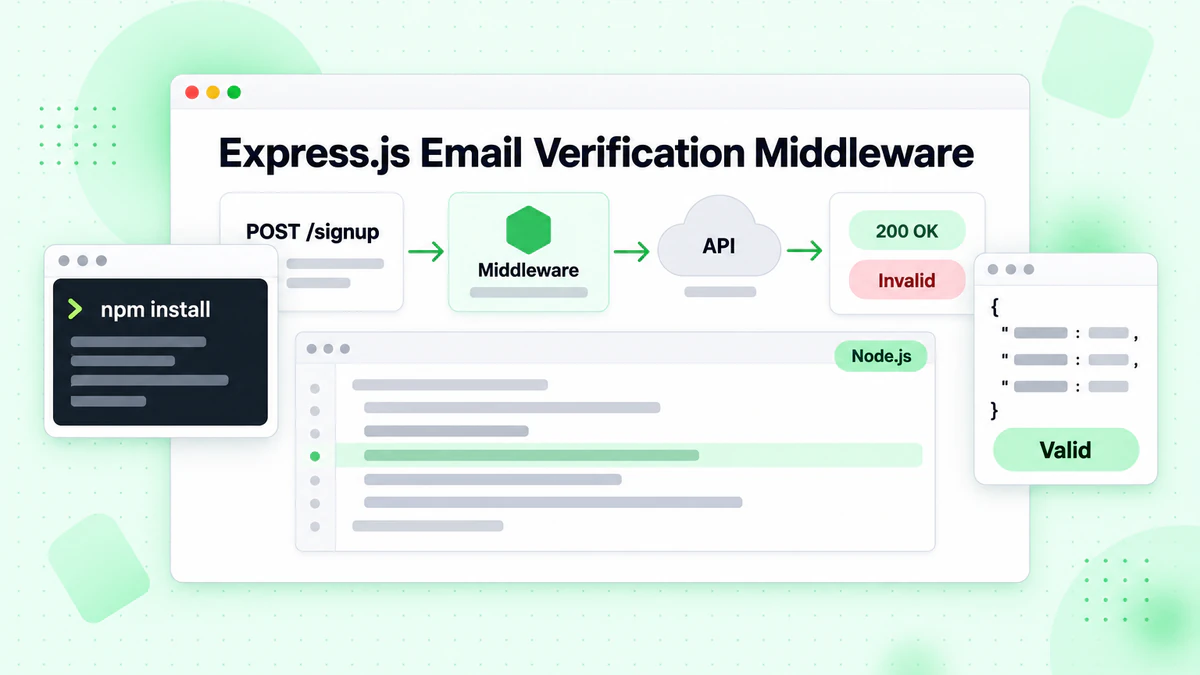
大多数 Node.js Web 应用程序使用 Express.js 或类似框架。将邮箱验证集成到您的 Express 路由中可在表单提交期间实现实时验证。用户会立即收到有关无效电子邮件地址的反馈,改善注册体验同时保护您的邮件列表质量。
创建验证中间件
创建一个中间件函数,在电子邮件地址到达路由处理程序之前对其进行验证。这种方法将验证逻辑与业务逻辑分离,使您的代码更易于维护和测试。
// server.js
import express from 'express';
import EmailValidator from './EmailValidator.js';

const app = express();
const validator = new EmailValidator();

app.use(express.json());

// Middleware for email verification
const verifyEmailMiddleware = async (req, res, next) => {
  const { email } = req.body;

  if (!email) {
    return res.status(400).json({ error: 'Email is required' });
  }

  try {
    const result = await validator.verify(email);

    if (!result.is_valid) {
      return res.status(400).json({
        error: 'Invalid email address',
        details: result
      });
    }

    if (result.is_disposable) {
      return res.status(400).json({
        error: 'Disposable email addresses are not allowed'
      });
    }

    // Attach verification result for downstream use
    req.emailVerification = result;
    next();
  } catch (error) {
    console.error('Email verification failed:', error);
    // Allow request to proceed but flag as unverified
    req.emailVerification = { verified: false, error: error.message };
    next();
  }
};

// Registration endpoint with email verification
app.post('/api/register', verifyEmailMiddleware, async (req, res) => {
  const { email, name, password } = req.body;

  // Email is already verified by middleware
  // Proceed with registration logic

  res.json({
    success: true,
    message: 'Registration successful',
    emailVerification: req.emailVerification
  });
});

app.listen(3000, () => {
  console.log('Server running on port 3000');
});
处理验证结果
中间件方法为如何严格执行邮箱验证提供了灵活性。某些应用程序可能选择拒绝所有未验证的电子邮件,而其他应用程序可能会接受它们并带有警告标志以供人工审核。附加到请求对象的邮件验证结果使下游处理程序能够做出细致的决策。
批量邮箱验证用于列表清理
虽然实时验证处理单个地址,但许多应用程序需要验证大型电子邮件列表。营销团队定期清理其订阅者列表,CRM 系统定期验证存储的联系人。批量验证端点高效处理多个电子邮件,减少 API 调用并提高吞吐量。
提交批量任务
批量操作需要与单个验证不同的处理。您需要将作业提交、状态轮询和结果检索作为单独的操作进行管理。这种异步模式允许邮箱验证服务处理大型列表而不会超时。
// batch-verify.js
import EmailValidator from './EmailValidator.js';

class BatchEmailValidator extends EmailValidator {
  async submitBatch(emails) {
    const response = await fetch(`${this.baseUrl}/verify/batch`, {
      method: 'POST',
      headers: {
        'Authorization': `Bearer ${this.apiKey}`,
        'Content-Type': 'application/json'
      },
      body: JSON.stringify({ emails })
    });

    if (!response.ok) {
      throw new Error(`Batch submission failed: ${response.status}`);
    }

    return response.json();
  }

  async getBatchStatus(jobId) {
    const response = await fetch(`${this.baseUrl}/verify/batch/${jobId}`, {
      headers: {
        'Authorization': `Bearer ${this.apiKey}`
      }
    });

    if (!response.ok) {
      throw new Error(`Status check failed: ${response.status}`);
    }

    return response.json();
  }

  async verifyBatch(emails, options = {}) {
    const {
      pollInterval = 5000,
      maxWaitTime = 300000,
      onProgress = () => {}
    } = options;

    // Submit the batch job
    const { job_id } = await this.submitBatch(emails);

    const startTime = Date.now();

    // Poll for completion
    while (Date.now() - startTime < maxWaitTime) {
      const status = await this.getBatchStatus(job_id);

      onProgress({
        processed: status.processed,
        total: status.total,
        percentage: Math.round((status.processed / status.total) * 100)
      });

      if (status.status === 'completed') {
        return status.results;
      }

      if (status.status === 'failed') {
        throw new Error(`Batch job failed: ${status.error}`);
      }

      await this.sleep(pollInterval);
    }

    throw new Error('Batch verification timed out');
  }
}

// Usage example
const batchValidator = new BatchEmailValidator();

const emails = [
  'user1@example.com',
  'user2@company.org',
  'invalid@fake.domain',
  // ... more emails
];

const results = await batchValidator.verifyBatch(emails, {
  onProgress: (progress) => {
    console.log(`Progress: ${progress.percentage}%`);
  }
});

// Process results
const validEmails = results.filter(r => r.is_valid);
const invalidEmails = results.filter(r => !r.is_valid);

console.log(`Valid: ${validEmails.length}, Invalid: ${invalidEmails.length}`);
轮询获取结果
批量验证实现包括进度回调,允许您的应用程序向用户显示验证进度或记录以供监控。这在处理可能需要几分钟才能完成的数千个电子邮件地址的列表时特别有用。
错误处理和弹性
生产环境的邮箱验证集成必须优雅地处理错误。网络问题、API 速率限制和服务不可用在分布式系统中是不可避免的。实施适当的错误处理可确保您的应用程序即使在验证服务遇到问题时也能保持正常运行。
自定义错误类
创建一个全面的错误处理策略,区分不同的错误类型。速率限制等瞬态错误值得重试,而无效 API 密钥等永久性错误需要立即关注和警报。
// errors.js
class EmailVerificationError extends Error {
  constructor(message, code, retryable = false) {
    super(message);
    this.name = 'EmailVerificationError';
    this.code = code;
    this.retryable = retryable;
  }
}

class RateLimitError extends EmailVerificationError {
  constructor(retryAfter) {
    super('Rate limit exceeded', 'RATE_LIMITED', true);
    this.retryAfter = retryAfter;
  }
}

class AuthenticationError extends EmailVerificationError {
  constructor() {
    super('Invalid API key', 'AUTH_FAILED', false);
  }
}

// Enhanced validator with error handling
class RobustEmailValidator extends EmailValidator {
  async verify(email) {
    try {
      const response = await fetch(`${this.baseUrl}/verify`, {
        method: 'POST',
        headers: {
          'Authorization': `Bearer ${this.apiKey}`,
          'Content-Type': 'application/json'
        },
        body: JSON.stringify({ email })
      });

      if (response.status === 401) {
        throw new AuthenticationError();
      }

      if (response.status === 429) {
        const retryAfter = response.headers.get('Retry-After') || 60;
        throw new RateLimitError(parseInt(retryAfter));
      }

      if (response.status >= 500) {
        throw new EmailVerificationError(
          'Service temporarily unavailable',
          'SERVICE_ERROR',
          true
        );
      }

      if (!response.ok) {
        const error = await response.json();
        throw new EmailVerificationError(
          error.message || 'Verification failed',
          'API_ERROR',
          false
        );
      }

      return response.json();
    } catch (error) {
      if (error instanceof EmailVerificationError) {
        throw error;
      }

      // Network or parsing error
      throw new EmailVerificationError(
        error.message,
        'NETWORK_ERROR',
        true
      );
    }
  }
}

export { EmailVerificationError, RateLimitError, AuthenticationError, RobustEmailValidator };
实现优雅降级
然后,您的应用程序代码可以适当地处理不同的错误类型,为用户提供有意义的反馈并为运营团队触发适当的警报。
实现缓存以提高性能
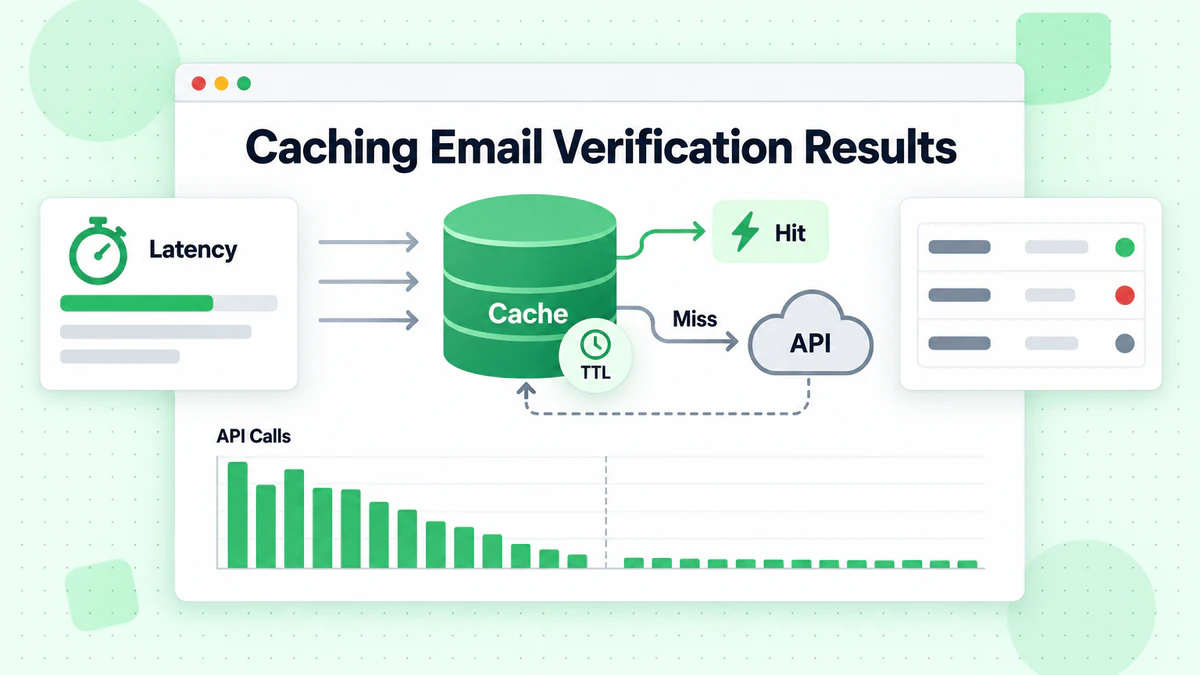
邮箱验证 API 调用有成本,无论是金钱还是延迟方面。实施缓存层可减少对相同电子邮件地址的冗余验证,同时提高响应时间。设计良好的缓存尊重电子邮件有效性的动态性质,同时提供有意义的性能优势。
内存缓存策略
根据您的使用场景选择适当的缓存持续时间。电子邮件有效性可能会改变——邮箱被删除、域过期、全接收配置更改。对于大多数应用程序,24 小时的缓存持续时间平衡了性能和准确性。
// cached-validator.js
class CachedEmailValidator extends EmailValidator {
  constructor(apiKey, cacheOptions = {}) {
    super(apiKey);
    this.cache = new Map();
    this.cacheTTL = cacheOptions.ttl || 24 * 60 * 60 * 1000; // 24 hours
    this.maxCacheSize = cacheOptions.maxSize || 10000;
  }

  getCacheKey(email) {
    return email.toLowerCase().trim();
  }

  getCached(email) {
    const key = this.getCacheKey(email);
    const cached = this.cache.get(key);

    if (!cached) return null;

    if (Date.now() > cached.expiresAt) {
      this.cache.delete(key);
      return null;
    }

    return cached.result;
  }

  setCache(email, result) {
    // Implement LRU eviction if cache is full
    if (this.cache.size >= this.maxCacheSize) {
      const oldestKey = this.cache.keys().next().value;
      this.cache.delete(oldestKey);
    }

    const key = this.getCacheKey(email);
    this.cache.set(key, {
      result,
      expiresAt: Date.now() + this.cacheTTL
    });
  }

  async verify(email) {
    // Check cache first
    const cached = this.getCached(email);
    if (cached) {
      return { ...cached, fromCache: true };
    }

    // Perform verification
    const result = await super.verify(email);

    // Cache successful results
    if (result && !result.error) {
      this.setCache(email, result);
    }

    return { ...result, fromCache: false };
  }

  clearCache() {
    this.cache.clear();
  }

  getCacheStats() {
    return {
      size: this.cache.size,
      maxSize: this.maxCacheSize
    };
  }
}

export default CachedEmailValidator;
缓存失效处理
对于处理高容量的生产应用程序,考虑使用 Redis 或 Memcached 而不是内存缓存。这些外部缓存存储在应用程序重启后仍然存在,并且可以在集群部署中的多个应用程序实例之间共享。
测试您的邮箱验证集成
全面的测试可确保您的邮箱验证集成在所有场景下都能正常工作。单元测试验证单个组件,而集成测试确认正确的 API 通信。在单元测试期间模拟 HTTP 层以避免进行实际的 API 调用。
使用 Mock 进行单元测试
// validator.test.js
import { jest } from '@jest/globals';
import EmailValidator from './EmailValidator.js';

describe('EmailValidator', () => {
  let validator;

  beforeEach(() => {
    validator = new EmailValidator('test-api-key');
    global.fetch = jest.fn();
  });

  test('returns valid result for valid email', async () => {
    fetch.mockResolvedValueOnce({
      ok: true,
      json: () => Promise.resolve({
        is_valid: true,
        is_deliverable: true,
        is_disposable: false,
        risk_score: 10
      })
    });

    const result = await validator.verify('valid@example.com');

    expect(result.is_valid).toBe(true);
    expect(result.is_deliverable).toBe(true);
  });

  test('handles rate limiting with retry', async () => {
    fetch
      .mockResolvedValueOnce({ ok: false, status: 429 })
      .mockResolvedValueOnce({
        ok: true,
        json: () => Promise.resolve({ is_valid: true })
      });

    const result = await validator.verify('test@example.com');

    expect(fetch).toHaveBeenCalledTimes(2);
    expect(result.is_valid).toBe(true);
  });

  test('throws after max retries exceeded', async () => {
    fetch.mockResolvedValue({ ok: false, status: 500 });

    await expect(validator.verify('test@example.com'))
      .rejects.toThrow('API error: 500');
  });
});
测试边缘情况
包括对边缘情况的测试,如网络故障、格式错误的响应和不寻常的电子邮件格式。邮箱检查器应该优雅地处理所有场景,而不会导致应用程序崩溃。
监控和日志记录最佳实践
生产环境的邮箱验证集成需要监控来跟踪性能、识别问题和优化成本。实施结构化日志记录,捕获验证结果、响应时间和错误率。
结构化日志
// monitored-validator.js
class MonitoredEmailValidator extends EmailValidator {
  constructor(apiKey, logger = console) {
    super(apiKey);
    this.logger = logger;
    this.metrics = {
      totalRequests: 0,
      successfulVerifications: 0,
      failedVerifications: 0,
      cacheHits: 0,
      totalLatency: 0
    };
  }

  async verify(email) {
    const startTime = Date.now();
    this.metrics.totalRequests++;

    try {
      const result = await super.verify(email);
      const latency = Date.now() - startTime;

      this.metrics.successfulVerifications++;
      this.metrics.totalLatency += latency;

      this.logger.info({
        event: 'email_verification',
        email: this.maskEmail(email),
        is_valid: result.is_valid,
        latency_ms: latency
      });

      return result;
    } catch (error) {
      this.metrics.failedVerifications++;

      this.logger.error({
        event: 'email_verification_error',
        email: this.maskEmail(email),
        error: error.message,
        latency_ms: Date.now() - startTime
      });

      throw error;
    }
  }

  maskEmail(email) {
    const [local, domain] = email.split('@');
    const maskedLocal = local.charAt(0) + '***' + local.slice(-1);
    return `${maskedLocal}@${domain}`;
  }

  getMetrics() {
    return {
      ...this.metrics,
      averageLatency: this.metrics.totalRequests > 0
        ? Math.round(this.metrics.totalLatency / this.metrics.totalRequests)
        : 0,
      successRate: this.metrics.totalRequests > 0
        ? (this.metrics.successfulVerifications / this.metrics.totalRequests * 100).toFixed(2)
        : 0
    };
  }
}

export default MonitoredEmailValidator;
指标追踪
为升高的错误率或可能表明 API 问题或滥用尝试的异常模式设置警报。监控仪表板可帮助您了解验证模式并随着时间的推移优化您的实现。
安全注意事项
邮箱验证集成处理潜在的敏感数据,需要仔细考虑安全性。保护您的 API 密钥,验证输入,并在您自己的端点上实施速率限制以防止滥用。
保护 API 凭证
永远不要将您的 BillionVerify API 密钥暴露给客户端代码。所有验证请求都应通过您的后端服务器路由,后端服务器安全地保存 API 凭据。这可以防止恶意行为者将您的 API 配额用于他们自己的目的。
输入验证与速率限制
在将电子邮件发送到验证邮箱地址 API 之前实施输入验证。您自己一方的基本格式验证可减少不必要的 API 调用,并为明显无效的输入提供更快的反馈。
// secure-validator.js
class SecureEmailValidator extends EmailValidator {
  constructor(apiKey, options = {}) {
    super(apiKey);
    this.rateLimiter = new Map();
    this.maxRequestsPerMinute = options.maxRequestsPerMinute || 100;
  }

  validateEmailFormat(email) {
    if (!email || typeof email !== 'string') {
      throw new Error('Email must be a non-empty string');
    }

    const emailRegex = /^[^\s@]+@[^\s@]+\.[^\s@]+$/;
    if (!emailRegex.test(email)) {
      throw new Error('Invalid email format');
    }

    if (email.length > 254) {
      throw new Error('Email exceeds maximum length');
    }

    return email.toLowerCase().trim();
  }

  checkRateLimit(clientId) {
    const now = Date.now();
    const windowStart = now - 60000;

    if (!this.rateLimiter.has(clientId)) {
      this.rateLimiter.set(clientId, []);
    }

    const requests = this.rateLimiter.get(clientId);
    const recentRequests = requests.filter(time => time > windowStart);

    if (recentRequests.length >= this.maxRequestsPerMinute) {
      throw new Error('Rate limit exceeded. Please try again later.');
    }

    recentRequests.push(now);
    this.rateLimiter.set(clientId, recentRequests);
  }

  async verify(email, clientId = 'default') {
    this.checkRateLimit(clientId);
    const sanitizedEmail = this.validateEmailFormat(email);
    return super.verify(sanitizedEmail);
  }
}

export default SecureEmailValidator;
结论
在 Node.js 应用程序中实现邮箱验证为维护高质量的电子邮件列表和保护您的发件人声誉奠定了基础。本教程涵盖的技术——从基本的 API 集成到包括缓存、错误处理和监控在内的生产就绪模式——使您能够在任何 Node.js 应用程序中构建强大的邮件验证。
BillionVerify 的邮箱验证 API 与 Node.js 无缝集成,提供实时单个邮箱验证和批量处理功能。响应数据支持关于电子邮件接受的细致决策,从简单的有效/无效判断到基于风险的复杂过滤。
从基本实现开始以了解 API 模式,然后随着应用程序需求的发展逐步添加缓存、监控和错误处理。这里演示的邮箱检查器模式可从初创公司 MVP 扩展到处理数百万次验证的企业级应用程序。
无论您是构建用户注册系统、清理营销列表还是验证联系表单提交,适当的邮箱验证都可以保护您的电子邮件可送达性并确保您的消息到达真实收件人。立即注册 BillionVerify 账户并将邮箱验证集成到您的 Node.js 应用程序中,迈出第一步。
使用 Instantly 或 Smartlead 的团队,在每次活动前通过 BillionVerify 清洗列表,可显著提升送达率。
在选择验证服务商前,对比 BillionVerify 与 ZeroBounce 在准确率和速度方面的差异。