



構建收集電子郵件地址的應用程式需要強大的郵箱驗證功能,以維護資料質量並保護您的發件人聲譽。Node.js 開發者擁有強大的工具來將郵箱驗證服務集成到他們的應用程式中。本綜合教程將指導您完成 Node.js 郵箱驗證 API 集成的實現,從基本設置到生產就緒的實現。
為什麼選擇 Node.js 進行郵箱驗證集成
Node.js 已成為構建現代 Web 應用程式的首選執行環境,其非同步特性使其特別適合郵箱驗證等 API 集成。當使用者透過表單提交電子郵件地址時,您需要快速、非阻塞的驗證,而不會降低使用者體驗。Node.js 擅長高效處理多個並發 API 請求,使其非常適合即時單個郵箱驗證和批量處理情境。
npm 生態系統提供了出色的 HTTP 用戶端程式庫,簡化了 API 集成。無論您偏好內建的 fetch API、axios 還是 node-fetch,在 Node.js 中實現郵箱驗證器都只需要最少的樣板程式碼,同時為自訂提供了最大的靈活性。
設定您的 Node.js 專案
在深入郵箱驗證實現之前,確保您的開發環境配置正確。您需要 Node.js 版本 18 或更高版本才能利用原生 fetch API,儘管早期版本可以使用 node-fetch 作為 polyfill。
安裝依賴
建立一個新的專案目錄並使用 npm 初始化。您的 package.json 應包含 HTTP 請求和環境變數管理所需的相依套件。dotenv 套件透過從環境檔案載入 API 憑證而不是在原始碼中硬編碼敏感資訊來幫助保持 API 憑證安全。
// package.json
{
  "name": "email-verification-demo",
  "version": "1.0.0",
  "type": "module",
  "dependencies": {
    "dotenv": "^16.3.1"
  }
}
配置環境變數
將您的 BillionVerify API 金鑰儲存在環境檔案中。永遠不要將 API 金鑰提交到版本控制。.env 檔案將憑證與程式碼庫分離,遵循每個郵箱驗證服務推薦的安全最佳實踐。
# .env
BV_API_KEY=your_api_key_here
實現單個郵箱驗證
任何郵箱驗證集成的基礎都是驗證單個電子郵件地址的能力。此功能為使用者註冊、聯絡表單提交以及任何需要即時回饋的情境提供即時驗證。
發起首次 API 呼叫
BillionVerify 郵箱驗證 API 接受帶有請求主體中電子郵件地址的 POST 請求。回應包括綜合驗證結果,包括有效性狀態、可送達性評估以及對一次性郵箱、角色類郵箱和全接收網域的詳細檢查。
// verify-email.js
import 'dotenv/config';

const API_BASE_URL = 'https://api.billionverify.com/v1';
const API_KEY = process.env.BV_API_KEY;

async function verifyEmail(email) {
  const response = await fetch(`${API_BASE_URL}/verify`, {
    method: 'POST',
    headers: {
      'Authorization': `Bearer ${API_KEY}`,
      'Content-Type': 'application/json'
    },
    body: JSON.stringify({ email })
  });

  if (!response.ok) {
    throw new Error(`Verification failed: ${response.status}`);
  }

  return response.json();
}

// Usage example
const result = await verifyEmail('user@example.com');
console.log(result);
理解回應欄位
驗證回應提供了關於每個電子郵件地址的可操作情報。了解這些回應欄位有助於您做出是否將電子郵件地址接受到系統中的明智決策。
| 欄位 | 描述 | 使用場景 |
|---|---|---|
| is_valid | 整體有效性評估 | 主要接受/拒絕決策 |
| is_deliverable | 可以接收電子郵件 | 電子郵件行銷活動資格 |
| is_disposable | 臨時郵箱服務 | 詐欺預防 |
| is_role_based | 通用地址(info@、support@) | B2B 定向 |
| is_catch_all | 網域接受所有地址 | 風險評估 |
| risk_score | 0-100 風險評級 | 細粒度過濾 |
構建可重用的郵箱驗證器類別
生產應用程式受益於將郵箱驗證邏輯封裝在可重用的類別中。這種方法提供了一致的錯誤處理、自動重試以及應用程式其餘部分使用的清晰介面。
類別架構設計
EmailValidator 類別抽象了 HTTP 細節,並為常見驗證情境提供方法。它處理 API 身份驗證、請求格式化和回應解析,使您的應用程式程式碼可以專注於業務邏輯而不是 API 機制。
// EmailValidator.js
import 'dotenv/config';

class EmailValidator {
  constructor(apiKey = process.env.BV_API_KEY) {
    this.apiKey = apiKey;
    this.baseUrl = 'https://api.billionverify.com/v1';
    this.maxRetries = 3;
    this.retryDelay = 1000;
  }

  async verify(email) {
    let lastError;

    for (let attempt = 1; attempt <= this.maxRetries; attempt++) {
      try {
        const response = await fetch(`${this.baseUrl}/verify`, {
          method: 'POST',
          headers: {
            'Authorization': `Bearer ${this.apiKey}`,
            'Content-Type': 'application/json'
          },
          body: JSON.stringify({ email })
        });

        if (response.status === 429) {
          // Rate limited - wait and retry
          await this.sleep(this.retryDelay * attempt);
          continue;
        }

        if (!response.ok) {
          throw new Error(`API error: ${response.status}`);
        }

        return await response.json();
      } catch (error) {
        lastError = error;
        if (attempt < this.maxRetries) {
          await this.sleep(this.retryDelay * attempt);
        }
      }
    }

    throw lastError;
  }

  async isValid(email) {
    const result = await this.verify(email);
    return result.is_valid && result.is_deliverable;
  }

  async isHighRisk(email) {
    const result = await this.verify(email);
    return result.risk_score > 70 || result.is_disposable;
  }

  sleep(ms) {
    return new Promise(resolve => setTimeout(resolve, ms));
  }
}

export default EmailValidator;
自動重試邏輯
此類別為失敗的請求實現了指數退避,這對於生產可靠性至關重要。當郵箱驗證服務返回速率限制錯誤或遇到臨時問題時,類別會自動重試,嘗試之間的延遲逐漸增加。
與 Express.js 應用程式集成
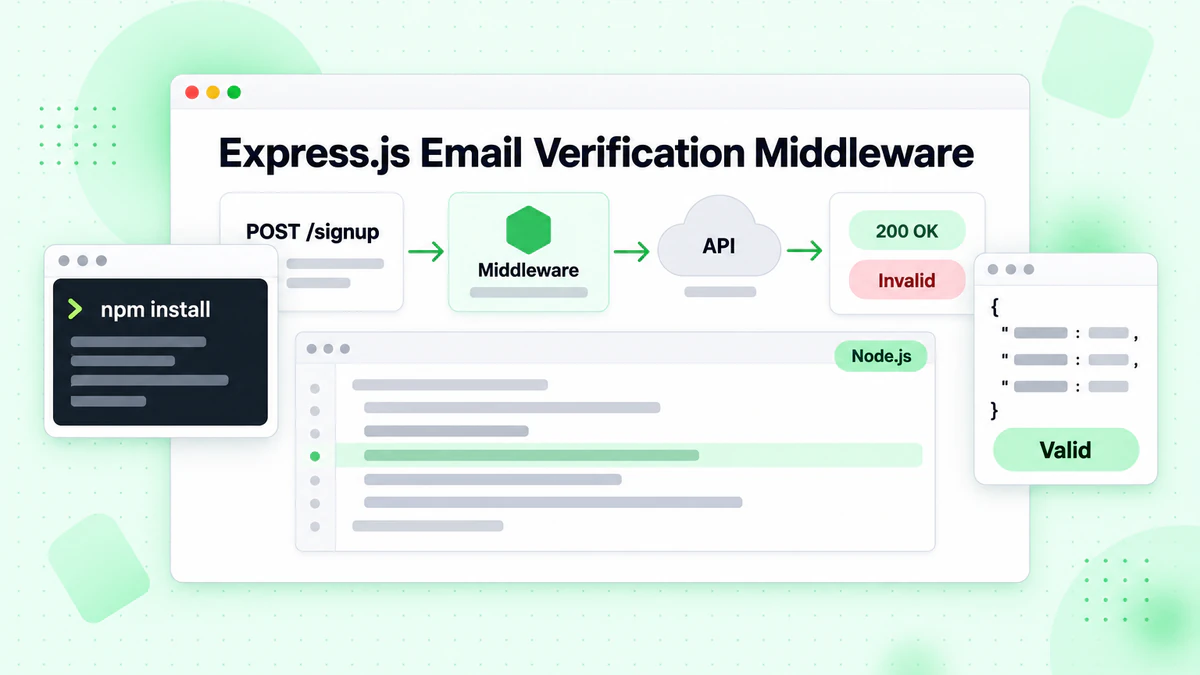
大多數 Node.js Web 應用程式使用 Express.js 或類似框架。將郵箱驗證集成到您的 Express 路由中可在表單提交期間實現即時驗證。使用者會立即收到有關無效電子郵件地址的回饋,改善註冊體驗同時保護您的郵件清單質量。
建立驗證中介軟體
建立一個中介軟體函數,在電子郵件地址到達路由處理程式之前對其進行驗證。這種方法將驗證邏輯與業務邏輯分離,使您的程式碼更易於維護和測試。
// server.js
import express from 'express';
import EmailValidator from './EmailValidator.js';

const app = express();
const validator = new EmailValidator();

app.use(express.json());

// Middleware for email verification
const verifyEmailMiddleware = async (req, res, next) => {
  const { email } = req.body;

  if (!email) {
    return res.status(400).json({ error: 'Email is required' });
  }

  try {
    const result = await validator.verify(email);

    if (!result.is_valid) {
      return res.status(400).json({
        error: 'Invalid email address',
        details: result
      });
    }

    if (result.is_disposable) {
      return res.status(400).json({
        error: 'Disposable email addresses are not allowed'
      });
    }

    // Attach verification result for downstream use
    req.emailVerification = result;
    next();
  } catch (error) {
    console.error('Email verification failed:', error);
    // Allow request to proceed but flag as unverified
    req.emailVerification = { verified: false, error: error.message };
    next();
  }
};

// Registration endpoint with email verification
app.post('/api/register', verifyEmailMiddleware, async (req, res) => {
  const { email, name, password } = req.body;

  // Email is already verified by middleware
  // Proceed with registration logic

  res.json({
    success: true,
    message: 'Registration successful',
    emailVerification: req.emailVerification
  });
});

app.listen(3000, () => {
  console.log('Server running on port 3000');
});
處理驗證結果
中介軟體方法為如何嚴格執行郵箱驗證提供了靈活性。某些應用程式可能選擇拒絕所有未驗證的電子郵件,而其他應用程式可能會接受它們並帶有警告標記以供人工審核。附加到請求物件的郵件驗證結果使下游處理程式能夠做出細緻的決策。
批量郵箱驗證用於清單清理
雖然即時驗證處理單個地址,但許多應用程式需要驗證大型電子郵件清單。行銷團隊定期清理其訂閱者清單,CRM 系統定期驗證儲存的聯絡人。批量驗證端點高效處理多個電子郵件,減少 API 呼叫並提高吞吐量。
提交批次任務
批量操作需要與單個驗證不同的處理。您需要將作業提交、狀態輪詢和結果檢索作為單獨的操作進行管理。這種非同步模式允許郵箱驗證服務處理大型清單而不會逾時。
// batch-verify.js
import EmailValidator from './EmailValidator.js';

class BatchEmailValidator extends EmailValidator {
  async submitBatch(emails) {
    const response = await fetch(`${this.baseUrl}/verify/batch`, {
      method: 'POST',
      headers: {
        'Authorization': `Bearer ${this.apiKey}`,
        'Content-Type': 'application/json'
      },
      body: JSON.stringify({ emails })
    });

    if (!response.ok) {
      throw new Error(`Batch submission failed: ${response.status}`);
    }

    return response.json();
  }

  async getBatchStatus(jobId) {
    const response = await fetch(`${this.baseUrl}/verify/batch/${jobId}`, {
      headers: {
        'Authorization': `Bearer ${this.apiKey}`
      }
    });

    if (!response.ok) {
      throw new Error(`Status check failed: ${response.status}`);
    }

    return response.json();
  }

  async verifyBatch(emails, options = {}) {
    const {
      pollInterval = 5000,
      maxWaitTime = 300000,
      onProgress = () => {}
    } = options;

    // Submit the batch job
    const { job_id } = await this.submitBatch(emails);

    const startTime = Date.now();

    // Poll for completion
    while (Date.now() - startTime < maxWaitTime) {
      const status = await this.getBatchStatus(job_id);

      onProgress({
        processed: status.processed,
        total: status.total,
        percentage: Math.round((status.processed / status.total) * 100)
      });

      if (status.status === 'completed') {
        return status.results;
      }

      if (status.status === 'failed') {
        throw new Error(`Batch job failed: ${status.error}`);
      }

      await this.sleep(pollInterval);
    }

    throw new Error('Batch verification timed out');
  }
}

// Usage example
const batchValidator = new BatchEmailValidator();

const emails = [
  'user1@example.com',
  'user2@company.org',
  'invalid@fake.domain',
  // ... more emails
];

const results = await batchValidator.verifyBatch(emails, {
  onProgress: (progress) => {
    console.log(`Progress: ${progress.percentage}%`);
  }
});

// Process results
const validEmails = results.filter(r => r.is_valid);
const invalidEmails = results.filter(r => !r.is_valid);

console.log(`Valid: ${validEmails.length}, Invalid: ${invalidEmails.length}`);
輪詢取得結果
批量驗證實現包括進度回呼,允許您的應用程式向使用者顯示驗證進度或記錄以供監控。這在處理可能需要幾分鐘才能完成的數千個電子郵件地址的清單時特別有用。
錯誤處理和彈性
生產環境的郵箱驗證集成必須優雅地處理錯誤。網路問題、API 速率限制和服務不可用在分散式系統中是不可避免的。實施適當的錯誤處理可確保您的應用程式即使在驗證服務遇到問題時也能保持正常運行。
自訂錯誤類別
建立一個全面的錯誤處理策略,區分不同的錯誤類型。速率限制等瞬態錯誤值得重試,而無效 API 金鑰等永久性錯誤需要立即關注和警報。
// errors.js
class EmailVerificationError extends Error {
  constructor(message, code, retryable = false) {
    super(message);
    this.name = 'EmailVerificationError';
    this.code = code;
    this.retryable = retryable;
  }
}

class RateLimitError extends EmailVerificationError {
  constructor(retryAfter) {
    super('Rate limit exceeded', 'RATE_LIMITED', true);
    this.retryAfter = retryAfter;
  }
}

class AuthenticationError extends EmailVerificationError {
  constructor() {
    super('Invalid API key', 'AUTH_FAILED', false);
  }
}

// Enhanced validator with error handling
class RobustEmailValidator extends EmailValidator {
  async verify(email) {
    try {
      const response = await fetch(`${this.baseUrl}/verify`, {
        method: 'POST',
        headers: {
          'Authorization': `Bearer ${this.apiKey}`,
          'Content-Type': 'application/json'
        },
        body: JSON.stringify({ email })
      });

      if (response.status === 401) {
        throw new AuthenticationError();
      }

      if (response.status === 429) {
        const retryAfter = response.headers.get('Retry-After') || 60;
        throw new RateLimitError(parseInt(retryAfter));
      }

      if (response.status >= 500) {
        throw new EmailVerificationError(
          'Service temporarily unavailable',
          'SERVICE_ERROR',
          true
        );
      }

      if (!response.ok) {
        const error = await response.json();
        throw new EmailVerificationError(
          error.message || 'Verification failed',
          'API_ERROR',
          false
        );
      }

      return response.json();
    } catch (error) {
      if (error instanceof EmailVerificationError) {
        throw error;
      }

      // Network or parsing error
      throw new EmailVerificationError(
        error.message,
        'NETWORK_ERROR',
        true
      );
    }
  }
}

export { EmailVerificationError, RateLimitError, AuthenticationError, RobustEmailValidator };
實作優雅降級
然後,您的應用程式程式碼可以適當地處理不同的錯誤類型,為使用者提供有意義的回饋並為營運團隊觸發適當的警報。
實現快取以提高效能
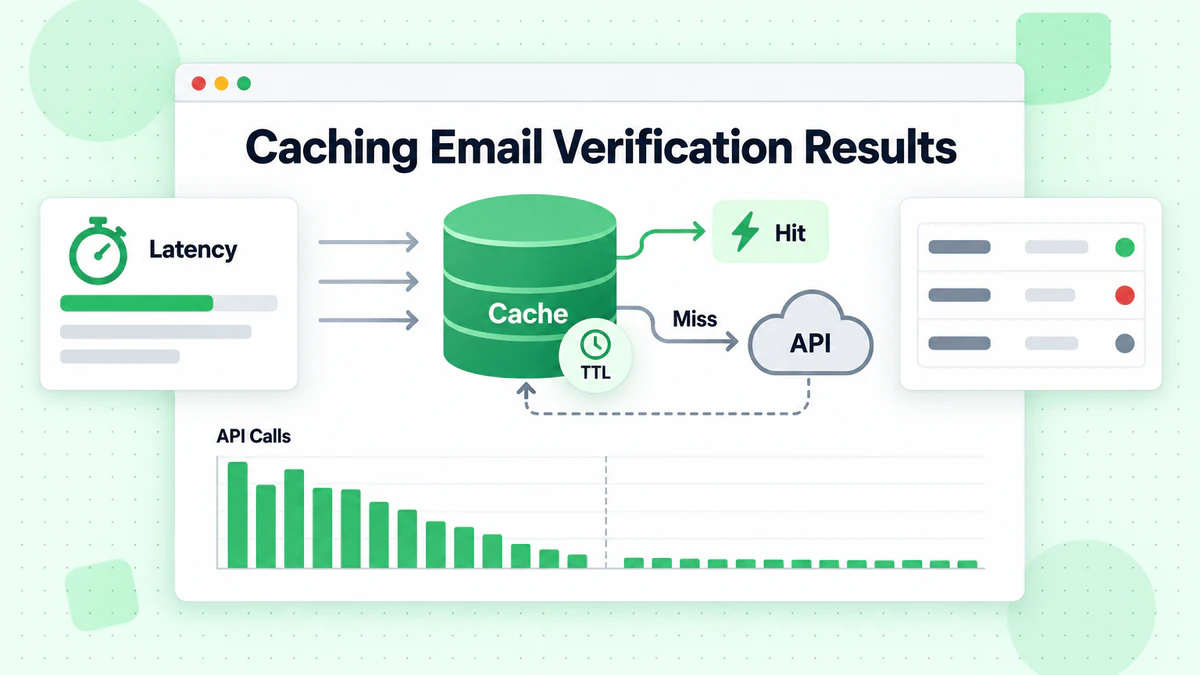
郵箱驗證 API 呼叫有成本,無論是金錢還是延遲方面。實施快取層可減少對相同電子郵件地址的冗餘驗證,同時提高回應時間。設計良好的快取尊重電子郵件有效性的動態性質,同時提供有意義的效能優勢。
記憶體快取策略
根據您的使用情境選擇適當的快取持續時間。電子郵件有效性可能會改變——郵箱被刪除、網域過期、全接收配置更改。對於大多數應用程式,24 小時的快取持續時間平衡了效能和準確性。
// cached-validator.js
class CachedEmailValidator extends EmailValidator {
  constructor(apiKey, cacheOptions = {}) {
    super(apiKey);
    this.cache = new Map();
    this.cacheTTL = cacheOptions.ttl || 24 * 60 * 60 * 1000; // 24 hours
    this.maxCacheSize = cacheOptions.maxSize || 10000;
  }

  getCacheKey(email) {
    return email.toLowerCase().trim();
  }

  getCached(email) {
    const key = this.getCacheKey(email);
    const cached = this.cache.get(key);

    if (!cached) return null;

    if (Date.now() > cached.expiresAt) {
      this.cache.delete(key);
      return null;
    }

    return cached.result;
  }

  setCache(email, result) {
    // Implement LRU eviction if cache is full
    if (this.cache.size >= this.maxCacheSize) {
      const oldestKey = this.cache.keys().next().value;
      this.cache.delete(oldestKey);
    }

    const key = this.getCacheKey(email);
    this.cache.set(key, {
      result,
      expiresAt: Date.now() + this.cacheTTL
    });
  }

  async verify(email) {
    // Check cache first
    const cached = this.getCached(email);
    if (cached) {
      return { ...cached, fromCache: true };
    }

    // Perform verification
    const result = await super.verify(email);

    // Cache successful results
    if (result && !result.error) {
      this.setCache(email, result);
    }

    return { ...result, fromCache: false };
  }

  clearCache() {
    this.cache.clear();
  }

  getCacheStats() {
    return {
      size: this.cache.size,
      maxSize: this.maxCacheSize
    };
  }
}

export default CachedEmailValidator;
快取失效處理
對於處理高容量的生產應用程式,考慮使用 Redis 或 Memcached 而不是記憶體快取。這些外部快取儲存在應用程式重新啟動後仍然存在,並且可以在叢集部署中的多個應用程式實例之間共享。
測試您的郵箱驗證集成
全面的測試可確保您的郵箱驗證集成在所有情境下都能正常工作。單元測試驗證單個元件,而集成測試確認正確的 API 通訊。在單元測試期間模擬 HTTP 層以避免進行實際的 API 呼叫。
使用 Mock 進行單元測試
// validator.test.js
import { jest } from '@jest/globals';
import EmailValidator from './EmailValidator.js';

describe('EmailValidator', () => {
  let validator;

  beforeEach(() => {
    validator = new EmailValidator('test-api-key');
    global.fetch = jest.fn();
  });

  test('returns valid result for valid email', async () => {
    fetch.mockResolvedValueOnce({
      ok: true,
      json: () => Promise.resolve({
        is_valid: true,
        is_deliverable: true,
        is_disposable: false,
        risk_score: 10
      })
    });

    const result = await validator.verify('valid@example.com');

    expect(result.is_valid).toBe(true);
    expect(result.is_deliverable).toBe(true);
  });

  test('handles rate limiting with retry', async () => {
    fetch
      .mockResolvedValueOnce({ ok: false, status: 429 })
      .mockResolvedValueOnce({
        ok: true,
        json: () => Promise.resolve({ is_valid: true })
      });

    const result = await validator.verify('test@example.com');

    expect(fetch).toHaveBeenCalledTimes(2);
    expect(result.is_valid).toBe(true);
  });

  test('throws after max retries exceeded', async () => {
    fetch.mockResolvedValue({ ok: false, status: 500 });

    await expect(validator.verify('test@example.com'))
      .rejects.toThrow('API error: 500');
  });
});
測試邊緣情況
包括對邊緣案例的測試,如網路故障、格式錯誤的回應和不尋常的電子郵件格式。郵箱檢查器應該優雅地處理所有情境,而不會導致應用程式崩潰。
監控和日誌記錄最佳實踐
生產環境的郵箱驗證集成需要監控來追蹤效能、識別問題和最佳化成本。實施結構化日誌記錄,擷取驗證結果、回應時間和錯誤率。
結構化日誌
// monitored-validator.js
class MonitoredEmailValidator extends EmailValidator {
  constructor(apiKey, logger = console) {
    super(apiKey);
    this.logger = logger;
    this.metrics = {
      totalRequests: 0,
      successfulVerifications: 0,
      failedVerifications: 0,
      cacheHits: 0,
      totalLatency: 0
    };
  }

  async verify(email) {
    const startTime = Date.now();
    this.metrics.totalRequests++;

    try {
      const result = await super.verify(email);
      const latency = Date.now() - startTime;

      this.metrics.successfulVerifications++;
      this.metrics.totalLatency += latency;

      this.logger.info({
        event: 'email_verification',
        email: this.maskEmail(email),
        is_valid: result.is_valid,
        latency_ms: latency
      });

      return result;
    } catch (error) {
      this.metrics.failedVerifications++;

      this.logger.error({
        event: 'email_verification_error',
        email: this.maskEmail(email),
        error: error.message,
        latency_ms: Date.now() - startTime
      });

      throw error;
    }
  }

  maskEmail(email) {
    const [local, domain] = email.split('@');
    const maskedLocal = local.charAt(0) + '***' + local.slice(-1);
    return `${maskedLocal}@${domain}`;
  }

  getMetrics() {
    return {
      ...this.metrics,
      averageLatency: this.metrics.totalRequests > 0
        ? Math.round(this.metrics.totalLatency / this.metrics.totalRequests)
        : 0,
      successRate: this.metrics.totalRequests > 0
        ? (this.metrics.successfulVerifications / this.metrics.totalRequests * 100).toFixed(2)
        : 0
    };
  }
}

export default MonitoredEmailValidator;
指標追蹤
為升高的錯誤率或可能表明 API 問題或濫用嘗試的異常模式設定警報。監控儀表板可幫助您了解驗證模式並隨著時間的推移最佳化您的實現。
安全注意事項
郵箱驗證集成處理潛在的敏感資料,需要仔細考慮安全性。保護您的 API 金鑰,驗證輸入,並在您自己的端點上實施速率限制以防止濫用。
保護 API 憑證
永遠不要將您的 BillionVerify API 金鑰暴露給用戶端程式碼。所有驗證請求都應透過您的後端伺服器路由,後端伺服器安全地儲存 API 憑證。這可以防止惡意行為者將您的 API 配額用於他們自己的目的。
輸入驗證與速率限制
在將電子郵件發送到驗證郵箱地址 API 之前實施輸入驗證。您自己一方的基本格式驗證可減少不必要的 API 呼叫,並為明顯無效的輸入提供更快的回饋。
// secure-validator.js
class SecureEmailValidator extends EmailValidator {
  constructor(apiKey, options = {}) {
    super(apiKey);
    this.rateLimiter = new Map();
    this.maxRequestsPerMinute = options.maxRequestsPerMinute || 100;
  }

  validateEmailFormat(email) {
    if (!email || typeof email !== 'string') {
      throw new Error('Email must be a non-empty string');
    }

    const emailRegex = /^[^\s@]+@[^\s@]+\.[^\s@]+$/;
    if (!emailRegex.test(email)) {
      throw new Error('Invalid email format');
    }

    if (email.length > 254) {
      throw new Error('Email exceeds maximum length');
    }

    return email.toLowerCase().trim();
  }

  checkRateLimit(clientId) {
    const now = Date.now();
    const windowStart = now - 60000;

    if (!this.rateLimiter.has(clientId)) {
      this.rateLimiter.set(clientId, []);
    }

    const requests = this.rateLimiter.get(clientId);
    const recentRequests = requests.filter(time => time > windowStart);

    if (recentRequests.length >= this.maxRequestsPerMinute) {
      throw new Error('Rate limit exceeded. Please try again later.');
    }

    recentRequests.push(now);
    this.rateLimiter.set(clientId, recentRequests);
  }

  async verify(email, clientId = 'default') {
    this.checkRateLimit(clientId);
    const sanitizedEmail = this.validateEmailFormat(email);
    return super.verify(sanitizedEmail);
  }
}

export default SecureEmailValidator;
結論
在 Node.js 應用程式中實現郵箱驗證為維護高質量的電子郵件清單和保護您的發件人聲譽奠定了基礎。本教程涵蓋的技術——從基本的 API 集成到包括快取、錯誤處理和監控在內的生產就緒模式——使您能夠在任何 Node.js 應用程式中構建強大的郵件驗證。
BillionVerify 的郵箱驗證 API 與 Node.js 無縫集成,提供即時單個郵箱驗證和批量處理功能。回應資料支援關於電子郵件接受的細緻決策,從簡單的有效/無效判斷到基於風險的複雜過濾。
從基本實現開始以了解 API 模式,然後隨著應用程式需求的發展逐步新增快取、監控和錯誤處理。這裡展示的郵箱檢查器模式可從新創公司 MVP 擴展到處理數百萬次驗證的企業級應用程式。
無論您是構建使用者註冊系統、清理行銷清單還是驗證聯絡表單提交,適當的郵箱驗證都可以保護您的電子郵件可送達性並確保您的訊息到達真實收件人。立即註冊 BillionVerify 帳戶並將郵箱驗證集成到您的 Node.js 應用程式中,邁出第一步。
使用 Instantly 或 Smartlead 的團隊,在每次活動前透過 BillionVerify 清洗名單,可顯著提升送達率。
在選擇驗證服務商之前,比較 BillionVerify 與 ZeroBounce 在準確率和速度方面的差異。