



ईमेल पते एकत्र करने वाले एप्लिकेशन बनाने के लिए डेटा गुणवत्ता बनाए रखने और अपनी sender reputation को सुरक्षित रखने के लिए मजबूत ईमेल सत्यापन की आवश्यकता होती है। Node.js developers के पास अपने एप्लिकेशन में ईमेल सत्यापन सेवाओं को एकीकृत करने के लिए शक्तिशाली टूल्स उपलब्ध हैं। यह व्यापक ट्यूटोरियल आपको बुनियादी सेटअप से लेकर प्रोडक्शन-रेडी इम्प्लीमेंटेशन तक Node.js के साथ ईमेल सत्यापन API एकीकरण को लागू करने के बारे में मार्गदर्शन करता है।
ईमेल सत्यापन एकीकरण के लिए Node.js क्यों
Node.js आधुनिक वेब एप्लिकेशन बनाने के लिए पसंदीदा रनटाइम बन गया है, और इसकी asynchronous प्रकृति इसे ईमेल सत्यापन जैसे API एकीकरण के लिए विशेष रूप से उपयुक्त बनाती है। जब यूज़र्स आपके फॉर्म के माध्यम से ईमेल पते सबमिट करते हैं, तो आपको तेज़, non-blocking सत्यापन की आवश्यकता होती है जो यूज़र अनुभव को धीमा न करे। Node.js कई concurrent API requests को कुशलता से संभालने में उत्कृष्ट है, जो इसे real-time single email verification और batch processing दोनों परिदृश्यों के लिए आदर्श बनाता है। E-commerce applications के लिए, E-commerce Implementation Guide देखें।
npm ecosystem उत्कृष्ट HTTP client libraries प्रदान करता है जो API एकीकरण को सरल बनाती हैं। चाहे आप built-in fetch API, axios, या node-fetch को पसंद करें, Node.js में ईमेल वैलिडेटर को लागू करने के लिए न्यूनतम boilerplate code की आवश्यकता होती है जबकि customization के लिए अधिकतम flexibility प्रदान करता है।
अपना Node.js प्रोजेक्ट सेटअप करना
ईमेल सत्यापन implementation में जाने से पहले, सुनिश्चित करें कि आपका development environment ठीक से configured है। आपको native fetch API का लाभ उठाने के लिए Node.js संस्करण 18 या उच्चतर की आवश्यकता होगी, हालांकि पहले के संस्करण polyfill के रूप में node-fetch का उपयोग कर सकते हैं।
निर्भरताओं को इंस्टॉल करना
एक नई प्रोजेक्ट डायरेक्टरी बनाएं और इसे npm के साथ initialize करें। आपके package.json में HTTP requests और environment variable management के लिए आवश्यक dependencies शामिल होनी चाहिए। dotenv package आपकी API credentials को source code में hardcode करने के बजाय environment files से load करके उन्हें सुरक्षित रखने में मदद करता है।
// package.json
{
  "name": "email-verification-demo",
  "version": "1.0.0",
  "type": "module",
  "dependencies": {
    "dotenv": "^16.3.1"
  }
}
एनवायरनमेंट वेरिएबल्स को कॉन्फ़िगर करना
अपनी BillionVerify API key को एक environment file में स्टोर करें। कभी भी API keys को version control में commit न करें। .env file credentials को आपके codebase से अलग रखती है, उन सुरक्षा best practices का पालन करते हुए जिनकी हर ईमेल सत्यापन सेवा सिफारिश करती है।
# .env
BV_API_KEY=your_api_key_here
एकल ईमेल सत्यापन लागू करना
किसी भी ईमेल सत्यापन एकीकरण की नींव व्यक्तिगत ईमेल पतों को सत्यापित करने की क्षमता है। यह functionality यूज़र पंजीकरण, contact form submissions, और किसी भी परिदृश्य के दौरान real-time validation को शक्ति देती है जहां तत्काल feedback की आवश्यकता होती है।
अपना पहला API कॉल करना
BillionVerify ईमेल सत्यापन API request body में ईमेल पते के साथ POST requests को स्वीकार करता है। Response में व्यापक सत्यापन परिणाम शामिल होते हैं जिनमें validity status, deliverability assessment, और disposable emails, role-based addresses, और catch-all domains के लिए विस्तृत जांच शामिल हैं।
// verify-email.js
import 'dotenv/config';

const API_BASE_URL = 'https://api.billionverify.com/v1';
const API_KEY = process.env.BV_API_KEY;

async function verifyEmail(email) {
  const response = await fetch(`${API_BASE_URL}/verify`, {
    method: 'POST',
    headers: {
      'Authorization': `Bearer ${API_KEY}`,
      'Content-Type': 'application/json'
    },
    body: JSON.stringify({ email })
  });

  if (!response.ok) {
    throw new Error(`Verification failed: ${response.status}`);
  }

  return response.json();
}

// Usage example
const result = await verifyEmail('user@example.com');
console.log(result);
रिस्पॉन्स फ़ील्ड को समझना
सत्यापन response प्रत्येक ईमेल पते के बारे में actionable intelligence प्रदान करता है। इन response fields को समझना आपको अपने सिस्टम में ईमेल पता स्वीकार करने या अस्वीकार करने के बारे में सूचित निर्णय लेने में मदद करता है।
| Field | Description | Use Case |
|---|---|---|
| is_valid | समग्र validity assessment | प्राथमिक accept/reject निर्णय |
| is_deliverable | ईमेल प्राप्त कर सकता है | ईमेल campaign eligibility |
| is_disposable | अस्थायी ईमेल सेवा | धोखाधड़ी की रोकथाम |
| is_role_based | सामान्य पता (info@, support@) | B2B targeting |
| is_catch_all | Domain सभी पतों को स्वीकार करता है | जोखिम मूल्यांकन |
| risk_score | 0-100 जोखिम रेटिंग | सूक्ष्म filtering |
एक पुन: प्रयोज्य ईमेल वैलिडेटर क्लास बनाना
Production applications ईमेल सत्यापन logic को एक पुन: प्रयोज्य class में encapsulate करने से लाभान्वित होते हैं। यह दृष्टिकोण consistent error handling, automatic retries, और आपके application के शेष भाग के लिए उपभोग करने के लिए एक स्वच्छ interface प्रदान करता है।
क्लास आर्किटेक्चर
EmailValidator class HTTP विवरणों को abstract करती है और सामान्य सत्यापन परिदृश्यों के लिए methods प्रदान करती है। यह API authentication, request formatting, और response parsing को संभालती है, जिससे आपका application code API mechanics के बजाय business logic पर ध्यान केंद्रित कर सकता है।
// EmailValidator.js
import 'dotenv/config';

class EmailValidator {
  constructor(apiKey = process.env.BV_API_KEY) {
    this.apiKey = apiKey;
    this.baseUrl = 'https://api.billionverify.com/v1';
    this.maxRetries = 3;
    this.retryDelay = 1000;
  }

  async verify(email) {
    let lastError;

    for (let attempt = 1; attempt <= this.maxRetries; attempt++) {
      try {
        const response = await fetch(`${this.baseUrl}/verify`, {
          method: 'POST',
          headers: {
            'Authorization': `Bearer ${this.apiKey}`,
            'Content-Type': 'application/json'
          },
          body: JSON.stringify({ email })
        });

        if (response.status === 429) {
          // Rate limited - wait and retry
          await this.sleep(this.retryDelay * attempt);
          continue;
        }

        if (!response.ok) {
          throw new Error(`API error: ${response.status}`);
        }

        return await response.json();
      } catch (error) {
        lastError = error;
        if (attempt < this.maxRetries) {
          await this.sleep(this.retryDelay * attempt);
        }
      }
    }

    throw lastError;
  }

  async isValid(email) {
    const result = await this.verify(email);
    return result.is_valid && result.is_deliverable;
  }

  async isHighRisk(email) {
    const result = await this.verify(email);
    return result.risk_score > 70 || result.is_disposable;
  }

  sleep(ms) {
    return new Promise(resolve => setTimeout(resolve, ms));
  }
}

export default EmailValidator;
स्वचालित रिट्राई लॉजिक
यह class failed requests के लिए exponential backoff को लागू करती है, जो production reliability के लिए आवश्यक है। जब ईमेल सत्यापन सेवा rate limit error लौटाती है या अस्थायी समस्याओं का अनुभव करती है, तो class स्वचालित रूप से attempts के बीच बढ़ती देरी के साथ retry करती है।
Express.js एप्लिकेशन के साथ एकीकरण
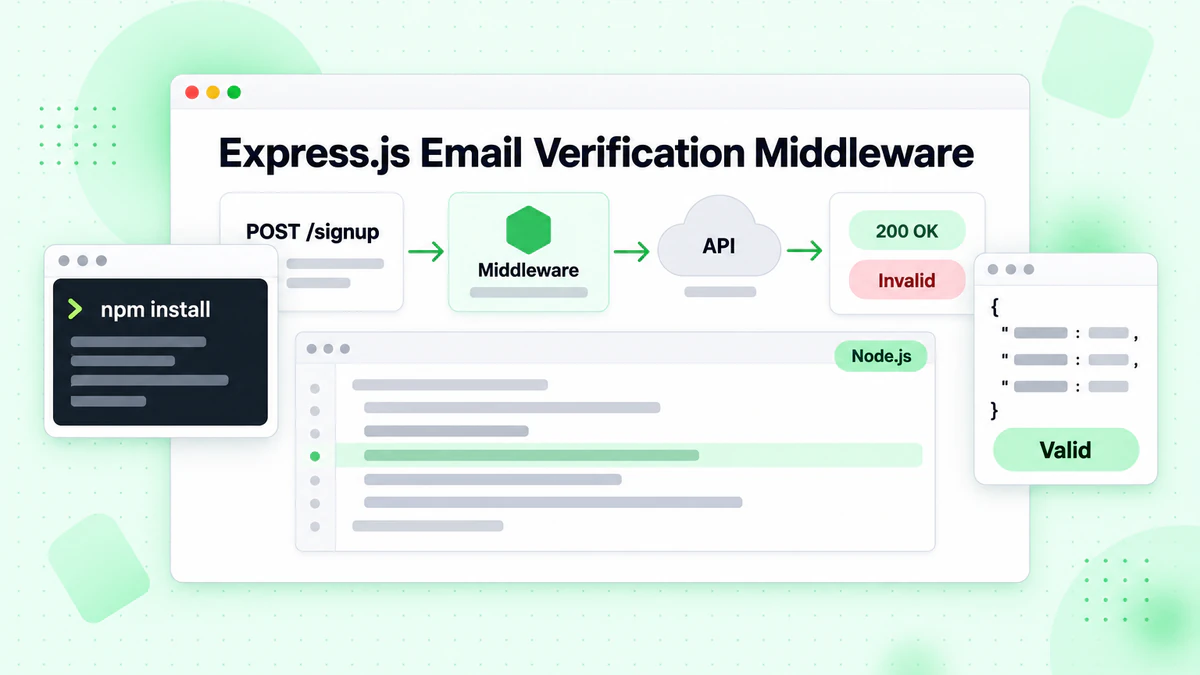
अधिकांश Node.js वेब एप्लिकेशन Express.js या समान frameworks का उपयोग करते हैं। अपने Express routes में ईमेल सत्यापन को एकीकृत करना form submissions के दौरान real-time validation को सक्षम बनाता है। यूज़र्स को invalid email addresses के बारे में तत्काल feedback मिलता है, जो आपकी email list quality की सुरक्षा करते हुए पंजीकरण अनुभव में सुधार करता है।
वेरिफिकेशन मिडलवेयर बनाना
एक middleware function बनाएं जो आपके route handlers तक पहुंचने से पहले ईमेल पतों को validate करता है। यह दृष्टिकोण सत्यापन logic को business logic से अलग करता है, जिससे आपका code अधिक maintainable और testable बनता है।
// server.js
import express from 'express';
import EmailValidator from './EmailValidator.js';

const app = express();
const validator = new EmailValidator();

app.use(express.json());

// Middleware for email verification
const verifyEmailMiddleware = async (req, res, next) => {
  const { email } = req.body;

  if (!email) {
    return res.status(400).json({ error: 'Email is required' });
  }

  try {
    const result = await validator.verify(email);

    if (!result.is_valid) {
      return res.status(400).json({
        error: 'Invalid email address',
        details: result
      });
    }

    if (result.is_disposable) {
      return res.status(400).json({
        error: 'Disposable email addresses are not allowed'
      });
    }

    // Attach verification result for downstream use
    req.emailVerification = result;
    next();
  } catch (error) {
    console.error('Email verification failed:', error);
    // Allow request to proceed but flag as unverified
    req.emailVerification = { verified: false, error: error.message };
    next();
  }
};

// Registration endpoint with email verification
app.post('/api/register', verifyEmailMiddleware, async (req, res) => {
  const { email, name, password } = req.body;

  // Email is already verified by middleware
  // Proceed with registration logic

  res.json({
    success: true,
    message: 'Registration successful',
    emailVerification: req.emailVerification
  });
});

app.listen(3000, () => {
  console.log('Server running on port 3000');
});
वेरिफिकेशन परिणामों को संभालना
Middleware दृष्टिकोण flexibility प्रदान करता है कि आप ईमेल सत्यापन को कितनी सख्ती से लागू करते हैं। कुछ applications सभी unverified emails को अस्वीकार करना चुन सकते हैं, जबकि अन्य उन्हें manual review के लिए warning flag के साथ स्वीकार कर सकते हैं। Request object से जुड़े ईमेल वैलिडेशन परिणाम downstream handlers को सूक्ष्म निर्णय लेने में सक्षम बनाते हैं।
लिस्ट क्लीनिंग के लिए बैच ईमेल सत्यापन
जबकि real-time verification व्यक्तिगत पतों को संभालता है, कई applications को बड़ी email lists को verify करने की आवश्यकता होती है। Marketing teams नियमित रूप से अपनी subscriber lists को साफ करती हैं, और CRM systems समय-समय पर stored contacts को validate करते हैं। Batch verification endpoint कई emails को कुशलता से process करता है, API calls को कम करता है और throughput में सुधार करता है।
बैच जॉब्स सबमिट करना
Batch operations को single verifications से अलग handling की आवश्यकता होती है। आपको job submission, status polling, और result retrieval को अलग operations के रूप में manage करने की आवश्यकता होगी। यह asynchronous pattern ईमेल सत्यापन सेवा को timeout के बिना बड़ी lists को process करने की अनुमति देता है।
// batch-verify.js
import EmailValidator from './EmailValidator.js';

class BatchEmailValidator extends EmailValidator {
  async submitBatch(emails) {
    const response = await fetch(`${this.baseUrl}/verify/batch`, {
      method: 'POST',
      headers: {
        'Authorization': `Bearer ${this.apiKey}`,
        'Content-Type': 'application/json'
      },
      body: JSON.stringify({ emails })
    });

    if (!response.ok) {
      throw new Error(`Batch submission failed: ${response.status}`);
    }

    return response.json();
  }

  async getBatchStatus(jobId) {
    const response = await fetch(`${this.baseUrl}/verify/batch/${jobId}`, {
      headers: {
        'Authorization': `Bearer ${this.apiKey}`
      }
    });

    if (!response.ok) {
      throw new Error(`Status check failed: ${response.status}`);
    }

    return response.json();
  }

  async verifyBatch(emails, options = {}) {
    const {
      pollInterval = 5000,
      maxWaitTime = 300000,
      onProgress = () => {}
    } = options;

    // Submit the batch job
    const { job_id } = await this.submitBatch(emails);

    const startTime = Date.now();

    // Poll for completion
    while (Date.now() - startTime < maxWaitTime) {
      const status = await this.getBatchStatus(job_id);

      onProgress({
        processed: status.processed,
        total: status.total,
        percentage: Math.round((status.processed / status.total) * 100)
      });

      if (status.status === 'completed') {
        return status.results;
      }

      if (status.status === 'failed') {
        throw new Error(`Batch job failed: ${status.error}`);
      }

      await this.sleep(pollInterval);
    }

    throw new Error('Batch verification timed out');
  }
}

// Usage example
const batchValidator = new BatchEmailValidator();

const emails = [
  'user1@example.com',
  'user2@company.org',
  'invalid@fake.domain',
  // ... more emails
];

const results = await batchValidator.verifyBatch(emails, {
  onProgress: (progress) => {
    console.log(`Progress: ${progress.percentage}%`);
  }
});

// Process results
const validEmails = results.filter(r => r.is_valid);
const invalidEmails = results.filter(r => !r.is_valid);

console.log(`Valid: ${validEmails.length}, Invalid: ${invalidEmails.length}`);
परिणामों के लिए पोलिंग
Batch verification implementation में एक progress callback शामिल है, जो आपके application को यूज़र्स को सत्यापन progress display करने या monitoring के लिए log करने की अनुमति देता है। यह विशेष रूप से उपयोगी है जब हजारों ईमेल पतों वाली lists को process करते हैं जिन्हें पूरा होने में कई मिनट लग सकते हैं।
एरर हैंडलिंग और रेजिलिएंस
Production ईमेल सत्यापन एकीकरण को errors को gracefully handle करना चाहिए। Network issues, API rate limits, और service unavailability distributed systems में अपरिहार्य हैं। उचित error handling को लागू करना सुनिश्चित करता है कि आपका application तब भी functional रहता है जब सत्यापन सेवा समस्याओं का अनुभव करती है।
कस्टम एरर क्लासेस
एक व्यापक error handling strategy बनाएं जो विभिन्न error types के बीच अंतर करती है। Rate limits जैसी transient errors retry attempts के योग्य हैं, जबकि invalid API keys जैसी permanent errors को तत्काल ध्यान और alerting की आवश्यकता होती है।
// errors.js
class EmailVerificationError extends Error {
  constructor(message, code, retryable = false) {
    super(message);
    this.name = 'EmailVerificationError';
    this.code = code;
    this.retryable = retryable;
  }
}

class RateLimitError extends EmailVerificationError {
  constructor(retryAfter) {
    super('Rate limit exceeded', 'RATE_LIMITED', true);
    this.retryAfter = retryAfter;
  }
}

class AuthenticationError extends EmailVerificationError {
  constructor() {
    super('Invalid API key', 'AUTH_FAILED', false);
  }
}

// Enhanced validator with error handling
class RobustEmailValidator extends EmailValidator {
  async verify(email) {
    try {
      const response = await fetch(`${this.baseUrl}/verify`, {
        method: 'POST',
        headers: {
          'Authorization': `Bearer ${this.apiKey}`,
          'Content-Type': 'application/json'
        },
        body: JSON.stringify({ email })
      });

      if (response.status === 401) {
        throw new AuthenticationError();
      }

      if (response.status === 429) {
        const retryAfter = response.headers.get('Retry-After') || 60;
        throw new RateLimitError(parseInt(retryAfter));
      }

      if (response.status >= 500) {
        throw new EmailVerificationError(
          'Service temporarily unavailable',
          'SERVICE_ERROR',
          true
        );
      }

      if (!response.ok) {
        const error = await response.json();
        throw new EmailVerificationError(
          error.message || 'Verification failed',
          'API_ERROR',
          false
        );
      }

      return response.json();
    } catch (error) {
      if (error instanceof EmailVerificationError) {
        throw error;
      }

      // Network or parsing error
      throw new EmailVerificationError(
        error.message,
        'NETWORK_ERROR',
        true
      );
    }
  }
}

export { EmailVerificationError, RateLimitError, AuthenticationError, RobustEmailValidator };
ग्रेसफुल डिग्रेडेशन लागू करना
आपका application code फिर विभिन्न error types को उचित रूप से handle कर सकता है, यूज़र्स को meaningful feedback प्रदान कर सकता है और operations teams के लिए उचित alerts trigger कर सकता है।
प्रदर्शन के लिए कैशिंग लागू करना
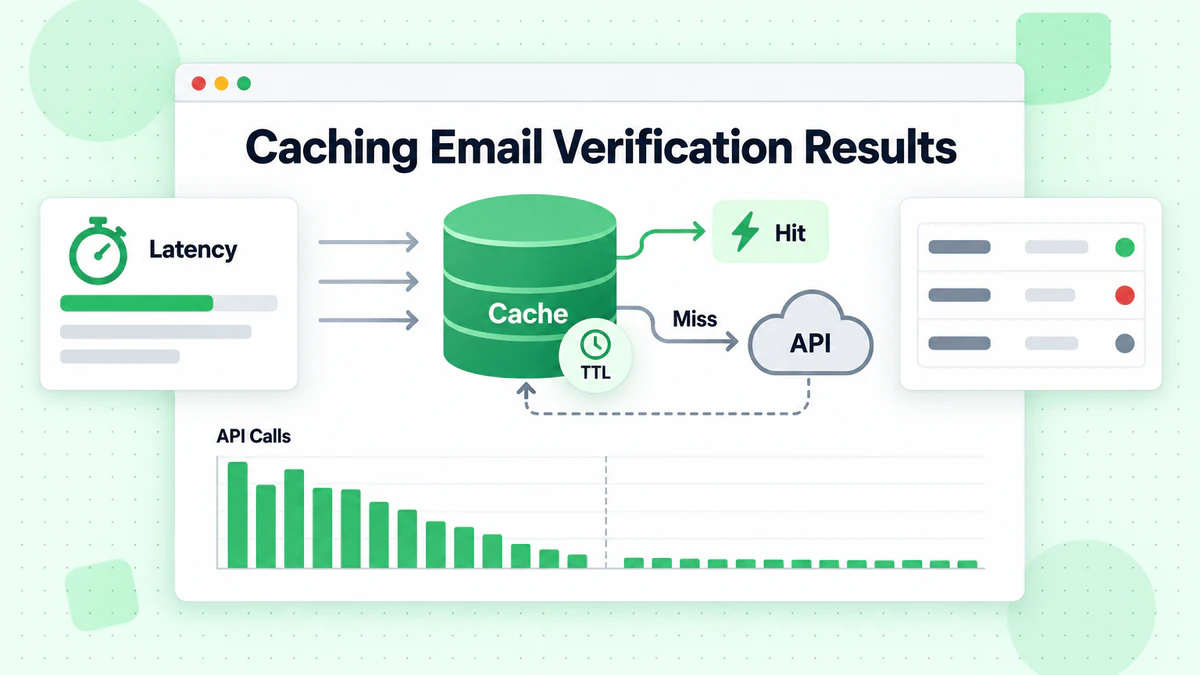
ईमेल सत्यापन API calls की एक cost होती है, पैसे और latency दोनों के संदर्भ में। एक caching layer को लागू करना समान ईमेल पतों के लिए redundant verifications को कम करता है जबकि response times में सुधार करता है। एक अच्छी तरह से designed cache email validity की dynamic प्रकृति का सम्मान करता है जबकि meaningful performance benefits प्रदान करता है।
इन-मेमोरी कैश रणनीति
अपने use case के आधार पर एक उचित cache duration चुनें। ईमेल validity बदल सकती है—mailboxes हटाए जाते हैं, domains expire हो जाते हैं, catch-all configurations बदलते हैं। अधिकांश applications के लिए 24 घंटे का cache duration performance के साथ accuracy को संतुलित करता है।
// cached-validator.js
class CachedEmailValidator extends EmailValidator {
  constructor(apiKey, cacheOptions = {}) {
    super(apiKey);
    this.cache = new Map();
    this.cacheTTL = cacheOptions.ttl || 24 * 60 * 60 * 1000; // 24 hours
    this.maxCacheSize = cacheOptions.maxSize || 10000;
  }

  getCacheKey(email) {
    return email.toLowerCase().trim();
  }

  getCached(email) {
    const key = this.getCacheKey(email);
    const cached = this.cache.get(key);

    if (!cached) return null;

    if (Date.now() > cached.expiresAt) {
      this.cache.delete(key);
      return null;
    }

    return cached.result;
  }

  setCache(email, result) {
    // Implement LRU eviction if cache is full
    if (this.cache.size >= this.maxCacheSize) {
      const oldestKey = this.cache.keys().next().value;
      this.cache.delete(oldestKey);
    }

    const key = this.getCacheKey(email);
    this.cache.set(key, {
      result,
      expiresAt: Date.now() + this.cacheTTL
    });
  }

  async verify(email) {
    // Check cache first
    const cached = this.getCached(email);
    if (cached) {
      return { ...cached, fromCache: true };
    }

    // Perform verification
    const result = await super.verify(email);

    // Cache successful results
    if (result && !result.error) {
      this.setCache(email, result);
    }

    return { ...result, fromCache: false };
  }

  clearCache() {
    this.cache.clear();
  }

  getCacheStats() {
    return {
      size: this.cache.size,
      maxSize: this.maxCacheSize
    };
  }
}

export default CachedEmailValidator;
कैश इनवैलिडेशन
High volumes को handle करने वाले production applications के लिए, in-memory cache के बजाय Redis या Memcached का उपयोग करने पर विचार करें। ये external cache stores application restarts के बीच persist करते हैं और clustered deployment में कई application instances के बीच साझा किए जा सकते हैं।
अपने ईमेल सत्यापन एकीकरण का परीक्षण
व्यापक परीक्षण सुनिश्चित करता है कि आपका ईमेल सत्यापन एकीकरण सभी परिदृश्यों में सही ढंग से काम करता है। Unit tests व्यक्तिगत components को verify करते हैं, जबकि integration tests उचित API communication की पुष्टि करते हैं। वास्तविक API calls करने से बचने के लिए unit tests के दौरान HTTP layer को mock करें।
मॉक्स के साथ यूनिट टेस्टिंग
// validator.test.js
import { jest } from '@jest/globals';
import EmailValidator from './EmailValidator.js';

describe('EmailValidator', () => {
  let validator;

  beforeEach(() => {
    validator = new EmailValidator('test-api-key');
    global.fetch = jest.fn();
  });

  test('returns valid result for valid email', async () => {
    fetch.mockResolvedValueOnce({
      ok: true,
      json: () => Promise.resolve({
        is_valid: true,
        is_deliverable: true,
        is_disposable: false,
        risk_score: 10
      })
    });

    const result = await validator.verify('valid@example.com');

    expect(result.is_valid).toBe(true);
    expect(result.is_deliverable).toBe(true);
  });

  test('handles rate limiting with retry', async () => {
    fetch
      .mockResolvedValueOnce({ ok: false, status: 429 })
      .mockResolvedValueOnce({
        ok: true,
        json: () => Promise.resolve({ is_valid: true })
      });

    const result = await validator.verify('test@example.com');

    expect(fetch).toHaveBeenCalledTimes(2);
    expect(result.is_valid).toBe(true);
  });

  test('throws after max retries exceeded', async () => {
    fetch.mockResolvedValue({ ok: false, status: 500 });

    await expect(validator.verify('test@example.com'))
      .rejects.toThrow('API error: 500');
  });
});
एज केसेस का परीक्षण
Network failures, malformed responses, और असामान्य email formats जैसे edge cases के लिए tests शामिल करें। Email checker को आपके application को crash किए बिना सभी परिदृश्यों को gracefully handle करना चाहिए।
मॉनिटरिंग और लॉगिंग बेस्ट प्रैक्टिसेस
Production ईमेल सत्यापन एकीकरण को performance track करने, issues identify करने, और costs optimize करने के लिए monitoring की आवश्यकता होती है। Structured logging लागू करें जो सत्यापन outcomes, response times, और error rates को capture करती है।
स्ट्रक्चर्ड लॉगिंग
// monitored-validator.js
class MonitoredEmailValidator extends EmailValidator {
  constructor(apiKey, logger = console) {
    super(apiKey);
    this.logger = logger;
    this.metrics = {
      totalRequests: 0,
      successfulVerifications: 0,
      failedVerifications: 0,
      cacheHits: 0,
      totalLatency: 0
    };
  }

  async verify(email) {
    const startTime = Date.now();
    this.metrics.totalRequests++;

    try {
      const result = await super.verify(email);
      const latency = Date.now() - startTime;

      this.metrics.successfulVerifications++;
      this.metrics.totalLatency += latency;

      this.logger.info({
        event: 'email_verification',
        email: this.maskEmail(email),
        is_valid: result.is_valid,
        latency_ms: latency
      });

      return result;
    } catch (error) {
      this.metrics.failedVerifications++;

      this.logger.error({
        event: 'email_verification_error',
        email: this.maskEmail(email),
        error: error.message,
        latency_ms: Date.now() - startTime
      });

      throw error;
    }
  }

  maskEmail(email) {
    const [local, domain] = email.split('@');
    const maskedLocal = local.charAt(0) + '***' + local.slice(-1);
    return `${maskedLocal}@${domain}`;
  }

  getMetrics() {
    return {
      ...this.metrics,
      averageLatency: this.metrics.totalRequests > 0
        ? Math.round(this.metrics.totalLatency / this.metrics.totalRequests)
        : 0,
      successRate: this.metrics.totalRequests > 0
        ? (this.metrics.successfulVerifications / this.metrics.totalRequests * 100).toFixed(2)
        : 0
    };
  }
}

export default MonitoredEmailValidator;
मेट्रिक्स ट्रैकिंग
Elevated error rates या असामान्य patterns के लिए alerts सेट करें जो API issues या abuse attempts का संकेत दे सकते हैं। Monitoring dashboards आपको सत्यापन patterns को समझने और समय के साथ अपने implementation को optimize करने में मदद करते हैं।
सुरक्षा विचार
ईमेल सत्यापन एकीकरण संभावित रूप से संवेदनशील data को handle करते हैं और सावधानीपूर्वक सुरक्षा विचार की आवश्यकता होती है। अपनी API keys की सुरक्षा करें, inputs को validate करें, और abuse को रोकने के लिए अपने स्वयं के endpoints पर rate limiting लागू करें।
API क्रेडेंशियल्स की सुरक्षा
कभी भी अपनी BillionVerify API key को client-side code में expose न करें। सभी सत्यापन requests आपके backend server के माध्यम से route होनी चाहिए, जो API credentials को सुरक्षित रूप से रखता है। यह malicious actors को अपने स्वयं के उद्देश्यों के लिए आपके API quota का उपयोग करने से रोकता है।
इनपुट वैलिडेशन और रेट लिमिटिंग
ईमेल सत्यापन API को emails भेजने से पहले input validation लागू करें। आपकी तरफ से basic format validation अनावश्यक API calls को कम करता है और स्पष्ट रूप से invalid inputs के लिए तेज़ feedback प्रदान करता है।
// secure-validator.js
class SecureEmailValidator extends EmailValidator {
  constructor(apiKey, options = {}) {
    super(apiKey);
    this.rateLimiter = new Map();
    this.maxRequestsPerMinute = options.maxRequestsPerMinute || 100;
  }

  validateEmailFormat(email) {
    if (!email || typeof email !== 'string') {
      throw new Error('Email must be a non-empty string');
    }

    const emailRegex = /^[^\s@]+@[^\s@]+\.[^\s@]+$/;
    if (!emailRegex.test(email)) {
      throw new Error('Invalid email format');
    }

    if (email.length > 254) {
      throw new Error('Email exceeds maximum length');
    }

    return email.toLowerCase().trim();
  }

  checkRateLimit(clientId) {
    const now = Date.now();
    const windowStart = now - 60000;

    if (!this.rateLimiter.has(clientId)) {
      this.rateLimiter.set(clientId, []);
    }

    const requests = this.rateLimiter.get(clientId);
    const recentRequests = requests.filter(time => time > windowStart);

    if (recentRequests.length >= this.maxRequestsPerMinute) {
      throw new Error('Rate limit exceeded. Please try again later.');
    }

    recentRequests.push(now);
    this.rateLimiter.set(clientId, recentRequests);
  }

  async verify(email, clientId = 'default') {
    this.checkRateLimit(clientId);
    const sanitizedEmail = this.validateEmailFormat(email);
    return super.verify(sanitizedEmail);
  }
}

export default SecureEmailValidator;
निष्कर्ष
Node.js applications में email verification को लागू करना उच्च-गुणवत्ता वाली email lists बनाए रखने और आपकी sender reputation की सुरक्षा के लिए नींव प्रदान करता है। इस tutorial में कवर की गई तकनीकें—basic API integration से लेकर production-ready patterns तक जिनमें caching, error handling, और monitoring शामिल हैं—आपको किसी भी Node.js application में robust ईमेल वैलिडेशन बनाने के लिए तैयार करती हैं।
BillionVerify का Node.js ईमेल सत्यापन API Node.js के साथ seamlessly integrate होता है, real-time single email verification और batch processing capabilities प्रदान करता है। Response data ईमेल स्वीकृति के बारे में सूक्ष्म निर्णय लेने में सक्षम बनाता है, simple valid/invalid determinations से लेकर sophisticated risk-based filtering तक।
API patterns को समझने के लिए basic implementation से शुरू करें, फिर अपने application की requirements के विकसित होने के साथ progressively caching, monitoring, और error handling जोड़ें। यहां प्रदर्शित ईमेल पता सत्यापित करें patterns startup MVPs से लेकर लाखों verifications को process करने वाले enterprise-grade applications तक scale करते हैं। अतिरिक्त implementation patterns के लिए Developer Guide देखें।
चाहे आप एक यूज़र पंजीकरण सिस्टम बना रहे हों, marketing lists को साफ कर रहे हों, या contact form submissions को validate कर रहे हों, उचित email verification आपकी email deliverability की सुरक्षा करता है और सुनिश्चित करता है कि आपके संदेश वास्तविक प्राप्तकर्ताओं तक पहुंचें। आज ही BillionVerify account के लिए साइन अप करके और अपने Node.js application में ईमेल सत्यापन को एकीकृत करके पहला कदम उठाएं।
Instantly या Smartlead का उपयोग करने वाली टीमें हर अभियान से पहले BillionVerify से सूचियाँ साफ करके डिलीवरेबिलिटी में उल्लेखनीय सुधार करती हैं।
वेरिफिकेशन प्रोवाइडर चुनने से पहले सटीकता और गति के मामले में BillionVerify की तुलना ZeroBounce से करें।