



फ़ॉर्म परित्याग व्यवसायों को हर साल अरबों डॉलर का नुकसान पहुंचाता है, और अमान्य ईमेल पते इसके प्रमुख कारणों में से एक हैं। जब उपयोगकर्ता गलत ईमेल पते दर्ज करते हैं और फ़ॉर्म सबमिट करने के बाद ही त्रुटि का पता चलता है, तो निराशा परित्याग की ओर ले जाती है। रियल-टाइम ईमेल सत्यापन इस समस्या को हल करता है क्योंकि यह उपयोगकर्ताओं के टाइप करते समय ईमेल पतों को सत्यापित करता है, तत्काल प्रतिक्रिया प्रदान करता है जो उपयोगकर्ता अनुभव और डेटा गुणवत्ता दोनों में सुधार करता है।
यह व्यापक गाइड रियल-टाइम ईमेल सत्यापन को लागू करने की खोज करता है, बुनियादी क्लाइंट-साइड वैलिडेशन से लेकर परिष्कृत API-संचालित सत्यापन प्रणालियों तक जो आपके डेटाबेस में प्रवेश करने से पहले अमान्य, डिस्पोजेबल और जोखिम भरे ईमेल पतों को पकड़ती हैं।
रियल-टाइम ईमेल सत्यापन को समझना
रियल-टाइम ईमेल सत्यापन ईमेल पतों को तुरंत सत्यापित करता है जब उपयोगकर्ता आपके फ़ॉर्म के साथ इंटरैक्ट करते हैं, फ़ॉर्म सबमिशन या बैच प्रोसेसिंग तक इंतजार करने के बजाय। यह दृष्टिकोण ईमेल वैधता के बारे में तत्काल प्रतिक्रिया प्रदान करने के लिए कई सत्यापन तकनीकों को जोड़ता है।
रियल-टाइम सत्यापन बैच प्रोसेसिंग से कैसे अलग है
पारंपरिक बैच ईमेल सत्यापन संग्रह के बाद ईमेल सूचियों को प्रोसेस करता है, जो कई समस्याएं पैदा करता है। अमान्य ईमेल पहले से ही आपके डेटाबेस में प्रवेश कर चुके हैं, उपयोगकर्ताओं ने सुधार के अवसरों के बिना अपनी यात्रा पूरी कर ली है, और सूचियों की सफाई एक अलग परिचालन कार्य बन जाता है।
रियल-टाइम ईमेल सत्यापन अलग तरह से काम करता है। ईमेल वैलिडेटर प्रविष्टि के बिंदु पर पतों की जांच करता है, अमान्य डेटा को आपकी प्रणालियों तक पहुंचने से रोकता है। उपयोगकर्ताओं को तत्काल प्रतिक्रिया मिलती है, जिससे वे अभी भी अपने फ़ॉर्म के साथ व्यस्त रहते हुए टाइपो सुधार सकते हैं या वैकल्पिक पते प्रदान कर सकते हैं।
सत्यापन पाइपलाइन
एक व्यापक रियल-टाइम ईमेल सत्यापन प्रणाली क्रम में कई जांच करती है:
सिंटैक्स वैलिडेशन: पहली परत जांचती है कि क्या ईमेल उचित फॉर्मेटिंग नियमों का पालन करता है। इसमें @ प्रतीक की उपस्थिति की पुष्टि करना, लोकल भाग (@ से पहले) और डोमेन भाग (@ के बाद) को वैलिडेट करना, और यह सुनिश्चित करना शामिल है कि कोई अमान्य वर्ण मौजूद नहीं हैं।
डोमेन सत्यापन: सिस्टम जांचता है कि क्या डोमेन मौजूद है और DNS रिकॉर्ड की क्वेरी करके ईमेल प्राप्त कर सकता है। यह "gmial.com" जैसे टाइपो या पूरी तरह से गढ़े गए डोमेन को पकड़ता है।
MX रिकॉर्ड चेक: मेल एक्सचेंज रिकॉर्ड संकेत देते हैं कि कौन से सर्वर किसी डोमेन के लिए ईमेल को हैंडल करते हैं। MX रिकॉर्ड के बिना डोमेन ईमेल प्राप्त नहीं कर सकते, जिससे इन डोमेन पर पते अमान्य हो जाते हैं।
SMTP सत्यापन: सबसे गहन जांच गंतव्य मेल सर्वर से कनेक्ट होती है और वास्तव में ईमेल भेजे बिना मेलबॉक्स के अस्तित्व की पुष्टि करती है। यह उन पतों को पकड़ता है जहां डोमेन वैध है लेकिन विशिष्ट मेलबॉक्स मौजूद नहीं है।
जोखिम मूल्यांकन: उन्नत ईमेल सत्यापन सेवाएं अतिरिक्त कारकों का विश्लेषण करती हैं जैसे कि क्या पता डिस्पोजेबल है, भूमिका-आधारित है, या ज्ञात स्पैम पैटर्न से जुड़ा है।
क्लाइंट-साइड वैलिडेशन को लागू करना
क्लाइंट-साइड वैलिडेशन रक्षा की पहली पंक्ति और तत्काल उपयोगकर्ता प्रतिक्रिया प्रदान करता है। जबकि अकेले पर्याप्त नहीं है, यह सर्वर राउंड-ट्रिप की आवश्यकता के बिना स्पष्ट त्रुटियों को पकड़ता है।
HTML5 ईमेल वैलिडेशन
आधुनिक ब्राउज़रों में HTML5 ईमेल इनपुट प्रकार के माध्यम से अंतर्निहित ईमेल सत्यापन शामिल है:
<form id="signup-form">
  <label for="email">Email Address</label>
  <input
    type="email"
    id="email"
    name="email"
    required
    placeholder="you@example.com"
  >
  <span class="error-message"></span>
  <button type="submit">Sign Up</button>
</form>
type="email" विशेषता ब्राउज़र वैलिडेशन को ट्रिगर करती है जो बुनियादी ईमेल फॉर्मेट की जांच करती है। हालांकि, ब्राउज़र वैलिडेशन उदार है और कई तकनीकी रूप से अमान्य पतों को स्वीकार करता है।
बेहतर JavaScript वैलिडेशन
अधिक गहन क्लाइंट-साइड जांच के लिए, कस्टम JavaScript वैलिडेशन लागू करें:
class EmailValidator {
  constructor(inputElement) {
    this.input = inputElement;
    this.errorElement = inputElement.nextElementSibling;
    this.setupListeners();
  }

  setupListeners() {
    this.input.addEventListener('blur', () => this.validate());
    this.input.addEventListener('input', () => this.clearError());
  }

  validate() {
    const email = this.input.value.trim();

    if (!email) {
      return this.showError('Email address is required');
    }

    if (!this.isValidFormat(email)) {
      return this.showError('Please enter a valid email address');
    }

    if (this.hasCommonTypo(email)) {
      return this.showError(this.getTypoSuggestion(email));
    }

    this.showSuccess();
    return true;
  }

  isValidFormat(email) {
    const pattern = /^[^\s@]+@[^\s@]+\.[^\s@]+$/;
    return pattern.test(email);
  }

  hasCommonTypo(email) {
    const domain = email.split('@')[1]?.toLowerCase();
    const typos = {
      'gmial.com': 'gmail.com',
      'gmal.com': 'gmail.com',
      'gamil.com': 'gmail.com',
      'hotmal.com': 'hotmail.com',
      'outlok.com': 'outlook.com',
      'yahooo.com': 'yahoo.com'
    };
    return typos.hasOwnProperty(domain);
  }

  getTypoSuggestion(email) {
    const [local, domain] = email.split('@');
    const corrections = {
      'gmial.com': 'gmail.com',
      'gmal.com': 'gmail.com',
      'gamil.com': 'gmail.com'
    };
    const corrected = corrections[domain.toLowerCase()];
    return `Did you mean ${local}@${corrected}?`;
  }

  showError(message) {
    this.input.classList.add('invalid');
    this.input.classList.remove('valid');
    this.errorElement.textContent = message;
    this.errorElement.classList.add('visible');
    return false;
  }

  showSuccess() {
    this.input.classList.add('valid');
    this.input.classList.remove('invalid');
    this.errorElement.classList.remove('visible');
  }

  clearError() {
    this.errorElement.classList.remove('visible');
    this.input.classList.remove('invalid', 'valid');
  }
}

// Initialize validator
const emailInput = document.getElementById('email');
const validator = new EmailValidator(emailInput);
विज़ुअल फीडबैक के लिए CSS
वैलिडेशन स्थितियों के लिए स्पष्ट दृश्य संकेतक प्रदान करें:
.form-group input {
  padding: 12px 16px;
  border: 2px solid #e0e0e0;
  border-radius: 8px;
  transition: border-color 0.2s, box-shadow 0.2s;
}

.form-group input:focus {
  outline: none;
  border-color: #2196f3;
  box-shadow: 0 0 0 3px rgba(33, 150, 243, 0.1);
}

.form-group input.valid {
  border-color: #4caf50;
  background-image: url("data:image/svg+xml,...");
  background-repeat: no-repeat;
  background-position: right 12px center;
}

.form-group input.invalid {
  border-color: #f44336;
}

.error-message {
  display: block;
  color: #f44336;
  font-size: 14px;
  margin-top: 4px;
  opacity: 0;
  transform: translateY(-4px);
  transition: opacity 0.2s, transform 0.2s;
}

.error-message.visible {
  opacity: 1;
  transform: translateY(0);
}
API-संचालित रियल-टाइम सत्यापन
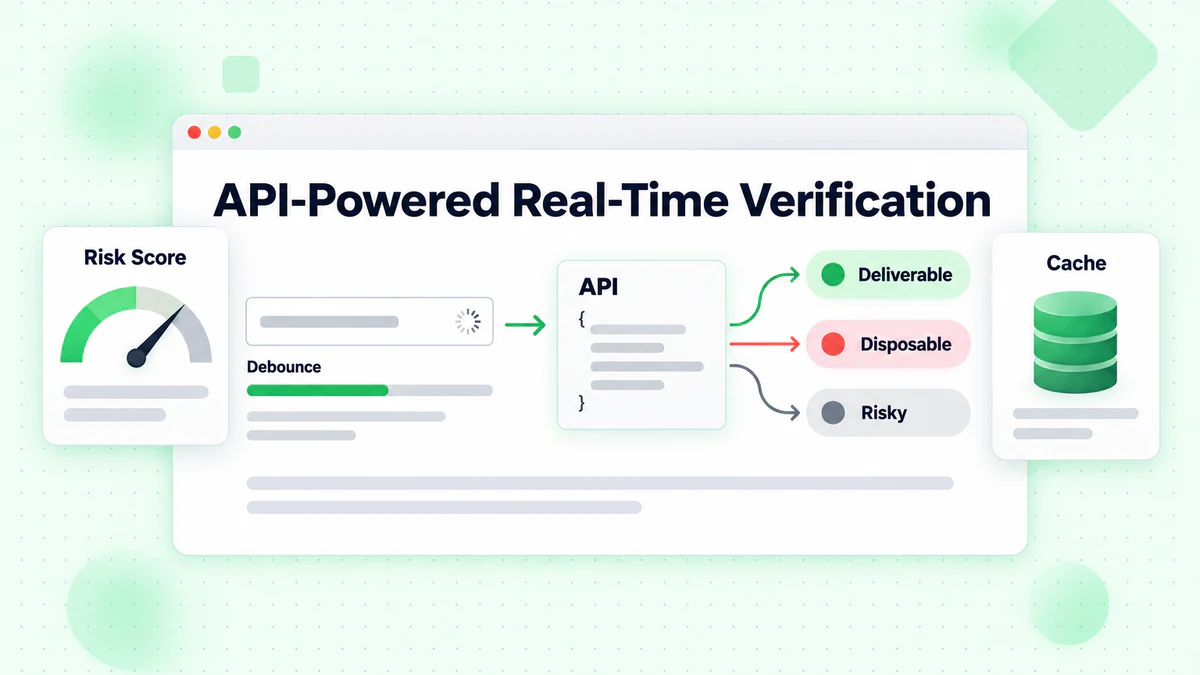
जबकि क्लाइंट-साइड वैलिडेशन फॉर्मेटिंग त्रुटियों को पकड़ता है, API-संचालित सत्यापन डिलीवरेबिलिटी सत्यापन, डिस्पोजेबल ईमेल डिटेक्शन और जोखिम स्कोरिंग सहित व्यापक ईमेल जांच प्रदान करता है।
डिबाउंस्ड API कॉल को लागू करना
हर कीस्ट्रोक पर API कॉल करना संसाधनों को बर्बाद करता है और खराब उपयोगकर्ता अनुभव बनाता है। उपयोगकर्ता के टाइपिंग को रोकने तक प्रतीक्षा करने के लिए डिबाउंसिंग लागू करें:
class RealTimeEmailVerifier {
  constructor(options = {}) {
    this.apiKey = options.apiKey;
    this.apiUrl = options.apiUrl || 'https://api.billionverify.com/v1/verify';
    this.debounceMs = options.debounceMs || 500;
    this.minLength = options.minLength || 5;
    this.debounceTimer = null;
    this.cache = new Map();
  }

  async verify(email, callbacks = {}) {
    const { onStart, onSuccess, onError, onComplete } = callbacks;

    // Clear pending verification
    if (this.debounceTimer) {
      clearTimeout(this.debounceTimer);
    }

    // Skip if email is too short or invalid format
    if (!this.shouldVerify(email)) {
      return;
    }

    // Check cache first
    if (this.cache.has(email)) {
      const cachedResult = this.cache.get(email);
      onSuccess?.(cachedResult);
      onComplete?.();
      return cachedResult;
    }

    // Debounce the API call
    return new Promise((resolve) => {
      this.debounceTimer = setTimeout(async () => {
        onStart?.();

        try {
          const result = await this.callApi(email);
          this.cache.set(email, result);
          onSuccess?.(result);
          resolve(result);
        } catch (error) {
          onError?.(error);
          resolve(null);
        } finally {
          onComplete?.();
        }
      }, this.debounceMs);
    });
  }

  shouldVerify(email) {
    if (email.length < this.minLength) return false;
    if (!email.includes('@')) return false;

    const basicPattern = /^[^\s@]+@[^\s@]+\.[^\s@]+$/;
    return basicPattern.test(email);
  }

  async callApi(email) {
    const response = await fetch(this.apiUrl, {
      method: 'POST',
      headers: {
        'Authorization': `Bearer ${this.apiKey}`,
        'Content-Type': 'application/json'
      },
      body: JSON.stringify({ email })
    });

    if (!response.ok) {
      throw new Error(`Verification failed: ${response.status}`);
    }

    return response.json();
  }

  clearCache() {
    this.cache.clear();
  }
}
फ़ॉर्म एलिमेंट्स के साथ इंटीग्रेशन
व्यापक UI फीडबैक के साथ सत्यापनकर्ता को अपने फ़ॉर्म से कनेक्ट करें:
class EmailFormField {
  constructor(inputSelector, options = {}) {
    this.input = document.querySelector(inputSelector);
    this.container = this.input.closest('.form-group');
    this.feedback = this.container.querySelector('.feedback');
    this.spinner = this.container.querySelector('.spinner');

    this.verifier = new RealTimeEmailVerifier({
      apiKey: options.apiKey,
      debounceMs: 600
    });

    this.lastVerifiedEmail = null;
    this.lastResult = null;

    this.setupEventListeners();
  }

  setupEventListeners() {
    this.input.addEventListener('input', (e) => {
      this.handleInput(e.target.value);
    });

    this.input.addEventListener('blur', () => {
      this.handleBlur();
    });
  }

  handleInput(email) {
    // Reset state while typing
    this.setStatus('typing');

    // Perform real-time verification
    this.verifier.verify(email, {
      onStart: () => this.setStatus('verifying'),
      onSuccess: (result) => this.handleResult(email, result),
      onError: (error) => this.handleError(error)
    });
  }

  handleBlur() {
    const email = this.input.value.trim();

    if (!email) {
      this.setStatus('empty');
      return;
    }

    // If we haven't verified this email yet, do it now
    if (email !== this.lastVerifiedEmail) {
      this.verifier.verify(email, {
        onStart: () => this.setStatus('verifying'),
        onSuccess: (result) => this.handleResult(email, result),
        onError: (error) => this.handleError(error)
      });
    }
  }

  handleResult(email, result) {
    this.lastVerifiedEmail = email;
    this.lastResult = result;

    if (result.is_deliverable) {
      this.setStatus('valid', 'Email address verified');
    } else if (result.is_disposable) {
      this.setStatus('warning', 'Please use a permanent email address');
    } else if (!result.is_valid) {
      this.setStatus('invalid', 'This email address appears to be invalid');
    } else {
      this.setStatus('warning', 'We could not verify this email address');
    }
  }

  handleError(error) {
    console.error('Verification error:', error);
    // Don't block user on API errors
    this.setStatus('neutral', '');
  }

  setStatus(status, message = '') {
    const statusClasses = ['typing', 'verifying', 'valid', 'invalid', 'warning', 'empty', 'neutral'];

    this.container.classList.remove(...statusClasses);
    this.container.classList.add(status);

    this.feedback.textContent = message;
    this.spinner.style.display = status === 'verifying' ? 'block' : 'none';
  }

  isValid() {
    return this.lastResult?.is_deliverable === true;
  }

  getResult() {
    return this.lastResult;
  }
}
रियल-टाइम सत्यापन के लिए HTML संरचना
<div class="form-group">
  <label for="email">Email Address</label>
  <div class="input-wrapper">
    <input
      type="email"
      id="email"
      name="email"
      autocomplete="email"
      placeholder="you@example.com"
    >
    <div class="spinner" style="display: none;">
      <svg class="animate-spin" viewBox="0 0 24 24">
        <circle cx="12" cy="12" r="10" stroke="currentColor" stroke-width="4" fill="none" opacity="0.25"/>
        <path fill="currentColor" d="M4 12a8 8 0 018-8V0C5.373 0 0 5.373 0 12h4z"/>
      </svg>
    </div>
    <div class="status-icon"></div>
  </div>
  <div class="feedback"></div>
</div>
एज केस और त्रुटियों को संभालना
रियल-टाइम ईमेल सत्यापन को अच्छे उपयोगकर्ता अनुभव को बनाए रखने के लिए विभिन्न एज केस को सुंदरता से संभालना चाहिए।
नेटवर्क विफलताएं
जब नेटवर्क समस्याओं के कारण API कॉल विफल हो जाती हैं, तो फ़ॉर्म सबमिशन को पूरी तरह से ब्लॉक न करें:
class ResilientEmailVerifier extends RealTimeEmailVerifier {
  constructor(options) {
    super(options);
    this.maxRetries = options.maxRetries || 2;
    this.retryDelay = options.retryDelay || 1000;
  }

  async callApi(email, attempt = 1) {
    try {
      return await super.callApi(email);
    } catch (error) {
      if (attempt < this.maxRetries) {
        await this.delay(this.retryDelay * attempt);
        return this.callApi(email, attempt + 1);
      }

      // Return a neutral result on failure
      return {
        email,
        is_valid: true,
        is_deliverable: null,
        verification_status: 'unknown',
        error: 'Verification unavailable'
      };
    }
  }

  delay(ms) {
    return new Promise(resolve => setTimeout(resolve, ms));
  }
}
रेट लिमिटिंग
API कोटा के भीतर रहने के लिए बुद्धिमान रेट लिमिटिंग लागू करें:
class RateLimitedVerifier {
  constructor(options) {
    this.verifier = new RealTimeEmailVerifier(options);
    this.requestQueue = [];
    this.requestsPerMinute = options.requestsPerMinute || 60;
    this.requestTimestamps = [];
  }

  async verify(email, callbacks) {
    // Clean old timestamps
    const oneMinuteAgo = Date.now() - 60000;
    this.requestTimestamps = this.requestTimestamps.filter(t => t > oneMinuteAgo);

    // Check if we're at the limit
    if (this.requestTimestamps.length >= this.requestsPerMinute) {
      const oldestRequest = this.requestTimestamps[0];
      const waitTime = oldestRequest + 60000 - Date.now();

      if (waitTime > 0) {
        await new Promise(resolve => setTimeout(resolve, waitTime));
      }
    }

    this.requestTimestamps.push(Date.now());
    return this.verifier.verify(email, callbacks);
  }
}
धीमे कनेक्शन को संभालना
धीमे कनेक्शन पर उपयोगकर्ताओं के लिए प्रतिक्रिया प्रदान करें:
class TimeoutAwareVerifier {
  constructor(options) {
    this.verifier = new RealTimeEmailVerifier(options);
    this.timeout = options.timeout || 10000;
  }

  async verify(email, callbacks) {
    const { onStart, onSuccess, onError, onComplete, onTimeout } = callbacks;

    const timeoutPromise = new Promise((_, reject) => {
      setTimeout(() => reject(new Error('Verification timeout')), this.timeout);
    });

    onStart?.();

    try {
      const result = await Promise.race([
        this.verifier.verify(email, {}),
        timeoutPromise
      ]);
      onSuccess?.(result);
      return result;
    } catch (error) {
      if (error.message === 'Verification timeout') {
        onTimeout?.();
      } else {
        onError?.(error);
      }
    } finally {
      onComplete?.();
    }
  }
}
रियल-टाइम सत्यापन के लिए UX सर्वोत्तम प्रथाएं
रियल-टाइम ईमेल सत्यापन को लागू करने के लिए उपयोगकर्ता अनुभव पर सावधानीपूर्वक ध्यान देने की आवश्यकता होती है। खराब कार्यान्वयन उपयोगकर्ताओं को निराश कर सकता है और फ़ॉर्म परित्याग में वृद्धि कर सकता है।
समय और फीडबैक
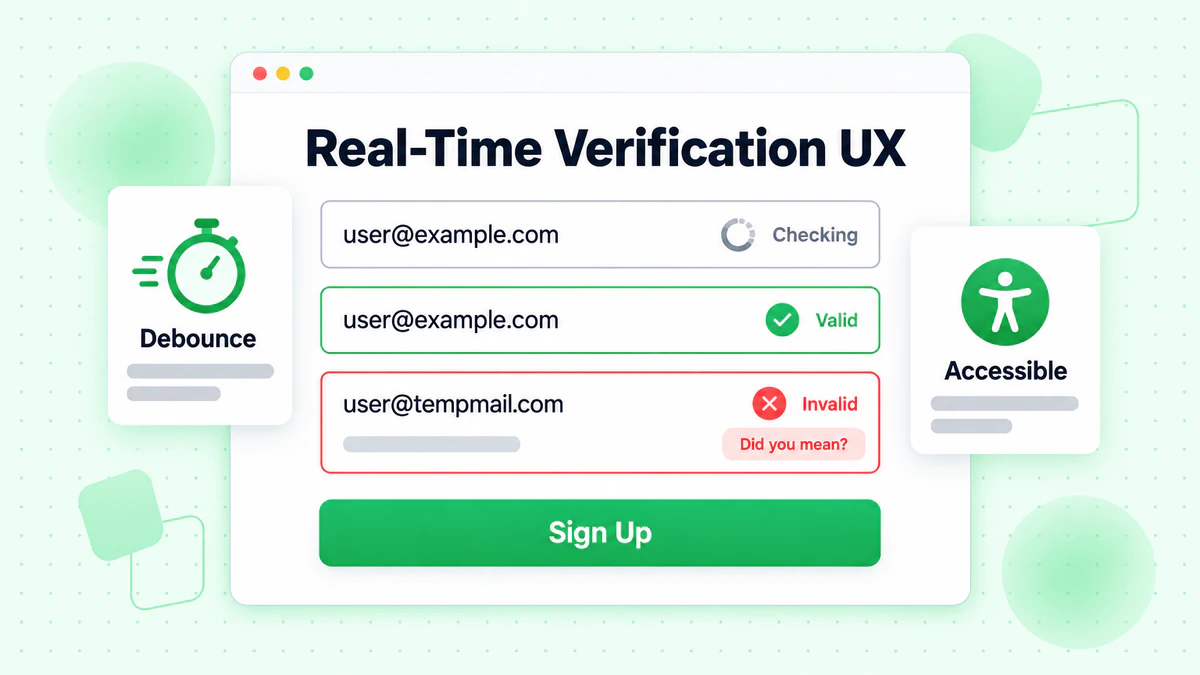
हर कीस्ट्रोक पर सत्यापन न करें: यह अत्यधिक API कॉल और विचलित करने वाले UI परिवर्तन बनाता है। 400-600ms देरी के साथ डिबाउंसिंग का उपयोग करें।
लोडिंग स्थितियों को स्पष्ट रूप से दिखाएं: उपयोगकर्ताओं को समझना चाहिए कि सत्यापन कब हो रहा है। एक सूक्ष्म स्पिनर या पल्सिंग एनीमेशन विचलित किए बिना गतिविधि को इंगित करता है।
तत्काल सिंटैक्स फीडबैक प्रदान करें: बुनियादी फॉर्मेट वैलिडेशन API कॉल के बिना तुरंत हो सकता है। API सत्यापन को तब तक सहेजें जब तक ईमेल पूर्ण न दिखे।
त्रुटि संदेश दिशानिर्देश
विशिष्ट और सहायक बनें: "अमान्य ईमेल" के बजाय, कहें "यह ईमेल डोमेन मौजूद नहीं दिखता है। क्या आपका मतलब gmail.com था?"
जब संभव हो सुझाव दें: यदि डोमेन टाइपो जैसा लगता है, तो सुधार का सुझाव दें। "gmial.com" जैसे सामान्य टाइपो को "क्या आपका मतलब gmail.com था?" संकेत देना चाहिए।
आक्रामक न बनें: डिस्पोजेबल ईमेल के बारे में चेतावनियों को सूचित करना चाहिए, फटकारना नहीं। "खाता सुरक्षा के लिए, कृपया एक स्थायी ईमेल पते का उपयोग करें" "डिस्पोजेबल ईमेल की अनुमति नहीं है" से बेहतर है।
प्रगतिशील संवर्द्धन
सत्यापन को एक संवर्द्धन के रूप में लागू करें, आवश्यकता के रूप में नहीं:
class ProgressiveEmailVerification {
  constructor(inputSelector, options) {
    this.input = document.querySelector(inputSelector);
    this.form = this.input.closest('form');
    this.hasApiAccess = !!options.apiKey;

    // Always enable basic validation
    this.enableBasicValidation();

    // Enable API verification if available
    if (this.hasApiAccess) {
      this.enableApiVerification(options);
    }
  }

  enableBasicValidation() {
    this.input.addEventListener('blur', () => {
      const email = this.input.value.trim();
      if (email && !this.isValidFormat(email)) {
        this.showError('Please enter a valid email address');
      }
    });
  }

  enableApiVerification(options) {
    this.verifier = new RealTimeEmailVerifier(options);

    this.input.addEventListener('input', (e) => {
      this.verifier.verify(e.target.value, {
        onSuccess: (result) => this.handleVerificationResult(result)
      });
    });
  }

  isValidFormat(email) {
    return /^[^\s@]+@[^\s@]+\.[^\s@]+$/.test(email);
  }

  handleVerificationResult(result) {
    // Enhanced verification results
  }

  showError(message) {
    // Error display logic
  }
}
फ्रेमवर्क-विशिष्ट कार्यान्वयन
आधुनिक JavaScript फ्रेमवर्क रियल-टाइम ईमेल सत्यापन को प्रभावी ढंग से लागू करने के लिए पैटर्न प्रदान करते हैं।
React कार्यान्वयन
import { useState, useCallback, useEffect, useRef } from 'react';

function useEmailVerification(apiKey, options = {}) {
  const [status, setStatus] = useState('idle');
  const [result, setResult] = useState(null);
  const [error, setError] = useState(null);
  const debounceRef = useRef(null);
  const cacheRef = useRef(new Map());

  const verify = useCallback(async (email) => {
    // Clear pending verification
    if (debounceRef.current) {
      clearTimeout(debounceRef.current);
    }

    // Skip invalid emails
    if (!email || !email.includes('@') || email.length < 5) {
      setStatus('idle');
      return;
    }

    // Check cache
    if (cacheRef.current.has(email)) {
      setResult(cacheRef.current.get(email));
      setStatus('success');
      return;
    }

    // Debounce API call
    debounceRef.current = setTimeout(async () => {
      setStatus('loading');

      try {
        const response = await fetch('https://api.billionverify.com/v1/verify', {
          method: 'POST',
          headers: {
            'Authorization': `Bearer ${apiKey}`,
            'Content-Type': 'application/json'
          },
          body: JSON.stringify({ email })
        });

        if (!response.ok) throw new Error('Verification failed');

        const data = await response.json();
        cacheRef.current.set(email, data);
        setResult(data);
        setStatus('success');
      } catch (err) {
        setError(err);
        setStatus('error');
      }
    }, options.debounceMs || 500);
  }, [apiKey, options.debounceMs]);

  return { verify, status, result, error };
}

function EmailInput({ apiKey }) {
  const [email, setEmail] = useState('');
  const { verify, status, result } = useEmailVerification(apiKey);

  useEffect(() => {
    verify(email);
  }, [email, verify]);

  const getStatusClass = () => {
    if (status === 'loading') return 'verifying';
    if (status === 'success' && result?.is_deliverable) return 'valid';
    if (status === 'success' && !result?.is_deliverable) return 'invalid';
    return '';
  };

  return (
    <div className={`form-group ${getStatusClass()}`}>
      <label htmlFor="email">Email Address</label>
      <input
        type="email"
        id="email"
        value={email}
        onChange={(e) => setEmail(e.target.value)}
        placeholder="you@example.com"
      />
      {status === 'loading' && <span className="spinner" />}
      {status === 'success' && result && (
        <span className="feedback">
          {result.is_deliverable
            ? '✓ Email verified'
            : 'This email may not be deliverable'}
        </span>
      )}
    </div>
  );
}
Vue.js कार्यान्वयन
<template>
  <div :class="['form-group', statusClass]">
    <label for="email">Email Address</label>
    <div class="input-wrapper">
      <input
        type="email"
        id="email"
        v-model="email"
        @input="handleInput"
        placeholder="you@example.com"
      />
      <span v-if="isVerifying" class="spinner"></span>
    </div>
    <span v-if="feedbackMessage" class="feedback">
      {{ feedbackMessage }}
    </span>
  </div>
</template>

<script>
import { ref, computed, watch } from 'vue';
import { useDebounceFn } from '@vueuse/core';

export default {
  props: {
    apiKey: { type: String, required: true }
  },
  setup(props) {
    const email = ref('');
    const status = ref('idle');
    const result = ref(null);
    const cache = new Map();

    const verifyEmail = useDebounceFn(async (emailValue) => {
      if (!emailValue || !emailValue.includes('@')) {
        status.value = 'idle';
        return;
      }

      if (cache.has(emailValue)) {
        result.value = cache.get(emailValue);
        status.value = 'success';
        return;
      }

      status.value = 'loading';

      try {
        const response = await fetch('https://api.billionverify.com/v1/verify', {
          method: 'POST',
          headers: {
            'Authorization': `Bearer ${props.apiKey}`,
            'Content-Type': 'application/json'
          },
          body: JSON.stringify({ email: emailValue })
        });

        const data = await response.json();
        cache.set(emailValue, data);
        result.value = data;
        status.value = 'success';
      } catch (error) {
        status.value = 'error';
      }
    }, 500);

    const handleInput = () => {
      verifyEmail(email.value);
    };

    const isVerifying = computed(() => status.value === 'loading');

    const statusClass = computed(() => {
      if (status.value === 'loading') return 'verifying';
      if (status.value === 'success' && result.value?.is_deliverable) return 'valid';
      if (status.value === 'success' && !result.value?.is_deliverable) return 'invalid';
      return '';
    });

    const feedbackMessage = computed(() => {
      if (status.value !== 'success' || !result.value) return '';
      return result.value.is_deliverable
        ? '✓ Email verified'
        : 'This email may not be deliverable';
    });

    return {
      email,
      handleInput,
      isVerifying,
      statusClass,
      feedbackMessage
    };
  }
};
</script>
प्रदर्शन अनुकूलन रणनीतियाँ
रियल-टाइम ईमेल सत्यापन सावधानी से लागू नहीं किए जाने पर पेज प्रदर्शन को प्रभावित कर सकता है। सुचारू उपयोगकर्ता अनुभव बनाए रखने के लिए इन अनुकूलन रणनीतियों को लागू करें।
सत्यापन परिणामों को कैश करना
अनावश्यक API कॉल से बचने के लिए क्लाइंट-साइड कैश लागू करें:
class VerificationCache {
  constructor(options = {}) {
    this.maxSize = options.maxSize || 100;
    this.ttl = options.ttl || 300000; // 5 minutes
    this.cache = new Map();
  }

  get(email) {
    const normalized = email.toLowerCase().trim();
    const entry = this.cache.get(normalized);

    if (!entry) return null;

    if (Date.now() > entry.expiresAt) {
      this.cache.delete(normalized);
      return null;
    }

    return entry.result;
  }

  set(email, result) {
    const normalized = email.toLowerCase().trim();

    // Enforce max size with LRU eviction
    if (this.cache.size >= this.maxSize) {
      const oldestKey = this.cache.keys().next().value;
      this.cache.delete(oldestKey);
    }

    this.cache.set(normalized, {
      result,
      expiresAt: Date.now() + this.ttl
    });
  }

  clear() {
    this.cache.clear();
  }
}
सत्यापन मॉड्यूल को लेज़ी लोड करना
सत्यापन मॉड्यूल को केवल आवश्यकता होने पर लोड करें:
async function initEmailVerification(inputSelector, options) {
  // Only load when user focuses on email field
  const input = document.querySelector(inputSelector);

  input.addEventListener('focus', async function onFocus() {
    input.removeEventListener('focus', onFocus);

    const { RealTimeEmailVerifier } = await import('./email-verifier.js');

    const verifier = new RealTimeEmailVerifier(options);

    input.addEventListener('input', (e) => {
      verifier.verify(e.target.value, {
        onSuccess: (result) => updateUI(result),
        onError: (error) => handleError(error)
      });
    });
  }, { once: true });
}
बंडल आकार को कम करना
पेज लोड पर प्रभाव को कम करने के लिए ट्री-शेकिंग और कोड स्प्लिटिंग का उपयोग करें:
// email-verifier/index.js - Main entry point
export { RealTimeEmailVerifier } from './verifier';
export { EmailFormField } from './form-field';

// email-verifier/lite.js - Lightweight version for basic validation
export { BasicEmailValidator } from './basic-validator';
सत्यापन प्रभावशीलता को मापना
यह समझने के लिए कि रियल-टाइम ईमेल सत्यापन आपके फ़ॉर्म को कैसे प्रभावित करता है, मुख्य मेट्रिक्स को ट्रैक करें।
मुख्य प्रदर्शन संकेतक
सत्यापन सफलता दर: सत्यापन पास करने वाले ईमेल का प्रतिशत। कम दरें UX समस्याओं या लक्ष्यीकरण समस्याओं का संकेत दे सकती हैं।
फ़ॉर्म पूर्णता दर: सत्यापन लागू करने से पहले और बाद में पूर्णता दरों की तुलना करें। अच्छे कार्यान्वयन पूर्णता दरों को बनाए रखना या सुधारना चाहिए।
अमान्य ईमेल दर: ट्रैक करें कि फ़ॉर्म भरते समय कितने अमान्य ईमेल पकड़े गए और सुधारे गए बनाम बाद में खोजे गए।
API प्रतिक्रिया समय: सत्यापन गति की निगरानी करें। धीमी प्रतिक्रियाएं उपयोगकर्ताओं को निराश करती हैं और परित्याग में वृद्धि करती हैं।
एनालिटिक्स कार्यान्वयन
class VerificationAnalytics {
  constructor(analyticsProvider) {
    this.analytics = analyticsProvider;
  }

  trackVerificationStart(email) {
    this.analytics.track('email_verification_started', {
      domain: this.extractDomain(email),
      timestamp: Date.now()
    });
  }

  trackVerificationComplete(email, result, duration) {
    this.analytics.track('email_verification_completed', {
      domain: this.extractDomain(email),
      is_valid: result.is_valid,
      is_deliverable: result.is_deliverable,
      is_disposable: result.is_disposable,
      risk_score: result.risk_score,
      duration_ms: duration
    });
  }

  trackVerificationError(email, error) {
    this.analytics.track('email_verification_error', {
      domain: this.extractDomain(email),
      error_type: error.name,
      error_message: error.message
    });
  }

  trackFormSubmission(email, verificationResult) {
    this.analytics.track('form_submitted_with_verification', {
      email_verified: !!verificationResult,
      verification_passed: verificationResult?.is_deliverable,
      verification_status: verificationResult?.verification_status
    });
  }

  extractDomain(email) {
    return email.split('@')[1]?.toLowerCase() || 'unknown';
  }
}
सुरक्षा विचार
रियल-टाइम ईमेल सत्यापन में बाहरी सेवाओं को उपयोगकर्ता डेटा भेजना शामिल है। उपयोगकर्ता गोपनीयता की रक्षा के लिए उचित सुरक्षा उपाय लागू करें।
API कुंजियों की सुरक्षा
क्लाइंट-साइड कोड में कभी भी API कुंजियों को उजागर न करें। बैकएंड प्रॉक्सी का उपयोग करें:
// Backend proxy endpoint (Node.js/Express)
app.post('/api/verify-email', async (req, res) => {
  const { email } = req.body;

  // Validate input
  if (!email || typeof email !== 'string') {
    return res.status(400).json({ error: 'Invalid email' });
  }

  // Rate limiting per IP
  const clientIp = req.ip;
  if (await isRateLimited(clientIp)) {
    return res.status(429).json({ error: 'Too many requests' });
  }

  try {
    const response = await fetch('https://api.billionverify.com/v1/verify', {
      method: 'POST',
      headers: {
        'Authorization': `Bearer ${process.env.BV_API_KEY}`,
        'Content-Type': 'application/json'
      },
      body: JSON.stringify({ email })
    });

    const result = await response.json();
    res.json(result);
  } catch (error) {
    res.status(500).json({ error: 'Verification service unavailable' });
  }
});
इनपुट सैनिटाइजेशन
प्रोसेसिंग से पहले हमेशा ईमेल इनपुट को सैनिटाइज करें:
function sanitizeEmail(email) {
  if (typeof email !== 'string') return '';

  return email
    .toLowerCase()
    .trim()
    .replace(/[<>\"']/g, '') // Remove potential XSS characters
    .substring(0, 254); // Max email length per RFC
}
निष्कर्ष
रियल-टाइम ईमेल सत्यापन फ़ॉर्म इंटरैक्शन को निराशाजनक अनुमान लगाने के खेल से आत्मविश्वास भरे, निर्देशित अनुभवों में बदल देता है। उपयोगकर्ताओं के टाइप करते समय ईमेल पतों को सत्यापित करके, आप अमान्य डेटा को अपनी प्रणालियों में प्रवेश करने से रोकते हैं जबकि तत्काल प्रतिक्रिया प्रदान करते हैं जो उपयोगकर्ताओं को सफल होने में मदद करती है।
सफल कार्यान्वयन के लिए मुख्य सिद्धांतों में शामिल हैं:
अपने सत्यापन को परत दें: व्यापक API सत्यापन के साथ तत्काल क्लाइंट-साइड फॉर्मेट जांच को संयोजित करें। प्रत्येक परत विभिन्न प्रकार की समस्याओं को पकड़ती है।
उपयोगकर्ता अनुभव के लिए अनुकूलित करें: अत्यधिक API कॉल को रोकने के लिए डिबाउंसिंग का उपयोग करें, स्पष्ट दृश्य प्रतिक्रिया प्रदान करें, और सत्यापन सेवा समस्याओं के कारण कभी भी उपयोगकर्ताओं को ब्लॉक न करें।
विफलताओं को सुंदरता से संभालें: नेटवर्क त्रुटियां और API टाइमआउट फ़ॉर्म सबमिशन को नहीं रोकना चाहिए। जब उन्नत सत्यापन अनुपलब्ध हो तो बुनियादी सत्यापन पर वापस आएं।
मॉनिटर करें और दोहराएं: यह समझने के लिए सत्यापन मेट्रिक्स को ट्रैक करें कि आपका कार्यान्वयन फ़ॉर्म पूर्णता और डेटा गुणवत्ता को कैसे प्रभावित करता है। अपने दृष्टिकोण को परिष्कृत करने के लिए इस डेटा का उपयोग करें।
उपयोगकर्ता डेटा की रक्षा करें: API कुंजियों की रक्षा के लिए बैकएंड प्रॉक्सी के माध्यम से सत्यापन अनुरोधों को रूट करें, रेट लिमिटिंग लागू करें, और सभी इनपुट को सैनिटाइज करें।
BillionVerify का ईमेल सत्यापन API डिलीवरेबिलिटी जांच, डिस्पोजेबल ईमेल डिटेक्शन और जोखिम स्कोरिंग सहित व्यापक रियल-टाइम ईमेल सत्यापन के लिए बुनियादी ढांचा प्रदान करता है। इस गाइड में कार्यान्वयन पैटर्न के साथ संयुक्त, आप उत्कृष्ट उपयोगकर्ता अनुभव बनाए रखते हुए उच्च-गुणवत्ता वाले ईमेल पतों को कैप्चर करने वाले फ़ॉर्म अनुभव बना सकते हैं।
बुनियादी क्लाइंट-साइड वैलिडेशन से शुरू करें, फिर अपनी विशिष्ट आवश्यकताओं के आधार पर API-संचालित सत्यापन के साथ प्रगतिशील रूप से बढ़ाएं। रियल-टाइम ईमेल सत्यापन में निवेश कम बाउंस दरों, बेहतर ईमेल डिलीवरेबिलिटी और उच्च-गुणवत्ता वाले उपयोगकर्ता डेटा के माध्यम से लाभांश का भुगतान करता है।
Instantly या Smartlead का उपयोग करने वाली टीमें हर अभियान से पहले BillionVerify से सूचियाँ साफ करके डिलीवरेबिलिटी में उल्लेखनीय सुधार करती हैं।
वेरिफिकेशन प्रोवाइडर चुनने से पहले सटीकता और गति के मामले में BillionVerify की तुलना ZeroBounce से करें।