



表單放棄每年給企業造成數十億美元的損失,而無效的郵箱地址是罪魁禍首之一。當使用者輸入錯誤的郵箱地址,並在提交表單後才發現錯誤時,挫敗感會導致放棄。即時郵箱驗證透過在使用者輸入時驗證郵箱地址來解決這個問題,提供即時回饋,既改善使用者體驗又提升資料品質。
這篇綜合指南探討了即時郵箱驗證的實現,從基本的客戶端驗證到複雜的 API 驅動驗證系統,在無效、臨時和高風險郵箱地址進入資料庫之前就將其捕獲。
理解即時郵箱驗證
即時郵箱驗證在使用者與表單互動時即刻驗證郵箱地址,而不是等到表單提交或批次處理。這種方法結合多種驗證技術,提供有關郵箱有效性的即時回饋。
即時驗證與批次處理的區別
傳統的批次郵箱驗證在收集郵箱清單後才處理,這會產生幾個問題。無效郵箱已經進入資料庫,使用者已經完成流程卻沒有糾正的機會,清理清單成為一項獨立的營運任務。
即時郵箱驗證的工作方式不同。郵箱驗證器在輸入點檢查地址,防止無效資料進入系統。使用者收到即時回饋,可以在仍然專注於表單時糾正拼寫錯誤或提供替代地址。
驗證流程
一個全面的即時郵箱驗證系統按順序執行多項檢查:
語法驗證:第一層檢查郵箱是否遵循正確的格式規則。這包括驗證 @ 符號的存在,驗證本地部分(@ 之前)和網域部分(@ 之後),並確保不存在無效字元。
網域驗證:系統透過查詢 DNS 記錄來檢查網域是否存在並能接收郵件。這可以捕獲像 "gmial.com" 這樣的拼寫錯誤或完全虛構的網域。
MX 記錄檢查:郵件交換記錄指示哪些伺服器處理網域的郵件。沒有 MX 記錄的網域無法接收郵件,使這些網域上的地址無效。
SMTP 驗證:最徹底的檢查連接到目標郵件伺服器並驗證郵箱是否存在,而無需實際發送郵件。這可以捕獲網域有效但特定郵箱不存在的地址。
風險評估:進階郵箱驗證服務分析其他因素,例如地址是否是臨時郵箱、角色郵箱或與已知垃圾郵件模式相關聯。
實現客戶端驗證
客戶端驗證提供第一道防線和即時使用者回饋。雖然單獨使用不夠充分,但它可以在不需要伺服器往返的情況下捕獲明顯錯誤。
HTML5 郵箱驗證
現代瀏覽器透過 HTML5 email 輸入類型包含內建郵箱驗證:
<form id="signup-form">
  <label for="email">Email Address</label>
  <input
    type="email"
    id="email"
    name="email"
    required
    placeholder="you@example.com"
  >
  <span class="error-message"></span>
  <button type="submit">Sign Up</button>
</form>
type="email" 屬性觸發瀏覽器驗證,檢查基本的郵箱格式。然而,瀏覽器驗證比較寬鬆,接受許多技術上無效的地址。
增強的 JavaScript 驗證
要進行更徹底的客戶端檢查,請實現自訂 JavaScript 驗證:
class EmailValidator {
  constructor(inputElement) {
    this.input = inputElement;
    this.errorElement = inputElement.nextElementSibling;
    this.setupListeners();
  }

  setupListeners() {
    this.input.addEventListener('blur', () => this.validate());
    this.input.addEventListener('input', () => this.clearError());
  }

  validate() {
    const email = this.input.value.trim();

    if (!email) {
      return this.showError('Email address is required');
    }

    if (!this.isValidFormat(email)) {
      return this.showError('Please enter a valid email address');
    }

    if (this.hasCommonTypo(email)) {
      return this.showError(this.getTypoSuggestion(email));
    }

    this.showSuccess();
    return true;
  }

  isValidFormat(email) {
    const pattern = /^[^\s@]+@[^\s@]+\.[^\s@]+$/;
    return pattern.test(email);
  }

  hasCommonTypo(email) {
    const domain = email.split('@')[1]?.toLowerCase();
    const typos = {
      'gmial.com': 'gmail.com',
      'gmal.com': 'gmail.com',
      'gamil.com': 'gmail.com',
      'hotmal.com': 'hotmail.com',
      'outlok.com': 'outlook.com',
      'yahooo.com': 'yahoo.com'
    };
    return typos.hasOwnProperty(domain);
  }

  getTypoSuggestion(email) {
    const [local, domain] = email.split('@');
    const corrections = {
      'gmial.com': 'gmail.com',
      'gmal.com': 'gmail.com',
      'gamil.com': 'gmail.com'
    };
    const corrected = corrections[domain.toLowerCase()];
    return `Did you mean ${local}@${corrected}?`;
  }

  showError(message) {
    this.input.classList.add('invalid');
    this.input.classList.remove('valid');
    this.errorElement.textContent = message;
    this.errorElement.classList.add('visible');
    return false;
  }

  showSuccess() {
    this.input.classList.add('valid');
    this.input.classList.remove('invalid');
    this.errorElement.classList.remove('visible');
  }

  clearError() {
    this.errorElement.classList.remove('visible');
    this.input.classList.remove('invalid', 'valid');
  }
}

// Initialize validator
const emailInput = document.getElementById('email');
const validator = new EmailValidator(emailInput);
視覺回饋的 CSS
為驗證狀態提供清晰的視覺指示:
.form-group input {
  padding: 12px 16px;
  border: 2px solid #e0e0e0;
  border-radius: 8px;
  transition: border-color 0.2s, box-shadow 0.2s;
}

.form-group input:focus {
  outline: none;
  border-color: #2196f3;
  box-shadow: 0 0 0 3px rgba(33, 150, 243, 0.1);
}

.form-group input.valid {
  border-color: #4caf50;
  background-image: url("data:image/svg+xml,...");
  background-repeat: no-repeat;
  background-position: right 12px center;
}

.form-group input.invalid {
  border-color: #f44336;
}

.error-message {
  display: block;
  color: #f44336;
  font-size: 14px;
  margin-top: 4px;
  opacity: 0;
  transform: translateY(-4px);
  transition: opacity 0.2s, transform 0.2s;
}

.error-message.visible {
  opacity: 1;
  transform: translateY(0);
}
API 驅動的即時驗證
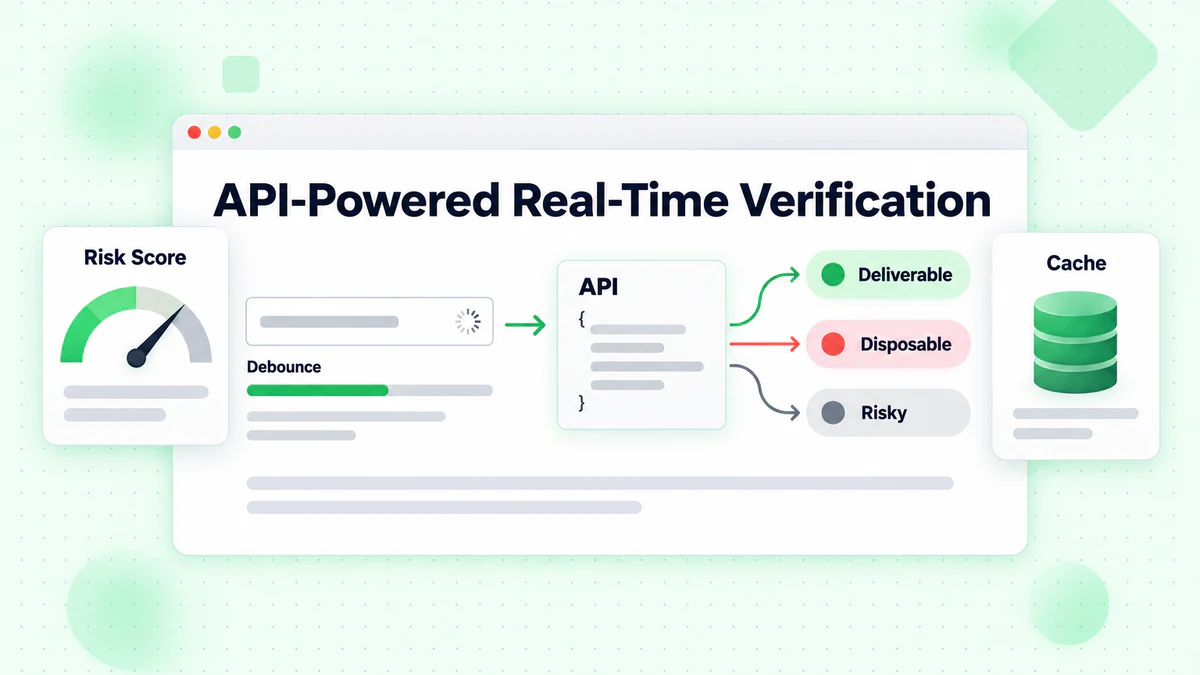
雖然客戶端驗證可以捕獲格式錯誤,但 API 驅動的驗證提供全面的郵箱檢查,包括可投遞性驗證、臨時郵箱偵測和風險評分。
實現防抖的 API 呼叫
在每次按鍵時都進行 API 呼叫會浪費資源並造成糟糕的使用者體驗。實現防抖以等待使用者暫停輸入:
class RealTimeEmailVerifier {
  constructor(options = {}) {
    this.apiKey = options.apiKey;
    this.apiUrl = options.apiUrl || 'https://api.billionverify.com/v1/verify';
    this.debounceMs = options.debounceMs || 500;
    this.minLength = options.minLength || 5;
    this.debounceTimer = null;
    this.cache = new Map();
  }

  async verify(email, callbacks = {}) {
    const { onStart, onSuccess, onError, onComplete } = callbacks;

    // Clear pending verification
    if (this.debounceTimer) {
      clearTimeout(this.debounceTimer);
    }

    // Skip if email is too short or invalid format
    if (!this.shouldVerify(email)) {
      return;
    }

    // Check cache first
    if (this.cache.has(email)) {
      const cachedResult = this.cache.get(email);
      onSuccess?.(cachedResult);
      onComplete?.();
      return cachedResult;
    }

    // Debounce the API call
    return new Promise((resolve) => {
      this.debounceTimer = setTimeout(async () => {
        onStart?.();

        try {
          const result = await this.callApi(email);
          this.cache.set(email, result);
          onSuccess?.(result);
          resolve(result);
        } catch (error) {
          onError?.(error);
          resolve(null);
        } finally {
          onComplete?.();
        }
      }, this.debounceMs);
    });
  }

  shouldVerify(email) {
    if (email.length < this.minLength) return false;
    if (!email.includes('@')) return false;

    const basicPattern = /^[^\s@]+@[^\s@]+\.[^\s@]+$/;
    return basicPattern.test(email);
  }

  async callApi(email) {
    const response = await fetch(this.apiUrl, {
      method: 'POST',
      headers: {
        'Authorization': `Bearer ${this.apiKey}`,
        'Content-Type': 'application/json'
      },
      body: JSON.stringify({ email })
    });

    if (!response.ok) {
      throw new Error(`Verification failed: ${response.status}`);
    }

    return response.json();
  }

  clearCache() {
    this.cache.clear();
  }
}
與表單元素整合
將驗證器連接到表單,提供全面的 UI 回饋:
class EmailFormField {
  constructor(inputSelector, options = {}) {
    this.input = document.querySelector(inputSelector);
    this.container = this.input.closest('.form-group');
    this.feedback = this.container.querySelector('.feedback');
    this.spinner = this.container.querySelector('.spinner');

    this.verifier = new RealTimeEmailVerifier({
      apiKey: options.apiKey,
      debounceMs: 600
    });

    this.lastVerifiedEmail = null;
    this.lastResult = null;

    this.setupEventListeners();
  }

  setupEventListeners() {
    this.input.addEventListener('input', (e) => {
      this.handleInput(e.target.value);
    });

    this.input.addEventListener('blur', () => {
      this.handleBlur();
    });
  }

  handleInput(email) {
    // Reset state while typing
    this.setStatus('typing');

    // Perform real-time verification
    this.verifier.verify(email, {
      onStart: () => this.setStatus('verifying'),
      onSuccess: (result) => this.handleResult(email, result),
      onError: (error) => this.handleError(error)
    });
  }

  handleBlur() {
    const email = this.input.value.trim();

    if (!email) {
      this.setStatus('empty');
      return;
    }

    // If we haven't verified this email yet, do it now
    if (email !== this.lastVerifiedEmail) {
      this.verifier.verify(email, {
        onStart: () => this.setStatus('verifying'),
        onSuccess: (result) => this.handleResult(email, result),
        onError: (error) => this.handleError(error)
      });
    }
  }

  handleResult(email, result) {
    this.lastVerifiedEmail = email;
    this.lastResult = result;

    if (result.is_deliverable) {
      this.setStatus('valid', 'Email address verified');
    } else if (result.is_disposable) {
      this.setStatus('warning', 'Please use a permanent email address');
    } else if (!result.is_valid) {
      this.setStatus('invalid', 'This email address appears to be invalid');
    } else {
      this.setStatus('warning', 'We could not verify this email address');
    }
  }

  handleError(error) {
    console.error('Verification error:', error);
    // Don't block user on API errors
    this.setStatus('neutral', '');
  }

  setStatus(status, message = '') {
    const statusClasses = ['typing', 'verifying', 'valid', 'invalid', 'warning', 'empty', 'neutral'];

    this.container.classList.remove(...statusClasses);
    this.container.classList.add(status);

    this.feedback.textContent = message;
    this.spinner.style.display = status === 'verifying' ? 'block' : 'none';
  }

  isValid() {
    return this.lastResult?.is_deliverable === true;
  }

  getResult() {
    return this.lastResult;
  }
}
即時驗證的 HTML 結構
<div class="form-group">
  <label for="email">Email Address</label>
  <div class="input-wrapper">
    <input
      type="email"
      id="email"
      name="email"
      autocomplete="email"
      placeholder="you@example.com"
    >
    <div class="spinner" style="display: none;">
      <svg class="animate-spin" viewBox="0 0 24 24">
        <circle cx="12" cy="12" r="10" stroke="currentColor" stroke-width="4" fill="none" opacity="0.25"/>
        <path fill="currentColor" d="M4 12a8 8 0 018-8V0C5.373 0 0 5.373 0 12h4z"/>
      </svg>
    </div>
    <div class="status-icon"></div>
  </div>
  <div class="feedback"></div>
</div>
處理邊界情況和錯誤
即時郵箱驗證必須優雅地處理各種邊界情況,以保持良好的使用者體驗。
網路故障
當 API 呼叫因網路問題失敗時,不要完全阻止表單提交:
class ResilientEmailVerifier extends RealTimeEmailVerifier {
  constructor(options) {
    super(options);
    this.maxRetries = options.maxRetries || 2;
    this.retryDelay = options.retryDelay || 1000;
  }

  async callApi(email, attempt = 1) {
    try {
      return await super.callApi(email);
    } catch (error) {
      if (attempt < this.maxRetries) {
        await this.delay(this.retryDelay * attempt);
        return this.callApi(email, attempt + 1);
      }

      // Return a neutral result on failure
      return {
        email,
        is_valid: true,
        is_deliverable: null,
        verification_status: 'unknown',
        error: 'Verification unavailable'
      };
    }
  }

  delay(ms) {
    return new Promise(resolve => setTimeout(resolve, ms));
  }
}
速率限制
實現智慧速率限制以保持在 API 配額內:
class RateLimitedVerifier {
  constructor(options) {
    this.verifier = new RealTimeEmailVerifier(options);
    this.requestQueue = [];
    this.requestsPerMinute = options.requestsPerMinute || 60;
    this.requestTimestamps = [];
  }

  async verify(email, callbacks) {
    // Clean old timestamps
    const oneMinuteAgo = Date.now() - 60000;
    this.requestTimestamps = this.requestTimestamps.filter(t => t > oneMinuteAgo);

    // Check if we're at the limit
    if (this.requestTimestamps.length >= this.requestsPerMinute) {
      const oldestRequest = this.requestTimestamps[0];
      const waitTime = oldestRequest + 60000 - Date.now();

      if (waitTime > 0) {
        await new Promise(resolve => setTimeout(resolve, waitTime));
      }
    }

    this.requestTimestamps.push(Date.now());
    return this.verifier.verify(email, callbacks);
  }
}
處理慢速連接
為慢速連接的使用者提供回饋:
class TimeoutAwareVerifier {
  constructor(options) {
    this.verifier = new RealTimeEmailVerifier(options);
    this.timeout = options.timeout || 10000;
  }

  async verify(email, callbacks) {
    const { onStart, onSuccess, onError, onComplete, onTimeout } = callbacks;

    const timeoutPromise = new Promise((_, reject) => {
      setTimeout(() => reject(new Error('Verification timeout')), this.timeout);
    });

    onStart?.();

    try {
      const result = await Promise.race([
        this.verifier.verify(email, {}),
        timeoutPromise
      ]);
      onSuccess?.(result);
      return result;
    } catch (error) {
      if (error.message === 'Verification timeout') {
        onTimeout?.();
      } else {
        onError?.(error);
      }
    } finally {
      onComplete?.();
    }
  }
}
即時驗證的使用者體驗最佳實踐
實現即時郵箱驗證需要仔細關注使用者體驗。糟糕的實現會讓使用者感到沮喪並增加表單放棄率。
時機和回饋
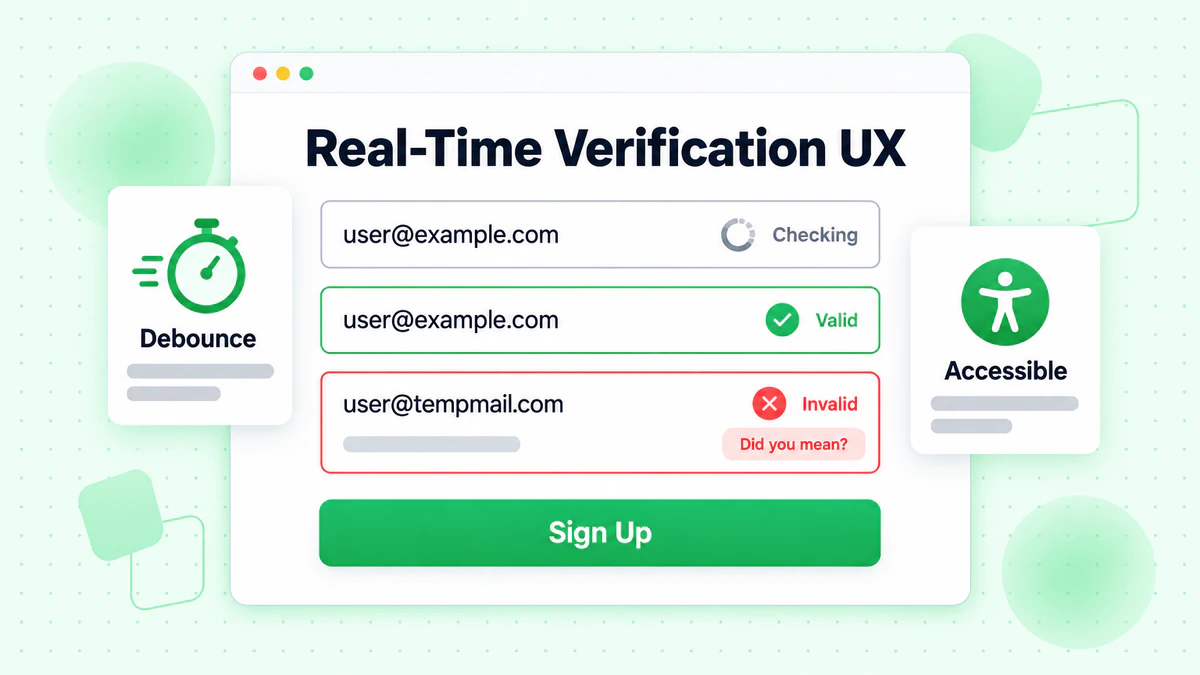
不要在每次按鍵時都驗證:這會產生過多的 API 呼叫和令人分心的 UI 變化。使用 400-600 毫秒延遲的防抖。
清晰顯示載入狀態:使用者應該了解何時進行驗證。一個微妙的載入動畫或脈衝動畫可以指示活動而不會分散注意力。
提供即時的語法回饋:基本格式驗證可以立即進行,無需 API 呼叫。在郵箱看起來完整時再保存 API 驗證。
錯誤訊息指南
具體且有幫助:不要說「無效郵箱」,而是說「此郵箱網域似乎不存在。您是指 gmail.com 嗎?」
儘可能提供建議:如果網域看起來像拼寫錯誤,建議更正。像 "gmial.com" 這樣的常見拼寫錯誤應該提示「您是指 gmail.com 嗎?」
不要過於激進:關於臨時郵箱的警告應該告知,而不是責罵。「為了帳戶安全,請使用永久郵箱地址」比「不允許使用臨時郵箱」更好。
漸進增強
將驗證實現為增強功能,而不是必需功能:
class ProgressiveEmailVerification {
  constructor(inputSelector, options) {
    this.input = document.querySelector(inputSelector);
    this.form = this.input.closest('form');
    this.hasApiAccess = !!options.apiKey;

    // Always enable basic validation
    this.enableBasicValidation();

    // Enable API verification if available
    if (this.hasApiAccess) {
      this.enableApiVerification(options);
    }
  }

  enableBasicValidation() {
    this.input.addEventListener('blur', () => {
      const email = this.input.value.trim();
      if (email && !this.isValidFormat(email)) {
        this.showError('Please enter a valid email address');
      }
    });
  }

  enableApiVerification(options) {
    this.verifier = new RealTimeEmailVerifier(options);

    this.input.addEventListener('input', (e) => {
      this.verifier.verify(e.target.value, {
        onSuccess: (result) => this.handleVerificationResult(result)
      });
    });
  }

  isValidFormat(email) {
    return /^[^\s@]+@[^\s@]+\.[^\s@]+$/.test(email);
  }

  handleVerificationResult(result) {
    // Enhanced verification results
  }

  showError(message) {
    // Error display logic
  }
}
特定框架的實現
現代 JavaScript 框架提供了有效實現即時郵箱驗證的模式。
React 實現
import { useState, useCallback, useEffect, useRef } from 'react';

function useEmailVerification(apiKey, options = {}) {
  const [status, setStatus] = useState('idle');
  const [result, setResult] = useState(null);
  const [error, setError] = useState(null);
  const debounceRef = useRef(null);
  const cacheRef = useRef(new Map());

  const verify = useCallback(async (email) => {
    // Clear pending verification
    if (debounceRef.current) {
      clearTimeout(debounceRef.current);
    }

    // Skip invalid emails
    if (!email || !email.includes('@') || email.length < 5) {
      setStatus('idle');
      return;
    }

    // Check cache
    if (cacheRef.current.has(email)) {
      setResult(cacheRef.current.get(email));
      setStatus('success');
      return;
    }

    // Debounce API call
    debounceRef.current = setTimeout(async () => {
      setStatus('loading');

      try {
        const response = await fetch('https://api.billionverify.com/v1/verify', {
          method: 'POST',
          headers: {
            'Authorization': `Bearer ${apiKey}`,
            'Content-Type': 'application/json'
          },
          body: JSON.stringify({ email })
        });

        if (!response.ok) throw new Error('Verification failed');

        const data = await response.json();
        cacheRef.current.set(email, data);
        setResult(data);
        setStatus('success');
      } catch (err) {
        setError(err);
        setStatus('error');
      }
    }, options.debounceMs || 500);
  }, [apiKey, options.debounceMs]);

  return { verify, status, result, error };
}

function EmailInput({ apiKey }) {
  const [email, setEmail] = useState('');
  const { verify, status, result } = useEmailVerification(apiKey);

  useEffect(() => {
    verify(email);
  }, [email, verify]);

  const getStatusClass = () => {
    if (status === 'loading') return 'verifying';
    if (status === 'success' && result?.is_deliverable) return 'valid';
    if (status === 'success' && !result?.is_deliverable) return 'invalid';
    return '';
  };

  return (
    <div className={`form-group ${getStatusClass()}`}>
      <label htmlFor="email">Email Address</label>
      <input
        type="email"
        id="email"
        value={email}
        onChange={(e) => setEmail(e.target.value)}
        placeholder="you@example.com"
      />
      {status === 'loading' && <span className="spinner" />}
      {status === 'success' && result && (
        <span className="feedback">
          {result.is_deliverable
            ? '✓ Email verified'
            : 'This email may not be deliverable'}
        </span>
      )}
    </div>
  );
}
Vue.js 實現
<template>
  <div :class="['form-group', statusClass]">
    <label for="email">Email Address</label>
    <div class="input-wrapper">
      <input
        type="email"
        id="email"
        v-model="email"
        @input="handleInput"
        placeholder="you@example.com"
      />
      <span v-if="isVerifying" class="spinner"></span>
    </div>
    <span v-if="feedbackMessage" class="feedback">
      {{ feedbackMessage }}
    </span>
  </div>
</template>

<script>
import { ref, computed, watch } from 'vue';
import { useDebounceFn } from '@vueuse/core';

export default {
  props: {
    apiKey: { type: String, required: true }
  },
  setup(props) {
    const email = ref('');
    const status = ref('idle');
    const result = ref(null);
    const cache = new Map();

    const verifyEmail = useDebounceFn(async (emailValue) => {
      if (!emailValue || !emailValue.includes('@')) {
        status.value = 'idle';
        return;
      }

      if (cache.has(emailValue)) {
        result.value = cache.get(emailValue);
        status.value = 'success';
        return;
      }

      status.value = 'loading';

      try {
        const response = await fetch('https://api.billionverify.com/v1/verify', {
          method: 'POST',
          headers: {
            'Authorization': `Bearer ${props.apiKey}`,
            'Content-Type': 'application/json'
          },
          body: JSON.stringify({ email: emailValue })
        });

        const data = await response.json();
        cache.set(emailValue, data);
        result.value = data;
        status.value = 'success';
      } catch (error) {
        status.value = 'error';
      }
    }, 500);

    const handleInput = () => {
      verifyEmail(email.value);
    };

    const isVerifying = computed(() => status.value === 'loading');

    const statusClass = computed(() => {
      if (status.value === 'loading') return 'verifying';
      if (status.value === 'success' && result.value?.is_deliverable) return 'valid';
      if (status.value === 'success' && !result.value?.is_deliverable) return 'invalid';
      return '';
    });

    const feedbackMessage = computed(() => {
      if (status.value !== 'success' || !result.value) return '';
      return result.value.is_deliverable
        ? '✓ Email verified'
        : 'This email may not be deliverable';
    });

    return {
      email,
      handleInput,
      isVerifying,
      statusClass,
      feedbackMessage
    };
  }
};
</script>
效能優化策略
如果實現不當,即時郵箱驗證可能會影響頁面效能。應用這些優化策略以保持流暢的使用者體驗。
快取驗證結果
實現客戶端快取以避免冗餘的 API 呼叫:
class VerificationCache {
  constructor(options = {}) {
    this.maxSize = options.maxSize || 100;
    this.ttl = options.ttl || 300000; // 5 minutes
    this.cache = new Map();
  }

  get(email) {
    const normalized = email.toLowerCase().trim();
    const entry = this.cache.get(normalized);

    if (!entry) return null;

    if (Date.now() > entry.expiresAt) {
      this.cache.delete(normalized);
      return null;
    }

    return entry.result;
  }

  set(email, result) {
    const normalized = email.toLowerCase().trim();

    // Enforce max size with LRU eviction
    if (this.cache.size >= this.maxSize) {
      const oldestKey = this.cache.keys().next().value;
      this.cache.delete(oldestKey);
    }

    this.cache.set(normalized, {
      result,
      expiresAt: Date.now() + this.ttl
    });
  }

  clear() {
    this.cache.clear();
  }
}
延遲載入驗證模組
僅在需要時載入驗證模組:
async function initEmailVerification(inputSelector, options) {
  // Only load when user focuses on email field
  const input = document.querySelector(inputSelector);

  input.addEventListener('focus', async function onFocus() {
    input.removeEventListener('focus', onFocus);

    const { RealTimeEmailVerifier } = await import('./email-verifier.js');

    const verifier = new RealTimeEmailVerifier(options);

    input.addEventListener('input', (e) => {
      verifier.verify(e.target.value, {
        onSuccess: (result) => updateUI(result),
        onError: (error) => handleError(error)
      });
    });
  }, { once: true });
}
減少套件大小
使用 tree-shaking 和程式碼分割來最小化對頁面載入的影響:
// email-verifier/index.js - Main entry point
export { RealTimeEmailVerifier } from './verifier';
export { EmailFormField } from './form-field';

// email-verifier/lite.js - Lightweight version for basic validation
export { BasicEmailValidator } from './basic-validator';
衡量驗證有效性
追蹤關鍵指標以了解即時郵箱驗證如何影響表單。
關鍵效能指標
驗證成功率:通過驗證的郵箱百分比。低比率可能表示使用者體驗問題或定位問題。
表單完成率:比較實施驗證前後的完成率。好的實現應該保持或提高完成率。
無效郵箱率:追蹤在表單填寫期間捕獲和糾正的無效郵箱數量與稍後發現的數量。
API 回應時間:監控驗證速度。慢速回應會讓使用者感到沮喪並增加放棄率。
分析實現
class VerificationAnalytics {
  constructor(analyticsProvider) {
    this.analytics = analyticsProvider;
  }

  trackVerificationStart(email) {
    this.analytics.track('email_verification_started', {
      domain: this.extractDomain(email),
      timestamp: Date.now()
    });
  }

  trackVerificationComplete(email, result, duration) {
    this.analytics.track('email_verification_completed', {
      domain: this.extractDomain(email),
      is_valid: result.is_valid,
      is_deliverable: result.is_deliverable,
      is_disposable: result.is_disposable,
      risk_score: result.risk_score,
      duration_ms: duration
    });
  }

  trackVerificationError(email, error) {
    this.analytics.track('email_verification_error', {
      domain: this.extractDomain(email),
      error_type: error.name,
      error_message: error.message
    });
  }

  trackFormSubmission(email, verificationResult) {
    this.analytics.track('form_submitted_with_verification', {
      email_verified: !!verificationResult,
      verification_passed: verificationResult?.is_deliverable,
      verification_status: verificationResult?.verification_status
    });
  }

  extractDomain(email) {
    return email.split('@')[1]?.toLowerCase() || 'unknown';
  }
}
安全考慮
即時郵箱驗證涉及將使用者資料發送到外部服務。實施適當的安全措施以保護使用者隱私。
保護 API 金鑰
永遠不要在客戶端程式碼中暴露 API 金鑰。使用後端代理:
// Backend proxy endpoint (Node.js/Express)
app.post('/api/verify-email', async (req, res) => {
  const { email } = req.body;

  // Validate input
  if (!email || typeof email !== 'string') {
    return res.status(400).json({ error: 'Invalid email' });
  }

  // Rate limiting per IP
  const clientIp = req.ip;
  if (await isRateLimited(clientIp)) {
    return res.status(429).json({ error: 'Too many requests' });
  }

  try {
    const response = await fetch('https://api.billionverify.com/v1/verify', {
      method: 'POST',
      headers: {
        'Authorization': `Bearer ${process.env.BV_API_KEY}`,
        'Content-Type': 'application/json'
      },
      body: JSON.stringify({ email })
    });

    const result = await response.json();
    res.json(result);
  } catch (error) {
    res.status(500).json({ error: 'Verification service unavailable' });
  }
});
輸入清理
在處理之前始終清理郵箱輸入:
function sanitizeEmail(email) {
  if (typeof email !== 'string') return '';

  return email
    .toLowerCase()
    .trim()
    .replace(/[<>\"']/g, '') // Remove potential XSS characters
    .substring(0, 254); // Max email length per RFC
}
結論
即時郵箱驗證將表單互動從令人沮喪的猜測遊戲轉變為自信、引導式的體驗。透過在使用者輸入時驗證郵箱地址,您可以防止無效資料進入系統,同時提供即時回饋幫助使用者成功。
成功實施的關鍵原則包括:
分層驗證:將即時客戶端格式檢查與全面的 API 驗證相結合。每一層捕獲不同類型的問題。
為使用者體驗優化:使用防抖防止過多的 API 呼叫,提供清晰的視覺回饋,永遠不要因驗證服務問題而阻止使用者。
優雅地處理失敗:網路錯誤和 API 逾時不應阻止表單提交。當進階驗證不可用時,回退到基本驗證。
監控和迭代:追蹤驗證指標以了解您的實現如何影響表單完成和資料品質。使用這些資料來改進您的方法。
保護使用者資料:透過後端代理路由驗證請求以保護 API 金鑰,實施速率限制,並清理所有輸入。
BillionVerify 的郵箱驗證 API 為全面的即時郵箱驗證提供基礎設施,包括可投遞性檢查、臨時郵箱偵測和風險評分。結合本指南中的實現模式,您可以建構捕獲高品質郵箱地址的表單體驗,同時保持出色的使用者體驗。
從基本的客戶端驗證開始,然後根據您的特定需求逐步增強 API 驅動的驗證。對即時郵箱驗證的投資透過降低退信率、提高郵件投遞率和更高品質的使用者資料而獲得回報。
使用 Instantly 或 Smartlead 的團隊,在每次活動前透過 BillionVerify 清洗名單,可顯著提升送達率。
在選擇驗證服務商之前,比較 BillionVerify 與 ZeroBounce 在準確率和速度方面的差異。