



表单放弃每年给企业造成数十亿美元的损失,而无效的邮箱地址是罪魁祸首之一。当用户输入错误的邮箱地址,并在提交表单后才发现错误时,挫败感会导致放弃。实时邮箱验证通过在用户输入时验证邮箱地址来解决这个问题,提供即时反馈,既改善用户体验又提升数据质量。
这篇综合指南探讨了实时邮箱验证的实现,从基本的客户端验证到复杂的 API 驱动验证系统,在无效、临时和高风险邮箱地址进入数据库之前就将其捕获。
理解实时邮箱验证
实时邮箱验证在用户与表单交互时即刻验证邮箱地址,而不是等到表单提交或批量处理。这种方法结合多种验证技术,提供有关邮箱有效性的即时反馈。
实时验证与批量处理的区别
传统的批量邮箱验证在收集邮箱列表后才处理,这会产生几个问题。无效邮箱已经进入数据库,用户已经完成流程却没有纠正的机会,清理列表成为一项独立的运营任务。
实时邮箱验证的工作方式不同。邮箱验证器在输入点检查地址,防止无效数据进入系统。用户收到即时反馈,可以在仍然专注于表单时纠正拼写错误或提供替代地址。
验证流程
一个全面的实时邮箱验证系统按顺序执行多项检查:
语法验证:第一层检查邮箱是否遵循正确的格式规则。这包括验证 @ 符号的存在,验证本地部分(@ 之前)和域部分(@ 之后),并确保不存在无效字符。
域验证:系统通过查询 DNS 记录来检查域是否存在并能接收邮件。这可以捕获像 "gmial.com" 这样的拼写错误或完全虚构的域。
MX 记录检查:邮件交换记录指示哪些服务器处理域的邮件。没有 MX 记录的域无法接收邮件,使这些域上的地址无效。
SMTP 验证:最彻底的检查连接到目标邮件服务器并验证邮箱是否存在,而无需实际发送邮件。这可以捕获域有效但特定邮箱不存在的地址。
风险评估:高级邮箱验证服务分析其他因素,例如地址是否是临时邮箱、角色邮箱或与已知垃圾邮件模式相关联。
实现客户端验证
客户端验证提供第一道防线和即时用户反馈。虽然单独使用不够充分,但它可以在不需要服务器往返的情况下捕获明显错误。
HTML5 邮箱验证
现代浏览器通过 HTML5 email 输入类型包含内置邮箱验证:
<form id="signup-form">
  <label for="email">Email Address</label>
  <input
    type="email"
    id="email"
    name="email"
    required
    placeholder="you@example.com"
  >
  <span class="error-message"></span>
  <button type="submit">Sign Up</button>
</form>
type="email" 属性触发浏览器验证,检查基本的邮箱格式。然而,浏览器验证比较宽松,接受许多技术上无效的地址。
增强的 JavaScript 验证
要进行更彻底的客户端检查,请实现自定义 JavaScript 验证:
class EmailValidator {
  constructor(inputElement) {
    this.input = inputElement;
    this.errorElement = inputElement.nextElementSibling;
    this.setupListeners();
  }

  setupListeners() {
    this.input.addEventListener('blur', () => this.validate());
    this.input.addEventListener('input', () => this.clearError());
  }

  validate() {
    const email = this.input.value.trim();

    if (!email) {
      return this.showError('Email address is required');
    }

    if (!this.isValidFormat(email)) {
      return this.showError('Please enter a valid email address');
    }

    if (this.hasCommonTypo(email)) {
      return this.showError(this.getTypoSuggestion(email));
    }

    this.showSuccess();
    return true;
  }

  isValidFormat(email) {
    const pattern = /^[^\s@]+@[^\s@]+\.[^\s@]+$/;
    return pattern.test(email);
  }

  hasCommonTypo(email) {
    const domain = email.split('@')[1]?.toLowerCase();
    const typos = {
      'gmial.com': 'gmail.com',
      'gmal.com': 'gmail.com',
      'gamil.com': 'gmail.com',
      'hotmal.com': 'hotmail.com',
      'outlok.com': 'outlook.com',
      'yahooo.com': 'yahoo.com'
    };
    return typos.hasOwnProperty(domain);
  }

  getTypoSuggestion(email) {
    const [local, domain] = email.split('@');
    const corrections = {
      'gmial.com': 'gmail.com',
      'gmal.com': 'gmail.com',
      'gamil.com': 'gmail.com'
    };
    const corrected = corrections[domain.toLowerCase()];
    return `Did you mean ${local}@${corrected}?`;
  }

  showError(message) {
    this.input.classList.add('invalid');
    this.input.classList.remove('valid');
    this.errorElement.textContent = message;
    this.errorElement.classList.add('visible');
    return false;
  }

  showSuccess() {
    this.input.classList.add('valid');
    this.input.classList.remove('invalid');
    this.errorElement.classList.remove('visible');
  }

  clearError() {
    this.errorElement.classList.remove('visible');
    this.input.classList.remove('invalid', 'valid');
  }
}

// Initialize validator
const emailInput = document.getElementById('email');
const validator = new EmailValidator(emailInput);
视觉反馈的 CSS
为验证状态提供清晰的视觉指示:
.form-group input {
  padding: 12px 16px;
  border: 2px solid #e0e0e0;
  border-radius: 8px;
  transition: border-color 0.2s, box-shadow 0.2s;
}

.form-group input:focus {
  outline: none;
  border-color: #2196f3;
  box-shadow: 0 0 0 3px rgba(33, 150, 243, 0.1);
}

.form-group input.valid {
  border-color: #4caf50;
  background-image: url("data:image/svg+xml,...");
  background-repeat: no-repeat;
  background-position: right 12px center;
}

.form-group input.invalid {
  border-color: #f44336;
}

.error-message {
  display: block;
  color: #f44336;
  font-size: 14px;
  margin-top: 4px;
  opacity: 0;
  transform: translateY(-4px);
  transition: opacity 0.2s, transform 0.2s;
}

.error-message.visible {
  opacity: 1;
  transform: translateY(0);
}
API 驱动的实时验证
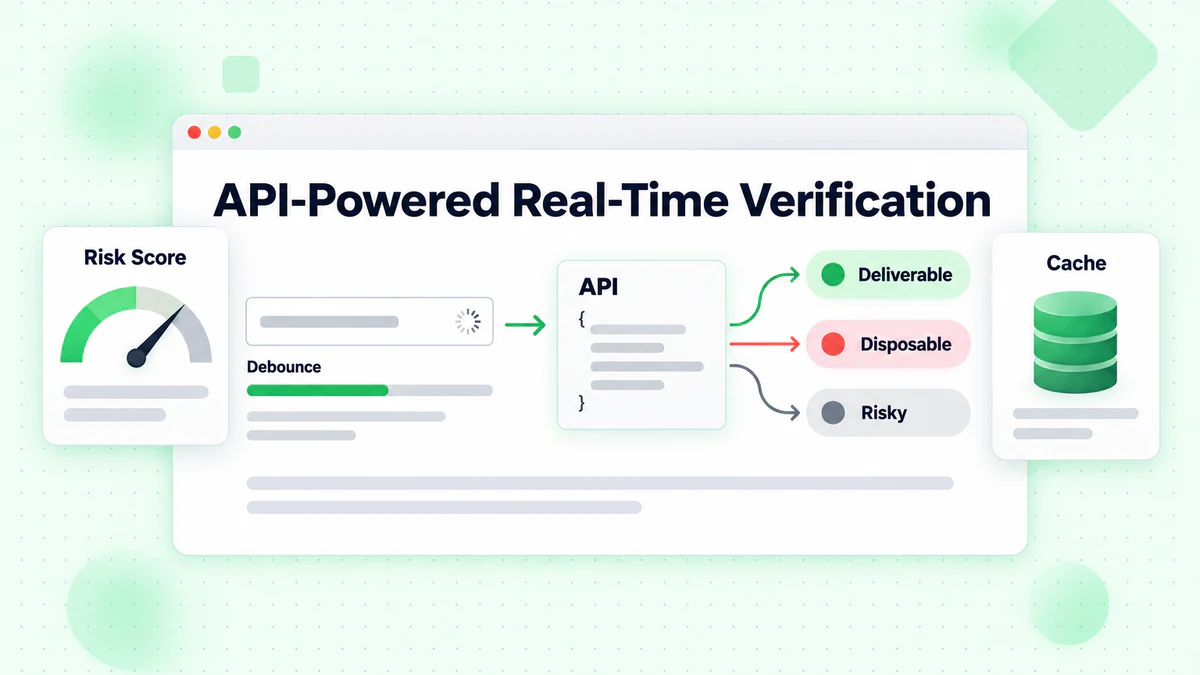
虽然客户端验证可以捕获格式错误,但 API 驱动的验证提供全面的邮箱检查,包括可投递性验证、临时邮箱检测和风险评分。
实现防抖的 API 调用
在每次按键时都进行 API 调用会浪费资源并造成糟糕的用户体验。实现防抖以等待用户暂停输入:
class RealTimeEmailVerifier {
  constructor(options = {}) {
    this.apiKey = options.apiKey;
    this.apiUrl = options.apiUrl || 'https://api.billionverify.com/v1/verify';
    this.debounceMs = options.debounceMs || 500;
    this.minLength = options.minLength || 5;
    this.debounceTimer = null;
    this.cache = new Map();
  }

  async verify(email, callbacks = {}) {
    const { onStart, onSuccess, onError, onComplete } = callbacks;

    // Clear pending verification
    if (this.debounceTimer) {
      clearTimeout(this.debounceTimer);
    }

    // Skip if email is too short or invalid format
    if (!this.shouldVerify(email)) {
      return;
    }

    // Check cache first
    if (this.cache.has(email)) {
      const cachedResult = this.cache.get(email);
      onSuccess?.(cachedResult);
      onComplete?.();
      return cachedResult;
    }

    // Debounce the API call
    return new Promise((resolve) => {
      this.debounceTimer = setTimeout(async () => {
        onStart?.();

        try {
          const result = await this.callApi(email);
          this.cache.set(email, result);
          onSuccess?.(result);
          resolve(result);
        } catch (error) {
          onError?.(error);
          resolve(null);
        } finally {
          onComplete?.();
        }
      }, this.debounceMs);
    });
  }

  shouldVerify(email) {
    if (email.length < this.minLength) return false;
    if (!email.includes('@')) return false;

    const basicPattern = /^[^\s@]+@[^\s@]+\.[^\s@]+$/;
    return basicPattern.test(email);
  }

  async callApi(email) {
    const response = await fetch(this.apiUrl, {
      method: 'POST',
      headers: {
        'Authorization': `Bearer ${this.apiKey}`,
        'Content-Type': 'application/json'
      },
      body: JSON.stringify({ email })
    });

    if (!response.ok) {
      throw new Error(`Verification failed: ${response.status}`);
    }

    return response.json();
  }

  clearCache() {
    this.cache.clear();
  }
}
与表单元素集成
将验证器连接到表单,提供全面的 UI 反馈:
class EmailFormField {
  constructor(inputSelector, options = {}) {
    this.input = document.querySelector(inputSelector);
    this.container = this.input.closest('.form-group');
    this.feedback = this.container.querySelector('.feedback');
    this.spinner = this.container.querySelector('.spinner');

    this.verifier = new RealTimeEmailVerifier({
      apiKey: options.apiKey,
      debounceMs: 600
    });

    this.lastVerifiedEmail = null;
    this.lastResult = null;

    this.setupEventListeners();
  }

  setupEventListeners() {
    this.input.addEventListener('input', (e) => {
      this.handleInput(e.target.value);
    });

    this.input.addEventListener('blur', () => {
      this.handleBlur();
    });
  }

  handleInput(email) {
    // Reset state while typing
    this.setStatus('typing');

    // Perform real-time verification
    this.verifier.verify(email, {
      onStart: () => this.setStatus('verifying'),
      onSuccess: (result) => this.handleResult(email, result),
      onError: (error) => this.handleError(error)
    });
  }

  handleBlur() {
    const email = this.input.value.trim();

    if (!email) {
      this.setStatus('empty');
      return;
    }

    // If we haven't verified this email yet, do it now
    if (email !== this.lastVerifiedEmail) {
      this.verifier.verify(email, {
        onStart: () => this.setStatus('verifying'),
        onSuccess: (result) => this.handleResult(email, result),
        onError: (error) => this.handleError(error)
      });
    }
  }

  handleResult(email, result) {
    this.lastVerifiedEmail = email;
    this.lastResult = result;

    if (result.is_deliverable) {
      this.setStatus('valid', 'Email address verified');
    } else if (result.is_disposable) {
      this.setStatus('warning', 'Please use a permanent email address');
    } else if (!result.is_valid) {
      this.setStatus('invalid', 'This email address appears to be invalid');
    } else {
      this.setStatus('warning', 'We could not verify this email address');
    }
  }

  handleError(error) {
    console.error('Verification error:', error);
    // Don't block user on API errors
    this.setStatus('neutral', '');
  }

  setStatus(status, message = '') {
    const statusClasses = ['typing', 'verifying', 'valid', 'invalid', 'warning', 'empty', 'neutral'];

    this.container.classList.remove(...statusClasses);
    this.container.classList.add(status);

    this.feedback.textContent = message;
    this.spinner.style.display = status === 'verifying' ? 'block' : 'none';
  }

  isValid() {
    return this.lastResult?.is_deliverable === true;
  }

  getResult() {
    return this.lastResult;
  }
}
实时验证的 HTML 结构
<div class="form-group">
  <label for="email">Email Address</label>
  <div class="input-wrapper">
    <input
      type="email"
      id="email"
      name="email"
      autocomplete="email"
      placeholder="you@example.com"
    >
    <div class="spinner" style="display: none;">
      <svg class="animate-spin" viewBox="0 0 24 24">
        <circle cx="12" cy="12" r="10" stroke="currentColor" stroke-width="4" fill="none" opacity="0.25"/>
        <path fill="currentColor" d="M4 12a8 8 0 018-8V0C5.373 0 0 5.373 0 12h4z"/>
      </svg>
    </div>
    <div class="status-icon"></div>
  </div>
  <div class="feedback"></div>
</div>
处理边界情况和错误
实时邮箱验证必须优雅地处理各种边界情况,以保持良好的用户体验。
网络故障
当 API 调用因网络问题失败时,不要完全阻止表单提交:
class ResilientEmailVerifier extends RealTimeEmailVerifier {
  constructor(options) {
    super(options);
    this.maxRetries = options.maxRetries || 2;
    this.retryDelay = options.retryDelay || 1000;
  }

  async callApi(email, attempt = 1) {
    try {
      return await super.callApi(email);
    } catch (error) {
      if (attempt < this.maxRetries) {
        await this.delay(this.retryDelay * attempt);
        return this.callApi(email, attempt + 1);
      }

      // Return a neutral result on failure
      return {
        email,
        is_valid: true,
        is_deliverable: null,
        verification_status: 'unknown',
        error: 'Verification unavailable'
      };
    }
  }

  delay(ms) {
    return new Promise(resolve => setTimeout(resolve, ms));
  }
}
速率限制
实现智能速率限制以保持在 API 配额内:
class RateLimitedVerifier {
  constructor(options) {
    this.verifier = new RealTimeEmailVerifier(options);
    this.requestQueue = [];
    this.requestsPerMinute = options.requestsPerMinute || 60;
    this.requestTimestamps = [];
  }

  async verify(email, callbacks) {
    // Clean old timestamps
    const oneMinuteAgo = Date.now() - 60000;
    this.requestTimestamps = this.requestTimestamps.filter(t => t > oneMinuteAgo);

    // Check if we're at the limit
    if (this.requestTimestamps.length >= this.requestsPerMinute) {
      const oldestRequest = this.requestTimestamps[0];
      const waitTime = oldestRequest + 60000 - Date.now();

      if (waitTime > 0) {
        await new Promise(resolve => setTimeout(resolve, waitTime));
      }
    }

    this.requestTimestamps.push(Date.now());
    return this.verifier.verify(email, callbacks);
  }
}
处理慢速连接
为慢速连接的用户提供反馈:
class TimeoutAwareVerifier {
  constructor(options) {
    this.verifier = new RealTimeEmailVerifier(options);
    this.timeout = options.timeout || 10000;
  }

  async verify(email, callbacks) {
    const { onStart, onSuccess, onError, onComplete, onTimeout } = callbacks;

    const timeoutPromise = new Promise((_, reject) => {
      setTimeout(() => reject(new Error('Verification timeout')), this.timeout);
    });

    onStart?.();

    try {
      const result = await Promise.race([
        this.verifier.verify(email, {}),
        timeoutPromise
      ]);
      onSuccess?.(result);
      return result;
    } catch (error) {
      if (error.message === 'Verification timeout') {
        onTimeout?.();
      } else {
        onError?.(error);
      }
    } finally {
      onComplete?.();
    }
  }
}
实时验证的用户体验最佳实践
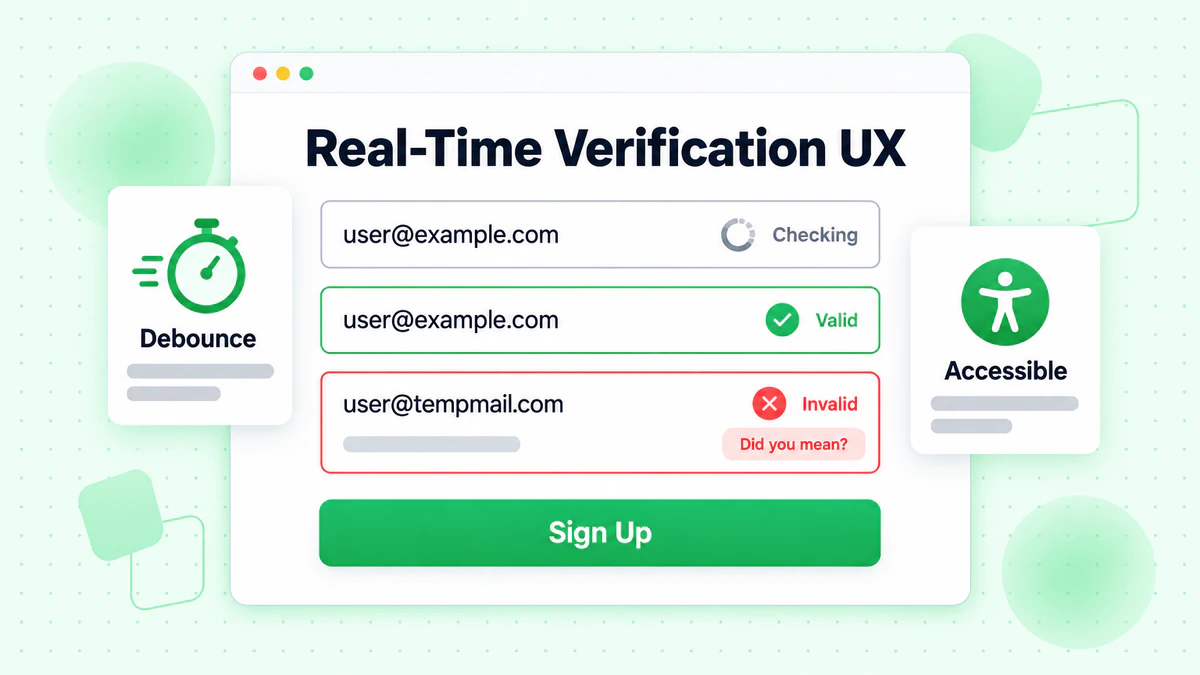
实现实时邮箱验证需要仔细关注用户体验。糟糕的实现会让用户感到沮丧并增加表单放弃率。
时机和反馈
不要在每次按键时都验证:这会产生过多的 API 调用和令人分心的 UI 变化。使用 400-600 毫秒延迟的防抖。
清晰显示加载状态:用户应该了解何时进行验证。一个微妙的加载动画或脉冲动画可以指示活动而不会分散注意力。
提供即时的语法反馈:基本格式验证可以立即进行,无需 API 调用。在邮箱看起来完整时再保存 API 验证。
错误消息指南
具体且有帮助:不要说"无效邮箱",而是说"此邮箱域似乎不存在。您是指 gmail.com 吗?"
尽可能提供建议:如果域看起来像拼写错误,建议更正。像 "gmial.com" 这样的常见拼写错误应该提示"您是指 gmail.com 吗?"
不要过于激进:关于临时邮箱的警告应该告知,而不是责骂。"为了账户安全,请使用永久邮箱地址"比"不允许使用临时邮箱"更好。
渐进增强
将验证实现为增强功能,而不是必需功能:
class ProgressiveEmailVerification {
  constructor(inputSelector, options) {
    this.input = document.querySelector(inputSelector);
    this.form = this.input.closest('form');
    this.hasApiAccess = !!options.apiKey;

    // Always enable basic validation
    this.enableBasicValidation();

    // Enable API verification if available
    if (this.hasApiAccess) {
      this.enableApiVerification(options);
    }
  }

  enableBasicValidation() {
    this.input.addEventListener('blur', () => {
      const email = this.input.value.trim();
      if (email && !this.isValidFormat(email)) {
        this.showError('Please enter a valid email address');
      }
    });
  }

  enableApiVerification(options) {
    this.verifier = new RealTimeEmailVerifier(options);

    this.input.addEventListener('input', (e) => {
      this.verifier.verify(e.target.value, {
        onSuccess: (result) => this.handleVerificationResult(result)
      });
    });
  }

  isValidFormat(email) {
    return /^[^\s@]+@[^\s@]+\.[^\s@]+$/.test(email);
  }

  handleVerificationResult(result) {
    // Enhanced verification results
  }

  showError(message) {
    // Error display logic
  }
}
特定框架的实现
现代 JavaScript 框架提供了有效实现实时邮箱验证的模式。
React 实现
import { useState, useCallback, useEffect, useRef } from 'react';

function useEmailVerification(apiKey, options = {}) {
  const [status, setStatus] = useState('idle');
  const [result, setResult] = useState(null);
  const [error, setError] = useState(null);
  const debounceRef = useRef(null);
  const cacheRef = useRef(new Map());

  const verify = useCallback(async (email) => {
    // Clear pending verification
    if (debounceRef.current) {
      clearTimeout(debounceRef.current);
    }

    // Skip invalid emails
    if (!email || !email.includes('@') || email.length < 5) {
      setStatus('idle');
      return;
    }

    // Check cache
    if (cacheRef.current.has(email)) {
      setResult(cacheRef.current.get(email));
      setStatus('success');
      return;
    }

    // Debounce API call
    debounceRef.current = setTimeout(async () => {
      setStatus('loading');

      try {
        const response = await fetch('https://api.billionverify.com/v1/verify', {
          method: 'POST',
          headers: {
            'Authorization': `Bearer ${apiKey}`,
            'Content-Type': 'application/json'
          },
          body: JSON.stringify({ email })
        });

        if (!response.ok) throw new Error('Verification failed');

        const data = await response.json();
        cacheRef.current.set(email, data);
        setResult(data);
        setStatus('success');
      } catch (err) {
        setError(err);
        setStatus('error');
      }
    }, options.debounceMs || 500);
  }, [apiKey, options.debounceMs]);

  return { verify, status, result, error };
}

function EmailInput({ apiKey }) {
  const [email, setEmail] = useState('');
  const { verify, status, result } = useEmailVerification(apiKey);

  useEffect(() => {
    verify(email);
  }, [email, verify]);

  const getStatusClass = () => {
    if (status === 'loading') return 'verifying';
    if (status === 'success' && result?.is_deliverable) return 'valid';
    if (status === 'success' && !result?.is_deliverable) return 'invalid';
    return '';
  };

  return (
    <div className={`form-group ${getStatusClass()}`}>
      <label htmlFor="email">Email Address</label>
      <input
        type="email"
        id="email"
        value={email}
        onChange={(e) => setEmail(e.target.value)}
        placeholder="you@example.com"
      />
      {status === 'loading' && <span className="spinner" />}
      {status === 'success' && result && (
        <span className="feedback">
          {result.is_deliverable
            ? '✓ Email verified'
            : 'This email may not be deliverable'}
        </span>
      )}
    </div>
  );
}
Vue.js 实现
<template>
  <div :class="['form-group', statusClass]">
    <label for="email">Email Address</label>
    <div class="input-wrapper">
      <input
        type="email"
        id="email"
        v-model="email"
        @input="handleInput"
        placeholder="you@example.com"
      />
      <span v-if="isVerifying" class="spinner"></span>
    </div>
    <span v-if="feedbackMessage" class="feedback">
      {{ feedbackMessage }}
    </span>
  </div>
</template>

<script>
import { ref, computed, watch } from 'vue';
import { useDebounceFn } from '@vueuse/core';

export default {
  props: {
    apiKey: { type: String, required: true }
  },
  setup(props) {
    const email = ref('');
    const status = ref('idle');
    const result = ref(null);
    const cache = new Map();

    const verifyEmail = useDebounceFn(async (emailValue) => {
      if (!emailValue || !emailValue.includes('@')) {
        status.value = 'idle';
        return;
      }

      if (cache.has(emailValue)) {
        result.value = cache.get(emailValue);
        status.value = 'success';
        return;
      }

      status.value = 'loading';

      try {
        const response = await fetch('https://api.billionverify.com/v1/verify', {
          method: 'POST',
          headers: {
            'Authorization': `Bearer ${props.apiKey}`,
            'Content-Type': 'application/json'
          },
          body: JSON.stringify({ email: emailValue })
        });

        const data = await response.json();
        cache.set(emailValue, data);
        result.value = data;
        status.value = 'success';
      } catch (error) {
        status.value = 'error';
      }
    }, 500);

    const handleInput = () => {
      verifyEmail(email.value);
    };

    const isVerifying = computed(() => status.value === 'loading');

    const statusClass = computed(() => {
      if (status.value === 'loading') return 'verifying';
      if (status.value === 'success' && result.value?.is_deliverable) return 'valid';
      if (status.value === 'success' && !result.value?.is_deliverable) return 'invalid';
      return '';
    });

    const feedbackMessage = computed(() => {
      if (status.value !== 'success' || !result.value) return '';
      return result.value.is_deliverable
        ? '✓ Email verified'
        : 'This email may not be deliverable';
    });

    return {
      email,
      handleInput,
      isVerifying,
      statusClass,
      feedbackMessage
    };
  }
};
</script>
性能优化策略
如果实现不当,实时邮箱验证可能会影响页面性能。应用这些优化策略以保持流畅的用户体验。
缓存验证结果
实现客户端缓存以避免冗余的 API 调用:
class VerificationCache {
  constructor(options = {}) {
    this.maxSize = options.maxSize || 100;
    this.ttl = options.ttl || 300000; // 5 minutes
    this.cache = new Map();
  }

  get(email) {
    const normalized = email.toLowerCase().trim();
    const entry = this.cache.get(normalized);

    if (!entry) return null;

    if (Date.now() > entry.expiresAt) {
      this.cache.delete(normalized);
      return null;
    }

    return entry.result;
  }

  set(email, result) {
    const normalized = email.toLowerCase().trim();

    // Enforce max size with LRU eviction
    if (this.cache.size >= this.maxSize) {
      const oldestKey = this.cache.keys().next().value;
      this.cache.delete(oldestKey);
    }

    this.cache.set(normalized, {
      result,
      expiresAt: Date.now() + this.ttl
    });
  }

  clear() {
    this.cache.clear();
  }
}
延迟加载验证模块
仅在需要时加载验证模块:
async function initEmailVerification(inputSelector, options) {
  // Only load when user focuses on email field
  const input = document.querySelector(inputSelector);

  input.addEventListener('focus', async function onFocus() {
    input.removeEventListener('focus', onFocus);

    const { RealTimeEmailVerifier } = await import('./email-verifier.js');

    const verifier = new RealTimeEmailVerifier(options);

    input.addEventListener('input', (e) => {
      verifier.verify(e.target.value, {
        onSuccess: (result) => updateUI(result),
        onError: (error) => handleError(error)
      });
    });
  }, { once: true });
}
减少包大小
使用 tree-shaking 和代码分割来最小化对页面加载的影响:
// email-verifier/index.js - Main entry point
export { RealTimeEmailVerifier } from './verifier';
export { EmailFormField } from './form-field';

// email-verifier/lite.js - Lightweight version for basic validation
export { BasicEmailValidator } from './basic-validator';
衡量验证有效性
跟踪关键指标以了解实时邮箱验证如何影响表单。
关键性能指标
验证成功率:通过验证的邮箱百分比。低比率可能表示用户体验问题或定位问题。
表单完成率:比较实施验证前后的完成率。好的实现应该保持或提高完成率。
无效邮箱率:跟踪在表单填写期间捕获和纠正的无效邮箱数量与稍后发现的数量。
API 响应时间:监控验证速度。慢速响应会让用户感到沮丧并增加放弃率。
分析实现
class VerificationAnalytics {
  constructor(analyticsProvider) {
    this.analytics = analyticsProvider;
  }

  trackVerificationStart(email) {
    this.analytics.track('email_verification_started', {
      domain: this.extractDomain(email),
      timestamp: Date.now()
    });
  }

  trackVerificationComplete(email, result, duration) {
    this.analytics.track('email_verification_completed', {
      domain: this.extractDomain(email),
      is_valid: result.is_valid,
      is_deliverable: result.is_deliverable,
      is_disposable: result.is_disposable,
      risk_score: result.risk_score,
      duration_ms: duration
    });
  }

  trackVerificationError(email, error) {
    this.analytics.track('email_verification_error', {
      domain: this.extractDomain(email),
      error_type: error.name,
      error_message: error.message
    });
  }

  trackFormSubmission(email, verificationResult) {
    this.analytics.track('form_submitted_with_verification', {
      email_verified: !!verificationResult,
      verification_passed: verificationResult?.is_deliverable,
      verification_status: verificationResult?.verification_status
    });
  }

  extractDomain(email) {
    return email.split('@')[1]?.toLowerCase() || 'unknown';
  }
}
安全考虑
实时邮箱验证涉及将用户数据发送到外部服务。实施适当的安全措施以保护用户隐私。
保护 API 密钥
永远不要在客户端代码中暴露 API 密钥。使用后端代理:
// Backend proxy endpoint (Node.js/Express)
app.post('/api/verify-email', async (req, res) => {
  const { email } = req.body;

  // Validate input
  if (!email || typeof email !== 'string') {
    return res.status(400).json({ error: 'Invalid email' });
  }

  // Rate limiting per IP
  const clientIp = req.ip;
  if (await isRateLimited(clientIp)) {
    return res.status(429).json({ error: 'Too many requests' });
  }

  try {
    const response = await fetch('https://api.billionverify.com/v1/verify', {
      method: 'POST',
      headers: {
        'Authorization': `Bearer ${process.env.BV_API_KEY}`,
        'Content-Type': 'application/json'
      },
      body: JSON.stringify({ email })
    });

    const result = await response.json();
    res.json(result);
  } catch (error) {
    res.status(500).json({ error: 'Verification service unavailable' });
  }
});
输入清理
在处理之前始终清理邮箱输入:
function sanitizeEmail(email) {
  if (typeof email !== 'string') return '';

  return email
    .toLowerCase()
    .trim()
    .replace(/[<>\"']/g, '') // Remove potential XSS characters
    .substring(0, 254); // Max email length per RFC
}
结论
实时邮箱验证将表单交互从令人沮丧的猜测游戏转变为自信、引导式的体验。通过在用户输入时验证邮箱地址,您可以防止无效数据进入系统,同时提供即时反馈帮助用户成功。
成功实施的关键原则包括:
分层验证:将即时客户端格式检查与全面的 API 验证相结合。每一层捕获不同类型的问题。
为用户体验优化:使用防抖防止过多的 API 调用,提供清晰的视觉反馈,永远不要因验证服务问题而阻止用户。
优雅地处理失败:网络错误和 API 超时不应阻止表单提交。当高级验证不可用时,回退到基本验证。
监控和迭代:跟踪验证指标以了解您的实现如何影响表单完成和数据质量。使用这些数据来改进您的方法。
保护用户数据:通过后端代理路由验证请求以保护 API 密钥,实施速率限制,并清理所有输入。
BillionVerify 的邮箱验证 API 为全面的实时邮箱验证提供基础设施,包括可投递性检查、临时邮箱检测和风险评分。结合本指南中的实现模式,您可以构建捕获高质量邮箱地址的表单体验,同时保持出色的用户体验。
从基本的客户端验证开始,然后根据您的特定需求逐步增强 API 驱动的验证。对实时邮箱验证的投资通过降低退信率、提高邮件投递率和更高质量的用户数据而获得回报。
想要了解更多关于选择最佳邮箱验证服务的信息,请查看我们的完整对比指南。
使用 Instantly 或 Smartlead 的团队,在每次活动前通过 BillionVerify 清洗列表,可显著提升送达率。
在选择验证服务商前,对比 BillionVerify 与 ZeroBounce 在准确率和速度方面的差异。