



폼 이탈은 기업들에게 매년 수십억 달러의 비용을 발생시키며, 잘못된 이메일 주소는 주요 원인 중 하나입니다. 사용자가 잘못된 이메일 주소를 입력하고 폼을 제출한 후에야 오류를 발견하면, 좌절감으로 인해 이탈하게 됩니다. 실시간 이메일 검증은 사용자가 입력하는 동안 이메일 주소를 검증하여 즉각적인 피드백을 제공함으로써 사용자 경험과 데이터 품질을 모두 개선합니다.
이 종합 가이드는 기본 클라이언트 측 검증부터 데이터베이스에 입력되기 전에 유효하지 않거나 일회용 이메일, 위험한 이메일 주소를 잡아내는 정교한 API 기반 검증 시스템까지 실시간 이메일 검증 구현을 다룹니다.
실시간 이메일 검증 이해하기
실시간 이메일 검증은 폼 제출이나 일괄 처리를 기다리지 않고 사용자가 폼과 상호작용하는 동안 즉시 이메일 주소를 검증합니다. 이 접근 방식은 여러 검증 기술을 결합하여 이메일 유효성에 대한 즉각적인 피드백을 제공합니다.
일괄 처리와 실시간 검증의 차이점
전통적인 일괄 이메일 검증은 수집 후에 이메일 목록을 처리하므로 여러 문제가 발생합니다. 유효하지 않은 이메일이 이미 데이터베이스에 들어갔고, 사용자는 수정 기회 없이 여정을 완료했으며, 목록 정리가 별도의 운영 작업이 됩니다.
실시간 이메일 검증은 다르게 작동합니다. 이메일 검증기는 입력 시점에 주소를 확인하여 유효하지 않은 데이터가 시스템에 들어가는 것을 방지합니다. 사용자는 즉각적인 피드백을 받아 폼에 참여하는 동안 오타를 수정하거나 대체 주소를 제공할 수 있습니다.
검증 파이프라인
종합적인 실시간 이메일 검증 시스템은 순차적으로 여러 확인을 수행합니다:
구문 검증: 첫 번째 계층은 이메일이 적절한 형식 규칙을 따르는지 확인합니다. 여기에는 @ 기호의 존재 확인, 로컬 부분(@ 앞)과 도메인 부분(@ 뒤) 검증, 잘못된 문자가 없는지 확인이 포함됩니다.
도메인 검증: 시스템은 DNS 레코드를 쿼리하여 도메인이 존재하고 이메일을 받을 수 있는지 확인합니다. 이를 통해 "gmial.com"과 같은 오타나 완전히 조작된 도메인을 잡아냅니다.
MX 레코드 확인: 메일 교환 레코드는 어떤 서버가 도메인의 이메일을 처리하는지 나타냅니다. MX 레코드가 없는 도메인은 이메일을 받을 수 없으므로 해당 도메인의 주소는 유효하지 않습니다.
SMTP 검증: 가장 철저한 확인으로 대상 메일 서버에 연결하여 실제로 이메일을 보내지 않고 메일함이 존재하는지 확인합니다. 이를 통해 도메인은 유효하지만 특정 메일함이 존재하지 않는 주소를 잡아냅니다.
위험 평가: 고급 이메일 검증 서비스는 주소가 일회용인지, 역할 기반인지, 알려진 스팸 패턴과 연관되어 있는지와 같은 추가 요인을 분석합니다.
클라이언트 측 검증 구현하기
클라이언트 측 검증은 첫 번째 방어선이자 즉각적인 사용자 피드백을 제공합니다. 단독으로는 충분하지 않지만, 서버 왕복 없이 명백한 오류를 잡아냅니다.
HTML5 이메일 검증
최신 브라우저는 HTML5 이메일 입력 타입을 통해 내장 이메일 검증을 포함합니다:
<form id="signup-form">
  <label for="email">Email Address</label>
  <input
    type="email"
    id="email"
    name="email"
    required
    placeholder="you@example.com"
  >
  <span class="error-message"></span>
  <button type="submit">Sign Up</button>
</form>
type="email" 속성은 기본 이메일 형식을 확인하는 브라우저 검증을 트리거합니다. 그러나 브라우저 검증은 관대하여 기술적으로 유효하지 않은 많은 주소를 허용합니다.
향상된 JavaScript 검증
더 철저한 클라이언트 측 확인을 위해 맞춤형 JavaScript 검증을 구현하세요:
class EmailValidator {
  constructor(inputElement) {
    this.input = inputElement;
    this.errorElement = inputElement.nextElementSibling;
    this.setupListeners();
  }

  setupListeners() {
    this.input.addEventListener('blur', () => this.validate());
    this.input.addEventListener('input', () => this.clearError());
  }

  validate() {
    const email = this.input.value.trim();

    if (!email) {
      return this.showError('Email address is required');
    }

    if (!this.isValidFormat(email)) {
      return this.showError('Please enter a valid email address');
    }

    if (this.hasCommonTypo(email)) {
      return this.showError(this.getTypoSuggestion(email));
    }

    this.showSuccess();
    return true;
  }

  isValidFormat(email) {
    const pattern = /^[^\s@]+@[^\s@]+\.[^\s@]+$/;
    return pattern.test(email);
  }

  hasCommonTypo(email) {
    const domain = email.split('@')[1]?.toLowerCase();
    const typos = {
      'gmial.com': 'gmail.com',
      'gmal.com': 'gmail.com',
      'gamil.com': 'gmail.com',
      'hotmal.com': 'hotmail.com',
      'outlok.com': 'outlook.com',
      'yahooo.com': 'yahoo.com'
    };
    return typos.hasOwnProperty(domain);
  }

  getTypoSuggestion(email) {
    const [local, domain] = email.split('@');
    const corrections = {
      'gmial.com': 'gmail.com',
      'gmal.com': 'gmail.com',
      'gamil.com': 'gmail.com'
    };
    const corrected = corrections[domain.toLowerCase()];
    return `Did you mean ${local}@${corrected}?`;
  }

  showError(message) {
    this.input.classList.add('invalid');
    this.input.classList.remove('valid');
    this.errorElement.textContent = message;
    this.errorElement.classList.add('visible');
    return false;
  }

  showSuccess() {
    this.input.classList.add('valid');
    this.input.classList.remove('invalid');
    this.errorElement.classList.remove('visible');
  }

  clearError() {
    this.errorElement.classList.remove('visible');
    this.input.classList.remove('invalid', 'valid');
  }
}

// Initialize validator
const emailInput = document.getElementById('email');
const validator = new EmailValidator(emailInput);
시각적 피드백을 위한 CSS
검증 상태에 대한 명확한 시각적 표시를 제공하세요:
.form-group input {
  padding: 12px 16px;
  border: 2px solid #e0e0e0;
  border-radius: 8px;
  transition: border-color 0.2s, box-shadow 0.2s;
}

.form-group input:focus {
  outline: none;
  border-color: #2196f3;
  box-shadow: 0 0 0 3px rgba(33, 150, 243, 0.1);
}

.form-group input.valid {
  border-color: #4caf50;
  background-image: url("data:image/svg+xml,...");
  background-repeat: no-repeat;
  background-position: right 12px center;
}

.form-group input.invalid {
  border-color: #f44336;
}

.error-message {
  display: block;
  color: #f44336;
  font-size: 14px;
  margin-top: 4px;
  opacity: 0;
  transform: translateY(-4px);
  transition: opacity 0.2s, transform 0.2s;
}

.error-message.visible {
  opacity: 1;
  transform: translateY(0);
}
API 기반 실시간 검증
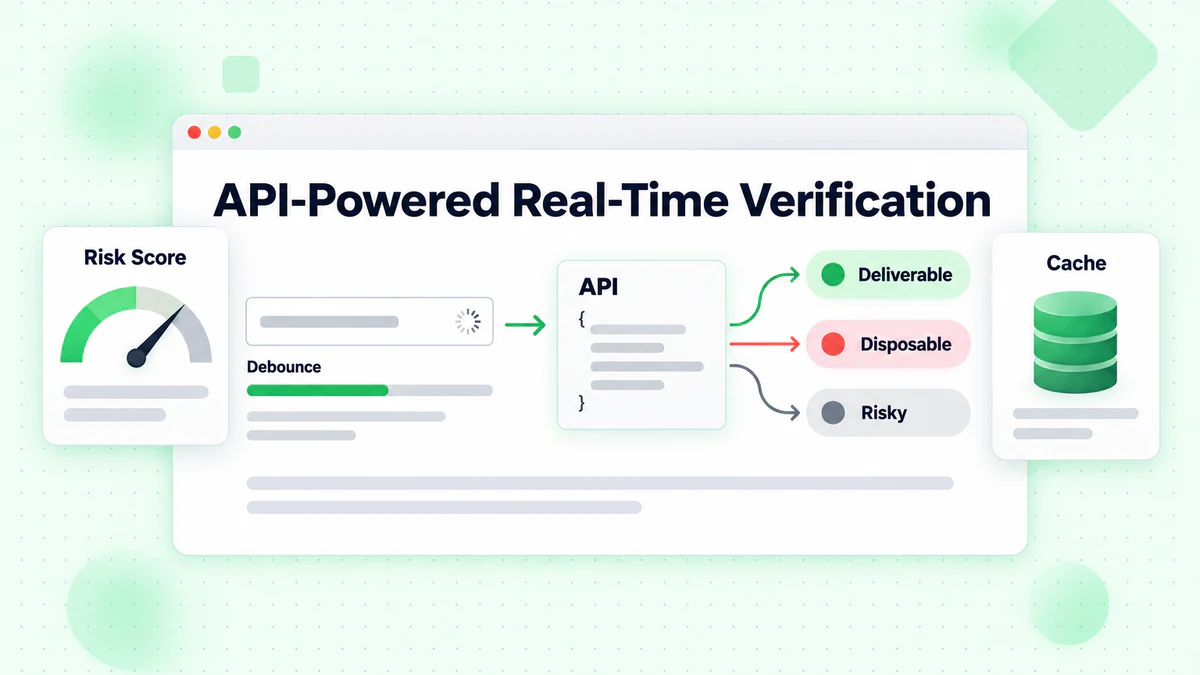
클라이언트 측 검증이 형식 오류를 잡아내는 반면, API 기반 검증은 전달 가능성 검증, 일회용 이메일 감지, 위험 점수 평가를 포함한 포괄적인 이메일 확인을 제공합니다.
디바운스된 API 호출 구현하기
모든 키 입력마다 API 호출을 하면 리소스가 낭비되고 사용자 경험이 나빠집니다. 사용자가 입력을 멈출 때까지 기다리도록 디바운싱을 구현하세요:
class RealTimeEmailVerifier {
  constructor(options = {}) {
    this.apiKey = options.apiKey;
    this.apiUrl = options.apiUrl || 'https://api.billionverify.com/v1/verify';
    this.debounceMs = options.debounceMs || 500;
    this.minLength = options.minLength || 5;
    this.debounceTimer = null;
    this.cache = new Map();
  }

  async verify(email, callbacks = {}) {
    const { onStart, onSuccess, onError, onComplete } = callbacks;

    // Clear pending verification
    if (this.debounceTimer) {
      clearTimeout(this.debounceTimer);
    }

    // Skip if email is too short or invalid format
    if (!this.shouldVerify(email)) {
      return;
    }

    // Check cache first
    if (this.cache.has(email)) {
      const cachedResult = this.cache.get(email);
      onSuccess?.(cachedResult);
      onComplete?.();
      return cachedResult;
    }

    // Debounce the API call
    return new Promise((resolve) => {
      this.debounceTimer = setTimeout(async () => {
        onStart?.();

        try {
          const result = await this.callApi(email);
          this.cache.set(email, result);
          onSuccess?.(result);
          resolve(result);
        } catch (error) {
          onError?.(error);
          resolve(null);
        } finally {
          onComplete?.();
        }
      }, this.debounceMs);
    });
  }

  shouldVerify(email) {
    if (email.length < this.minLength) return false;
    if (!email.includes('@')) return false;

    const basicPattern = /^[^\s@]+@[^\s@]+\.[^\s@]+$/;
    return basicPattern.test(email);
  }

  async callApi(email) {
    const response = await fetch(this.apiUrl, {
      method: 'POST',
      headers: {
        'Authorization': `Bearer ${this.apiKey}`,
        'Content-Type': 'application/json'
      },
      body: JSON.stringify({ email })
    });

    if (!response.ok) {
      throw new Error(`Verification failed: ${response.status}`);
    }

    return response.json();
  }

  clearCache() {
    this.cache.clear();
  }
}
폼 요소와 통합하기
종합적인 UI 피드백으로 검증기를 폼에 연결하세요:
class EmailFormField {
  constructor(inputSelector, options = {}) {
    this.input = document.querySelector(inputSelector);
    this.container = this.input.closest('.form-group');
    this.feedback = this.container.querySelector('.feedback');
    this.spinner = this.container.querySelector('.spinner');

    this.verifier = new RealTimeEmailVerifier({
      apiKey: options.apiKey,
      debounceMs: 600
    });

    this.lastVerifiedEmail = null;
    this.lastResult = null;

    this.setupEventListeners();
  }

  setupEventListeners() {
    this.input.addEventListener('input', (e) => {
      this.handleInput(e.target.value);
    });

    this.input.addEventListener('blur', () => {
      this.handleBlur();
    });
  }

  handleInput(email) {
    // Reset state while typing
    this.setStatus('typing');

    // Perform real-time verification
    this.verifier.verify(email, {
      onStart: () => this.setStatus('verifying'),
      onSuccess: (result) => this.handleResult(email, result),
      onError: (error) => this.handleError(error)
    });
  }

  handleBlur() {
    const email = this.input.value.trim();

    if (!email) {
      this.setStatus('empty');
      return;
    }

    // If we haven't verified this email yet, do it now
    if (email !== this.lastVerifiedEmail) {
      this.verifier.verify(email, {
        onStart: () => this.setStatus('verifying'),
        onSuccess: (result) => this.handleResult(email, result),
        onError: (error) => this.handleError(error)
      });
    }
  }

  handleResult(email, result) {
    this.lastVerifiedEmail = email;
    this.lastResult = result;

    if (result.is_deliverable) {
      this.setStatus('valid', 'Email address verified');
    } else if (result.is_disposable) {
      this.setStatus('warning', 'Please use a permanent email address');
    } else if (!result.is_valid) {
      this.setStatus('invalid', 'This email address appears to be invalid');
    } else {
      this.setStatus('warning', 'We could not verify this email address');
    }
  }

  handleError(error) {
    console.error('Verification error:', error);
    // Don't block user on API errors
    this.setStatus('neutral', '');
  }

  setStatus(status, message = '') {
    const statusClasses = ['typing', 'verifying', 'valid', 'invalid', 'warning', 'empty', 'neutral'];

    this.container.classList.remove(...statusClasses);
    this.container.classList.add(status);

    this.feedback.textContent = message;
    this.spinner.style.display = status === 'verifying' ? 'block' : 'none';
  }

  isValid() {
    return this.lastResult?.is_deliverable === true;
  }

  getResult() {
    return this.lastResult;
  }
}
실시간 검증을 위한 HTML 구조
<div class="form-group">
  <label for="email">Email Address</label>
  <div class="input-wrapper">
    <input
      type="email"
      id="email"
      name="email"
      autocomplete="email"
      placeholder="you@example.com"
    >
    <div class="spinner" style="display: none;">
      <svg class="animate-spin" viewBox="0 0 24 24">
        <circle cx="12" cy="12" r="10" stroke="currentColor" stroke-width="4" fill="none" opacity="0.25"/>
        <path fill="currentColor" d="M4 12a8 8 0 018-8V0C5.373 0 0 5.373 0 12h4z"/>
      </svg>
    </div>
    <div class="status-icon"></div>
  </div>
  <div class="feedback"></div>
</div>
엣지 케이스 및 오류 처리
실시간 이메일 검증은 좋은 사용자 경험을 유지하기 위해 다양한 엣지 케이스를 우아하게 처리해야 합니다.
네트워크 장애
네트워크 문제로 인해 API 호출이 실패할 때 폼 제출을 완전히 차단하지 마세요:
class ResilientEmailVerifier extends RealTimeEmailVerifier {
  constructor(options) {
    super(options);
    this.maxRetries = options.maxRetries || 2;
    this.retryDelay = options.retryDelay || 1000;
  }

  async callApi(email, attempt = 1) {
    try {
      return await super.callApi(email);
    } catch (error) {
      if (attempt < this.maxRetries) {
        await this.delay(this.retryDelay * attempt);
        return this.callApi(email, attempt + 1);
      }

      // Return a neutral result on failure
      return {
        email,
        is_valid: true,
        is_deliverable: null,
        verification_status: 'unknown',
        error: 'Verification unavailable'
      };
    }
  }

  delay(ms) {
    return new Promise(resolve => setTimeout(resolve, ms));
  }
}
속도 제한
API 할당량 내에서 유지하기 위한 지능적인 속도 제한을 구현하세요:
class RateLimitedVerifier {
  constructor(options) {
    this.verifier = new RealTimeEmailVerifier(options);
    this.requestQueue = [];
    this.requestsPerMinute = options.requestsPerMinute || 60;
    this.requestTimestamps = [];
  }

  async verify(email, callbacks) {
    // Clean old timestamps
    const oneMinuteAgo = Date.now() - 60000;
    this.requestTimestamps = this.requestTimestamps.filter(t => t > oneMinuteAgo);

    // Check if we're at the limit
    if (this.requestTimestamps.length >= this.requestsPerMinute) {
      const oldestRequest = this.requestTimestamps[0];
      const waitTime = oldestRequest + 60000 - Date.now();

      if (waitTime > 0) {
        await new Promise(resolve => setTimeout(resolve, waitTime));
      }
    }

    this.requestTimestamps.push(Date.now());
    return this.verifier.verify(email, callbacks);
  }
}
느린 연결 처리
느린 연결을 사용하는 사용자를 위한 피드백을 제공하세요:
class TimeoutAwareVerifier {
  constructor(options) {
    this.verifier = new RealTimeEmailVerifier(options);
    this.timeout = options.timeout || 10000;
  }

  async verify(email, callbacks) {
    const { onStart, onSuccess, onError, onComplete, onTimeout } = callbacks;

    const timeoutPromise = new Promise((_, reject) => {
      setTimeout(() => reject(new Error('Verification timeout')), this.timeout);
    });

    onStart?.();

    try {
      const result = await Promise.race([
        this.verifier.verify(email, {}),
        timeoutPromise
      ]);
      onSuccess?.(result);
      return result;
    } catch (error) {
      if (error.message === 'Verification timeout') {
        onTimeout?.();
      } else {
        onError?.(error);
      }
    } finally {
      onComplete?.();
    }
  }
}
실시간 검증을 위한 UX 모범 사례
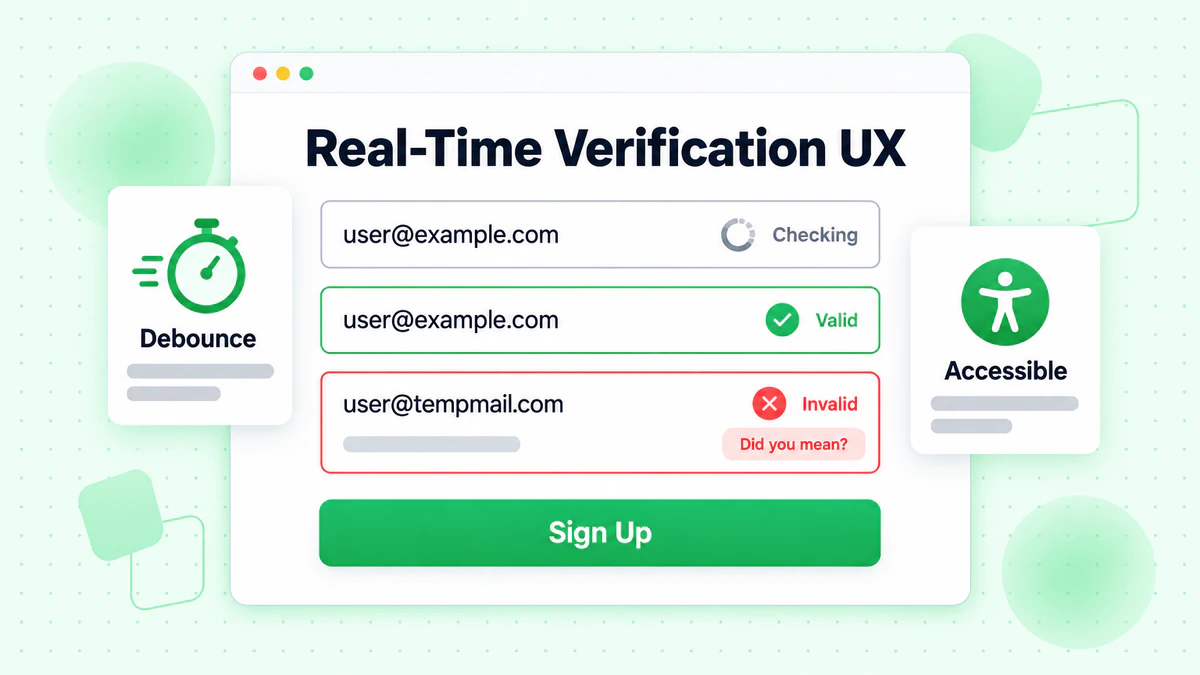
실시간 이메일 검증을 구현하려면 사용자 경험에 대한 세심한 주의가 필요합니다. 잘못된 구현은 사용자를 좌절시키고 폼 이탈을 증가시킬 수 있습니다.
타이밍 및 피드백
모든 키 입력마다 검증하지 마세요: 과도한 API 호출과 산만한 UI 변경을 만듭니다. 400-600ms 지연으로 디바운싱을 사용하세요.
로딩 상태를 명확하게 표시하세요: 사용자는 검증이 진행 중일 때를 이해해야 합니다. 미묘한 스피너나 펄스 애니메이션은 주의를 산만하게 하지 않으면서 활동을 나타냅니다.
즉각적인 구문 피드백을 제공하세요: 기본 형식 검증은 API 호출 없이 즉시 발생할 수 있습니다. 이메일이 완성된 것처럼 보일 때 API 검증을 저장하세요.
오류 메시지 가이드라인
구체적이고 도움이 되게 하세요: "잘못된 이메일" 대신 "이 이메일 도메인이 존재하지 않는 것 같습니다. gmail.com을 의미하셨나요?"라고 말하세요.
가능한 경우 제안을 제공하세요: 도메인이 오타처럼 보이면 수정을 제안하세요. "gmial.com"과 같은 일반적인 오타는 "gmail.com을 의미하셨나요?"를 제안해야 합니다.
공격적이지 마세요: 일회용 이메일에 대한 경고는 알려야 하지 비난하지 않아야 합니다. "일회용 이메일은 허용되지 않습니다"보다 "계정 보안을 위해 영구 이메일 주소를 사용해 주세요"가 더 좋습니다.
점진적 향상
검증을 요구 사항이 아닌 향상으로 구현하세요:
class ProgressiveEmailVerification {
  constructor(inputSelector, options) {
    this.input = document.querySelector(inputSelector);
    this.form = this.input.closest('form');
    this.hasApiAccess = !!options.apiKey;

    // Always enable basic validation
    this.enableBasicValidation();

    // Enable API verification if available
    if (this.hasApiAccess) {
      this.enableApiVerification(options);
    }
  }

  enableBasicValidation() {
    this.input.addEventListener('blur', () => {
      const email = this.input.value.trim();
      if (email && !this.isValidFormat(email)) {
        this.showError('Please enter a valid email address');
      }
    });
  }

  enableApiVerification(options) {
    this.verifier = new RealTimeEmailVerifier(options);

    this.input.addEventListener('input', (e) => {
      this.verifier.verify(e.target.value, {
        onSuccess: (result) => this.handleVerificationResult(result)
      });
    });
  }

  isValidFormat(email) {
    return /^[^\s@]+@[^\s@]+\.[^\s@]+$/.test(email);
  }

  handleVerificationResult(result) {
    // Enhanced verification results
  }

  showError(message) {
    // Error display logic
  }
}
프레임워크별 구현
최신 JavaScript 프레임워크는 실시간 이메일 검증을 효과적으로 구현하기 위한 패턴을 제공합니다.
React 구현
import { useState, useCallback, useEffect, useRef } from 'react';

function useEmailVerification(apiKey, options = {}) {
  const [status, setStatus] = useState('idle');
  const [result, setResult] = useState(null);
  const [error, setError] = useState(null);
  const debounceRef = useRef(null);
  const cacheRef = useRef(new Map());

  const verify = useCallback(async (email) => {
    // Clear pending verification
    if (debounceRef.current) {
      clearTimeout(debounceRef.current);
    }

    // Skip invalid emails
    if (!email || !email.includes('@') || email.length < 5) {
      setStatus('idle');
      return;
    }

    // Check cache
    if (cacheRef.current.has(email)) {
      setResult(cacheRef.current.get(email));
      setStatus('success');
      return;
    }

    // Debounce API call
    debounceRef.current = setTimeout(async () => {
      setStatus('loading');

      try {
        const response = await fetch('https://api.billionverify.com/v1/verify', {
          method: 'POST',
          headers: {
            'Authorization': `Bearer ${apiKey}`,
            'Content-Type': 'application/json'
          },
          body: JSON.stringify({ email })
        });

        if (!response.ok) throw new Error('Verification failed');

        const data = await response.json();
        cacheRef.current.set(email, data);
        setResult(data);
        setStatus('success');
      } catch (err) {
        setError(err);
        setStatus('error');
      }
    }, options.debounceMs || 500);
  }, [apiKey, options.debounceMs]);

  return { verify, status, result, error };
}

function EmailInput({ apiKey }) {
  const [email, setEmail] = useState('');
  const { verify, status, result } = useEmailVerification(apiKey);

  useEffect(() => {
    verify(email);
  }, [email, verify]);

  const getStatusClass = () => {
    if (status === 'loading') return 'verifying';
    if (status === 'success' && result?.is_deliverable) return 'valid';
    if (status === 'success' && !result?.is_deliverable) return 'invalid';
    return '';
  };

  return (
    <div className={`form-group ${getStatusClass()}`}>
      <label htmlFor="email">Email Address</label>
      <input
        type="email"
        id="email"
        value={email}
        onChange={(e) => setEmail(e.target.value)}
        placeholder="you@example.com"
      />
      {status === 'loading' && <span className="spinner" />}
      {status === 'success' && result && (
        <span className="feedback">
          {result.is_deliverable
            ? '✓ Email verified'
            : 'This email may not be deliverable'}
        </span>
      )}
    </div>
  );
}
Vue.js 구현
<template>
  <div :class="['form-group', statusClass]">
    <label for="email">Email Address</label>
    <div class="input-wrapper">
      <input
        type="email"
        id="email"
        v-model="email"
        @input="handleInput"
        placeholder="you@example.com"
      />
      <span v-if="isVerifying" class="spinner"></span>
    </div>
    <span v-if="feedbackMessage" class="feedback">
      {{ feedbackMessage }}
    </span>
  </div>
</template>

<script>
import { ref, computed, watch } from 'vue';
import { useDebounceFn } from '@vueuse/core';

export default {
  props: {
    apiKey: { type: String, required: true }
  },
  setup(props) {
    const email = ref('');
    const status = ref('idle');
    const result = ref(null);
    const cache = new Map();

    const verifyEmail = useDebounceFn(async (emailValue) => {
      if (!emailValue || !emailValue.includes('@')) {
        status.value = 'idle';
        return;
      }

      if (cache.has(emailValue)) {
        result.value = cache.get(emailValue);
        status.value = 'success';
        return;
      }

      status.value = 'loading';

      try {
        const response = await fetch('https://api.billionverify.com/v1/verify', {
          method: 'POST',
          headers: {
            'Authorization': `Bearer ${props.apiKey}`,
            'Content-Type': 'application/json'
          },
          body: JSON.stringify({ email: emailValue })
        });

        const data = await response.json();
        cache.set(emailValue, data);
        result.value = data;
        status.value = 'success';
      } catch (error) {
        status.value = 'error';
      }
    }, 500);

    const handleInput = () => {
      verifyEmail(email.value);
    };

    const isVerifying = computed(() => status.value === 'loading');

    const statusClass = computed(() => {
      if (status.value === 'loading') return 'verifying';
      if (status.value === 'success' && result.value?.is_deliverable) return 'valid';
      if (status.value === 'success' && !result.value?.is_deliverable) return 'invalid';
      return '';
    });

    const feedbackMessage = computed(() => {
      if (status.value !== 'success' || !result.value) return '';
      return result.value.is_deliverable
        ? '✓ Email verified'
        : 'This email may not be deliverable';
    });

    return {
      email,
      handleInput,
      isVerifying,
      statusClass,
      feedbackMessage
    };
  }
};
</script>
성능 최적화 전략
신중하게 구현하지 않으면 실시간 이메일 검증이 페이지 성능에 영향을 미칠 수 있습니다. 원활한 사용자 경험을 유지하기 위해 다음 최적화 전략을 적용하세요.
검증 결과 캐싱
중복 API 호출을 피하기 위해 클라이언트 측 캐시를 구현하세요:
class VerificationCache {
  constructor(options = {}) {
    this.maxSize = options.maxSize || 100;
    this.ttl = options.ttl || 300000; // 5 minutes
    this.cache = new Map();
  }

  get(email) {
    const normalized = email.toLowerCase().trim();
    const entry = this.cache.get(normalized);

    if (!entry) return null;

    if (Date.now() > entry.expiresAt) {
      this.cache.delete(normalized);
      return null;
    }

    return entry.result;
  }

  set(email, result) {
    const normalized = email.toLowerCase().trim();

    // Enforce max size with LRU eviction
    if (this.cache.size >= this.maxSize) {
      const oldestKey = this.cache.keys().next().value;
      this.cache.delete(oldestKey);
    }

    this.cache.set(normalized, {
      result,
      expiresAt: Date.now() + this.ttl
    });
  }

  clear() {
    this.cache.clear();
  }
}
검증 모듈 지연 로딩
필요할 때만 검증 모듈을 로드하세요:
async function initEmailVerification(inputSelector, options) {
  // Only load when user focuses on email field
  const input = document.querySelector(inputSelector);

  input.addEventListener('focus', async function onFocus() {
    input.removeEventListener('focus', onFocus);

    const { RealTimeEmailVerifier } = await import('./email-verifier.js');

    const verifier = new RealTimeEmailVerifier(options);

    input.addEventListener('input', (e) => {
      verifier.verify(e.target.value, {
        onSuccess: (result) => updateUI(result),
        onError: (error) => handleError(error)
      });
    });
  }, { once: true });
}
번들 크기 줄이기
페이지 로드에 미치는 영향을 최소화하기 위해 트리 셰이킹과 코드 분할을 사용하세요:
// email-verifier/index.js - Main entry point
export { RealTimeEmailVerifier } from './verifier';
export { EmailFormField } from './form-field';

// email-verifier/lite.js - Lightweight version for basic validation
export { BasicEmailValidator } from './basic-validator';
검증 효과 측정하기
실시간 이메일 검증이 폼에 미치는 영향을 이해하기 위해 주요 메트릭을 추적하세요.
주요 성과 지표
검증 성공률: 검증을 통과한 이메일의 백분율입니다. 낮은 비율은 UX 문제나 타겟팅 문제를 나타낼 수 있습니다.
폼 완료율: 검증 구현 전후의 완료율을 비교하세요. 좋은 구현은 완료율을 유지하거나 개선해야 합니다.
잘못된 이메일 비율: 폼 작성 중에 잡히고 수정된 잘못된 이메일과 나중에 발견된 것을 추적하세요.
API 응답 시간: 검증 속도를 모니터링하세요. 느린 응답은 사용자를 좌절시키고 이탈을 증가시킵니다.
분석 구현
class VerificationAnalytics {
  constructor(analyticsProvider) {
    this.analytics = analyticsProvider;
  }

  trackVerificationStart(email) {
    this.analytics.track('email_verification_started', {
      domain: this.extractDomain(email),
      timestamp: Date.now()
    });
  }

  trackVerificationComplete(email, result, duration) {
    this.analytics.track('email_verification_completed', {
      domain: this.extractDomain(email),
      is_valid: result.is_valid,
      is_deliverable: result.is_deliverable,
      is_disposable: result.is_disposable,
      risk_score: result.risk_score,
      duration_ms: duration
    });
  }

  trackVerificationError(email, error) {
    this.analytics.track('email_verification_error', {
      domain: this.extractDomain(email),
      error_type: error.name,
      error_message: error.message
    });
  }

  trackFormSubmission(email, verificationResult) {
    this.analytics.track('form_submitted_with_verification', {
      email_verified: !!verificationResult,
      verification_passed: verificationResult?.is_deliverable,
      verification_status: verificationResult?.verification_status
    });
  }

  extractDomain(email) {
    return email.split('@')[1]?.toLowerCase() || 'unknown';
  }
}
보안 고려 사항
실시간 이메일 검증은 사용자 데이터를 외부 서비스로 보내는 것과 관련이 있습니다. 사용자 개인 정보를 보호하기 위해 적절한 보안 조치를 구현하세요.
API 키 보호
클라이언트 측 코드에 API 키를 노출하지 마세요. 백엔드 프록시를 사용하세요:
// Backend proxy endpoint (Node.js/Express)
app.post('/api/verify-email', async (req, res) => {
  const { email } = req.body;

  // Validate input
  if (!email || typeof email !== 'string') {
    return res.status(400).json({ error: 'Invalid email' });
  }

  // Rate limiting per IP
  const clientIp = req.ip;
  if (await isRateLimited(clientIp)) {
    return res.status(429).json({ error: 'Too many requests' });
  }

  try {
    const response = await fetch('https://api.billionverify.com/v1/verify', {
      method: 'POST',
      headers: {
        'Authorization': `Bearer ${process.env.BV_API_KEY}`,
        'Content-Type': 'application/json'
      },
      body: JSON.stringify({ email })
    });

    const result = await response.json();
    res.json(result);
  } catch (error) {
    res.status(500).json({ error: 'Verification service unavailable' });
  }
});
입력 새니타이징
처리하기 전에 항상 이메일 입력을 새니타이즈하세요:
function sanitizeEmail(email) {
  if (typeof email !== 'string') return '';

  return email
    .toLowerCase()
    .trim()
    .replace(/[<>\"']/g, '') // Remove potential XSS characters
    .substring(0, 254); // Max email length per RFC
}
결론
실시간 이메일 검증은 폼 상호작용을 좌절스러운 추측 게임에서 자신감 있고 안내되는 경험으로 변환합니다. 사용자가 입력하는 동안 이메일 주소를 검증함으로써 유효하지 않은 데이터가 시스템에 들어가는 것을 방지하면서 사용자가 성공할 수 있도록 돕는 즉각적인 피드백을 제공합니다.
성공적인 구현을 위한 주요 원칙은 다음과 같습니다:
검증을 계층화하세요: 즉각적인 클라이언트 측 형식 확인과 포괄적인 API 검증을 결합하세요. 각 계층은 서로 다른 유형의 문제를 잡아냅니다.
사용자 경험을 최적화하세요: 과도한 API 호출을 방지하기 위해 디바운싱을 사용하고, 명확한 시각적 피드백을 제공하며, 검증 서비스 문제로 인해 사용자를 차단하지 마세요.
실패를 우아하게 처리하세요: 네트워크 오류와 API 타임아웃이 폼 제출을 방해해서는 안 됩니다. 고급 검증을 사용할 수 없을 때 기본 검증으로 폴백하세요.
모니터링하고 반복하세요: 구현이 폼 완료와 데이터 품질에 미치는 영향을 이해하기 위해 검증 메트릭을 추적하세요. 이 데이터를 사용하여 접근 방식을 개선하세요.
사용자 데이터를 보호하세요: API 키를 보호하기 위해 백엔드 프록시를 통해 검증 요청을 라우팅하고, 속도 제한을 구현하며, 모든 입력을 새니타이즈하세요.
BillionVerify의 이메일 검증 API는 전달 가능성 확인, 일회용 이메일 감지, 위험 점수 평가를 포함한 포괄적인 실시간 이메일 검증을 위한 인프라를 제공합니다. 이 가이드의 구현 패턴과 결합하면 우수한 사용자 경험을 유지하면서 고품질 이메일 주소를 수집하는 폼 경험을 구축할 수 있습니다.
기본 클라이언트 측 검증으로 시작한 다음 특정 요구 사항에 따라 API 기반 검증으로 점진적으로 향상시키세요. 실시간 이메일 검증에 대한 투자는 반송률 감소, 더 나은 이메일 전달성, 더 높은 품질의 사용자 데이터를 통해 배당금을 지급합니다.
Instantly 또는 Smartlead를 사용하는 팀은 캠페인 전에 BillionVerify로 목록을 정리하여 전달성을 크게 향상시킬 수 있습니다.
인증 제공업체를 선택하기 전에 정확도와 속도 면에서 BillionVerify와 ZeroBounce를 비교해 보세요.