



フォームの離脱は企業に毎年数十億ドルのコストをもたらしており、無効なメールアドレスはその主な原因の一つです。ユーザーが誤ったメールアドレスを入力し、フォームを送信した後にエラーを発見した場合、フラストレーションが離脱につながります。リアルタイムメール検証は、ユーザーが入力する際にメールアドレスを検証し、ユーザーエクスペリエンスとデータ品質の両方を向上させる即座のフィードバックを提供することで、この問題を解決します。
この包括的なガイドでは、基本的なクライアント側の検証から、無効なメールアドレス、使い捨てメールアドレス、リスクの高いメールアドレスがデータベースに入る前に検出する高度な API ベースの検証システムまで、リアルタイムメール検証の実装を探ります。
リアルタイムメール検証の理解
リアルタイムメール検証は、フォーム送信やバッチ処理を待つのではなく、ユーザーがフォームと対話する際に即座にメールアドレスを検証します。このアプローチは、メールの有効性について即座のフィードバックを提供するために、複数の検証技術を組み合わせています。
リアルタイム検証とバッチ処理の違い
従来のバッチメール検証は、収集後にメールリストを処理するため、いくつかの問題が発生します。無効なメールはすでにデータベースに入っており、ユーザーは修正の機会なしに旅を完了し、リストのクリーニングは別の運用タスクになります。
リアルタイムメール検証は異なる動作をします。メールバリデーターは入力時点でアドレスをチェックし、無効なデータがシステムに到達することを防ぎます。ユーザーは即座のフィードバックを受け取り、フォームに関与している間にタイプミスを修正したり、代替のアドレスを提供したりすることができます。
検証パイプライン
包括的なリアルタイムメール検証システムは、複数のチェックを順次実行します:
構文検証:最初の層は、メールが適切なフォーマット規則に従っているかどうかをチェックします。これには、@ 記号の存在の検証、ローカル部分(@ の前)とドメイン部分(@ の後)の検証、無効な文字が存在しないことの確認が含まれます。
ドメイン検証:システムは、ドメインが存在し、DNS レコードをクエリしてメールを受信できるかどうかをチェックします。これにより、「gmial.com」のようなタイプミスや完全に架空のドメインを検出します。
MX レコードチェック:メール交換レコードは、ドメインのメールを処理するサーバーを示します。MX レコードのないドメインはメールを受信できないため、これらのドメインのアドレスは無効です。
SMTP 検証:最も徹底的なチェックは、宛先メールサーバーに接続し、実際にメールを送信することなくメールボックスが存在することを検証します。これにより、ドメインは有効だが特定のメールボックスが存在しないアドレスを検出します。
リスク評価:高度なメール検証サービスは、アドレスが使い捨てか、役割ベースか、既知のスパムパターンに関連付けられているかなどの追加要因を分析します。
クライアント側検証の実装
クライアント側検証は、最初の防御線と即座のユーザーフィードバックを提供します。単独では不十分ですが、サーバーへのラウンドトリップを必要とせずに明らかなエラーを検出します。
HTML5 メール検証
最新のブラウザには、HTML5 メール入力タイプを通じた組み込みのメール検証が含まれています:
<form id="signup-form">
  <label for="email">Email Address</label>
  <input
    type="email"
    id="email"
    name="email"
    required
    placeholder="you@example.com"
  >
  <span class="error-message"></span>
  <button type="submit">Sign Up</button>
</form>
type="email" 属性は、基本的なメールフォーマットをチェックするブラウザ検証をトリガーします。ただし、ブラウザの検証は寛容で、技術的に無効な多くのアドレスを受け入れます。
強化された JavaScript 検証
より徹底的なクライアント側チェックのために、カスタム JavaScript 検証を実装します:
class EmailValidator {
  constructor(inputElement) {
    this.input = inputElement;
    this.errorElement = inputElement.nextElementSibling;
    this.setupListeners();
  }

  setupListeners() {
    this.input.addEventListener('blur', () => this.validate());
    this.input.addEventListener('input', () => this.clearError());
  }

  validate() {
    const email = this.input.value.trim();

    if (!email) {
      return this.showError('Email address is required');
    }

    if (!this.isValidFormat(email)) {
      return this.showError('Please enter a valid email address');
    }

    if (this.hasCommonTypo(email)) {
      return this.showError(this.getTypoSuggestion(email));
    }

    this.showSuccess();
    return true;
  }

  isValidFormat(email) {
    const pattern = /^[^\s@]+@[^\s@]+\.[^\s@]+$/;
    return pattern.test(email);
  }

  hasCommonTypo(email) {
    const domain = email.split('@')[1]?.toLowerCase();
    const typos = {
      'gmial.com': 'gmail.com',
      'gmal.com': 'gmail.com',
      'gamil.com': 'gmail.com',
      'hotmal.com': 'hotmail.com',
      'outlok.com': 'outlook.com',
      'yahooo.com': 'yahoo.com'
    };
    return typos.hasOwnProperty(domain);
  }

  getTypoSuggestion(email) {
    const [local, domain] = email.split('@');
    const corrections = {
      'gmial.com': 'gmail.com',
      'gmal.com': 'gmail.com',
      'gamil.com': 'gmail.com'
    };
    const corrected = corrections[domain.toLowerCase()];
    return `Did you mean ${local}@${corrected}?`;
  }

  showError(message) {
    this.input.classList.add('invalid');
    this.input.classList.remove('valid');
    this.errorElement.textContent = message;
    this.errorElement.classList.add('visible');
    return false;
  }

  showSuccess() {
    this.input.classList.add('valid');
    this.input.classList.remove('invalid');
    this.errorElement.classList.remove('visible');
  }

  clearError() {
    this.errorElement.classList.remove('visible');
    this.input.classList.remove('invalid', 'valid');
  }
}

// Initialize validator
const emailInput = document.getElementById('email');
const validator = new EmailValidator(emailInput);
視覚的フィードバックのための CSS
検証状態の明確な視覚的インジケーターを提供します:
.form-group input {
  padding: 12px 16px;
  border: 2px solid #e0e0e0;
  border-radius: 8px;
  transition: border-color 0.2s, box-shadow 0.2s;
}

.form-group input:focus {
  outline: none;
  border-color: #2196f3;
  box-shadow: 0 0 0 3px rgba(33, 150, 243, 0.1);
}

.form-group input.valid {
  border-color: #4caf50;
  background-image: url("data:image/svg+xml,...");
  background-repeat: no-repeat;
  background-position: right 12px center;
}

.form-group input.invalid {
  border-color: #f44336;
}

.error-message {
  display: block;
  color: #f44336;
  font-size: 14px;
  margin-top: 4px;
  opacity: 0;
  transform: translateY(-4px);
  transition: opacity 0.2s, transform 0.2s;
}

.error-message.visible {
  opacity: 1;
  transform: translateY(0);
}
API ベースのリアルタイム検証
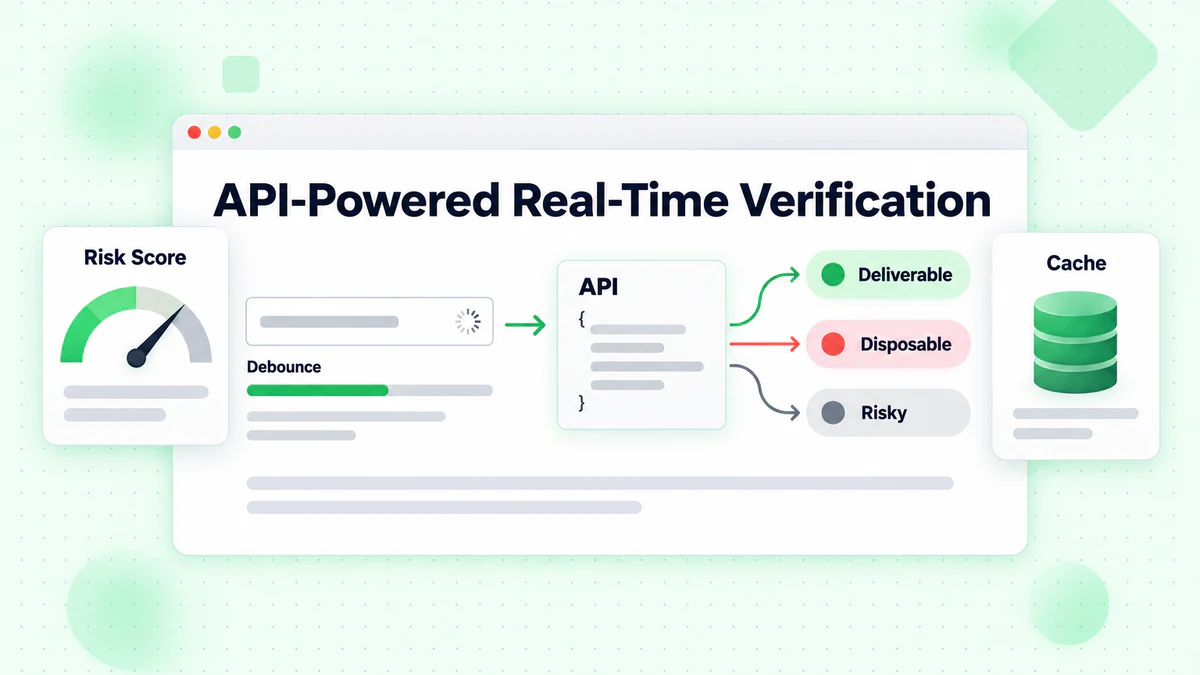
クライアント側検証はフォーマットエラーを検出しますが、API ベースの検証は、配信可能性の検証、使い捨てメールの検出、リスクスコアリングを含む包括的なメールチェックを提供します。
デバウンスされた API コールの実装
すべてのキーストロークで API コールを行うことは、リソースを無駄にし、ユーザーエクスペリエンスを悪化させます。ユーザーが入力を一時停止するまで待つデバウンスを実装します:
class RealTimeEmailVerifier {
  constructor(options = {}) {
    this.apiKey = options.apiKey;
    this.apiUrl = options.apiUrl || 'https://api.billionverify.com/v1/verify';
    this.debounceMs = options.debounceMs || 500;
    this.minLength = options.minLength || 5;
    this.debounceTimer = null;
    this.cache = new Map();
  }

  async verify(email, callbacks = {}) {
    const { onStart, onSuccess, onError, onComplete } = callbacks;

    // Clear pending verification
    if (this.debounceTimer) {
      clearTimeout(this.debounceTimer);
    }

    // Skip if email is too short or invalid format
    if (!this.shouldVerify(email)) {
      return;
    }

    // Check cache first
    if (this.cache.has(email)) {
      const cachedResult = this.cache.get(email);
      onSuccess?.(cachedResult);
      onComplete?.();
      return cachedResult;
    }

    // Debounce the API call
    return new Promise((resolve) => {
      this.debounceTimer = setTimeout(async () => {
        onStart?.();

        try {
          const result = await this.callApi(email);
          this.cache.set(email, result);
          onSuccess?.(result);
          resolve(result);
        } catch (error) {
          onError?.(error);
          resolve(null);
        } finally {
          onComplete?.();
        }
      }, this.debounceMs);
    });
  }

  shouldVerify(email) {
    if (email.length < this.minLength) return false;
    if (!email.includes('@')) return false;

    const basicPattern = /^[^\s@]+@[^\s@]+\.[^\s@]+$/;
    return basicPattern.test(email);
  }

  async callApi(email) {
    const response = await fetch(this.apiUrl, {
      method: 'POST',
      headers: {
        'Authorization': `Bearer ${this.apiKey}`,
        'Content-Type': 'application/json'
      },
      body: JSON.stringify({ email })
    });

    if (!response.ok) {
      throw new Error(`Verification failed: ${response.status}`);
    }

    return response.json();
  }

  clearCache() {
    this.cache.clear();
  }
}
フォーム要素との統合
包括的な UI フィードバックを使用して、検証ツールをフォームに接続します:
class EmailFormField {
  constructor(inputSelector, options = {}) {
    this.input = document.querySelector(inputSelector);
    this.container = this.input.closest('.form-group');
    this.feedback = this.container.querySelector('.feedback');
    this.spinner = this.container.querySelector('.spinner');

    this.verifier = new RealTimeEmailVerifier({
      apiKey: options.apiKey,
      debounceMs: 600
    });

    this.lastVerifiedEmail = null;
    this.lastResult = null;

    this.setupEventListeners();
  }

  setupEventListeners() {
    this.input.addEventListener('input', (e) => {
      this.handleInput(e.target.value);
    });

    this.input.addEventListener('blur', () => {
      this.handleBlur();
    });
  }

  handleInput(email) {
    // Reset state while typing
    this.setStatus('typing');

    // Perform real-time verification
    this.verifier.verify(email, {
      onStart: () => this.setStatus('verifying'),
      onSuccess: (result) => this.handleResult(email, result),
      onError: (error) => this.handleError(error)
    });
  }

  handleBlur() {
    const email = this.input.value.trim();

    if (!email) {
      this.setStatus('empty');
      return;
    }

    // If we haven't verified this email yet, do it now
    if (email !== this.lastVerifiedEmail) {
      this.verifier.verify(email, {
        onStart: () => this.setStatus('verifying'),
        onSuccess: (result) => this.handleResult(email, result),
        onError: (error) => this.handleError(error)
      });
    }
  }

  handleResult(email, result) {
    this.lastVerifiedEmail = email;
    this.lastResult = result;

    if (result.is_deliverable) {
      this.setStatus('valid', 'Email address verified');
    } else if (result.is_disposable) {
      this.setStatus('warning', 'Please use a permanent email address');
    } else if (!result.is_valid) {
      this.setStatus('invalid', 'This email address appears to be invalid');
    } else {
      this.setStatus('warning', 'We could not verify this email address');
    }
  }

  handleError(error) {
    console.error('Verification error:', error);
    // Don't block user on API errors
    this.setStatus('neutral', '');
  }

  setStatus(status, message = '') {
    const statusClasses = ['typing', 'verifying', 'valid', 'invalid', 'warning', 'empty', 'neutral'];

    this.container.classList.remove(...statusClasses);
    this.container.classList.add(status);

    this.feedback.textContent = message;
    this.spinner.style.display = status === 'verifying' ? 'block' : 'none';
  }

  isValid() {
    return this.lastResult?.is_deliverable === true;
  }

  getResult() {
    return this.lastResult;
  }
}
リアルタイム検証のための HTML 構造
<div class="form-group">
  <label for="email">Email Address</label>
  <div class="input-wrapper">
    <input
      type="email"
      id="email"
      name="email"
      autocomplete="email"
      placeholder="you@example.com"
    >
    <div class="spinner" style="display: none;">
      <svg class="animate-spin" viewBox="0 0 24 24">
        <circle cx="12" cy="12" r="10" stroke="currentColor" stroke-width="4" fill="none" opacity="0.25"/>
        <path fill="currentColor" d="M4 12a8 8 0 018-8V0C5.373 0 0 5.373 0 12h4z"/>
      </svg>
    </div>
    <div class="status-icon"></div>
  </div>
  <div class="feedback"></div>
</div>
エッジケースとエラーの処理
リアルタイムメール検証は、良好なユーザーエクスペリエンスを維持するために、さまざまなエッジケースを適切に処理する必要があります。
ネットワーク障害
ネットワークの問題により API コールが失敗した場合、フォーム送信を完全にブロックしないでください:
class ResilientEmailVerifier extends RealTimeEmailVerifier {
  constructor(options) {
    super(options);
    this.maxRetries = options.maxRetries || 2;
    this.retryDelay = options.retryDelay || 1000;
  }

  async callApi(email, attempt = 1) {
    try {
      return await super.callApi(email);
    } catch (error) {
      if (attempt < this.maxRetries) {
        await this.delay(this.retryDelay * attempt);
        return this.callApi(email, attempt + 1);
      }

      // Return a neutral result on failure
      return {
        email,
        is_valid: true,
        is_deliverable: null,
        verification_status: 'unknown',
        error: 'Verification unavailable'
      };
    }
  }

  delay(ms) {
    return new Promise(resolve => setTimeout(resolve, ms));
  }
}
レート制限
API クォータ内に留まるために、インテリジェントなレート制限を実装します:
class RateLimitedVerifier {
  constructor(options) {
    this.verifier = new RealTimeEmailVerifier(options);
    this.requestQueue = [];
    this.requestsPerMinute = options.requestsPerMinute || 60;
    this.requestTimestamps = [];
  }

  async verify(email, callbacks) {
    // Clean old timestamps
    const oneMinuteAgo = Date.now() - 60000;
    this.requestTimestamps = this.requestTimestamps.filter(t => t > oneMinuteAgo);

    // Check if we're at the limit
    if (this.requestTimestamps.length >= this.requestsPerMinute) {
      const oldestRequest = this.requestTimestamps[0];
      const waitTime = oldestRequest + 60000 - Date.now();

      if (waitTime > 0) {
        await new Promise(resolve => setTimeout(resolve, waitTime));
      }
    }

    this.requestTimestamps.push(Date.now());
    return this.verifier.verify(email, callbacks);
  }
}
低速接続の処理
低速接続のユーザーにフィードバックを提供します:
class TimeoutAwareVerifier {
  constructor(options) {
    this.verifier = new RealTimeEmailVerifier(options);
    this.timeout = options.timeout || 10000;
  }

  async verify(email, callbacks) {
    const { onStart, onSuccess, onError, onComplete, onTimeout } = callbacks;

    const timeoutPromise = new Promise((_, reject) => {
      setTimeout(() => reject(new Error('Verification timeout')), this.timeout);
    });

    onStart?.();

    try {
      const result = await Promise.race([
        this.verifier.verify(email, {}),
        timeoutPromise
      ]);
      onSuccess?.(result);
      return result;
    } catch (error) {
      if (error.message === 'Verification timeout') {
        onTimeout?.();
      } else {
        onError?.(error);
      }
    } finally {
      onComplete?.();
    }
  }
}
リアルタイム検証の UX ベストプラクティス
リアルタイムメール検証の実装には、ユーザーエクスペリエンスへの細心の注意が必要です。実装が不十分だと、ユーザーをイライラさせ、フォームの離脱を増加させる可能性があります。
タイミングとフィードバック
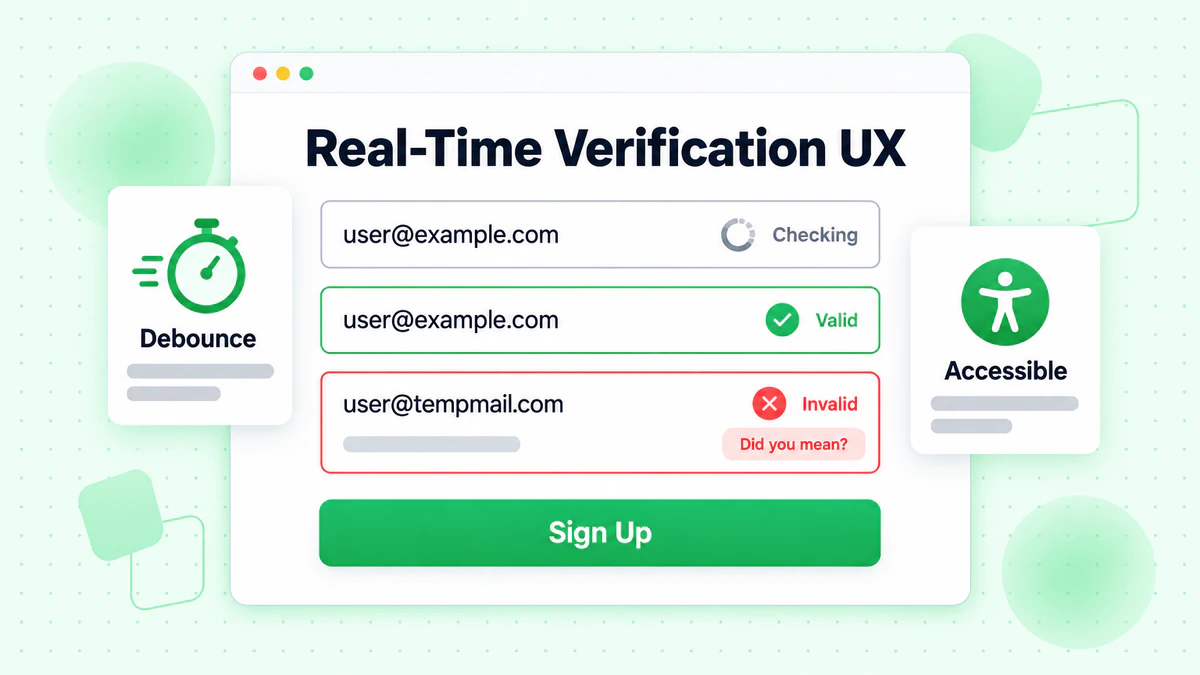
すべてのキーストロークで検証しない:これは過度の API コールと気が散る UI の変更を引き起こします。400〜600ms の遅延でデバウンスを使用します。
ローディング状態を明確に表示:ユーザーは検証がいつ行われているかを理解する必要があります。控えめなスピナーまたは脈動アニメーションは、気が散ることなくアクティビティを示します。
即座の構文フィードバックを提供:基本的なフォーマット検証は、API コールなしで即座に行うことができます。メールが完全に見えるときに API 検証を保存します。
エラーメッセージのガイドライン
具体的で役立つ内容に:「無効なメール」の代わりに、「このメールドメインは存在しないようです。gmail.com のことでしたか?」と言います。
可能な場合は提案を提供:ドメインがタイプミスのように見える場合は、修正を提案します。「gmial.com」のような一般的なタイプミスは、「gmail.com のことでしたか?」と促す必要があります。
攻撃的にならない:使い捨てメールに関する警告は、叱責するのではなく、情報を提供する必要があります。「アカウントのセキュリティのため、永続的なメールアドレスを使用してください」の方が「使い捨てメールは許可されていません」よりも良いです。
プログレッシブエンハンスメント
検証を要件ではなく、拡張機能として実装します:
class ProgressiveEmailVerification {
  constructor(inputSelector, options) {
    this.input = document.querySelector(inputSelector);
    this.form = this.input.closest('form');
    this.hasApiAccess = !!options.apiKey;

    // Always enable basic validation
    this.enableBasicValidation();

    // Enable API verification if available
    if (this.hasApiAccess) {
      this.enableApiVerification(options);
    }
  }

  enableBasicValidation() {
    this.input.addEventListener('blur', () => {
      const email = this.input.value.trim();
      if (email && !this.isValidFormat(email)) {
        this.showError('Please enter a valid email address');
      }
    });
  }

  enableApiVerification(options) {
    this.verifier = new RealTimeEmailVerifier(options);

    this.input.addEventListener('input', (e) => {
      this.verifier.verify(e.target.value, {
        onSuccess: (result) => this.handleVerificationResult(result)
      });
    });
  }

  isValidFormat(email) {
    return /^[^\s@]+@[^\s@]+\.[^\s@]+$/.test(email);
  }

  handleVerificationResult(result) {
    // Enhanced verification results
  }

  showError(message) {
    // Error display logic
  }
}
フレームワーク固有の実装
最新の JavaScript フレームワークは、リアルタイムメール検証を効果的に実装するためのパターンを提供します。
React 実装
import { useState, useCallback, useEffect, useRef } from 'react';

function useEmailVerification(apiKey, options = {}) {
  const [status, setStatus] = useState('idle');
  const [result, setResult] = useState(null);
  const [error, setError] = useState(null);
  const debounceRef = useRef(null);
  const cacheRef = useRef(new Map());

  const verify = useCallback(async (email) => {
    // Clear pending verification
    if (debounceRef.current) {
      clearTimeout(debounceRef.current);
    }

    // Skip invalid emails
    if (!email || !email.includes('@') || email.length < 5) {
      setStatus('idle');
      return;
    }

    // Check cache
    if (cacheRef.current.has(email)) {
      setResult(cacheRef.current.get(email));
      setStatus('success');
      return;
    }

    // Debounce API call
    debounceRef.current = setTimeout(async () => {
      setStatus('loading');

      try {
        const response = await fetch('https://api.billionverify.com/v1/verify', {
          method: 'POST',
          headers: {
            'Authorization': `Bearer ${apiKey}`,
            'Content-Type': 'application/json'
          },
          body: JSON.stringify({ email })
        });

        if (!response.ok) throw new Error('Verification failed');

        const data = await response.json();
        cacheRef.current.set(email, data);
        setResult(data);
        setStatus('success');
      } catch (err) {
        setError(err);
        setStatus('error');
      }
    }, options.debounceMs || 500);
  }, [apiKey, options.debounceMs]);

  return { verify, status, result, error };
}

function EmailInput({ apiKey }) {
  const [email, setEmail] = useState('');
  const { verify, status, result } = useEmailVerification(apiKey);

  useEffect(() => {
    verify(email);
  }, [email, verify]);

  const getStatusClass = () => {
    if (status === 'loading') return 'verifying';
    if (status === 'success' && result?.is_deliverable) return 'valid';
    if (status === 'success' && !result?.is_deliverable) return 'invalid';
    return '';
  };

  return (
    <div className={`form-group ${getStatusClass()}`}>
      <label htmlFor="email">Email Address</label>
      <input
        type="email"
        id="email"
        value={email}
        onChange={(e) => setEmail(e.target.value)}
        placeholder="you@example.com"
      />
      {status === 'loading' && <span className="spinner" />}
      {status === 'success' && result && (
        <span className="feedback">
          {result.is_deliverable
            ? '✓ Email verified'
            : 'This email may not be deliverable'}
        </span>
      )}
    </div>
  );
}
Vue.js 実装
<template>
  <div :class="['form-group', statusClass]">
    <label for="email">Email Address</label>
    <div class="input-wrapper">
      <input
        type="email"
        id="email"
        v-model="email"
        @input="handleInput"
        placeholder="you@example.com"
      />
      <span v-if="isVerifying" class="spinner"></span>
    </div>
    <span v-if="feedbackMessage" class="feedback">
      {{ feedbackMessage }}
    </span>
  </div>
</template>

<script>
import { ref, computed, watch } from 'vue';
import { useDebounceFn } from '@vueuse/core';

export default {
  props: {
    apiKey: { type: String, required: true }
  },
  setup(props) {
    const email = ref('');
    const status = ref('idle');
    const result = ref(null);
    const cache = new Map();

    const verifyEmail = useDebounceFn(async (emailValue) => {
      if (!emailValue || !emailValue.includes('@')) {
        status.value = 'idle';
        return;
      }

      if (cache.has(emailValue)) {
        result.value = cache.get(emailValue);
        status.value = 'success';
        return;
      }

      status.value = 'loading';

      try {
        const response = await fetch('https://api.billionverify.com/v1/verify', {
          method: 'POST',
          headers: {
            'Authorization': `Bearer ${props.apiKey}`,
            'Content-Type': 'application/json'
          },
          body: JSON.stringify({ email: emailValue })
        });

        const data = await response.json();
        cache.set(emailValue, data);
        result.value = data;
        status.value = 'success';
      } catch (error) {
        status.value = 'error';
      }
    }, 500);

    const handleInput = () => {
      verifyEmail(email.value);
    };

    const isVerifying = computed(() => status.value === 'loading');

    const statusClass = computed(() => {
      if (status.value === 'loading') return 'verifying';
      if (status.value === 'success' && result.value?.is_deliverable) return 'valid';
      if (status.value === 'success' && !result.value?.is_deliverable) return 'invalid';
      return '';
    });

    const feedbackMessage = computed(() => {
      if (status.value !== 'success' || !result.value) return '';
      return result.value.is_deliverable
        ? '✓ Email verified'
        : 'This email may not be deliverable';
    });

    return {
      email,
      handleInput,
      isVerifying,
      statusClass,
      feedbackMessage
    };
  }
};
</script>
パフォーマンス最適化戦略
リアルタイムメール検証は、慎重に実装しないとページのパフォーマンスに影響を与える可能性があります。スムーズなユーザーエクスペリエンスを維持するために、これらの最適化戦略を適用します。
検証結果のキャッシング
冗長な API コールを回避するために、クライアント側キャッシュを実装します:
class VerificationCache {
  constructor(options = {}) {
    this.maxSize = options.maxSize || 100;
    this.ttl = options.ttl || 300000; // 5 minutes
    this.cache = new Map();
  }

  get(email) {
    const normalized = email.toLowerCase().trim();
    const entry = this.cache.get(normalized);

    if (!entry) return null;

    if (Date.now() > entry.expiresAt) {
      this.cache.delete(normalized);
      return null;
    }

    return entry.result;
  }

  set(email, result) {
    const normalized = email.toLowerCase().trim();

    // Enforce max size with LRU eviction
    if (this.cache.size >= this.maxSize) {
      const oldestKey = this.cache.keys().next().value;
      this.cache.delete(oldestKey);
    }

    this.cache.set(normalized, {
      result,
      expiresAt: Date.now() + this.ttl
    });
  }

  clear() {
    this.cache.clear();
  }
}
検証モジュールの遅延読み込み
必要なときにのみ検証モジュールを読み込みます:
async function initEmailVerification(inputSelector, options) {
  // Only load when user focuses on email field
  const input = document.querySelector(inputSelector);

  input.addEventListener('focus', async function onFocus() {
    input.removeEventListener('focus', onFocus);

    const { RealTimeEmailVerifier } = await import('./email-verifier.js');

    const verifier = new RealTimeEmailVerifier(options);

    input.addEventListener('input', (e) => {
      verifier.verify(e.target.value, {
        onSuccess: (result) => updateUI(result),
        onError: (error) => handleError(error)
      });
    });
  }, { once: true });
}
バンドルサイズの削減
ツリーシェイキングとコード分割を使用して、ページ読み込みへの影響を最小限に抑えます:
// email-verifier/index.js - Main entry point
export { RealTimeEmailVerifier } from './verifier';
export { EmailFormField } from './form-field';

// email-verifier/lite.js - Lightweight version for basic validation
export { BasicEmailValidator } from './basic-validator';
検証の効果の測定
フォームにリアルタイムメール検証がどのように影響するかを理解するために、主要なメトリクスを追跡します。
主要業績評価指標
検証成功率:検証に合格したメールの割合。低い率は、UX の問題またはターゲティングの問題を示している可能性があります。
フォーム完了率:検証を実装する前後の完了率を比較します。良好な実装は、完了率を維持または改善する必要があります。
無効なメール率:フォーム入力中に検出および修正された無効なメールの数と、後で発見された無効なメールの数を追跡します。
API 応答時間:検証速度を監視します。遅い応答は、ユーザーをイライラさせ、離脱を増加させます。
分析実装
class VerificationAnalytics {
  constructor(analyticsProvider) {
    this.analytics = analyticsProvider;
  }

  trackVerificationStart(email) {
    this.analytics.track('email_verification_started', {
      domain: this.extractDomain(email),
      timestamp: Date.now()
    });
  }

  trackVerificationComplete(email, result, duration) {
    this.analytics.track('email_verification_completed', {
      domain: this.extractDomain(email),
      is_valid: result.is_valid,
      is_deliverable: result.is_deliverable,
      is_disposable: result.is_disposable,
      risk_score: result.risk_score,
      duration_ms: duration
    });
  }

  trackVerificationError(email, error) {
    this.analytics.track('email_verification_error', {
      domain: this.extractDomain(email),
      error_type: error.name,
      error_message: error.message
    });
  }

  trackFormSubmission(email, verificationResult) {
    this.analytics.track('form_submitted_with_verification', {
      email_verified: !!verificationResult,
      verification_passed: verificationResult?.is_deliverable,
      verification_status: verificationResult?.verification_status
    });
  }

  extractDomain(email) {
    return email.split('@')[1]?.toLowerCase() || 'unknown';
  }
}
セキュリティに関する考慮事項
リアルタイムメール検証には、ユーザーデータを外部サービスに送信することが含まれます。ユーザーのプライバシーを保護するために、適切なセキュリティ対策を実装します。
API キーの保護
クライアント側のコードで API キーを公開しないでください。バックエンドプロキシを使用します:
// Backend proxy endpoint (Node.js/Express)
app.post('/api/verify-email', async (req, res) => {
  const { email } = req.body;

  // Validate input
  if (!email || typeof email !== 'string') {
    return res.status(400).json({ error: 'Invalid email' });
  }

  // Rate limiting per IP
  const clientIp = req.ip;
  if (await isRateLimited(clientIp)) {
    return res.status(429).json({ error: 'Too many requests' });
  }

  try {
    const response = await fetch('https://api.billionverify.com/v1/verify', {
      method: 'POST',
      headers: {
        'Authorization': `Bearer ${process.env.BV_API_KEY}`,
        'Content-Type': 'application/json'
      },
      body: JSON.stringify({ email })
    });

    const result = await response.json();
    res.json(result);
  } catch (error) {
    res.status(500).json({ error: 'Verification service unavailable' });
  }
});
入力のサニタイズ
処理する前に、常にメール入力をサニタイズします:
function sanitizeEmail(email) {
  if (typeof email !== 'string') return '';

  return email
    .toLowerCase()
    .trim()
    .replace(/[<>\"']/g, '') // Remove potential XSS characters
    .substring(0, 254); // Max email length per RFC
}
まとめ
リアルタイムメール検証は、フォームのインタラクションを、イライラする当て推量ゲームから、自信に満ちた案内されたエクスペリエンスに変えます。ユーザーが入力する際にメールアドレスを検証することで、システムに無効なデータが入ることを防ぎながら、ユーザーが成功するのに役立つ即座のフィードバックを提供します。
成功した実装の主要な原則には、次のものがあります:
検証を階層化:即座のクライアント側フォーマットチェックと包括的な API 検証を組み合わせます。各層は異なるタイプの問題を検出します。
ユーザーエクスペリエンスのために最適化:デバウンスを使用して過度の API コールを防ぎ、明確な視覚的フィードバックを提供し、検証サービスの問題によってユーザーをブロックしないでください。
障害を優雅に処理:ネットワークエラーと API タイムアウトは、フォーム送信を妨げるべきではありません。高度な検証が利用できない場合は、基本的な検証にフォールバックします。
監視と反復:検証メトリクスを追跡して、実装がフォームの完了とデータ品質にどのように影響するかを理解します。このデータを使用してアプローチを改善します。
ユーザーデータを保護:API キーを保護するためにバックエンドプロキシを介して検証リクエストをルーティングし、レート制限を実装し、すべての入力をサニタイズします。
BillionVerify のメール検証 API は、配信可能性チェック、使い捨てメール検出、リスクスコアリングを含む包括的なリアルタイムメール検証のためのインフラストラクチャを提供します。このガイドの実装パターンと組み合わせることで、優れたユーザーエクスペリエンスを維持しながら高品質のメールアドレスをキャプチャするフォームエクスペリエンスを構築できます。
基本的なクライアント側検証から始めて、特定のニーズに基づいて API ベースの検証で段階的に強化します。リアルタイムメール検証への投資は、バウンス率の削減、メール配信可能性の向上、高品質のユーザーデータを通じて利益をもたらします。
Instantly や Smartlead を使うチームは、キャンペーン前に BillionVerify でリストをクリーニングすることで到達率を大幅に改善できます。
認証プロバイダーを選ぶ前に、精度と速度の面で BillionVerify と ZeroBounce を比較してみてください。