



이메일 주소를 수집하는 애플리케이션을 구축할 때는 데이터 품질을 유지하고 발신자 평판을 보호하기 위해 강력한 이메일 검증이 필요합니다. Node.js 개발자는 애플리케이션에 이메일 검증 서비스를 통합할 수 있는 강력한 도구를 사용할 수 있습니다. 이 종합 튜토리얼은 기본 설정부터 프로덕션 수준의 구현까지 Node.js 이메일 검증 API 통합을 구현하는 과정을 안내합니다.
Node.js 이메일 검증 통합을 선택하는 이유
Node.js는 현대적인 웹 애플리케이션 구축을 위한 선호 런타임이 되었으며, 비동기 특성으로 인해 이메일 검증과 같은 API 통합에 특히 적합합니다. 사용자가 양식을 통해 이메일 주소를 제출할 때, 사용자 경험을 저하시키지 않는 빠르고 논블로킹 검증이 필요합니다. Node.js는 여러 동시 API 요청을 효율적으로 처리하는 데 뛰어나 실시간 단일 이메일 유효성 검사와 일괄 처리 시나리오 모두에 이상적입니다.
npm 생태계는 API 통합을 간소화하는 우수한 HTTP 클라이언트 라이브러리를 제공합니다. 내장 fetch API, axios 또는 node-fetch를 선호하든, Node.js 이메일 유효성 검사기를 구현하는 데 필요한 보일러플레이트 코드는 최소화하면서 사용자 정의를 위한 최대의 유연성을 제공합니다.
Node.js 프로젝트 설정
의존성 설치
이메일 검증 구현을 시작하기 전에 개발 환경이 올바르게 구성되었는지 확인하세요. 네이티브 fetch API를 활용하려면 Node.js 버전 18 이상이 필요하지만, 이전 버전에서는 node-fetch를 폴리필로 사용할 수 있습니다.
새 프로젝트 디렉토리를 생성하고 npm으로 초기화하세요. package.json에는 HTTP 요청 및 환경 변수 관리를 위한 필수 종속성이 포함되어야 합니다. dotenv 패키지는 소스 코드에 민감한 정보를 하드코딩하는 대신 환경 파일에서 로드하여 API 자격 증명을 안전하게 유지하는 데 도움이 됩니다.
// package.json
{
  "name": "email-verification-demo",
  "version": "1.0.0",
  "type": "module",
  "dependencies": {
    "dotenv": "^16.3.1"
  }
}
환경 변수 구성
BillionVerify API 키를 환경 파일에 저장하세요. API 키를 버전 관리에 커밋하지 마세요. .env 파일은 자격 증명을 코드베이스와 분리하여 모든 이메일 검증 서비스가 권장하는 보안 모범 사례를 따릅니다.
# .env
BV_API_KEY=your_api_key_here
단일 이메일 주소 확인 구현
첫 번째 API 호출하기
모든 이메일 검증 통합의 기초는 개별 이메일 주소를 확인하는 기능입니다. 이 기능은 사용자 등록, 연락처 양식 제출 및 즉각적인 피드백이 필요한 모든 시나리오에서 실시간 유효성 검사를 지원합니다.
BillionVerify 이메일 검증 API는 요청 본문에 이메일 주소가 포함된 POST 요청을 수락합니다. 응답에는 유효성 상태, 전달 가능성 평가, 일회용 이메일, 역할 기반 주소 및 캐치올 도메인에 대한 상세한 확인을 포함한 포괄적인 검증 결과가 포함됩니다.
// verify-email.js
import 'dotenv/config';

const API_BASE_URL = 'https://api.billionverify.com/v1';
const API_KEY = process.env.BV_API_KEY;

async function verifyEmail(email) {
  const response = await fetch(`${API_BASE_URL}/verify`, {
    method: 'POST',
    headers: {
      'Authorization': `Bearer ${API_KEY}`,
      'Content-Type': 'application/json'
    },
    body: JSON.stringify({ email })
  });

  if (!response.ok) {
    throw new Error(`Verification failed: ${response.status}`);
  }

  return response.json();
}

// Usage example
const result = await verifyEmail('user@example.com');
console.log(result);
응답 필드 이해하기
검증 응답은 각 이메일 주소에 대한 실행 가능한 정보를 제공합니다. 이러한 응답 필드를 이해하면 이메일 주소를 시스템에 수락할지 여부에 대한 정보에 입각한 결정을 내릴 수 있습니다.
| 필드 | 설명 | 사용 사례 |
|---|---|---|
| is_valid | 전반적인 유효성 평가 | 수락/거부 결정 |
| is_deliverable | 이메일 수신 가능 여부 | 이메일 캠페인 적격성 |
| is_disposable | 임시 이메일 서비스 | 사기 방지 |
| is_role_based | 일반 주소 (info@, support@) | B2B 타겟팅 |
| is_catch_all | 도메인이 모든 주소 수락 | 위험 평가 |
| risk_score | 0-100 위험 등급 | 세밀한 필터링 |
재사용 가능한 이메일 유효성 검사기 클래스 구축
클래스 아키텍처
프로덕션 애플리케이션은 이메일 검증 로직을 재사용 가능한 클래스로 캡슐화하면 이점이 있습니다. 이 접근 방식은 일관된 오류 처리, 자동 재시도 및 애플리케이션의 나머지 부분이 사용할 수 있는 깔끔한 인터페이스를 제공합니다.
EmailValidator 클래스는 HTTP 세부 사항을 추상화하고 일반적인 검증 시나리오를 위한 메서드를 제공합니다. API 인증, 요청 형식 지정 및 응답 구문 분석을 처리하여 애플리케이션 코드가 API 메커니즘 대신 비즈니스 로직에 집중할 수 있도록 합니다.
// EmailValidator.js
import 'dotenv/config';

class EmailValidator {
  constructor(apiKey = process.env.BV_API_KEY) {
    this.apiKey = apiKey;
    this.baseUrl = 'https://api.billionverify.com/v1';
    this.maxRetries = 3;
    this.retryDelay = 1000;
  }

  async verify(email) {
    let lastError;

    for (let attempt = 1; attempt <= this.maxRetries; attempt++) {
      try {
        const response = await fetch(`${this.baseUrl}/verify`, {
          method: 'POST',
          headers: {
            'Authorization': `Bearer ${this.apiKey}`,
            'Content-Type': 'application/json'
          },
          body: JSON.stringify({ email })
        });

        if (response.status === 429) {
          // Rate limited - wait and retry
          await this.sleep(this.retryDelay * attempt);
          continue;
        }

        if (!response.ok) {
          throw new Error(`API error: ${response.status}`);
        }

        return await response.json();
      } catch (error) {
        lastError = error;
        if (attempt < this.maxRetries) {
          await this.sleep(this.retryDelay * attempt);
        }
      }
    }

    throw lastError;
  }

  async isValid(email) {
    const result = await this.verify(email);
    return result.is_valid && result.is_deliverable;
  }

  async isHighRisk(email) {
    const result = await this.verify(email);
    return result.risk_score > 70 || result.is_disposable;
  }

  sleep(ms) {
    return new Promise(resolve => setTimeout(resolve, ms));
  }
}

export default EmailValidator;
자동 재시도 로직
이 클래스는 실패한 요청에 대한 지수 백오프를 구현하며, 이는 프로덕션 안정성에 필수적입니다. 이메일 검증 서비스가 속도 제한 오류를 반환하거나 일시적인 문제를 경험할 때 클래스는 시도 사이에 점점 더 긴 지연 시간을 두고 자동으로 재시도합니다.
Express.js 애플리케이션과 통합
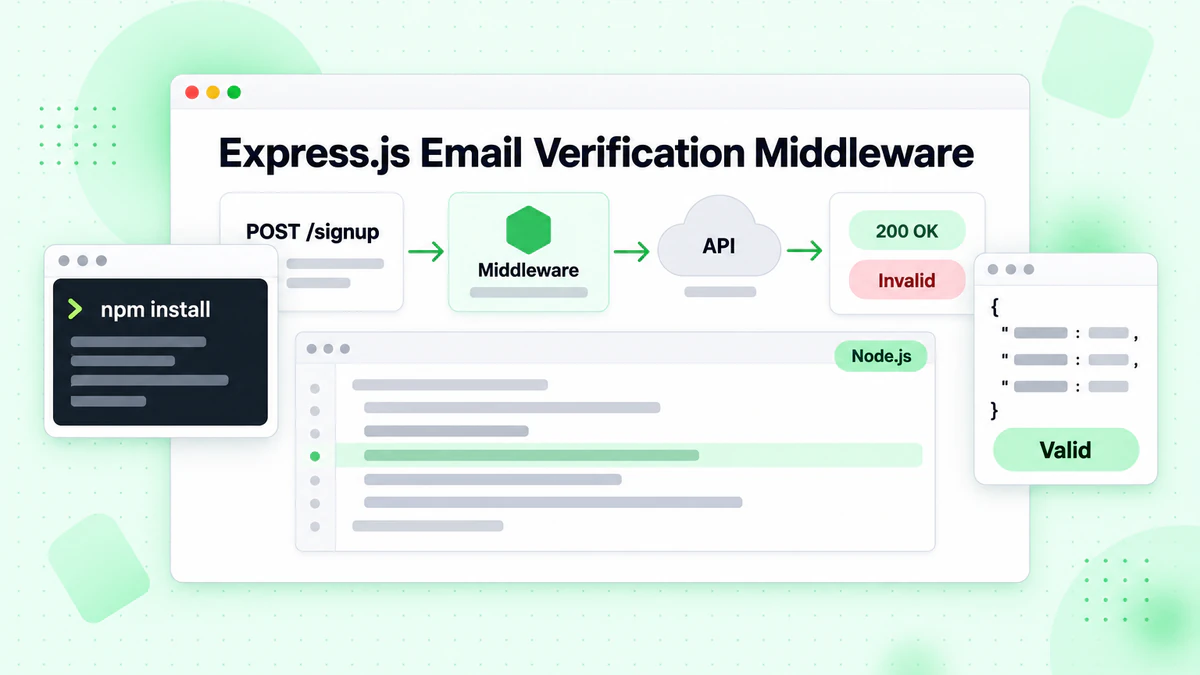
검증 미들웨어 생성
대부분의 Node.js 웹 애플리케이션은 Express.js 또는 유사한 프레임워크를 사용합니다. Express 라우트에 이메일 검증을 통합하면 양식 제출 중에 실시간 유효성 검사가 가능합니다. 사용자는 유효하지 않은 이메일 주소에 대한 즉각적인 피드백을 받아 등록 경험이 개선되는 동시에 이메일 목록 품질이 보호됩니다.
라우트 핸들러에 도달하기 전에 이메일 주소의 유효성을 검사하는 미들웨어 함수를 만드세요. 이 접근 방식은 검증 로직을 비즈니스 로직과 분리하여 코드를 더 유지 관리하기 쉽고 테스트 가능하게 만듭니다.
// server.js
import express from 'express';
import EmailValidator from './EmailValidator.js';

const app = express();
const validator = new EmailValidator();

app.use(express.json());

// Middleware for email verification
const verifyEmailMiddleware = async (req, res, next) => {
  const { email } = req.body;

  if (!email) {
    return res.status(400).json({ error: 'Email is required' });
  }

  try {
    const result = await validator.verify(email);

    if (!result.is_valid) {
      return res.status(400).json({
        error: 'Invalid email address',
        details: result
      });
    }

    if (result.is_disposable) {
      return res.status(400).json({
        error: 'Disposable email addresses are not allowed'
      });
    }

    // Attach verification result for downstream use
    req.emailVerification = result;
    next();
  } catch (error) {
    console.error('Email verification failed:', error);
    // Allow request to proceed but flag as unverified
    req.emailVerification = { verified: false, error: error.message };
    next();
  }
};

// Registration endpoint with email verification
app.post('/api/register', verifyEmailMiddleware, async (req, res) => {
  const { email, name, password } = req.body;

  // Email is already verified by middleware
  // Proceed with registration logic

  res.json({
    success: true,
    message: 'Registration successful',
    emailVerification: req.emailVerification
  });
});

app.listen(3000, () => {
  console.log('Server running on port 3000');
});
검증 결과 처리
미들웨어 접근 방식은 이메일 검증을 얼마나 엄격하게 시행할지에 대한 유연성을 제공합니다. 일부 애플리케이션은 검증되지 않은 모든 이메일을 거부할 수 있지만, 다른 애플리케이션은 수동 검토를 위한 경고 플래그와 함께 이메일을 수락할 수 있습니다. 요청 객체에 첨부된 이메일 유효성 검사 결과를 통해 다운스트림 핸들러가 세밀한 결정을 내릴 수 있습니다.
목록 정리를 위한 일괄 이메일 검증
배치 작업 제출
실시간 검증이 개별 주소를 처리하는 동안, 많은 애플리케이션은 대량의 이메일 목록을 검증해야 합니다. 마케팅 팀은 정기적으로 구독자 목록을 정리하고, CRM 시스템은 정기적으로 저장된 연락처의 유효성을 검사합니다. 일괄 검증 엔드포인트는 여러 이메일을 효율적으로 처리하여 API 호출을 줄이고 처리량을 개선합니다.
일괄 작업은 단일 검증과 다른 처리가 필요합니다. 작업 제출, 상태 폴링 및 결과 검색을 별도의 작업으로 관리해야 합니다. 이 비동기 패턴을 통해 이메일 검증 서비스는 타임아웃 없이 대량 목록을 처리할 수 있습니다.
// batch-verify.js
import EmailValidator from './EmailValidator.js';

class BatchEmailValidator extends EmailValidator {
  async submitBatch(emails) {
    const response = await fetch(`${this.baseUrl}/verify/batch`, {
      method: 'POST',
      headers: {
        'Authorization': `Bearer ${this.apiKey}`,
        'Content-Type': 'application/json'
      },
      body: JSON.stringify({ emails })
    });

    if (!response.ok) {
      throw new Error(`Batch submission failed: ${response.status}`);
    }

    return response.json();
  }

  async getBatchStatus(jobId) {
    const response = await fetch(`${this.baseUrl}/verify/batch/${jobId}`, {
      headers: {
        'Authorization': `Bearer ${this.apiKey}`
      }
    });

    if (!response.ok) {
      throw new Error(`Status check failed: ${response.status}`);
    }

    return response.json();
  }

  async verifyBatch(emails, options = {}) {
    const {
      pollInterval = 5000,
      maxWaitTime = 300000,
      onProgress = () => {}
    } = options;

    // Submit the batch job
    const { job_id } = await this.submitBatch(emails);

    const startTime = Date.now();

    // Poll for completion
    while (Date.now() - startTime < maxWaitTime) {
      const status = await this.getBatchStatus(job_id);

      onProgress({
        processed: status.processed,
        total: status.total,
        percentage: Math.round((status.processed / status.total) * 100)
      });

      if (status.status === 'completed') {
        return status.results;
      }

      if (status.status === 'failed') {
        throw new Error(`Batch job failed: ${status.error}`);
      }

      await this.sleep(pollInterval);
    }

    throw new Error('Batch verification timed out');
  }
}

// Usage example
const batchValidator = new BatchEmailValidator();

const emails = [
  'user1@example.com',
  'user2@company.org',
  'invalid@fake.domain',
  // ... more emails
];

const results = await batchValidator.verifyBatch(emails, {
  onProgress: (progress) => {
    console.log(`Progress: ${progress.percentage}%`);
  }
});

// Process results
const validEmails = results.filter(r => r.is_valid);
const invalidEmails = results.filter(r => !r.is_valid);

console.log(`Valid: ${validEmails.length}, Invalid: ${invalidEmails.length}`);
결과 폴링
일괄 검증 구현에는 진행 상황 콜백이 포함되어 있어 애플리케이션이 사용자에게 검증 진행 상황을 표시하거나 모니터링을 위해 기록할 수 있습니다. 이는 완료하는 데 몇 분이 걸릴 수 있는 수천 개의 이메일 주소가 포함된 목록을 처리할 때 특히 유용합니다.
오류 처리 및 복원력
사용자 정의 오류 클래스
프로덕션 이메일 검증 통합은 오류를 우아하게 처리해야 합니다. 네트워크 문제, API 속도 제한 및 서비스 불가용은 분산 시스템에서 불가피합니다. 적절한 오류 처리를 구현하면 검증 서비스에 문제가 발생하더라도 애플리케이션이 기능을 유지할 수 있습니다.
다양한 오류 유형을 구분하는 포괄적인 오류 처리 전략을 만드세요. 속도 제한과 같은 일시적 오류는 재시도가 필요하지만, 잘못된 API 키와 같은 영구적인 오류는 즉각적인 주의와 알림이 필요합니다.
// errors.js
class EmailVerificationError extends Error {
  constructor(message, code, retryable = false) {
    super(message);
    this.name = 'EmailVerificationError';
    this.code = code;
    this.retryable = retryable;
  }
}

class RateLimitError extends EmailVerificationError {
  constructor(retryAfter) {
    super('Rate limit exceeded', 'RATE_LIMITED', true);
    this.retryAfter = retryAfter;
  }
}

class AuthenticationError extends EmailVerificationError {
  constructor() {
    super('Invalid API key', 'AUTH_FAILED', false);
  }
}

// Enhanced validator with error handling
class RobustEmailValidator extends EmailValidator {
  async verify(email) {
    try {
      const response = await fetch(`${this.baseUrl}/verify`, {
        method: 'POST',
        headers: {
          'Authorization': `Bearer ${this.apiKey}`,
          'Content-Type': 'application/json'
        },
        body: JSON.stringify({ email })
      });

      if (response.status === 401) {
        throw new AuthenticationError();
      }

      if (response.status === 429) {
        const retryAfter = response.headers.get('Retry-After') || 60;
        throw new RateLimitError(parseInt(retryAfter));
      }

      if (response.status >= 500) {
        throw new EmailVerificationError(
          'Service temporarily unavailable',
          'SERVICE_ERROR',
          true
        );
      }

      if (!response.ok) {
        const error = await response.json();
        throw new EmailVerificationError(
          error.message || 'Verification failed',
          'API_ERROR',
          false
        );
      }

      return response.json();
    } catch (error) {
      if (error instanceof EmailVerificationError) {
        throw error;
      }

      // Network or parsing error
      throw new EmailVerificationError(
        error.message,
        'NETWORK_ERROR',
        true
      );
    }
  }
}

export { EmailVerificationError, RateLimitError, AuthenticationError, RobustEmailValidator };
그레이스풀 디그레이데이션 구현
애플리케이션 코드는 다양한 오류 유형을 적절하게 처리하여 사용자에게 의미 있는 피드백을 제공하고 운영 팀에 적절한 알림을 트리거할 수 있습니다.
성능을 위한 캐싱 구현
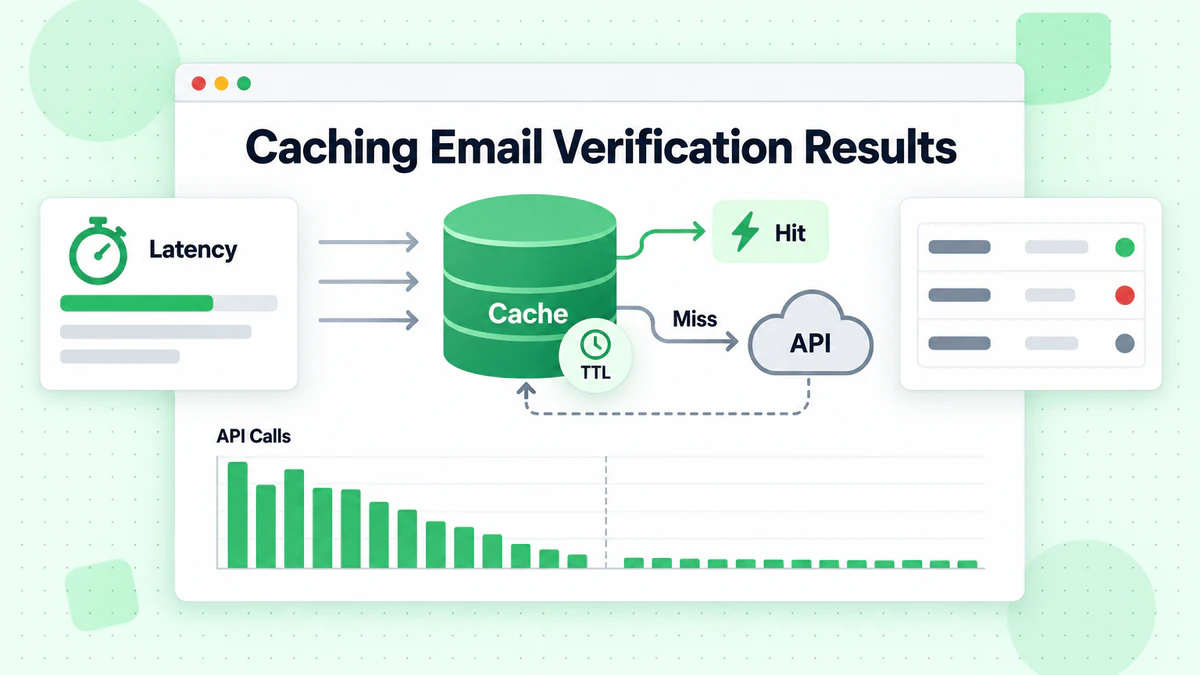
인메모리 캐시 전략
이메일 검증 API 호출은 비용과 지연 시간 측면에서 모두 비용이 듭니다. 캐싱 계층을 구현하면 동일한 이메일 주소에 대한 중복 검증을 줄이면서 응답 시간을 개선할 수 있습니다. 잘 설계된 캐시는 이메일 유효성의 동적 특성을 존중하면서 의미 있는 성능 이점을 제공합니다.
사용 사례에 따라 적절한 캐시 기간을 선택하세요. 이메일 유효성은 변경될 수 있습니다. 사서함이 삭제되고, 도메인이 만료되고, 캐치올 구성이 변경됩니다. 대부분의 애플리케이션에서 24시간의 캐시 기간은 성능과 정확성의 균형을 맞춥니다.
// cached-validator.js
class CachedEmailValidator extends EmailValidator {
  constructor(apiKey, cacheOptions = {}) {
    super(apiKey);
    this.cache = new Map();
    this.cacheTTL = cacheOptions.ttl || 24 * 60 * 60 * 1000; // 24 hours
    this.maxCacheSize = cacheOptions.maxSize || 10000;
  }

  getCacheKey(email) {
    return email.toLowerCase().trim();
  }

  getCached(email) {
    const key = this.getCacheKey(email);
    const cached = this.cache.get(key);

    if (!cached) return null;

    if (Date.now() > cached.expiresAt) {
      this.cache.delete(key);
      return null;
    }

    return cached.result;
  }

  setCache(email, result) {
    // Implement LRU eviction if cache is full
    if (this.cache.size >= this.maxCacheSize) {
      const oldestKey = this.cache.keys().next().value;
      this.cache.delete(oldestKey);
    }

    const key = this.getCacheKey(email);
    this.cache.set(key, {
      result,
      expiresAt: Date.now() + this.cacheTTL
    });
  }

  async verify(email) {
    // Check cache first
    const cached = this.getCached(email);
    if (cached) {
      return { ...cached, fromCache: true };
    }

    // Perform verification
    const result = await super.verify(email);

    // Cache successful results
    if (result && !result.error) {
      this.setCache(email, result);
    }

    return { ...result, fromCache: false };
  }

  clearCache() {
    this.cache.clear();
  }

  getCacheStats() {
    return {
      size: this.cache.size,
      maxSize: this.maxCacheSize
    };
  }
}

export default CachedEmailValidator;
캐시 무효화
대량 처리를 하는 프로덕션 애플리케이션의 경우 메모리 내 캐시 대신 Redis 또는 Memcached 사용을 고려하세요. 이러한 외부 캐시 저장소는 애플리케이션 재시작 시에도 지속되며 클러스터링된 배포의 여러 애플리케이션 인스턴스 간에 공유할 수 있습니다.
이메일 검증 통합 테스트
Mock을 사용한 유닛 테스트
포괄적인 테스트를 통해 이메일 검증 통합이 모든 시나리오에서 올바르게 작동하는지 확인할 수 있습니다. 단위 테스트는 개별 구성 요소를 확인하고 통합 테스트는 적절한 API 통신을 확인합니다. 실제 API 호출을 피하기 위해 단위 테스트 중에 HTTP 계층을 모킹하세요.
// validator.test.js
import { jest } from '@jest/globals';
import EmailValidator from './EmailValidator.js';

describe('EmailValidator', () => {
  let validator;

  beforeEach(() => {
    validator = new EmailValidator('test-api-key');
    global.fetch = jest.fn();
  });

  test('returns valid result for valid email', async () => {
    fetch.mockResolvedValueOnce({
      ok: true,
      json: () => Promise.resolve({
        is_valid: true,
        is_deliverable: true,
        is_disposable: false,
        risk_score: 10
      })
    });

    const result = await validator.verify('valid@example.com');

    expect(result.is_valid).toBe(true);
    expect(result.is_deliverable).toBe(true);
  });

  test('handles rate limiting with retry', async () => {
    fetch
      .mockResolvedValueOnce({ ok: false, status: 429 })
      .mockResolvedValueOnce({
        ok: true,
        json: () => Promise.resolve({ is_valid: true })
      });

    const result = await validator.verify('test@example.com');

    expect(fetch).toHaveBeenCalledTimes(2);
    expect(result.is_valid).toBe(true);
  });

  test('throws after max retries exceeded', async () => {
    fetch.mockResolvedValue({ ok: false, status: 500 });

    await expect(validator.verify('test@example.com'))
      .rejects.toThrow('API error: 500');
  });
});
엣지 케이스 테스트
네트워크 장애, 잘못된 형식의 응답 및 비정상적인 이메일 형식과 같은 엣지 케이스에 대한 테스트를 포함하세요. 이메일 유효성 검사기는 애플리케이션을 중단시키지 않고 모든 시나리오를 우아하게 처리해야 합니다.
모니터링 및 로깅 모범 사례
구조화된 로깅
프로덕션 이메일 검증 통합은 성능 추적, 문제 식별 및 비용 최적화를 위한 모니터링이 필요합니다. 검증 결과, 응답 시간 및 오류율을 캡처하는 구조화된 로깅을 구현하세요.
// monitored-validator.js
class MonitoredEmailValidator extends EmailValidator {
  constructor(apiKey, logger = console) {
    super(apiKey);
    this.logger = logger;
    this.metrics = {
      totalRequests: 0,
      successfulVerifications: 0,
      failedVerifications: 0,
      cacheHits: 0,
      totalLatency: 0
    };
  }

  async verify(email) {
    const startTime = Date.now();
    this.metrics.totalRequests++;

    try {
      const result = await super.verify(email);
      const latency = Date.now() - startTime;

      this.metrics.successfulVerifications++;
      this.metrics.totalLatency += latency;

      this.logger.info({
        event: 'email_verification',
        email: this.maskEmail(email),
        is_valid: result.is_valid,
        latency_ms: latency
      });

      return result;
    } catch (error) {
      this.metrics.failedVerifications++;

      this.logger.error({
        event: 'email_verification_error',
        email: this.maskEmail(email),
        error: error.message,
        latency_ms: Date.now() - startTime
      });

      throw error;
    }
  }

  maskEmail(email) {
    const [local, domain] = email.split('@');
    const maskedLocal = local.charAt(0) + '***' + local.slice(-1);
    return `${maskedLocal}@${domain}`;
  }

  getMetrics() {
    return {
      ...this.metrics,
      averageLatency: this.metrics.totalRequests > 0
        ? Math.round(this.metrics.totalLatency / this.metrics.totalRequests)
        : 0,
      successRate: this.metrics.totalRequests > 0
        ? (this.metrics.successfulVerifications / this.metrics.totalRequests * 100).toFixed(2)
        : 0
    };
  }
}

export default MonitoredEmailValidator;
메트릭 추적
API 문제 또는 남용 시도를 나타낼 수 있는 높은 오류율 또는 비정상적인 패턴에 대한 알림을 설정하세요. 모니터링 대시보드는 검증 패턴을 이해하고 시간이 지남에 따라 구현을 최적화하는 데 도움이 됩니다.
보안 고려 사항
API 자격 증명 보호
이메일 검증 통합은 잠재적으로 민감한 데이터를 처리하며 신중한 보안 고려가 필요합니다. API 키를 보호하고, 입력의 유효성을 검사하고, 자체 엔드포인트에 속도 제한을 구현하여 남용을 방지하세요.
BillionVerify API 키를 클라이언트 측 코드에 노출하지 마세요. 모든 검증 요청은 API 자격 증명을 안전하게 보유한 백엔드 서버를 통해 라우팅되어야 합니다. 이렇게 하면 악의적인 행위자가 자신의 목적을 위해 API 할당량을 사용하는 것을 방지할 수 있습니다.
입력 검증 및 속도 제한
검증 API에 이메일을 보내기 전에 입력 유효성 검사를 구현하세요. 측에서 기본 형식 유효성 검사를 수행하면 불필요한 API 호출을 줄이고 명백히 유효하지 않은 입력에 대해 더 빠른 피드백을 제공합니다.
// secure-validator.js
class SecureEmailValidator extends EmailValidator {
  constructor(apiKey, options = {}) {
    super(apiKey);
    this.rateLimiter = new Map();
    this.maxRequestsPerMinute = options.maxRequestsPerMinute || 100;
  }

  validateEmailFormat(email) {
    if (!email || typeof email !== 'string') {
      throw new Error('Email must be a non-empty string');
    }

    const emailRegex = /^[^\s@]+@[^\s@]+\.[^\s@]+$/;
    if (!emailRegex.test(email)) {
      throw new Error('Invalid email format');
    }

    if (email.length > 254) {
      throw new Error('Email exceeds maximum length');
    }

    return email.toLowerCase().trim();
  }

  checkRateLimit(clientId) {
    const now = Date.now();
    const windowStart = now - 60000;

    if (!this.rateLimiter.has(clientId)) {
      this.rateLimiter.set(clientId, []);
    }

    const requests = this.rateLimiter.get(clientId);
    const recentRequests = requests.filter(time => time > windowStart);

    if (recentRequests.length >= this.maxRequestsPerMinute) {
      throw new Error('Rate limit exceeded. Please try again later.');
    }

    recentRequests.push(now);
    this.rateLimiter.set(clientId, recentRequests);
  }

  async verify(email, clientId = 'default') {
    this.checkRateLimit(clientId);
    const sanitizedEmail = this.validateEmailFormat(email);
    return super.verify(sanitizedEmail);
  }
}

export default SecureEmailValidator;
결론
Node.js 애플리케이션에서 이메일 검증을 구현하면 고품질 이메일 목록을 유지하고 발신자 평판을 보호하는 기반이 마련됩니다. 이 튜토리얼에서 다룬 기술인 기본 API 통합부터 캐싱, 오류 처리 및 모니터링을 포함한 프로덕션 수준 패턴까지, 모든 Node.js 애플리케이션에 강력한 이메일 유효성 검사를 구축할 수 있는 역량을 제공합니다.
BillionVerify의 Node.js 이메일 검증 API는 실시간 단일 이메일 유효성 검사 및 일괄 처리 기능을 제공하여 Node.js와 원활하게 통합됩니다. 응답 데이터를 통해 간단한 유효/무효 판단부터 정교한 위험 기반 필터링까지 이메일 수락에 대한 세밀한 의사 결정이 가능합니다.
API 패턴을 이해하기 위해 기본 구현부터 시작한 다음 애플리케이션 요구 사항이 발전함에 따라 점진적으로 캐싱, 모니터링 및 오류 처리를 추가하세요. 여기에 설명된 이메일 유효성 검사기 패턴은 스타트업 MVP에서 수백만 건의 검증을 처리하는 엔터프라이즈급 애플리케이션까지 확장됩니다.
사용자 등록 시스템을 구축하든, 마케팅 목록을 정리하든, 연락처 양식 제출의 유효성을 검사하든, 적절한 이메일 주소 확인은 이메일 전달 가능성을 보호하고 메시지가 실제 수신자에게 도달하도록 보장합니다. BillionVerify 계정에 가입하고 오늘 Node.js 애플리케이션에 이메일 검증을 통합하여 첫걸음을 내디디세요.
Instantly 또는 Smartlead를 사용하는 팀은 캠페인 전에 BillionVerify로 목록을 정리하여 전달성을 크게 향상시킬 수 있습니다.
인증 제공업체를 선택하기 전에 정확도와 속도 면에서 BillionVerify와 ZeroBounce를 비교해 보세요.