



SMTP ईमेल सत्यापन यह पुष्टि करने के लिए स्वर्ण मानक का प्रतिनिधित्व करता है कि क्या कोई ईमेल पता वास्तव में संदेश प्राप्त कर सकता है। बुनियादी syntax validation या domain checks के विपरीत, SMTP verification प्राप्तकर्ता के mail server के साथ सीधे संचार करता है यह सत्यापित करने के लिए कि एक विशिष्ट mailbox मौजूद है और ईमेल प्राप्त करने में सक्षम है। यह शक्तिशाली ईमेल वैलिडेशन तकनीक professional email verification services की रीढ़ बनती है और businesses को स्वच्छ email lists बनाए रखने, sender reputation की रक्षा करने और email deliverability में सुधार करने में मदद करती है।
SMTP ईमेल सत्यापन को समझना
SMTP, Simple Mail Transfer Protocol, ईमेल संचरण के लिए इंटरनेट मानक है। हर बार जब आप एक ईमेल भेजते हैं, तो आपका mail client या server उस संदेश को प्राप्तकर्ता के mail server तक पहुंचाने के लिए SMTP का उपयोग करता है। SMTP ईमेल सत्यापन इसी protocol का उपयोग यह जांचने के लिए करता है कि कोई ईमेल पता मौजूद है या नहीं—लेकिन वास्तव में कोई संदेश भेजे बिना।
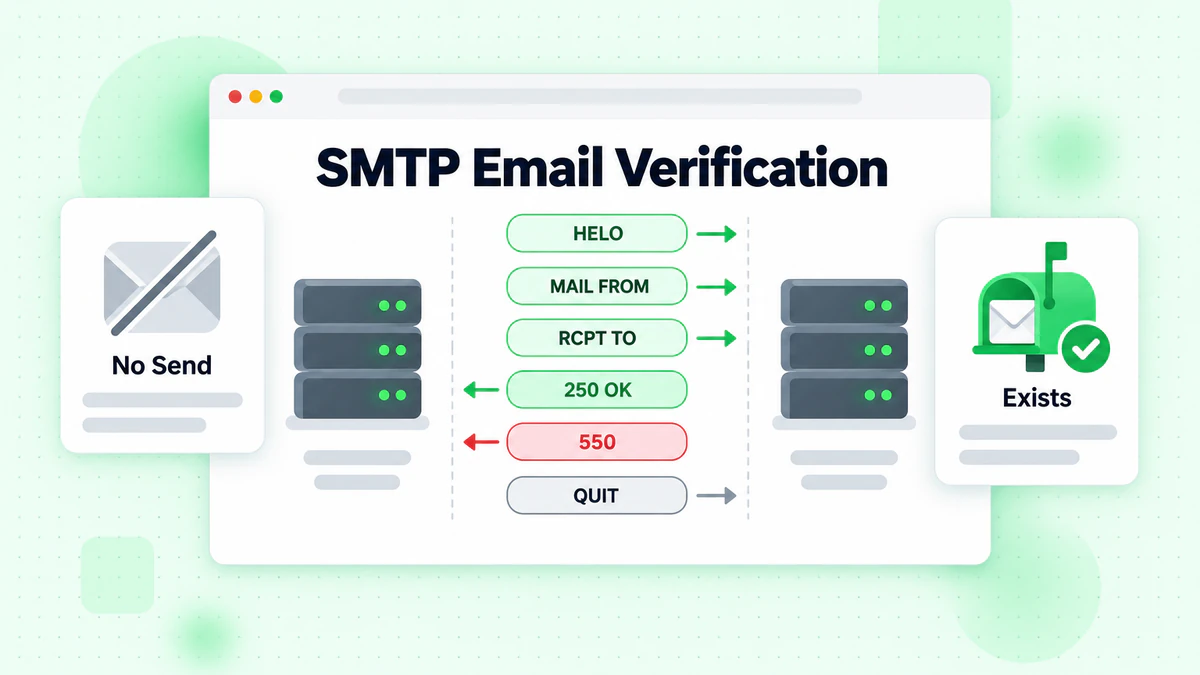
SMTP verification की सुंदरता स्रोत पर ईमेल पता सत्यापित करने की इसकी क्षमता में निहित है। format या domain के आधार पर यह अनुमान लगाने के बजाय कि कोई पता वैध है या नहीं, SMTP verification mail server से सीधे पूछता है: "क्या आप इस पते के लिए mail स्वीकार करेंगे?" server की प्रतिक्रिया यह बताती है कि mailbox मौजूद है, भरा हुआ है, या निष्क्रिय कर दिया गया है।
SMTP ईमेल सत्यापन कैसे काम करता है
SMTP verification process commands के एक विशिष्ट अनुक्रम का पालन करती है जो ईमेल delivery की शुरुआत की नकल करती है लेकिन वास्तव में कोई संदेश content भेजने से पहले रुक जाती है। यहाँ step-by-step विवरण है:
Step 1: MX Records के लिए DNS Lookup
किसी भी mail server से कनेक्ट होने से पहले, verification process को यह पहचानना होगा कि domain के लिए कौन सा server ईमेल संभालता है। इसमें Mail Exchange (MX) records के लिए DNS को query करना शामिल है। एक domain में विभिन्न प्राथमिकताओं के साथ कई MX records हो सकते हैं, जो primary server अनुपलब्ध होने पर fallback की अनुमति देते हैं।
Step 2: TCP Connection स्थापित करें
एक बार mail server की पहचान हो जाने पर, verifier port 25 (मानक SMTP port) या submission के लिए 587 या 465 जैसे वैकल्पिक ports पर एक TCP connection स्थापित करता है।
Step 3: SMTP Handshake (HELO/EHLO)
Connection एक greeting के साथ शुरू होता है। Verifier mail server से अपना परिचय देने के लिए एक EHLO (Extended HELO) या HELO command भेजता है। Server अपनी क्षमताओं के साथ प्रतिक्रिया देता है और पुष्टि करता है कि वह आगे बढ़ने के लिए तैयार है।
Step 4: MAIL FROM Command
Verifier MAIL FROM command का उपयोग करके एक sender address निर्दिष्ट करता है। हालांकि यह पता अंतिम sender होने की आवश्यकता नहीं है, mail servers verification प्रयासों को अस्वीकार कर सकते हैं यदि MAIL FROM domain में उचित DNS records की कमी है या संदिग्ध दिखाई देता है।
Step 5: RCPT TO Command (महत्वपूर्ण कदम)
यहीं पर वास्तविक verification होता है। Verifier जांचे जा रहे ईमेल पते के साथ एक RCPT TO command भेजता है। इस command के लिए mail server की प्रतिक्रिया यह इंगित करती है कि mailbox मौजूद है या नहीं:
- 250 OK: Mailbox मौजूद है और mail प्राप्त कर सकता है
- 550 User unknown: Mailbox मौजूद नहीं है
- 551 User not local: Server उपयोगकर्ता के बारे में जानता है लेकिन एक अन्य पता सुझाता है
- 552 Mailbox full: Mailbox मौजूद है लेकिन संदेश प्राप्त नहीं कर सकता
- 553 Mailbox name not allowed: पता syntax अस्वीकार कर दिया गया है
Step 6: QUIT
RCPT TO response प्राप्त करने के बाद, verifier वास्तव में कोई संदेश भेजे बिना connection को gracefully बंद करने के लिए QUIT भेजता है।
SMTP Response Codes की व्याख्या
सटीक ईमेल चेकर systems बनाने के लिए SMTP response codes को समझना आवश्यक है। ये तीन-अंकीय codes विशिष्ट अर्थ रखते हैं जो verification outcomes निर्धारित करते हैं।
2xx Success Codes
- 250: अनुरोधित कार्रवाई सफलतापूर्वक पूर्ण हुई (ईमेल मौजूद है)
- 251: उपयोगकर्ता local नहीं है; निर्दिष्ट path पर forward करेगा
4xx Temporary Failure Codes
- 421: सेवा उपलब्ध नहीं है, transmission channel बंद हो रहा है
- 450: अनुरोधित mail action नहीं लिया गया: mailbox अनुपलब्ध (व्यस्त/अस्थायी रूप से blocked)
- 451: अनुरोधित action निरस्त: processing में local error
- 452: अनुरोधित action नहीं लिया गया: अपर्याप्त system storage
5xx Permanent Failure Codes
- 550: अनुरोधित action नहीं लिया गया: mailbox अनुपलब्ध (मौजूद नहीं है)
- 551: उपयोगकर्ता local नहीं है; कृपया दूसरा path आज़माएं
- 552: अनुरोधित mail action निरस्त: storage आवंटन से अधिक हो गया
- 553: अनुरोधित action नहीं लिया गया: mailbox name की अनुमति नहीं है
- 554: Transaction विफल
4xx और 5xx codes के बीच अंतर महत्वपूर्ण रूप से मायने रखता है। एक 4xx response अस्थायी मुद्दों का सुझाव देता है—mailbox बाद में उपलब्ध हो सकता है। एक 5xx response स्थायी विफलता को इंगित करता है—पते को invalid माना जाना चाहिए।
SMTP ईमेल सत्यापन को लागू करना
एक SMTP verification system बनाने के लिए protocol विवरण, error handling, और rate limiting पर सावधानीपूर्वक ध्यान देने की आवश्यकता होती है। यहाँ एक व्यावहारिक implementation guide है।
बुनियादी SMTP Verification Flow
निम्नलिखित pseudocode मुख्य verification logic को दिखाता है:
function verifyEmail(email):
    domain = extractDomain(email)

    // Step 1: Get MX records
    mxRecords = getMXRecords(domain)
    if mxRecords is empty:
        return INVALID_DOMAIN

    // Sort by priority (lowest number = highest priority)
    sortByPriority(mxRecords)

    // Try each MX server
    for mx in mxRecords:
        try:
            // Step 2: Connect
            connection = connectSMTP(mx.host, 25)

            // Step 3: EHLO
            response = sendCommand("EHLO verifier.example.com")
            if response.code != 250:
                continue  // Try next MX

            // Step 4: MAIL FROM
            response = sendCommand("MAIL FROM:<verify@example.com>")
            if response.code != 250:
                continue

            // Step 5: RCPT TO
            response = sendCommand("RCPT TO:<" + email + ">")

            // Step 6: QUIT
            sendCommand("QUIT")
            closeConnection()

            // Interpret result
            if response.code == 250:
                return VALID
            else if response.code >= 500:
                return INVALID
            else:
                return UNKNOWN

        catch ConnectionError:
            continue  // Try next MX

    return UNABLE_TO_VERIFY
Node.js Implementation
यहाँ native net और dns modules का उपयोग करते हुए एक व्यावहारिक Node.js implementation है:
const dns = require('dns');
const net = require('net');

async function verifyEmailSMTP(email) {
  const domain = email.split('@')[1];

  // Get MX records
  const mxRecords = await new Promise((resolve, reject) => {
    dns.resolveMx(domain, (err, addresses) => {
      if (err) reject(err);
      else resolve(addresses.sort((a, b) => a.priority - b.priority));
    });
  });

  if (!mxRecords || mxRecords.length === 0) {
    return { valid: false, reason: 'No MX records found' };
  }

  // Try each MX server
  for (const mx of mxRecords) {
    try {
      const result = await checkMailbox(mx.exchange, email);
      return result;
    } catch (err) {
      continue; // Try next MX server
    }
  }

  return { valid: null, reason: 'Unable to verify' };
}

function checkMailbox(mxHost, email) {
  return new Promise((resolve, reject) => {
    const socket = net.createConnection(25, mxHost);
    let step = 0;
    let response = '';

    socket.setTimeout(10000);

    socket.on('data', (data) => {
      response = data.toString();
      const code = parseInt(response.substring(0, 3));

      switch (step) {
        case 0: // Server greeting
          if (code === 220) {
            socket.write('EHLO verifier.example.com\r\n');
            step++;
          } else {
            socket.end();
            reject(new Error('Server rejected connection'));
          }
          break;

        case 1: // EHLO response
          if (code === 250) {
            socket.write('MAIL FROM:<verify@example.com>\r\n');
            step++;
          } else {
            socket.end();
            reject(new Error('EHLO failed'));
          }
          break;

        case 2: // MAIL FROM response
          if (code === 250) {
            socket.write(`RCPT TO:<${email}>\r\n`);
            step++;
          } else {
            socket.end();
            reject(new Error('MAIL FROM rejected'));
          }
          break;

        case 3: // RCPT TO response - the verification result
          socket.write('QUIT\r\n');
          socket.end();

          if (code === 250) {
            resolve({ valid: true, reason: 'Mailbox exists' });
          } else if (code >= 500) {
            resolve({ valid: false, reason: 'Mailbox does not exist', code });
          } else {
            resolve({ valid: null, reason: 'Unable to determine', code });
          }
          break;
      }
    });

    socket.on('timeout', () => {
      socket.end();
      reject(new Error('Connection timeout'));
    });

    socket.on('error', (err) => {
      reject(err);
    });
  });
}
Python Implementation
Python अपने smtplib module के साथ स्वच्छ SMTP verification प्रदान करता है:
import dns.resolver
import smtplib
import socket

def verify_email_smtp(email):
    domain = email.split('@')[1]

    # Get MX records
    try:
        mx_records = dns.resolver.resolve(domain, 'MX')
        mx_hosts = sorted([(r.preference, str(r.exchange).rstrip('.'))
                          for r in mx_records])
    except dns.resolver.NXDOMAIN:
        return {'valid': False, 'reason': 'Domain does not exist'}
    except dns.resolver.NoAnswer:
        return {'valid': False, 'reason': 'No MX records found'}

    # Try each MX server
    for priority, mx_host in mx_hosts:
        try:
            result = check_mailbox(mx_host, email)
            if result['valid'] is not None:
                return result
        except Exception as e:
            continue

    return {'valid': None, 'reason': 'Unable to verify'}

def check_mailbox(mx_host, email):
    try:
        # Connect to SMTP server
        smtp = smtplib.SMTP(timeout=10)
        smtp.connect(mx_host, 25)

        # EHLO
        code, message = smtp.ehlo('verifier.example.com')
        if code != 250:
            smtp.quit()
            return {'valid': None, 'reason': 'EHLO failed'}

        # MAIL FROM
        code, message = smtp.mail('verify@example.com')
        if code != 250:
            smtp.quit()
            return {'valid': None, 'reason': 'MAIL FROM rejected'}

        # RCPT TO - the verification step
        code, message = smtp.rcpt(email)
        smtp.quit()

        if code == 250:
            return {'valid': True, 'reason': 'Mailbox exists'}
        elif code >= 500:
            return {'valid': False, 'reason': 'Mailbox does not exist', 'code': code}
        else:
            return {'valid': None, 'reason': 'Temporary failure', 'code': code}

    except socket.timeout:
        return {'valid': None, 'reason': 'Connection timeout'}
    except smtplib.SMTPServerDisconnected:
        return {'valid': None, 'reason': 'Server disconnected'}
    except Exception as e:
        return {'valid': None, 'reason': str(e)}
SMTP ईमेल सत्यापन में चुनौतियाँ
जबकि SMTP verification शक्तिशाली है, कई चुनौतियाँ implementation को जटिल बना सकती हैं और सटीकता को प्रभावित कर सकती हैं।
Catch-All Domains
कुछ mail servers catch-all के रूप में configured हैं, अपने domain पर किसी भी पते पर mail स्वीकार करते हैं चाहे कोई विशिष्ट mailbox मौजूद हो या नहीं। जब आप किसी भी पते के लिए RCPT TO भेजते हैं—यहां तक कि random characters के लिए—server 250 OK के साथ प्रतिक्रिया देता है।
Catch-all configurations SMTP verification को उस domain पर valid और invalid addresses के बीच अंतर करने में असमर्थ बनाती हैं। BillionVerify जैसी professional email verification services इन domains की पहचान करने और उचित confidence scores प्रदान करने के लिए विशेष catch-all detection algorithms लागू करती हैं।
Greylisting
Greylisting एक anti-spam तकनीक है जहां mail servers अज्ञात senders से ईमेल को अस्थायी रूप से अस्वीकार करते हैं। पहला SMTP connection attempt एक 4xx temporary error लौटाता है। वैध mail servers delivery को retry करते हैं, जबकि कई spam systems नहीं करते।
ईमेल वैलिडेशन के लिए, greylisting एक अस्थायी विफलता के रूप में प्रकट होती है। उचित implementation की आवश्यकता है:
- Greylisting responses की पहचान करना (अक्सर 450 या 451)
- उचित delays के साथ retry logic लागू करना
- Track करना कि कौन से servers greylisting का उपयोग करते हैं
Rate Limiting और Blocking
Mail servers एक ही IP address से कम समय में बहुत सारे verification प्रयासों को connections को rate limiting करके abuse से खुद को बचाते हैं, जो trigger कर सकता है:
- Temporary blocks (4xx responses)
- Permanent blacklisting
- Connection timeouts
- CAPTCHAs या challenges
Professional email verification services इन protections को trigger करने से बचने के लिए कई IP addresses पर verification requests को वितरित करती हैं और sophisticated rate limiting लागू करती हैं।
False Positives और Negatives
SMTP verification 100% सटीक नहीं है। कई परिदृश्य गलत परिणाम उत्पन्न कर सकते हैं:
False Positives (Invalid को valid के रूप में रिपोर्ट करना)
- Catch-all domains सब कुछ स्वीकार करते हैं
- Servers SMTP के दौरान स्वीकार करते हैं लेकिन बाद में bounce करते हैं
- Full mailboxes जो अभी भी connections स्वीकार करते हैं
False Negatives (Valid को invalid के रूप में रिपोर्ट करना)
- Greylisting पहले प्रयासों को अस्वीकार करना
- Rate limiting वैध checks को block करना
- Server misconfiguration
- अस्थायी outages
SMTP Server Variations
विभिन्न mail servers SMTP को variations के साथ लागू करते हैं जो verification को प्रभावित करते हैं:
Microsoft Exchange/Office 365
- अक्सर विस्तृत responses के लिए authentication की आवश्यकता होती है
- SMTP के दौरान स्वीकार कर सकता है लेकिन बाद में delivery को अस्वीकार कर सकता है
- Sophisticated anti-spam उपाय लागू करता है
Gmail/Google Workspace
- आम तौर पर accepting/rejecting के लिए विश्वसनीय
- Aggressive verification प्रयासों को rate limit कर सकता है
- Consistent responses लौटाता है
Yahoo Mail
- Strict rate limiting के लिए जाना जाता है
- Challenges को solve करने की आवश्यकता हो सकती है
- Greylisting लागू करता है
Custom Mail Servers
- व्यवहार व्यापक रूप से भिन्न होता है
- Non-standard configurations हो सकते हैं
- Security settings verification accuracy को प्रभावित करती हैं
SMTP ईमेल सत्यापन के लिए सर्वोत्तम प्रथाएं
विश्वसनीय SMTP verification बनाने के लिए सिद्ध सर्वोत्तम प्रथाओं का पालन करना आवश्यक है।
उचित EHLO/HELO Configuration
आपका EHLO hostname होना चाहिए:
- आपके verification server के IP को resolve करना
- Valid reverse DNS (PTR record) होना
- Blacklists पर प्रदर्शित नहीं होना
- आपके नियंत्रण में एक वैध domain होना
EHLO verify.yourdomain.com
Generic या संदिग्ध hostnames से बचें जो spam filters को trigger करते हैं।
MAIL FROM Address Selection
MAIL FROM address verification acceptance के लिए मायने रखता है:
- Valid MX records के साथ एक वास्तविक domain का उपयोग करें
- सुनिश्चित करें कि SPF records आपके verification server को अनुमति देते हैं
- Verification के लिए समर्पित एक domain का उपयोग करने पर विचार करें
- ज्ञात spam trap domains से बचें
Connection Management
कुशल connection management verification speed और reliability में सुधार करता है:
// Connection pooling example
class SMTPConnectionPool {
  constructor(maxConnections = 10) {
    this.pools = new Map(); // Domain -> connections
    this.maxConnections = maxConnections;
  }

  async getConnection(mxHost) {
    if (!this.pools.has(mxHost)) {
      this.pools.set(mxHost, []);
    }

    const pool = this.pools.get(mxHost);

    // Reuse existing connection if available
    if (pool.length > 0) {
      return pool.pop();
    }

    // Create new connection
    return await this.createConnection(mxHost);
  }

  releaseConnection(mxHost, connection) {
    const pool = this.pools.get(mxHost);
    if (pool && pool.length < this.maxConnections) {
      pool.push(connection);
    } else {
      connection.end();
    }
  }
}
Timeout Configuration
Unresponsive servers पर hanging से बचने के लिए उचित timeouts सेट करें:
const TIMEOUT_CONFIG = {
  connection: 10000,    // 10 seconds to establish connection
  greeting: 30000,      // 30 seconds for server greeting
  command: 30000,       // 30 seconds per command response
  total: 60000          // 60 seconds maximum per verification
};
Error Handling और Retry Logic
Intelligent retry के साथ मजबूत error handling लागू करें:
async function verifyWithRetry(email, maxRetries = 3) {
  const delays = [1000, 5000, 15000]; // Exponential backoff

  for (let attempt = 0; attempt < maxRetries; attempt++) {
    try {
      const result = await verifyEmailSMTP(email);

      // Don't retry if we got a definitive answer
      if (result.valid !== null) {
        return result;
      }

      // Check if error is retryable
      if (isGreylisting(result) || isTemporaryError(result)) {
        await sleep(delays[attempt]);
        continue;
      }

      return result;

    } catch (err) {
      if (attempt === maxRetries - 1) {
        return { valid: null, reason: err.message };
      }
      await sleep(delays[attempt]);
    }
  }
}

function isGreylisting(result) {
  return result.code === 450 || result.code === 451;
}

function isTemporaryError(result) {
  return result.code >= 400 && result.code < 500;
}
Rate Limiting Implementation
अपनी verification infrastructure की रक्षा करें और अच्छी reputation बनाए रखें:
class RateLimiter {
  constructor() {
    this.domainLimits = new Map();
    this.globalCounter = 0;
    this.globalLimit = 100; // per second
    this.domainLimit = 10;  // per second per domain
  }

  async waitForSlot(domain) {
    // Check global limit
    while (this.globalCounter >= this.globalLimit) {
      await sleep(100);
    }

    // Check domain limit
    const domainCount = this.domainLimits.get(domain) || 0;
    while (domainCount >= this.domainLimit) {
      await sleep(100);
    }

    // Reserve slot
    this.globalCounter++;
    this.domainLimits.set(domain, domainCount + 1);

    // Release after 1 second
    setTimeout(() => {
      this.globalCounter--;
      this.domainLimits.set(domain,
        (this.domainLimits.get(domain) || 1) - 1);
    }, 1000);
  }
}
SMTP Verification बनाम अन्य विधियाँ
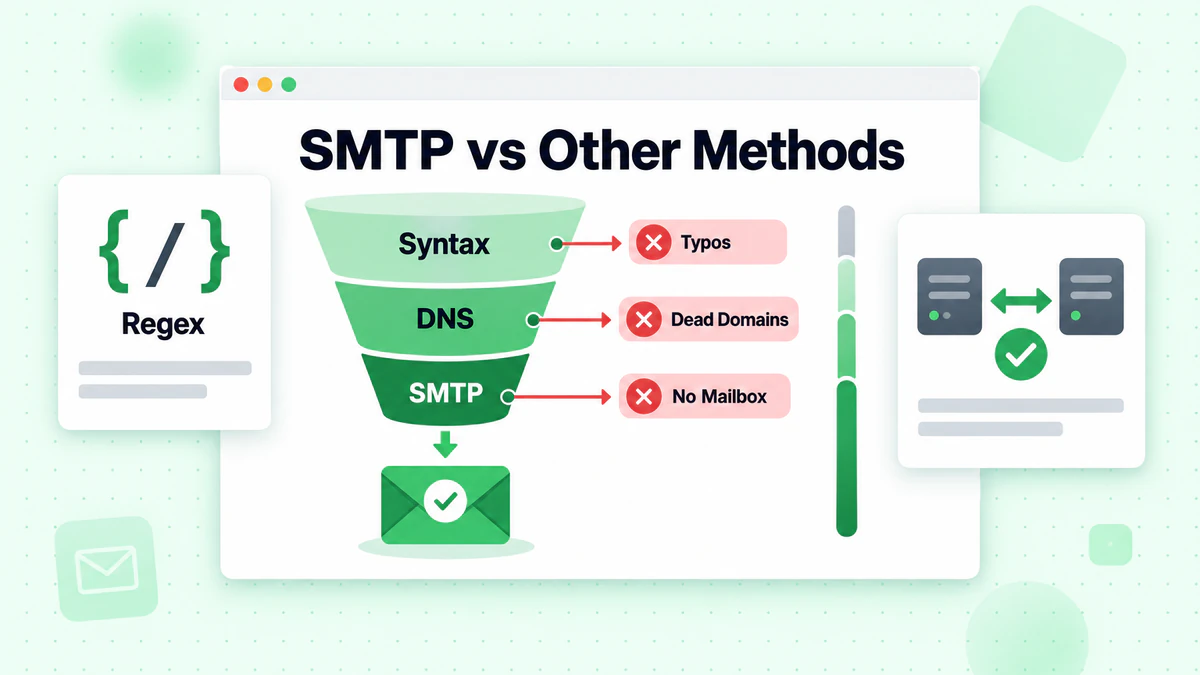
यह समझना कि SMTP verification अन्य email validation तकनीकों की तुलना में कैसे है, आपको सही दृष्टिकोण चुनने में मदद करता है।
Syntax Validation
Syntax validation regex patterns का उपयोग करके जांचता है कि कोई ईमेल सही format का पालन करता है या नहीं। यह तेज़ है और client-side पर किया जा सकता है लेकिन केवल स्पष्ट formatting errors को पकड़ता है।
शक्तियाँ:
- तत्काल परिणाम
- कोई network requests नहीं
- Typos को पकड़ता है
सीमाएँ:
- Existence की पुष्टि नहीं कर सकता
- कई invalid ईमेल syntax checks पास करते हैं
Domain/MX Verification
MX record verification mail server records की जांच करके पुष्टि करता है कि एक domain ईमेल प्राप्त कर सकता है।
शक्तियाँ:
- Non-existent domains को पकड़ता है
- तेज़ DNS lookup
- कोई SMTP connection की आवश्यकता नहीं
सीमाएँ:
- विशिष्ट mailboxes को verify नहीं कर सकता
- Domain में MX हो सकता है लेकिन कोई valid users नहीं
SMTP Verification
SMTP verification पुष्टि करता है कि विशिष्ट mailbox मौजूद है और mail प्राप्त कर सकता है।
शक्तियाँ:
- Mailbox existence के लिए उच्चतम सटीकता
- Mail server के साथ सीधा संचार
- कई invalid addresses को पकड़ता है
सीमाएँ:
- अन्य विधियों की तुलना में धीमा
- Catch-all domains से प्रभावित
- Rate limiting द्वारा block किया जा सकता है
Verification Hierarchy
एक व्यापक ईमेल वैलिडेटर strategy इन विधियों को layers करती है:
- Syntax validation - स्पष्ट रूप से invalid formats को filter करें
- Domain verification - पुष्टि करें कि domain मौजूद है और MX records हैं
- SMTP verification - विशिष्ट mailbox को verify करें
- अतिरिक्त checks - Disposable email detection, role-based detection, catch-all detection
BillionVerify जैसी professional email verification services इस पूर्ण hierarchy को लागू करती हैं, SMTP verification की जटिलता को संभालती हैं जबकि ईमेल गुणवत्ता के बारे में अतिरिक्त intelligence प्रदान करती हैं।
Professional SMTP Verification Services का उपयोग करना
जबकि अपना खुद का SMTP verification system बनाना शैक्षिक है, production applications अक्सर professional ईमेल वैलिडेटर APIs से लाभान्वित होते हैं जो जटिलता को संभालते हैं।
Professional Services के लाभ
Infrastructure
- विश्वव्यापी वितरित verification servers
- स्वच्छ IP reputation management
- उच्च availability और redundancy
Intelligence
- Catch-all domain detection
- Disposable email identification
- Role-based address flagging
- Spam trap detection
Compliance
- Privacy-compliant processing
- सुरक्षित data handling
- Audit trails
BillionVerify API Integration
BillionVerify SMTP checks सहित व्यापक ईमेल सत्यापन प्रदान करता है:
async function verifyWithBillionVerify(email) {
  const response = await fetch('https://api.billionverify.com/v1/verify', {
    method: 'POST',
    headers: {
      'Authorization': 'Bearer YOUR_API_KEY',
      'Content-Type': 'application/json'
    },
    body: JSON.stringify({ email })
  });

  const result = await response.json();

  return {
    isValid: result.is_valid,
    isDeliverable: result.is_deliverable,
    isCatchAll: result.is_catch_all,
    isDisposable: result.is_disposable,
    isRoleBased: result.is_role_based,
    smtpCheck: result.smtp_check,
    mxRecords: result.mx_records,
    riskScore: result.risk_score
  };
}
API आंतरिक रूप से सभी SMTP जटिलता को संभालता है जबकि अतिरिक्त intelligence प्रदान करता है जिसे replicate करने के लिए महत्वपूर्ण infrastructure की आवश्यकता होगी।
Bulk SMTP Verification
बड़ी email lists को verify करने के लिए, bulk verification प्रक्रिया को अनुकूलित करता है:
async function bulkVerify(emails) {
  // Upload file for batch processing
  const formData = new FormData();
  formData.append('file', createCSV(emails));

  const uploadResponse = await fetch('https://api.billionverify.com/v1/bulk/upload', {
    method: 'POST',
    headers: {
      'Authorization': 'Bearer YOUR_API_KEY'
    },
    body: formData
  });

  const { jobId } = await uploadResponse.json();

  // Poll for completion
  let status = 'processing';
  while (status === 'processing') {
    await sleep(5000);
    const statusResponse = await fetch(
      `https://api.billionverify.com/v1/bulk/status/${jobId}`,
      { headers: { 'Authorization': 'Bearer YOUR_API_KEY' } }
    );
    const job = await statusResponse.json();
    status = job.status;
  }

  // Download results
  const resultsResponse = await fetch(
    `https://api.billionverify.com/v1/bulk/download/${jobId}`,
    { headers: { 'Authorization': 'Bearer YOUR_API_KEY' } }
  );

  return await resultsResponse.json();
}
Signup Forms के लिए Real-Time SMTP Verification
उपयोगकर्ता registration के दौरान real-time ईमेल सत्यापन लागू करना शुरू से ही data quality में सुधार करता है।
Frontend Implementation
// Debounced email verification on input
const emailInput = document.getElementById('email');
let verificationTimeout;

emailInput.addEventListener('input', (e) => {
  clearTimeout(verificationTimeout);

  const email = e.target.value;
  if (!isValidSyntax(email)) {
    showError('Please enter a valid email format');
    return;
  }

  verificationTimeout = setTimeout(async () => {
    showLoading();

    try {
      const result = await verifyEmail(email);

      if (result.isValid) {
        showSuccess('Email verified');
      } else if (result.isCatchAll) {
        showWarning('Unable to fully verify this email');
      } else {
        showError('This email address appears invalid');
      }
    } catch (err) {
      // Don't block signup on verification errors
      clearStatus();
    }
  }, 500); // Wait 500ms after typing stops
});

async function verifyEmail(email) {
  const response = await fetch('/api/verify-email', {
    method: 'POST',
    headers: { 'Content-Type': 'application/json' },
    body: JSON.stringify({ email })
  });
  return response.json();
}
Backend API Endpoint
// Express.js endpoint
app.post('/api/verify-email', async (req, res) => {
  const { email } = req.body;

  // Quick syntax check first
  if (!isValidEmailSyntax(email)) {
    return res.json({ isValid: false, reason: 'Invalid syntax' });
  }

  try {
    // Call BillionVerify API for full verification
    const result = await emailVerify.verify(email);

    res.json({
      isValid: result.is_valid && result.is_deliverable,
      isCatchAll: result.is_catch_all,
      isDisposable: result.is_disposable,
      suggestion: result.did_you_mean // Typo suggestions
    });
  } catch (err) {
    // Fail open - don't block signup on API errors
    res.json({ isValid: true, verified: false });
  }
});
SMTP Verification के लिए सुरक्षा विचार
SMTP verification में network connections शामिल हैं जिन्हें security awareness की आवश्यकता होती है।
अपनी Infrastructure की रक्षा करना
Firewall Configuration
- केवल verification servers से outbound SMTP connections की अनुमति दें
- असामान्य connection patterns के लिए monitor करें
- ज्ञात malicious IP ranges को block करें
TLS/SSL Usage
- जब उपलब्ध हो तो STARTTLS का उपयोग करें
- Server certificates को verify करें
- Certificate errors को gracefully handle करें
Blacklisting से बचना
आपके verification servers को blacklist किया जा सकता है यदि वे spam भेज रहे या mail servers का abuse कर रहे प्रतीत होते हैं:
- Strict rate limiting लागू करें
- Verification के लिए समर्पित IPs का उपयोग करें
- नियमित रूप से blacklist status की निगरानी करें
- उचित reverse DNS बनाए रखें
- Abuse complaints का तुरंत जवाब दें
Data Privacy
ईमेल पते व्यक्तिगत data हैं जिन्हें सुरक्षा की आवश्यकता है:
- पूर्ण ईमेल पतों को अनावश्यक रूप से log न करें
- संग्रहीत verification परिणामों को encrypt करें
- Data retention policies लागू करें
- GDPR और अन्य regulations का पालन करें
- API calls के लिए सुरक्षित connections का उपयोग करें
SMTP Verification Performance को मापना
अपने verification system के अच्छे प्रदर्शन को सुनिश्चित करने के लिए प्रमुख metrics को track करें।
प्रमुख Metrics
Accuracy Metrics
- True positive rate (valid सही ढंग से पहचाना गया)
- False positive rate (invalid को valid के रूप में चिह्नित)
- Catch-all detection accuracy
- Unknown/unable to verify rate
Performance Metrics
- औसत verification समय
- 95th percentile response समय
- Connection success rate
- Domain द्वारा timeout rate
Operational Metrics
- दैनिक verification volume
- Type द्वारा error rates
- Blacklist incidents
- API availability
Monitoring Dashboard Example
class VerificationMetrics {
  constructor() {
    this.counters = {
      total: 0,
      valid: 0,
      invalid: 0,
      catchAll: 0,
      unknown: 0,
      errors: 0
    };
    this.timings = [];
  }

  record(result, duration) {
    this.counters.total++;
    this.timings.push(duration);

    if (result.valid === true) this.counters.valid++;
    else if (result.valid === false) this.counters.invalid++;
    else if (result.isCatchAll) this.counters.catchAll++;
    else this.counters.unknown++;
  }

  recordError() {
    this.counters.errors++;
  }

  getStats() {
    const sortedTimings = this.timings.sort((a, b) => a - b);

    return {
      counts: this.counters,
      accuracy: {
        validRate: this.counters.valid / this.counters.total,
        unknownRate: this.counters.unknown / this.counters.total
      },
      performance: {
        avgTime: average(this.timings),
        p95Time: sortedTimings[Math.floor(sortedTimings.length * 0.95)],
        errorRate: this.counters.errors / this.counters.total
      }
    };
  }
}
निष्कर्ष
SMTP ईमेल सत्यापन यह सत्यापित करने के लिए सबसे सटीक विधि प्रदान करता है कि कोई ईमेल पता संदेश प्राप्त कर सकता है या नहीं। SMTP protocol का उपयोग करके mail servers के साथ सीधे संचार करके, आप वास्तविक ईमेल भेजे बिना mailbox existence निर्धारित कर सकते हैं।
प्रभावी SMTP verification बनाने के लिए protocol विवरण को समझने, catch-all domains और greylisting जैसी विभिन्न चुनौतियों को संभालने, और उचित rate limiting और error handling को लागू करने की आवश्यकता होती है। अधिकांश production applications के लिए, BillionVerify जैसी professional ईमेल चेकर services verification infrastructure को बनाने और बनाए रखने की जटिलता के बिना आवश्यक infrastructure, intelligence, और reliability प्रदान करती हैं।
चाहे आप सीखने के उद्देश्यों के लिए अपना खुद का SMTP verification लागू कर रहे हों या एक professional ईमेल वैलिडेटर API को integrate कर रहे हों, इस guide में शामिल सिद्धांत आपको यह समझने में मदद करेंगे कि बड़े पैमाने पर ईमेल पता सत्यापित करते समय पर्दे के पीछे क्या होता है।
याद रखें कि SMTP verification व्यापक ईमेल वैलिडेशन का केवल एक घटक है। इसे syntax validation, domain verification, disposable email detection, और catch-all identification के साथ मिलाना एक पूर्ण ईमेल वैलिडेशन strategy बनाता है जो आपकी sender reputation की रक्षा करता है, email deliverability में सुधार करता है, और आपकी email lists की गुणवत्ता बनाए रखता है।
तत्काल feedback के लिए बुनियादी syntax और domain checks से शुरू करें, गहन validation के लिए SMTP verification को layer करें, और BillionVerify जैसी professional services पर विचार करें जब आपको समर्पित email verification infrastructure से आने वाली reliability, accuracy, और अतिरिक्त intelligence की आवश्यकता हो।
Instantly या Smartlead का उपयोग करने वाली टीमें हर अभियान से पहले BillionVerify से सूचियाँ साफ करके डिलीवरेबिलिटी में उल्लेखनीय सुधार करती हैं।
वेरिफिकेशन प्रोवाइडर चुनने से पहले सटीकता और गति के मामले में BillionVerify की तुलना ZeroBounce से करें।