



郵箱驗證是現代 Web 應用的關鍵元件,每個開發者都必須理解並正確實現它。無論您是在建構使用者註冊系統、電子報平台還是電子商務應用,實現強大的郵箱驗證都能保護您的應用免受無效資料的影響,降低退信率,並提高整體可投遞性。本綜合指南為開發者提供從零開始實現專業級郵箱驗證所需的一切。
為什麼開發者需要郵箱驗證
理解郵箱驗證的重要性有助於開發者在實現策略和資源分配方面做出明智的決策。
郵箱驗證的商業價值
無效的郵箱地址每年給企業造成數百萬美元的損失,包括浪費的行銷支出、受損的寄件人聲譽和失去的客戶互動機會。當使用者在註冊過程中輸入錯誤的郵箱地址時,無論是由於拼寫錯誤還是故意填寫虛假地址,後果都會波及整個系統。
Gmail、Outlook 和 Yahoo 等電子郵件服務提供商會密切監控寄件人聲譽指標。當您的應用向無效地址傳送郵件時,這些郵件會被退回並對您的寄件人評分產生負面影響。糟糕的寄件人聲譽意味著您的合法郵件越來越多地落入垃圾郵件資料夾,降低了所有郵件通訊的有效性。
對於開發者來說,在輸入點實現郵箱驗證可以在問題發生之前預防這些問題。通過在使用者註冊期間即時驗證郵箱地址,您可以確保資料庫從一開始就只包含合法的、可投遞的地址。
郵箱驗證的技術優勢
除了業務指標之外,郵箱驗證還提供了顯著的技術優勢,可以提高應用品質和可靠性。乾淨的郵箱資料可以減少虛假帳戶造成的資料庫膨脹,提高查詢效能,並簡化使用者管理。
郵箱驗證還通過防止帳戶列舉攻擊和降低機器人註冊的有效性來增強安全性。當與速率限制和驗證碼等其他安全措施結合使用時,郵箱驗證可以建立強大的防禦機制來對抗自動化濫用。
郵箱驗證架構概述
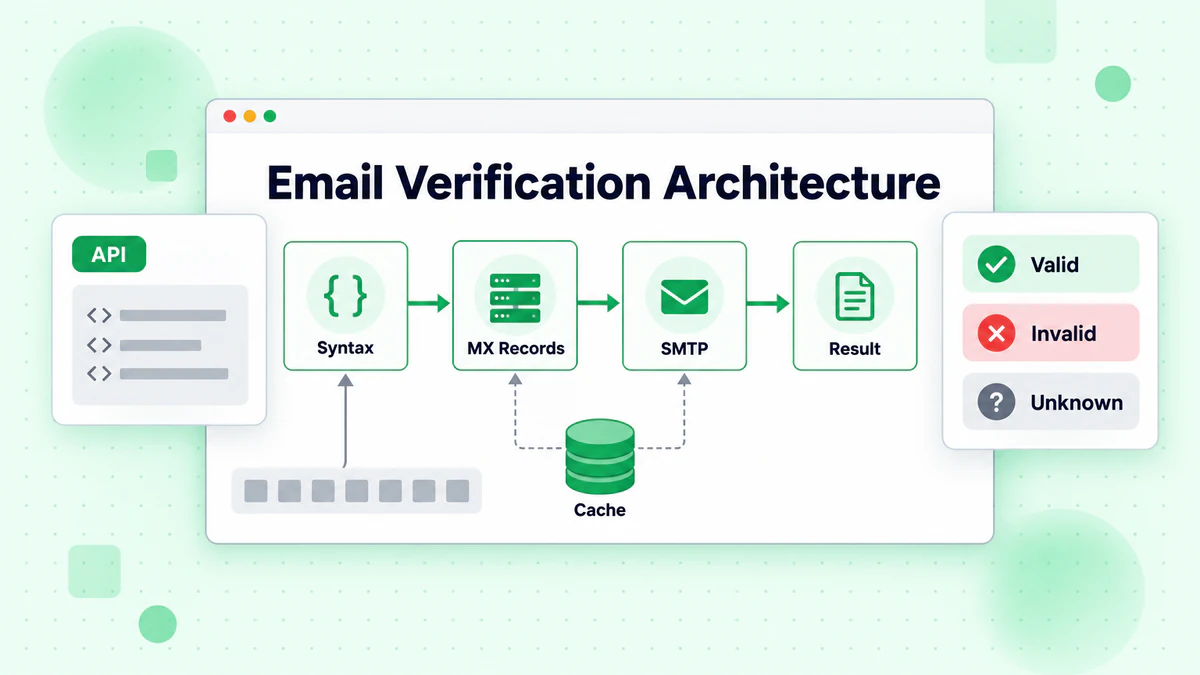
在深入實現細節之前,開發者應該理解完整的郵箱驗證架構以及不同元件如何協同工作。
多層驗證方法
專業的郵箱驗證系統實現多個驗證層,每一層都捕獲不同類型的無效地址。這種分層方法在最佳化效能的同時最大化準確性。
第一層執行語法驗證,檢查郵箱地址是否符合 RFC 5321 和 RFC 5322 標準。這種快速的本地驗證可以捕獲明顯的格式錯誤,無需任何網路請求。
第二層執行 DNS 驗證,查詢 MX 記錄以驗證郵箱網域是否可以接收郵件。這種基於網路的驗證可以捕獲不存在或缺少正確郵件設定的網域。
第三層執行 SMTP 驗證,連線到接收方的郵件伺服器以驗證特定郵箱是否存在。這提供了最高的準確性,但需要仔細實現以避免被阻擋。
同步與非同步驗證
開發者必須在表單提交期間的同步驗證和提交後的非同步驗證之間做出選擇。每種方法都有不同的優勢和權衡。
同步驗證為使用者提供即時回饋,防止無效地址進入您的系統。但是,SMTP 驗證可能需要幾秒鐘,在註冊過程中可能會讓使用者感到沮喪。
非同步驗證立即接受地址並在背景驗證它們。這提供了更好的使用者體驗,但需要額外的邏輯來處理提交後驗證失敗的地址。
許多生產系統使用混合方法,同步執行快速的語法和 DNS 驗證,同時將 SMTP 驗證推遲到背景處理。
實現語法驗證
語法驗證是郵箱驗證的基礎,在執行昂貴的網路操作之前捕獲格式錯誤的地址。
理解郵箱地址結構
有效的郵箱地址由本地部分、@ 符號和網域部分組成。雖然完整的 RFC 規範允許複雜的格式,但實際驗證應該關注常用的模式。
本地部分可以包含字母數字字元、點、連字號、底線和加號。網域部分必須是有效的網域名稱,至少有一個點分隔網域和頂級網域。
基於正則表達式的驗證
正則表達式提供快速、靈活的郵箱驗證。但是,建立一個正確驗證所有有效地址同時拒絕無效地址的正則表達式出乎意料地複雜。
// Practical email validation regex for JavaScript
const emailRegex = /^[a-zA-Z0-9.!#$%&'*+/=?^_`{|}~-]+@[a-zA-Z0-9](?:[a-zA-Z0-9-]{0,61}[a-zA-Z0-9])?(?:\.[a-zA-Z0-9](?:[a-zA-Z0-9-]{0,61}[a-zA-Z0-9])?)*$/;

function validateEmailSyntax(email) {
  if (!email || typeof email !== 'string') {
    return { valid: false, error: 'Email is required' };
  }

  const trimmedEmail = email.trim().toLowerCase();

  if (trimmedEmail.length > 254) {
    return { valid: false, error: 'Email address too long' };
  }

  if (!emailRegex.test(trimmedEmail)) {
    return { valid: false, error: 'Invalid email format' };
  }

  const [localPart, domain] = trimmedEmail.split('@');

  if (localPart.length > 64) {
    return { valid: false, error: 'Local part too long' };
  }

  return { valid: true, email: trimmedEmail };
}
超越基本正則驗證
雖然正則表達式可以捕獲明顯的格式錯誤,但額外的檢查可以提高驗證準確性。這些檢查包括檢查連續的點、驗證頂級網域長度以及偵測常見的拼寫錯誤模式。
function enhancedSyntaxValidation(email) {
  const basicResult = validateEmailSyntax(email);
  if (!basicResult.valid) return basicResult;

  const normalizedEmail = basicResult.email;
  const [localPart, domain] = normalizedEmail.split('@');

  // Check for consecutive dots
  if (localPart.includes('..') || domain.includes('..')) {
    return { valid: false, error: 'Consecutive dots not allowed' };
  }

  // Check for leading/trailing dots
  if (localPart.startsWith('.') || localPart.endsWith('.')) {
    return { valid: false, error: 'Local part cannot start or end with dot' };
  }

  // Validate TLD
  const tld = domain.split('.').pop();
  if (tld.length < 2 || tld.length > 63) {
    return { valid: false, error: 'Invalid top-level domain' };
  }

  // Check for numeric-only TLD (not valid)
  if (/^\d+$/.test(tld)) {
    return { valid: false, error: 'TLD cannot be numeric only' };
  }

  return { valid: true, email: normalizedEmail };
}
DNS 和 MX 記錄驗證
在語法驗證之後,DNS 驗證通過檢查有效的 MX 記錄來驗證郵箱網域是否可以接收郵件。
理解 MX 記錄
郵件交換 (MX) 記錄是 DNS 記錄,指定負責接受網域郵件的郵件伺服器。每個 MX 記錄包括一個優先順序值和一個主機名稱,允許網域設定具有故障轉移的多個郵件伺服器。
當向 user@example.com 傳送郵件時,發送伺服器查詢 DNS 以取得 example.com 的 MX 記錄,然後連線到回應的最高優先順序(最低數字)郵件伺服器。
在 Node.js 中實現 MX 查詢
Node.js 通過 dns 模組提供內建的 DNS 解析,使 MX 驗證實現變得簡單。
const dns = require('dns').promises;

async function validateMXRecords(domain) {
  try {
    const mxRecords = await dns.resolveMx(domain);

    if (!mxRecords || mxRecords.length === 0) {
      return {
        valid: false,
        error: 'No MX records found',
        domain
      };
    }

    // Sort by priority (lower is higher priority)
    const sortedRecords = mxRecords.sort((a, b) => a.priority - b.priority);

    return {
      valid: true,
      domain,
      mxRecords: sortedRecords,
      primaryMX: sortedRecords[0].exchange
    };
  } catch (error) {
    if (error.code === 'ENOTFOUND' || error.code === 'ENODATA') {
      return {
        valid: false,
        error: 'Domain does not exist or has no MX records',
        domain
      };
    }

    return {
      valid: false,
      error: `DNS lookup failed: ${error.message}`,
      domain
    };
  }
}

async function validateEmailDomain(email) {
  const domain = email.split('@')[1];

  // First try MX records
  const mxResult = await validateMXRecords(domain);
  if (mxResult.valid) return mxResult;

  // Fall back to A record check (some domains accept mail without MX)
  try {
    const aRecords = await dns.resolve4(domain);
    if (aRecords && aRecords.length > 0) {
      return {
        valid: true,
        domain,
        mxRecords: [],
        fallbackToA: true,
        aRecords
      };
    }
  } catch (error) {
    // A record lookup also failed
  }

  return mxResult;
}
處理 DNS 邊緣情況
生產環境的郵箱驗證必須處理各種 DNS 邊緣情況,包括逾時、臨時故障和具有異常設定的網域。
async function robustDNSValidation(email, options = {}) {
  const { timeout = 5000, retries = 2 } = options;
  const domain = email.split('@')[1];

  for (let attempt = 0; attempt <= retries; attempt++) {
    try {
      const controller = new AbortController();
      const timeoutId = setTimeout(() => controller.abort(), timeout);

      const result = await validateEmailDomain(email);
      clearTimeout(timeoutId);

      return result;
    } catch (error) {
      if (attempt === retries) {
        return {
          valid: false,
          error: 'DNS validation failed after retries',
          domain,
          temporary: true
        };
      }

      // Exponential backoff
      await new Promise(resolve =>
        setTimeout(resolve, Math.pow(2, attempt) * 100)
      );
    }
  }
}
SMTP 驗證實現
SMTP 驗證通過直接查詢接收方的郵件伺服器來驗證郵箱是否存在,從而提供最高的準確性。
SMTP 驗證的工作原理
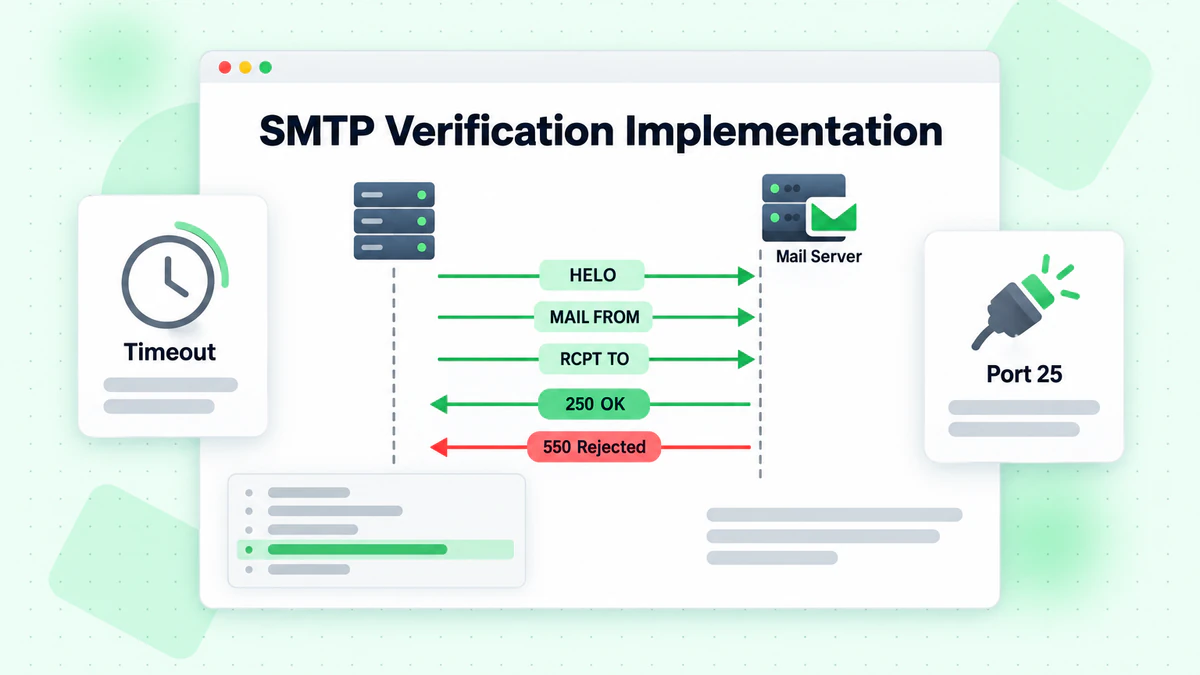
SMTP 驗證模擬傳送郵件的初始步驟,而不實際投遞訊息。驗證過程建立到郵件伺服器的連線,使用 EHLO/HELO 介紹自己,使用 MAIL FROM 提供寄件人地址,然後使用 RCPT TO 請求發送到目標地址。
郵件伺服器對 RCPT TO 的回應指示郵箱是否存在。250 回應確認地址有效,而 550 表示使用者不存在。但是,許多伺服器現在使用全部接收設定或灰名單,這使該過程變得複雜。
Node.js 中的基本 SMTP 驗證
const net = require('net');

class SMTPVerifier {
  constructor(options = {}) {
    this.timeout = options.timeout || 10000;
    this.fromEmail = options.fromEmail || 'verify@example.com';
    this.fromDomain = options.fromDomain || 'example.com';
  }

  async verify(email, mxHost) {
    return new Promise((resolve) => {
      const socket = new net.Socket();
      let step = 0;
      let response = '';

      const cleanup = () => {
        socket.destroy();
      };

      socket.setTimeout(this.timeout);

      socket.on('timeout', () => {
        cleanup();
        resolve({ valid: false, error: 'Connection timeout' });
      });

      socket.on('error', (error) => {
        cleanup();
        resolve({ valid: false, error: error.message });
      });

      socket.on('data', (data) => {
        response = data.toString();
        const code = parseInt(response.substring(0, 3));

        switch (step) {
          case 0: // Connected, received greeting
            if (code === 220) {
              socket.write(`EHLO ${this.fromDomain}\r\n`);
              step = 1;
            } else {
              cleanup();
              resolve({ valid: false, error: 'Invalid greeting' });
            }
            break;

          case 1: // EHLO response
            if (code === 250) {
              socket.write(`MAIL FROM:<${this.fromEmail}>\r\n`);
              step = 2;
            } else {
              cleanup();
              resolve({ valid: false, error: 'EHLO rejected' });
            }
            break;

          case 2: // MAIL FROM response
            if (code === 250) {
              socket.write(`RCPT TO:<${email}>\r\n`);
              step = 3;
            } else {
              cleanup();
              resolve({ valid: false, error: 'MAIL FROM rejected' });
            }
            break;

          case 3: // RCPT TO response - the verification result
            socket.write('QUIT\r\n');
            cleanup();

            if (code === 250) {
              resolve({ valid: true, email });
            } else if (code === 550 || code === 551 || code === 552 || code === 553) {
              resolve({ valid: false, error: 'Mailbox does not exist', code });
            } else if (code === 450 || code === 451 || code === 452) {
              resolve({ valid: false, error: 'Temporary failure', temporary: true, code });
            } else {
              resolve({ valid: false, error: `Unknown response: ${code}`, code });
            }
            break;
        }
      });

      socket.connect(25, mxHost);
    });
  }
}
處理 SMTP 挑戰
現實世界的 SMTP 驗證面臨眾多挑戰,包括灰名單、速率限制和全部接收網域。開發者必須實現策略來處理這些情況。
async function comprehensiveSMTPVerification(email, mxRecords) {
  const verifier = new SMTPVerifier({
    fromEmail: 'verify@yourdomain.com',
    fromDomain: 'yourdomain.com',
    timeout: 15000
  });

  // Try each MX server in priority order
  for (const mx of mxRecords) {
    const result = await verifier.verify(email, mx.exchange);

    // If we get a definitive answer, return it
    if (result.valid || (!result.temporary && result.code === 550)) {
      return result;
    }

    // For temporary failures or connection issues, try next server
    if (result.temporary || result.error.includes('timeout')) {
      continue;
    }

    // For other errors, return the result
    return result;
  }

  return {
    valid: false,
    error: 'All MX servers failed',
    temporary: true
  };
}
使用郵箱驗證 API
雖然建構自訂驗證具有教育意義,但生產應用通常受益於使用像 BillionVerify 這樣的專業郵箱驗證 API。
為什麼使用郵箱驗證 API
專業的郵箱驗證服務比自訂實現提供了幾個優勢。它們維護已知的一次性郵箱提供商、全部接收網域和垃圾郵件陷阱的廣泛資料庫。它們還管理大容量 SMTP 驗證所需的基礎設施,而不會被阻擋。
BillionVerify 的郵箱驗證 API 通過簡單的 REST API 提供全面的驗證,包括語法檢查、DNS 驗證、SMTP 驗證、一次性郵箱偵測和可投遞性評分。
整合 BillionVerify API
const axios = require('axios');

class BillionVerifyClient {
  constructor(apiKey) {
    this.apiKey = apiKey;
    this.baseURL = 'https://api.billionverify.com/v1';
  }

  async verifySingle(email) {
    try {
      const response = await axios.get(`${this.baseURL}/verify`, {
        params: { email },
        headers: {
          'Authorization': `Bearer ${this.apiKey}`,
          'Content-Type': 'application/json'
        }
      });

      return {
        success: true,
        data: response.data
      };
    } catch (error) {
      return {
        success: false,
        error: error.response?.data?.message || error.message
      };
    }
  }

  async verifyBatch(emails) {
    try {
      const response = await axios.post(`${this.baseURL}/verify/batch`, {
        emails
      }, {
        headers: {
          'Authorization': `Bearer ${this.apiKey}`,
          'Content-Type': 'application/json'
        }
      });

      return {
        success: true,
        data: response.data
      };
    } catch (error) {
      return {
        success: false,
        error: error.response?.data?.message || error.message
      };
    }
  }
}

// Usage example
async function validateUserEmail(email) {
  const client = new BillionVerifyClient(process.env.BV_API_KEY);
  const result = await client.verifySingle(email);

  if (!result.success) {
    console.error('Verification failed:', result.error);
    return { valid: false, error: 'Verification service unavailable' };
  }

  const { data } = result;

  return {
    valid: data.deliverable,
    email: data.email,
    status: data.status,
    isDisposable: data.is_disposable,
    isCatchAll: data.is_catch_all,
    score: data.quality_score
  };
}
Web 應用中的即時驗證
在 Web 應用中實現即時郵箱驗證需要仔細考慮使用者體驗和效能。
前端驗證策略
前端驗證應該為明顯的錯誤提供即時回饋,同時將全面驗證推遲到後端。這種方法在使用者體驗和安全性之間取得平衡。
// Frontend email validation with debouncing
class EmailValidator {
  constructor(options = {}) {
    this.debounceMs = options.debounceMs || 500;
    this.onValidating = options.onValidating || (() => {});
    this.onResult = options.onResult || (() => {});
    this.pendingRequest = null;
    this.debounceTimer = null;
  }

  validateSyntax(email) {
    const regex = /^[^\s@]+@[^\s@]+\.[^\s@]+$/;
    return regex.test(email);
  }

  async validate(email) {
    // Clear any pending requests
    if (this.debounceTimer) {
      clearTimeout(this.debounceTimer);
    }

    // Immediate syntax check
    if (!this.validateSyntax(email)) {
      this.onResult({
        valid: false,
        error: 'Please enter a valid email address'
      });
      return;
    }

    // Debounce API calls
    this.debounceTimer = setTimeout(async () => {
      this.onValidating(true);

      try {
        const response = await fetch('/api/verify-email', {
          method: 'POST',
          headers: { 'Content-Type': 'application/json' },
          body: JSON.stringify({ email })
        });

        const result = await response.json();
        this.onResult(result);
      } catch (error) {
        this.onResult({
          valid: false,
          error: 'Unable to verify email'
        });
      } finally {
        this.onValidating(false);
      }
    }, this.debounceMs);
  }
}

// React component example
function EmailInput() {
  const [email, setEmail] = useState('');
  const [status, setStatus] = useState({ checking: false, result: null });

  const validator = useMemo(() => new EmailValidator({
    onValidating: (checking) => setStatus(s => ({ ...s, checking })),
    onResult: (result) => setStatus(s => ({ ...s, result }))
  }), []);

  const handleChange = (e) => {
    const value = e.target.value;
    setEmail(value);
    if (value) validator.validate(value);
  };

  return (
    <div className="email-input">
      <input
        type="email"
        value={email}
        onChange={handleChange}
        placeholder="Enter your email"
      />
      {status.checking && <span className="loading">Verifying...</span>}
      {status.result && (
        <span className={status.result.valid ? 'valid' : 'invalid'}>
          {status.result.valid ? '✓ Valid email' : status.result.error}
        </span>
      )}
    </div>
  );
}
後端 API 端點
後端 API 端點應該實現全面的驗證,同時通過速率限制防止濫用。
const express = require('express');
const rateLimit = require('express-rate-limit');

const app = express();

// Rate limiting for verification endpoint
const verifyLimiter = rateLimit({
  windowMs: 60 * 1000, // 1 minute
  max: 10, // 10 requests per minute per IP
  message: { error: 'Too many verification requests' }
});

app.post('/api/verify-email', verifyLimiter, async (req, res) => {
  const { email } = req.body;

  if (!email) {
    return res.status(400).json({ valid: false, error: 'Email required' });
  }

  try {
    // Layer 1: Syntax validation
    const syntaxResult = enhancedSyntaxValidation(email);
    if (!syntaxResult.valid) {
      return res.json(syntaxResult);
    }

    // Layer 2: DNS validation
    const dnsResult = await robustDNSValidation(syntaxResult.email);
    if (!dnsResult.valid) {
      return res.json(dnsResult);
    }

    // Layer 3: API-based comprehensive validation
    const apiResult = await validateUserEmail(syntaxResult.email);

    res.json(apiResult);
  } catch (error) {
    console.error('Verification error:', error);
    res.status(500).json({ valid: false, error: 'Verification failed' });
  }
});
偵測一次性和臨時郵箱
一次性郵箱地址對需要真實使用者參與的應用構成重大挑戰。偵測和阻擋這些地址對於維護列表品質至關重要。
理解一次性郵箱
Guerrilla Mail、10MinuteMail 和 Mailinator 等一次性郵箱服務提供使用者可以無需註冊即時建立的臨時地址。雖然這些服務有合法用途,但它們經常被用來繞過註冊要求或建立虛假帳戶。
建構一次性郵箱偵測器
class DisposableEmailDetector {
  constructor() {
    // Common disposable email domains
    this.knownDisposable = new Set([
      'guerrillamail.com', 'guerrillamail.org',
      '10minutemail.com', '10minutemail.net',
      'mailinator.com', 'mailinator.net',
      'tempmail.com', 'tempmail.net',
      'throwaway.email', 'throwawaymail.com',
      'fakeinbox.com', 'trashmail.com',
      'getnada.com', 'temp-mail.org',
      'mohmal.com', 'emailondeck.com'
      // Add more known disposable domains
    ]);

    // Patterns that often indicate disposable services
    this.suspiciousPatterns = [
      /^temp/i,
      /^trash/i,
      /^throw/i,
      /^fake/i,
      /^disposable/i,
      /\d{2,}mail/i,
      /minutemail/i
    ];
  }

  isDisposable(email) {
    const domain = email.split('@')[1].toLowerCase();

    // Check known disposable domains
    if (this.knownDisposable.has(domain)) {
      return { isDisposable: true, reason: 'Known disposable domain' };
    }

    // Check suspicious patterns
    for (const pattern of this.suspiciousPatterns) {
      if (pattern.test(domain)) {
        return { isDisposable: true, reason: 'Suspicious domain pattern' };
      }
    }

    return { isDisposable: false };
  }

  async updateDisposableList() {
    // Fetch updated list from a maintained source
    try {
      const response = await fetch(
        'https://raw.githubusercontent.com/disposable-email-domains/disposable-email-domains/master/disposable_email_blocklist.conf'
      );
      const text = await response.text();
      const domains = text.split('\n').filter(d => d.trim());

      domains.forEach(domain => this.knownDisposable.add(domain.toLowerCase()));

      return { success: true, count: this.knownDisposable.size };
    } catch (error) {
      return { success: false, error: error.message };
    }
  }
}
效能最佳化策略
如果實現不當,郵箱驗證可能會影響應用效能。這些最佳化策略有助於保持快速的回應時間。
快取驗證結果
快取減少了冗餘的驗證請求,並提高了重複驗證的回應時間。
const NodeCache = require('node-cache');

class CachedEmailVerifier {
  constructor(options = {}) {
    this.cache = new NodeCache({
      stdTTL: options.ttl || 3600, // 1 hour default
      checkperiod: options.checkperiod || 600
    });
    this.verifier = options.verifier;
  }

  async verify(email) {
    const normalizedEmail = email.toLowerCase().trim();
    const cacheKey = `email:${normalizedEmail}`;

    // Check cache first
    const cached = this.cache.get(cacheKey);
    if (cached) {
      return { ...cached, fromCache: true };
    }

    // Perform verification
    const result = await this.verifier.verify(normalizedEmail);

    // Cache the result (don't cache temporary failures)
    if (!result.temporary) {
      this.cache.set(cacheKey, result);
    }

    return result;
  }

  invalidate(email) {
    const normalizedEmail = email.toLowerCase().trim();
    this.cache.del(`email:${normalizedEmail}`);
  }

  getStats() {
    return this.cache.getStats();
  }
}
實現請求佇列
對於高容量應用,請求佇列可以防止驗證服務過載,並確保公平的資源分配。
const Queue = require('bull');

const verificationQueue = new Queue('email-verification', {
  redis: { host: 'localhost', port: 6379 },
  defaultJobOptions: {
    attempts: 3,
    backoff: {
      type: 'exponential',
      delay: 1000
    }
  }
});

// Process verification jobs
verificationQueue.process(async (job) => {
  const { email, userId } = job.data;

  const result = await comprehensiveEmailVerification(email);

  // Store result in database
  await updateUserEmailStatus(userId, result);

  return result;
});

// Queue a verification request
async function queueEmailVerification(email, userId) {
  const job = await verificationQueue.add({
    email,
    userId
  }, {
    priority: 1,
    delay: 0
  });

  return job.id;
}
錯誤處理和日誌記錄
強大的錯誤處理和全面的日誌記錄對於維護可靠的郵箱驗證系統至關重要。
實現全面的錯誤處理
class EmailVerificationError extends Error {
  constructor(message, code, details = {}) {
    super(message);
    this.name = 'EmailVerificationError';
    this.code = code;
    this.details = details;
    this.timestamp = new Date().toISOString();
  }
}

async function safeEmailVerification(email) {
  const startTime = Date.now();

  try {
    // Validate input
    if (!email || typeof email !== 'string') {
      throw new EmailVerificationError(
        'Invalid email input',
        'INVALID_INPUT',
        { received: typeof email }
      );
    }

    const result = await comprehensiveEmailVerification(email);

    // Log successful verification
    logger.info('Email verification completed', {
      email: maskEmail(email),
      valid: result.valid,
      duration: Date.now() - startTime
    });

    return result;

  } catch (error) {
    // Log error with context
    logger.error('Email verification failed', {
      email: maskEmail(email),
      error: error.message,
      code: error.code,
      duration: Date.now() - startTime,
      stack: error.stack
    });

    // Return safe error response
    return {
      valid: false,
      error: 'Verification failed',
      errorCode: error.code || 'UNKNOWN_ERROR',
      temporary: true
    };
  }
}

function maskEmail(email) {
  const [local, domain] = email.split('@');
  const maskedLocal = local.charAt(0) + '***' + local.charAt(local.length - 1);
  return `${maskedLocal}@${domain}`;
}
安全考慮
郵箱驗證系統必須在設計時考慮安全性,以防止濫用並保護使用者資料。
防止列舉攻擊
攻擊者可能使用郵箱驗證端點來列舉有效的郵箱地址。實現針對此攻擊向量的防禦措施。
const crypto = require('crypto');

function secureVerificationResponse(result, options = {}) {
  const { hideDetails = true } = options;

  // Add consistent response timing to prevent timing attacks
  const minResponseTime = 200;
  const elapsed = Date.now() - result.startTime;
  const delay = Math.max(0, minResponseTime - elapsed);

  return new Promise(resolve => {
    setTimeout(() => {
      if (hideDetails && !result.valid) {
        // Don't reveal whether email exists or domain is invalid
        resolve({
          valid: false,
          message: 'Unable to verify email address'
        });
      } else {
        resolve(result);
      }
    }, delay);
  });
}
速率限制和濫用防護
實現全面的速率限制以防止驗證端點的濫用。
const rateLimit = require('express-rate-limit');
const RedisStore = require('rate-limit-redis');

const verificationRateLimiter = rateLimit({
  store: new RedisStore({
    client: redisClient,
    prefix: 'rl:verify:'
  }),
  windowMs: 60 * 1000, // 1 minute
  max: 5, // 5 requests per minute
  keyGenerator: (req) => {
    // Combine IP and user ID if authenticated
    const userId = req.user?.id || 'anonymous';
    return `${req.ip}:${userId}`;
  },
  handler: (req, res) => {
    res.status(429).json({
      error: 'Too many verification requests',
      retryAfter: Math.ceil(req.rateLimit.resetTime / 1000)
    });
  }
});
測試郵箱驗證系統
全面的測試確保郵箱驗證系統在所有場景下正常工作。
驗證函式的單元測試
const { expect } = require('chai');

describe('Email Syntax Validation', () => {
  it('should accept valid email addresses', () => {
    const validEmails = [
      'user@example.com',
      'user.name@example.com',
      'user+tag@example.com',
      'user@subdomain.example.com'
    ];

    validEmails.forEach(email => {
      const result = validateEmailSyntax(email);
      expect(result.valid).to.be.true;
    });
  });

  it('should reject invalid email addresses', () => {
    const invalidEmails = [
      'invalid',
      '@example.com',
      'user@',
      'user@@example.com',
      'user@example',
      'user@.com'
    ];

    invalidEmails.forEach(email => {
      const result = validateEmailSyntax(email);
      expect(result.valid).to.be.false;
    });
  });

  it('should handle edge cases', () => {
    expect(validateEmailSyntax('')).to.have.property('valid', false);
    expect(validateEmailSyntax(null)).to.have.property('valid', false);
    expect(validateEmailSyntax(undefined)).to.have.property('valid', false);
  });
});
總結
作為開發者實現郵箱驗證需要理解多個驗證層,從基本的語法檢查到進階的 SMTP 驗證。通過結合本地驗證、DNS 查詢和像 BillionVerify 這樣的專業驗證 API,開發者可以建構強大的系統,在提供出色使用者體驗的同時保持高資料品質。
成功實現郵箱驗證的關鍵原則包括使用多個驗證層以實現全面覆蓋,實現適當的快取和速率限制以確保效能和安全性,優雅地處理邊緣情況和錯誤,以及持續監控和提高驗證準確性。
無論您選擇實現自訂驗證邏輯還是利用專業 API,本指南涵蓋的技術都為建構郵箱驗證系統提供了基礎,這些系統可以保護您的應用和使用者,同時保持最高的可投遞性和參與度標準。
立即使用 BillionVerify 的開發者友善型 API 在您的應用中實現郵箱驗證。在 BillionVerify 註冊,免費獲得驗證額度和全面的文件。
使用 Instantly 或 Smartlead 的團隊,在每次活動前透過 BillionVerify 清洗名單,可顯著提升送達率。
在選擇驗證服務商之前,比較 BillionVerify 與 ZeroBounce 在準確率和速度方面的差異。