



Email verification is a critical component of modern web applications that every developer must understand and implement correctly. Whether you're building a user registration system, a newsletter platform, or an e-commerce application, implementing robust email verification protects your application from invalid data, reduces bounce rates, and improves overall deliverability. This comprehensive guide provides developers with everything needed to implement professional-grade email verification from scratch. For foundational concepts, see our complete guide to email verification.
Why Developers Need Email Verification
Understanding the importance of email verification helps developers make informed decisions about implementation strategies and resource allocation.
The Business Case for Email Verification
Invalid email addresses cost businesses millions of dollars annually through wasted marketing spend, damaged sender reputation, and lost customer engagement opportunities. When users enter incorrect email addresses during registration, whether through typos or intentional fake addresses, the consequences ripple throughout your entire system.
Email service providers like Gmail, Outlook, and Yahoo closely monitor sender reputation metrics. When your application sends emails to invalid addresses, these bounce back and negatively impact your sender score. A poor sender reputation means your legitimate emails increasingly land in spam folders, reducing the effectiveness of all your email communications.
For developers, implementing email verification at the point of entry prevents these problems before they occur. By validating email addresses in real-time during user signup, you ensure your database contains only legitimate, deliverable addresses from the start.
Technical Benefits of Email Verification
Beyond business metrics, email verification provides significant technical benefits that improve application quality and reliability. Clean email data reduces database bloat from fake accounts, improves query performance, and simplifies user management.
Email verification also enhances security by preventing account enumeration attacks and reducing the effectiveness of bot registrations. When combined with other security measures like rate limiting and CAPTCHA, email verification creates a robust defense against automated abuse.
Email Verification Architecture Overview
Before diving into implementation details, developers should understand the complete email verification architecture and how different components work together.
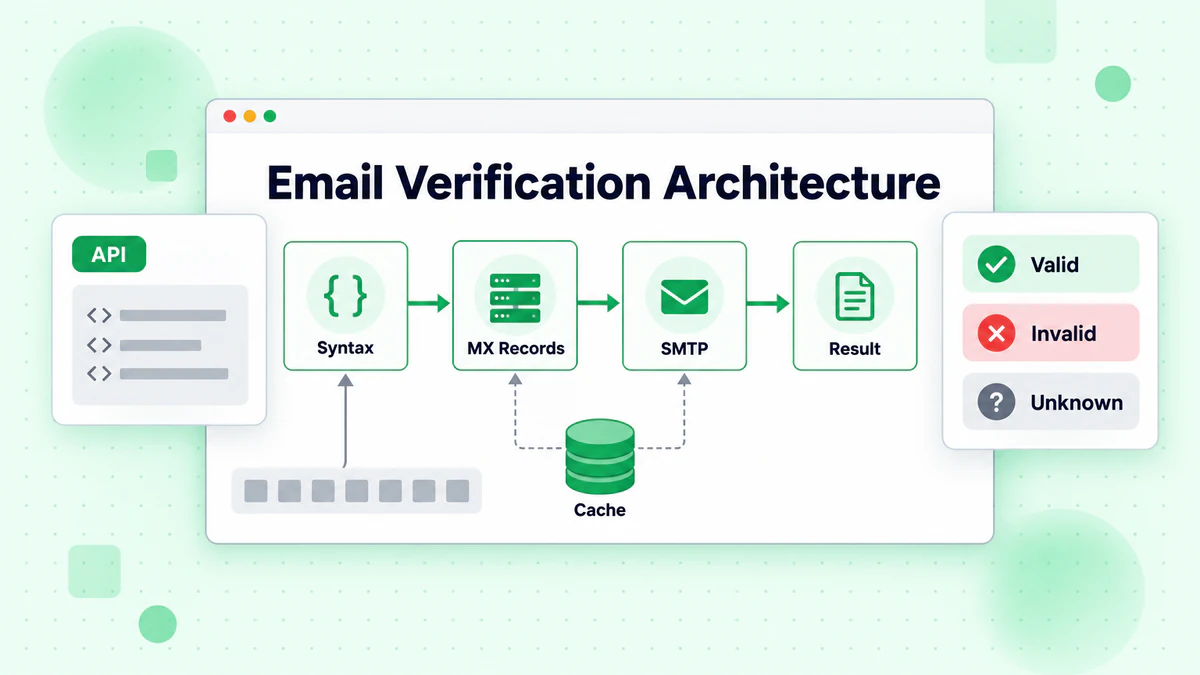
Multi-Layer Verification Approach
Professional email verification systems implement multiple validation layers, each catching different types of invalid addresses. This layered approach maximizes accuracy while optimizing performance.
The first layer performs syntax validation, checking that email addresses conform to RFC 5321 and RFC 5322 standards. This fast, local validation catches obvious formatting errors without any network requests.
The second layer performs DNS validation, querying MX records to verify that the email domain can receive mail. This network-based validation catches domains that don't exist or lack proper email configuration.
The third layer performs SMTP validation, connecting to the recipient's mail server to verify the specific mailbox exists. This provides the highest accuracy but requires careful implementation to avoid being blocked.
Synchronous vs Asynchronous Verification
Developers must decide between synchronous verification during form submission and asynchronous verification after submission. Each approach has distinct advantages and trade-offs.
Synchronous verification provides immediate feedback to users, preventing invalid addresses from entering your system. However, SMTP verification can take several seconds, potentially frustrating users during registration.
Asynchronous verification accepts addresses immediately and validates them in the background. This provides better user experience but requires additional logic to handle addresses that fail verification after submission.
Many production systems use a hybrid approach, performing fast syntax and DNS validation synchronously while deferring SMTP verification to background processing.
Implementing Syntax Validation
Syntax validation is the foundation of email verification, catching malformed addresses before performing expensive network operations.
Understanding Email Address Structure
Valid email addresses consist of a local part, the @ symbol, and a domain part. While the full RFC specification allows complex formats, practical validation should focus on commonly accepted patterns.
The local part can contain alphanumeric characters, dots, hyphens, underscores, and plus signs. The domain part must be a valid domain name with at least one dot separating the domain and top-level domain.
Regex-Based Validation
Regular expressions provide fast, flexible email validation. However, creating a regex that correctly validates all valid addresses while rejecting invalid ones is surprisingly complex.
// Practical email validation regex for JavaScript
const emailRegex = /^[a-zA-Z0-9.!#$%&'*+/=?^_`{|}~-]+@[a-zA-Z0-9](?:[a-zA-Z0-9-]{0,61}[a-zA-Z0-9])?(?:\.[a-zA-Z0-9](?:[a-zA-Z0-9-]{0,61}[a-zA-Z0-9])?)*$/;

function validateEmailSyntax(email) {
  if (!email || typeof email !== 'string') {
    return { valid: false, error: 'Email is required' };
  }

  const trimmedEmail = email.trim().toLowerCase();

  if (trimmedEmail.length > 254) {
    return { valid: false, error: 'Email address too long' };
  }

  if (!emailRegex.test(trimmedEmail)) {
    return { valid: false, error: 'Invalid email format' };
  }

  const [localPart, domain] = trimmedEmail.split('@');

  if (localPart.length > 64) {
    return { valid: false, error: 'Local part too long' };
  }

  return { valid: true, email: trimmedEmail };
}
Beyond Basic Regex Validation
While regex catches obvious formatting errors, additional checks improve validation accuracy. These include checking for consecutive dots, validating top-level domain length, and detecting common typo patterns.
function enhancedSyntaxValidation(email) {
  const basicResult = validateEmailSyntax(email);
  if (!basicResult.valid) return basicResult;

  const normalizedEmail = basicResult.email;
  const [localPart, domain] = normalizedEmail.split('@');

  // Check for consecutive dots
  if (localPart.includes('..') || domain.includes('..')) {
    return { valid: false, error: 'Consecutive dots not allowed' };
  }

  // Check for leading/trailing dots
  if (localPart.startsWith('.') || localPart.endsWith('.')) {
    return { valid: false, error: 'Local part cannot start or end with dot' };
  }

  // Validate TLD
  const tld = domain.split('.').pop();
  if (tld.length < 2 || tld.length > 63) {
    return { valid: false, error: 'Invalid top-level domain' };
  }

  // Check for numeric-only TLD (not valid)
  if (/^\d+$/.test(tld)) {
    return { valid: false, error: 'TLD cannot be numeric only' };
  }

  return { valid: true, email: normalizedEmail };
}
DNS and MX Record Validation
After syntax validation, DNS validation verifies that the email domain can receive mail by checking for valid MX records.
Understanding MX Records
Mail Exchange (MX) records are DNS records that specify the mail servers responsible for accepting email for a domain. Each MX record includes a priority value and a hostname, allowing domains to configure multiple mail servers with failover.
When sending email to user@example.com, the sending server queries DNS for example.com's MX records, then connects to the highest priority (lowest number) mail server that responds.
Implementing MX Lookup in Node.js
Node.js provides built-in DNS resolution through the dns module, making MX validation straightforward to implement.
const dns = require('dns').promises;

async function validateMXRecords(domain) {
  try {
    const mxRecords = await dns.resolveMx(domain);

    if (!mxRecords || mxRecords.length === 0) {
      return {
        valid: false,
        error: 'No MX records found',
        domain
      };
    }

    // Sort by priority (lower is higher priority)
    const sortedRecords = mxRecords.sort((a, b) => a.priority - b.priority);

    return {
      valid: true,
      domain,
      mxRecords: sortedRecords,
      primaryMX: sortedRecords[0].exchange
    };
  } catch (error) {
    if (error.code === 'ENOTFOUND' || error.code === 'ENODATA') {
      return {
        valid: false,
        error: 'Domain does not exist or has no MX records',
        domain
      };
    }

    return {
      valid: false,
      error: `DNS lookup failed: ${error.message}`,
      domain
    };
  }
}

async function validateEmailDomain(email) {
  const domain = email.split('@')[1];

  // First try MX records
  const mxResult = await validateMXRecords(domain);
  if (mxResult.valid) return mxResult;

  // Fall back to A record check (some domains accept mail without MX)
  try {
    const aRecords = await dns.resolve4(domain);
    if (aRecords && aRecords.length > 0) {
      return {
        valid: true,
        domain,
        mxRecords: [],
        fallbackToA: true,
        aRecords
      };
    }
  } catch (error) {
    // A record lookup also failed
  }

  return mxResult;
}
Handling DNS Edge Cases
Production email verification must handle various DNS edge cases including timeouts, temporary failures, and domains with unusual configurations.
async function robustDNSValidation(email, options = {}) {
  const { timeout = 5000, retries = 2 } = options;
  const domain = email.split('@')[1];

  for (let attempt = 0; attempt <= retries; attempt++) {
    try {
      const controller = new AbortController();
      const timeoutId = setTimeout(() => controller.abort(), timeout);

      const result = await validateEmailDomain(email);
      clearTimeout(timeoutId);

      return result;
    } catch (error) {
      if (attempt === retries) {
        return {
          valid: false,
          error: 'DNS validation failed after retries',
          domain,
          temporary: true
        };
      }

      // Exponential backoff
      await new Promise(resolve =>
        setTimeout(resolve, Math.pow(2, attempt) * 100)
      );
    }
  }
}
SMTP Verification Implementation
SMTP verification provides the highest accuracy by directly querying the recipient's mail server to verify the mailbox exists.
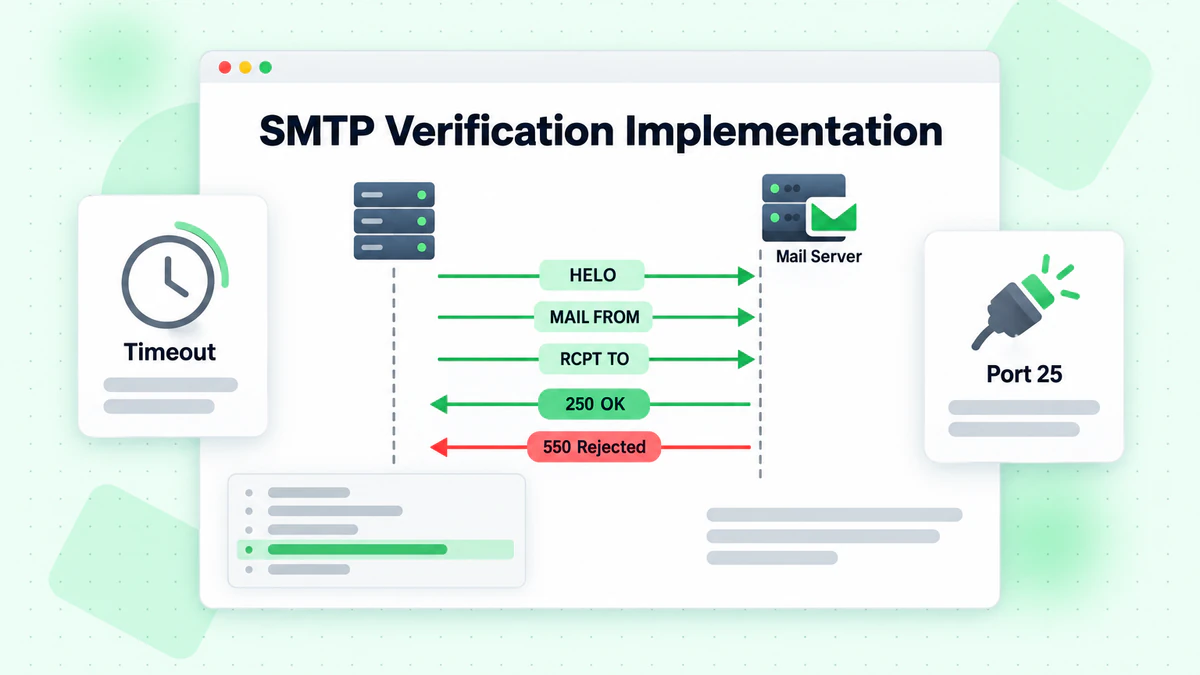
How SMTP Verification Works
SMTP verification simulates the initial steps of sending an email without actually delivering a message. The verification process establishes a connection to the mail server, introduces itself with EHLO/HELO, provides a sender address with MAIL FROM, then requests to send to the target address with RCPT TO.
The mail server's response to RCPT TO indicates whether the mailbox exists. A 250 response confirms the address is valid, while 550 indicates the user doesn't exist. However, many servers now use catch-all configurations or greylisting that complicate this process.
Basic SMTP Verification in Node.js
const net = require('net');

class SMTPVerifier {
  constructor(options = {}) {
    this.timeout = options.timeout || 10000;
    this.fromEmail = options.fromEmail || 'verify@example.com';
    this.fromDomain = options.fromDomain || 'example.com';
  }

  async verify(email, mxHost) {
    return new Promise((resolve) => {
      const socket = new net.Socket();
      let step = 0;
      let response = '';

      const cleanup = () => {
        socket.destroy();
      };

      socket.setTimeout(this.timeout);

      socket.on('timeout', () => {
        cleanup();
        resolve({ valid: false, error: 'Connection timeout' });
      });

      socket.on('error', (error) => {
        cleanup();
        resolve({ valid: false, error: error.message });
      });

      socket.on('data', (data) => {
        response = data.toString();
        const code = parseInt(response.substring(0, 3));

        switch (step) {
          case 0: // Connected, received greeting
            if (code === 220) {
              socket.write(`EHLO ${this.fromDomain}\r\n`);
              step = 1;
            } else {
              cleanup();
              resolve({ valid: false, error: 'Invalid greeting' });
            }
            break;

          case 1: // EHLO response
            if (code === 250) {
              socket.write(`MAIL FROM:<${this.fromEmail}>\r\n`);
              step = 2;
            } else {
              cleanup();
              resolve({ valid: false, error: 'EHLO rejected' });
            }
            break;

          case 2: // MAIL FROM response
            if (code === 250) {
              socket.write(`RCPT TO:<${email}>\r\n`);
              step = 3;
            } else {
              cleanup();
              resolve({ valid: false, error: 'MAIL FROM rejected' });
            }
            break;

          case 3: // RCPT TO response - the verification result
            socket.write('QUIT\r\n');
            cleanup();

            if (code === 250) {
              resolve({ valid: true, email });
            } else if (code === 550 || code === 551 || code === 552 || code === 553) {
              resolve({ valid: false, error: 'Mailbox does not exist', code });
            } else if (code === 450 || code === 451 || code === 452) {
              resolve({ valid: false, error: 'Temporary failure', temporary: true, code });
            } else {
              resolve({ valid: false, error: `Unknown response: ${code}`, code });
            }
            break;
        }
      });

      socket.connect(25, mxHost);
    });
  }
}
Handling SMTP Challenges
Real-world SMTP verification faces numerous challenges including greylisting, rate limiting, and catch-all domains. Developers must implement strategies to handle these situations.
async function comprehensiveSMTPVerification(email, mxRecords) {
  const verifier = new SMTPVerifier({
    fromEmail: 'verify@yourdomain.com',
    fromDomain: 'yourdomain.com',
    timeout: 15000
  });

  // Try each MX server in priority order
  for (const mx of mxRecords) {
    const result = await verifier.verify(email, mx.exchange);

    // If we get a definitive answer, return it
    if (result.valid || (!result.temporary && result.code === 550)) {
      return result;
    }

    // For temporary failures or connection issues, try next server
    if (result.temporary || result.error.includes('timeout')) {
      continue;
    }

    // For other errors, return the result
    return result;
  }

  return {
    valid: false,
    error: 'All MX servers failed',
    temporary: true
  };
}
Using Email Verification APIs
While building custom verification is educational, production applications often benefit from using professional email verification APIs like BillionVerify.
Why Use an Email Verification API
Professional email verification services offer several advantages over custom implementations. They maintain extensive databases of known disposable email providers, catch-all domains, and spam traps. They also manage the infrastructure needed for high-volume SMTP verification without getting blocked.
BillionVerify's email verification API provides comprehensive validation including syntax checking, DNS verification, SMTP verification, disposable email detection, and deliverability scoring, all through a simple REST API.
Integrating BillionVerify API
const axios = require('axios');

class BillionVerifyClient {
  constructor(apiKey) {
    this.apiKey = apiKey;
    this.baseURL = 'https://api.billionverify.com/v1';
  }

  async verifySingle(email) {
    try {
      const response = await axios.get(`${this.baseURL}/verify`, {
        params: { email },
        headers: {
          'Authorization': `Bearer ${this.apiKey}`,
          'Content-Type': 'application/json'
        }
      });

      return {
        success: true,
        data: response.data
      };
    } catch (error) {
      return {
        success: false,
        error: error.response?.data?.message || error.message
      };
    }
  }

  async verifyBatch(emails) {
    try {
      const response = await axios.post(`${this.baseURL}/verify/batch`, {
        emails
      }, {
        headers: {
          'Authorization': `Bearer ${this.apiKey}`,
          'Content-Type': 'application/json'
        }
      });

      return {
        success: true,
        data: response.data
      };
    } catch (error) {
      return {
        success: false,
        error: error.response?.data?.message || error.message
      };
    }
  }
}

// Usage example
async function validateUserEmail(email) {
  const client = new BillionVerifyClient(process.env.BV_API_KEY);
  const result = await client.verifySingle(email);

  if (!result.success) {
    console.error('Verification failed:', result.error);
    return { valid: false, error: 'Verification service unavailable' };
  }

  const { data } = result;

  return {
    valid: data.deliverable,
    email: data.email,
    status: data.status,
    isDisposable: data.is_disposable,
    isCatchAll: data.is_catch_all,
    score: data.quality_score
  };
}
Real-Time Verification in Web Applications
Implementing real-time email verification in web applications requires careful consideration of user experience and performance.
Frontend Validation Strategy
Frontend validation should provide immediate feedback for obvious errors while deferring comprehensive validation to the backend. This approach balances user experience with security.
// Frontend email validation with debouncing
class EmailValidator {
  constructor(options = {}) {
    this.debounceMs = options.debounceMs || 500;
    this.onValidating = options.onValidating || (() => {});
    this.onResult = options.onResult || (() => {});
    this.pendingRequest = null;
    this.debounceTimer = null;
  }

  validateSyntax(email) {
    const regex = /^[^\s@]+@[^\s@]+\.[^\s@]+$/;
    return regex.test(email);
  }

  async validate(email) {
    // Clear any pending requests
    if (this.debounceTimer) {
      clearTimeout(this.debounceTimer);
    }

    // Immediate syntax check
    if (!this.validateSyntax(email)) {
      this.onResult({
        valid: false,
        error: 'Please enter a valid email address'
      });
      return;
    }

    // Debounce API calls
    this.debounceTimer = setTimeout(async () => {
      this.onValidating(true);

      try {
        const response = await fetch('/api/verify-email', {
          method: 'POST',
          headers: { 'Content-Type': 'application/json' },
          body: JSON.stringify({ email })
        });

        const result = await response.json();
        this.onResult(result);
      } catch (error) {
        this.onResult({
          valid: false,
          error: 'Unable to verify email'
        });
      } finally {
        this.onValidating(false);
      }
    }, this.debounceMs);
  }
}

// React component example
function EmailInput() {
  const [email, setEmail] = useState('');
  const [status, setStatus] = useState({ checking: false, result: null });

  const validator = useMemo(() => new EmailValidator({
    onValidating: (checking) => setStatus(s => ({ ...s, checking })),
    onResult: (result) => setStatus(s => ({ ...s, result }))
  }), []);

  const handleChange = (e) => {
    const value = e.target.value;
    setEmail(value);
    if (value) validator.validate(value);
  };

  return (
    <div className="email-input">
      <input
        type="email"
        value={email}
        onChange={handleChange}
        placeholder="Enter your email"
      />
      {status.checking && <span className="loading">Verifying...</span>}
      {status.result && (
        <span className={status.result.valid ? 'valid' : 'invalid'}>
          {status.result.valid ? '✓ Valid email' : status.result.error}
        </span>
      )}
    </div>
  );
}
Backend API Endpoint
The backend API endpoint should implement comprehensive validation while protecting against abuse through rate limiting.
const express = require('express');
const rateLimit = require('express-rate-limit');

const app = express();

// Rate limiting for verification endpoint
const verifyLimiter = rateLimit({
  windowMs: 60 * 1000, // 1 minute
  max: 10, // 10 requests per minute per IP
  message: { error: 'Too many verification requests' }
});

app.post('/api/verify-email', verifyLimiter, async (req, res) => {
  const { email } = req.body;

  if (!email) {
    return res.status(400).json({ valid: false, error: 'Email required' });
  }

  try {
    // Layer 1: Syntax validation
    const syntaxResult = enhancedSyntaxValidation(email);
    if (!syntaxResult.valid) {
      return res.json(syntaxResult);
    }

    // Layer 2: DNS validation
    const dnsResult = await robustDNSValidation(syntaxResult.email);
    if (!dnsResult.valid) {
      return res.json(dnsResult);
    }

    // Layer 3: API-based comprehensive validation
    const apiResult = await validateUserEmail(syntaxResult.email);

    res.json(apiResult);
  } catch (error) {
    console.error('Verification error:', error);
    res.status(500).json({ valid: false, error: 'Verification failed' });
  }
});
Detecting Disposable and Temporary Emails
Disposable email addresses pose significant challenges for applications that need genuine user engagement. Detecting and blocking these addresses is essential for maintaining list quality.
Understanding Disposable Emails
Disposable email services like Guerrilla Mail, 10MinuteMail, and Mailinator provide temporary addresses that users can create instantly without registration. While these services have legitimate uses, they're often used to bypass registration requirements or create fake accounts.
Building a Disposable Email Detector
class DisposableEmailDetector {
  constructor() {
    // Common disposable email domains
    this.knownDisposable = new Set([
      'guerrillamail.com', 'guerrillamail.org',
      '10minutemail.com', '10minutemail.net',
      'mailinator.com', 'mailinator.net',
      'tempmail.com', 'tempmail.net',
      'throwaway.email', 'throwawaymail.com',
      'fakeinbox.com', 'trashmail.com',
      'getnada.com', 'temp-mail.org',
      'mohmal.com', 'emailondeck.com'
      // Add more known disposable domains
    ]);

    // Patterns that often indicate disposable services
    this.suspiciousPatterns = [
      /^temp/i,
      /^trash/i,
      /^throw/i,
      /^fake/i,
      /^disposable/i,
      /\d{2,}mail/i,
      /minutemail/i
    ];
  }

  isDisposable(email) {
    const domain = email.split('@')[1].toLowerCase();

    // Check known disposable domains
    if (this.knownDisposable.has(domain)) {
      return { isDisposable: true, reason: 'Known disposable domain' };
    }

    // Check suspicious patterns
    for (const pattern of this.suspiciousPatterns) {
      if (pattern.test(domain)) {
        return { isDisposable: true, reason: 'Suspicious domain pattern' };
      }
    }

    return { isDisposable: false };
  }

  async updateDisposableList() {
    // Fetch updated list from a maintained source
    try {
      const response = await fetch(
        'https://raw.githubusercontent.com/disposable-email-domains/disposable-email-domains/master/disposable_email_blocklist.conf'
      );
      const text = await response.text();
      const domains = text.split('\n').filter(d => d.trim());

      domains.forEach(domain => this.knownDisposable.add(domain.toLowerCase()));

      return { success: true, count: this.knownDisposable.size };
    } catch (error) {
      return { success: false, error: error.message };
    }
  }
}
Performance Optimization Strategies
Email verification can impact application performance if not implemented carefully. These optimization strategies help maintain fast response times.
Caching Verification Results
Caching reduces redundant verification requests and improves response times for repeated validations.
const NodeCache = require('node-cache');

class CachedEmailVerifier {
  constructor(options = {}) {
    this.cache = new NodeCache({
      stdTTL: options.ttl || 3600, // 1 hour default
      checkperiod: options.checkperiod || 600
    });
    this.verifier = options.verifier;
  }

  async verify(email) {
    const normalizedEmail = email.toLowerCase().trim();
    const cacheKey = `email:${normalizedEmail}`;

    // Check cache first
    const cached = this.cache.get(cacheKey);
    if (cached) {
      return { ...cached, fromCache: true };
    }

    // Perform verification
    const result = await this.verifier.verify(normalizedEmail);

    // Cache the result (don't cache temporary failures)
    if (!result.temporary) {
      this.cache.set(cacheKey, result);
    }

    return result;
  }

  invalidate(email) {
    const normalizedEmail = email.toLowerCase().trim();
    this.cache.del(`email:${normalizedEmail}`);
  }

  getStats() {
    return this.cache.getStats();
  }
}
Implementing Request Queuing
For high-volume applications, request queuing prevents overwhelming verification services and ensures fair resource distribution.
const Queue = require('bull');

const verificationQueue = new Queue('email-verification', {
  redis: { host: 'localhost', port: 6379 },
  defaultJobOptions: {
    attempts: 3,
    backoff: {
      type: 'exponential',
      delay: 1000
    }
  }
});

// Process verification jobs
verificationQueue.process(async (job) => {
  const { email, userId } = job.data;

  const result = await comprehensiveEmailVerification(email);

  // Store result in database
  await updateUserEmailStatus(userId, result);

  return result;
});

// Queue a verification request
async function queueEmailVerification(email, userId) {
  const job = await verificationQueue.add({
    email,
    userId
  }, {
    priority: 1,
    delay: 0
  });

  return job.id;
}
Error Handling and Logging
Robust error handling and comprehensive logging are essential for maintaining reliable email verification systems.
Implementing Comprehensive Error Handling
class EmailVerificationError extends Error {
  constructor(message, code, details = {}) {
    super(message);
    this.name = 'EmailVerificationError';
    this.code = code;
    this.details = details;
    this.timestamp = new Date().toISOString();
  }
}

async function safeEmailVerification(email) {
  const startTime = Date.now();

  try {
    // Validate input
    if (!email || typeof email !== 'string') {
      throw new EmailVerificationError(
        'Invalid email input',
        'INVALID_INPUT',
        { received: typeof email }
      );
    }

    const result = await comprehensiveEmailVerification(email);

    // Log successful verification
    logger.info('Email verification completed', {
      email: maskEmail(email),
      valid: result.valid,
      duration: Date.now() - startTime
    });

    return result;

  } catch (error) {
    // Log error with context
    logger.error('Email verification failed', {
      email: maskEmail(email),
      error: error.message,
      code: error.code,
      duration: Date.now() - startTime,
      stack: error.stack
    });

    // Return safe error response
    return {
      valid: false,
      error: 'Verification failed',
      errorCode: error.code || 'UNKNOWN_ERROR',
      temporary: true
    };
  }
}

function maskEmail(email) {
  const [local, domain] = email.split('@');
  const maskedLocal = local.charAt(0) + '***' + local.charAt(local.length - 1);
  return `${maskedLocal}@${domain}`;
}
Security Considerations
Email verification systems must be designed with security in mind to prevent abuse and protect user data.
Preventing Enumeration Attacks
Attackers may use email verification endpoints to enumerate valid email addresses. Implement defenses against this attack vector.
const crypto = require('crypto');

function secureVerificationResponse(result, options = {}) {
  const { hideDetails = true } = options;

  // Add consistent response timing to prevent timing attacks
  const minResponseTime = 200;
  const elapsed = Date.now() - result.startTime;
  const delay = Math.max(0, minResponseTime - elapsed);

  return new Promise(resolve => {
    setTimeout(() => {
      if (hideDetails && !result.valid) {
        // Don't reveal whether email exists or domain is invalid
        resolve({
          valid: false,
          message: 'Unable to verify email address'
        });
      } else {
        resolve(result);
      }
    }, delay);
  });
}
Rate Limiting and Abuse Prevention
Implement comprehensive rate limiting to prevent abuse of verification endpoints.
const rateLimit = require('express-rate-limit');
const RedisStore = require('rate-limit-redis');

const verificationRateLimiter = rateLimit({
  store: new RedisStore({
    client: redisClient,
    prefix: 'rl:verify:'
  }),
  windowMs: 60 * 1000, // 1 minute
  max: 5, // 5 requests per minute
  keyGenerator: (req) => {
    // Combine IP and user ID if authenticated
    const userId = req.user?.id || 'anonymous';
    return `${req.ip}:${userId}`;
  },
  handler: (req, res) => {
    res.status(429).json({
      error: 'Too many verification requests',
      retryAfter: Math.ceil(req.rateLimit.resetTime / 1000)
    });
  }
});
Testing Email Verification Systems
Comprehensive testing ensures email verification systems work correctly across all scenarios.
Unit Testing Verification Functions
const { expect } = require('chai');

describe('Email Syntax Validation', () => {
  it('should accept valid email addresses', () => {
    const validEmails = [
      'user@example.com',
      'user.name@example.com',
      'user+tag@example.com',
      'user@subdomain.example.com'
    ];

    validEmails.forEach(email => {
      const result = validateEmailSyntax(email);
      expect(result.valid).to.be.true;
    });
  });

  it('should reject invalid email addresses', () => {
    const invalidEmails = [
      'invalid',
      '@example.com',
      'user@',
      'user@@example.com',
      'user@example',
      'user@.com'
    ];

    invalidEmails.forEach(email => {
      const result = validateEmailSyntax(email);
      expect(result.valid).to.be.false;
    });
  });

  it('should handle edge cases', () => {
    expect(validateEmailSyntax('')).to.have.property('valid', false);
    expect(validateEmailSyntax(null)).to.have.property('valid', false);
    expect(validateEmailSyntax(undefined)).to.have.property('valid', false);
  });
});
Conclusion
Implementing email verification as a developer requires understanding multiple validation layers, from basic syntax checking to advanced SMTP verification. By combining local validation, DNS lookups, and professional verification APIs like BillionVerify, developers can build robust systems that maintain high data quality while providing excellent user experience.
The key principles for successful email verification implementation include using multiple validation layers for comprehensive coverage, implementing proper caching and rate limiting for performance and security, handling edge cases and errors gracefully, and continuously monitoring and improving verification accuracy.
Whether you choose to implement custom verification logic or leverage professional APIs, the techniques covered in this guide provide the foundation for building email verification systems that protect your application and users while maintaining the highest standards of deliverability and engagement. For help choosing the right solution, see our best email verification service comparison.
Start implementing email verification in your application today with BillionVerify's developer-friendly API. Sign up at BillionVerify to get started with free verification credits and comprehensive documentation.