



When you're verifying thousands or millions of email addresses, waiting synchronously for each result isn't practical. Email verification webhooks provide an elegant solution by notifying your application when verification tasks complete, eliminating the need for constant polling and enabling efficient asynchronous workflows. This comprehensive guide explores everything developers need to know about implementing email verification webhooks, from basic setup to advanced patterns for handling large-scale verification operations. For foundational concepts, see our complete guide to email verification.
Understanding Email Verification Webhooks
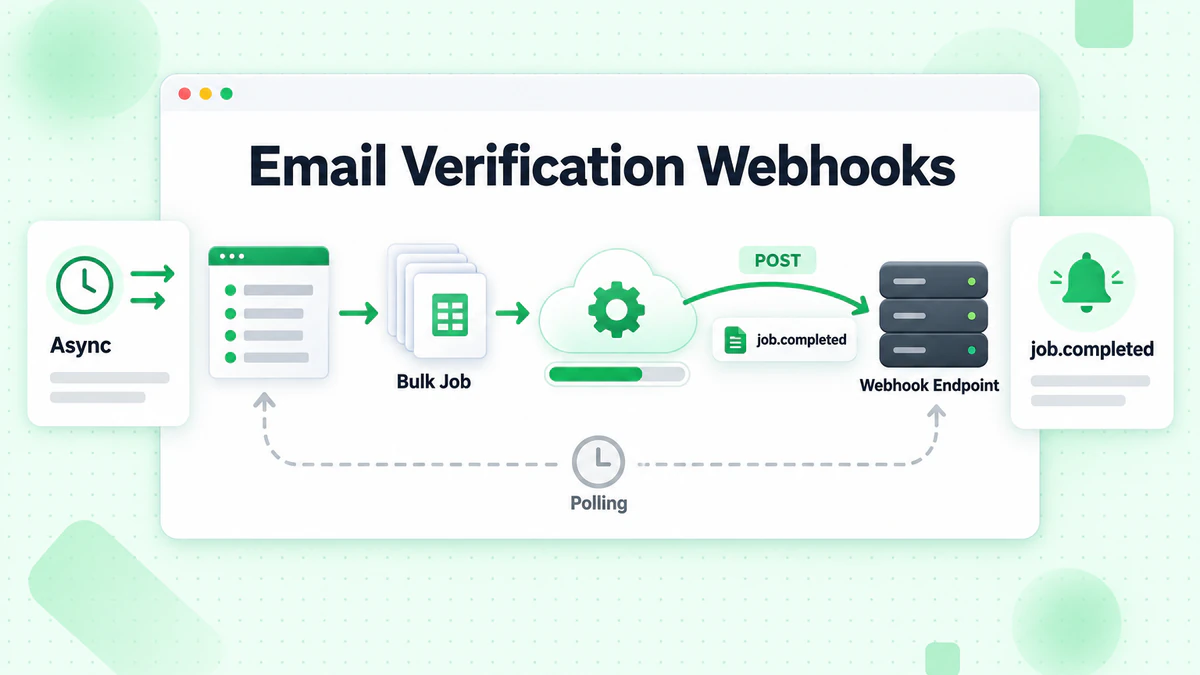
Webhooks are HTTP callbacks that deliver data to your application when specific events occur. In the context of email verification, webhooks notify your systems when bulk verification jobs complete, when individual email verification finishes in async mode, or when other significant events occur during the verification process.
Why Use Webhooks for Email Verification?
Traditional request-response patterns work well for single email verification, but bulk operations present challenges. Verifying 100,000 emails might take hours, and keeping an HTTP connection open that long isn't feasible. Polling for status updates wastes resources and creates unnecessary API load.
Eliminated Polling Overhead
Without webhooks, you'd need to repeatedly query the API to check if bulk jobs have completed. This creates unnecessary network traffic, consumes API rate limits, and adds complexity to your application. Webhooks push notifications to you exactly when they're needed.
Real-Time Processing
Webhooks enable immediate action when verification completes. Your application can process results, update databases, and trigger follow-up actions without delays introduced by polling intervals.
Scalable Architecture
Webhook-based architectures scale naturally. Whether you're processing one bulk job or hundreds simultaneously, your webhook endpoint receives notifications as they arrive, and you can process them asynchronously using queues or workers.
Resource Efficiency
Instead of maintaining connections or running polling loops, your application remains idle until webhooks arrive. This reduces compute costs and simplifies infrastructure requirements.
Webhook Events in Email Verification
Email verification services typically trigger webhooks for several event types:
Bulk Job Completion
The most common webhook event fires when a bulk verification job finishes processing. The payload includes job status, summary statistics, and information about downloading results.
Bulk Job Progress
Some services send progress webhooks at intervals during bulk processing, allowing you to track verification progress and estimate completion time.
Bulk Job Failure
When a bulk job encounters errors that prevent completion, failure webhooks provide details about what went wrong and whether partial results are available.
Single Email Verification (Async Mode)
For high-volume real-time verification scenarios, async single-email verification sends results via webhook instead of waiting for synchronous response.
Setting Up Webhook Endpoints
Implementing webhooks requires creating an endpoint in your application that can receive and process webhook payloads.
Basic Endpoint Structure
A webhook endpoint is simply an HTTP POST endpoint that accepts JSON payloads:
const express = require('express');
const app = express();

app.use(express.json());

app.post('/webhooks/email-verification', async (req, res) => {
  const { event_type, job_id, status, data } = req.body;

  console.log(`Received webhook: ${event_type} for job ${job_id}`);

  // Process the webhook
  try {
    await handleWebhookEvent(req.body);

    // Always respond quickly to acknowledge receipt
    res.status(200).json({ received: true });
  } catch (error) {
    console.error('Webhook processing error:', error);

    // Still acknowledge receipt to prevent retries
    res.status(200).json({ received: true, error: error.message });
  }
});

async function handleWebhookEvent(payload) {
  switch (payload.event_type) {
    case 'bulk.completed':
      await handleBulkCompleted(payload);
      break;
    case 'bulk.failed':
      await handleBulkFailed(payload);
      break;
    case 'bulk.progress':
      await handleBulkProgress(payload);
      break;
    default:
      console.log(`Unknown event type: ${payload.event_type}`);
  }
}
Webhook Response Best Practices
Email verification services expect quick responses from webhook endpoints. If your endpoint takes too long to respond, the service may assume delivery failed and retry.
Respond Immediately
Acknowledge webhook receipt immediately, then process the payload asynchronously:
app.post('/webhooks/email-verification', async (req, res) => {
  // Immediately acknowledge receipt
  res.status(200).json({ received: true });

  // Process asynchronously
  setImmediate(async () => {
    try {
      await handleWebhookEvent(req.body);
    } catch (error) {
      console.error('Async webhook processing error:', error);
      // Log for retry or manual processing
      await logFailedWebhook(req.body, error);
    }
  });
});
Use Message Queues for Heavy Processing
For production systems, queue webhook payloads for processing by worker processes:
const Queue = require('bull');
const webhookQueue = new Queue('email-verification-webhooks');

app.post('/webhooks/email-verification', async (req, res) => {
  // Queue the webhook for processing
  await webhookQueue.add('process-webhook', req.body, {
    attempts: 3,
    backoff: {
      type: 'exponential',
      delay: 1000
    }
  });

  res.status(200).json({ received: true });
});

// Worker process
webhookQueue.process('process-webhook', async (job) => {
  const payload = job.data;
  await handleWebhookEvent(payload);
});
Configuring Webhooks with the API
Register your webhook endpoint with the email verification service:
async function registerWebhook(webhookUrl, events, secret) {
  const response = await fetch('https://api.billionverify.com/v1/webhooks', {
    method: 'POST',
    headers: {
      'Authorization': `Bearer ${process.env.BV_API_KEY}`,
      'Content-Type': 'application/json'
    },
    body: JSON.stringify({
      url: webhookUrl,
      events: events,
      secret: secret
    })
  });

  const result = await response.json();

  if (!response.ok) {
    throw new Error(`Failed to register webhook: ${result.error}`);
  }

  console.log(`Webhook registered: ${result.webhook_id}`);
  return result;
}

// Register for bulk job events
await registerWebhook(
  'https://yourapp.com/webhooks/email-verification',
  ['bulk.completed', 'bulk.failed', 'bulk.progress'],
  process.env.WEBHOOK_SECRET
);
Securing Webhook Endpoints
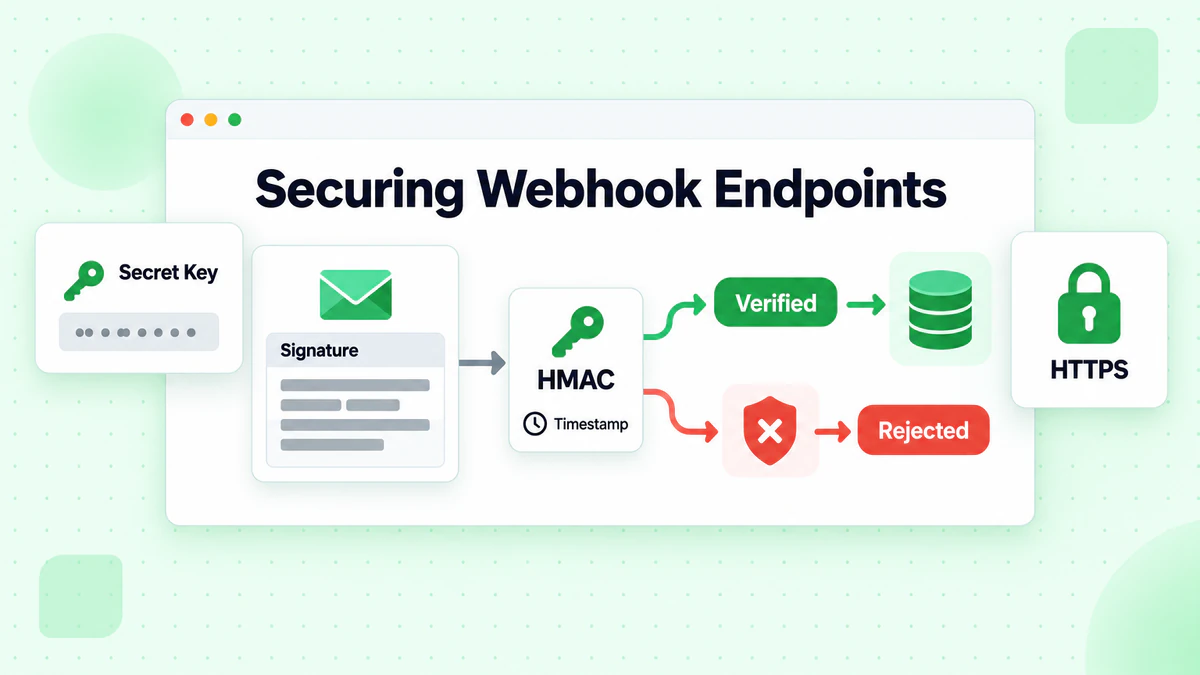
Webhook endpoints are publicly accessible, making security essential. Without proper verification, attackers could send fake webhook payloads to manipulate your application.
Signature Verification
Most email verification services sign webhook payloads using HMAC-SHA256 with a shared secret. Verify signatures before processing:
const crypto = require('crypto');

function verifyWebhookSignature(payload, signature, secret) {
  const expectedSignature = crypto
    .createHmac('sha256', secret)
    .update(JSON.stringify(payload))
    .digest('hex');

  // Use timing-safe comparison to prevent timing attacks
  return crypto.timingSafeEqual(
    Buffer.from(signature),
    Buffer.from(expectedSignature)
  );
}

app.post('/webhooks/email-verification', async (req, res) => {
  const signature = req.headers['x-webhook-signature'];

  if (!signature) {
    return res.status(401).json({ error: 'Missing signature' });
  }

  const isValid = verifyWebhookSignature(
    req.body,
    signature,
    process.env.WEBHOOK_SECRET
  );

  if (!isValid) {
    console.warn('Invalid webhook signature received');
    return res.status(401).json({ error: 'Invalid signature' });
  }

  // Signature valid, process webhook
  await handleWebhookEvent(req.body);
  res.status(200).json({ received: true });
});
Timestamp Validation
Prevent replay attacks by validating webhook timestamps:
function isTimestampValid(timestamp, toleranceSeconds = 300) {
  const webhookTime = new Date(timestamp).getTime();
  const currentTime = Date.now();
  const difference = Math.abs(currentTime - webhookTime);

  return difference <= toleranceSeconds * 1000;
}

app.post('/webhooks/email-verification', async (req, res) => {
  const { timestamp } = req.body;

  if (!isTimestampValid(timestamp)) {
    console.warn('Webhook timestamp outside acceptable range');
    return res.status(400).json({ error: 'Invalid timestamp' });
  }

  // Continue with signature verification and processing
});
IP Allowlisting
For additional security, restrict webhook access to known IP addresses:
const allowedIPs = [
  '203.0.113.0/24',  // BillionVerify webhook servers
  '198.51.100.0/24'
];

function isIPAllowed(clientIP) {
  // Implement CIDR range checking
  return allowedIPs.some(range => isIPInRange(clientIP, range));
}

app.post('/webhooks/email-verification', async (req, res) => {
  const clientIP = req.ip || req.connection.remoteAddress;

  if (!isIPAllowed(clientIP)) {
    console.warn(`Webhook from unauthorized IP: ${clientIP}`);
    return res.status(403).json({ error: 'Forbidden' });
  }

  // Continue with processing
});
Idempotency Handling
Webhooks may be delivered multiple times due to network issues or retries. Implement idempotency to handle duplicates safely:
const processedWebhooks = new Set(); // Use Redis in production

async function handleWebhookIdempotent(payload) {
  const webhookId = payload.webhook_id || payload.event_id;

  // Check if already processed
  if (processedWebhooks.has(webhookId)) {
    console.log(`Duplicate webhook ignored: ${webhookId}`);
    return;
  }

  // Mark as processing
  processedWebhooks.add(webhookId);

  try {
    await handleWebhookEvent(payload);
  } catch (error) {
    // Remove from processed set to allow retry
    processedWebhooks.delete(webhookId);
    throw error;
  }
}
For production systems, use Redis for distributed idempotency:
const Redis = require('ioredis');
const redis = new Redis();

async function isWebhookProcessed(webhookId) {
  const key = `webhook:processed:${webhookId}`;
  const result = await redis.set(key, '1', 'NX', 'EX', 86400); // 24 hour expiry
  return result === null; // Already exists
}

app.post('/webhooks/email-verification', async (req, res) => {
  const webhookId = req.body.webhook_id;

  if (await isWebhookProcessed(webhookId)) {
    console.log(`Duplicate webhook: ${webhookId}`);
    return res.status(200).json({ received: true, duplicate: true });
  }

  await handleWebhookEvent(req.body);
  res.status(200).json({ received: true });
});
Processing Webhook Payloads
Different webhook events require different handling logic. Let's explore common patterns for processing email verification webhooks.
Handling Bulk Job Completion
When a bulk verification job completes, download and process the results:
async function handleBulkCompleted(payload) {
  const { job_id, status, summary, download_url } = payload;

  console.log(`Bulk job ${job_id} completed with status: ${status}`);
  console.log(`Summary: ${summary.valid} valid, ${summary.invalid} invalid`);

  // Download results
  const results = await downloadResults(download_url);

  // Process results
  await processVerificationResults(job_id, results);

  // Update job status in database
  await updateJobStatus(job_id, 'completed', summary);

  // Notify relevant parties
  await sendCompletionNotification(job_id, summary);
}

async function downloadResults(url) {
  const response = await fetch(url, {
    headers: {
      'Authorization': `Bearer ${process.env.BV_API_KEY}`
    }
  });

  if (!response.ok) {
    throw new Error(`Failed to download results: ${response.status}`);
  }

  return await response.json();
}

async function processVerificationResults(jobId, results) {
  // Batch update contacts in database
  const validEmails = results.filter(r => r.is_valid);
  const invalidEmails = results.filter(r => !r.is_valid);

  await db.transaction(async (trx) => {
    // Update valid emails
    for (const batch of chunkArray(validEmails, 1000)) {
      await trx('contacts')
        .whereIn('email', batch.map(r => r.email))
        .update({
          email_verified: true,
          verification_date: new Date(),
          verification_job_id: jobId
        });
    }

    // Handle invalid emails
    for (const batch of chunkArray(invalidEmails, 1000)) {
      await trx('contacts')
        .whereIn('email', batch.map(r => r.email))
        .update({
          email_verified: false,
          email_invalid_reason: trx.raw('CASE email ' +
            batch.map(r => `WHEN '${r.email}' THEN '${r.reason}'`).join(' ') +
            ' END'),
          verification_date: new Date(),
          verification_job_id: jobId
        });
    }
  });
}
Handling Bulk Job Failures
When jobs fail, capture error information and determine if recovery is possible:
async function handleBulkFailed(payload) {
  const { job_id, error_code, error_message, partial_results_available } = payload;

  console.error(`Bulk job ${job_id} failed: ${error_message}`);

  // Update job status
  await updateJobStatus(job_id, 'failed', {
    error_code,
    error_message
  });

  // Try to retrieve partial results if available
  if (partial_results_available) {
    console.log('Attempting to retrieve partial results...');
    try {
      const partialResults = await downloadPartialResults(job_id);
      await processVerificationResults(job_id, partialResults);

      // Identify unprocessed emails for retry
      const processedEmails = new Set(partialResults.map(r => r.email));
      const originalEmails = await getOriginalJobEmails(job_id);
      const unprocessedEmails = originalEmails.filter(e => !processedEmails.has(e));

      if (unprocessedEmails.length > 0) {
        // Schedule retry for unprocessed emails
        await scheduleRetryJob(job_id, unprocessedEmails);
      }
    } catch (error) {
      console.error('Failed to retrieve partial results:', error);
    }
  }

  // Notify about failure
  await sendFailureNotification(job_id, error_message);
}

async function scheduleRetryJob(originalJobId, emails) {
  // Create new job for remaining emails
  const response = await fetch('https://api.billionverify.com/v1/bulk/verify', {
    method: 'POST',
    headers: {
      'Authorization': `Bearer ${process.env.BV_API_KEY}`,
      'Content-Type': 'application/json'
    },
    body: JSON.stringify({
      emails,
      metadata: {
        retry_of: originalJobId
      }
    })
  });

  const { job_id: newJobId } = await response.json();
  console.log(`Scheduled retry job ${newJobId} for ${emails.length} emails`);
}
Handling Progress Updates
Progress webhooks help track long-running jobs:
async function handleBulkProgress(payload) {
  const { job_id, processed_count, total_count, estimated_completion } = payload;

  const percentComplete = Math.round((processed_count / total_count) * 100);
  console.log(`Job ${job_id}: ${percentComplete}% complete (${processed_count}/${total_count})`);

  // Update progress in database
  await updateJobProgress(job_id, {
    processed_count,
    total_count,
    percent_complete: percentComplete,
    estimated_completion: new Date(estimated_completion)
  });

  // Optionally notify users of progress
  if (percentComplete % 25 === 0) {
    await sendProgressNotification(job_id, percentComplete);
  }
}
Advanced Webhook Patterns
Production systems benefit from advanced patterns that improve reliability and maintainability.
Dead Letter Queue for Failed Webhooks
When webhook processing fails repeatedly, move payloads to a dead letter queue for manual review:
const webhookQueue = new Queue('email-verification-webhooks');
const deadLetterQueue = new Queue('webhook-dead-letters');

webhookQueue.process('process-webhook', async (job) => {
  try {
    await handleWebhookEvent(job.data);
  } catch (error) {
    // Check if this is the final retry
    if (job.attemptsMade >= job.opts.attempts - 1) {
      // Move to dead letter queue
      await deadLetterQueue.add('failed-webhook', {
        original_payload: job.data,
        error: error.message,
        failed_at: new Date().toISOString(),
        attempts: job.attemptsMade + 1
      });
    }
    throw error; // Re-throw to trigger retry
  }
});

// Process dead letters manually or with alerts
deadLetterQueue.on('completed', async (job) => {
  await sendAlert({
    type: 'webhook_dead_letter',
    job_id: job.data.original_payload.job_id,
    error: job.data.error
  });
});
Webhook Event Sourcing
Store all webhook events for audit trails and replay capability:
async function handleWebhookWithEventSourcing(payload) {
  // Store raw event
  const eventId = await storeWebhookEvent(payload);

  try {
    // Process event
    await handleWebhookEvent(payload);

    // Mark as processed
    await markEventProcessed(eventId);
  } catch (error) {
    // Mark as failed
    await markEventFailed(eventId, error);
    throw error;
  }
}

async function storeWebhookEvent(payload) {
  const result = await db('webhook_events').insert({
    event_type: payload.event_type,
    job_id: payload.job_id,
    payload: JSON.stringify(payload),
    received_at: new Date(),
    status: 'pending'
  });

  return result[0];
}

// Replay failed events
async function replayFailedEvents() {
  const failedEvents = await db('webhook_events')
    .where('status', 'failed')
    .where('retry_count', '<', 3);

  for (const event of failedEvents) {
    try {
      await handleWebhookEvent(JSON.parse(event.payload));
      await markEventProcessed(event.id);
    } catch (error) {
      await incrementRetryCount(event.id);
    }
  }
}
Multi-Tenant Webhook Routing
For SaaS applications, route webhooks to tenant-specific handlers:
async function handleMultiTenantWebhook(payload) {
  const { tenant_id, event_type, data } = payload;

  // Get tenant configuration
  const tenant = await getTenantConfig(tenant_id);

  if (!tenant) {
    console.error(`Unknown tenant: ${tenant_id}`);
    return;
  }

  // Route to tenant-specific handler
  switch (event_type) {
    case 'bulk.completed':
      await handleTenantBulkCompleted(tenant, data);
      break;
    case 'bulk.failed':
      await handleTenantBulkFailed(tenant, data);
      break;
  }

  // Forward to tenant webhook if configured
  if (tenant.webhook_url) {
    await forwardToTenant(tenant.webhook_url, tenant.webhook_secret, payload);
  }
}

async function forwardToTenant(url, secret, payload) {
  const signature = crypto
    .createHmac('sha256', secret)
    .update(JSON.stringify(payload))
    .digest('hex');

  await fetch(url, {
    method: 'POST',
    headers: {
      'Content-Type': 'application/json',
      'X-Webhook-Signature': signature
    },
    body: JSON.stringify(payload)
  });
}
Error Handling and Reliability
Robust webhook implementations handle failures gracefully and ensure no data is lost.
Retry Strategies
Implement exponential backoff for transient failures:
async function processWebhookWithRetry(payload, maxRetries = 5) {
  const delays = [1000, 5000, 30000, 120000, 300000]; // 1s, 5s, 30s, 2m, 5m

  for (let attempt = 0; attempt < maxRetries; attempt++) {
    try {
      await handleWebhookEvent(payload);
      return; // Success
    } catch (error) {
      const isRetryable = isRetryableError(error);

      if (!isRetryable || attempt === maxRetries - 1) {
        // Log to dead letter queue
        await logFailedWebhook(payload, error, attempt + 1);
        throw error;
      }

      console.log(`Retry ${attempt + 1}/${maxRetries} after ${delays[attempt]}ms`);
      await sleep(delays[attempt]);
    }
  }
}

function isRetryableError(error) {
  // Network errors, timeouts, and 5xx responses are retryable
  const retryableCodes = ['ECONNRESET', 'ETIMEDOUT', 'ENOTFOUND'];
  return retryableCodes.includes(error.code) ||
         (error.status && error.status >= 500);
}
Circuit Breaker Pattern
Prevent cascade failures when downstream services are unavailable:
class CircuitBreaker {
  constructor(options = {}) {
    this.failureThreshold = options.failureThreshold || 5;
    this.resetTimeout = options.resetTimeout || 60000;
    this.state = 'CLOSED';
    this.failures = 0;
    this.lastFailure = null;
  }

  async execute(fn) {
    if (this.state === 'OPEN') {
      if (Date.now() - this.lastFailure > this.resetTimeout) {
        this.state = 'HALF_OPEN';
      } else {
        throw new Error('Circuit breaker is OPEN');
      }
    }

    try {
      const result = await fn();
      this.onSuccess();
      return result;
    } catch (error) {
      this.onFailure();
      throw error;
    }
  }

  onSuccess() {
    this.failures = 0;
    this.state = 'CLOSED';
  }

  onFailure() {
    this.failures++;
    this.lastFailure = Date.now();

    if (this.failures >= this.failureThreshold) {
      this.state = 'OPEN';
      console.warn('Circuit breaker opened due to failures');
    }
  }
}

const databaseCircuitBreaker = new CircuitBreaker();

async function handleBulkCompletedSafely(payload) {
  await databaseCircuitBreaker.execute(async () => {
    await processVerificationResults(payload.job_id, payload.results);
  });
}
Monitoring and Alerting
Track webhook health metrics:
const metrics = {
  received: 0,
  processed: 0,
  failed: 0,
  latency: []
};

app.post('/webhooks/email-verification', async (req, res) => {
  const startTime = Date.now();
  metrics.received++;

  try {
    await handleWebhookEvent(req.body);
    metrics.processed++;
  } catch (error) {
    metrics.failed++;
    throw error;
  } finally {
    metrics.latency.push(Date.now() - startTime);

    // Keep only last 1000 measurements
    if (metrics.latency.length > 1000) {
      metrics.latency.shift();
    }
  }

  res.status(200).json({ received: true });
});

// Expose metrics endpoint
app.get('/metrics/webhooks', (req, res) => {
  const avgLatency = metrics.latency.reduce((a, b) => a + b, 0) / metrics.latency.length;

  res.json({
    received: metrics.received,
    processed: metrics.processed,
    failed: metrics.failed,
    success_rate: (metrics.processed / metrics.received * 100).toFixed(2) + '%',
    avg_latency_ms: Math.round(avgLatency)
  });
});

// Alert on high failure rate
setInterval(() => {
  const failureRate = metrics.failed / metrics.received;

  if (failureRate > 0.1) { // More than 10% failures
    sendAlert({
      type: 'high_webhook_failure_rate',
      failure_rate: failureRate,
      total_received: metrics.received,
      total_failed: metrics.failed
    });
  }
}, 60000);
Testing Webhook Implementations
Thorough testing ensures webhook handlers work correctly in production.
Local Testing with ngrok
Use ngrok to expose local endpoints for webhook testing:
# Start your local server
node server.js

# In another terminal, expose it via ngrok
ngrok http 3000
Register the ngrok URL as your webhook endpoint during development.
Mock Webhook Payloads
Create test fixtures for different event types:
const mockPayloads = {
  bulkCompleted: {
    event_type: 'bulk.completed',
    job_id: 'job_123456',
    status: 'completed',
    timestamp: new Date().toISOString(),
    summary: {
      total: 1000,
      valid: 850,
      invalid: 120,
      risky: 30
    },
    download_url: 'https://api.billionverify.com/v1/bulk/download/job_123456'
  },

  bulkFailed: {
    event_type: 'bulk.failed',
    job_id: 'job_789012',
    error_code: 'PROCESSING_ERROR',
    error_message: 'Internal processing error',
    partial_results_available: true
  },

  bulkProgress: {
    event_type: 'bulk.progress',
    job_id: 'job_345678',
    processed_count: 5000,
    total_count: 10000,
    estimated_completion: new Date(Date.now() + 3600000).toISOString()
  }
};

// Test endpoint
describe('Webhook Handler', () => {
  it('should process bulk.completed event', async () => {
    const response = await request(app)
      .post('/webhooks/email-verification')
      .set('X-Webhook-Signature', generateSignature(mockPayloads.bulkCompleted))
      .send(mockPayloads.bulkCompleted);

    expect(response.status).toBe(200);
    expect(response.body.received).toBe(true);

    // Verify side effects
    const job = await db('verification_jobs').where('job_id', 'job_123456').first();
    expect(job.status).toBe('completed');
  });
});
Integration Testing
Test the complete webhook flow including signature verification:
describe('Webhook Security', () => {
  it('should reject requests without signature', async () => {
    const response = await request(app)
      .post('/webhooks/email-verification')
      .send(mockPayloads.bulkCompleted);

    expect(response.status).toBe(401);
  });

  it('should reject requests with invalid signature', async () => {
    const response = await request(app)
      .post('/webhooks/email-verification')
      .set('X-Webhook-Signature', 'invalid_signature')
      .send(mockPayloads.bulkCompleted);

    expect(response.status).toBe(401);
  });

  it('should accept requests with valid signature', async () => {
    const signature = generateSignature(mockPayloads.bulkCompleted);

    const response = await request(app)
      .post('/webhooks/email-verification')
      .set('X-Webhook-Signature', signature)
      .send(mockPayloads.bulkCompleted);

    expect(response.status).toBe(200);
  });
});
BillionVerify Webhook Integration
BillionVerify provides comprehensive webhook support for email verification events, making it easy to build asynchronous verification workflows.
Configuring Webhooks
Set up webhooks through the BillionVerify dashboard or API:
// Register webhook via API
async function setupBillionVerifyWebhooks() {
  const webhook = await registerWebhook(
    'https://yourapp.com/webhooks/emailverify',
    ['bulk.completed', 'bulk.failed', 'bulk.progress'],
    process.env.EMAILVERIFY_WEBHOOK_SECRET
  );

  console.log('Webhook configured:', webhook);
}
Webhook Payload Format
BillionVerify webhooks include comprehensive information about verification events:
{
  "event_type": "bulk.completed",
  "webhook_id": "wh_abc123",
  "job_id": "job_xyz789",
  "timestamp": "2025-01-15T10:30:00Z",
  "status": "completed",
  "summary": {
    "total": 10000,
    "valid": 8500,
    "invalid": 1200,
    "risky": 300,
    "disposable": 150,
    "catch_all": 200
  },
  "processing_time_ms": 45000,
  "download_url": "https://api.billionverify.com/v1/bulk/download/job_xyz789"
}
Complete Integration Example
const express = require('express');
const crypto = require('crypto');

const app = express();
app.use(express.json());

// Webhook endpoint for BillionVerify
app.post('/webhooks/emailverify', async (req, res) => {
  // Verify signature
  const signature = req.headers['x-emailverify-signature'];
  const isValid = verifySignature(req.body, signature);

  if (!isValid) {
    return res.status(401).json({ error: 'Invalid signature' });
  }

  // Acknowledge immediately
  res.status(200).json({ received: true });

  // Process asynchronously
  processWebhookAsync(req.body);
});

async function processWebhookAsync(payload) {
  try {
    switch (payload.event_type) {
      case 'bulk.completed':
        await handleBulkCompleted(payload);
        break;
      case 'bulk.failed':
        await handleBulkFailed(payload);
        break;
      case 'bulk.progress':
        await handleBulkProgress(payload);
        break;
    }
  } catch (error) {
    console.error('Webhook processing error:', error);
    await logFailedWebhook(payload, error);
  }
}

app.listen(3000, () => {
  console.log('Webhook server running on port 3000');
});
Conclusion
Email verification webhooks transform how applications handle bulk verification by enabling efficient, scalable, and reliable asynchronous processing. By implementing proper webhook handling with security measures, error handling, and monitoring, you can build robust email verification workflows that scale with your application's needs.
Key takeaways for implementing email verification webhooks:
- Respond quickly to webhook requests and process payloads asynchronously
- Verify signatures to ensure webhooks come from legitimate sources
- Implement idempotency to handle duplicate deliveries safely
- Use message queues for reliable processing at scale
- Monitor webhook health with metrics and alerting
Whether you're processing thousands or millions of email verifications, webhooks provide the foundation for efficient async processing. For help choosing the right solution, see our best email verification service comparison. Start implementing webhooks today with BillionVerify's comprehensive webhook support and take your email verification workflows to the next level.
See how BillionVerify compares to NeverBounce on bulk throughput and API response time for high-volume verification needs.
When evaluating tools, the ZeroBounce comparison highlights key differences in catch-all handling and pricing.
For CRM-connected workflows, HubSpot and Salesforce integrations let you verify contacts automatically on import.