



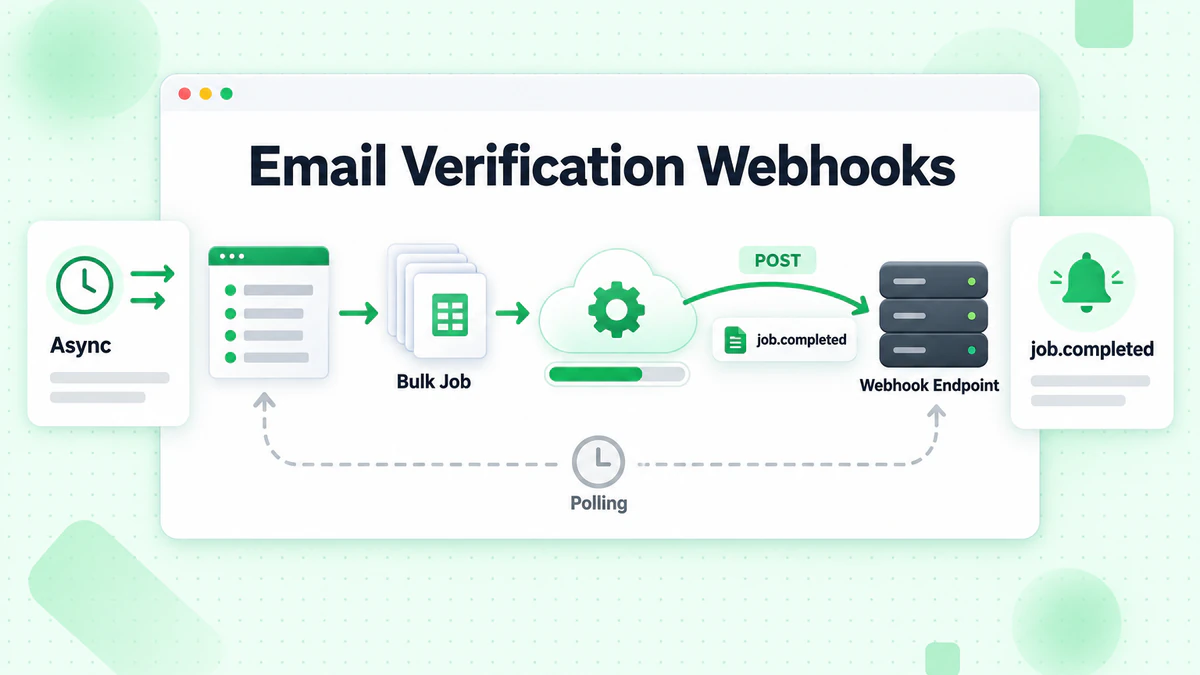
जब आप हजारों या लाखों ईमेल पतों को सत्यापित कर रहे हों, तो प्रत्येक परिणाम के लिए सिंक्रोनस रूप से प्रतीक्षा करना व्यावहारिक नहीं है। ईमेल सत्यापन webhooks एक सुरुचिपूर्ण समाधान प्रदान करते हैं जो आपके एप्लिकेशन को सूचित करते हैं जब सत्यापन कार्य पूर्ण हो जाते हैं, निरंतर polling की आवश्यकता को समाप्त करते हैं और कुशल असिंक्रोनस वर्कफ़्लो को सक्षम करते हैं। यह व्यापक गाइड बुनियादी सेटअप से लेकर बड़े पैमाने पर सत्यापन संचालन को संभालने के लिए उन्नत पैटर्न तक, ईमेल सत्यापन webhooks को लागू करने के बारे में डेवलपर्स को जानने के लिए आवश्यक सब कुछ प्रस्तुत करती है।
ईमेल सत्यापन Webhooks को समझना
Webhooks HTTP callbacks हैं जो विशिष्ट घटनाओं के घटित होने पर आपके एप्लिकेशन को डेटा वितरित करते हैं। ईमेल सत्यापन के संदर्भ में, webhooks आपके सिस्टम को सूचित करते हैं जब बल्क सत्यापन कार्य पूर्ण होते हैं, जब async मोड में व्यक्तिगत ईमेल सत्यापन समाप्त होता है, या जब सत्यापन प्रक्रिया के दौरान अन्य महत्वपूर्ण घटनाएं घटित होती हैं।
ईमेल सत्यापन के लिए Webhooks का उपयोग क्यों करें?
पारंपरिक request-response पैटर्न एकल ईमेल सत्यापन के लिए अच्छी तरह से काम करते हैं, लेकिन बल्क ऑपरेशन चुनौतियां प्रस्तुत करते हैं। 100,000 ईमेल को सत्यापित करने में घंटों लग सकते हैं, और एक HTTP कनेक्शन को इतने लंबे समय तक खुला रखना संभव नहीं है। स्टेटस अपडेट के लिए polling करना संसाधनों को बर्बाद करता है और अनावश्यक API लोड बनाता है।
Polling ओवरहेड को समाप्त करना
Webhooks के बिना, आपको बल्क कार्य पूर्ण हो गए हैं या नहीं यह जांचने के लिए API को बार-बार query करना होगा। यह अनावश्यक नेटवर्क ट्रैफ़िक बनाता है, API दर सीमाओं का उपभोग करता है, और आपके एप्लिकेशन में जटिलता जोड़ता है। Webhooks आपको सूचनाएं तभी push करते हैं जब उनकी आवश्यकता हो।
रीयल-टाइम प्रोसेसिंग
Webhooks सत्यापन पूर्ण होने पर तुरंत कार्रवाई सक्षम करते हैं। आपका एप्लिकेशन परिणामों को प्रोसेस कर सकता है, डेटाबेस को अपडेट कर सकता है, और polling अंतराल द्वारा पेश की गई देरी के बिना अनुवर्ती कार्रवाई कर सकता है।
स्केलेबल आर्किटेक्चर
Webhook-आधारित आर्किटेक्चर स्वाभाविक रूप से स्केल करते हैं। चाहे आप एक बल्क कार्य संसाधित कर रहे हों या सैकड़ों एक साथ, आपका webhook endpoint सूचनाएं प्राप्त करता है जैसे ही वे आती हैं, और आप उन्हें queues या workers का उपयोग करके असिंक्रोनस रूप से प्रोसेस कर सकते हैं।
संसाधन दक्षता
कनेक्शन बनाए रखने या polling loops चलाने के बजाय, आपका एप्लिकेशन निष्क्रिय रहता है जब तक webhooks नहीं आते। यह compute लागत को कम करता है और infrastructure आवश्यकताओं को सरल बनाता है।
ईमेल सत्यापन में Webhook घटनाएं
ईमेल सत्यापन सेवाएं आमतौर पर कई घटना प्रकारों के लिए webhooks ट्रिगर करती हैं:
बल्क कार्य पूर्णता
सबसे सामान्य webhook घटना तब सक्रिय होती है जब एक बल्क सत्यापन कार्य प्रोसेसिंग समाप्त कर लेता है। Payload में कार्य स्थिति, सारांश सांख्यिकी, और परिणाम डाउनलोड करने के बारे में जानकारी शामिल होती है।
बल्क कार्य प्रगति
कुछ सेवाएं बल्क प्रोसेसिंग के दौरान अंतराल पर प्रगति webhooks भेजती हैं, जिससे आप सत्यापन प्रगति को ट्रैक कर सकते हैं और पूर्णता समय का अनुमान लगा सकते हैं।
बल्क कार्य विफलता
जब एक बल्क कार्य त्रुटियों का सामना करता है जो पूर्णता को रोकती हैं, विफलता webhooks विवरण प्रदान करते हैं कि क्या गलत हुआ और क्या आंशिक परिणाम उपलब्ध हैं।
एकल ईमेल सत्यापन (Async मोड)
उच्च-मात्रा रीयल-टाइम सत्यापन परिदृश्यों के लिए, async एकल-ईमेल सत्यापन सिंक्रोनस प्रतिक्रिया की प्रतीक्षा करने के बजाय webhook के माध्यम से परिणाम भेजता है।
Webhook Endpoints सेटअप करना
Webhooks को लागू करने के लिए आपके एप्लिकेशन में एक endpoint बनाने की आवश्यकता है जो webhook payloads को प्राप्त और प्रोसेस कर सके।
बुनियादी Endpoint संरचना
एक webhook endpoint केवल एक HTTP POST endpoint है जो JSON payloads स्वीकार करता है:
const express = require('express');
const app = express();

app.use(express.json());

app.post('/webhooks/email-verification', async (req, res) => {
  const { event_type, job_id, status, data } = req.body;

  console.log(`Received webhook: ${event_type} for job ${job_id}`);

  // Process the webhook
  try {
    await handleWebhookEvent(req.body);

    // Always respond quickly to acknowledge receipt
    res.status(200).json({ received: true });
  } catch (error) {
    console.error('Webhook processing error:', error);

    // Still acknowledge receipt to prevent retries
    res.status(200).json({ received: true, error: error.message });
  }
});

async function handleWebhookEvent(payload) {
  switch (payload.event_type) {
    case 'bulk.completed':
      await handleBulkCompleted(payload);
      break;
    case 'bulk.failed':
      await handleBulkFailed(payload);
      break;
    case 'bulk.progress':
      await handleBulkProgress(payload);
      break;
    default:
      console.log(`Unknown event type: ${payload.event_type}`);
  }
}
Webhook प्रतिक्रिया सर्वोत्तम प्रथाएं
ईमेल सत्यापन सेवाएं webhook endpoints से त्वरित प्रतिक्रिया की अपेक्षा करती हैं। यदि आपका endpoint प्रतिक्रिया देने में बहुत अधिक समय लेता है, तो सेवा यह मान सकती है कि वितरण विफल हो गया और पुनः प्रयास कर सकती है।
तुरंत प्रतिक्रिया दें
Webhook प्राप्ति को तुरंत स्वीकार करें, फिर payload को असिंक्रोनस रूप से प्रोसेस करें:
app.post('/webhooks/email-verification', async (req, res) => {
  // Immediately acknowledge receipt
  res.status(200).json({ received: true });

  // Process asynchronously
  setImmediate(async () => {
    try {
      await handleWebhookEvent(req.body);
    } catch (error) {
      console.error('Async webhook processing error:', error);
      // Log for retry or manual processing
      await logFailedWebhook(req.body, error);
    }
  });
});
भारी प्रोसेसिंग के लिए Message Queues का उपयोग करें
प्रोडक्शन सिस्टम के लिए, worker प्रक्रियाओं द्वारा प्रोसेसिंग के लिए webhook payloads को queue करें:
const Queue = require('bull');
const webhookQueue = new Queue('email-verification-webhooks');

app.post('/webhooks/email-verification', async (req, res) => {
  // Queue the webhook for processing
  await webhookQueue.add('process-webhook', req.body, {
    attempts: 3,
    backoff: {
      type: 'exponential',
      delay: 1000
    }
  });

  res.status(200).json({ received: true });
});

// Worker process
webhookQueue.process('process-webhook', async (job) => {
  const payload = job.data;
  await handleWebhookEvent(payload);
});
API के साथ Webhooks को कॉन्फ़िगर करना
ईमेल सत्यापन सेवा के साथ अपने webhook endpoint को पंजीकृत करें:
async function registerWebhook(webhookUrl, events, secret) {
  const response = await fetch('https://api.billionverify.com/v1/webhooks', {
    method: 'POST',
    headers: {
      'Authorization': `Bearer ${process.env.BV_API_KEY}`,
      'Content-Type': 'application/json'
    },
    body: JSON.stringify({
      url: webhookUrl,
      events: events,
      secret: secret
    })
  });

  const result = await response.json();

  if (!response.ok) {
    throw new Error(`Failed to register webhook: ${result.error}`);
  }

  console.log(`Webhook registered: ${result.webhook_id}`);
  return result;
}

// Register for bulk job events
await registerWebhook(
  'https://yourapp.com/webhooks/email-verification',
  ['bulk.completed', 'bulk.failed', 'bulk.progress'],
  process.env.WEBHOOK_SECRET
);
Webhook Endpoints को सुरक्षित करना
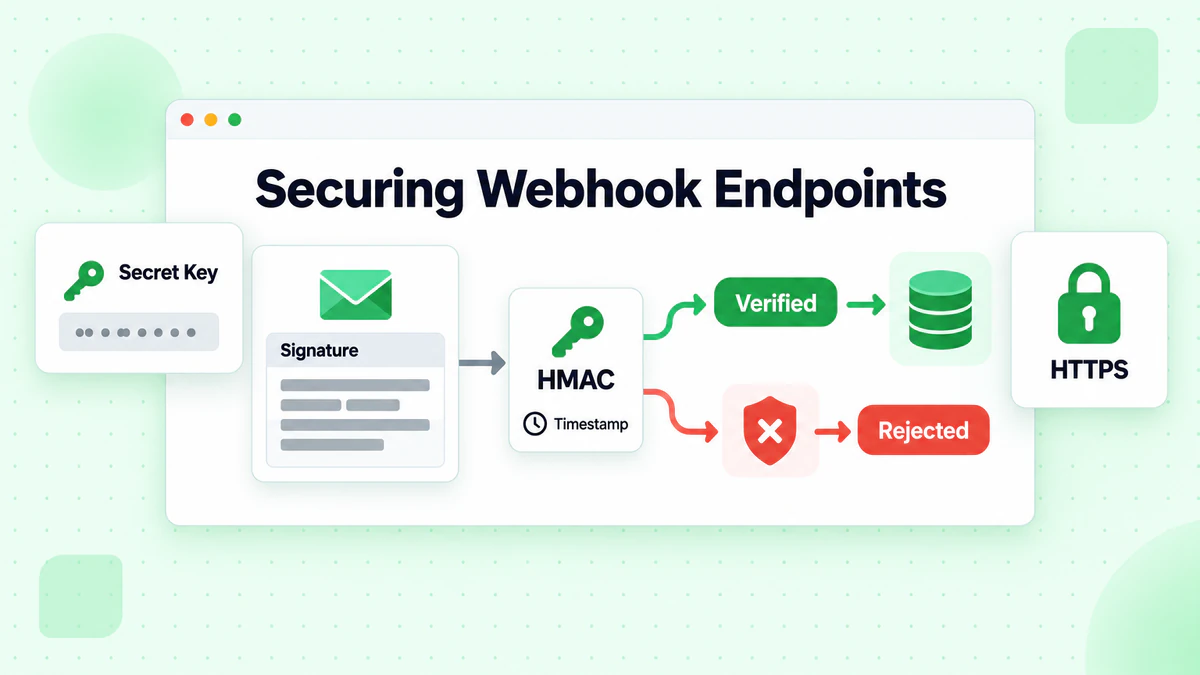
Webhook endpoints सार्वजनिक रूप से सुलभ हैं, जिससे सुरक्षा आवश्यक हो जाती है। उचित सत्यापन के बिना, हमलावर आपके एप्लिकेशन को हेरफेर करने के लिए नकली webhook payloads भेज सकते हैं।
हस्ताक्षर सत्यापन
अधिकांश ईमेल सत्यापन सेवाएं साझा secret के साथ HMAC-SHA256 का उपयोग करके webhook payloads पर हस्ताक्षर करती हैं। प्रोसेसिंग से पहले हस्ताक्षर सत्यापित करें:
const crypto = require('crypto');

function verifyWebhookSignature(payload, signature, secret) {
  const expectedSignature = crypto
    .createHmac('sha256', secret)
    .update(JSON.stringify(payload))
    .digest('hex');

  // Use timing-safe comparison to prevent timing attacks
  return crypto.timingSafeEqual(
    Buffer.from(signature),
    Buffer.from(expectedSignature)
  );
}

app.post('/webhooks/email-verification', async (req, res) => {
  const signature = req.headers['x-webhook-signature'];

  if (!signature) {
    return res.status(401).json({ error: 'Missing signature' });
  }

  const isValid = verifyWebhookSignature(
    req.body,
    signature,
    process.env.WEBHOOK_SECRET
  );

  if (!isValid) {
    console.warn('Invalid webhook signature received');
    return res.status(401).json({ error: 'Invalid signature' });
  }

  // Signature valid, process webhook
  await handleWebhookEvent(req.body);
  res.status(200).json({ received: true });
});
Timestamp सत्यापन
Webhook timestamps को मान्य करके replay हमलों को रोकें:
function isTimestampValid(timestamp, toleranceSeconds = 300) {
  const webhookTime = new Date(timestamp).getTime();
  const currentTime = Date.now();
  const difference = Math.abs(currentTime - webhookTime);

  return difference <= toleranceSeconds * 1000;
}

app.post('/webhooks/email-verification', async (req, res) => {
  const { timestamp } = req.body;

  if (!isTimestampValid(timestamp)) {
    console.warn('Webhook timestamp outside acceptable range');
    return res.status(400).json({ error: 'Invalid timestamp' });
  }

  // Continue with signature verification and processing
});
IP Allowlisting
अतिरिक्त सुरक्षा के लिए, webhook पहुंच को ज्ञात IP पतों तक सीमित करें:
const allowedIPs = [
  '203.0.113.0/24',  // BillionVerify webhook servers
  '198.51.100.0/24'
];

function isIPAllowed(clientIP) {
  // Implement CIDR range checking
  return allowedIPs.some(range => isIPInRange(clientIP, range));
}

app.post('/webhooks/email-verification', async (req, res) => {
  const clientIP = req.ip || req.connection.remoteAddress;

  if (!isIPAllowed(clientIP)) {
    console.warn(`Webhook from unauthorized IP: ${clientIP}`);
    return res.status(403).json({ error: 'Forbidden' });
  }

  // Continue with processing
});
Idempotency प्रबंधन
नेटवर्क समस्याओं या पुनः प्रयासों के कारण Webhooks कई बार वितरित किए जा सकते हैं। डुप्लिकेट को सुरक्षित रूप से संभालने के लिए idempotency लागू करें:
const processedWebhooks = new Set(); // Use Redis in production

async function handleWebhookIdempotent(payload) {
  const webhookId = payload.webhook_id || payload.event_id;

  // Check if already processed
  if (processedWebhooks.has(webhookId)) {
    console.log(`Duplicate webhook ignored: ${webhookId}`);
    return;
  }

  // Mark as processing
  processedWebhooks.add(webhookId);

  try {
    await handleWebhookEvent(payload);
  } catch (error) {
    // Remove from processed set to allow retry
    processedWebhooks.delete(webhookId);
    throw error;
  }
}
प्रोडक्शन सिस्टम के लिए, वितरित idempotency के लिए Redis का उपयोग करें:
const Redis = require('ioredis');
const redis = new Redis();

async function isWebhookProcessed(webhookId) {
  const key = `webhook:processed:${webhookId}`;
  const result = await redis.set(key, '1', 'NX', 'EX', 86400); // 24 hour expiry
  return result === null; // Already exists
}

app.post('/webhooks/email-verification', async (req, res) => {
  const webhookId = req.body.webhook_id;

  if (await isWebhookProcessed(webhookId)) {
    console.log(`Duplicate webhook: ${webhookId}`);
    return res.status(200).json({ received: true, duplicate: true });
  }

  await handleWebhookEvent(req.body);
  res.status(200).json({ received: true });
});
Webhook Payloads को प्रोसेस करना
विभिन्न webhook घटनाओं को विभिन्न प्रबंधन तर्क की आवश्यकता होती है। आइए ईमेल सत्यापन webhooks को प्रोसेस करने के लिए सामान्य पैटर्न देखें।
बल्क कार्य पूर्णता को संभालना
जब एक बल्क सत्यापन कार्य पूर्ण होता है, तो परिणामों को डाउनलोड और प्रोसेस करें:
async function handleBulkCompleted(payload) {
  const { job_id, status, summary, download_url } = payload;

  console.log(`Bulk job ${job_id} completed with status: ${status}`);
  console.log(`Summary: ${summary.valid} valid, ${summary.invalid} invalid`);

  // Download results
  const results = await downloadResults(download_url);

  // Process results
  await processVerificationResults(job_id, results);

  // Update job status in database
  await updateJobStatus(job_id, 'completed', summary);

  // Notify relevant parties
  await sendCompletionNotification(job_id, summary);
}

async function downloadResults(url) {
  const response = await fetch(url, {
    headers: {
      'Authorization': `Bearer ${process.env.BV_API_KEY}`
    }
  });

  if (!response.ok) {
    throw new Error(`Failed to download results: ${response.status}`);
  }

  return await response.json();
}

async function processVerificationResults(jobId, results) {
  // Batch update contacts in database
  const validEmails = results.filter(r => r.is_valid);
  const invalidEmails = results.filter(r => !r.is_valid);

  await db.transaction(async (trx) => {
    // Update valid emails
    for (const batch of chunkArray(validEmails, 1000)) {
      await trx('contacts')
        .whereIn('email', batch.map(r => r.email))
        .update({
          email_verified: true,
          verification_date: new Date(),
          verification_job_id: jobId
        });
    }

    // Handle invalid emails
    for (const batch of chunkArray(invalidEmails, 1000)) {
      await trx('contacts')
        .whereIn('email', batch.map(r => r.email))
        .update({
          email_verified: false,
          email_invalid_reason: trx.raw('CASE email ' +
            batch.map(r => `WHEN '${r.email}' THEN '${r.reason}'`).join(' ') +
            ' END'),
          verification_date: new Date(),
          verification_job_id: jobId
        });
    }
  });
}
बल्क कार्य विफलताओं को संभालना
जब कार्य विफल होते हैं, तो त्रुटि जानकारी कैप्चर करें और निर्धारित करें कि क्या रिकवरी संभव है:
async function handleBulkFailed(payload) {
  const { job_id, error_code, error_message, partial_results_available } = payload;

  console.error(`Bulk job ${job_id} failed: ${error_message}`);

  // Update job status
  await updateJobStatus(job_id, 'failed', {
    error_code,
    error_message
  });

  // Try to retrieve partial results if available
  if (partial_results_available) {
    console.log('Attempting to retrieve partial results...');
    try {
      const partialResults = await downloadPartialResults(job_id);
      await processVerificationResults(job_id, partialResults);

      // Identify unprocessed emails for retry
      const processedEmails = new Set(partialResults.map(r => r.email));
      const originalEmails = await getOriginalJobEmails(job_id);
      const unprocessedEmails = originalEmails.filter(e => !processedEmails.has(e));

      if (unprocessedEmails.length > 0) {
        // Schedule retry for unprocessed emails
        await scheduleRetryJob(job_id, unprocessedEmails);
      }
    } catch (error) {
      console.error('Failed to retrieve partial results:', error);
    }
  }

  // Notify about failure
  await sendFailureNotification(job_id, error_message);
}

async function scheduleRetryJob(originalJobId, emails) {
  // Create new job for remaining emails
  const response = await fetch('https://api.billionverify.com/v1/bulk/verify', {
    method: 'POST',
    headers: {
      'Authorization': `Bearer ${process.env.BV_API_KEY}`,
      'Content-Type': 'application/json'
    },
    body: JSON.stringify({
      emails,
      metadata: {
        retry_of: originalJobId
      }
    })
  });

  const { job_id: newJobId } = await response.json();
  console.log(`Scheduled retry job ${newJobId} for ${emails.length} emails`);
}
प्रगति अपडेट को संभालना
प्रगति webhooks लंबे समय तक चलने वाले कार्यों को ट्रैक करने में मदद करते हैं:
async function handleBulkProgress(payload) {
  const { job_id, processed_count, total_count, estimated_completion } = payload;

  const percentComplete = Math.round((processed_count / total_count) * 100);
  console.log(`Job ${job_id}: ${percentComplete}% complete (${processed_count}/${total_count})`);

  // Update progress in database
  await updateJobProgress(job_id, {
    processed_count,
    total_count,
    percent_complete: percentComplete,
    estimated_completion: new Date(estimated_completion)
  });

  // Optionally notify users of progress
  if (percentComplete % 25 === 0) {
    await sendProgressNotification(job_id, percentComplete);
  }
}
उन्नत Webhook पैटर्न
प्रोडक्शन सिस्टम उन्नत पैटर्न से लाभान्वित होते हैं जो विश्वसनीयता और रखरखाव योग्यता में सुधार करते हैं।
विफल Webhooks के लिए Dead Letter Queue
जब webhook प्रोसेसिंग बार-बार विफल होती है, तो मैनुअल समीक्षा के लिए payloads को dead letter queue में ले जाएं:
const webhookQueue = new Queue('email-verification-webhooks');
const deadLetterQueue = new Queue('webhook-dead-letters');

webhookQueue.process('process-webhook', async (job) => {
  try {
    await handleWebhookEvent(job.data);
  } catch (error) {
    // Check if this is the final retry
    if (job.attemptsMade >= job.opts.attempts - 1) {
      // Move to dead letter queue
      await deadLetterQueue.add('failed-webhook', {
        original_payload: job.data,
        error: error.message,
        failed_at: new Date().toISOString(),
        attempts: job.attemptsMade + 1
      });
    }
    throw error; // Re-throw to trigger retry
  }
});

// Process dead letters manually or with alerts
deadLetterQueue.on('completed', async (job) => {
  await sendAlert({
    type: 'webhook_dead_letter',
    job_id: job.data.original_payload.job_id,
    error: job.data.error
  });
});
Webhook Event Sourcing
ऑडिट ट्रेल और replay क्षमता के लिए सभी webhook घटनाओं को संग्रहीत करें:
async function handleWebhookWithEventSourcing(payload) {
  // Store raw event
  const eventId = await storeWebhookEvent(payload);

  try {
    // Process event
    await handleWebhookEvent(payload);

    // Mark as processed
    await markEventProcessed(eventId);
  } catch (error) {
    // Mark as failed
    await markEventFailed(eventId, error);
    throw error;
  }
}

async function storeWebhookEvent(payload) {
  const result = await db('webhook_events').insert({
    event_type: payload.event_type,
    job_id: payload.job_id,
    payload: JSON.stringify(payload),
    received_at: new Date(),
    status: 'pending'
  });

  return result[0];
}

// Replay failed events
async function replayFailedEvents() {
  const failedEvents = await db('webhook_events')
    .where('status', 'failed')
    .where('retry_count', '<', 3);

  for (const event of failedEvents) {
    try {
      await handleWebhookEvent(JSON.parse(event.payload));
      await markEventProcessed(event.id);
    } catch (error) {
      await incrementRetryCount(event.id);
    }
  }
}
मल्टी-टेनेंट Webhook रूटिंग
SaaS एप्लिकेशन के लिए, webhooks को tenant-विशिष्ट handlers में रूट करें:
async function handleMultiTenantWebhook(payload) {
  const { tenant_id, event_type, data } = payload;

  // Get tenant configuration
  const tenant = await getTenantConfig(tenant_id);

  if (!tenant) {
    console.error(`Unknown tenant: ${tenant_id}`);
    return;
  }

  // Route to tenant-specific handler
  switch (event_type) {
    case 'bulk.completed':
      await handleTenantBulkCompleted(tenant, data);
      break;
    case 'bulk.failed':
      await handleTenantBulkFailed(tenant, data);
      break;
  }

  // Forward to tenant webhook if configured
  if (tenant.webhook_url) {
    await forwardToTenant(tenant.webhook_url, tenant.webhook_secret, payload);
  }
}

async function forwardToTenant(url, secret, payload) {
  const signature = crypto
    .createHmac('sha256', secret)
    .update(JSON.stringify(payload))
    .digest('hex');

  await fetch(url, {
    method: 'POST',
    headers: {
      'Content-Type': 'application/json',
      'X-Webhook-Signature': signature
    },
    body: JSON.stringify(payload)
  });
}
त्रुटि प्रबंधन और विश्वसनीयता
मजबूत webhook कार्यान्वयन विफलताओं को सुचारू रूप से संभालते हैं और सुनिश्चित करते हैं कि कोई डेटा खो नहीं गया है।
पुनः प्रयास रणनीतियां
क्षणिक विफलताओं के लिए exponential backoff लागू करें:
async function processWebhookWithRetry(payload, maxRetries = 5) {
  const delays = [1000, 5000, 30000, 120000, 300000]; // 1s, 5s, 30s, 2m, 5m

  for (let attempt = 0; attempt < maxRetries; attempt++) {
    try {
      await handleWebhookEvent(payload);
      return; // Success
    } catch (error) {
      const isRetryable = isRetryableError(error);

      if (!isRetryable || attempt === maxRetries - 1) {
        // Log to dead letter queue
        await logFailedWebhook(payload, error, attempt + 1);
        throw error;
      }

      console.log(`Retry ${attempt + 1}/${maxRetries} after ${delays[attempt]}ms`);
      await sleep(delays[attempt]);
    }
  }
}

function isRetryableError(error) {
  // Network errors, timeouts, and 5xx responses are retryable
  const retryableCodes = ['ECONNRESET', 'ETIMEDOUT', 'ENOTFOUND'];
  return retryableCodes.includes(error.code) ||
         (error.status && error.status >= 500);
}
Circuit Breaker पैटर्न
जब downstream सेवाएं अनुपलब्ध हों तो cascade विफलताओं को रोकें:
class CircuitBreaker {
  constructor(options = {}) {
    this.failureThreshold = options.failureThreshold || 5;
    this.resetTimeout = options.resetTimeout || 60000;
    this.state = 'CLOSED';
    this.failures = 0;
    this.lastFailure = null;
  }

  async execute(fn) {
    if (this.state === 'OPEN') {
      if (Date.now() - this.lastFailure > this.resetTimeout) {
        this.state = 'HALF_OPEN';
      } else {
        throw new Error('Circuit breaker is OPEN');
      }
    }

    try {
      const result = await fn();
      this.onSuccess();
      return result;
    } catch (error) {
      this.onFailure();
      throw error;
    }
  }

  onSuccess() {
    this.failures = 0;
    this.state = 'CLOSED';
  }

  onFailure() {
    this.failures++;
    this.lastFailure = Date.now();

    if (this.failures >= this.failureThreshold) {
      this.state = 'OPEN';
      console.warn('Circuit breaker opened due to failures');
    }
  }
}

const databaseCircuitBreaker = new CircuitBreaker();

async function handleBulkCompletedSafely(payload) {
  await databaseCircuitBreaker.execute(async () => {
    await processVerificationResults(payload.job_id, payload.results);
  });
}
निगरानी और चेतावनी
Webhook स्वास्थ्य मेट्रिक्स को ट्रैक करें:
const metrics = {
  received: 0,
  processed: 0,
  failed: 0,
  latency: []
};

app.post('/webhooks/email-verification', async (req, res) => {
  const startTime = Date.now();
  metrics.received++;

  try {
    await handleWebhookEvent(req.body);
    metrics.processed++;
  } catch (error) {
    metrics.failed++;
    throw error;
  } finally {
    metrics.latency.push(Date.now() - startTime);

    // Keep only last 1000 measurements
    if (metrics.latency.length > 1000) {
      metrics.latency.shift();
    }
  }

  res.status(200).json({ received: true });
});

// Expose metrics endpoint
app.get('/metrics/webhooks', (req, res) => {
  const avgLatency = metrics.latency.reduce((a, b) => a + b, 0) / metrics.latency.length;

  res.json({
    received: metrics.received,
    processed: metrics.processed,
    failed: metrics.failed,
    success_rate: (metrics.processed / metrics.received * 100).toFixed(2) + '%',
    avg_latency_ms: Math.round(avgLatency)
  });
});

// Alert on high failure rate
setInterval(() => {
  const failureRate = metrics.failed / metrics.received;

  if (failureRate > 0.1) { // More than 10% failures
    sendAlert({
      type: 'high_webhook_failure_rate',
      failure_rate: failureRate,
      total_received: metrics.received,
      total_failed: metrics.failed
    });
  }
}, 60000);
Webhook कार्यान्वयन का परीक्षण
संपूर्ण परीक्षण यह सुनिश्चित करता है कि webhook handlers प्रोडक्शन में सही तरीके से काम करते हैं।
ngrok के साथ स्थानीय परीक्षण
Webhook परीक्षण के लिए स्थानीय endpoints को expose करने के लिए ngrok का उपयोग करें:
# Start your local server
node server.js

# In another terminal, expose it via ngrok
ngrok http 3000
विकास के दौरान अपने webhook endpoint के रूप में ngrok URL पंजीकृत करें।
Mock Webhook Payloads
विभिन्न घटना प्रकारों के लिए परीक्षण fixtures बनाएं:
const mockPayloads = {
  bulkCompleted: {
    event_type: 'bulk.completed',
    job_id: 'job_123456',
    status: 'completed',
    timestamp: new Date().toISOString(),
    summary: {
      total: 1000,
      valid: 850,
      invalid: 120,
      risky: 30
    },
    download_url: 'https://api.billionverify.com/v1/bulk/download/job_123456'
  },

  bulkFailed: {
    event_type: 'bulk.failed',
    job_id: 'job_789012',
    error_code: 'PROCESSING_ERROR',
    error_message: 'Internal processing error',
    partial_results_available: true
  },

  bulkProgress: {
    event_type: 'bulk.progress',
    job_id: 'job_345678',
    processed_count: 5000,
    total_count: 10000,
    estimated_completion: new Date(Date.now() + 3600000).toISOString()
  }
};

// Test endpoint
describe('Webhook Handler', () => {
  it('should process bulk.completed event', async () => {
    const response = await request(app)
      .post('/webhooks/email-verification')
      .set('X-Webhook-Signature', generateSignature(mockPayloads.bulkCompleted))
      .send(mockPayloads.bulkCompleted);

    expect(response.status).toBe(200);
    expect(response.body.received).toBe(true);

    // Verify side effects
    const job = await db('verification_jobs').where('job_id', 'job_123456').first();
    expect(job.status).toBe('completed');
  });
});
एकीकरण परीक्षण
हस्ताक्षर सत्यापन सहित संपूर्ण webhook प्रवाह का परीक्षण करें:
describe('Webhook Security', () => {
  it('should reject requests without signature', async () => {
    const response = await request(app)
      .post('/webhooks/email-verification')
      .send(mockPayloads.bulkCompleted);

    expect(response.status).toBe(401);
  });

  it('should reject requests with invalid signature', async () => {
    const response = await request(app)
      .post('/webhooks/email-verification')
      .set('X-Webhook-Signature', 'invalid_signature')
      .send(mockPayloads.bulkCompleted);

    expect(response.status).toBe(401);
  });

  it('should accept requests with valid signature', async () => {
    const signature = generateSignature(mockPayloads.bulkCompleted);

    const response = await request(app)
      .post('/webhooks/email-verification')
      .set('X-Webhook-Signature', signature)
      .send(mockPayloads.bulkCompleted);

    expect(response.status).toBe(200);
  });
});
BillionVerify Webhook एकीकरण
BillionVerify ईमेल सत्यापन घटनाओं के लिए व्यापक webhook समर्थन प्रदान करता है, जिससे असिंक्रोनस सत्यापन वर्कफ़्लो बनाना आसान हो जाता है।
Webhooks को कॉन्फ़िगर करना
BillionVerify dashboard या API के माध्यम से webhooks सेटअप करें:
// Register webhook via API
async function setupBillionVerifyWebhooks() {
  const webhook = await registerWebhook(
    'https://yourapp.com/webhooks/emailverify',
    ['bulk.completed', 'bulk.failed', 'bulk.progress'],
    process.env.EMAILVERIFY_WEBHOOK_SECRET
  );

  console.log('Webhook configured:', webhook);
}
Webhook Payload फॉर्मेट
BillionVerify webhooks सत्यापन घटनाओं के बारे में व्यापक जानकारी शामिल करते हैं:
{
  "event_type": "bulk.completed",
  "webhook_id": "wh_abc123",
  "job_id": "job_xyz789",
  "timestamp": "2025-01-15T10:30:00Z",
  "status": "completed",
  "summary": {
    "total": 10000,
    "valid": 8500,
    "invalid": 1200,
    "risky": 300,
    "disposable": 150,
    "catch_all": 200
  },
  "processing_time_ms": 45000,
  "download_url": "https://api.billionverify.com/v1/bulk/download/job_xyz789"
}
पूर्ण एकीकरण उदाहरण
const express = require('express');
const crypto = require('crypto');

const app = express();
app.use(express.json());

// Webhook endpoint for BillionVerify
app.post('/webhooks/emailverify', async (req, res) => {
  // Verify signature
  const signature = req.headers['x-emailverify-signature'];
  const isValid = verifySignature(req.body, signature);

  if (!isValid) {
    return res.status(401).json({ error: 'Invalid signature' });
  }

  // Acknowledge immediately
  res.status(200).json({ received: true });

  // Process asynchronously
  processWebhookAsync(req.body);
});

async function processWebhookAsync(payload) {
  try {
    switch (payload.event_type) {
      case 'bulk.completed':
        await handleBulkCompleted(payload);
        break;
      case 'bulk.failed':
        await handleBulkFailed(payload);
        break;
      case 'bulk.progress':
        await handleBulkProgress(payload);
        break;
    }
  } catch (error) {
    console.error('Webhook processing error:', error);
    await logFailedWebhook(payload, error);
  }
}

app.listen(3000, () => {
  console.log('Webhook server running on port 3000');
});
निष्कर्ष
ईमेल सत्यापन webhooks बल्क सत्यापन को संभालने के तरीके को रूपांतरित करते हैं, कुशल, स्केलेबल और विश्वसनीय असिंक्रोनस प्रोसेसिंग को सक्षम करके। सुरक्षा उपायों, त्रुटि प्रबंधन और निगरानी के साथ उचित webhook प्रबंधन को लागू करके, आप मजबूत ईमेल सत्यापन वर्कफ़्लो बना सकते हैं जो आपके एप्लिकेशन की जरूरतों के साथ स्केल करते हैं।
ईमेल सत्यापन webhooks को लागू करने के लिए मुख्य बिंदु:
- Webhook अनुरोधों पर त्वरित प्रतिक्रिया दें और payloads को असिंक्रोनस रूप से प्रोसेस करें
- यह सुनिश्चित करने के लिए हस्ताक्षर सत्यापित करें कि webhooks वैध स्रोतों से आते हैं
- डुप्लिकेट वितरण को सुरक्षित रूप से संभालने के लिए idempotency लागू करें
- पैमाने पर विश्वसनीय प्रोसेसिंग के लिए message queues का उपयोग करें
- मेट्रिक्स और चेतावनी के साथ webhook स्वास्थ्य की निगरानी करें
चाहे आप हजारों या लाखों ईमेल सत्यापन प्रोसेस कर रहे हों, webhooks कुशल async प्रोसेसिंग के लिए नींव प्रदान करते हैं। BillionVerify के व्यापक webhook समर्थन के साथ आज ही webhooks को लागू करना शुरू करें और अपने ईमेल सत्यापन वर्कफ़्लो को अगले स्तर पर ले जाएं।
Instantly या Smartlead का उपयोग करने वाली टीमें हर अभियान से पहले BillionVerify से सूचियाँ साफ करके डिलीवरेबिलिटी में उल्लेखनीय सुधार करती हैं।
वेरिफिकेशन प्रोवाइडर चुनने से पहले सटीकता और गति के मामले में BillionVerify की तुलना ZeroBounce से करें।