



이메일 주소를 검증할 때 가장 어려운 시나리오 중 하나는 catch-all 이메일 서버입니다. 이러한 서버는 도메인의 모든 주소로 들어오는 메일을 수락하기 때문에 표준 SMTP 검증을 통해 특정 메일함이 실제로 존재하는지 판단하는 것이 불가능합니다. Catch-all 이메일 감지를 이해하는 것은 이메일 목록 품질을 유지하고 전달률을 극대화하는 데 진지한 사람이라면 누구에게나 필수적입니다. 기본 개념에 대해서는 이메일 검증 완전 가이드를 참조하세요.
이 포괄적인 가이드에서는 catch-all 이메일에 대해 알아야 할 모든 것을 살펴봅니다: catch-all 이메일이 무엇인지, 왜 존재하는지, 어떻게 감지하는지, 그리고 가장 중요하게는 이메일 검증 워크플로우에서 어떻게 처리하는지에 대해 다룹니다. 이메일 검증 시스템을 구축하는 개발자이든 이메일 목록을 정리하려는 마케터이든, 이 가이드는 catch-all 도메인을 효과적으로 처리하는 데 필요한 지식과 도구를 제공합니다.
견고한 이메일 검증 전략은 catch-all 서버를 고려해야 합니다. 적절한 감지 및 처리 없이는 검증 결과가 이메일 전달 가능성에 대해 잘못된 확신을 줄 수 있습니다. 기술적 세부 사항과 실용적인 솔루션을 살펴보겠습니다.
Catch-All 이메일 서버란 무엇인가?
Catch-all 이메일 서버(accept-all 서버라고도 함)는 특정 메일함이 존재하는지 여부와 관계없이 도메인의 모든 주소로 들어오는 이메일을 수락하도록 구성됩니다. anyaddress@catchall-domain.com으로 이메일을 보내면 "anyaddress"라는 이름의 메일함이 생성된 적이 없더라도 서버는 반송하지 않고 이를 수락합니다.
Catch-All 구성 작동 방식
일반적인 이메일 서버 구성에서는 존재하지 않는 메일함으로 메시지가 도착하면 서버가 "550 User not found" 또는 유사한 거부 메시지로 응답합니다. 이 동작을 통해 이메일 검증 시스템은 서버의 응답을 확인하여 주소가 존재하는지 판단할 수 있습니다.
Catch-all 서버는 다르게 동작합니다. 수신자 주소와 관계없이 모든 수신 메일을 수락하도록 구성됩니다. 그러면 메일은 다음과 같이 처리될 수 있습니다:
- 지정된 메일함으로 라우팅 - 단일 관리자가 모든 메시지를 받음
- 일반 대기열에 저장 - 메시지가 나중에 분류하기 위해 보관됨
- 자동으로 삭제 - 수락되지만 전달되지 않고 삭제됨
- 다른 시스템으로 전달 - 처리를 위해 다른 서버로 전송됨
다음은 Postfix 메일 서버 구성에서 이것이 어떻게 보이는지에 대한 예입니다:
# /etc/postfix/main.cf
# 표준 구성 - 알 수 없는 수신자를 거부
local_recipient_maps = proxy:unix:passwd.byname $alias_maps

# Catch-all 구성 - 모든 수신자를 수락
local_recipient_maps =
조직이 Catch-All 서버를 사용하는 이유
조직이 catch-all 이메일을 구성하는 데에는 여러 가지 합법적인 이유가 있습니다:
1. 비즈니스 커뮤니케이션 손실 방지
중소기업은 종종 직원 이름의 오타나 변형으로 인해 중요한 이메일을 놓칠까 봐 걱정합니다. 누군가가 john.smith@company.com으로 이메일을 보냈지만 실제 주소가 jsmith@company.com인 경우, catch-all 구성은 메시지가 손실되지 않도록 보장합니다.
2. 유연한 이메일 라우팅
일부 조직은 정교한 이메일 라우팅 시스템의 일부로 catch-all을 사용합니다. 모든 수신 메일이 중앙 대기열로 이동하여 규칙에 따라 자동으로 분류되고 배포됩니다.
3. 보안 모니터링
보안 팀은 때때로 공격자나 스패머가 타겟팅하는 주소를 모니터링하기 위해 catch-all을 구성합니다. 이 정보는 피싱 시도나 데이터 유출을 식별하는 데 도움이 됩니다.
4. 레거시 시스템 호환성
한 이메일 시스템에서 다른 시스템으로 마이그레이션하는 조직은 전환 중에 메시지가 손실되지 않도록 일시적으로 catch-all을 활성화할 수 있습니다.
5. 개인정보 보호
일부 개인정보 보호를 중시하는 조직은 가입하는 각 서비스에 대해 고유한 이메일 주소를 생성하기 위해 catch-all 도메인을 사용하며, 이를 통해 어떤 회사가 자신의 데이터를 공유하거나 유출하는지 추적하기가 더 쉬워집니다.
이메일 검증의 문제점
이메일 검증 목적으로 catch-all 서버는 중대한 문제를 제기합니다. Catch-all 도메인에서 SMTP 검증을 수행하면 서버는 실제 주소이든 완전히 조작된 주소이든 테스트하는 모든 주소에 대해 "250 OK" 수락 응답을 합니다.
다음 SMTP 세션 예를 고려하세요:
> MAIL FROM:<test@verify.local>
< 250 OK
> RCPT TO:<real.user@catchall-domain.com>
< 250 OK
> RCPT TO:<completely.fake.address@catchall-domain.com>
< 250 OK
> RCPT TO:<asdfghjkl12345@catchall-domain.com>
< 250 OK
세 가지 주소 모두 동일한 긍정 응답을 받으므로 SMTP 검증만으로는 실제 사용자와 가짜 주소를 구별하는 것이 불가능합니다.
Catch-All 이메일 서버를 감지하는 방법
메일 서버가 catch-all로 구성되어 있는지 감지하려면 영리한 접근 방식이 필요합니다: 절대로 존재해서는 안 되는 주소로 테스트하고 서버의 응답을 관찰하는 것입니다.
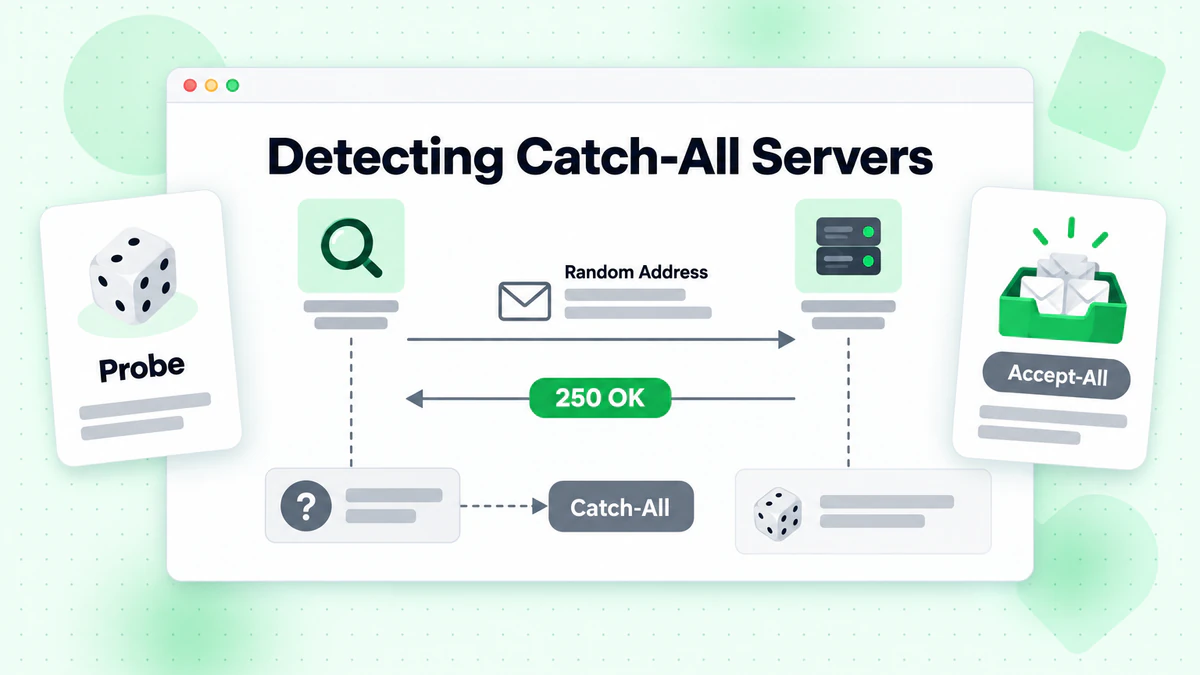
감지 알고리즘
기본 catch-all 감지 알고리즘은 다음과 같이 작동합니다:
- 대상 도메인에서 무작위로 존재하지 않는 주소 생성
- 이 가짜 주소에 대해 SMTP 검증 수행
- 응답 분석:
- 서버가 가짜 주소를 수락하면 → catch-all일 가능성이 높음
- 서버가 가짜 주소를 거부하면 → 일반 검증이 적용됨
Node.js 구현
다음은 catch-all 감지를 위한 완전한 Node.js 구현입니다:
const net = require('net');
const dns = require('dns').promises;
const crypto = require('crypto');

class CatchAllDetector {
  constructor(options = {}) {
    this.timeout = options.timeout || 10000;
    this.fromEmail = options.fromEmail || 'verify@verify.local';
    this.fromDomain = options.fromDomain || 'verify.local';
  }

  /**
   * Generate a random email address that definitely doesn't exist
   */
  generateRandomEmail(domain) {
    const randomString = crypto.randomBytes(16).toString('hex');
    const timestamp = Date.now();
    return `nonexistent-${randomString}-${timestamp}@${domain}`;
  }

  /**
   * Get the primary MX server for a domain
   */
  async getMXServer(domain) {
    try {
      const records = await dns.resolveMx(domain);
      if (!records || records.length === 0) {
        return null;
      }
      // Sort by priority and return the primary server
      records.sort((a, b) => a.priority - b.priority);
      return records[0].exchange;
    } catch (error) {
      return null;
    }
  }

  /**
   * Perform SMTP verification on an email address
   */
  async smtpVerify(email, mxServer) {
    return new Promise((resolve) => {
      const socket = new net.Socket();
      let step = 0;
      let result = { accepted: false, response: '' };

      const commands = [
        null, // Wait for greeting
        `EHLO ${this.fromDomain}\r\n`,
        `MAIL FROM:<${this.fromEmail}>\r\n`,
        `RCPT TO:<${email}>\r\n`,
        'QUIT\r\n'
      ];

      socket.setTimeout(this.timeout);

      socket.on('data', (data) => {
        const response = data.toString();
        const code = parseInt(response.substring(0, 3));

        if (step === 0 && code === 220) {
          socket.write(commands[1]);
          step++;
        } else if (step === 1 && code === 250) {
          socket.write(commands[2]);
          step++;
        } else if (step === 2 && code === 250) {
          socket.write(commands[3]);
          step++;
        } else if (step === 3) {
          result.response = response.trim();
          result.accepted = code === 250 || code === 251;
          socket.write(commands[4]);
          socket.destroy();
          resolve(result);
        } else if (code >= 400) {
          result.response = response.trim();
          result.accepted = false;
          socket.destroy();
          resolve(result);
        }
      });

      socket.on('timeout', () => {
        result.response = 'Connection timeout';
        socket.destroy();
        resolve(result);
      });

      socket.on('error', (error) => {
        result.response = `Error: ${error.message}`;
        socket.destroy();
        resolve(result);
      });

      socket.connect(25, mxServer);
    });
  }

  /**
   * Detect if a domain is configured as catch-all
   */
  async detectCatchAll(domain) {
    // Get MX server
    const mxServer = await this.getMXServer(domain);
    if (!mxServer) {
      return {
        isCatchAll: null,
        reason: 'Could not resolve MX records',
        domain
      };
    }

    // Generate a random non-existent email
    const fakeEmail = this.generateRandomEmail(domain);

    // Test the fake email
    const result = await this.smtpVerify(fakeEmail, mxServer);

    return {
      isCatchAll: result.accepted,
      reason: result.accepted
        ? 'Server accepts mail for non-existent addresses'
        : 'Server rejects non-existent addresses',
      domain,
      mxServer,
      testEmail: fakeEmail,
      serverResponse: result.response
    };
  }

  /**
   * Verify an email with catch-all detection
   */
  async verifyWithCatchAllDetection(email) {
    const domain = email.split('@')[1];

    // First, detect if domain is catch-all
    const catchAllResult = await this.detectCatchAll(domain);

    if (catchAllResult.isCatchAll === null) {
      return {
        email,
        valid: null,
        catchAll: null,
        reason: catchAllResult.reason
      };
    }

    // Get MX server
    const mxServer = await this.getMXServer(domain);

    // Verify the actual email
    const verifyResult = await this.smtpVerify(email, mxServer);

    return {
      email,
      valid: verifyResult.accepted,
      catchAll: catchAllResult.isCatchAll,
      reason: catchAllResult.isCatchAll
        ? 'Address accepted but domain is catch-all (deliverability uncertain)'
        : verifyResult.accepted
          ? 'Address verified successfully'
          : 'Address rejected by server',
      serverResponse: verifyResult.response
    };
  }
}

// Usage example
async function main() {
  const detector = new CatchAllDetector();

  // Test catch-all detection
  const domains = ['gmail.com', 'example.com', 'company.com'];

  for (const domain of domains) {
    console.log(`\nTesting domain: ${domain}`);
    const result = await detector.detectCatchAll(domain);
    console.log(`Is Catch-All: ${result.isCatchAll}`);
    console.log(`Reason: ${result.reason}`);
    if (result.serverResponse) {
      console.log(`Server Response: ${result.serverResponse}`);
    }
  }

  // Verify specific email with catch-all detection
  const emailResult = await detector.verifyWithCatchAllDetection('user@example.com');
  console.log('\nEmail Verification Result:');
  console.log(JSON.stringify(emailResult, null, 2));
}

main().catch(console.error);
Python 구현
다음은 동등한 Python 구현입니다:
import socket
import dns.resolver
import secrets
import time
from dataclasses import dataclass
from typing import Optional

@dataclass
class CatchAllResult:
    is_catch_all: Optional[bool]
    reason: str
    domain: str
    mx_server: Optional[str] = None
    test_email: Optional[str] = None
    server_response: Optional[str] = None

@dataclass
class VerificationResult:
    email: str
    valid: Optional[bool]
    catch_all: Optional[bool]
    reason: str
    server_response: Optional[str] = None

class CatchAllDetector:
    def __init__(self, timeout: int = 10, from_email: str = 'verify@verify.local',
                 from_domain: str = 'verify.local'):
        self.timeout = timeout
        self.from_email = from_email
        self.from_domain = from_domain

    def generate_random_email(self, domain: str) -> str:
        """Generate a random email address that definitely doesn't exist."""
        random_string = secrets.token_hex(16)
        timestamp = int(time.time() * 1000)
        return f"nonexistent-{random_string}-{timestamp}@{domain}"

    def get_mx_server(self, domain: str) -> Optional[str]:
        """Get the primary MX server for a domain."""
        try:
            records = dns.resolver.resolve(domain, 'MX')
            mx_records = sorted(
                [(r.preference, str(r.exchange).rstrip('.')) for r in records],
                key=lambda x: x[0]
            )
            return mx_records[0][1] if mx_records else None
        except Exception:
            return None

    def smtp_verify(self, email: str, mx_server: str) -> dict:
        """Perform SMTP verification on an email address."""
        result = {'accepted': False, 'response': ''}

        try:
            sock = socket.socket(socket.AF_INET, socket.SOCK_STREAM)
            sock.settimeout(self.timeout)
            sock.connect((mx_server, 25))

            # Receive greeting
            response = sock.recv(1024).decode()
            if not response.startswith('220'):
                result['response'] = response.strip()
                return result

            # Send EHLO
            sock.send(f'EHLO {self.from_domain}\r\n'.encode())
            response = sock.recv(1024).decode()
            if not response.startswith('250'):
                result['response'] = response.strip()
                return result

            # Send MAIL FROM
            sock.send(f'MAIL FROM:<{self.from_email}>\r\n'.encode())
            response = sock.recv(1024).decode()
            if not response.startswith('250'):
                result['response'] = response.strip()
                return result

            # Send RCPT TO
            sock.send(f'RCPT TO:<{email}>\r\n'.encode())
            response = sock.recv(1024).decode()
            result['response'] = response.strip()
            code = int(response[:3])
            result['accepted'] = code in (250, 251)

            # Send QUIT
            sock.send(b'QUIT\r\n')
            sock.close()

        except socket.timeout:
            result['response'] = 'Connection timeout'
        except socket.error as e:
            result['response'] = f'Socket error: {str(e)}'
        except Exception as e:
            result['response'] = f'Error: {str(e)}'

        return result

    def detect_catch_all(self, domain: str) -> CatchAllResult:
        """Detect if a domain is configured as catch-all."""
        # Get MX server
        mx_server = self.get_mx_server(domain)
        if not mx_server:
            return CatchAllResult(
                is_catch_all=None,
                reason='Could not resolve MX records',
                domain=domain
            )

        # Generate a random non-existent email
        fake_email = self.generate_random_email(domain)

        # Test the fake email
        result = self.smtp_verify(fake_email, mx_server)

        return CatchAllResult(
            is_catch_all=result['accepted'],
            reason='Server accepts mail for non-existent addresses' if result['accepted']
                   else 'Server rejects non-existent addresses',
            domain=domain,
            mx_server=mx_server,
            test_email=fake_email,
            server_response=result['response']
        )

    def verify_with_catch_all_detection(self, email: str) -> VerificationResult:
        """Verify an email with catch-all detection."""
        domain = email.split('@')[1]

        # First, detect if domain is catch-all
        catch_all_result = self.detect_catch_all(domain)

        if catch_all_result.is_catch_all is None:
            return VerificationResult(
                email=email,
                valid=None,
                catch_all=None,
                reason=catch_all_result.reason
            )

        # Get MX server
        mx_server = self.get_mx_server(domain)

        # Verify the actual email
        verify_result = self.smtp_verify(email, mx_server)

        if catch_all_result.is_catch_all:
            reason = 'Address accepted but domain is catch-all (deliverability uncertain)'
        elif verify_result['accepted']:
            reason = 'Address verified successfully'
        else:
            reason = 'Address rejected by server'

        return VerificationResult(
            email=email,
            valid=verify_result['accepted'],
            catch_all=catch_all_result.is_catch_all,
            reason=reason,
            server_response=verify_result['response']
        )


# Usage example
if __name__ == '__main__':
    detector = CatchAllDetector()

    # Test catch-all detection
    domains = ['gmail.com', 'example.com', 'company.com']

    for domain in domains:
        print(f"\nTesting domain: {domain}")
        result = detector.detect_catch_all(domain)
        print(f"Is Catch-All: {result.is_catch_all}")
        print(f"Reason: {result.reason}")
        if result.server_response:
            print(f"Server Response: {result.server_response}")

    # Verify specific email with catch-all detection
    email_result = detector.verify_with_catch_all_detection('user@example.com')
    print("\nEmail Verification Result:")
    print(f"  Email: {email_result.email}")
    print(f"  Valid: {email_result.valid}")
    print(f"  Catch-All: {email_result.catch_all}")
    print(f"  Reason: {email_result.reason}")
고급 감지 기술
기본 catch-all 감지는 다음과 같은 고급 기술로 개선할 수 있습니다:
1. 다중 프로브 테스트
하나의 가짜 주소로만 테스트하는 대신 무작위로 생성된 여러 주소로 테스트합니다. 이는 일관되지 않은 동작을 가진 서버를 식별하는 데 도움이 됩니다:
async detectCatchAllAdvanced(domain, probeCount = 3) {
  const results = [];

  for (let i = 0; i < probeCount; i++) {
    const fakeEmail = this.generateRandomEmail(domain);
    const result = await this.smtpVerify(fakeEmail, await this.getMXServer(domain));
    results.push(result.accepted);

    // Small delay between probes to avoid rate limiting
    await new Promise(resolve => setTimeout(resolve, 500));
  }

  // Analyze results
  const acceptedCount = results.filter(r => r).length;

  if (acceptedCount === probeCount) {
    return { isCatchAll: true, confidence: 'high' };
  } else if (acceptedCount === 0) {
    return { isCatchAll: false, confidence: 'high' };
  } else {
    return { isCatchAll: null, confidence: 'low', note: 'Inconsistent server behavior' };
  }
}
2. 패턴 기반 감지
일부 catch-all 서버는 패턴으로 구성됩니다. 다양한 형식의 주소를 테스트합니다:
const testPatterns = [
  `nonexistent${Date.now()}@${domain}`,           // Random with timestamp
  `zzz-fake-user-zzz@${domain}`,                  // Obvious fake pattern
  `test.${crypto.randomUUID()}@${domain}`,        // UUID format
  `admin-backup-${Date.now()}@${domain}`          // Administrative-looking
];
3. 응답 코드 분석
추가 통찰력을 위해 특정 SMTP 응답 코드와 메시지를 분석합니다:
function analyzeResponse(response) {
  const code = parseInt(response.substring(0, 3));
  const message = response.toLowerCase();

  if (code === 250) {
    if (message.includes('accepted for delivery')) {
      return { accepted: true, type: 'explicit_accept' };
    }
    return { accepted: true, type: 'standard_accept' };
  }

  if (code === 550) {
    if (message.includes('user unknown') || message.includes('no such user')) {
      return { accepted: false, type: 'user_not_found' };
    }
    if (message.includes('rejected') || message.includes('denied')) {
      return { accepted: false, type: 'policy_rejection' };
    }
  }

  if (code === 451 || code === 452) {
    return { accepted: null, type: 'temporary_failure' };
  }

  return { accepted: code < 400, type: 'unknown' };
}
Catch-All 이메일 처리를 위한 모범 사례
Catch-all 도메인을 감지한 후에는 이메일 검증 워크플로우에서 해당 주소를 처리하기 위한 전략이 필요합니다.
전략 1: 위험 기반 분류
다양한 신뢰도 수준을 할당하는 위험 분류 시스템을 구현합니다:
function classifyEmailRisk(verificationResult) {
  const { valid, catchAll, domain } = verificationResult;

  if (!valid) {
    return { risk: 'high', action: 'reject', reason: 'Invalid email address' };
  }

  if (!catchAll) {
    return { risk: 'low', action: 'accept', reason: 'Verified deliverable' };
  }

  // Catch-all domain - assess additional risk factors
  const riskFactors = [];

  // Check domain age and reputation (would need external data)
  // Check if domain is a known business domain
  // Check email pattern (role-based, random, etc.)

  const localPart = verificationResult.email.split('@')[0];

  if (isRoleBasedAddress(localPart)) {
    riskFactors.push('role_based');
  }

  if (looksRandomlyGenerated(localPart)) {
    riskFactors.push('random_looking');
  }

  if (riskFactors.length >= 2) {
    return { risk: 'high', action: 'reject', reason: 'Catch-all with multiple risk factors' };
  }

  if (riskFactors.length === 1) {
    return { risk: 'medium', action: 'flag', reason: 'Catch-all with one risk factor' };
  }

  return { risk: 'medium', action: 'accept_with_caution', reason: 'Catch-all domain' };
}

function isRoleBasedAddress(localPart) {
  const rolePatterns = [
    'admin', 'info', 'support', 'sales', 'contact',
    'help', 'webmaster', 'postmaster', 'noreply', 'no-reply'
  ];
  return rolePatterns.some(pattern =>
    localPart.toLowerCase().includes(pattern)
  );
}

function looksRandomlyGenerated(localPart) {
  // Check for high entropy (random-looking strings)
  const consonants = localPart.match(/[bcdfghjklmnpqrstvwxyz]/gi) || [];
  const vowels = localPart.match(/[aeiou]/gi) || [];

  if (consonants.length > 0 && vowels.length === 0) {
    return true; // No vowels suggests random
  }

  if (localPart.length > 20) {
    return true; // Very long local parts are suspicious
  }

  // Check for number sequences
  if (/\d{5,}/.test(localPart)) {
    return true; // Long number sequences
  }

  return false;
}
전략 2: 참여 기반 필터링
마케팅 목적으로 참여 데이터를 사용하여 catch-all 주소를 필터링하는 것을 고려하세요:
function shouldIncludeInCampaign(email, engagementData, catchAllStatus) {
  // Always include if we have positive engagement history
  if (engagementData.hasOpened || engagementData.hasClicked) {
    return { include: true, reason: 'Previous engagement confirmed' };
  }

  // Non-catch-all verified emails are safe
  if (!catchAllStatus.isCatchAll && catchAllStatus.verified) {
    return { include: true, reason: 'Verified deliverable' };
  }

  // Catch-all with no engagement history - be cautious
  if (catchAllStatus.isCatchAll) {
    // Check if we've successfully delivered before
    if (engagementData.previousDeliveries > 0 && engagementData.bounceRate < 0.1) {
      return { include: true, reason: 'Previous successful deliveries' };
    }

    // New catch-all address with no history
    return {
      include: false,
      reason: 'Catch-all domain with no engagement history',
      recommendation: 'Send verification email first'
    };
  }

  return { include: true, reason: 'Default include' };
}
전략 3: 점진적 워밍업
Catch-all 주소를 처리할 때 점진적인 전송 전략을 구현합니다:
class CatchAllWarmingStrategy {
  constructor() {
    this.warmingGroups = {
      verified: { dailyLimit: 1000, priority: 1 },
      catchAllEngaged: { dailyLimit: 500, priority: 2 },
      catchAllNew: { dailyLimit: 100, priority: 3 }
    };
  }

  categorizeAddress(email, verification, engagement) {
    if (!verification.catchAll) {
      return 'verified';
    }

    if (engagement.hasInteracted) {
      return 'catchAllEngaged';
    }

    return 'catchAllNew';
  }

  buildSendingQueue(emails, verifications, engagements) {
    const categorized = {
      verified: [],
      catchAllEngaged: [],
      catchAllNew: []
    };

    emails.forEach(email => {
      const category = this.categorizeAddress(
        email,
        verifications[email],
        engagements[email] || {}
      );
      categorized[category].push(email);
    });

    // Build queue respecting daily limits
    const queue = [];

    Object.entries(this.warmingGroups)
      .sort((a, b) => a[1].priority - b[1].priority)
      .forEach(([category, config]) => {
        const addresses = categorized[category].slice(0, config.dailyLimit);
        queue.push(...addresses.map(email => ({
          email,
          category,
          priority: config.priority
        })));
      });

    return queue;
  }
}
실제 사례 연구
사례 연구 1: 전자상거래 회사 목록 정리
500,000명의 이메일 구독자를 보유한 중견 전자상거래 회사가 전달률을 개선하고자 했습니다. 분석 결과는 다음과 같습니다:
초기 상태:
- 총 구독자 500,000명
- 캠페인 반송률 12%
- Catch-all 도메인의 주소 45,000개(9%)
검증 결과:
- 425,000개 검증된 전달 가능 주소(비 catch-all)
- 45,000개의 catch-all 주소 식별
- 30,000개의 유효하지 않은 주소 제거
Catch-All 처리 전략:
모든 catch-all 주소를 제거하는 대신 계층화된 접근 방식을 구현했습니다:
- 계층 1 - 유지: 이전 참여가 있는 15,000개의 catch-all 주소(6개월 이내 열람 또는 클릭)
- 계층 2 - 확인: 20,000개의 catch-all 주소에 재참여 캠페인 발송
- 계층 3 - 제거: 참여 이력이 없고 의심스러운 패턴이 있는 10,000개의 catch-all 주소
3개월 후 결과:
- 반송률이 2.1%로 감소
- 열람률이 18% 증가
- 발신자 평판 점수가 크게 향상됨
- 이메일 전달률이 98.5%에 도달
사례 연구 2: B2B SaaS 리드 검증
월 10,000개의 신규 리드를 받는 B2B SaaS 회사가 가입 흐름에 catch-all 감지를 구현했습니다:
과제: 많은 B2B 리드가 catch-all로 구성된 회사 도메인에서 왔기 때문에 검증이 어려웠습니다. 가치 있는 리드를 잃지 않고 모든 catch-all 주소를 단순히 거부할 수는 없었습니다.
솔루션:
async function validateB2BLead(email, companyInfo) {
  const verification = await verifyEmail(email);
  const catchAllResult = await detectCatchAll(email.split('@')[1]);

  if (!verification.valid) {
    return { accept: false, reason: 'Invalid email' };
  }

  if (!catchAllResult.isCatchAll) {
    return { accept: true, reason: 'Verified deliverable', confidence: 'high' };
  }

  // Catch-all domain - use company info to validate
  const domainMatchesCompany = email.split('@')[1].includes(
    companyInfo.name.toLowerCase().replace(/\s+/g, '')
  );

  if (domainMatchesCompany) {
    // Email domain matches company name - likely legitimate
    return {
      accept: true,
      reason: 'Catch-all but matches company domain',
      confidence: 'medium',
      requireVerification: true
    };
  }

  // Catch-all with unrelated domain
  return {
    accept: true,
    reason: 'Catch-all domain',
    confidence: 'low',
    requireVerification: true,
    sendDoubleOptIn: true
  };
}
결과:
- 리드 수락률이 95%로 유지됨
- 잘못된 긍정 거부가 60% 감소
- Catch-all에 대한 이중 옵트인 확인률: 72%
- 전반적인 리드 품질이 25% 향상됨
Catch-All 감지를 위한 BillionVerify 사용
자체 catch-all 감지를 구축하는 것도 가능하지만, BillionVerify와 같은 전문 이메일 검증 서비스를 사용하면 상당한 이점을 얻을 수 있습니다:
API 통합 예제
const axios = require('axios');

async function verifyWithBillionVerify(email) {
  const response = await axios.post(
    'https://api.billionverify.com/v1/verify',
    { email },
    {
      headers: {
        'Authorization': `Bearer ${process.env.BV_API_KEY}`,
        'Content-Type': 'application/json'
      }
    }
  );

  const result = response.data;

  return {
    email: result.email,
    deliverable: result.deliverable,
    isCatchAll: result.is_catch_all,
    isDisposable: result.is_disposable,
    isRoleBased: result.is_role_address,
    qualityScore: result.quality_score,
    recommendation: result.recommendation
  };
}

// Bulk verification with catch-all handling
async function bulkVerifyWithStrategy(emails) {
  const results = await Promise.all(
    emails.map(email => verifyWithBillionVerify(email))
  );

  return {
    safe: results.filter(r => r.deliverable && !r.isCatchAll),
    catchAll: results.filter(r => r.deliverable && r.isCatchAll),
    invalid: results.filter(r => !r.deliverable),
    stats: {
      total: results.length,
      safeCount: results.filter(r => r.deliverable && !r.isCatchAll).length,
      catchAllCount: results.filter(r => r.deliverable && r.isCatchAll).length,
      invalidCount: results.filter(r => !r.deliverable).length
    }
  };
}
BillionVerify 사용의 장점
더 높은 정확도: catch-all 감지는 여러 검증 기술을 사용하고 알려진 catch-all 도메인의 광범위한 데이터베이스를 유지 관리합니다.
추가 인텔리전스: Catch-all 감지 외에도 일회용 이메일 감지, 역할 기반 주소 식별 및 품질 점수를 얻을 수 있습니다.
속도 제한 관리: 속도 제한 및 IP 로테이션을 처리하여 차단 없이 일관된 검증을 보장합니다.
기록 데이터: 기록 검증 데이터에 대한 액세스는 패턴을 식별하고 의사 결정을 개선하는 데 도움이 됩니다.
실시간 업데이트: catch-all 데이터베이스는 도메인 구성이 변경됨에 따라 지속적으로 업데이트됩니다.
결론
Catch-all 이메일 감지는 포괄적인 이메일 검증 전략의 중요한 구성 요소입니다. 이러한 서버는 검증에 어려움을 제시하지만, 작동 방식을 이해하고 적절한 감지 및 처리 전략을 구현하면 가치 있는 연락처를 잃지 않으면서 높은 전달률을 유지할 수 있습니다.
이 가이드의 주요 내용:
- Catch-all 서버는 모든 메일을 수락합니다 - 특정 메일함이 존재하는지 여부와 관계없이
- 감지에는 테스트가 포함됩니다 - 절대로 존재하지 않는 주소로 테스트
- 자동으로 거부하지 마세요 - catch-all 주소에 대해 위험 기반 전략을 구현하세요
- 참여 데이터를 사용하세요 - catch-all 연락처에 대한 정보에 입각한 결정을 내리세요
- 전문 서비스를 고려하세요 - 프로덕션 시스템을 위해 BillionVerify와 같은 서비스 사용
워크플로우에 catch-all 감지를 구현할 준비가 되셨나요? 이메일 검사기 도구를 사용하여 개별 주소를 테스트하거나 애플리케이션에 원활하게 통합하기 위한 BillionVerify API를 살펴보세요.
Catch-all 도메인을 적절히 처리함으로써 이메일 전달률을 개선하고 발신자 평판을 보호하며 이메일 연락처에 대해 더 나은 결정을 내릴 수 있습니다.
Instantly 또는 Smartlead를 사용하는 팀은 캠페인 전에 BillionVerify로 목록을 정리하여 전달성을 크게 향상시킬 수 있습니다.
인증 제공업체를 선택하기 전에 정확도와 속도 면에서 BillionVerify와 ZeroBounce를 비교해 보세요.