



メールアドレスを検証する際に、最も困難なシナリオの1つがキャッチオールメールサーバーです。これらのサーバーは、ドメイン内のあらゆるアドレス宛てのメールを受信するため、標準的な SMTP 検証では特定のメールボックスが実際に存在するかどうかを判断することができません。キャッチオールメール検出を理解することは、メールリストの品質を維持し、到達率を最大化するために真剣に取り組むすべての人にとって不可欠です。基礎概念については、メール検証完全ガイドをご覧ください。
この包括的なガイドでは、キャッチオールメールについて知っておくべきすべてを探ります:それらが何であるか、なぜ存在するのか、どのように検出するか、そして最も重要なのは、メール検証ワークフローでどのように処理するかです。メール検証システムを構築する開発者であれ、メールリストをクリーンアップしようとするマーケターであれ、このガイドはキャッチオールドメインを効果的に扱うために必要な知識とツールを提供します。
堅牢なメール検証戦略は、キャッチオールサーバーを考慮する必要があります。適切な検出と処理がなければ、検証結果がメール到達率について誤った信頼を与える可能性があります。技術的な詳細と実用的なソリューションを掘り下げていきましょう。
キャッチオールメールサーバーとは?
キャッチオールメールサーバー(アクセプトオールサーバーとも呼ばれます)は、特定のメールボックスが存在するかどうかに関係なく、そのドメイン宛てのすべての受信メールを受け入れるように設定されています。anyaddress@catchall-domain.com にメールを送信すると、「anyaddress」という名前のメールボックスが作成されたことがなくても、サーバーはバウンスせずにそれを受け入れます。
キャッチオール設定の仕組み
通常のメールサーバー設定では、存在しないメールボックス宛てのメッセージが到着すると、サーバーは「550 User not found」または類似の拒否メッセージで応答します。この動作により、メール検証システムはサーバーの応答を確認することでアドレスが存在するかどうかを判断できます。
キャッチオールサーバーは異なる動作をします。受信者アドレスに関係なく、すべての受信メールを受け入れるように設定されています。メールはその後、次のように処理される可能性があります:
- 指定されたメールボックスにルーティング - 単一の管理者がすべてのメッセージを受信
- 一般キューに保存 - メッセージは後で仕分けするために保持
- 静かに破棄 - 受け入れられるが配信されずに削除
- 別のシステムに転送 - 処理のために別のサーバーに送信
これがPostfixメールサーバー設定でどのように見えるかの例を以下に示します:
# /etc/postfix/main.cf
# 標準設定 - 未知の受信者を拒否
local_recipient_maps = proxy:unix:passwd.byname $alias_maps

# キャッチオール設定 - すべての受信者を受け入れる
local_recipient_maps =
組織がキャッチオールサーバーを使用する理由
組織がキャッチオールメールを設定する正当な理由はいくつかあります:
1. ビジネスコミュニケーションの紛失防止
中小企業は、従業員名のタイプミスやバリエーションのために重要なメールを見逃すことを心配することがよくあります。誰かが john.smith@company.com にメールを送っても、実際のアドレスが jsmith@company.com である場合、キャッチオール設定によりメッセージが失われないことが保証されます。
2. 柔軟なメールルーティング
一部の組織は、洗練されたメールルーティングシステムの一部としてキャッチオールを使用します。すべての受信メールは中央キューに送られ、そこでルールに基づいて自動的に仕分けされ配信されます。
3. セキュリティ監視
セキュリティチームは、攻撃者やスパマーがどのアドレスをターゲットにしているかを監視するためにキャッチオールを設定することがあります。このインテリジェンスは、フィッシング試行やデータ侵害を特定するのに役立ちます。
4. レガシーシステムの互換性
あるメールシステムから別のシステムに移行する組織は、移行中にメッセージが失われないようにするために一時的にキャッチオールを有効にする場合があります。
5. プライバシー保護
プライバシーを重視する一部の組織は、登録する各サービスに対して一意のメールアドレスを作成するためにキャッチオールドメインを使用し、どの企業がデータを共有または漏洩したかを追跡しやすくします。
メール検証における問題
メール検証の目的では、キャッチオールサーバーは大きな課題を提示します。キャッチオールドメインでSMTP検証を実行すると、サーバーはテストするすべてのアドレスに対して「250 OK」の受け入れ応答を返します—それが本物であろうと完全に架空のものであろうと関係ありません。
このSMTPセッションの例を考えてみましょう:
> MAIL FROM:<test@verify.local>
< 250 OK
> RCPT TO:<real.user@catchall-domain.com>
< 250 OK
> RCPT TO:<completely.fake.address@catchall-domain.com>
< 250 OK
> RCPT TO:<asdfghjkl12345@catchall-domain.com>
< 250 OK
3つのアドレスすべてが同じ肯定的な応答を受け取るため、SMTP検証だけでは実際のユーザーと偽のアドレスを区別することが不可能です。
キャッチオールメールサーバーを検出する方法
メールサーバーがキャッチオールとして設定されているかどうかを検出するには、巧妙なアプローチが必要です:確実に存在しないはずのアドレスでテストし、サーバーの応答を観察します。
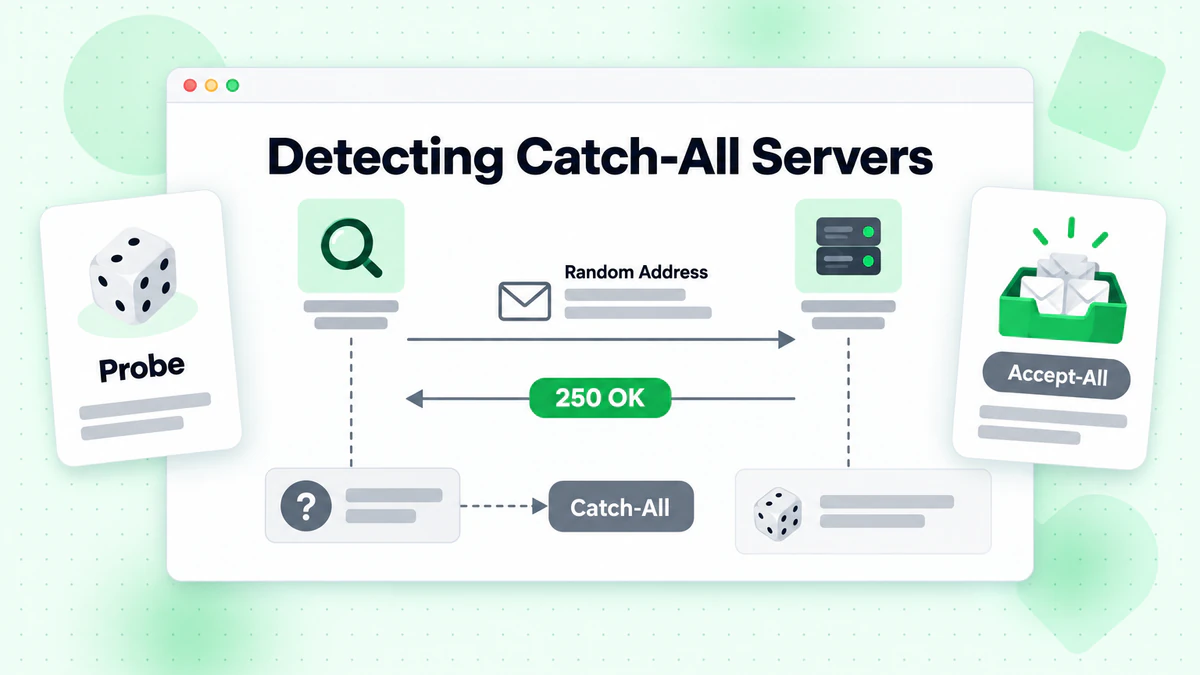
検出アルゴリズム
基本的なキャッチオール検出アルゴリズムは次のように機能します:
- ターゲットドメインでランダムな存在しないアドレスを生成
- この偽のアドレスでSMTP検証を実行
- 応答を分析:
- サーバーが偽のアドレスを受け入れる場合 → キャッチオールの可能性が高い
- サーバーが偽のアドレスを拒否する場合 → 通常の検証が適用される
Node.jsでの実装
キャッチオール検出の完全なNode.js実装は次のとおりです:
const net = require('net');
const dns = require('dns').promises;
const crypto = require('crypto');

class CatchAllDetector {
  constructor(options = {}) {
    this.timeout = options.timeout || 10000;
    this.fromEmail = options.fromEmail || 'verify@verify.local';
    this.fromDomain = options.fromDomain || 'verify.local';
  }

  /**
   * Generate a random email address that definitely doesn't exist
   */
  generateRandomEmail(domain) {
    const randomString = crypto.randomBytes(16).toString('hex');
    const timestamp = Date.now();
    return `nonexistent-${randomString}-${timestamp}@${domain}`;
  }

  /**
   * Get the primary MX server for a domain
   */
  async getMXServer(domain) {
    try {
      const records = await dns.resolveMx(domain);
      if (!records || records.length === 0) {
        return null;
      }
      // Sort by priority and return the primary server
      records.sort((a, b) => a.priority - b.priority);
      return records[0].exchange;
    } catch (error) {
      return null;
    }
  }

  /**
   * Perform SMTP verification on an email address
   */
  async smtpVerify(email, mxServer) {
    return new Promise((resolve) => {
      const socket = new net.Socket();
      let step = 0;
      let result = { accepted: false, response: '' };

      const commands = [
        null, // Wait for greeting
        `EHLO ${this.fromDomain}\r\n`,
        `MAIL FROM:<${this.fromEmail}>\r\n`,
        `RCPT TO:<${email}>\r\n`,
        'QUIT\r\n'
      ];

      socket.setTimeout(this.timeout);

      socket.on('data', (data) => {
        const response = data.toString();
        const code = parseInt(response.substring(0, 3));

        if (step === 0 && code === 220) {
          socket.write(commands[1]);
          step++;
        } else if (step === 1 && code === 250) {
          socket.write(commands[2]);
          step++;
        } else if (step === 2 && code === 250) {
          socket.write(commands[3]);
          step++;
        } else if (step === 3) {
          result.response = response.trim();
          result.accepted = code === 250 || code === 251;
          socket.write(commands[4]);
          socket.destroy();
          resolve(result);
        } else if (code >= 400) {
          result.response = response.trim();
          result.accepted = false;
          socket.destroy();
          resolve(result);
        }
      });

      socket.on('timeout', () => {
        result.response = 'Connection timeout';
        socket.destroy();
        resolve(result);
      });

      socket.on('error', (error) => {
        result.response = `Error: ${error.message}`;
        socket.destroy();
        resolve(result);
      });

      socket.connect(25, mxServer);
    });
  }

  /**
   * Detect if a domain is configured as catch-all
   */
  async detectCatchAll(domain) {
    // Get MX server
    const mxServer = await this.getMXServer(domain);
    if (!mxServer) {
      return {
        isCatchAll: null,
        reason: 'Could not resolve MX records',
        domain
      };
    }

    // Generate a random non-existent email
    const fakeEmail = this.generateRandomEmail(domain);

    // Test the fake email
    const result = await this.smtpVerify(fakeEmail, mxServer);

    return {
      isCatchAll: result.accepted,
      reason: result.accepted
        ? 'Server accepts mail for non-existent addresses'
        : 'Server rejects non-existent addresses',
      domain,
      mxServer,
      testEmail: fakeEmail,
      serverResponse: result.response
    };
  }

  /**
   * Verify an email with catch-all detection
   */
  async verifyWithCatchAllDetection(email) {
    const domain = email.split('@')[1];

    // First, detect if domain is catch-all
    const catchAllResult = await this.detectCatchAll(domain);

    if (catchAllResult.isCatchAll === null) {
      return {
        email,
        valid: null,
        catchAll: null,
        reason: catchAllResult.reason
      };
    }

    // Get MX server
    const mxServer = await this.getMXServer(domain);

    // Verify the actual email
    const verifyResult = await this.smtpVerify(email, mxServer);

    return {
      email,
      valid: verifyResult.accepted,
      catchAll: catchAllResult.isCatchAll,
      reason: catchAllResult.isCatchAll
        ? 'Address accepted but domain is catch-all (deliverability uncertain)'
        : verifyResult.accepted
          ? 'Address verified successfully'
          : 'Address rejected by server',
      serverResponse: verifyResult.response
    };
  }
}

// Usage example
async function main() {
  const detector = new CatchAllDetector();

  // Test catch-all detection
  const domains = ['gmail.com', 'example.com', 'company.com'];

  for (const domain of domains) {
    console.log(`\nTesting domain: ${domain}`);
    const result = await detector.detectCatchAll(domain);
    console.log(`Is Catch-All: ${result.isCatchAll}`);
    console.log(`Reason: ${result.reason}`);
    if (result.serverResponse) {
      console.log(`Server Response: ${result.serverResponse}`);
    }
  }

  // Verify specific email with catch-all detection
  const emailResult = await detector.verifyWithCatchAllDetection('user@example.com');
  console.log('\nEmail Verification Result:');
  console.log(JSON.stringify(emailResult, null, 2));
}

main().catch(console.error);
Pythonでの実装
同等のPython実装は次のとおりです:
import socket
import dns.resolver
import secrets
import time
from dataclasses import dataclass
from typing import Optional

@dataclass
class CatchAllResult:
    is_catch_all: Optional[bool]
    reason: str
    domain: str
    mx_server: Optional[str] = None
    test_email: Optional[str] = None
    server_response: Optional[str] = None

@dataclass
class VerificationResult:
    email: str
    valid: Optional[bool]
    catch_all: Optional[bool]
    reason: str
    server_response: Optional[str] = None

class CatchAllDetector:
    def __init__(self, timeout: int = 10, from_email: str = 'verify@verify.local',
                 from_domain: str = 'verify.local'):
        self.timeout = timeout
        self.from_email = from_email
        self.from_domain = from_domain

    def generate_random_email(self, domain: str) -> str:
        """Generate a random email address that definitely doesn't exist."""
        random_string = secrets.token_hex(16)
        timestamp = int(time.time() * 1000)
        return f"nonexistent-{random_string}-{timestamp}@{domain}"

    def get_mx_server(self, domain: str) -> Optional[str]:
        """Get the primary MX server for a domain."""
        try:
            records = dns.resolver.resolve(domain, 'MX')
            mx_records = sorted(
                [(r.preference, str(r.exchange).rstrip('.')) for r in records],
                key=lambda x: x[0]
            )
            return mx_records[0][1] if mx_records else None
        except Exception:
            return None

    def smtp_verify(self, email: str, mx_server: str) -> dict:
        """Perform SMTP verification on an email address."""
        result = {'accepted': False, 'response': ''}

        try:
            sock = socket.socket(socket.AF_INET, socket.SOCK_STREAM)
            sock.settimeout(self.timeout)
            sock.connect((mx_server, 25))

            # Receive greeting
            response = sock.recv(1024).decode()
            if not response.startswith('220'):
                result['response'] = response.strip()
                return result

            # Send EHLO
            sock.send(f'EHLO {self.from_domain}\r\n'.encode())
            response = sock.recv(1024).decode()
            if not response.startswith('250'):
                result['response'] = response.strip()
                return result

            # Send MAIL FROM
            sock.send(f'MAIL FROM:<{self.from_email}>\r\n'.encode())
            response = sock.recv(1024).decode()
            if not response.startswith('250'):
                result['response'] = response.strip()
                return result

            # Send RCPT TO
            sock.send(f'RCPT TO:<{email}>\r\n'.encode())
            response = sock.recv(1024).decode()
            result['response'] = response.strip()
            code = int(response[:3])
            result['accepted'] = code in (250, 251)

            # Send QUIT
            sock.send(b'QUIT\r\n')
            sock.close()

        except socket.timeout:
            result['response'] = 'Connection timeout'
        except socket.error as e:
            result['response'] = f'Socket error: {str(e)}'
        except Exception as e:
            result['response'] = f'Error: {str(e)}'

        return result

    def detect_catch_all(self, domain: str) -> CatchAllResult:
        """Detect if a domain is configured as catch-all."""
        # Get MX server
        mx_server = self.get_mx_server(domain)
        if not mx_server:
            return CatchAllResult(
                is_catch_all=None,
                reason='Could not resolve MX records',
                domain=domain
            )

        # Generate a random non-existent email
        fake_email = self.generate_random_email(domain)

        # Test the fake email
        result = self.smtp_verify(fake_email, mx_server)

        return CatchAllResult(
            is_catch_all=result['accepted'],
            reason='Server accepts mail for non-existent addresses' if result['accepted']
                   else 'Server rejects non-existent addresses',
            domain=domain,
            mx_server=mx_server,
            test_email=fake_email,
            server_response=result['response']
        )

    def verify_with_catch_all_detection(self, email: str) -> VerificationResult:
        """Verify an email with catch-all detection."""
        domain = email.split('@')[1]

        # First, detect if domain is catch-all
        catch_all_result = self.detect_catch_all(domain)

        if catch_all_result.is_catch_all is None:
            return VerificationResult(
                email=email,
                valid=None,
                catch_all=None,
                reason=catch_all_result.reason
            )

        # Get MX server
        mx_server = self.get_mx_server(domain)

        # Verify the actual email
        verify_result = self.smtp_verify(email, mx_server)

        if catch_all_result.is_catch_all:
            reason = 'Address accepted but domain is catch-all (deliverability uncertain)'
        elif verify_result['accepted']:
            reason = 'Address verified successfully'
        else:
            reason = 'Address rejected by server'

        return VerificationResult(
            email=email,
            valid=verify_result['accepted'],
            catch_all=catch_all_result.is_catch_all,
            reason=reason,
            server_response=verify_result['response']
        )


# Usage example
if __name__ == '__main__':
    detector = CatchAllDetector()

    # Test catch-all detection
    domains = ['gmail.com', 'example.com', 'company.com']

    for domain in domains:
        print(f"\nTesting domain: {domain}")
        result = detector.detect_catch_all(domain)
        print(f"Is Catch-All: {result.is_catch_all}")
        print(f"Reason: {result.reason}")
        if result.server_response:
            print(f"Server Response: {result.server_response}")

    # Verify specific email with catch-all detection
    email_result = detector.verify_with_catch_all_detection('user@example.com')
    print("\nEmail Verification Result:")
    print(f"  Email: {email_result.email}")
    print(f"  Valid: {email_result.valid}")
    print(f"  Catch-All: {email_result.catch_all}")
    print(f"  Reason: {email_result.reason}")
高度な検出技術
基本的なキャッチオール検出は、これらの高度な技術で改善できます:
1. 複数プローブテスト
1つの偽アドレスだけでテストするのではなく、ランダムに生成された複数のアドレスでテストします。これは、一貫性のない動作をするサーバーを特定するのに役立ちます:
async detectCatchAllAdvanced(domain, probeCount = 3) {
  const results = [];

  for (let i = 0; i < probeCount; i++) {
    const fakeEmail = this.generateRandomEmail(domain);
    const result = await this.smtpVerify(fakeEmail, await this.getMXServer(domain));
    results.push(result.accepted);

    // Small delay between probes to avoid rate limiting
    await new Promise(resolve => setTimeout(resolve, 500));
  }

  // Analyze results
  const acceptedCount = results.filter(r => r).length;

  if (acceptedCount === probeCount) {
    return { isCatchAll: true, confidence: 'high' };
  } else if (acceptedCount === 0) {
    return { isCatchAll: false, confidence: 'high' };
  } else {
    return { isCatchAll: null, confidence: 'low', note: 'Inconsistent server behavior' };
  }
}
2. パターンベースの検出
一部のキャッチオールサーバーはパターンで設定されています。異なる形式のアドレスをテストします:
const testPatterns = [
  `nonexistent${Date.now()}@${domain}`,           // Random with timestamp
  `zzz-fake-user-zzz@${domain}`,                  // Obvious fake pattern
  `test.${crypto.randomUUID()}@${domain}`,        // UUID format
  `admin-backup-${Date.now()}@${domain}`          // Administrative-looking
];
3. 応答コード分析
追加の洞察のために特定のSMTP応答コードとメッセージを分析します:
function analyzeResponse(response) {
  const code = parseInt(response.substring(0, 3));
  const message = response.toLowerCase();

  if (code === 250) {
    if (message.includes('accepted for delivery')) {
      return { accepted: true, type: 'explicit_accept' };
    }
    return { accepted: true, type: 'standard_accept' };
  }

  if (code === 550) {
    if (message.includes('user unknown') || message.includes('no such user')) {
      return { accepted: false, type: 'user_not_found' };
    }
    if (message.includes('rejected') || message.includes('denied')) {
      return { accepted: false, type: 'policy_rejection' };
    }
  }

  if (code === 451 || code === 452) {
    return { accepted: null, type: 'temporary_failure' };
  }

  return { accepted: code < 400, type: 'unknown' };
}
キャッチオールメールの処理に関するベストプラクティス
キャッチオールドメインを検出したら、メール検証ワークフローでそれらのアドレスを処理するための戦略が必要です。
戦略1:リスクベースの分類
異なる信頼度レベルを割り当てるリスク分類システムを実装します:
function classifyEmailRisk(verificationResult) {
  const { valid, catchAll, domain } = verificationResult;

  if (!valid) {
    return { risk: 'high', action: 'reject', reason: 'Invalid email address' };
  }

  if (!catchAll) {
    return { risk: 'low', action: 'accept', reason: 'Verified deliverable' };
  }

  // Catch-all domain - assess additional risk factors
  const riskFactors = [];

  // Check domain age and reputation (would need external data)
  // Check if domain is a known business domain
  // Check email pattern (role-based, random, etc.)

  const localPart = verificationResult.email.split('@')[0];

  if (isRoleBasedAddress(localPart)) {
    riskFactors.push('role_based');
  }

  if (looksRandomlyGenerated(localPart)) {
    riskFactors.push('random_looking');
  }

  if (riskFactors.length >= 2) {
    return { risk: 'high', action: 'reject', reason: 'Catch-all with multiple risk factors' };
  }

  if (riskFactors.length === 1) {
    return { risk: 'medium', action: 'flag', reason: 'Catch-all with one risk factor' };
  }

  return { risk: 'medium', action: 'accept_with_caution', reason: 'Catch-all domain' };
}

function isRoleBasedAddress(localPart) {
  const rolePatterns = [
    'admin', 'info', 'support', 'sales', 'contact',
    'help', 'webmaster', 'postmaster', 'noreply', 'no-reply'
  ];
  return rolePatterns.some(pattern =>
    localPart.toLowerCase().includes(pattern)
  );
}

function looksRandomlyGenerated(localPart) {
  // Check for high entropy (random-looking strings)
  const consonants = localPart.match(/[bcdfghjklmnpqrstvwxyz]/gi) || [];
  const vowels = localPart.match(/[aeiou]/gi) || [];

  if (consonants.length > 0 && vowels.length === 0) {
    return true; // No vowels suggests random
  }

  if (localPart.length > 20) {
    return true; // Very long local parts are suspicious
  }

  // Check for number sequences
  if (/\d{5,}/.test(localPart)) {
    return true; // Long number sequences
  }

  return false;
}
戦略2:エンゲージメントベースのフィルタリング
マーケティング目的では、エンゲージメントデータを使用してキャッチオールアドレスをフィルタリングすることを検討してください:
function shouldIncludeInCampaign(email, engagementData, catchAllStatus) {
  // Always include if we have positive engagement history
  if (engagementData.hasOpened || engagementData.hasClicked) {
    return { include: true, reason: 'Previous engagement confirmed' };
  }

  // Non-catch-all verified emails are safe
  if (!catchAllStatus.isCatchAll && catchAllStatus.verified) {
    return { include: true, reason: 'Verified deliverable' };
  }

  // Catch-all with no engagement history - be cautious
  if (catchAllStatus.isCatchAll) {
    // Check if we've successfully delivered before
    if (engagementData.previousDeliveries > 0 && engagementData.bounceRate < 0.1) {
      return { include: true, reason: 'Previous successful deliveries' };
    }

    // New catch-all address with no history
    return {
      include: false,
      reason: 'Catch-all domain with no engagement history',
      recommendation: 'Send verification email first'
    };
  }

  return { include: true, reason: 'Default include' };
}
戦略3:段階的なウォーミング
キャッチオールアドレスを扱う際は、段階的な送信戦略を実装します:
class CatchAllWarmingStrategy {
  constructor() {
    this.warmingGroups = {
      verified: { dailyLimit: 1000, priority: 1 },
      catchAllEngaged: { dailyLimit: 500, priority: 2 },
      catchAllNew: { dailyLimit: 100, priority: 3 }
    };
  }

  categorizeAddress(email, verification, engagement) {
    if (!verification.catchAll) {
      return 'verified';
    }

    if (engagement.hasInteracted) {
      return 'catchAllEngaged';
    }

    return 'catchAllNew';
  }

  buildSendingQueue(emails, verifications, engagements) {
    const categorized = {
      verified: [],
      catchAllEngaged: [],
      catchAllNew: []
    };

    emails.forEach(email => {
      const category = this.categorizeAddress(
        email,
        verifications[email],
        engagements[email] || {}
      );
      categorized[category].push(email);
    });

    // Build queue respecting daily limits
    const queue = [];

    Object.entries(this.warmingGroups)
      .sort((a, b) => a[1].priority - b[1].priority)
      .forEach(([category, config]) => {
        const addresses = categorized[category].slice(0, config.dailyLimit);
        queue.push(...addresses.map(email => ({
          email,
          category,
          priority: config.priority
        })));
      });

    return queue;
  }
}
実際のケーススタディ
ケーススタディ1:Eコマース企業のリストクリーニング
50万人のメール購読者を抱える中規模Eコマース企業が到達率を改善したいと考えていました。分析の結果、次のことが明らかになりました:
初期状態:
- 合計購読者数500,000人
- キャンペーンのバウンス率12%
- キャッチオールドメイン上のアドレス45,000件(9%)
検証結果:
- 検証済み配信可能425,000件(非キャッチオール)
- キャッチオールアドレス特定45,000件
- 無効なアドレス削除30,000件
キャッチオール処理戦略:
すべてのキャッチオールアドレスを削除する代わりに、段階的なアプローチを実装しました:
- ティア1 - 保持: 過去のエンゲージメント(6ヶ月以内の開封またはクリック)があるキャッチオールアドレス15,000件
- ティア2 - 検証: 再エンゲージメントキャンペーンを送信したキャッチオールアドレス20,000件
- ティア3 - 削除: エンゲージメント履歴がなく疑わしいパターンがあるキャッチオールアドレス10,000件
3ヶ月後の結果:
- バウンス率が2.1%に低下
- 開封率が18%向上
- 送信者レピュテーションスコアが大幅に改善
- メール到達率が98.5%に達した
ケーススタディ2:B2B SaaSリード検証
月間10,000件の新規リードを受け取るB2B SaaS企業が、サインアップフローにキャッチオール検出を実装しました:
課題: 多くのB2Bリードは、キャッチオールとして設定された企業ドメインから来ており、検証が困難でした。貴重なリードを失うことなく、すべてのキャッチオールアドレスを単純に拒否することはできませんでした。
ソリューション:
async function validateB2BLead(email, companyInfo) {
  const verification = await verifyEmail(email);
  const catchAllResult = await detectCatchAll(email.split('@')[1]);

  if (!verification.valid) {
    return { accept: false, reason: 'Invalid email' };
  }

  if (!catchAllResult.isCatchAll) {
    return { accept: true, reason: 'Verified deliverable', confidence: 'high' };
  }

  // Catch-all domain - use company info to validate
  const domainMatchesCompany = email.split('@')[1].includes(
    companyInfo.name.toLowerCase().replace(/\s+/g, '')
  );

  if (domainMatchesCompany) {
    // Email domain matches company name - likely legitimate
    return {
      accept: true,
      reason: 'Catch-all but matches company domain',
      confidence: 'medium',
      requireVerification: true
    };
  }

  // Catch-all with unrelated domain
  return {
    accept: true,
    reason: 'Catch-all domain',
    confidence: 'low',
    requireVerification: true,
    sendDoubleOptIn: true
  };
}
結果:
- リード受け入れ率が95%を維持
- 偽陽性拒否が60%削減
- キャッチオールのダブルオプトイン確認率:72%
- 全体的なリード品質が25%向上
BillionVerifyを使用したキャッチオール検出
独自のキャッチオール検出を構築することは可能ですが、BillionVerifyのようなプロフェッショナルなメール検証サービスを使用することで、大きな利点があります:
API統合例
const axios = require('axios');

async function verifyWithBillionVerify(email) {
  const response = await axios.post(
    'https://api.billionverify.com/v1/verify',
    { email },
    {
      headers: {
        'Authorization': `Bearer ${process.env.BV_API_KEY}`,
        'Content-Type': 'application/json'
      }
    }
  );

  const result = response.data;

  return {
    email: result.email,
    deliverable: result.deliverable,
    isCatchAll: result.is_catch_all,
    isDisposable: result.is_disposable,
    isRoleBased: result.is_role_address,
    qualityScore: result.quality_score,
    recommendation: result.recommendation
  };
}

// Bulk verification with catch-all handling
async function bulkVerifyWithStrategy(emails) {
  const results = await Promise.all(
    emails.map(email => verifyWithBillionVerify(email))
  );

  return {
    safe: results.filter(r => r.deliverable && !r.isCatchAll),
    catchAll: results.filter(r => r.deliverable && r.isCatchAll),
    invalid: results.filter(r => !r.deliverable),
    stats: {
      total: results.length,
      safeCount: results.filter(r => r.deliverable && !r.isCatchAll).length,
      catchAllCount: results.filter(r => r.deliverable && r.isCatchAll).length,
      invalidCount: results.filter(r => !r.deliverable).length
    }
  };
}
BillionVerifyを使用する利点
より高い精度: 当社のキャッチオール検出は、複数の検証技術を使用し、既知のキャッチオールドメインの広範なデータベースを維持しています。
追加のインテリジェンス: キャッチオール検出に加えて、使い捨てメール検出、ロールベースアドレス識別、品質スコアリングを取得できます。
レート制限管理: レート制限とIPローテーションを処理し、ブロックされることなく一貫した検証を保証します。
履歴データ: 履歴検証データへのアクセスは、パターンの特定と意思決定の改善に役立ちます。
リアルタイム更新: ドメイン設定が変更されると、キャッチオールデータベースが継続的に更新されます。
まとめ
キャッチオールメール検出は、包括的なメール検証戦略の重要なコンポーネントです。これらのサーバーは検証に課題を提示しますが、それらがどのように機能するかを理解し、適切な検出と処理戦略を実装することで、貴重な連絡先を失うことなく高い到達率を維持できます。
このガイドからの重要なポイント:
- キャッチオールサーバーはすべてのメールを受け入れる 特定のメールボックスが存在するかどうかに関係なく
- 検出には、確実に存在しないアドレスでのテストが含まれる
- キャッチオールアドレスを自動的に拒否しない—リスクベースの戦略を実装する
- エンゲージメントデータを使用する キャッチオール連絡先について情報に基づいた決定を行う
- プロフェッショナルサービスを検討する 本番システムではBillionVerifyのような
ワークフローにキャッチオール検出を実装する準備はできましたか? 個々のアドレスをテストするには、メールチェッカーツールを試すか、アプリケーションへのシームレスな統合のためにBillionVerify APIを探索してください。
キャッチオールドメインを適切に処理することで、メール到達率を改善し、送信者レピュテーションを保護し、メール連絡先についてより良い決定を下すことができます。
BillionVerify は HubSpot、Mailchimp、ActiveCampaign と直接統合し、連絡先リストを自動的にクリーンに保ちます。
Instantly や Smartlead を使うチームは、キャンペーン前に BillionVerify でリストをクリーニングすることで到達率を大幅に改善できます。
認証プロバイダーを選ぶ前に、精度と速度の面で BillionVerify と ZeroBounce を比較してみてください。