



在验证邮箱地址时,您会遇到的最具挑战性的场景之一就是 Catch-All 邮箱服务器。这些服务器会接收发送到其域名的任何地址的邮件,使得通过标准 SMTP 验证无法确定特定邮箱是否真实存在。理解 Catch-All 邮箱检测对于任何认真维护邮件列表质量和最大化送达率的人来说都至关重要。有关基础概念,请参阅我们的邮箱验证完整指南。
在这份综合指南中,我们将探讨关于 Catch-All 邮箱您需要了解的一切:它们是什么、为何存在、如何检测它们,以及最重要的是如何在邮箱验证工作流程中处理它们。无论您是构建邮件验证系统的开发者,还是试图清理邮件列表的营销人员,本指南都将为您提供有效处理 Catch-All 域名所需的知识和工具。
强大的邮箱验证策略必须考虑 Catch-All 服务器。如果没有正确的检测和处理,您的验证结果可能会给您关于邮件送达性的错误信心。让我们深入了解技术细节和实用解决方案。
什么是 Catch-All 邮箱服务器?
Catch-All 邮箱服务器,也称为全接收服务器,被配置为接收发送到其域名的任何地址的传入邮件,无论该特定邮箱是否存在。当您向 anyaddress@catchall-domain.com 发送邮件时,服务器会接收它而不会退信,即使从未创建过名为 "anyaddress" 的邮箱。
Catch-All 配置的工作原理
在典型的邮箱服务器配置中,当为不存在的邮箱到达邮件时,服务器会响应 "550 User not found" 或类似的拒绝消息。这种行为允许邮箱验证系统通过检查服务器的响应来确定地址是否存在。
Catch-All 服务器的行为有所不同。它们被配置为接收所有传入邮件,无论收件人地址如何。然后邮件可能会:
- 路由到指定邮箱 - 单个管理员接收所有消息
- 存储在常规队列中 - 消息被保留以便稍后分类
- 静默丢弃 - 被接收但删除而不传递
- 转发到另一个系统 - 发送到不同的服务器进行处理
这在 Postfix 邮件服务器配置中的示例如下:
# /etc/postfix/main.cf
# 标准配置 - 拒绝未知收件人
local_recipient_maps = proxy:unix:passwd.byname $alias_maps

# Catch-all 配置 - 接收所有收件人
local_recipient_maps =
组织使用 Catch-All 服务器的原因
组织配置 Catch-All 邮箱有几个合法原因:
1. 防止丢失业务通信
小型企业通常担心因拼写错误或员工姓名变体而错过重要邮件。如果有人发送邮件到 john.smith@company.com,但实际地址是 jsmith@company.com,Catch-All 配置可确保消息不会丢失。
2. 灵活的邮件路由
一些组织使用 Catch-All 作为复杂邮件路由系统的一部分。所有传入邮件都会进入中央队列,然后根据规则自动分类和分发。
3. 安全监控
安全团队有时会配置 Catch-All 来监控攻击者或垃圾邮件发送者正在针对哪些地址。这些情报有助于识别网络钓鱼尝试或数据泄露。
4. 旧系统兼容性
从一个邮件系统迁移到另一个系统的组织可能会临时启用 Catch-All,以确保在过渡期间不会丢失任何消息。
5. 隐私保护
一些注重隐私的组织使用 Catch-All 域名为其注册的每个服务创建唯一的邮箱地址,这样可以更容易地跟踪哪些公司共享或泄露了他们的数据。
邮箱验证面临的问题
对于邮箱验证目的,Catch-All 服务器带来了重大挑战。当您对 Catch-All 域名执行 SMTP 验证时,服务器对您测试的每个地址都会响应 "250 OK" 接受——无论是真实的还是完全虚构的。
考虑这个 SMTP 会话示例:
> MAIL FROM:<test@verify.local>
< 250 OK
> RCPT TO:<real.user@catchall-domain.com>
< 250 OK
> RCPT TO:<completely.fake.address@catchall-domain.com>
< 250 OK
> RCPT TO:<asdfghjkl12345@catchall-domain.com>
< 250 OK
所有三个地址都收到相同的肯定响应,使得仅通过 SMTP 验证无法区分真实用户和虚假地址。
如何检测 Catch-All 邮箱服务器
检测邮件服务器是否配置为 Catch-All 需要一个巧妙的方法:使用一个绝对不应该存在的地址进行测试,并观察服务器的响应。
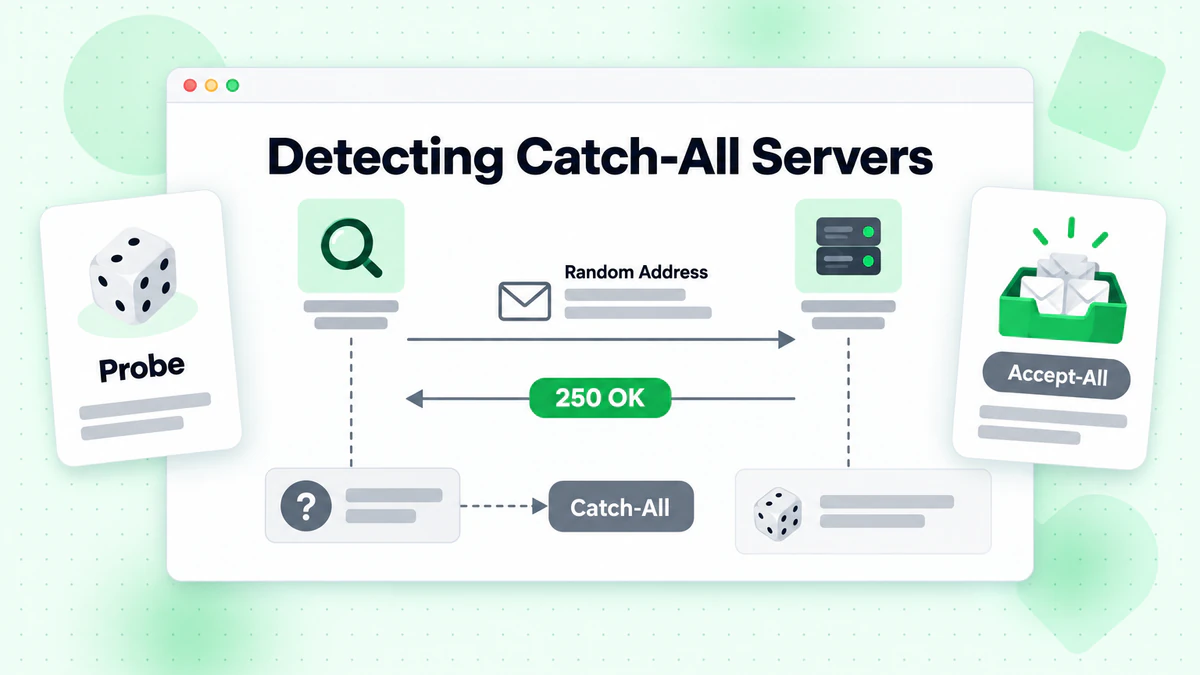
检测算法
基本的 Catch-All 检测算法工作流程如下:
- 生成一个随机的不存在地址 在目标域名上
- 对这个虚假地址执行 SMTP 验证
- 分析响应:
- 如果服务器接受虚假地址 → 它可能是 Catch-All
- 如果服务器拒绝虚假地址 → 正常验证适用
Node.js 实现
这是一个完整的 Node.js 实现用于 Catch-All 检测:
const net = require('net');
const dns = require('dns').promises;
const crypto = require('crypto');

class CatchAllDetector {
  constructor(options = {}) {
    this.timeout = options.timeout || 10000;
    this.fromEmail = options.fromEmail || 'verify@verify.local';
    this.fromDomain = options.fromDomain || 'verify.local';
  }

  /**
   * 生成一个绝对不存在的随机邮箱地址
   */
  generateRandomEmail(domain) {
    const randomString = crypto.randomBytes(16).toString('hex');
    const timestamp = Date.now();
    return `nonexistent-${randomString}-${timestamp}@${domain}`;
  }

  /**
   * 获取域名的主 MX 服务器
   */
  async getMXServer(domain) {
    try {
      const records = await dns.resolveMx(domain);
      if (!records || records.length === 0) {
        return null;
      }
      // 按优先级排序并返回主服务器
      records.sort((a, b) => a.priority - b.priority);
      return records[0].exchange;
    } catch (error) {
      return null;
    }
  }

  /**
   * 对邮箱地址执行 SMTP 验证
   */
  async smtpVerify(email, mxServer) {
    return new Promise((resolve) => {
      const socket = new net.Socket();
      let step = 0;
      let result = { accepted: false, response: '' };

      const commands = [
        null, // 等待问候
        `EHLO ${this.fromDomain}\r\n`,
        `MAIL FROM:<${this.fromEmail}>\r\n`,
        `RCPT TO:<${email}>\r\n`,
        'QUIT\r\n'
      ];

      socket.setTimeout(this.timeout);

      socket.on('data', (data) => {
        const response = data.toString();
        const code = parseInt(response.substring(0, 3));

        if (step === 0 && code === 220) {
          socket.write(commands[1]);
          step++;
        } else if (step === 1 && code === 250) {
          socket.write(commands[2]);
          step++;
        } else if (step === 2 && code === 250) {
          socket.write(commands[3]);
          step++;
        } else if (step === 3) {
          result.response = response.trim();
          result.accepted = code === 250 || code === 251;
          socket.write(commands[4]);
          socket.destroy();
          resolve(result);
        } else if (code >= 400) {
          result.response = response.trim();
          result.accepted = false;
          socket.destroy();
          resolve(result);
        }
      });

      socket.on('timeout', () => {
        result.response = 'Connection timeout';
        socket.destroy();
        resolve(result);
      });

      socket.on('error', (error) => {
        result.response = `Error: ${error.message}`;
        socket.destroy();
        resolve(result);
      });

      socket.connect(25, mxServer);
    });
  }

  /**
   * 检测域名是否配置为 Catch-All
   */
  async detectCatchAll(domain) {
    // 获取 MX 服务器
    const mxServer = await this.getMXServer(domain);
    if (!mxServer) {
      return {
        isCatchAll: null,
        reason: 'Could not resolve MX records',
        domain
      };
    }

    // 生成一个随机的不存在邮箱
    const fakeEmail = this.generateRandomEmail(domain);

    // 测试虚假邮箱
    const result = await this.smtpVerify(fakeEmail, mxServer);

    return {
      isCatchAll: result.accepted,
      reason: result.accepted
        ? 'Server accepts mail for non-existent addresses'
        : 'Server rejects non-existent addresses',
      domain,
      mxServer,
      testEmail: fakeEmail,
      serverResponse: result.response
    };
  }

  /**
   * 使用 Catch-All 检测验证邮箱
   */
  async verifyWithCatchAllDetection(email) {
    const domain = email.split('@')[1];

    // 首先,检测域名是否为 Catch-All
    const catchAllResult = await this.detectCatchAll(domain);

    if (catchAllResult.isCatchAll === null) {
      return {
        email,
        valid: null,
        catchAll: null,
        reason: catchAllResult.reason
      };
    }

    // 获取 MX 服务器
    const mxServer = await this.getMXServer(domain);

    // 验证实际邮箱
    const verifyResult = await this.smtpVerify(email, mxServer);

    return {
      email,
      valid: verifyResult.accepted,
      catchAll: catchAllResult.isCatchAll,
      reason: catchAllResult.isCatchAll
        ? 'Address accepted but domain is catch-all (deliverability uncertain)'
        : verifyResult.accepted
          ? 'Address verified successfully'
          : 'Address rejected by server',
      serverResponse: verifyResult.response
    };
  }
}

// 使用示例
async function main() {
  const detector = new CatchAllDetector();

  // 测试 Catch-All 检测
  const domains = ['gmail.com', 'example.com', 'company.com'];

  for (const domain of domains) {
    console.log(`\nTesting domain: ${domain}`);
    const result = await detector.detectCatchAll(domain);
    console.log(`Is Catch-All: ${result.isCatchAll}`);
    console.log(`Reason: ${result.reason}`);
    if (result.serverResponse) {
      console.log(`Server Response: ${result.serverResponse}`);
    }
  }

  // 使用 Catch-All 检测验证特定邮箱
  const emailResult = await detector.verifyWithCatchAllDetection('user@example.com');
  console.log('\nEmail Verification Result:');
  console.log(JSON.stringify(emailResult, null, 2));
}

main().catch(console.error);
Python 实现
这是等效的 Python 实现:
import socket
import dns.resolver
import secrets
import time
from dataclasses import dataclass
from typing import Optional

@dataclass
class CatchAllResult:
    is_catch_all: Optional[bool]
    reason: str
    domain: str
    mx_server: Optional[str] = None
    test_email: Optional[str] = None
    server_response: Optional[str] = None

@dataclass
class VerificationResult:
    email: str
    valid: Optional[bool]
    catch_all: Optional[bool]
    reason: str
    server_response: Optional[str] = None

class CatchAllDetector:
    def __init__(self, timeout: int = 10, from_email: str = 'verify@verify.local',
                 from_domain: str = 'verify.local'):
        self.timeout = timeout
        self.from_email = from_email
        self.from_domain = from_domain

    def generate_random_email(self, domain: str) -> str:
        """生成一个绝对不存在的随机邮箱地址。"""
        random_string = secrets.token_hex(16)
        timestamp = int(time.time() * 1000)
        return f"nonexistent-{random_string}-{timestamp}@{domain}"

    def get_mx_server(self, domain: str) -> Optional[str]:
        """获取域名的主 MX 服务器。"""
        try:
            records = dns.resolver.resolve(domain, 'MX')
            mx_records = sorted(
                [(r.preference, str(r.exchange).rstrip('.')) for r in records],
                key=lambda x: x[0]
            )
            return mx_records[0][1] if mx_records else None
        except Exception:
            return None

    def smtp_verify(self, email: str, mx_server: str) -> dict:
        """对邮箱地址执行 SMTP 验证。"""
        result = {'accepted': False, 'response': ''}

        try:
            sock = socket.socket(socket.AF_INET, socket.SOCK_STREAM)
            sock.settimeout(self.timeout)
            sock.connect((mx_server, 25))

            # 接收问候
            response = sock.recv(1024).decode()
            if not response.startswith('220'):
                result['response'] = response.strip()
                return result

            # 发送 EHLO
            sock.send(f'EHLO {self.from_domain}\r\n'.encode())
            response = sock.recv(1024).decode()
            if not response.startswith('250'):
                result['response'] = response.strip()
                return result

            # 发送 MAIL FROM
            sock.send(f'MAIL FROM:<{self.from_email}>\r\n'.encode())
            response = sock.recv(1024).decode()
            if not response.startswith('250'):
                result['response'] = response.strip()
                return result

            # 发送 RCPT TO
            sock.send(f'RCPT TO:<{email}>\r\n'.encode())
            response = sock.recv(1024).decode()
            result['response'] = response.strip()
            code = int(response[:3])
            result['accepted'] = code in (250, 251)

            # 发送 QUIT
            sock.send(b'QUIT\r\n')
            sock.close()

        except socket.timeout:
            result['response'] = 'Connection timeout'
        except socket.error as e:
            result['response'] = f'Socket error: {str(e)}'
        except Exception as e:
            result['response'] = f'Error: {str(e)}'

        return result

    def detect_catch_all(self, domain: str) -> CatchAllResult:
        """检测域名是否配置为 Catch-All。"""
        # 获取 MX 服务器
        mx_server = self.get_mx_server(domain)
        if not mx_server:
            return CatchAllResult(
                is_catch_all=None,
                reason='Could not resolve MX records',
                domain=domain
            )

        # 生成一个随机的不存在邮箱
        fake_email = self.generate_random_email(domain)

        # 测试虚假邮箱
        result = self.smtp_verify(fake_email, mx_server)

        return CatchAllResult(
            is_catch_all=result['accepted'],
            reason='Server accepts mail for non-existent addresses' if result['accepted']
                   else 'Server rejects non-existent addresses',
            domain=domain,
            mx_server=mx_server,
            test_email=fake_email,
            server_response=result['response']
        )

    def verify_with_catch_all_detection(self, email: str) -> VerificationResult:
        """使用 Catch-All 检测验证邮箱。"""
        domain = email.split('@')[1]

        # 首先,检测域名是否为 Catch-All
        catch_all_result = self.detect_catch_all(domain)

        if catch_all_result.is_catch_all is None:
            return VerificationResult(
                email=email,
                valid=None,
                catch_all=None,
                reason=catch_all_result.reason
            )

        # 获取 MX 服务器
        mx_server = self.get_mx_server(domain)

        # 验证实际邮箱
        verify_result = self.smtp_verify(email, mx_server)

        if catch_all_result.is_catch_all:
            reason = 'Address accepted but domain is catch-all (deliverability uncertain)'
        elif verify_result['accepted']:
            reason = 'Address verified successfully'
        else:
            reason = 'Address rejected by server'

        return VerificationResult(
            email=email,
            valid=verify_result['accepted'],
            catch_all=catch_all_result.is_catch_all,
            reason=reason,
            server_response=verify_result['response']
        )


# 使用示例
if __name__ == '__main__':
    detector = CatchAllDetector()

    # 测试 Catch-All 检测
    domains = ['gmail.com', 'example.com', 'company.com']

    for domain in domains:
        print(f"\nTesting domain: {domain}")
        result = detector.detect_catch_all(domain)
        print(f"Is Catch-All: {result.is_catch_all}")
        print(f"Reason: {result.reason}")
        if result.server_response:
            print(f"Server Response: {result.server_response}")

    # 使用 Catch-All 检测验证特定邮箱
    email_result = detector.verify_with_catch_all_detection('user@example.com')
    print("\nEmail Verification Result:")
    print(f"  Email: {email_result.email}")
    print(f"  Valid: {email_result.valid}")
    print(f"  Catch-All: {email_result.catch_all}")
    print(f"  Reason: {email_result.reason}")
高级检测技术
基本的 Catch-All 检测可以通过以下高级技术得到改进:
1. 多探针测试
不仅使用一个虚假地址进行测试,而是使用多个随机生成的地址进行测试。这有助于识别行为不一致的服务器:
async detectCatchAllAdvanced(domain, probeCount = 3) {
  const results = [];

  for (let i = 0; i < probeCount; i++) {
    const fakeEmail = this.generateRandomEmail(domain);
    const result = await this.smtpVerify(fakeEmail, await this.getMXServer(domain));
    results.push(result.accepted);

    // 探针之间的小延迟以避免速率限制
    await new Promise(resolve => setTimeout(resolve, 500));
  }

  // 分析结果
  const acceptedCount = results.filter(r => r).length;

  if (acceptedCount === probeCount) {
    return { isCatchAll: true, confidence: 'high' };
  } else if (acceptedCount === 0) {
    return { isCatchAll: false, confidence: 'high' };
  } else {
    return { isCatchAll: null, confidence: 'low', note: 'Inconsistent server behavior' };
  }
}
2. 基于模式的检测
一些 Catch-All 服务器配置了模式。测试不同格式的地址:
const testPatterns = [
  `nonexistent${Date.now()}@${domain}`,           // 带时间戳的随机
  `zzz-fake-user-zzz@${domain}`,                  // 明显的虚假模式
  `test.${crypto.randomUUID()}@${domain}`,        // UUID 格式
  `admin-backup-${Date.now()}@${domain}`          // 管理员外观
];
3. 响应代码分析
分析特定的 SMTP 响应代码和消息以获得额外洞察:
function analyzeResponse(response) {
  const code = parseInt(response.substring(0, 3));
  const message = response.toLowerCase();

  if (code === 250) {
    if (message.includes('accepted for delivery')) {
      return { accepted: true, type: 'explicit_accept' };
    }
    return { accepted: true, type: 'standard_accept' };
  }

  if (code === 550) {
    if (message.includes('user unknown') || message.includes('no such user')) {
      return { accepted: false, type: 'user_not_found' };
    }
    if (message.includes('rejected') || message.includes('denied')) {
      return { accepted: false, type: 'policy_rejection' };
    }
  }

  if (code === 451 || code === 452) {
    return { accepted: null, type: 'temporary_failure' };
  }

  return { accepted: code < 400, type: 'unknown' };
}
处理 Catch-All 邮箱的最佳实践
一旦检测到 Catch-All 域名,您需要一个策略来在邮箱验证工作流程中处理这些地址。
策略 1: 基于风险的分类
实施一个风险分类系统,分配不同的置信度级别:
function classifyEmailRisk(verificationResult) {
  const { valid, catchAll, domain } = verificationResult;

  if (!valid) {
    return { risk: 'high', action: 'reject', reason: 'Invalid email address' };
  }

  if (!catchAll) {
    return { risk: 'low', action: 'accept', reason: 'Verified deliverable' };
  }

  // Catch-All 域名 - 评估额外风险因素
  const riskFactors = [];

  // 检查域名年龄和声誉(需要外部数据)
  // 检查域名是否为已知的业务域名
  // 检查邮箱模式(基于角色、随机等)

  const localPart = verificationResult.email.split('@')[0];

  if (isRoleBasedAddress(localPart)) {
    riskFactors.push('role_based');
  }

  if (looksRandomlyGenerated(localPart)) {
    riskFactors.push('random_looking');
  }

  if (riskFactors.length >= 2) {
    return { risk: 'high', action: 'reject', reason: 'Catch-all with multiple risk factors' };
  }

  if (riskFactors.length === 1) {
    return { risk: 'medium', action: 'flag', reason: 'Catch-all with one risk factor' };
  }

  return { risk: 'medium', action: 'accept_with_caution', reason: 'Catch-all domain' };
}

function isRoleBasedAddress(localPart) {
  const rolePatterns = [
    'admin', 'info', 'support', 'sales', 'contact',
    'help', 'webmaster', 'postmaster', 'noreply', 'no-reply'
  ];
  return rolePatterns.some(pattern =>
    localPart.toLowerCase().includes(pattern)
  );
}

function looksRandomlyGenerated(localPart) {
  // 检查高熵(看起来随机的字符串)
  const consonants = localPart.match(/[bcdfghjklmnpqrstvwxyz]/gi) || [];
  const vowels = localPart.match(/[aeiou]/gi) || [];

  if (consonants.length > 0 && vowels.length === 0) {
    return true; // 没有元音表明随机
  }

  if (localPart.length > 20) {
    return true; // 非常长的本地部分是可疑的
  }

  // 检查数字序列
  if (/\d{5,}/.test(localPart)) {
    return true; // 长数字序列
  }

  return false;
}
策略 2: 基于参与度的过滤
对于营销目的,考虑使用参与度数据来过滤 Catch-All 地址:
function shouldIncludeInCampaign(email, engagementData, catchAllStatus) {
  // 如果有积极的参与历史,总是包括
  if (engagementData.hasOpened || engagementData.hasClicked) {
    return { include: true, reason: 'Previous engagement confirmed' };
  }

  // 非 Catch-All 验证过的邮箱是安全的
  if (!catchAllStatus.isCatchAll && catchAllStatus.verified) {
    return { include: true, reason: 'Verified deliverable' };
  }

  // 没有参与历史的 Catch-All - 保持谨慎
  if (catchAllStatus.isCatchAll) {
    // 检查我们之前是否成功投递过
    if (engagementData.previousDeliveries > 0 && engagementData.bounceRate < 0.1) {
      return { include: true, reason: 'Previous successful deliveries' };
    }

    // 没有历史记录的新 Catch-All 地址
    return {
      include: false,
      reason: 'Catch-all domain with no engagement history',
      recommendation: 'Send verification email first'
    };
  }

  return { include: true, reason: 'Default include' };
}
策略 3: 逐步预热
在处理 Catch-All 地址时,实施逐步发送策略:
class CatchAllWarmingStrategy {
  constructor() {
    this.warmingGroups = {
      verified: { dailyLimit: 1000, priority: 1 },
      catchAllEngaged: { dailyLimit: 500, priority: 2 },
      catchAllNew: { dailyLimit: 100, priority: 3 }
    };
  }

  categorizeAddress(email, verification, engagement) {
    if (!verification.catchAll) {
      return 'verified';
    }

    if (engagement.hasInteracted) {
      return 'catchAllEngaged';
    }

    return 'catchAllNew';
  }

  buildSendingQueue(emails, verifications, engagements) {
    const categorized = {
      verified: [],
      catchAllEngaged: [],
      catchAllNew: []
    };

    emails.forEach(email => {
      const category = this.categorizeAddress(
        email,
        verifications[email],
        engagements[email] || {}
      );
      categorized[category].push(email);
    });

    // 构建遵守每日限制的队列
    const queue = [];

    Object.entries(this.warmingGroups)
      .sort((a, b) => a[1].priority - b[1].priority)
      .forEach(([category, config]) => {
        const addresses = categorized[category].slice(0, config.dailyLimit);
        queue.push(...addresses.map(email => ({
          email,
          category,
          priority: config.priority
        })));
      });

    return queue;
  }
}
真实世界案例研究
案例研究 1: 电子商务公司列表清理
一家拥有 500,000 邮件订阅者的中型电子商务公司希望提高其送达率。他们的分析显示:
初始状态:
- 总共 500,000 订阅者
- 活动退信率 12%
- 45,000 个地址(9%)在 Catch-All 域名上
验证结果:
- 425,000 验证可送达(非 Catch-All)
- 识别出 45,000 个 Catch-All 地址
- 删除了 30,000 个无效地址
Catch-All 处理策略:
他们没有删除所有 Catch-All 地址,而是实施了分层方法:
- 第 1 层 - 保留: 15,000 个之前有参与(6 个月内打开或点击)的 Catch-All 地址
- 第 2 层 - 验证: 20,000 个 Catch-All 地址发送重新参与活动
- 第 3 层 - 删除: 10,000 个没有参与历史且模式可疑的 Catch-All 地址
3 个月后的结果:
- 退信率降至 2.1%
- 打开率提高了 18%
- 发件人声誉得分显著提高
- 邮件送达率达到 98.5%
案例研究 2: B2B SaaS 潜在客户验证
一家每月收到 10,000 个新潜在客户的 B2B SaaS 公司在其注册流程中实施了 Catch-All 检测:
挑战: 许多 B2B 潜在客户来自配置为 Catch-All 的公司域名,使验证变得困难。他们不能简单地拒绝所有 Catch-All 地址而不丢失有价值的潜在客户。
解决方案:
async function validateB2BLead(email, companyInfo) {
  const verification = await verifyEmail(email);
  const catchAllResult = await detectCatchAll(email.split('@')[1]);

  if (!verification.valid) {
    return { accept: false, reason: 'Invalid email' };
  }

  if (!catchAllResult.isCatchAll) {
    return { accept: true, reason: 'Verified deliverable', confidence: 'high' };
  }

  // Catch-All 域名 - 使用公司信息验证
  const domainMatchesCompany = email.split('@')[1].includes(
    companyInfo.name.toLowerCase().replace(/\s+/g, '')
  );

  if (domainMatchesCompany) {
    // 邮箱域名与公司名称匹配 - 可能是合法的
    return {
      accept: true,
      reason: 'Catch-all but matches company domain',
      confidence: 'medium',
      requireVerification: true
    };
  }

  // 域名不相关的 Catch-All
  return {
    accept: true,
    reason: 'Catch-all domain',
    confidence: 'low',
    requireVerification: true,
    sendDoubleOptIn: true
  };
}
结果:
- 潜在客户接受率保持在 95%
- 假阳性拒绝减少了 60%
- Catch-All 的双重确认率: 72%
- 整体潜在客户质量提高了 25%
使用 BillionVerify 进行 Catch-All 检测
虽然构建自己的 Catch-All 检测是可能的,但使用像 BillionVerify 这样的专业邮箱验证服务可以提供显著优势:
API 集成示例
const axios = require('axios');

async function verifyWithBillionVerify(email) {
  const response = await axios.post(
    'https://api.billionverify.com/v1/verify',
    { email },
    {
      headers: {
        'Authorization': `Bearer ${process.env.BV_API_KEY}`,
        'Content-Type': 'application/json'
      }
    }
  );

  const result = response.data;

  return {
    email: result.email,
    deliverable: result.deliverable,
    isCatchAll: result.is_catch_all,
    isDisposable: result.is_disposable,
    isRoleBased: result.is_role_address,
    qualityScore: result.quality_score,
    recommendation: result.recommendation
  };
}

// 使用 Catch-All 处理的批量验证
async function bulkVerifyWithStrategy(emails) {
  const results = await Promise.all(
    emails.map(email => verifyWithBillionVerify(email))
  );

  return {
    safe: results.filter(r => r.deliverable && !r.isCatchAll),
    catchAll: results.filter(r => r.deliverable && r.isCatchAll),
    invalid: results.filter(r => !r.deliverable),
    stats: {
      total: results.length,
      safeCount: results.filter(r => r.deliverable && !r.isCatchAll).length,
      catchAllCount: results.filter(r => r.deliverable && r.isCatchAll).length,
      invalidCount: results.filter(r => !r.deliverable).length
    }
  };
}
使用 BillionVerify 的优势
更高的准确性: 我们的 Catch-All 检测使用多种验证技术,并维护一个广泛的已知 Catch-All 域名数据库。
额外的情报: 除了 Catch-All 检测之外,您还可以获得一次性邮箱检测、基于角色的地址识别和质量评分。
速率限制管理: 我们处理速率限制和 IP 轮换,确保一致的验证而不会被阻止。
历史数据: 访问历史验证数据有助于识别模式并改进决策制定。
实时更新: 随着域名配置的变化,我们的 Catch-All 数据库会持续更新。
结论
Catch-All 邮箱检测是任何全面邮箱验证策略的关键组成部分。虽然这些服务器给验证带来了挑战,但了解它们的工作原理并实施适当的检测和处理策略可以让您在不丢失有价值联系人的情况下保持高送达率。
本指南的关键要点:
- Catch-All 服务器接收所有邮件 无论特定邮箱是否存在
- 检测涉及测试 使用绝对不存在的地址
- 不要自动拒绝 Catch-All 地址——实施基于风险的策略
- 使用参与度数据 对 Catch-All 联系人做出明智的决定
- 考虑专业服务 像 BillionVerify 用于生产系统
准备好在您的工作流程中实施 Catch-All 检测了吗?试用我们的邮箱检测工具测试单个地址,或探索 BillionVerify API 以无缝集成到您的应用程序中。
通过正确处理 Catch-All 域名,您将提高邮件送达性,保护发件人声誉,并对您的邮件联系人做出更好的决策。如需帮助选择合适的解决方案,请参阅我们的最佳邮箱验证服务比较。
在选择验证服务商前,对比 BillionVerify 与 ZeroBounce 在准确率和速度方面的差异。
BillionVerify 可直接与 HubSpot、Mailchimp 和 ActiveCampaign 集成,自动保持联系人列表的清洁。
使用 Instantly 或 Smartlead 的团队,在每次活动前通过 BillionVerify 清洗列表,可显著提升送达率。
进行 B2B 营销活动时,Apollo 和 ZoomInfo 的导出数据在导入前可通过 BillionVerify 验证。