



Email addresses की जांच करते समय, सबसे चुनौतीपूर्ण परिस्थितियों में से एक जिसका आप सामना करेंगे वह है catch-all email server। ये servers अपने domain पर किसी भी address के लिए mail स्वीकार करते हैं, जिससे standard SMTP verification के माध्यम से यह निर्धारित करना असंभव हो जाता है कि कोई विशिष्ट mailbox वास्तव में मौजूद है या नहीं। Catch-all email detection को समझना किसी भी व्यक्ति के लिए महत्वपूर्ण है जो email list की quality बनाए रखने और deliverability rates को अधिकतम करने के बारे में गंभीर है।
इस व्यापक गाइड में, हम catch-all emails के बारे में आपको जो कुछ भी जानने की आवश्यकता है उसका पता लगाएंगे: वे क्या हैं, वे क्यों मौजूद हैं, उन्हें कैसे detect करें, और सबसे महत्वपूर्ण बात, अपने email verification workflow में उन्हें कैसे संभालें। चाहे आप एक developer हों जो email validation system बना रहे हों या एक marketer हों जो अपनी email list को साफ करने की कोशिश कर रहे हों, यह गाइड आपको catch-all domains से प्रभावी ढंग से निपटने के लिए आवश्यक ज्ञान और tools देगी।
एक मजबूत email verification strategy में catch-all servers का ध्यान रखना आवश्यक है। उचित detection और handling के बिना, आपके verification results आपको email deliverability के बारे में गलत विश्वास दिला सकते हैं। आइए तकनीकी विवरण और व्यावहारिक समाधानों में गोता लगाएं।
Catch-All Email Server क्या है?
Catch-all email server, जिसे accept-all server के रूप में भी जाना जाता है, अपने domain पर किसी भी address के लिए incoming email स्वीकार करने के लिए configured होता है, चाहे वह विशिष्ट mailbox मौजूद हो या नहीं। जब आप anyaddress@catchall-domain.com पर email भेजते हैं, तो server इसे bounce किए बिना स्वीकार करता है, भले ही "anyaddress" नाम का कोई mailbox कभी नहीं बनाया गया हो।
Catch-All Configuration कैसे काम करता है
एक typical email server configuration में, जब किसी non-existent mailbox के लिए message आता है, तो server "550 User not found" या समान rejection message के साथ respond करता है। यह व्यवहार email verification systems को server की response की जांच करके यह निर्धारित करने की अनुमति देता है कि कोई address मौजूद है या नहीं।
Catch-all servers अलग तरह से व्यवहार करते हैं। वे recipient address की परवाह किए बिना सभी incoming mail को स्वीकार करने के लिए configured होते हैं। फिर mail को:
- Designated mailbox पर route किया जा सकता है - एक single administrator सभी messages प्राप्त करता है
- General queue में store किया जा सकता है - Messages को बाद में sorting के लिए रखा जाता है
- चुपचाप discard किया जा सकता है - स्वीकार किया गया लेकिन delivery के बिना delete किया गया
- दूसरे system पर forward किया जा सकता है - Processing के लिए किसी अन्य server पर भेजा गया
यहाँ एक उदाहरण है कि Postfix mail server configuration में यह कैसा दिखता है:
# /etc/postfix/main.cf
# Standard configuration - rejects unknown recipients
local_recipient_maps = proxy:unix:passwd.byname $alias_maps

# Catch-all configuration - accepts all recipients
local_recipient_maps =
Organizations Catch-All Servers का उपयोग क्यों करते हैं
Organizations के पास catch-all email configure करने के कई legitimate कारण हैं:
1. खोए हुए व्यावसायिक संचार को रोकना
छोटे businesses अक्सर typos या employee names में variations के कारण महत्वपूर्ण emails खोने के बारे में चिंतित रहते हैं। यदि कोई john.smith@company.com पर email करता है लेकिन वास्तविक address jsmith@company.com है, तो catch-all configuration यह सुनिश्चित करता है कि message खो न जाए।
2. Flexible Email Routing
कुछ organizations sophisticated email routing system के हिस्से के रूप में catch-all का उपयोग करते हैं। सभी incoming mail एक central queue में जाता है जहां इसे rules के आधार पर automatically sorted और distributed किया जाता है।
3. Security Monitoring
Security teams कभी-कभी catch-all को यह monitor करने के लिए configure करते हैं कि attackers या spammers किन addresses को target कर रहे हैं। यह intelligence phishing attempts या data breaches की पहचान करने में मदद करती है।
4. Legacy System Compatibility
एक email system से दूसरे में migrate करने वाले organizations transition के दौरान कोई message खोने से बचाने के लिए temporarily catch-all enable कर सकते हैं।
5. Privacy Protection
कुछ privacy-conscious organizations प्रत्येक service के लिए unique email addresses बनाने के लिए catch-all domains का उपयोग करते हैं जिसके लिए वे sign up करते हैं, जिससे यह track करना आसान हो जाता है कि कौन सी companies उनका data share या leak करती हैं।
Email Verification के लिए समस्या
Email verification उद्देश्यों के लिए, catch-all servers एक महत्वपूर्ण चुनौती present करते हैं। जब आप किसी catch-all domain पर SMTP verification करते हैं, तो server आपके द्वारा test किए गए प्रत्येक address के लिए "250 OK" acceptance के साथ respond करता है—चाहे वह real हो या पूरी तरह से fabricated।
इस SMTP session example पर विचार करें:
> MAIL FROM:<test@verify.local>
< 250 OK
> RCPT TO:<real.user@catchall-domain.com>
< 250 OK
> RCPT TO:<completely.fake.address@catchall-domain.com>
< 250 OK
> RCPT TO:<asdfghjkl12345@catchall-domain.com>
< 250 OK
सभी तीन addresses को समान positive response मिलता है, जिससे SMTP verification अकेले के माध्यम से real user को fake addresses से distinguish करना असंभव हो जाता है।
Catch-All Email Servers का पता कैसे लगाएं
यह detect करने के लिए कि कोई mail server catch-all के रूप में configured है या नहीं, एक चतुर approach की आवश्यकता होती है: एक ऐसे address के साथ testing करना जो निश्चित रूप से मौजूद नहीं होना चाहिए और server की response को observe करना।
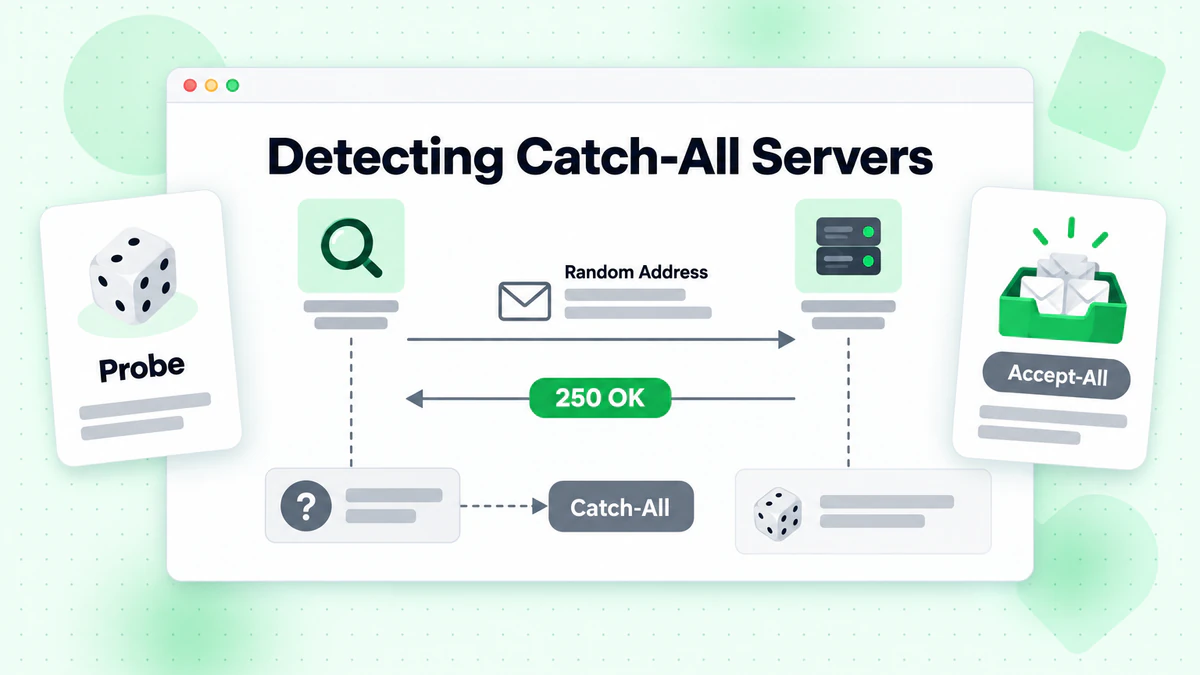
Detection Algorithm
Basic catch-all detection algorithm इस प्रकार काम करता है:
- Target domain पर एक random, non-existent address generate करें
- इस fake address पर SMTP verification करें
- Response का विश्लेषण करें:
- यदि server fake address को accept करता है → यह likely catch-all है
- यदि server fake address को reject करता है → सामान्य verification लागू होती है
Node.js में Implementation
यहाँ catch-all detection के लिए एक complete Node.js implementation है:
const net = require('net');
const dns = require('dns').promises;
const crypto = require('crypto');

class CatchAllDetector {
  constructor(options = {}) {
    this.timeout = options.timeout || 10000;
    this.fromEmail = options.fromEmail || 'verify@verify.local';
    this.fromDomain = options.fromDomain || 'verify.local';
  }

  /**
   * Generate a random email address that definitely doesn't exist
   */
  generateRandomEmail(domain) {
    const randomString = crypto.randomBytes(16).toString('hex');
    const timestamp = Date.now();
    return `nonexistent-${randomString}-${timestamp}@${domain}`;
  }

  /**
   * Get the primary MX server for a domain
   */
  async getMXServer(domain) {
    try {
      const records = await dns.resolveMx(domain);
      if (!records || records.length === 0) {
        return null;
      }
      // Sort by priority and return the primary server
      records.sort((a, b) => a.priority - b.priority);
      return records[0].exchange;
    } catch (error) {
      return null;
    }
  }

  /**
   * Perform SMTP verification on an email address
   */
  async smtpVerify(email, mxServer) {
    return new Promise((resolve) => {
      const socket = new net.Socket();
      let step = 0;
      let result = { accepted: false, response: '' };

      const commands = [
        null, // Wait for greeting
        `EHLO ${this.fromDomain}\r\n`,
        `MAIL FROM:<${this.fromEmail}>\r\n`,
        `RCPT TO:<${email}>\r\n`,
        'QUIT\r\n'
      ];

      socket.setTimeout(this.timeout);

      socket.on('data', (data) => {
        const response = data.toString();
        const code = parseInt(response.substring(0, 3));

        if (step === 0 && code === 220) {
          socket.write(commands[1]);
          step++;
        } else if (step === 1 && code === 250) {
          socket.write(commands[2]);
          step++;
        } else if (step === 2 && code === 250) {
          socket.write(commands[3]);
          step++;
        } else if (step === 3) {
          result.response = response.trim();
          result.accepted = code === 250 || code === 251;
          socket.write(commands[4]);
          socket.destroy();
          resolve(result);
        } else if (code >= 400) {
          result.response = response.trim();
          result.accepted = false;
          socket.destroy();
          resolve(result);
        }
      });

      socket.on('timeout', () => {
        result.response = 'Connection timeout';
        socket.destroy();
        resolve(result);
      });

      socket.on('error', (error) => {
        result.response = `Error: ${error.message}`;
        socket.destroy();
        resolve(result);
      });

      socket.connect(25, mxServer);
    });
  }

  /**
   * Detect if a domain is configured as catch-all
   */
  async detectCatchAll(domain) {
    // Get MX server
    const mxServer = await this.getMXServer(domain);
    if (!mxServer) {
      return {
        isCatchAll: null,
        reason: 'Could not resolve MX records',
        domain
      };
    }

    // Generate a random non-existent email
    const fakeEmail = this.generateRandomEmail(domain);

    // Test the fake email
    const result = await this.smtpVerify(fakeEmail, mxServer);

    return {
      isCatchAll: result.accepted,
      reason: result.accepted
        ? 'Server accepts mail for non-existent addresses'
        : 'Server rejects non-existent addresses',
      domain,
      mxServer,
      testEmail: fakeEmail,
      serverResponse: result.response
    };
  }

  /**
   * Verify an email with catch-all detection
   */
  async verifyWithCatchAllDetection(email) {
    const domain = email.split('@')[1];

    // First, detect if domain is catch-all
    const catchAllResult = await this.detectCatchAll(domain);

    if (catchAllResult.isCatchAll === null) {
      return {
        email,
        valid: null,
        catchAll: null,
        reason: catchAllResult.reason
      };
    }

    // Get MX server
    const mxServer = await this.getMXServer(domain);

    // Verify the actual email
    const verifyResult = await this.smtpVerify(email, mxServer);

    return {
      email,
      valid: verifyResult.accepted,
      catchAll: catchAllResult.isCatchAll,
      reason: catchAllResult.isCatchAll
        ? 'Address accepted but domain is catch-all (deliverability uncertain)'
        : verifyResult.accepted
          ? 'Address verified successfully'
          : 'Address rejected by server',
      serverResponse: verifyResult.response
    };
  }
}

// Usage example
async function main() {
  const detector = new CatchAllDetector();

  // Test catch-all detection
  const domains = ['gmail.com', 'example.com', 'company.com'];

  for (const domain of domains) {
    console.log(`\nTesting domain: ${domain}`);
    const result = await detector.detectCatchAll(domain);
    console.log(`Is Catch-All: ${result.isCatchAll}`);
    console.log(`Reason: ${result.reason}`);
    if (result.serverResponse) {
      console.log(`Server Response: ${result.serverResponse}`);
    }
  }

  // Verify specific email with catch-all detection
  const emailResult = await detector.verifyWithCatchAllDetection('user@example.com');
  console.log('\nEmail Verification Result:');
  console.log(JSON.stringify(emailResult, null, 2));
}

main().catch(console.error);
Python में Implementation
यहाँ equivalent Python implementation है:
import socket
import dns.resolver
import secrets
import time
from dataclasses import dataclass
from typing import Optional

@dataclass
class CatchAllResult:
    is_catch_all: Optional[bool]
    reason: str
    domain: str
    mx_server: Optional[str] = None
    test_email: Optional[str] = None
    server_response: Optional[str] = None

@dataclass
class VerificationResult:
    email: str
    valid: Optional[bool]
    catch_all: Optional[bool]
    reason: str
    server_response: Optional[str] = None

class CatchAllDetector:
    def __init__(self, timeout: int = 10, from_email: str = 'verify@verify.local',
                 from_domain: str = 'verify.local'):
        self.timeout = timeout
        self.from_email = from_email
        self.from_domain = from_domain

    def generate_random_email(self, domain: str) -> str:
        """Generate a random email address that definitely doesn't exist."""
        random_string = secrets.token_hex(16)
        timestamp = int(time.time() * 1000)
        return f"nonexistent-{random_string}-{timestamp}@{domain}"

    def get_mx_server(self, domain: str) -> Optional[str]:
        """Get the primary MX server for a domain."""
        try:
            records = dns.resolver.resolve(domain, 'MX')
            mx_records = sorted(
                [(r.preference, str(r.exchange).rstrip('.')) for r in records],
                key=lambda x: x[0]
            )
            return mx_records[0][1] if mx_records else None
        except Exception:
            return None

    def smtp_verify(self, email: str, mx_server: str) -> dict:
        """Perform SMTP verification on an email address."""
        result = {'accepted': False, 'response': ''}

        try:
            sock = socket.socket(socket.AF_INET, socket.SOCK_STREAM)
            sock.settimeout(self.timeout)
            sock.connect((mx_server, 25))

            # Receive greeting
            response = sock.recv(1024).decode()
            if not response.startswith('220'):
                result['response'] = response.strip()
                return result

            # Send EHLO
            sock.send(f'EHLO {self.from_domain}\r\n'.encode())
            response = sock.recv(1024).decode()
            if not response.startswith('250'):
                result['response'] = response.strip()
                return result

            # Send MAIL FROM
            sock.send(f'MAIL FROM:<{self.from_email}>\r\n'.encode())
            response = sock.recv(1024).decode()
            if not response.startswith('250'):
                result['response'] = response.strip()
                return result

            # Send RCPT TO
            sock.send(f'RCPT TO:<{email}>\r\n'.encode())
            response = sock.recv(1024).decode()
            result['response'] = response.strip()
            code = int(response[:3])
            result['accepted'] = code in (250, 251)

            # Send QUIT
            sock.send(b'QUIT\r\n')
            sock.close()

        except socket.timeout:
            result['response'] = 'Connection timeout'
        except socket.error as e:
            result['response'] = f'Socket error: {str(e)}'
        except Exception as e:
            result['response'] = f'Error: {str(e)}'

        return result

    def detect_catch_all(self, domain: str) -> CatchAllResult:
        """Detect if a domain is configured as catch-all."""
        # Get MX server
        mx_server = self.get_mx_server(domain)
        if not mx_server:
            return CatchAllResult(
                is_catch_all=None,
                reason='Could not resolve MX records',
                domain=domain
            )

        # Generate a random non-existent email
        fake_email = self.generate_random_email(domain)

        # Test the fake email
        result = self.smtp_verify(fake_email, mx_server)

        return CatchAllResult(
            is_catch_all=result['accepted'],
            reason='Server accepts mail for non-existent addresses' if result['accepted']
                   else 'Server rejects non-existent addresses',
            domain=domain,
            mx_server=mx_server,
            test_email=fake_email,
            server_response=result['response']
        )

    def verify_with_catch_all_detection(self, email: str) -> VerificationResult:
        """Verify an email with catch-all detection."""
        domain = email.split('@')[1]

        # First, detect if domain is catch-all
        catch_all_result = self.detect_catch_all(domain)

        if catch_all_result.is_catch_all is None:
            return VerificationResult(
                email=email,
                valid=None,
                catch_all=None,
                reason=catch_all_result.reason
            )

        # Get MX server
        mx_server = self.get_mx_server(domain)

        # Verify the actual email
        verify_result = self.smtp_verify(email, mx_server)

        if catch_all_result.is_catch_all:
            reason = 'Address accepted but domain is catch-all (deliverability uncertain)'
        elif verify_result['accepted']:
            reason = 'Address verified successfully'
        else:
            reason = 'Address rejected by server'

        return VerificationResult(
            email=email,
            valid=verify_result['accepted'],
            catch_all=catch_all_result.is_catch_all,
            reason=reason,
            server_response=verify_result['response']
        )


# Usage example
if __name__ == '__main__':
    detector = CatchAllDetector()

    # Test catch-all detection
    domains = ['gmail.com', 'example.com', 'company.com']

    for domain in domains:
        print(f"\nTesting domain: {domain}")
        result = detector.detect_catch_all(domain)
        print(f"Is Catch-All: {result.is_catch_all}")
        print(f"Reason: {result.reason}")
        if result.server_response:
            print(f"Server Response: {result.server_response}")

    # Verify specific email with catch-all detection
    email_result = detector.verify_with_catch_all_detection('user@example.com')
    print("\nEmail Verification Result:")
    print(f"  Email: {email_result.email}")
    print(f"  Valid: {email_result.valid}")
    print(f"  Catch-All: {email_result.catch_all}")
    print(f"  Reason: {email_result.reason}")
Advanced Detection Techniques
Basic catch-all detection को इन advanced techniques से improve किया जा सकता है:
1. Multiple Probe Testing
सिर्फ एक fake address के साथ test करने के बजाय, कई randomly generated addresses के साथ test करें। यह inconsistent behavior वाले servers की पहचान करने में मदद करता है:
async detectCatchAllAdvanced(domain, probeCount = 3) {
  const results = [];

  for (let i = 0; i < probeCount; i++) {
    const fakeEmail = this.generateRandomEmail(domain);
    const result = await this.smtpVerify(fakeEmail, await this.getMXServer(domain));
    results.push(result.accepted);

    // Small delay between probes to avoid rate limiting
    await new Promise(resolve => setTimeout(resolve, 500));
  }

  // Analyze results
  const acceptedCount = results.filter(r => r).length;

  if (acceptedCount === probeCount) {
    return { isCatchAll: true, confidence: 'high' };
  } else if (acceptedCount === 0) {
    return { isCatchAll: false, confidence: 'high' };
  } else {
    return { isCatchAll: null, confidence: 'low', note: 'Inconsistent server behavior' };
  }
}
2. Pattern-Based Detection
कुछ catch-all servers patterns के साथ configured होते हैं। विभिन्न formats के साथ addresses को test करें:
const testPatterns = [
  `nonexistent${Date.now()}@${domain}`,           // Random with timestamp
  `zzz-fake-user-zzz@${domain}`,                  // Obvious fake pattern
  `test.${crypto.randomUUID()}@${domain}`,        // UUID format
  `admin-backup-${Date.now()}@${domain}`          // Administrative-looking
];
3. Response Code Analysis
अतिरिक्त insight के लिए specific SMTP response codes और messages का विश्लेषण करें:
function analyzeResponse(response) {
  const code = parseInt(response.substring(0, 3));
  const message = response.toLowerCase();

  if (code === 250) {
    if (message.includes('accepted for delivery')) {
      return { accepted: true, type: 'explicit_accept' };
    }
    return { accepted: true, type: 'standard_accept' };
  }

  if (code === 550) {
    if (message.includes('user unknown') || message.includes('no such user')) {
      return { accepted: false, type: 'user_not_found' };
    }
    if (message.includes('rejected') || message.includes('denied')) {
      return { accepted: false, type: 'policy_rejection' };
    }
  }

  if (code === 451 || code === 452) {
    return { accepted: null, type: 'temporary_failure' };
  }

  return { accepted: code < 400, type: 'unknown' };
}
Catch-All Emails को संभालने के लिए सर्वोत्तम प्रथाएं
एक बार जब आप किसी catch-all domain का पता लगा लेते हैं, तो आपको अपने email verification workflow में उन addresses को संभालने के लिए एक strategy की आवश्यकता होती है।
Strategy 1: Risk-Based Classification
एक risk classification system implement करें जो विभिन्न confidence levels assign करता है:
function classifyEmailRisk(verificationResult) {
  const { valid, catchAll, domain } = verificationResult;

  if (!valid) {
    return { risk: 'high', action: 'reject', reason: 'Invalid email address' };
  }

  if (!catchAll) {
    return { risk: 'low', action: 'accept', reason: 'Verified deliverable' };
  }

  // Catch-all domain - assess additional risk factors
  const riskFactors = [];

  // Check domain age and reputation (would need external data)
  // Check if domain is a known business domain
  // Check email pattern (role-based, random, etc.)

  const localPart = verificationResult.email.split('@')[0];

  if (isRoleBasedAddress(localPart)) {
    riskFactors.push('role_based');
  }

  if (looksRandomlyGenerated(localPart)) {
    riskFactors.push('random_looking');
  }

  if (riskFactors.length >= 2) {
    return { risk: 'high', action: 'reject', reason: 'Catch-all with multiple risk factors' };
  }

  if (riskFactors.length === 1) {
    return { risk: 'medium', action: 'flag', reason: 'Catch-all with one risk factor' };
  }

  return { risk: 'medium', action: 'accept_with_caution', reason: 'Catch-all domain' };
}

function isRoleBasedAddress(localPart) {
  const rolePatterns = [
    'admin', 'info', 'support', 'sales', 'contact',
    'help', 'webmaster', 'postmaster', 'noreply', 'no-reply'
  ];
  return rolePatterns.some(pattern =>
    localPart.toLowerCase().includes(pattern)
  );
}

function looksRandomlyGenerated(localPart) {
  // Check for high entropy (random-looking strings)
  const consonants = localPart.match(/[bcdfghjklmnpqrstvwxyz]/gi) || [];
  const vowels = localPart.match(/[aeiou]/gi) || [];

  if (consonants.length > 0 && vowels.length === 0) {
    return true; // No vowels suggests random
  }

  if (localPart.length > 20) {
    return true; // Very long local parts are suspicious
  }

  // Check for number sequences
  if (/\d{5,}/.test(localPart)) {
    return true; // Long number sequences
  }

  return false;
}
Strategy 2: Engagement-Based Filtering
Marketing उद्देश्यों के लिए, catch-all addresses को filter करने के लिए engagement data का उपयोग करने पर विचार करें:
function shouldIncludeInCampaign(email, engagementData, catchAllStatus) {
  // Always include if we have positive engagement history
  if (engagementData.hasOpened || engagementData.hasClicked) {
    return { include: true, reason: 'Previous engagement confirmed' };
  }

  // Non-catch-all verified emails are safe
  if (!catchAllStatus.isCatchAll && catchAllStatus.verified) {
    return { include: true, reason: 'Verified deliverable' };
  }

  // Catch-all with no engagement history - be cautious
  if (catchAllStatus.isCatchAll) {
    // Check if we've successfully delivered before
    if (engagementData.previousDeliveries > 0 && engagementData.bounceRate < 0.1) {
      return { include: true, reason: 'Previous successful deliveries' };
    }

    // New catch-all address with no history
    return {
      include: false,
      reason: 'Catch-all domain with no engagement history',
      recommendation: 'Send verification email first'
    };
  }

  return { include: true, reason: 'Default include' };
}
Strategy 3: Gradual Warming
Catch-all addresses से निपटने के दौरान, एक gradual sending strategy implement करें:
class CatchAllWarmingStrategy {
  constructor() {
    this.warmingGroups = {
      verified: { dailyLimit: 1000, priority: 1 },
      catchAllEngaged: { dailyLimit: 500, priority: 2 },
      catchAllNew: { dailyLimit: 100, priority: 3 }
    };
  }

  categorizeAddress(email, verification, engagement) {
    if (!verification.catchAll) {
      return 'verified';
    }

    if (engagement.hasInteracted) {
      return 'catchAllEngaged';
    }

    return 'catchAllNew';
  }

  buildSendingQueue(emails, verifications, engagements) {
    const categorized = {
      verified: [],
      catchAllEngaged: [],
      catchAllNew: []
    };

    emails.forEach(email => {
      const category = this.categorizeAddress(
        email,
        verifications[email],
        engagements[email] || {}
      );
      categorized[category].push(email);
    });

    // Build queue respecting daily limits
    const queue = [];

    Object.entries(this.warmingGroups)
      .sort((a, b) => a[1].priority - b[1].priority)
      .forEach(([category, config]) => {
        const addresses = categorized[category].slice(0, config.dailyLimit);
        queue.push(...addresses.map(email => ({
          email,
          category,
          priority: config.priority
        })));
      });

    return queue;
  }
}
वास्तविक दुनिया के केस स्टडीज
केस स्टडी 1: E-commerce Company List Cleaning
500,000 email subscribers के साथ एक मध्यम आकार की e-commerce company अपनी deliverability rates improve करना चाहती थी। उनके विश्लेषण ने reveal किया:
प्रारंभिक स्थिति:
- 500,000 कुल subscribers
- Campaigns पर 12% bounce rate
- Catch-all domains पर 45,000 addresses (9%)
Verification परिणाम:
- 425,000 verified deliverable (non-catch-all)
- 45,000 catch-all addresses identified
- 30,000 invalid addresses removed
Catch-All Handling Strategy:
सभी catch-all addresses को remove करने के बजाय, उन्होंने एक tiered approach implement किया:
- Tier 1 - Keep: 15,000 catch-all addresses जिनमें previous engagement है (6 महीनों के भीतर opens या clicks)
- Tier 2 - Verify: 20,000 catch-all addresses को re-engagement campaign भेजा गया
- Tier 3 - Remove: 10,000 catch-all addresses जिनमें कोई engagement history नहीं थी और suspicious patterns थे
3 महीनों के बाद परिणाम:
- Bounce rate 2.1% तक गिर गई
- Open rates में 18% की वृद्धि हुई
- Sender reputation score में significant सुधार हुआ
- Email deliverability 98.5% तक पहुंच गई
केस स्टडी 2: B2B SaaS Lead Validation
एक B2B SaaS company जो monthly 10,000 new leads प्राप्त करती थी, उन्होंने अपने signup flow में catch-all detection implement किया:
चुनौती: कई B2B leads catch-all के रूप में configured company domains से आई थीं, जिससे verification मुश्किल हो गया। वे valuable leads खोए बिना सभी catch-all addresses को simply reject नहीं कर सकते थे।
समाधान:
async function validateB2BLead(email, companyInfo) {
  const verification = await verifyEmail(email);
  const catchAllResult = await detectCatchAll(email.split('@')[1]);

  if (!verification.valid) {
    return { accept: false, reason: 'Invalid email' };
  }

  if (!catchAllResult.isCatchAll) {
    return { accept: true, reason: 'Verified deliverable', confidence: 'high' };
  }

  // Catch-all domain - use company info to validate
  const domainMatchesCompany = email.split('@')[1].includes(
    companyInfo.name.toLowerCase().replace(/\s+/g, '')
  );

  if (domainMatchesCompany) {
    // Email domain matches company name - likely legitimate
    return {
      accept: true,
      reason: 'Catch-all but matches company domain',
      confidence: 'medium',
      requireVerification: true
    };
  }

  // Catch-all with unrelated domain
  return {
    accept: true,
    reason: 'Catch-all domain',
    confidence: 'low',
    requireVerification: true,
    sendDoubleOptIn: true
  };
}
परिणाम:
- Lead acceptance rate 95% पर maintained रही
- False positive rejection में 60% की कमी
- Catch-all के लिए double opt-in confirmation rate: 72%
- Overall lead quality में 25% सुधार
Catch-All Detection के लिए BillionVerify का उपयोग
जबकि अपना catch-all detection बनाना संभव है, BillionVerify जैसी professional email verification service का उपयोग करने से महत्वपूर्ण लाभ मिलते हैं:
API Integration Example
const axios = require('axios');

async function verifyWithBillionVerify(email) {
  const response = await axios.post(
    'https://api.billionverify.com/v1/verify',
    { email },
    {
      headers: {
        'Authorization': `Bearer ${process.env.BV_API_KEY}`,
        'Content-Type': 'application/json'
      }
    }
  );

  const result = response.data;

  return {
    email: result.email,
    deliverable: result.deliverable,
    isCatchAll: result.is_catch_all,
    isDisposable: result.is_disposable,
    isRoleBased: result.is_role_address,
    qualityScore: result.quality_score,
    recommendation: result.recommendation
  };
}

// Bulk verification with catch-all handling
async function bulkVerifyWithStrategy(emails) {
  const results = await Promise.all(
    emails.map(email => verifyWithBillionVerify(email))
  );

  return {
    safe: results.filter(r => r.deliverable && !r.isCatchAll),
    catchAll: results.filter(r => r.deliverable && r.isCatchAll),
    invalid: results.filter(r => !r.deliverable),
    stats: {
      total: results.length,
      safeCount: results.filter(r => r.deliverable && !r.isCatchAll).length,
      catchAllCount: results.filter(r => r.deliverable && r.isCatchAll).length,
      invalidCount: results.filter(r => !r.deliverable).length
    }
  };
}
BillionVerify का उपयोग करने के लाभ
Higher Accuracy: हमारा catch-all detection कई verification techniques का उपयोग करता है और ज्ञात catch-all domains का एक extensive database maintain करता है।
Additional Intelligence: Catch-all detection के अलावा, आपको disposable email detection, role-based address identification और quality scoring मिलती है।
Rate Limit Management: हम rate limiting और IP rotation को संभालते हैं, जो blocks के बिना consistent verification सुनिश्चित करता है।
Historical Data: Historical verification data तक पहुंच patterns की पहचान करने और decision-making को improve करने में मदद करती है।
Real-Time Updates: हमारा catch-all database domain configurations के बदलने पर continuously update होता है।
निष्कर्ष
Catch-all email detection किसी भी comprehensive email verification strategy का एक critical component है। जबकि ये servers verification के लिए चुनौतियां present करते हैं, यह समझना कि वे कैसे काम करते हैं और उचित detection और handling strategies को implement करना आपको valuable contacts खोए बिना high deliverability rates बनाए रखने की अनुमति देता है।
इस गाइड से मुख्य takeaways:
- Catch-all servers सभी mail को accept करते हैं चाहे specific mailbox मौजूद हो या नहीं
- Detection में उन addresses के साथ testing शामिल है जो निश्चित रूप से मौजूद नहीं हैं
- Catch-all addresses को automatically reject न करें—risk-based strategies implement करें
- Catch-all contacts के बारे में informed decisions लेने के लिए engagement data का उपयोग करें
- Production systems के लिए BillionVerify जैसी professional services पर विचार करें
अपने workflow में catch-all detection implement करने के लिए तैयार हैं? Individual addresses को test करने के लिए हमारा email checker tool आज़माएं, या अपने applications में seamless integration के लिए BillionVerify API को explore करें।
Catch-all domains को ठीक से संभालकर, आप अपनी email deliverability में सुधार करेंगे, अपनी sender reputation की रक्षा करेंगे, और अपने email contacts के बारे में बेहतर decisions लेंगे।
Instantly या Smartlead का उपयोग करने वाली टीमें हर अभियान से पहले BillionVerify से सूचियाँ साफ करके डिलीवरेबिलिटी में उल्लेखनीय सुधार करती हैं।
वेरिफिकेशन प्रोवाइडर चुनने से पहले सटीकता और गति के मामले में BillionVerify की तुलना ZeroBounce से करें।
BillionVerify सीधे HubSpot, Mailchimp और ActiveCampaign के साथ इंटीग्रेट होता है ताकि कॉन्टैक्ट लिस्ट को स्वचालित रूप से साफ रखा जा सके।