



Most email marketers believe a bounce is just a bounce, but this costly misconception can tank your sender reputation faster than you realize. Different bounce types signal vastly different problems, from permanent address failures to temporary server hiccups, and treating them identically wastes resources and damages deliverability. Understanding these distinctions empowers you to diagnose list quality issues, protect your domain reputation, and maximize campaign ROI. This guide breaks down bounce categories, their causes, and proven strategies to minimize them.
Key takeaways
| Point | Details |
|---|---|
| Hard vs soft bounces | Hard bounces are permanent failures requiring immediate removal; soft bounces are temporary issues that may resolve. |
| Sender reputation impact | High bounce rates signal poor list hygiene to ISPs, reducing inbox placement and increasing blocking risks. |
| Cost efficiency | Sending to invalid addresses wastes budget and skews campaign metrics, lowering overall marketing ROI. |
| Regular verification | Implementing email verification tools before campaigns prevents bounces and maintains list quality. |
| Engagement segmentation | Segmenting by engagement reduces bounces and protects your sender reputation over time. |
Understanding email bounce basics and classification
An email bounce occurs when your message fails to reach the recipient's inbox and returns to your mail server with an error code. Recognizing bounce types is essential because they reveal whether the problem is fixable or requires immediate list action. Hard bounces indicate permanent delivery failure due to invalid addresses; soft bounces are temporary delivery issues that might resolve on retry. Misclassifying these can lead to wasted sends, inflated costs, and damaged sender reputation.
Hard bounces happen when an email address is invalid, the domain doesn't exist, or the recipient's server has permanently blocked your messages. These failures are final. Continuing to send to hard bounce addresses signals to ISPs that you're not maintaining your list, which can trigger spam filters or blacklisting. Common causes include typos during signup, abandoned email accounts, or domains that have expired.
Soft bounces occur when temporary conditions prevent delivery, such as a full inbox, a server outage, or message size limits. These issues often resolve themselves within hours or days. Your email service provider typically retries delivery for soft bounces over a set period before converting them to hard bounces if the problem persists. Understanding this distinction helps you decide whether to remove an address immediately or monitor it for resolution.
Bounce codes provide technical details about why delivery failed. SMTP error codes like 550 (mailbox unavailable) or 552 (mailbox full) tell you exactly what went wrong. Familiarizing yourself with these codes allows you to categorize bounces accurately and take appropriate corrective action. Many email platforms automate this process, but knowing the basics helps you troubleshoot edge cases.
Identifying bounce types correctly is the foundation of effective email bounce management. It informs whether you should remove an address, retry delivery, or investigate deeper issues like server configuration or content filtering. Ignoring these signals leads to compounding deliverability problems that erode campaign performance over time.
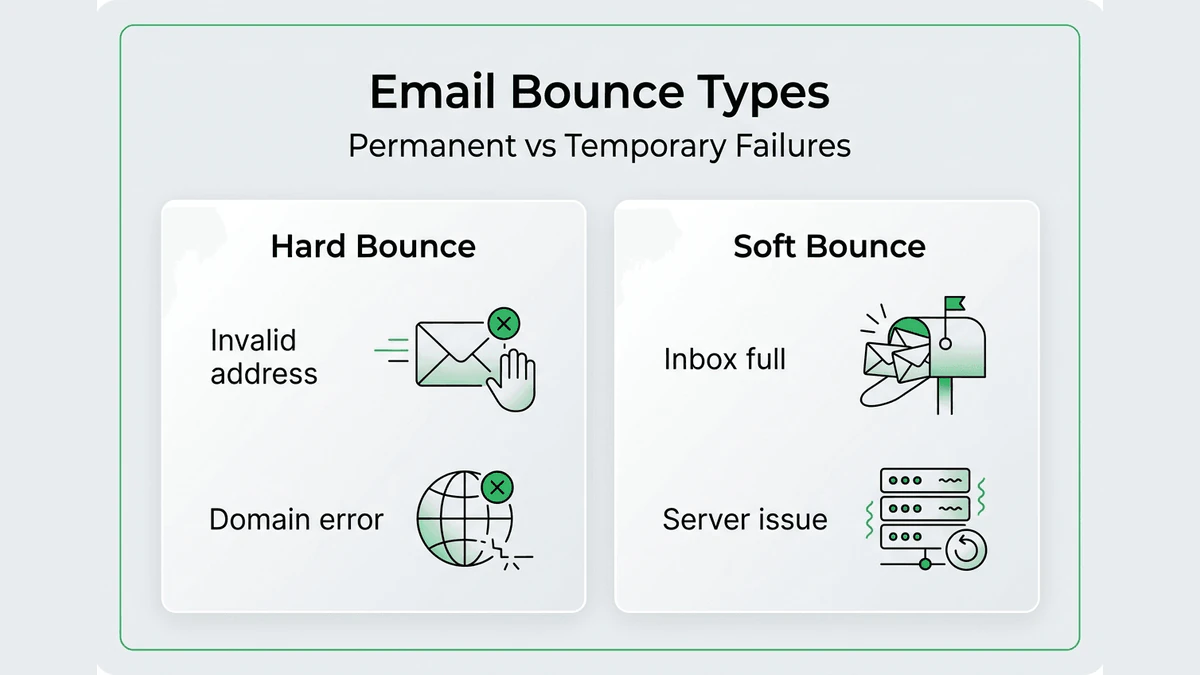
Common types of email bounces with examples and causes
Hard bounces fall into several subtypes, each with distinct causes:
- Invalid email address: The recipient address doesn't exist or contains a typo, such as "john@gmial.com" instead of "john@gmail.com."
- Domain not found: The domain in the email address is unregistered or has expired, making delivery impossible.
- Blocked address: The recipient's server has permanently blocked your sending IP or domain due to spam complaints or blacklisting.
Soft bounces also vary by underlying issue:
- Mailbox full: The recipient's inbox has reached its storage limit, preventing new messages from being accepted.
- Temporary server issues: The receiving mail server is down for maintenance or experiencing technical problems.
- Message size limits: Your email exceeds the recipient server's maximum allowed size, often due to large attachments or embedded images.
Email bounces include mailbox full, invalid recipient, server downtime, and spam filtering among others. Recognizing these patterns helps you address root causes rather than symptoms.
| Bounce Type | Cause | Impact on Campaign | Recommended Action |
|---|---|---|---|
| Hard bounce | Invalid address | Permanent failure, harms reputation | Remove immediately |
| Soft bounce | Full mailbox | Temporary delay, may resolve | Retry 2-3 times, then remove |
| Hard bounce | Domain not found | Permanent failure, indicates poor list quality | Remove and verify source |
| Soft bounce | Server downtime | Temporary delay, usually resolves quickly | Retry within 24-48 hours |
SMTP codes help you categorize bounce responses automatically. Code 550 indicates a hard bounce due to an invalid mailbox, while 452 signals a temporary issue like insufficient storage. Your email service provider logs these codes, and many platforms offer dashboards to track bounce reasons over time. Monitoring these patterns reveals whether your list quality is improving or declining.
Pro Tip: Use automated tools to analyze bounce codes for precise classification and automated list cleaning. This saves hours of manual review and ensures you're acting on accurate data rather than assumptions.
Understanding these bounce subtypes allows you to tailor your response. Hard bounces require immediate removal to protect your sender score, while soft bounces benefit from a retry strategy before taking permanent action. This nuanced approach maximizes deliverability while minimizing unnecessary list attrition.
Implications of bounce types on deliverability and sender reputation
Hard bounces directly damage your sender reputation because they signal to ISPs that you're sending to unverified or outdated lists. High bounce rates damage sender reputation and reduce inbox placement, leading to ROI losses. When your hard bounce rate exceeds 2%, major email providers like Gmail and Outlook start flagging your domain as a potential spammer. This triggers filtering algorithms that divert your emails to spam folders or block them entirely.

Repeated soft bounces also raise red flags, even though they're temporary. If the same addresses consistently soft bounce across multiple campaigns, it suggests you're not monitoring engagement or cleaning your list. ISPs interpret this as negligence, which compounds deliverability issues over time. Soft bounces that persist beyond three attempts often convert to hard bounces, further harming your metrics.
Sending to non-existent or inactive addresses wastes budget and skews campaign analytics. Every bounce represents a wasted send, inflating your cost per acquisition and diluting open and click-through rates. For enterprises sending millions of emails monthly, even a 3% bounce rate translates to tens of thousands of wasted messages and significant budget leakage.
Statistical data shows that bounce rates above 5% correlate with a 20% to 30% decline in inbox placement rates. This threshold varies by industry and sender history, but the trend is consistent: higher bounces lead to lower deliverability. Maintaining bounce rates below 2% is the gold standard for protecting your sender reputation and ensuring maximum inbox reach.
"Effective bounce management isn't optional for serious email marketers. It's the difference between reaching your audience and wasting resources on dead ends. Every bounce you prevent is a step toward better engagement and higher ROI."
Ignoring bounce types also increases the risk of landing on public blacklists maintained by organizations like Spamhaus or Barracuda. Once blacklisted, your emails face widespread blocking across multiple ISPs, requiring time-consuming delisting processes and reputation repair. Proactive bounce management prevents these scenarios by keeping your list clean and your sending practices aligned with industry standards.
The cumulative effect of poor bounce management extends beyond immediate campaigns. It erodes trust with ISPs over months, making it progressively harder to achieve inbox placement even after you've cleaned your list. Rebuilding sender reputation takes time and consistent good practices, making prevention far more cost-effective than remediation.
Best practices to manage bounce types and improve email hygiene
Managing bounces effectively requires a systematic approach that addresses both immediate issues and long-term list health:
- Remove hard bounces immediately: As soon as a hard bounce is confirmed, delete the address from your list to prevent further reputation damage.
- Implement a retry strategy for soft bounces: Attempt delivery two to three times over 48 to 72 hours before marking the address as problematic.
- Verify emails before adding to your list: Use email verification tools at the point of signup to catch invalid addresses before they enter your database.
- Monitor bounce rates by campaign and segment: Track bounce patterns to identify problematic sources or list segments that need attention.
- Segment inactive subscribers separately: Move unengaged contacts to a re-engagement campaign or remove them to protect your sender score.
- Audit your list quarterly: Conduct comprehensive list reviews every three months to catch addresses that have degraded over time.
Email list hygiene through verification and bounce management boosts campaign success and cuts bounce rates. Regular verification ensures you're only sending to valid, active addresses, which maximizes engagement and minimizes waste.
Pro Tip: Segment email lists by engagement to reduce bounces and protect sender reputation. Highly engaged subscribers are less likely to bounce, while inactive segments often harbor invalid or abandoned addresses.
Implementing essential email verification methods before campaigns prevents bounces at the source. Real-time verification APIs catch typos and invalid domains during signup, while bulk verification tools clean existing lists before major sends. These tools check syntax, domain validity, mailbox existence, and even detect disposable email services that inflate bounce risk.
Routine bounce analysis helps you adapt your sending strategies continuously. Review bounce reports weekly to spot trends, such as increased soft bounces from a specific ISP indicating server issues or policy changes. This proactive monitoring allows you to adjust sending times, message content, or list segments to maintain optimal deliverability.
Following email marketing best practices for higher deliverability reinforces bounce management efforts. Practices like double opt-in, regular engagement tracking, and content optimization work synergistically with bounce reduction to create a robust email program. Together, these strategies ensure your messages reach engaged recipients who want to hear from you.
Explore BillionVerify's tools for bounce management and email verification
Reducing bounce rates and maintaining pristine email lists requires powerful, scalable verification tools designed for enterprise needs. BillionVerify offers comprehensive email verification services that detect invalid addresses, disposable emails, spam traps, and risky domains before they damage your sender reputation. Our multi-layer verification technology ensures accuracy at scale, processing millions of verifications monthly with seamless API integration into your existing email marketing platforms and CRMs.
Whether you're managing bulk campaigns or real-time user registrations, BillionVerify's tools help you classify bounce types accurately, automate list cleaning, and protect your deliverability metrics. Our platform supports over 20 major email marketing systems, making implementation straightforward for marketing teams at medium to large enterprises. Explore BillionVerify's email verification services to see how precision verification can boost your campaign ROI and keep your sender reputation intact.
FAQ
What is the difference between a hard bounce and a soft bounce?
A hard bounce is a permanent delivery failure caused by an invalid email address, non-existent domain, or permanent block. These addresses should be removed immediately to protect your sender reputation. A soft bounce is a temporary issue like a full inbox or server downtime that may resolve on its own. Soft bounces warrant a retry strategy before taking permanent action.
How can I reduce my email bounce rate effectively?
Regularly clean your lists by removing hard bounces immediately and monitoring soft bounces for patterns. Verify emails before sending using real-time or bulk verification tools to catch invalid addresses at signup. Segment your audience by engagement to focus on active subscribers and reduce bounce risk.
Why does email deliverability suffer when bounce rates are high?
High bounce rates signal to ISPs that you're sending to unverified or outdated lists, which harms your sender reputation. ISPs use bounce data to filter or block emails from senders with poor list hygiene. Maintaining email hygiene through regular verification ensures your messages reach inboxes instead of spam folders.
Can I prevent bounces entirely with email verification?
While no tool can eliminate bounces completely, email verification dramatically reduces bounce rates by identifying invalid addresses before they enter your list. Verification checks syntax, domain validity, and mailbox existence, catching most issues at the source. Combining verification with regular list maintenance keeps bounce rates well below industry thresholds.
How often should I verify my email list?
Verify new signups in real-time to prevent invalid addresses from entering your database. For existing lists, conduct bulk verification quarterly or before major campaigns to catch addresses that have degraded over time. High-volume senders benefit from monthly verification to maintain optimal list quality and protect sender reputation continuously.