



Nearly 70% of online shopping carts are abandoned. That represents billions in lost revenue—but also a massive opportunity. Cart abandonment emails consistently deliver some of the highest ROI in email marketing, recovering 10-15% of otherwise lost sales. This guide covers everything you need to build cart recovery sequences that work.
Understanding Cart Abandonment
Why customers leave and how to bring them back.
Cart Abandonment Statistics
The Numbers:
- Average cart abandonment rate: 69.8%
- Mobile abandonment: 85.6%
- Desktop abandonment: 69.7%
- Tablet abandonment: 80.7%
What This Means: For every 10 customers who add items to cart, only 3 complete the purchase.
Why Customers Abandon Carts
Top Reasons for Abandonment:
| Reason | Percentage |
|---|---|
| Unexpected costs (shipping, taxes) | 48% |
| Required to create account | 24% |
| Complex checkout process | 18% |
| Couldn't see total cost upfront | 17% |
| Website errors/crashes | 13% |
| Didn't trust site with card info | 12% |
| Delivery too slow | 11% |
| Returns policy unclear | 10% |
| Not enough payment methods | 7% |
| Card declined | 4% |
Types of Cart Abandonment
Just Browsing: Added to cart but not serious yet. Window shopping behavior.
Research Mode: Comparing prices, checking options. May return on their own.
Interrupted: Intended to buy but got distracted. Life happened.
Surprised by Costs: Ready to buy until they saw shipping or taxes.
Technical Issues: Wanted to buy but couldn't. Checkout failed.
Saving for Later: Using cart as a wishlist. Not ready to commit.
Trust Concerns: Uncertain about the site, product, or transaction.
Cart Abandonment Email Fundamentals
The basics of recovery emails.
What Are Cart Abandonment Emails?
Definition: Automated emails sent to customers who add items to their cart but leave without purchasing. Learn more about email automation strategies.
Requirements:
- Customer's email address (must be captured before checkout)
- Cart contents saved
- Automation triggers when cart is abandoned
- Timely delivery
Why Cart Emails Work
High Intent: These customers already showed purchase intent by adding to cart.
Relevance: The email contains exactly what they want—products they selected.
Timing: Reaches them while interest is still fresh.
Personalization: Natural personalization with their specific cart items.
Cart Email Performance
Typical Metrics:
- Open rate: 40-50%
- Click rate: 10-15%
- Conversion rate: 5-10%
- Revenue recovered: 10-15% of abandoned carts
Comparison to Regular Emails: Cart emails typically see 3-5x higher engagement than promotional emails.
Building Your Cart Abandonment Sequence
Creating a multi-email recovery series.
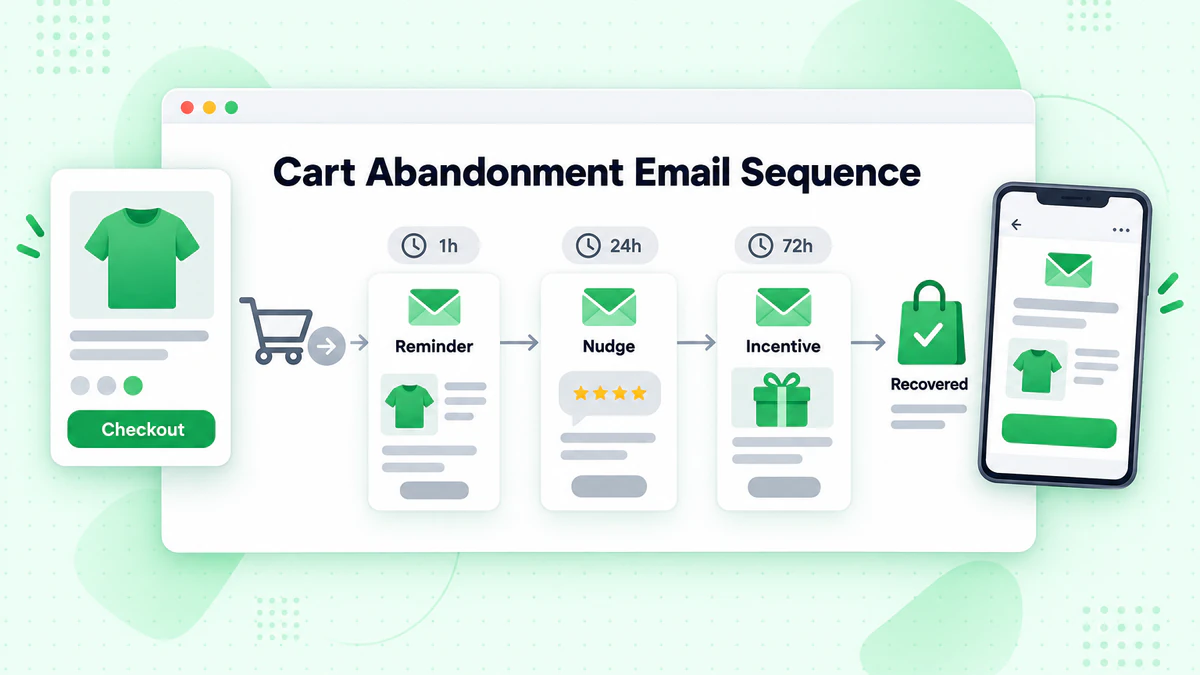
The Cart Email Sequence
Why Multiple Emails: One email isn't enough. A sequence catches customers at different moments.
Standard Sequence Structure:
- Email 1: Reminder (1 hour)
- Email 2: Soft nudge (24 hours)
- Email 3: Incentive or final push (48-72 hours)
Extended Sequences: Some businesses add a 4th or 5th email for high-value carts.
Email 1: The Reminder (1 Hour)
Timing: 1 hour after abandonment
Purpose: Gentle reminder while interest is fresh
Approach:
- No pressure
- Helpful tone
- Show cart contents
- Simple "Complete Purchase" CTA
Subject Line Examples:
- "Did you forget something?"
- "You left items in your cart"
- "Still shopping?"
Content Strategy:
- Product images from their cart
- Clear pricing
- Direct link back to cart
- Brief message (not salesy)
Template:
Subject: Still thinking it over?

Hi [Name],

You left some great items in your cart:

[Product Image] [Product Name] - $XX

We've saved everything for you—just click below to
pick up where you left off.

[Return to Cart button]

Questions? Reply to this email or contact us at [support].

[Signature]
Email 2: The Value Add (24 Hours)
Timing: 24 hours after abandonment
Purpose: Add value, address concerns
Approach:
- Add social proof
- Address common objections
- Highlight benefits
- Still no discount (usually)
Subject Line Examples:
- "Your cart is waiting"
- "Don't miss out on [Product Name]"
- "Still interested in your items?"
Content Strategy:
- Remind of cart contents
- Add testimonials or reviews
- Mention key benefits
- Free shipping reminder (if applicable)
- Urgency (if appropriate)
Template:
Subject: Your [Product] is selling fast

Hi [Name],

Those items you picked out are still waiting:

[Product Image] [Product Name] - $XX

WHY CUSTOMERS LOVE [PRODUCT]:
★★★★★ "Best purchase I've made..." - [Customer]

REMEMBER:
✓ Free shipping over $50
✓ 30-day easy returns
✓ 24/7 customer support

[Complete Your Order button]

[Signature]
Email 3: The Incentive (48-72 Hours)
Timing: 48-72 hours after abandonment
Purpose: Create urgency, possibly offer incentive
Approach:
- Stronger urgency
- Consider offering discount
- Last chance messaging
- Clear call-to-action
Subject Line Examples:
- "Last chance: 10% off your cart"
- "Your cart is about to expire"
- "We're holding your items..."
Content Strategy:
- Urgency around cart expiration
- Discount code (if offering)
- Scarcity (low stock, if true)
- Final push
Template:
Subject: Your cart expires soon + 10% off inside

Hi [Name],

We don't want you to miss out!

Your cart will expire in 24 hours. As a thank you for
shopping with us, here's 10% off:

Code: COMEBACK10

[Product Image] [Product Name]
Was: $XX → Now: $XX with code

[Complete Order with 10% Off button]

This offer expires: [Date/Time]

[Signature]
Cart Email Content Strategies
What to include in your recovery emails.
Product Display
Best Practices:
- High-quality product images
- Clear product names
- Prices clearly shown
- Quantity if multiple
- Direct links to products
For Multiple Items:
- Show all items (if few)
- Show top items (if many)
- Include total value
- "You have X items in your cart"
Dynamic Content
Personalization Elements:
- Customer name
- Specific products
- Cart total
- Product recommendations
Advanced Dynamic Content:
- Recently viewed items
- Complementary products
- Category-specific messaging
- Stock levels
Social Proof
Types to Include:
- Star ratings
- Number of reviews
- Customer testimonials
- "X people bought this today"
- Expert endorsements
Placement: Near product images or before CTA.
Trust Signals
Include When Relevant:
- Secure checkout badges
- Money-back guarantee
- Return policy
- Customer service contact
- Payment method icons
Urgency Elements
Legitimate Urgency:
- Cart expiration
- Low stock alerts
- Sale ending
- Limited-time offers
Caution: Only use urgency that's true. False urgency damages trust.
The Discount Debate
Whether and when to offer incentives.
Arguments for Discounts
Pros:
- Higher conversion rates
- Competitive against price-focused shoppers
- Clears abandoned inventory
- Gets first purchase from new customers
Arguments Against Discounts
Cons:
- Trains customers to abandon and wait
- Reduces margins
- Attracts discount-seekers only
- May not be sustainable
Discount Strategies
If You Offer Discounts:
Delay the Discount: Don't offer in first email. Wait for email 2 or 3.
Segment First-Time vs. Repeat:
- New customers: May need incentive
- Repeat customers: Often convert without
Tiered Discounts:
- Email 2: Free shipping
- Email 3: 10% off
- Email 4: 15% off (high-value carts only)
Alternative Incentives:
- Free shipping (less margin impact)
- Free gift with purchase
- Points/loyalty credits
- Extended returns
No-Discount Strategy
Focus On:
- Product value
- Social proof
- Trust building
- Urgency (legitimate)
- Customer service
When This Works Best:
- Strong brand loyalty
- Unique products
- Premium positioning
- High existing margins
Segmentation Strategies
Tailoring cart emails by customer type.
By Cart Value
High-Value Carts ($500+):
- More emails in sequence
- Higher incentive offers
- Personal outreach option
- VIP treatment
Medium-Value Carts ($100-500):
- Standard sequence
- Moderate incentives
- Focus on value
Low-Value Carts ($25-100):
- Shorter sequence
- Minimal discounts
- Efficiency focus
Micro Carts (<$25):
- Single email may suffice
- No discounts
- Simple reminder
By Customer Type
New Customers (never purchased):
- Build trust
- May need incentive
- Emphasize guarantee and returns
- Highlight customer support
Previous Customers:
- Skip trust-building
- Personalized recommendations
- Loyalty references
- Often convert without discount
VIP/High-Spenders:
- Priority treatment
- Exclusive offers
- Personal messaging
- Extended sequences
By Product Category
High-Consideration Items (furniture, electronics):
- Longer sequence
- More information
- Comparison content
- Support offer
Fashion/Apparel:
- Size/fit concerns
- Style suggestions
- Mix-and-match
- Trend relevance
Consumables/Replenishables:
- Convenience focus
- Subscription option
- Bundle suggestions
By Behavior
Repeated Abandoners:
- Different messaging
- Consider suppression after X times
- May need deeper investigation
First-Time Abandoners:
- Standard sequence
- Full treatment
High Engagement, No Purchase:
- May have specific objection
- Consider survey or chat offer
Timing Optimization
When to send for maximum impact.
First Email Timing
Options:
- 30 minutes: Catches while still shopping
- 1 hour: Standard best practice
- 3 hours: Gives time to return naturally
- 24 hours: Less pushy, may miss window
Best Practice: 1 hour works for most businesses.
Test It: Your audience may differ.
Sequence Spacing
Tight Sequence (urgency focus):
- Email 1: 1 hour
- Email 2: 12 hours
- Email 3: 24 hours
Standard Sequence:
- Email 1: 1 hour
- Email 2: 24 hours
- Email 3: 72 hours
Extended Sequence:
- Email 1: 1 hour
- Email 2: 24 hours
- Email 3: 72 hours
- Email 4: 7 days
Time of Day
When to Send: Follow-up emails can be timed to recipient's timezone and typical engagement times.
Consideration: The first email should go out based on abandonment time, not optimal send time.
Technical Implementation
Setting up cart abandonment automation.
Requirements
Technical Needs:
- Email capture before checkout
- Cart data stored and accessible
- Automation platform with triggers
- Integration between store and ESP
Email Capture Strategies
Before They Abandon:
- Early email capture in checkout
- Pop-ups with email incentive
- Account creation early
- Guest checkout with email first
Timing of Capture: The earlier you get email, the more carts you can recover.
Integration Setup
Data Flow:
Customer adds to cart
        ↓
Customer provides email
        ↓
Customer abandons (leaves site)
        ↓
Trigger sent to ESP
        ↓
Wait period (1 hour)
        ↓
Check: Still abandoned?
        ↓
   Yes → Send Email 1
   No  → End sequence
        ↓
Continue sequence logic
Common Platforms
E-commerce Platforms with Built-In:
- Shopify
- WooCommerce
- BigCommerce
- Magento
ESPs with Cart Abandonment:
- Klaviyo
- Omnisend
- Drip
- ActiveCampaign
Subject Line Strategies
Getting the email opened.
Effective Approaches
Question:
- "Forget something?"
- "Still thinking it over?"
- "Did you mean to leave?"
Direct:
- "You left items in your cart"
- "Your cart is waiting"
- "Complete your order"
Urgency:
- "Your cart is about to expire"
- "Items selling out fast"
- "Last chance for your cart"
Personalization:
- "[Product Name] is still in your cart"
- "[Name], you left something behind"
Incentive:
- "Get 10% off your cart"
- "Free shipping on your order"
Subject Line Testing
Test Variables:
- Emoji vs. no emoji
- Question vs. statement
- Urgency level
- Product name inclusion
- Personalization
Preview Text
Don't Forget It: Preview text adds context in the inbox.
Examples:
- "Complete your purchase before items sell out"
- "Your [Product] is waiting + free shipping"
- "We saved your cart just in case"
Measuring Cart Email Success
Tracking and optimizing performance.
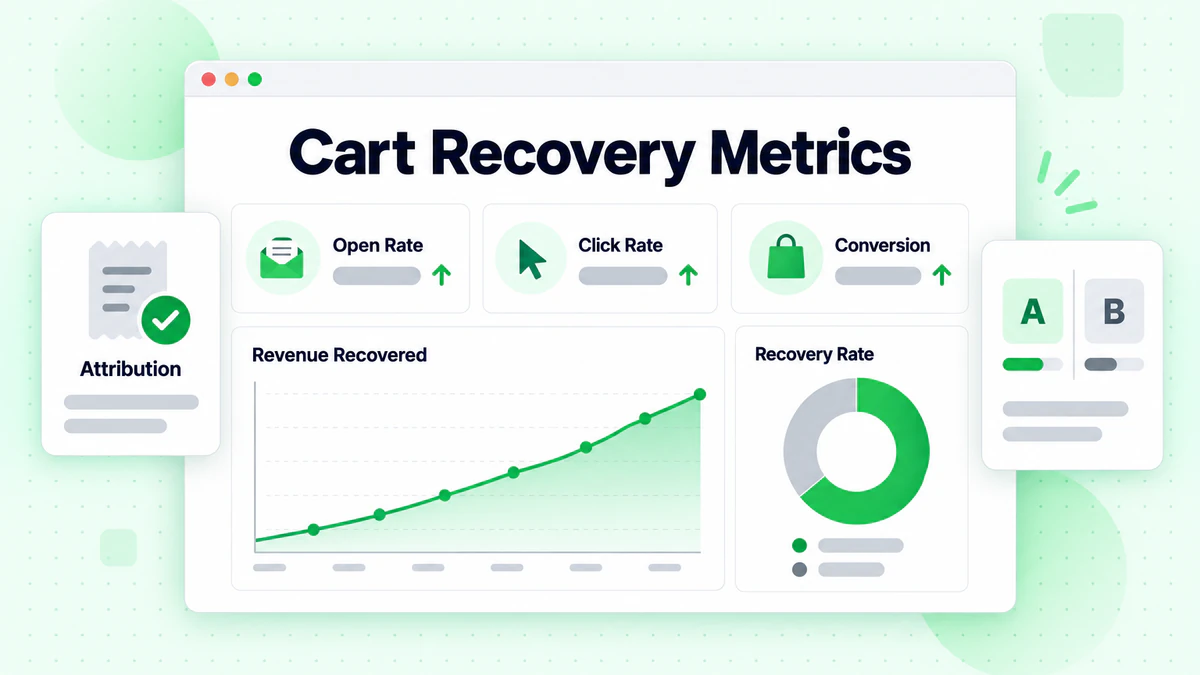
Key Metrics
Email Metrics:
- Open rate (target: 40%+)
- Click rate (target: 10%+)
- Conversion rate (target: 5%+)
Business Metrics:
- Recovery rate (% of abandoners who purchase)
- Revenue recovered
- Revenue per email
- Customer acquisition cost impact
Attribution
How to Attribute:
- Did they click the email?
- Did they purchase within 24-48 hours?
- Was the cart the same items?
View-Through: Some customers see the email but return directly. Consider view-through attribution.
Optimization Process
What to Test:
- Timing (when emails send)
- Subject lines
- Email content
- Discount vs. no discount
- Number of emails in sequence
- CTA design and copy
Testing Approach: A/B test one variable at a time with significant sample sizes.
Advanced Cart Strategies
Taking recovery to the next level.
Browse Abandonment
Expanding Beyond Cart: Target customers who viewed products but didn't add to cart.
Key Differences:
- Lower intent than cart abandonment
- Less specific (no cart to reference)
- Broader product recommendations
Price Drop Alerts
When Carted Items Go On Sale: Notify customers when items in their cart drop in price.
High Intent: Price was likely the objection—now it's addressed.
Stock Alerts
Back in Stock: If items were out of stock, notify when available.
Low Stock: Create urgency with "only 3 left" messages (if true).
Cross-Sell in Recovery
After Recovery: Once they complete purchase, follow up with complementary items.
In Sequence: Include recommendations alongside cart items.
Real-Time Engagement
Chat/SMS Options: Offer live chat or SMS as alternatives to email.
When to Use: High-value carts or customers who haven't responded to email.
Common Mistakes
Pitfalls to avoid.
Mistake 1: Sending Too Late
Problem: First email 24+ hours later. Fix: Send within 1 hour.
Mistake 2: Only Sending One Email
Problem: Missing customers who need multiple touches. Fix: Build a 3+ email sequence.
Mistake 3: Immediate Discounts
Problem: Training customers to abandon for discounts. Fix: Try to recover without discounts first.
Mistake 4: Generic Content
Problem: Not showing specific cart items. Fix: Dynamic content with their products.
Mistake 5: Forgetting Mobile
Problem: Emails not optimized for mobile. Fix: Mobile-first design.
Mistake 6: No Suppression
Problem: Sending cart emails after purchase. Fix: Real-time suppression when cart is purchased.
Mistake 7: Ignoring High-Value Carts
Problem: Same treatment for $50 and $500 carts. Fix: Segment and treat high-value differently.
Cart Abandonment Checklist
Setup
- [ ] Email capture before checkout
- [ ] Cart data integration with ESP
- [ ] Automation triggers configured
- [ ] Suppression for completed purchases
- [ ] Dynamic content working
Email 1 (Reminder)
- [ ] Sends within 1 hour
- [ ] Shows cart items
- [ ] Clear CTA
- [ ] Mobile optimized
- [ ] Simple, helpful tone
Email 2 (Value)
- [ ] Sends 24 hours later
- [ ] Adds social proof
- [ ] Addresses objections
- [ ] Stronger CTA
Email 3 (Urgency/Offer)
- [ ] Sends 48-72 hours later
- [ ] Creates urgency
- [ ] Offer included (if using)
- [ ] Final push messaging
Optimization
- [ ] Tracking in place
- [ ] Regular performance review
- [ ] A/B testing active
- [ ] Segmentation implemented
Data Quality for Cart Recovery
Why list health matters.
The Impact
Valid Emails Mean:
- Cart recovery emails actually arrive
- Your highest-intent customers are reached
- Accurate ROI measurement
Invalid Emails Mean:
- Lost revenue from undelivered recoveries
- Wasted automation resources
- Inaccurate performance metrics
Verification at Checkout
Real-Time Verification: Verify email addresses at checkout before cart is saved using email verification.
Benefits:
- Only valid emails enter recovery flow
- Higher recovery success rate
- Better email deliverability
Implement our email checker tool at your checkout to catch invalid addresses immediately.
Conclusion
Cart abandonment emails are among the highest-ROI tactics in email marketing. With nearly 70% of carts abandoned, the opportunity is massive—and a well-executed recovery sequence can capture 10-15% of otherwise lost revenue.
Key cart abandonment principles:
- Act quickly: First email within 1 hour
- Build a sequence: 3+ emails catch different moments
- Show their cart: Dynamic content with their specific items
- Add value progressively: Trust, proof, then possibly incentives
- Segment and personalize: Treat high-value carts differently
Cart emails only work if they reach real inboxes. Invalid email addresses at checkout mean lost recovery opportunities.
Ready to ensure your cart recovery emails reach valid customers? Start with BillionVerify to verify emails at checkout and maximize recovery revenue.