



Every email you send travels through a carefully orchestrated network of servers, and Mail Exchange (MX) records are the signposts that guide this journey. Understanding how to validate MX records is a fundamental skill for any developer building email verification systems, contact forms, or applications that collect email addresses. This comprehensive guide explores MX record validation from basic concepts to advanced implementation strategies, giving you the knowledge to build robust email verification into your applications. For foundational concepts, see our complete guide to email verification.
Understanding MX Records
Mail Exchange records are DNS records that specify which mail servers are responsible for accepting email on behalf of a domain. When you send an email to user@example.com, your mail server needs to know where to deliver it. MX records provide this information by pointing to the domain's mail servers.
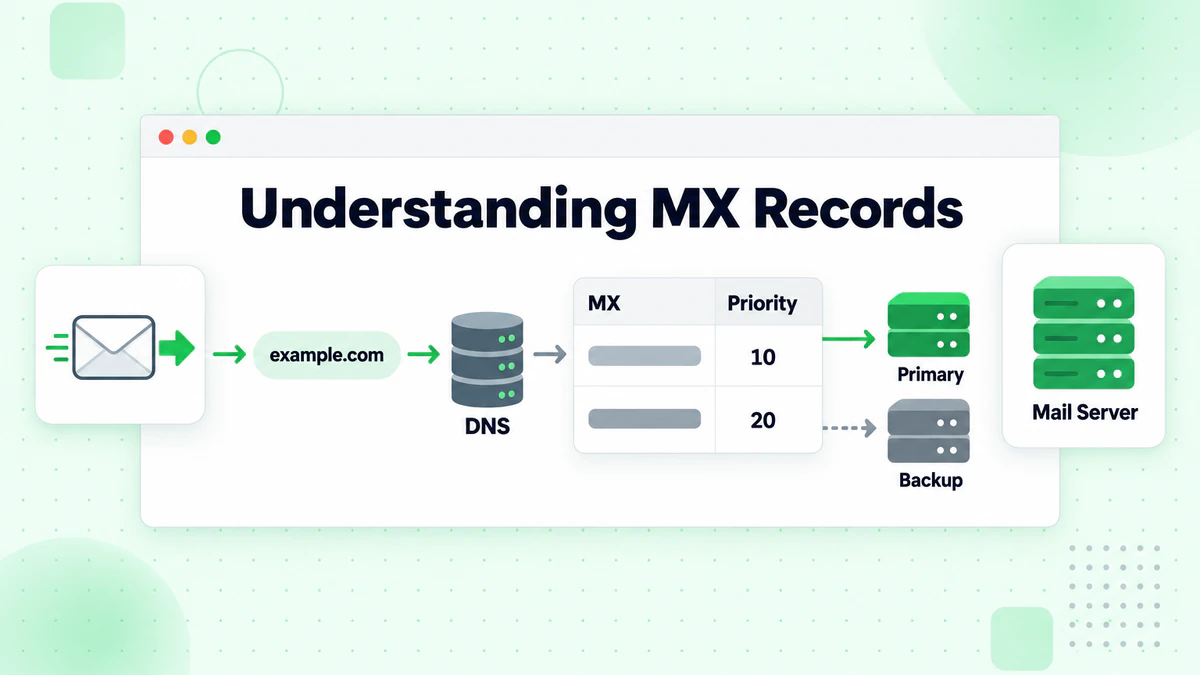
How MX Records Work
When an email is sent, the sending mail server performs a DNS lookup to find the MX records for the recipient's domain. This lookup returns one or more mail server hostnames along with priority values that indicate preference order.
A typical MX record lookup for gmail.com might return:
gmail.com.    MX    5     gmail-smtp-in.l.google.com.
gmail.com.    MX    10    alt1.gmail-smtp-in.l.google.com.
gmail.com.    MX    20    alt2.gmail-smtp-in.l.google.com.
gmail.com.    MX    30    alt3.gmail-smtp-in.l.google.com.
gmail.com.    MX    40    alt4.gmail-smtp-in.l.google.com.
The sending server attempts delivery to the lowest priority server first (in this case, priority 5). If that server is unavailable, it tries the next priority level, and so on. This redundancy ensures email delivery even when individual servers are down.
MX Record Components
Each MX record contains two essential pieces of information:
Priority (Preference)
A numerical value indicating the order in which mail servers should be tried. Lower numbers indicate higher priority. Servers with the same priority are tried in random order, providing load balancing.
Mail Server Hostname
The fully qualified domain name (FQDN) of the mail server that handles email for the domain. This hostname must resolve to an IP address via an A or AAAA record.
Why MX Records Matter for Email Verification
MX record validation serves as a critical checkpoint in the email verification process:
Domain Existence Confirmation
If a domain has no MX records, it typically cannot receive email. Some domains may have an A record fallback, but the absence of MX records is often a strong indicator that the domain isn't configured for email.
Infrastructure Verification
Valid MX records that resolve to working mail servers indicate the domain has email infrastructure in place. This doesn't guarantee a specific address exists, but it confirms the domain can receive email.
Spam and Fraud Detection
Legitimate businesses maintain proper MX records. Suspicious domains used for spam or fraud often have misconfigured or missing MX records.
Performance Optimization
Checking MX records before attempting SMTP verification avoids wasted time connecting to domains that can't receive email.
Implementing MX Record Lookups
Let's explore how to implement MX record validation in different programming environments.
Node.js Implementation
Node.js provides built-in DNS resolution through the dns module:
const dns = require('dns').promises;

async function getMxRecords(domain) {
  try {
    const records = await dns.resolveMx(domain);

    // Sort by priority (lowest first)
    records.sort((a, b) => a.priority - b.priority);

    return {
      success: true,
      domain,
      records: records.map(r => ({
        exchange: r.exchange,
        priority: r.priority
      }))
    };
  } catch (error) {
    return {
      success: false,
      domain,
      error: error.code,
      message: getMxErrorMessage(error.code)
    };
  }
}

function getMxErrorMessage(code) {
  const messages = {
    'ENODATA': 'No MX records found for this domain',
    'ENOTFOUND': 'Domain does not exist',
    'ETIMEOUT': 'DNS lookup timed out',
    'ESERVFAIL': 'DNS server failed to respond'
  };
  return messages[code] || 'Unknown DNS error';
}

// Usage
const result = await getMxRecords('gmail.com');
console.log(result);
Python Implementation
Python's dns.resolver module from the dnspython library provides comprehensive DNS lookup capabilities:
import dns.resolver
import dns.exception

def get_mx_records(domain):
    try:
        answers = dns.resolver.resolve(domain, 'MX')

        records = []
        for rdata in answers:
            records.append({
                'exchange': str(rdata.exchange).rstrip('.'),
                'priority': rdata.preference
            })

        # Sort by priority
        records.sort(key=lambda x: x['priority'])

        return {
            'success': True,
            'domain': domain,
            'records': records
        }

    except dns.resolver.NXDOMAIN:
        return {
            'success': False,
            'domain': domain,
            'error': 'NXDOMAIN',
            'message': 'Domain does not exist'
        }

    except dns.resolver.NoAnswer:
        return {
            'success': False,
            'domain': domain,
            'error': 'NoAnswer',
            'message': 'No MX records found for this domain'
        }

    except dns.exception.Timeout:
        return {
            'success': False,
            'domain': domain,
            'error': 'Timeout',
            'message': 'DNS lookup timed out'
        }

# Usage
result = get_mx_records('gmail.com')
print(result)
Go Implementation
Go's net package provides straightforward DNS lookup functions:
package main

import (
    "fmt"
    "net"
    "sort"
)

type MxResult struct {
    Success bool
    Domain  string
    Records []MxRecord
    Error   string
}

type MxRecord struct {
    Exchange string
    Priority uint16
}

func getMxRecords(domain string) MxResult {
    records, err := net.LookupMX(domain)

    if err != nil {
        return MxResult{
            Success: false,
            Domain:  domain,
            Error:   err.Error(),
        }
    }

    if len(records) == 0 {
        return MxResult{
            Success: false,
            Domain:  domain,
            Error:   "No MX records found",
        }
    }

    // Sort by priority
    sort.Slice(records, func(i, j int) bool {
        return records[i].Pref < records[j].Pref
    })

    result := MxResult{
        Success: true,
        Domain:  domain,
        Records: make([]MxRecord, len(records)),
    }

    for i, r := range records {
        result.Records[i] = MxRecord{
            Exchange: r.Host,
            Priority: r.Pref,
        }
    }

    return result
}

func main() {
    result := getMxRecords("gmail.com")
    fmt.Printf("%+v\n", result)
}
Advanced MX Validation Techniques
Basic MX lookups confirm records exist, but comprehensive email validation requires deeper analysis.
Validating Mail Server Connectivity
MX records point to hostnames that must resolve to IP addresses. Verify the mail servers are actually reachable:
const dns = require('dns').promises;
const net = require('net');

async function validateMxConnectivity(domain) {
  // Get MX records
  const mxResult = await getMxRecords(domain);

  if (!mxResult.success) {
    return mxResult;
  }

  // Validate each mail server
  const validatedRecords = [];

  for (const record of mxResult.records) {
    const validation = await validateMailServer(record.exchange);
    validatedRecords.push({
      ...record,
      ...validation
    });
  }

  return {
    success: true,
    domain,
    records: validatedRecords,
    hasReachableServer: validatedRecords.some(r => r.reachable)
  };
}

async function validateMailServer(hostname) {
  try {
    // Resolve hostname to IP
    const addresses = await dns.resolve4(hostname);

    if (addresses.length === 0) {
      return { reachable: false, error: 'No A record' };
    }

    // Test connection to port 25
    const connected = await testConnection(addresses[0], 25);

    return {
      reachable: connected,
      ip: addresses[0],
      error: connected ? null : 'Connection refused'
    };
  } catch (error) {
    return {
      reachable: false,
      error: error.message
    };
  }
}

function testConnection(host, port, timeout = 5000) {
  return new Promise((resolve) => {
    const socket = new net.Socket();

    socket.setTimeout(timeout);

    socket.on('connect', () => {
      socket.destroy();
      resolve(true);
    });

    socket.on('timeout', () => {
      socket.destroy();
      resolve(false);
    });

    socket.on('error', () => {
      resolve(false);
    });

    socket.connect(port, host);
  });
}
Handling A Record Fallback
When no MX records exist, email standards (RFC 5321) specify that the domain's A record should be used as a fallback. Implement this fallback in your validation:
async function getMailServers(domain) {
  // Try MX records first
  try {
    const mxRecords = await dns.resolveMx(domain);

    if (mxRecords.length > 0) {
      return {
        type: 'MX',
        servers: mxRecords.sort((a, b) => a.priority - b.priority)
      };
    }
  } catch (error) {
    if (error.code !== 'ENODATA') {
      throw error;
    }
  }

  // Fallback to A record
  try {
    const aRecords = await dns.resolve4(domain);

    if (aRecords.length > 0) {
      return {
        type: 'A_FALLBACK',
        servers: [{ exchange: domain, priority: 0 }],
        warning: 'Using A record fallback - no MX records found'
      };
    }
  } catch (error) {
    if (error.code !== 'ENODATA') {
      throw error;
    }
  }

  return {
    type: 'NONE',
    servers: [],
    error: 'No mail servers found for domain'
  };
}
Detecting Null MX Records
RFC 7505 defines "null MX" records that explicitly indicate a domain does not accept email. These records have a single MX entry with priority 0 and an empty hostname ("."):
function hasNullMx(mxRecords) {
  if (mxRecords.length === 1) {
    const record = mxRecords[0];
    if (record.priority === 0 &&
        (record.exchange === '.' || record.exchange === '')) {
      return true;
    }
  }
  return false;
}

async function validateDomainMx(domain) {
  const mxResult = await getMxRecords(domain);

  if (!mxResult.success) {
    return mxResult;
  }

  if (hasNullMx(mxResult.records)) {
    return {
      success: false,
      domain,
      error: 'NULL_MX',
      message: 'Domain explicitly does not accept email'
    };
  }

  return mxResult;
}
Caching MX Lookups
DNS lookups add latency to every verification. Implement caching to improve performance:
class MxCache {
  constructor(ttlMs = 3600000) { // 1 hour default TTL
    this.cache = new Map();
    this.ttl = ttlMs;
  }

  get(domain) {
    const entry = this.cache.get(domain.toLowerCase());

    if (!entry) return null;

    if (Date.now() > entry.expiry) {
      this.cache.delete(domain.toLowerCase());
      return null;
    }

    return entry.data;
  }

  set(domain, data) {
    this.cache.set(domain.toLowerCase(), {
      data,
      expiry: Date.now() + this.ttl
    });
  }

  // Respect DNS TTL values when available
  setWithTtl(domain, data, ttlSeconds) {
    const ttlMs = Math.min(ttlSeconds * 1000, this.ttl);
    this.cache.set(domain.toLowerCase(), {
      data,
      expiry: Date.now() + ttlMs
    });
  }
}

const mxCache = new MxCache();

async function getMxRecordsCached(domain) {
  const cached = mxCache.get(domain);

  if (cached) {
    return { ...cached, fromCache: true };
  }

  const result = await getMxRecords(domain);

  if (result.success) {
    mxCache.set(domain, result);
  }

  return { ...result, fromCache: false };
}
Common MX Record Patterns
Understanding common MX configurations helps you interpret validation results and identify potential issues.
Major Email Providers
Recognizing MX patterns for major providers can help identify free email addresses:
const knownProviders = {
  'google': [
    'gmail-smtp-in.l.google.com',
    'googlemail-smtp-in.l.google.com',
    'aspmx.l.google.com'
  ],
  'microsoft': [
    'outlook-com.olc.protection.outlook.com',
    'mail.protection.outlook.com'
  ],
  'yahoo': [
    'mta5.am0.yahoodns.net',
    'mta6.am0.yahoodns.net',
    'mta7.am0.yahoodns.net'
  ],
  'protonmail': [
    'mail.protonmail.ch',
    'mailsec.protonmail.ch'
  ]
};

function identifyEmailProvider(mxRecords) {
  const exchanges = mxRecords.map(r => r.exchange.toLowerCase());

  for (const [provider, patterns] of Object.entries(knownProviders)) {
    for (const pattern of patterns) {
      if (exchanges.some(ex => ex.includes(pattern.toLowerCase()))) {
        return provider;
      }
    }
  }

  return 'unknown';
}
Google Workspace Detection
Google Workspace (formerly G Suite) domains use Google's mail servers but aren't free email accounts:
function isGoogleWorkspace(domain, mxRecords) {
  const isGoogleMx = mxRecords.some(r =>
    r.exchange.toLowerCase().includes('google') ||
    r.exchange.toLowerCase().includes('googlemail')
  );

  // Check if domain is not a known Google consumer domain
  const googleConsumerDomains = ['gmail.com', 'googlemail.com'];
  const isConsumerDomain = googleConsumerDomains.includes(domain.toLowerCase());

  return isGoogleMx && !isConsumerDomain;
}
Self-Hosted Email Detection
Domains that host their own email often have MX records pointing to subdomains:
function isSelfHosted(domain, mxRecords) {
  const domainParts = domain.toLowerCase().split('.');
  const baseDomain = domainParts.slice(-2).join('.');

  return mxRecords.some(r => {
    const exchange = r.exchange.toLowerCase();
    return exchange.includes(baseDomain) &&
           !isKnownProvider(exchange);
  });
}

function isKnownProvider(exchange) {
  const providers = ['google', 'microsoft', 'yahoo', 'outlook', 'protonmail'];
  return providers.some(p => exchange.includes(p));
}
MX Validation in Email Verification Pipelines
MX validation is one step in a comprehensive email verification process. Understanding its role helps build effective verification pipelines.

Verification Order
MX validation typically occurs early in the verification pipeline:
async function verifyEmail(email) {
  // 1. [Syntax validation](/blog/email-syntax-validation) (fastest, no network)
  const syntaxResult = validateEmailSyntax(email);
  if (!syntaxResult.valid) {
    return { valid: false, reason: 'invalid_syntax', details: syntaxResult };
  }

  const domain = email.split('@')[1];

  // 2. MX record validation (fast DNS lookup)
  const mxResult = await validateMxRecords(domain);
  if (!mxResult.valid) {
    return { valid: false, reason: 'no_mx_records', details: mxResult };
  }

  // 3. Additional checks ([disposable](/blog/disposable-email-detection), role-based, etc.)
  const domainCheck = await checkDomainReputation(domain);
  if (domainCheck.isDisposable) {
    return { valid: true, risky: true, reason: 'disposable_domain' };
  }

  // 4. [SMTP verification](/blog/smtp-email-verification) (slowest, most thorough)
  const smtpResult = await verifySmtp(email, mxResult.records);

  return {
    valid: smtpResult.exists,
    deliverable: smtpResult.deliverable,
    mxRecords: mxResult.records,
    provider: mxResult.provider
  };
}
Parallel MX Lookups
When verifying multiple emails, parallelize MX lookups for different domains:
async function verifyEmailsBatch(emails) {
  // Group emails by domain
  const emailsByDomain = {};

  for (const email of emails) {
    const domain = email.split('@')[1];
    if (!emailsByDomain[domain]) {
      emailsByDomain[domain] = [];
    }
    emailsByDomain[domain].push(email);
  }

  // Lookup MX records for all domains in parallel
  const domains = Object.keys(emailsByDomain);
  const mxResults = await Promise.all(
    domains.map(domain => getMxRecordsCached(domain))
  );

  // Map results back to domains
  const mxByDomain = {};
  domains.forEach((domain, index) => {
    mxByDomain[domain] = mxResults[index];
  });

  // Process emails with MX data
  const results = [];

  for (const email of emails) {
    const domain = email.split('@')[1];
    const mx = mxByDomain[domain];

    if (!mx.success) {
      results.push({ email, valid: false, reason: 'invalid_domain' });
      continue;
    }

    // Continue with SMTP verification using cached MX data
    const smtpResult = await verifySmtp(email, mx.records);
    results.push({ email, ...smtpResult });
  }

  return results;
}
Error Handling and Edge Cases
Robust MX validation handles various error conditions gracefully.
DNS Timeout Handling
Network issues can cause DNS lookups to hang. Implement timeout handling:
async function getMxRecordsWithTimeout(domain, timeoutMs = 10000) {
  const timeoutPromise = new Promise((_, reject) => {
    setTimeout(() => reject(new Error('DNS_TIMEOUT')), timeoutMs);
  });

  try {
    const result = await Promise.race([
      getMxRecords(domain),
      timeoutPromise
    ]);
    return result;
  } catch (error) {
    if (error.message === 'DNS_TIMEOUT') {
      return {
        success: false,
        domain,
        error: 'TIMEOUT',
        message: 'DNS lookup timed out',
        retryable: true
      };
    }
    throw error;
  }
}
Invalid Domain Handling
Handle domains that are syntactically invalid before attempting DNS lookups:
function isValidDomain(domain) {
  if (!domain || typeof domain !== 'string') {
    return false;
  }

  // Check length
  if (domain.length > 253) {
    return false;
  }

  // Check for valid characters and structure
  const domainRegex = /^(?!-)[A-Za-z0-9-]+(?:\.[A-Za-z0-9-]+)*\.[A-Za-z]{2,}$/;

  if (!domainRegex.test(domain)) {
    return false;
  }

  // Check each label length
  const labels = domain.split('.');
  for (const label of labels) {
    if (label.length > 63) {
      return false;
    }
  }

  return true;
}

async function validateDomainMxSafe(domain) {
  if (!isValidDomain(domain)) {
    return {
      success: false,
      domain,
      error: 'INVALID_DOMAIN',
      message: 'Domain format is invalid'
    };
  }

  return await getMxRecordsWithTimeout(domain);
}
Handling Temporary DNS Failures
DNS failures may be temporary. Implement retry logic with exponential backoff:
async function getMxRecordsWithRetry(domain, maxRetries = 3) {
  const delays = [1000, 2000, 4000];

  for (let attempt = 0; attempt < maxRetries; attempt++) {
    const result = await getMxRecordsWithTimeout(domain);

    // Don't retry for definitive failures
    if (result.success ||
        result.error === 'NXDOMAIN' ||
        result.error === 'ENOTFOUND') {
      return result;
    }

    // Retry for temporary failures
    if (result.retryable && attempt < maxRetries - 1) {
      await sleep(delays[attempt]);
      continue;
    }

    return result;
  }
}

function sleep(ms) {
  return new Promise(resolve => setTimeout(resolve, ms));
}
Security Considerations
MX validation introduces security considerations that developers must address.
DNS Spoofing Prevention
Standard DNS queries are unencrypted and vulnerable to spoofing. Consider using DNS over HTTPS (DoH) for sensitive applications:
const https = require('https');

async function getMxRecordsDoH(domain) {
  const url = `https://cloudflare-dns.com/dns-query?name=${encodeURIComponent(domain)}&type=MX`;

  return new Promise((resolve, reject) => {
    https.get(url, {
      headers: { 'Accept': 'application/dns-json' }
    }, (res) => {
      let data = '';

      res.on('data', chunk => data += chunk);

      res.on('end', () => {
        try {
          const response = JSON.parse(data);

          if (response.Status !== 0) {
            resolve({
              success: false,
              domain,
              error: 'DNS_ERROR',
              status: response.Status
            });
            return;
          }

          const records = (response.Answer || [])
            .filter(a => a.type === 15)
            .map(a => {
              const [priority, exchange] = a.data.split(' ');
              return {
                priority: parseInt(priority),
                exchange: exchange.replace(/\.$/, '')
              };
            })
            .sort((a, b) => a.priority - b.priority);

          resolve({
            success: records.length > 0,
            domain,
            records
          });
        } catch (error) {
          reject(error);
        }
      });
    }).on('error', reject);
  });
}
Rate Limiting DNS Queries
Prevent abuse by limiting the rate of DNS queries:
class DnsRateLimiter {
  constructor(maxQueriesPerSecond = 100) {
    this.tokens = maxQueriesPerSecond;
    this.maxTokens = maxQueriesPerSecond;
    this.lastRefill = Date.now();
  }

  async acquire() {
    this.refillTokens();

    if (this.tokens > 0) {
      this.tokens--;
      return true;
    }

    // Wait for token availability
    await sleep(1000 / this.maxTokens);
    return this.acquire();
  }

  refillTokens() {
    const now = Date.now();
    const elapsed = now - this.lastRefill;
    const tokensToAdd = (elapsed / 1000) * this.maxTokens;

    this.tokens = Math.min(this.maxTokens, this.tokens + tokensToAdd);
    this.lastRefill = now;
  }
}

const dnsLimiter = new DnsRateLimiter(50);

async function getMxRecordsRateLimited(domain) {
  await dnsLimiter.acquire();
  return getMxRecords(domain);
}
Using BillionVerify for MX Validation
While implementing MX validation yourself provides educational value, professional email verification services like BillionVerify handle MX validation as part of comprehensive email verification.
Advantages of Using an Email Verification API
Comprehensive Checks
BillionVerify's email verification API combines MX validation with syntax checking, SMTP verification, disposable email detection, and more in a single API call. This eliminates the need to maintain multiple validation systems.
Optimized Infrastructure
Professional services maintain globally distributed DNS resolvers, handle caching at scale, and optimize for performance across millions of verifications.
Continuous Updates
Mail server configurations change constantly. Email verification services continuously update their databases of known providers, disposable domains, and mail server patterns.
API Integration Example
async function verifyEmailWithBillionVerify(email) {
  const response = await fetch('https://api.billionverify.com/v1/verify', {
    method: 'POST',
    headers: {
      'Authorization': `Bearer ${process.env.BV_API_KEY}`,
      'Content-Type': 'application/json'
    },
    body: JSON.stringify({ email })
  });

  const result = await response.json();

  // MX information is included in the response
  console.log('MX Valid:', result.mx_found);
  console.log('Domain Valid:', result.domain_valid);
  console.log('Is Deliverable:', result.is_deliverable);

  return result;
}
Conclusion
MX record validation is a fundamental component of email verification that confirms a domain can receive email before attempting more resource-intensive checks. By implementing proper MX validation, you can quickly filter out invalid domains, optimize verification performance, and build more reliable email-handling applications.
Key takeaways for MX record validation:
- Always check MX records before attempting SMTP verification to save time and resources
- Handle the A record fallback per RFC standards for domains without MX records
- Implement caching to reduce DNS lookup overhead for repeated validations
- Recognize common patterns to identify email providers and potential risks
- Handle errors gracefully with timeouts, retries, and proper error messages
Whether you're building a custom email verification system or integrating with a service like BillionVerify, understanding MX records helps you build better email handling into your applications. For help choosing the right solution, see our best email verification service comparison. Start implementing MX validation today and take the first step toward comprehensive email verification.