




ConvertKit vs Mailchimp is now a comparison between Kit and Mailchimp, because ConvertKit changed its name to Kit. The short answer is that the two platforms serve different senders. Kit is built for creators who grow a newsletter and sell digital products, it bills by subscriber, and the Kit free plan covers up to 10,000 subscribers. Mailchimp is a general email marketing platform for small businesses and online stores, it bills by contact, and the Mailchimp free plan stops at 250 contacts. Automation, the way each one counts your audience and the price at your list size decide the rest.
The company announced the new name in its post ConvertKit is now Kit, first published in October 2024, and the product, the plans and the help center all use Kit today. This article uses Kit from here on. Every price, limit and rule below comes from the two vendors' own pricing pages and help centers, as read in November 2026. Both companies change plans and promotions often, so confirm the live page before you buy. We have no connection with Kit or Mailchimp. BillionVerify is an email verification service, and the section on migration explains where checking addresses fits when you move a list between the platforms.
Key facts (checked November 2026):
- Kit's pricing page lists a $0 plan for up to 10,000 subscribers, Creator at $39 and Pro at $79 a month for 1,000 subscribers, and no sending limits on any plan.
- Mailchimp's help article on pricing plans caps its free plan at 250 contacts and 500 sends a month, with no more than 250 sends in a day.
- Mailchimp's price list starts Essentials at $13, Standard at $20 and Premium at $350 a month, and charges $26.50 and $45 for Essentials and Standard at up to 1,500 contacts.
- Mailchimp's contact rules count subscribed, unsubscribed and non-subscribed people toward the bill, while cleaned, archived and deleted ones do not count.
- Kit's billing guide bills on confirmed subscribers, and its yearly option gives 12 months for the price of 10.
What Changed When ConvertKit Became Kit
The rename did not create a new product. The announcement describes a new look and feel rolled out on the website and inside existing accounts, and the same platform now carries the Kit name. Searches still use the old name, which is why people type the ConvertKit vs Mailchimp question more often than Kit vs Mailchimp. The plans today are Free, Creator and Pro.
Prices did change after the rename. The Kit billing guide describes a 2025 update as the first price increase in 12 years, taking effect for existing customers on the next billing cycle after October 15, 2025. Older reviews that quote ConvertKit prices from before that date are out of date. The figures in this article are the ones Kit shows on its site in November 2026.
The product direction stayed the same. Kit describes itself as an email-first platform for creators, and its use-case pages list authors, bloggers, coaches, course creators, musicians, podcasters and YouTubers. Mailchimp describes its plans in terms of businesses, contacts and marketing channels such as SMS. That difference in audience explains most of the feature gaps below.
Kit vs Mailchimp at a Glance
The table compares the two on the points that change the bill and the daily work. Prices are in US dollars, "starts at" means the smallest audience size, and Kit prices assume monthly billing.
| Point | Kit | Mailchimp |
|---|---|---|
| Free plan | Up to 10,000 people | 250 contacts, 500 monthly emails, 250 daily |
| Paid plans | Creator, Pro | Essentials, Standard, Premium |
| Cheapest paid start | $39 for Creator | $13 for Essentials |
| What the bill counts | Unique, active subscribers | All stored contacts except cleaned, pending and archived ones |
| Email send limit | None on any plan | 10x, 12x or 15x the contact limit |
| Automation | Visual automations and sequences from Creator | 4 steps per flow on Essentials, up to 200 steps on the upper plans |
| Landing pages | Unlimited on all plans | Included for all users |
| Selling products | Digital products on all plans, 3.5% + $0.30 a sale | Through connected store integrations |
| Integrations | 100+ apps from Creator, API on all plans | 300+ on all plans |
| Users | 1, 2 or unlimited | 1, 3, 5 or unlimited seats |
| Paid trial | 14 days, no card | 14 days on Essentials and Standard, payment details required |
| Help moving in | In-house migration help on paid plans | Partner-led migration for eligible Premium accounts |
Free Plans Compared
The two free plans are the biggest single difference in this comparison. Kit's is designed to hold a real audience for a long time, while Mailchimp's is a small starting point.
Kit free plan
The Kit free plan guide lists the same subscriber cap as the pricing page, unlimited forms and landing pages, unlimited email broadcasts, tagging and segmentation, product and subscription sales, A/B testing on broadcasts and API access. The plan costs nothing for as long as you stay under that cap. Once a list passes it, you upgrade to keep sending, and everything you built stays in place.
What the plan leaves out is automation. Visual automations, email sequences, rules, RSS campaigns, AI connectors and paid apps in the app store all need Creator or Pro. Branding stays on, so the Kit badge appears on emails, landing pages and product pages until you pay. Support is by email, answered in the order received within 24 hours. A creator who sends a weekly broadcast to a large audience and does not need a welcome series can stay on it for a long time.
Mailchimp free plan
The Mailchimp free plan is aimed at beginners. It includes one audience, one seat with Owner permissions, a limited set of email templates, basic reporting, plus landing pages and signup forms. The pricing table adds that email support lasts for the first 30 days, that you cannot schedule emails and that the Mailchimp badge stays in your emails and signup forms.
The caps are tight: 250 people, 500 emails in a month and no more than 250 on any single day. Mailchimp free plan limits are enforced by a pause, not by a bill. When the contact total passes 250, Mailchimp holds live and test sends until you upgrade or reduce the list, though you can still edit emails, collect signups and import people during the hold. For a full look at the product behind this plan, our guide on what Mailchimp is covers it from the start.
What the gap means
At 250 people the two free plans look similar on paper. At a thousand subscribers the Kit free plan still costs nothing, while Mailchimp needs a paid plan. Mailchimp's free plan, however, has nothing like Kit's sales tools, and Kit Free excludes the sequences that many senders want first. Pick the plan by the feature you need on the first day, not only by the audience cap.
ConvertKit vs Mailchimp Pricing
ConvertKit vs Mailchimp pricing follows the same basic idea: both vendors set the price by plan and audience size. They count the audience differently, though, and bill in different steps. Kit moves you up a subscriber band automatically as you grow. Mailchimp asks you to choose a contact tier and charges overages if you pass it during a billing cycle.
Kit Creator and Pro
Creator is the plan most Kit users compare with Mailchimp. For a list of 1,000 it costs $39 a month on monthly billing, or $390 a year, which Kit shows as $33 a month. It adds unlimited visual automations and email sequences, RSS campaigns, SMS marketing, removal of Kit branding, two users, the Kit MCP connector for AI tools, more than 100 direct apps, and email and chat support around the clock. A Black Friday offer on the page in November 2026 cut monthly Creator to $20 for the first three months, ending December 1.
Pro costs $79 a month at the same size, or $790 a year. It adds Subscriber Signals audience research, engagement scoring, deliverability reporting, an insights dashboard, unlimited users, collaborative editing, the option to edit links in sent broadcasts, a custom tracking domain and quarterly reviews from a Growth Concierge team. Pro also allows five subject lines in an A/B test, where the lower plans allow two.
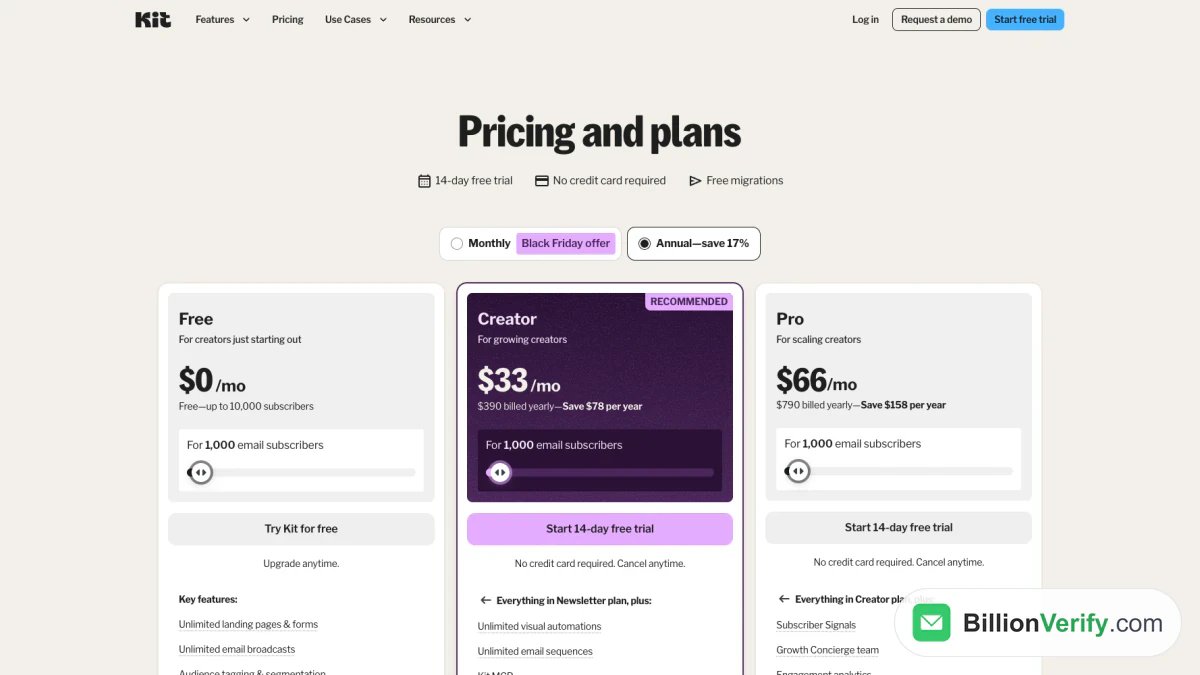
Screenshot: Kit's plans and prices with yearly billing on, listing three plan cards at the 1,000-subscriber level, captured in November 2026.
Mailchimp Essentials, Standard and Premium
Mailchimp's paid plans start at 500 contacts, except Premium. The Mailchimp Essentials plan starts at $13 a month, holds up to 50,000 contacts and caps monthly sends at 10 times the contact limit. Standard starts at $20, holds twice as many and caps sends at 12 times the limit. Premium starts at $350 because its base level already includes ten thousand contacts, holds up to 200,000 and caps sends at 15 times the limit.
Essentials adds three audiences, three seats, scheduling, A/B testing, all templates and automation flows of up to four steps. Standard adds five audiences and five seats, the full flow builder, custom-coded templates you can send, multivariate testing, custom reports, dynamic content and one onboarding session. Premium adds unlimited seats and audiences, phone and priority support, Enterprise SSO and a dedicated onboarding specialist. Mailchimp also sells a Pay As You Go option with email credits and the features of Essentials, which suits a business that mails a few times a year.
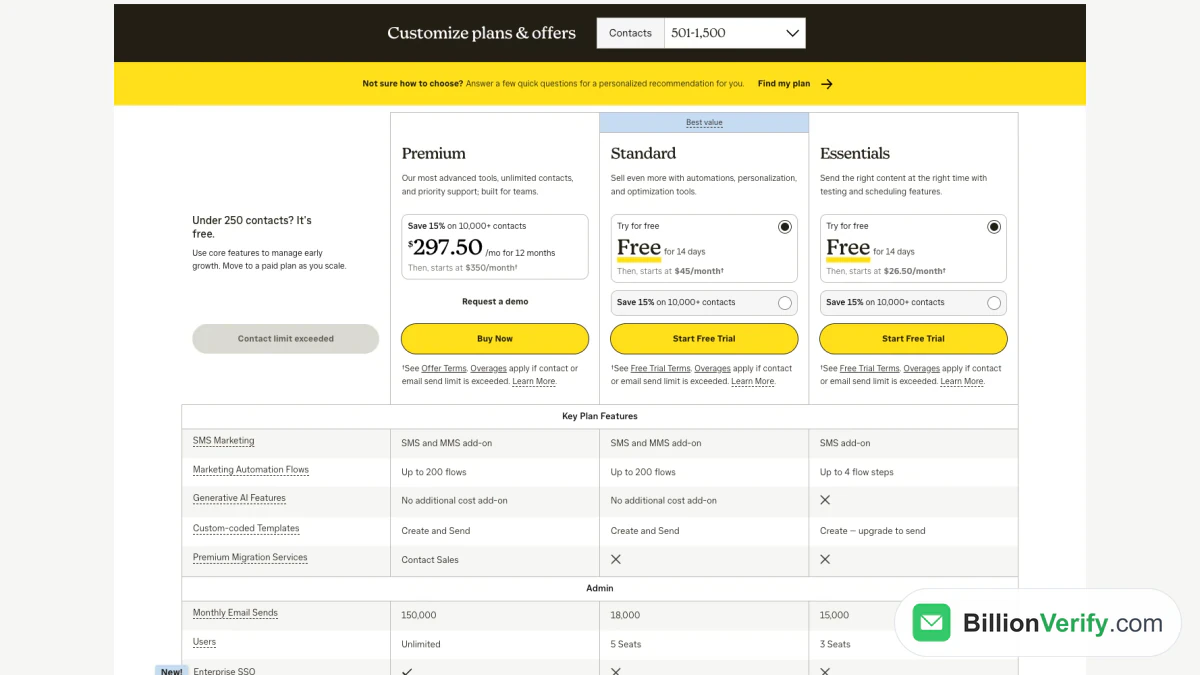
Screenshot: Mailchimp's plans and prices set to the 501-1,500 contact range, listing paid plan prices, flow steps, send caps and seats, captured Nov 2026.
Monthly cost at three list sizes
Both vendors publish their prices by audience size, so the same list can be priced on each site. The table uses monthly billing unless the row says yearly. Kit's bands end exactly at the sizes in the header, while Mailchimp's matching contact ranges are 501 to 1,500, 2,501 to 5,000 and 5,001 to 10,000.
| Plan | 1,000 | 5,000 | 10,000 |
|---|---|---|---|
| Kit Free | $0 | $0 | $0 |
| Kit Creator | $39 | $89 | $139 |
| Kit Creator, billed yearly | $33 | $75 | $116 |
| Kit Pro | $79 | $139 | $189 |
| Mailchimp Free | Not available | Not available | Not available |
| Mailchimp Essentials | $26.50 | $75 | $110 |
| Mailchimp Standard | $45 | $100 | $135 |
| Mailchimp Premium | $350 | $350 | $350 |
Read the rows together with the feature lists. Kit Free and the Mailchimp Essentials plan are not equivalent, because the $0 plan has no automation and Essentials has short flows. The closer match on features is Creator against Mailchimp Standard, and at these three sizes the two stay within $11 of each other. The difference grows with list size and with how many of your contacts have unsubscribed, which the next section explains.
Trials, discounts and refunds
Kit offers a 14-day trial of both paid plans with no credit card, and you can drop back to Free afterwards. Its billing guide promises a full refund within 30 days of the first payment and no refunds after that. Paying yearly gives two months at no charge, and a switch back to monthly takes effect at the end of the yearly term.
Mailchimp's 14-day trial covers Standard and Essentials, and the trial terms require valid payment details when you enroll. Lists of ten thousand contacts or more can take 15% off their first 12 months, nonprofits and charities can ask for a 15% discount, and qualified new customers can ask sales for a one-month Premium trial. Mailchimp says annual plans for Standard or Premium at that size and above are arranged through sales.
How Each Platform Counts Your Audience
The number that sets your price is not always the number of people who read your emails. This is the least visible difference between the two platforms, and it changes the bill more than the list price does.
Kit counts subscribers, and its pricing table says a subscriber is counted only when unique and active. Kit keeps one list per account and organizes people with tags and segments, so a person who joined through three forms is still one subscriber. When you pass a band, Kit moves you up automatically. Going down is your call: after cleaning a list, a "Switch to a lower tier" link appears in billing settings, and the lower price starts on the next billing date.
Mailchimp counts contacts. People who opted out still add to the total, as do contacts who never opted in, so they cost money until you archive or delete them. Cleaned contacts, which are hard bounces and repeated soft bounces, do not count, and neither do pending, archived or deleted ones. The pricing page adds that a contact stored in more than one audience is counted once for each audience. If your total passes the limit you chose during a cycle, Mailchimp keeps sending and adds a charge to the bill.
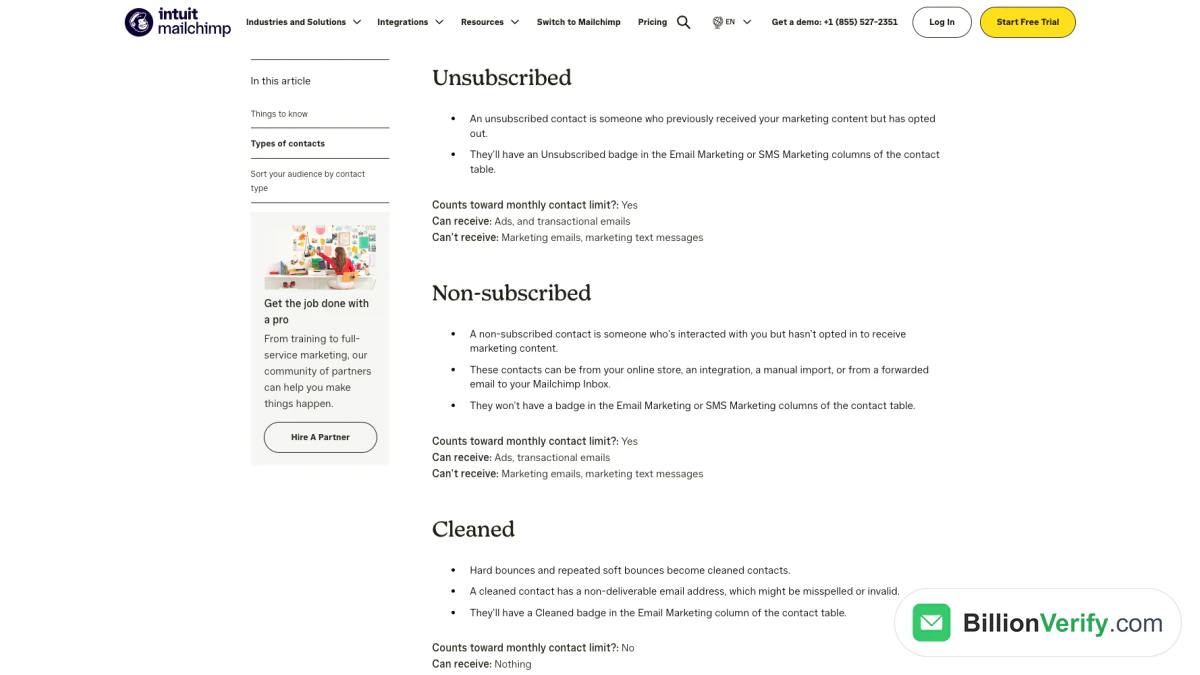
Screenshot: Mailchimp's help article on contact types, where opted-out and never-opted-in people count toward the monthly limit and cleaned ones do not, captured Nov 2026.
Both rules reward a tidy list. On Kit, removing dead subscribers can drop you to a cheaper band. On Mailchimp, archiving people who left long ago and removing addresses that will never deliver keeps the contact total, and the price, lower.
Sending Limits and Deliverability
Kit's pricing FAQ says there are no sending limits on any of its plans, so a list on any Kit plan can be mailed as often as you like. Mailchimp caps sends on all its plans, at a multiple of the contact limit on paid ones and at 500 a month on its free plan. A Standard account at the 1,500-contact level, for example, can send up to 18,000 emails a month. Most senders never reach these caps, but a daily newsletter on a small Mailchimp plan can.
No cap does not mean no rules. Kit asks every new account to send a link to its blog or site before it turns on sending, as its account verification article explains, to confirm you are a real person who owns your domain. Its deliverability guides advise sending at least weekly, avoiding long gaps and adding large new groups gradually, because sudden changes in volume make mailbox providers more cautious.
Both vendors also want mail sent from a domain you own and have authenticated. Kit's article on a verified sending domain covers DMARC, SPF and DKIM records and suggests warming up with your most engaged subscribers first. Mailchimp's domain authentication guide uses two CNAME records and one TXT record and can set them up automatically through Entri.
The mailbox providers set the floor for both. Google's email sender guidelines require senders of more than 5,000 messages a day to Gmail accounts to publish DMARC, support one-click unsubscribe and keep reported spam below 0.30%. Yahoo's sender best practices set the same spam threshold and recommend the one-click method in RFC 8058. Microsoft's requirements for high-volume Outlook senders apply SPF, DKIM and DMARC checks to domains that send at that volume from May 5, 2025, and Microsoft says mail that fails them will be rejected. In the United States, 15 U.S.C. 7704 requires a valid physical postal address in commercial email and bars sending to someone more than 10 business days after they opt out. Both platforms give you the authentication settings these rules expect, and neither can protect a sender who mails people who never asked for it.
Automation, Sequences and Email Design
Automation is where the plan you pick matters most, because both vendors keep the strongest tools off their lowest plans.
Automation and sequences
Kit splits automation into email sequences and visual automations. A sequence is a set of emails sent on a schedule, such as a five-part welcome course. A visual automation is a flow with entry points, conditions and actions that moves subscribers between sequences, tags and products. Rules handle simple if-this-then-that actions, and RSS campaigns turn new blog posts into emails. All of these start on Creator, which lists them as unlimited.
Mailchimp calls its builder Marketing Automation Flows, renamed from Customer Journey Builder in June 2025. Essentials keeps each flow to four steps or fewer, enough for a short welcome or an abandoned-cart reminder. Standard and Premium unlock the full builder, which the pricing page describes as up to 200 steps per flow with multiple branching points, plus flow templates and predictive segments. Neither free plan includes automation.
Templates and the editor
Mailchimp offers 100+ pre-built email templates, with a limited set on the free plan and the full library on paid ones. Custom-coded HTML templates can be created on Essentials but sent only from Standard up, and branded templates and dynamic content also start there. Kit's template library, custom HTML and CSS templates and Liquid personalization are included on all its plans.
Testing and reporting
Kit allows subject-line A/B tests with two variants below Pro and five on Pro, which also adds content tests, deliverability reporting and an insights dashboard that tracks revenue across the funnel. Mailchimp includes A/B testing from Essentials, multivariate testing of up to eight variations on its upper plans, and custom reports from Standard. Kit also includes list growth reports at every level, showing which forms and pages bring in new readers.
Landing Pages, Forms and Selling Products
Both tools let you collect subscribers without a separate website, but only one of them lets you sell directly.
Landing pages and forms
Kit includes unlimited landing pages and opt-in forms on all plans, with templates, a custom domain, a newsletter feed and site, and automatic delivery of a download when someone signs up. Mailchimp's landing page guide says its landing pages cost nothing extra on any account, can add up to five tags to new contacts and can be shared to social networks from inside the account. Popup forms are listed on all Mailchimp plans. On this point the two are close, and the choice comes down to which builder you prefer.
Kit creator commerce
Selling is where Kit stands apart. Its guide to selling digital products says commerce works on every plan with no monthly fee and costs 3.5% plus $0.30 for each sale in US dollars. You can sell e-books, courses, templates, presets, music, paid newsletters, recurring subscriptions and tips. Payments run through Stripe, which is the only processor Kit supports, and payouts arrive weekly on Fridays.
The limits are clear in the same guide. Kit fulfills digital products only, does not sell bundles, and collects VAT but not US sales tax. The paid plans add Paid Recommendations, where you earn by recommending other newsletters and Kit keeps 23.5% of those earnings, plus newsletter sponsorships and abandoned-checkout recovery for Shopify, Fourthwall and Wix stores.
Mailchimp and online stores
Mailchimp's plan table lists no product checkout like the one Kit offers. Its store features come from connecting the store you already run, and its import tool lists Shopify, WooCommerce, Squarespace Commerce, QuickBooks Online, Salesforce and Zapier among the services it can pull contacts from. Store data then feeds automation flows, and Standard adds predictive segments built on purchase behavior, as does Premium. Mailchimp also sells SMS as an add-on to paid plans, with MMS on the two upper plans in the US and Canada, and a transactional email add-on for those plans. For an online shop that wants campaigns, cart reminders and order emails in one account, that store connection is the main reason to look at Mailchimp.
Integrations, Seats and Support
Mailchimp lists 300+ integrations and includes them at every level. Kit lists more than 100 direct apps in its app store, but those start on Creator, while its API is open on all plans. If your stack depends on one specific tool, check that tool's own listing on each side before you decide.
Team size matters as well. Kit allows one user on Free, two on Creator and unlimited users on Pro. Mailchimp allows one seat on Free, three on Essentials, five on Standard and unlimited seats on Premium, with more permission roles at each step.
Support follows the same pattern. Kit answers unpaid accounts by email within 24 hours and gives Creator round-the-clock email and chat, with priority support on Pro. Mailchimp gives unpaid accounts email support for the first 30 days, paid accounts chat and email around the clock, and Premium phone support in English during business hours.
Which Platform Fits Which Sender
The Kit vs Mailchimp choice depends on the kind of sender you are, and neither vendor wins every case. The short sections below match common situations with the published terms of each platform, so you can see which facts apply to you.
Creators and newsletter writers
Kit email marketing is built for this group. Kit's free plan takes a five-figure audience with unlimited broadcasts and landing pages, and you can sell downloads and paid subscriptions from the first day. Creator adds the welcome series and automated flows most creators set up next. Mailchimp can send a newsletter just as well, but its $0 plan is capped at a few hundred contacts and its plans list no product checkout.
Small businesses
Mailchimp is the more general tool for a local business, a service firm or a nonprofit. Essentials starts lower than Creator, it includes three seats, and the 300+ integrations cover common booking, accounting and CRM tools. A business that mostly sends promotions and needs several people in the account will find that layout familiar. Kit fits a business when that business is run like a creator brand, built on a newsletter and online courses or downloads.
Online stores
For a shop that sells physical goods, Mailchimp links to the shop and turns order data into flows and segments. Kit fulfills only items delivered online, though its paid plans can win back abandoned checkouts from three store platforms. A store that sells downloads or memberships can run its whole sales process in Kit, while a store shipping products usually needs the connection that Mailchimp offers.
Senders who want to switch
Moving to Kit from Mailchimp is supported by a built-in importer and a migration team on paid plans. Moving the other way is a CSV import, with partner-led help only for eligible new Premium accounts. If you are weighing Mailchimp vs ConvertKit because you want to leave your current tool, the next section lists the steps.
Migrating Your List in Either Direction
Both directions are possible, and in both cases your subscribers move but your automations are rebuilt by hand.
From Mailchimp to Kit
Kit's guide to migrating from Mailchimp sets out the order: learn the terms, import contacts, then rebuild forms, landing pages, templates, campaigns and automations, and test. The importer sits under Add Subscribers, then Other provider, and it asks for a Mailchimp API key. It maps merge fields to custom fields and turns list names, Mailchimp tags and interest groups into tags, so a "Newsletter" list with a "Tech" group becomes a "Newsletter:Tech" tag. Mailchimp audiences become a single Kit list, and automated Mailchimp emails become Kit sequences inside visual automations.
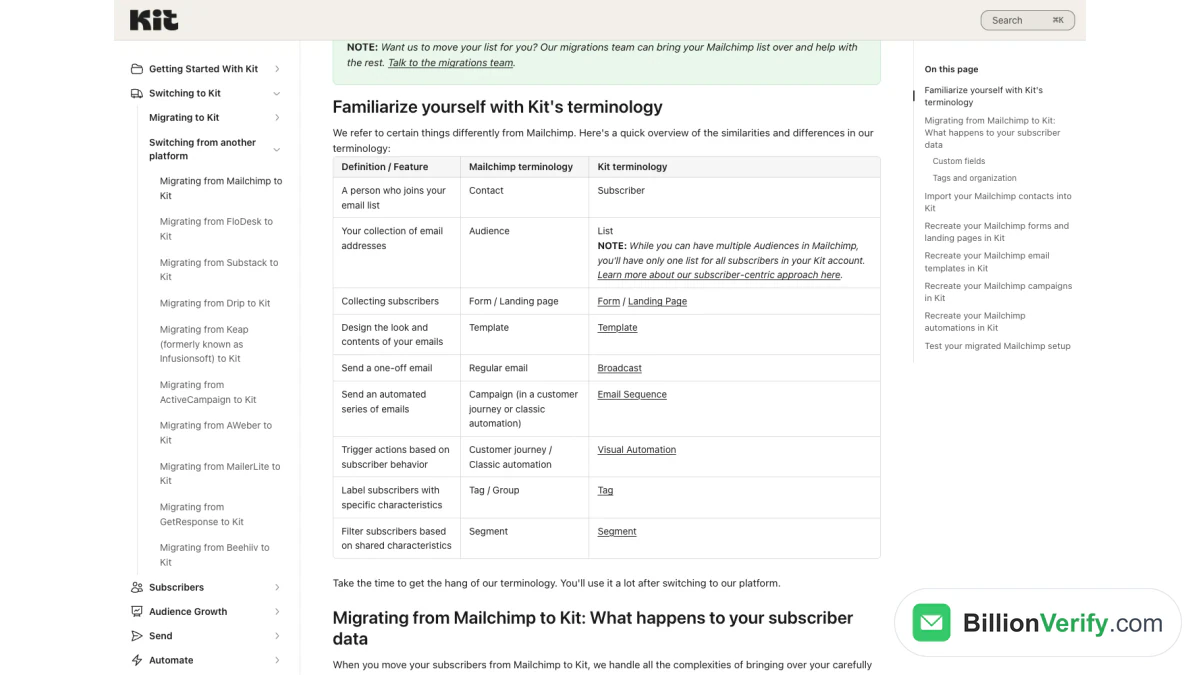
Screenshot: Kit's migration guide with its table that maps Mailchimp vocabulary to Kit vocabulary, captured in Nov 2026.
Two warnings from the Kit import notes matter here. Subscribers imported into a form are confirmed automatically, even when that form uses double opt-in, so only import people who gave permission. Imports into a tag or form also trigger any automation that uses it as an entry point, so pause those first.
From Kit to Mailchimp
Kit's guide to exporting subscribers produces a CSV with first name, email, created date, status, tags, location, attribution data and custom fields. Filter to confirmed subscribers before you export, and download the file promptly, because the link expires after five days. Mailchimp's contact import guide accepts CSV or TXT files, imports one marketing status at a time and warns that an import pushing you over your contact limit adds charges. Rebuild sequences as Mailchimp flows afterwards, keeping in mind the four-step limit on Essentials.
Check the list before you import
A migration is the moment a list's old problems show up. Addresses that bounced quietly for years, typos from old forms and abandoned inboxes all move with the file, and on Mailchimp the ones still marked subscribed count toward your price until they bounce and are cleaned. A burst of bounces on the first send from a new platform also lands on your own sending domain, and mailbox providers read a high bounce rate as a sign of a poorly kept list.
BillionVerify checks a file before it reaches either platform. Use BillionVerify's free checker for a quick look at a single address, or confirm an email address is valid with syntax, DNS, MX and SMTP checks. For a full export, bulk email verification reports catch-all domains as their own category instead of calling them valid, and unknown results cost nothing. Every account gets 20 credits on each day it is used, up to 600 a month, with no credit card. The ConvertKit integration and Mailchimp integration pages show how verification connects to each platform. A reverse email lookup helps when an address in the file looks suspicious, and a phone number validator checks the numbers you plan to use with Kit's SMS feature or Mailchimp's SMS add-on.
FAQs
Is Kit the same company as ConvertKit?
Yes. ConvertKit renamed itself Kit in October 2024 and kept running the same platform under the new name. The site, the app and the help center now use Kit, while the old name still appears in searches and older articles.
Is ConvertKit better than Mailchimp for a newsletter?
For a newsletter that you plan to grow and earn from, Kit offers more at no cost: a large audience cap, unlimited broadcasts and built-in sales of paid subscriptions. Mailchimp's free plan is capped at 250. Mailchimp is the stronger fit when the newsletter is one channel of a business that also needs store data, SMS and several seats.
Which one is cheaper at 5,000 subscribers?
On monthly billing, the Mailchimp Essentials plan costs $75 and Kit Creator costs $89 at that size, while Mailchimp Standard costs $100. Kit's $0 plan still covers that audience if you can live without automation. Mailchimp's bill can end up higher than the list price suggests, since contacts who unsubscribed still count.
Does Kit limit how many emails you can send?
No. Kit states that none of its plans have sending limits. Mailchimp, by contrast, limits paid plans to between 10 and 15 times your contact limit each month and its lowest plan to 500 emails a month.
What are good ConvertKit alternatives besides Mailchimp?
MailerLite and Brevo are the usual alternatives for a similar budget. Our MailerLite review covers a lean tool with websites and digital-product sales, the Brevo review covers a platform priced by email volume, and our email marketing software guide compares 12 platforms side by side.
Can I move my automations from Mailchimp to Kit automatically?
No. Kit's importer brings over contacts, fields and tags, but forms, email designs and automated flows are recreated by hand or by Kit's migration team on a paid plan. Mailchimp automated emails become Kit email sequences, and the logic around them is rebuilt with visual automations.