



Your email's call-to-action (CTA) is the moment of truth. Every element of your email—subject line, content, design—builds toward this single point where subscribers decide to take action or move on. This comprehensive guide reveals how to create CTAs that compel clicks and drive conversions.
Understanding Email CTAs
A call-to-action is an instruction that prompts an immediate response. In email marketing, CTAs typically appear as buttons or text links that guide subscribers toward desired actions.
Why CTAs Matter
The CTA bridges the gap between reading and doing.
Without Strong CTAs:
- Subscribers read and leave
- Engagement ends at the open
- No conversion, no ROI
- Wasted marketing effort
With Strong CTAs:
- Reading converts to clicking
- Clicks lead to conversions
- Measurable marketing results
- Clear path to revenue
The CTA's Role in Email Performance
CTAs directly impact your key metrics.
Click-Through Rate (CTR): The primary metric CTAs influence. Better CTAs = more clicks.
Conversion Rate: Clicks that complete the desired action. CTA clarity affects post-click behavior.
Revenue Per Email: Ultimate measure of email effectiveness. Strong CTAs drive revenue.
CTA Components
Effective CTAs combine multiple elements.
Copy: The words on the button or link Design: Visual appearance (color, size, shape) Placement: Location within the email Context: Surrounding content that builds toward the CTA
CTA Copy Principles
The words you choose matter enormously.
Action-Oriented Language
Start with strong action verbs.
Weak Verbs:
- Submit
- Click here
- Learn more
Strong Verbs:
- Get
- Start
- Claim
- Download
- Join
- Discover
- Unlock
- Grab
Action Verb Examples:
- "Get Your Free Guide"
- "Start Your Trial"
- "Claim Your Discount"
- "Download Now"
First-Person vs. Second-Person
Research shows first-person often outperforms second-person.
Second-Person (You-focused):
- "Start Your Free Trial"
- "Get Your Copy"
- "Download Your Guide"
First-Person (I-focused):
- "Start My Free Trial"
- "Get My Copy"
- "Yes, I Want This"
Why First-Person Works:
- Creates mental ownership
- Feels like subscriber's decision
- Reduces psychological resistance
- More personal and immediate
Specificity Over Vagueness
Specific CTAs outperform generic ones.
Generic CTAs:
- "Click Here"
- "Learn More"
- "Submit"
- "Continue"
Specific CTAs:
- "Download the 50-Page Guide"
- "See Pricing Plans"
- "Get My Personalized Report"
- "Reserve My Spot"
Why Specificity Works:
- Sets clear expectations
- Reduces uncertainty
- Matches intent with action
- Builds confidence in click
Value Proposition in CTA
Tell subscribers what they'll get.
Without Value:
- "Submit"
- "Sign Up"
- "Register"
With Value:
- "Get Instant Access"
- "Join 50,000 Marketers"
- "Start Saving Today"
Value-Focused Examples:
- "Get My Free Templates" (What: Templates, Benefit: Free)
- "Cut Email Costs by 50%" (Outcome-focused)
- "Boost Open Rates Now" (Results-focused)
Creating Urgency
Legitimate urgency motivates immediate action.
Urgency Language:
- "Now"
- "Today"
- "Before [deadline]"
- "Limited time"
- "While available"
Urgency Examples:
- "Claim Your Spot Before Friday"
- "Get 50% Off Today Only"
- "Reserve Now—Only 5 Seats Left"
Urgency Warnings:
- Only use real urgency
- Fake scarcity destroys trust
- Overuse creates immunity
- Match urgency to actual situation
CTA Button Design
Visual design affects click probability.
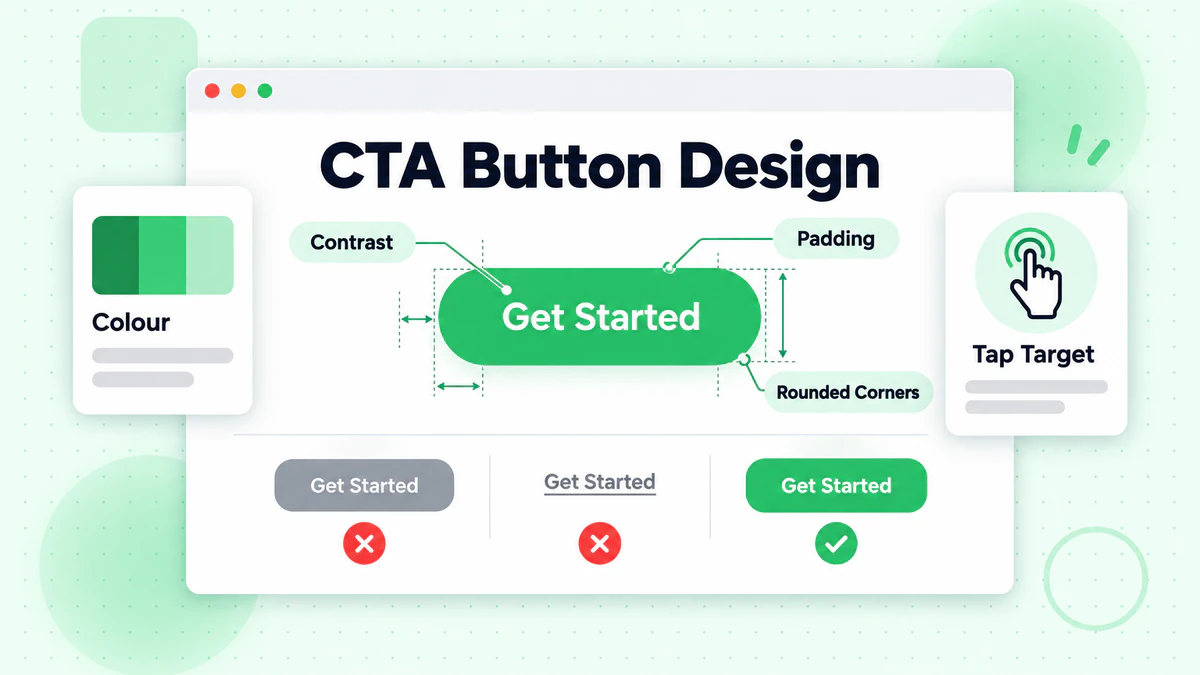
Button Color
Color impacts visibility and click rates.
Best Practices:
- Contrast with background
- Stand out from surrounding elements
- Consistent with brand (but distinctive in email)
- Avoid colors that blend in
Common High-Performing Colors:
- Orange/Red: Energy, urgency
- Green: Positive, go ahead
- Blue: Trust, reliability
- Bright/Saturated: Attention-grabbing
Testing Is Essential: Your audience may respond differently. Test colors systematically.
Button Size
Size affects both visibility and usability.
Size Guidelines:
- Large enough to tap easily on mobile (minimum 44x44 pixels)
- Prominent enough to stand out
- Not so large it overwhelms content
- Proportional to email design
Mobile Considerations:
- Fingers are less precise than mouse cursors
- Ensure adequate tap target
- Add padding around buttons
- Test on actual mobile devices
Button Shape
Shape influences perception and click behavior.
Common Shapes:
- Rectangular (standard)
- Rounded corners (softer, friendly)
- Pill-shaped (modern, distinctive)
- Angled/dynamic (energetic)
Shape Best Practices:
- Rounded corners typically perform well
- Consistency across campaigns builds recognition
- Shape should match brand personality
- Avoid shapes that don't look clickable
Button Effects
Subtle design elements can enhance CTAs.
Effective Effects:
- Drop shadows (creates depth, looks clickable)
- Borders (defines button edges)
- Gradients (adds dimension)
- White space (isolates importance)
Effects to Avoid:
- Excessive decoration
- Hard-to-read text
- Effects that reduce legibility
- Trendy designs that don't render well
CTA Placement Strategy
Where you place CTAs affects performance.
Above the Fold
CTAs visible without scrolling capture immediate action.
Above-the-Fold Benefits:
- Seen by everyone who opens
- Captures ready-to-act subscribers
- Works for simple, clear offers
- Essential for mobile
When to Prioritize Above-the-Fold:
- Subscribers already know the offer
- Simple, clear value proposition
- Re-engagement or follow-up emails
- Time-sensitive offers
After Value Delivery
CTAs placed after compelling content have context.
Post-Content Benefits:
- Subscriber is informed and warmed up
- Action feels logical after persuasion
- Higher quality clicks (more informed)
- Better for complex offers
When to Place After Content:
- New subscribers need education
- Complex products or services
- Higher-commitment actions
- When objections need addressing first
Multiple CTAs
Using multiple CTAs can increase clicks—if done right.
Multiple CTA Strategy:
- Primary CTA above the fold
- Repeat primary CTA after content
- All CTAs should lead to same destination
- Maintain visual consistency
Multiple CTA Risks:
- Too many choices = decision paralysis
- Competing CTAs dilute effectiveness
- Can feel pushy or desperate
- May confuse subscribers
Best Practice: One primary action, repeated strategically.
Secondary CTAs
Sometimes emails need secondary options.
When Secondary CTAs Work:
- Primary action + alternative (e.g., "Buy Now" + "Learn More")
- Different audience segments in same email
- Sequential funnel options
Secondary CTA Design:
- Visually subordinate to primary
- Different style (text link vs. button)
- Clearly distinct hierarchy
- Don't compete for attention
CTA Context and Surrounding Content
CTAs don't exist in isolation.
Building to the CTA
Content should progressively build toward the CTA.
Content Progression:
- Hook: Capture attention
- Problem: Acknowledge their challenge
- Agitation: Emphasize stakes
- Solution: Present your answer
- Proof: Provide evidence
- CTA: Invite action
Example Flow:
Are your emails landing in spam? (Hook)
→ Most marketers lose 20% of emails to spam folders (Problem)
→ That's 20% of potential revenue, gone (Agitation)
→ Email verification removes invalid addresses before they hurt deliverability (Solution)
→ Companies using verification see 35% higher inbox placement (Proof)
→ [Clean My List Now] (CTA)
Pre-CTA Reinforcement
Content immediately before CTA should reduce friction.
Pre-CTA Elements:
- Brief value reminder
- Risk reducers (guarantees, free trial)
- Social proof snippet
- Urgency reinforcement
Example:
Join 50,000+ marketers who've improved their deliverability.
No credit card required. Cancel anytime.
[Start My Free Trial]
Post-CTA Reassurance
Content after CTA can capture hesitant readers.
Post-CTA Elements:
- Additional testimonial
- FAQ addressing objections
- Secondary CTA option
- Contact information for questions
CTA Examples by Email Type
Different emails need different CTA approaches.
Welcome Email CTAs
Guide new subscribers to key first action.
Goals: Complete profile, explore product, engage with content.
Effective Examples:
- "Complete My Profile" (action + personalization)
- "Explore the Dashboard" (discovery-focused)
- "Get My Welcome Gift" (value-focused)
- "Start the Quick Tutorial" (education-focused)
Promotional Email CTAs
Drive sales or conversions.
Goals: Purchase, sign up, redeem offer.
Effective Examples:
- "Shop Now—Save 30%" (action + value)
- "Claim My Discount" (first-person + value)
- "Get [Product] Before It's Gone" (urgency)
- "Upgrade to Premium" (specific action)
Newsletter CTAs
Drive traffic to content.
Goals: Read article, watch video, explore content.
Effective Examples:
- "Read the Full Story" (curiosity)
- "Watch the 3-Minute Video" (time commitment clear)
- "Get the Complete Guide" (value)
- "See All New Articles" (exploration)
Transactional Email CTAs
Facilitate necessary actions or encourage engagement.
Goals: Track order, complete action, continue relationship.
Effective Examples:
- "Track My Order" (utility)
- "Download My Receipt" (utility)
- "Leave a Review" (engagement)
- "Explore Related Products" (cross-sell)
Re-engagement Email CTAs
Win back inactive subscribers.
Goals: Re-activate engagement, update preferences, confirm interest.
Effective Examples:
- "Yes, Keep Me Subscribed" (clear intent)
- "See What's New" (curiosity)
- "Update My Preferences" (give control)
- "Bring Me Back" (emotional)
Testing Your CTAs
Optimization requires systematic testing. Learn complete testing methodologies in our email A/B testing guide.
What to Test
CTA Copy:
- Action verbs (Get vs. Download vs. Claim)
- Person (My vs. Your)
- Length (short vs. descriptive)
- Value statement inclusion
CTA Design:
- Button color
- Button size
- Button shape
- Button effects
CTA Placement:
- Above the fold only
- Above and below content
- Multiple placement positions
- In-line vs. separate section
CTA Quantity:
- Single CTA
- Repeated CTA
- Multiple different CTAs
A/B Testing Process
Step 1: Identify what to test (start with biggest potential impact) Step 2: Create variant (change ONE element) Step 3: Split audience randomly Step 4: Run test to statistical significance Step 5: Analyze results Step 6: Implement winner Step 7: Document learnings Step 8: Test next element
Measuring CTA Performance
Primary Metrics:
- Click-through rate (CTR): Clicks / Delivered emails
- Click-to-open rate (CTOR): Clicks / Opens
Secondary Metrics:
- Conversion rate post-click
- Revenue per click
- Time to click (from open)
Analysis Questions:
- Which CTA copy gets more clicks?
- Does button color affect performance?
- Does placement change click behavior?
- Do multiple CTAs help or hurt?
Mobile CTA Optimization
Over 40% of emails are opened on mobile. Explore comprehensive mobile design principles in our email design guide.
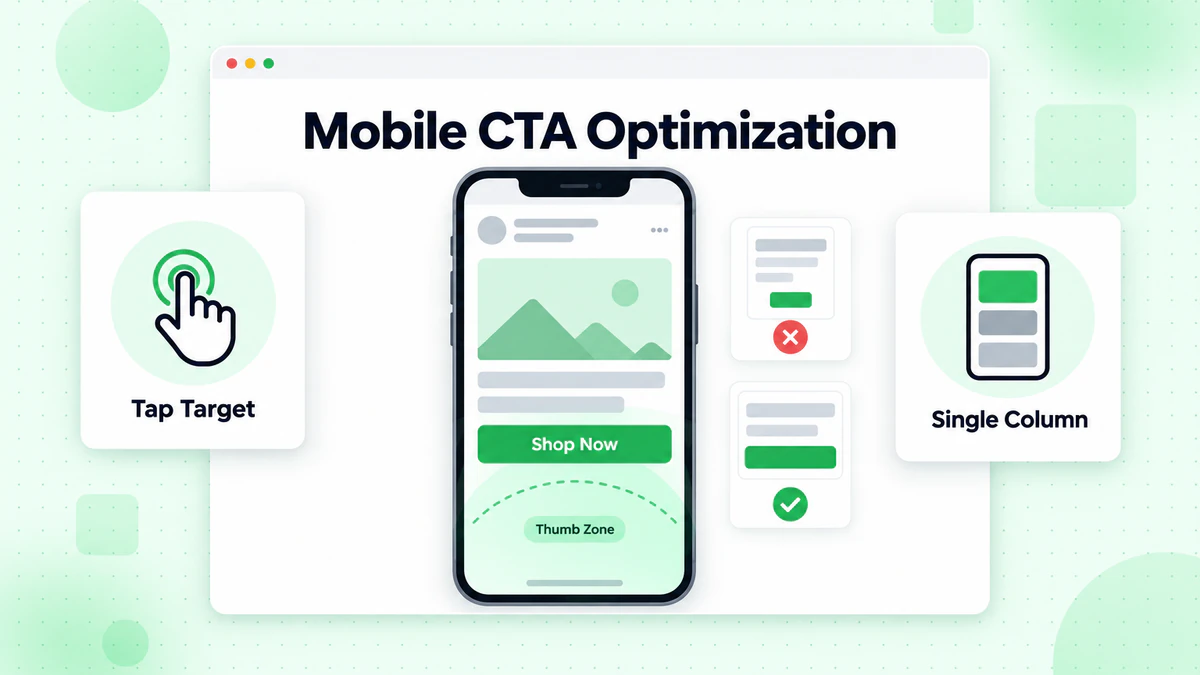
Mobile CTA Requirements
Size:
- Minimum 44x44 pixel tap target
- Larger is often better for mobile
- Account for finger precision
Spacing:
- Adequate space around buttons
- Prevent accidental taps on wrong elements
- Enough padding for easy tapping
Visibility:
- Stand out on small screens
- Work in both portrait and landscape
- Visible without horizontal scrolling
Mobile-Specific Strategies
Simplify: Fewer elements, clearer path to CTA.
Stack: Vertical layouts work better than horizontal on mobile.
Prioritize: Put most important CTA first (above the fold on mobile).
Test: Preview and test on actual mobile devices.
Responsive CTA Design
Full-Width Buttons: Stack and expand to full width on mobile.
Touch-Friendly Spacing: Increase tap target size for mobile.
Font Size: Ensure CTA text is readable on small screens.
Single Column: Switch to single-column layout on mobile.
CTA Mistakes to Avoid
Common pitfalls that kill click rates.
Too Many CTAs
The Problem: Decision paralysis from competing options.
Example: Email with "Shop Now," "Learn More," "Contact Us," "Read Blog," and "Follow Us" all competing.
The Fix: One primary CTA, clearly prioritized.
Generic Copy
The Problem: Vague CTAs don't motivate action.
Example: "Click Here" or "Submit"
The Fix: Specific, value-focused copy like "Download My Free Guide."
Hidden or Small CTAs
The Problem: Subscribers can't find the action point.
Example: Small text link buried in paragraph.
The Fix: Prominent, obvious buttons that stand out.
CTA Doesn't Match Content
The Problem: Disconnect between email content and CTA.
Example: Email about deliverability tips, CTA says "Shop Now."
The Fix: CTA should be logical next step from content.
Ignoring Mobile
The Problem: CTAs that work on desktop fail on mobile.
Example: Small buttons, tiny text, hard-to-tap targets.
The Fix: Design mobile-first, test on actual devices.
CTAs and Email Deliverability
CTA performance depends on emails reaching inboxes.
The Deliverability Connection
Learn how to maximize inbox placement in our comprehensive email deliverability guide.
If Emails Don't Arrive: No opens, no clicks, no conversions.
Invalid Emails: Send to invalid addresses → bounces → reputation damage → fewer delivered emails.
Engagement Loop: High engagement → better reputation → better deliverability → more opportunities for CTA clicks.
Optimizing the Full Path
Step 1: Clean list with email verification Step 2: Ensure deliverability fundamentals Step 3: Optimize subject lines for opens Step 4: Create compelling content Step 5: Design effective CTAs Step 6: Track and optimize
CTA Quick Reference
CTA Copy Checklist
- [ ] Starts with action verb
- [ ] Specific about what happens
- [ ] Includes value or benefit
- [ ] Creates appropriate urgency
- [ ] Uses first-person when appropriate
CTA Design Checklist
- [ ] Contrasting color
- [ ] Adequate size (44x44px minimum)
- [ ] Clear, readable text
- [ ] Looks clickable (buttons look like buttons)
- [ ] Works on mobile
CTA Placement Checklist
- [ ] Primary CTA above the fold
- [ ] Repeated after content if appropriate
- [ ] Clear visual hierarchy
- [ ] No competing CTAs
- [ ] Logical position in content flow
Conclusion
Your email CTA is where strategy becomes action. By combining persuasive copy, effective design, strategic placement, and continuous testing, you can significantly improve click-through rates and drive real business results.
Remember these key principles:
- Be specific: Tell subscribers exactly what they'll get
- Make it obvious: CTAs should be unmissable
- Reduce friction: Remove barriers to clicking
- Test continuously: Your audience will reveal what works
- Mobile first: Design for the majority of opens
Even the best CTA can't generate clicks from an email that never arrives. Ensure your carefully crafted CTAs reach real inboxes by verifying your email list.
Ready to put your optimized CTAs in front of real, engaged subscribers? Start with BillionVerify to ensure maximum reach for your emails.