



Over the last release cycle, we made a set of changes that all point in the same direction: make BillionVerify easier to trust, easier to monitor, and easier to integrate.
Some of those changes are immediately visible in the product. The Bulk Verify experience is cleaner after file submission. The verification history page is more useful while a job is still running. Progress indicators now reflect what users actually care about instead of exposing internal queue mechanics.
Some of the changes are deeper. The verification status contract behind the UI is richer and more explicit. The data model now distinguishes between email-level progress and backend execution progress, which gives clients a much better foundation for rendering honest realtime state.
And some of the changes affect developers directly. BillionVerify MCP has now fully moved away from the older ?api_key= setup shape and into a hosted remote MCP model built around OAuth, protected-resource discovery, and modern client compatibility. We updated the product, the docs, the marketing pages, and the auth surfaces to match that reality.
This post pulls those updates together into one narrative so customers, developers, and internal teams can see how they fit.
If you want the short version, here it is:
- Bulk verification now has a cleaner post-upload flow.
- Async job monitoring is more informative and more honest.
- The backend status interface is better structured for distributed work.
- BillionVerify MCP now has a clearer long-term shape: remote endpoint plus OAuth, not URL-embedded API keys.
If you want the full story, read on.
Quick Links
- Bulk email verification
- What is email verification?
- MCP overview
- MCP developer guide
- Claude Code guide
- API reference
Why these updates belong together
At first glance, this release looks like several separate threads:
- a frontend cleanup on the bulk verification page
- a richer history detail screen
- a backend status contract upgrade
- an MCP authentication and documentation cleanup
But the underlying theme is the same across all of them: remove ambiguity.
Ambiguity shows up in different ways in software products.
Sometimes it looks like duplicate UI after a file upload. Users are not sure which button matters, where the best next step is, or whether the system is still doing work in the background.
Sometimes it looks like a progress bar that says "29% complete" while the surrounding numbers do not explain what that percentage represents. Is it 29% of emails processed? 29% of worker tasks completed? 29% of results merged? Most users do not want to decode queue architecture just to monitor a job.
Sometimes ambiguity is in developer onboarding. A product may already support one architecture in production while parts of its public docs still suggest an older connection model. That creates setup failures, confusion, and unnecessary distrust.
This release is our answer to those problems.
We tightened the product UX around what users actually need to know. We tightened the backend interfaces around what clients actually need to render. And we tightened the developer-facing MCP story around how the platform actually works today.
1. Bulk Verify now has a cleaner post-upload experience
The first part of this release focused on the moment right after a file is submitted.
That moment matters more than it looks.
When someone uploads a large CSV for verification, they are not done. They have just moved from an input state to a monitoring state. The interface has to help them answer a few immediate questions:
- Did my file submit successfully?
- Is processing already underway?
- Where do I go to monitor this specific job?
- Can I trust that the system will notify me when it finishes?
The previous flow answered those questions, but it did it with too much repetition. The success card, the surrounding status text, and the available buttons all pulled attention in slightly different directions.
We cleaned that up.
What changed on the page
The submission success state is now more compact and easier to scan. The success icon and title consume less vertical space, which gives more room to the details users actually care about: file name, email counts, estimated processing time, and the next action.
Live progress is also shown by default after submission. Users no longer have to take an extra step to reveal that information. If a job is moving, the page should show that immediately.
The main post-submit CTA has also changed in an important way. Instead of sending users to the generic history index, the primary action now links directly into the exact job detail page. That sounds like a small change, but it removes an unnecessary hop and makes the workflow feel much more deliberate.
We also removed elements that were technically functional but not meaningfully useful:
- duplicate status text in the upload area
- an extra "Upload Another File" button in the success card
Users can still upload another file from the main upload surface. The difference is that the interface no longer competes with itself.
Why this matters in practice
Bulk verification is often used in repetitive, operational workflows. Users may upload multiple files per day, monitor several jobs across a work session, and return later to download filtered results. In that kind of environment, even small pieces of UI duplication add up.
Cleaning the post-upload state helps in three ways:
- It reduces the amount of screen parsing required right after submission.
- It makes the next step obvious.
- It keeps the UI aligned with the user’s mental model: "My file is in. Now I want to follow this job."
This is the kind of improvement that rarely makes a splashy screenshot on its own, but it makes the product feel calmer and more coherent every single day.
Example: the new post-submit path
Here is the intended user journey now:
- Upload a CSV in the bulk verification flow.
- See an immediate success state with file name, row counts, and ETA.
- See live progress without needing to reveal it manually.
- Click one primary button to open the exact history detail page for that job.
- Return later through email or history to review results and exports.
That is a simpler path than:
- Upload file.
- Parse duplicate status areas.
- Click into generic history.
- Find the right row.
- Re-open the target job.
The reduction in effort is small in a single session and significant over repeated use.
2. Verification history now behaves like a real monitoring surface
The second major improvement was on the async verification history page.
This page used to be functional, but thin. It could show that a job existed and that it was in progress, but it did not yet feel like a surface designed for active monitoring.
That is a mismatch for a long-running verification job.
When a customer opens a history detail page while a file is still processing, they are not just looking for a percent number. They are trying to understand:
- what file this job refers to
- how large the workload is
- how much work has already completed
- what the early result mix looks like
- how long the job is likely to take
We redesigned the page around that reality.
Stable metadata now appears first
The updated history page now starts with a stable summary card. That card brings together the most important job metadata:
- original file name
- total rows
- unique email count
- estimated processing time
- start time
This information does not depend on the realtime polling loop. That matters because stable context should appear as soon as possible, even if the dynamic status payload is still settling or updating.
When users land on the page, they can orient themselves immediately instead of waiting for a live status response to do all the work.
The live progress area is much richer
Below the summary, the running-state experience is now materially better.
Instead of a bare progress bar with limited context, the page now surfaces:
- processed volume
- remaining volume
- result distribution across statuses
- language and ETA semantics that match the main bulk verification flow
Just as importantly, it removes internal metrics that should stay internal. We intentionally stopped exposing worker-task and chunk counts in the user-facing surface. Those values can be operationally useful, but they are not what customers are trying to measure when they ask, "How far along is my job?"
The right question is almost always email-centric, not queue-centric.
Completed-state tools remain intact
One of the design constraints for this work was that we did not want to lose the analytical depth of the completed job page.
So we kept the existing result breakdown chart and export tools. The update was not about replacing the completed-state experience. It was about strengthening the top of the page and making the running-state experience worthy of the workflow.
That means the page now does both jobs better:
- during processing, it works as a monitoring surface
- after completion, it still works as an analysis and export surface
Example: what users can now understand at a glance
A running job page now answers all of these quickly:
- "This is the 19,293-row file I uploaded earlier."
- "There are 19,010 unique emails in it."
- "The system estimates around 33 minutes."
- "499 emails have already been verified."
- "Most of the completed set so far is valid, with a smaller invalid and unknown share."
That is a far more useful mental model than a single percent number with unclear semantics.
3. Progress semantics are now more honest
One of the biggest lessons in async products is that "progress" is not a single concept.
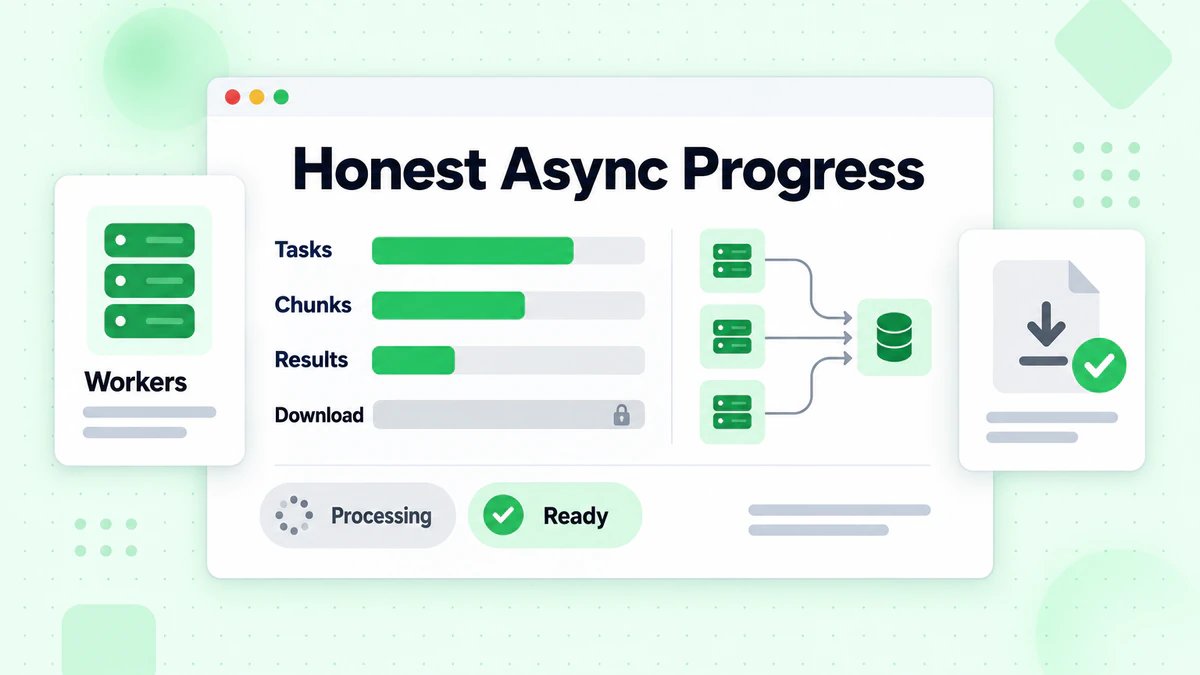
In a distributed system, there are several things that can move independently:
- worker tasks can finish
- chunks can merge
- email-level results can accumulate
- final files can become downloadable
If a client only receives one generic progress field, it has to guess which of those meanings the number is carrying. That is how you end up with UI states that are technically consistent but experientially confusing.
We wanted to fix that at the contract level.
The core shift
The updated interface makes it possible to distinguish between:
email_progresschunk_progressprogress_source
That distinction gives clients a much stronger base for rendering progress in a way that matches user intent.
For example:
- the large user-facing progress bar can now prioritize
email_progress - operational or diagnostic views can still use
chunk_progress - if a fallback is required,
progress_sourcecan make that explicit
This is a much healthier model than pretending all progress percentages mean the same thing.
Example payload
Here is the kind of shape this enables:
{
  "task_id": "36f68e67-ddcb-441a-a407-22f826e72443",
  "status": "processing",
  "total_emails": 19010,
  "processed_emails": 499,
  "valid_emails": 496,
  "invalid_emails": 2,
  "unknown_emails": 1,
  "catchall_emails": 0,
  "risky_emails": 0,
  "role_emails": 0,
  "disposable_emails": 0,
  "email_progress": 3,
  "chunk_progress": 7,
  "progress_source": "email_progress"
}
Even without knowing anything about the underlying queue system, a client can make good decisions from this response.
That matters because APIs do not just return data. They define meaning.
Why this is better for customers
Customers do not care whether a worker completed 7 of 96 internal tasks if only 499 out of 19,010 emails have actually been processed. Exposing the wrong progress abstraction creates confusion, not reassurance.
By moving the primary UI toward email_progress, the product now reflects the unit of work users actually care about.
Why this is better for frontend teams
The UI no longer has to infer too much from a single ambiguous percent field.
That reduces a whole class of product bugs:
- progress bars that appear too far ahead
- summary blocks that lag behind the main percentage
- awkward status copy that tries to explain backend implementation details to end users
It also gives frontend teams a cleaner way to separate stable job metadata from changing execution data, which leads directly into the next part of the release.
4. The backend status contract is now better structured for distributed work
The frontend changes would not hold together well without backend contract improvements.
We made two important structural decisions here.
First, we separated stable metadata from live status
Some fields barely change, if at all, after a job is created:
- file name
- created time
- total rows
- unique email count
- estimated processing time
Other fields are inherently dynamic:
- current status
- processed email count
- live result mix
- progress percentages
Trying to force both classes of data through the same polling path is a common source of UI awkwardness. The frontend ends up waiting on data that should have been available immediately, while also re-requesting stable data more often than needed.
The new model is cleaner:
- stable job metadata is treated as metadata
- live job status is treated as status
That sounds obvious when written plainly, but it has meaningful effects in implementation quality.
The history detail page can now render stable summary information quickly, poll only what needs to change, and keep the UI calm while the job runs.
Second, we broadened the status payload itself
The realtime status interface is now better suited to distributed async processing because it carries a richer picture of what has happened so far.
That includes counters such as:
- processed
- valid
- invalid
- unknown
- risky
- catch-all
- role
- disposable
- credits used
Those values make the interface more useful not only for human-facing progress surfaces but also for automation and downstream workflows. A client that understands the current result mix can make better decisions about alerts, notifications, exports, and post-processing.
Example: why this matters beyond the UI
Imagine a customer-facing app built on top of BillionVerify that wants to:
- show live quality distribution while a list is running
- notify a user if a job is producing an unusually high invalid rate
- offer filtered exports as soon as useful result sets exist
- power a support or ops dashboard without requiring engineering to inspect raw worker state
All of those use cases become easier when the backend status contract is explicit and rich enough.
This is why backend interface work matters even when the first visible change is "the progress bar looks better." A better progress bar is often the symptom of a better contract.
5. MCP has now fully moved into its remote OAuth era
The last major piece of this update is developer-facing, but it is one of the most important long-term product corrections in the release.
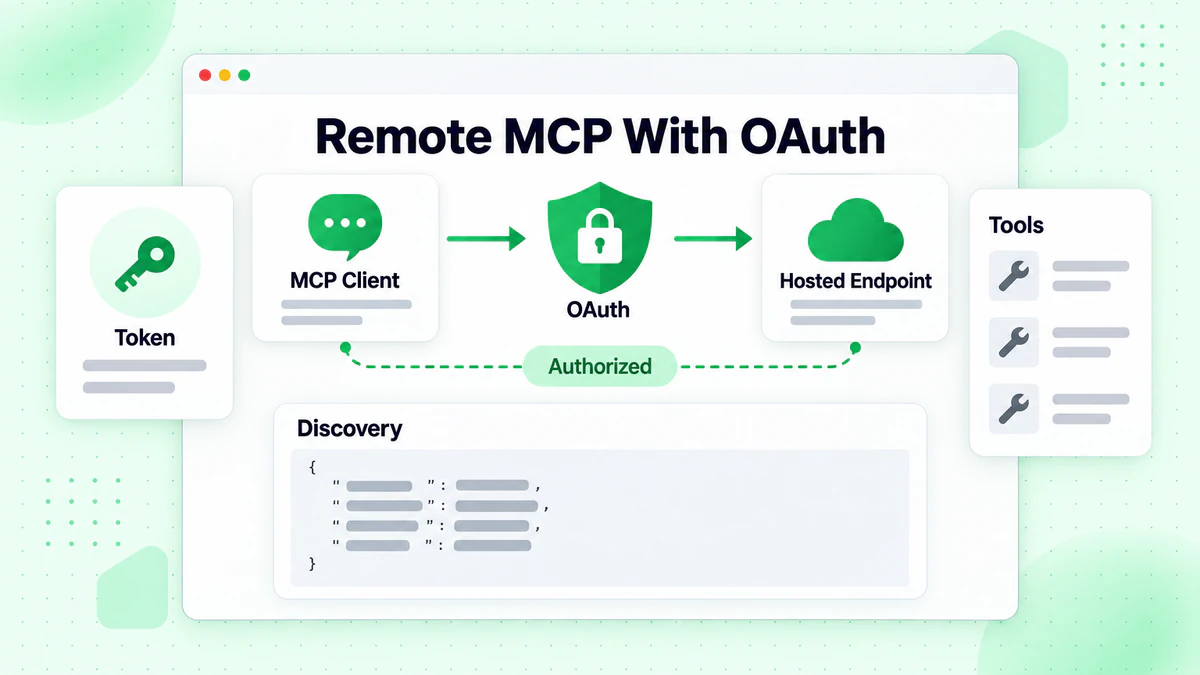
BillionVerify MCP is now being presented and documented in the shape it should have for modern remote clients:
- a hosted remote endpoint
- OAuth-based authorization
- protected-resource discovery
- standard Bearer token access
The endpoint is:
https://mcp.billionverify.com/mcp
This matters because older setup patterns can linger in public materials long after a platform has already moved on internally. In our case, some docs and marketing surfaces still implied that MCP could be connected through URL-embedded API keys and curl --stdio wrappers.
That is no longer the right shape for BillionVerify MCP.
The old mental model
The older pattern looked roughly like this:
curl --stdio "https://mcp.billionverify.com/mcp?api_key=YOUR_API_KEY"
That model collapses several concerns into one awkward setup step:
- transport
- authentication
- secret handling
- local wrapper behavior
It also sends the wrong signal about how a hosted remote MCP server should be consumed by modern clients.
The new mental model
The current model is cleaner.
For Claude Code, the recommended setup is:
claude mcp add --transport http billionverify https://mcp.billionverify.com/mcp
Then inside Claude Code:
/mcp
From there, the client completes the OAuth flow in the browser.
For ChatGPT and other compatible remote MCP clients, the right starting point is simply the endpoint itself:
https://mcp.billionverify.com/mcp
The client discovers the protected resource metadata, follows the authorization flow, and then uses Bearer access tokens for authenticated calls.
The most important distinction: MCP auth is not REST auth
One reason the older docs needed cleanup is that API keys still matter in BillionVerify. But they do not belong to the MCP bootstrap story anymore.
The clean split is:
- REST API uses API keys
- remote MCP uses OAuth
That distinction is now much clearer across the product surface.
If a developer is using:
- ChatGPT
- Claude Code
- another OAuth-capable remote MCP client
they should use the remote MCP path.
If they are building:
- backend-to-backend automation
- API-key-driven scripts
- clients that only support local stdio plus API keys
they should use the API reference and REST flow instead.
This is not a cosmetic distinction. It is a product boundary, and the docs should make it obvious.
6. Public docs and marketing now match the product
An architecture upgrade only solves part of the problem if the public materials still tell a different story.
That is why we treated the MCP documentation and marketing cleanup as part of the same release.
We updated:
- the public MCP page
- the MCP guide
- the Claude Code guide
- AI guide entry points
- multilingual doc variants
- localized marketing FAQ copy
The goal was simple: there should be one clear answer to the question, "How do I connect BillionVerify MCP?"
Now there is.
Why this matters for developers
When public docs lag behind implementation reality, developers pay the price in three ways:
- Failed setup attempts
- Lost confidence in the platform
- Extra support burden to clarify what should have been obvious
By aligning the public surface with the actual remote OAuth model, we reduce unnecessary friction before it becomes a support problem.
Why this matters for platform positioning
The MCP ecosystem is moving quickly. As more teams evaluate tools through ChatGPT, Claude Code, and other AI clients, the quality of the first integration experience matters more.
A product that looks modern at the protocol layer but outdated in its public setup guidance creates hesitation right where it should be building trust.
That is why we also strengthened the sign-in and consent surfaces with clearer Terms, Privacy, and support contact visibility. Reviewers, developers, and enterprise evaluators all benefit when the trust signals are explicit.
7. A practical before-and-after view of this release
One useful way to understand the release is to compare the user and developer experience before and after.
Before
- A bulk verification file could be submitted successfully, but the post-submit state still had duplicate UI and less obvious next steps.
- The history detail page showed activity, but it did not yet feel like a full monitoring surface.
- A percent-complete value could exist without clearly telling users whether it represented processed emails or internal task completion.
- MCP public materials still partially reflected a legacy
?api_key=setup story.
After
- The post-submit experience is cleaner, more compact, and more direct.
- Live progress appears by default in the bulk flow.
- The main CTA after submission takes users directly to the exact job detail page.
- History detail pages show stable summary metadata plus richer live result visibility.
- User-facing progress now centers on email-level progress semantics.
- Internal task counts are no longer exposed as customer-facing metrics.
- The backend status interface is better structured for realtime clients and distributed jobs.
- MCP public materials now consistently reflect the remote OAuth architecture.
That is not a single feature. It is a meaningful quality pass across a workflow.
8. What this means for different audiences
For operations and growth teams
You get a smoother bulk verification workflow with less UI friction, better visibility while jobs are running, and clearer access to the exact job you just launched.
For product and frontend teams
You now have stronger progress semantics and cleaner separation between metadata and live status, which makes progress-heavy screens easier to build and easier to explain.
For backend and platform teams
You have a stronger status contract for distributed verification and a cleaner story around what different progress values actually mean.
For developers integrating MCP
You now have a much clearer answer to the setup question: use remote MCP plus OAuth for MCP clients, and use API keys for the REST API where that model is appropriate.
9. Where to start
If you want to explore the updated experience or integration paths, start here:
- Learn more about the product: Email verification
- Run larger workflows: Bulk email verification
- Understand the fundamentals: What is email verification?
- Connect MCP from a supported client: MCP overview
- Go deeper on setup: MCP guide
- Set up Claude Code specifically: Claude Code guide
- Use API-key-based integration instead: API reference
Closing
This release was not about one big flashy surface. It was about tightening the product where ambiguity had crept in.
We made the bulk verification journey cleaner. We made async monitoring more useful. We made progress reporting more truthful. And we made the MCP story match the platform we are actually building.
Those improvements reinforce each other.
A product becomes easier to trust when the UI says less but means more. It becomes easier to integrate when the docs describe the real architecture. And it becomes easier to evolve when the interfaces underneath the experience carry clearer semantics.
That is the direction we are continuing to push BillionVerify.
If you are already using BillionVerify, these changes should make your day-to-day workflow feel more direct and more predictable.
If you are evaluating the platform now, this update is a good snapshot of how we think about product quality: user-facing clarity on top, explicit contracts underneath, and documentation that matches reality.
See how BillionVerify compares to NeverBounce on bulk throughput and API response time for high-volume verification needs.
When evaluating tools, the ZeroBounce comparison highlights key differences in catch-all handling and pricing.