



TL;DR:
- True CRM integration aligns customer data, signals, and workflows for personalized campaigns.
- Proper setup requires data governance, field mapping, and regular audits to prevent errors.
- Clean, verified data from platforms like BillionVerify enhances segmentation, deliverability, and ROI.
Most marketing teams treat CRM integration as a contact sync task. Export a list, import it into your email platform, and you're done. That assumption is exactly what separates average campaigns from high-performing ones. True CRM integration is the alignment of customer data, behavioral signals, and campaign workflows into a single, coherent system. When done correctly, it enables precise segmentation, lifecycle automation, and personalization at scale. This guide walks through the core methodologies, common pitfalls, and practical preparation steps that campaign managers at e-commerce and SaaS companies need to build integrations that actually move the needle on engagement and ROI.
Key Takeaways
| Point | Details |
|---|---|
| CRM integration explained | True CRM integration goes beyond contact syncing to power data-driven email campaigns. |
| Methodologies matter | Aligning people, process, and data is key to successful CRM-email workflows. |
| Sync strategies | Choosing the right sync strategy prevents data drift and ensures reliable automation. |
| Prepare your data | Cleaning and validating databases before integration avoids costly campaign errors. |
| Fresh perspective | Most failures are rooted in overlooked process alignment, not technology gaps. |
Understanding CRM integration in email marketing
CRM integration in email marketing means connecting your customer relationship management system with your email platform so that data flows accurately and triggers fire at the right moments. It is not simply about having the same contact list in two places. The real value comes from synchronizing behavioral data, lifecycle stages, purchase history, and engagement signals so your campaigns respond to what customers actually do, not just who they are.
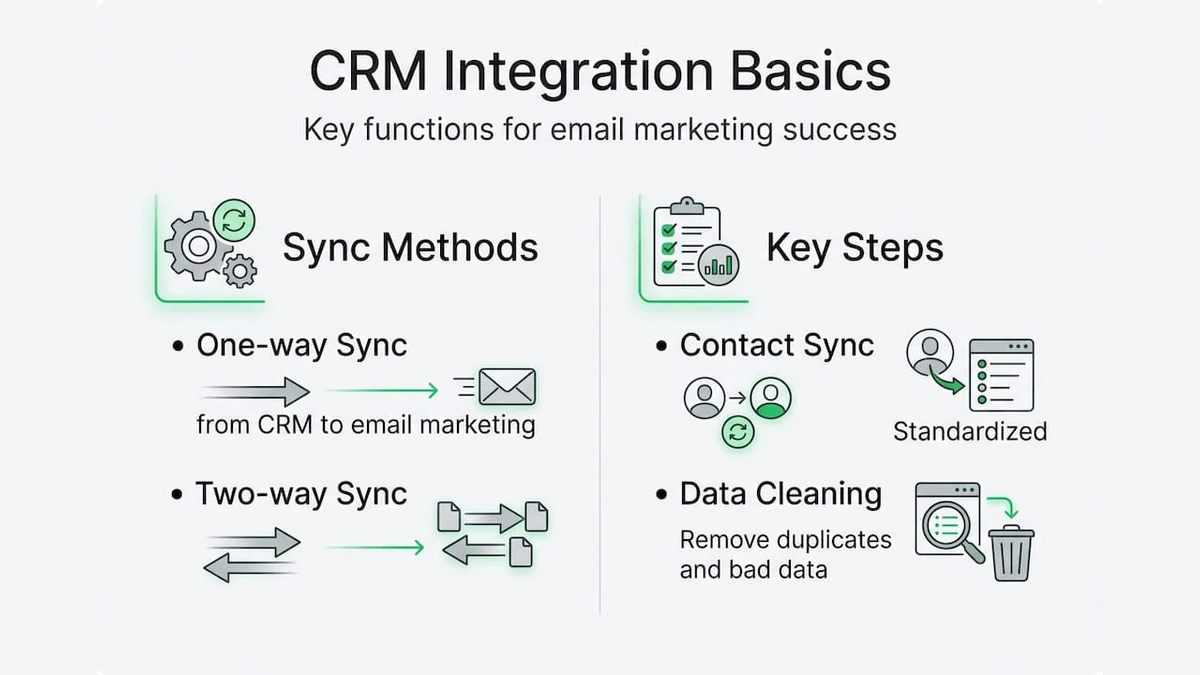
At its core, a well-built integration handles three critical functions. First, contact sync ensures that new subscribers, updated profiles, and unsubscribes are reflected across both systems without manual intervention. Second, data enrichment pulls CRM attributes such as deal stage, account tier, or product usage into your email platform so segments become more precise. Third, behavioral triggers fire automated sequences based on actions recorded in the CRM, such as a trial expiration, a support ticket closure, or a completed purchase.
Following email marketing best practices means treating your CRM as the authoritative source of customer truth, not just a database to export from occasionally. The email platform then becomes the execution layer, acting on the intelligence the CRM holds.
As CRM integration aligns people, process, and data for email marketing success, the technical setup is only one piece. You also need clear ownership of data governance rules, defined sync schedules, and field mapping decisions made before a single API call is configured.
"The biggest integration failures we see are not technical. They happen because no one agreed on who owns the data or what the source of truth is before the tools were connected."
For teams building or rebuilding their setup, reviewing an email workflow guide helps clarify which automation sequences depend on CRM data and where the handoffs between systems need to be airtight.
Pro Tip: Before touching any API settings, document your people, process, and data alignment. Assign a data owner, define your sync rules in writing, and get sign-off from both the marketing and CRM admin teams. This single step prevents the majority of post-launch sync errors.
- Contact sync keeps subscriber status consistent across platforms
- Data enrichment enables behavior-based segmentation
- Behavioral triggers automate lifecycle campaigns with precision
- Data governance defines who controls field updates and conflict resolution
Core methodologies and sync strategies
Once you understand what CRM integration is meant to accomplish, the next step is choosing the right sync strategy and setting up field mapping that supports your campaign goals. These decisions shape how reliably your integration performs over time.
There are two primary sync directions. One-way sync pushes data from one system to the other without feedback. Two-way sync allows both platforms to update each other, keeping records consistent regardless of where a change originates. Each has trade-offs, and the right choice depends on your team's workflow and data governance capacity.
| Sync type | Data flow | Best for | Risk |
|---|---|---|---|
| One-way | CRM to email only | Simple setups, read-only use | Data drift over time |
| Two-way | CRM and email platform | Full lifecycle automation | Conflict resolution complexity |
| Real-time | Instant updates | Triggered campaigns, SaaS trials | Higher API load |
| Batch | Scheduled intervals | Large databases, B2B lists | Delayed data accuracy |
Field mapping is where many integrations quietly break down. When the same data field exists in both systems, you must define which value wins when they conflict. Field mapping with behaviors such as "use CRM value," "use email value," or "use most recent" determines how profile updates flow and which system controls segmentation logic. Getting this wrong means your behavioral triggers fire on stale data.
Here is a practical sequence for setting up a reliable sync:
- Audit all fields in both systems and identify overlaps
- Define the authoritative source for each overlapping field
- Choose your sync direction and schedule (real-time or batch)
- Configure conflict resolution rules using field mapping behaviors
- Test with a small segment before enabling full sync
- Monitor sync logs for errors during the first two weeks
Before you configure anything, completing email list cleaning steps removes the invalid addresses and duplicates that will otherwise corrupt your integration from day one. Reviewing an email validation guide also helps establish the data quality baseline your sync rules depend on.
Pro Tip: Run a full duplicate audit before activating any sync. Duplicate contacts create conflicting update loops in two-way sync setups, and resolving them after the fact is far more time-consuming than catching them beforehand.
Data challenges and edge cases
Even well-planned integrations encounter obstacles. Knowing which problems are most common, and having a resolution path ready, keeps your campaigns running without unexpected disruptions.

Data silos are one of the most persistent issues. They occur when only part of your CRM data is connected to the email platform, leaving segments incomplete or triggers misfiring. A sales team using a custom CRM object that was never mapped to the email platform is a classic example. The email tool has no visibility into that data, so lifecycle campaigns built around it simply do not fire.
Edge cases in CRM integration such as field type mismatches, permission errors, and duplicate handling via email matching are often the root cause of campaign failures that look like deliverability problems on the surface.
"What looks like a deliverability issue is often a data issue. The wrong contacts are receiving the wrong messages because the integration was never properly validated."
Here are the most common challenges and how to address them:
- Data silos: Map all relevant CRM objects to the email platform, not just the primary contact record
- Field type mismatches: Ensure date fields, dropdown values, and boolean flags use compatible formats in both systems
- Permission errors: Grant the connector user the correct read and write permissions in both platforms before testing
- Sync drift: Schedule regular audits to catch records that have fallen out of sync over time
- Duplicate contacts: Use email address as the primary matching key and merge duplicates before activating sync
| Problem | Root cause | Resolution |
|---|---|---|
| Missing segments | Partial CRM object mapping | Map all relevant objects |
| Trigger misfires | Stale field values | Enable real-time sync for trigger fields |
| Duplicate sends | Unmerged contact records | Deduplicate using email matching |
| Sync errors | Field type mismatch | Standardize field formats before mapping |
| Permission failures | Insufficient connector access | Audit and update connector user roles |
For teams that rely on email validation for integration, running verification before sync activation catches invalid addresses that would otherwise generate bounce-related errors and damage sender reputation.
Practical steps: Preparing your CRM and email marketing data
Proactive preparation is the most reliable way to prevent integration failures. The steps below apply whether you are setting up a new integration or auditing an existing one that has developed reliability issues.
Following email best practices during the preparation phase means treating data quality as a prerequisite, not an afterthought. The same discipline that applies to campaign execution applies to the data that powers it.
- Export and audit your full contact database. Identify duplicates, incomplete records, and contacts with invalid email formats before any sync is configured.
- Run email verification on your full list. Remove invalid, disposable, and role-based addresses that will generate bounces and suppress deliverability.
- Merge duplicate records using email address as the primary key. Resolve any conflicting field values manually before the sync tool encounters them.
- Conduct a permission audit. Confirm that the connector user account in both your CRM and email platform has the correct read, write, and sync permissions.
- Document your field mapping decisions. Record which system controls each field and what the conflict resolution behavior is for every mapped pair.
- Activate sync on a test segment first. Validate that data flows correctly, triggers fire as expected, and no duplicate records are created before enabling full sync.
- Set a recurring audit schedule. Monthly or quarterly reviews catch sync drift, new field mismatches, and permission changes before they affect live campaigns.
For teams managing large B2B databases, following structured email list management tips ensures that the data entering your integration is clean enough to support reliable segmentation and automation.
Pro Tip: Schedule a data audit on the same cadence as your quarterly business reviews. Sync issues compound over time, and a 30-minute audit every three months prevents the kind of data degradation that takes weeks to untangle.
Cleanup duplicates before integration and handle permission issues for connector users before activating any live sync. These two steps alone eliminate the majority of post-launch integration failures.
Why most CRM integrations stumble—and how to fix them
After working through the mechanics of CRM integration, a pattern becomes clear. Most failures are not caused by the technology. The tools available today are capable and well-documented. What breaks integrations is the absence of process alignment before the first field is mapped.
Teams rush to connect systems because the business case is obvious. Personalized, behavior-driven email campaigns outperform generic blasts by a significant margin. But the urgency to launch leads to skipped steps: no data governance policy, no duplicate audit, no agreement on which system owns which field. The integration goes live, and within weeks, contacts are receiving duplicate emails, triggers are firing on stale data, and the marketing team is debugging instead of optimizing.
The uncomfortable truth is that data governance beats technical sophistication every time. A simple one-way sync with clean data and clear ownership rules will outperform a complex two-way integration built on an unaudited database.
Behavioral field mapping is the most commonly skipped step. Deciding whether the CRM value, the email platform value, or the most recent value controls a field is not a technical detail. It is a strategic decision that determines how your automation responds to customer actions. Skipping it means your triggers are guessing.
For teams looking to optimize SaaS email processes, the fix is straightforward: slow down the setup, invest in pre-integration data cleaning, and treat governance as a standing operational practice rather than a one-time task.
Supercharge your CRM-email workflow with BillionVerify
Clean data is the foundation of every reliable CRM integration. If invalid, duplicate, or risky email addresses enter your sync, they compromise segmentation accuracy, trigger deliverability issues, and erode sender reputation before your campaigns even reach the inbox.
BillionVerify's AI-first email verification platform removes that risk at scale. With real-time verification, bulk processing, and seamless integration with over 20 major CRMs and email marketing systems, BillionVerify ensures the data entering your integration is accurate, deliverable, and campaign-ready. Multi-layer detection catches disposable addresses, spam traps, role-based contacts, and risky domains before they reach your sync. Start with verified data and every downstream campaign benefits from higher engagement, lower bounce rates, and stronger ROI.
Frequently asked questions
How does CRM integration improve email marketing ROI?
CRM integration aligns people, process, and data to enable precise targeting, behavioral automation, and personalized messaging, all of which drive higher engagement rates and measurable campaign ROI.
What are the risks of one-way CRM and email sync?
One-way sync risks data drift because changes made in the email platform are never reflected back in the CRM, leading to incomplete profiles and inaccurate segmentation over time.
What data should be cleaned before integrating CRM with email marketing?
Cleanup duplicates before integration and also validate email addresses and audit connector permissions to prevent sync errors and protect campaign data quality.
What is behavioral field mapping in CRM-email integration?
Behavioral field mapping defines which data source controls profile updates when both systems hold a value for the same field, directly influencing how triggers and segments behave in automated campaigns.
See how BillionVerify compares to ZeroBounce and NeverBounce on accuracy, speed, and pricing before choosing a provider.