



TL;DR:
- Suppression excludes problematic email addresses to protect deliverability and sender reputation.
- Effective suppression manages hard bounces, spam complaints, unsubscribes, and edge cases like role-based or disposable emails.
- Automating suppression with AI verification tools enhances list hygiene, improves metrics, and boosts ROI.
Many email marketers operate under a persistent misconception: the larger the send volume, the stronger the results. In practice, the opposite is often true. Sending campaigns to every contact on your list, including unsubscribers, hard bounces, and spam trap addresses, actively damages your sender reputation and tanks deliverability rates. Suppressing email lists is not a sign of lost opportunity; it is a disciplined strategy that protects your campaigns, preserves your domain's standing with inbox providers, and drives measurable improvements in engagement. This guide covers what suppression means, the triggers that activate it, advanced edge cases, and best practices for implementation.
Key Takeaways
| Point | Details |
|---|---|
| Suppression protects deliverability | Excluding problematic contacts helps you avoid bounces and spam traps. |
| Triggers for suppression | Hard bounces, unsubscribes, and spam complaints are common automatic triggers. |
| Address advanced cases | Consider role accounts, recent buyers, and disposable emails for optimal campaign success. |
| Automation boosts results | AI and regular audits help keep suppression lists accurate and effective. |
What does suppressing email lists really mean?
In email marketing, suppression refers to the practice of excluding specific email addresses or defined segments from receiving future campaign sends. Suppressed contacts remain in your database, but your email service provider (ESP) or CRM is instructed not to deliver messages to them. This is a critical distinction that separates suppression from deletion.
When you delete a contact, you erase all associated data, including bounce history, complaint records, and consent logs. Suppression, by contrast, preserves that data while preventing further sends. This matters for compliance with regulations such as GDPR and CCPA, where retaining proof of an unsubscribe request is a legal requirement, not just a best practice.
"Suppressing email lists prevents sending to problematic contacts, reducing bounces and complaints" and protecting the sender's overall deliverability standing.
Proper email hygiene in marketing depends on suppression as a foundational layer. Without it, even a well-crafted campaign will reach addresses that generate bounces, spam complaints, and low engagement signals, all of which inbox providers use to evaluate your sending reputation.
The main categories of suppressed contacts include:
- Unsubscribes: Contacts who have explicitly opted out of receiving communications
- Hard bounces: Addresses that are permanently invalid or non-existent
- Soft bounces: Addresses that have repeatedly failed delivery over multiple attempts
- Spam complaints: Recipients who marked your message as spam through their email client
- Inactives: Contacts who have not engaged with campaigns over a defined period
Maintaining clean email lists requires treating suppression as an ongoing process rather than a one-time setup. Each of these categories represents a different type of risk, and managing them systematically is what separates high-performing email programs from those that struggle with inbox placement.
Common triggers: Who gets suppressed (and why)
Understanding what actually places an address on a suppression list is essential for building a reliable email program. Some triggers are automatic and immediate; others require judgment calls based on engagement patterns and business context.
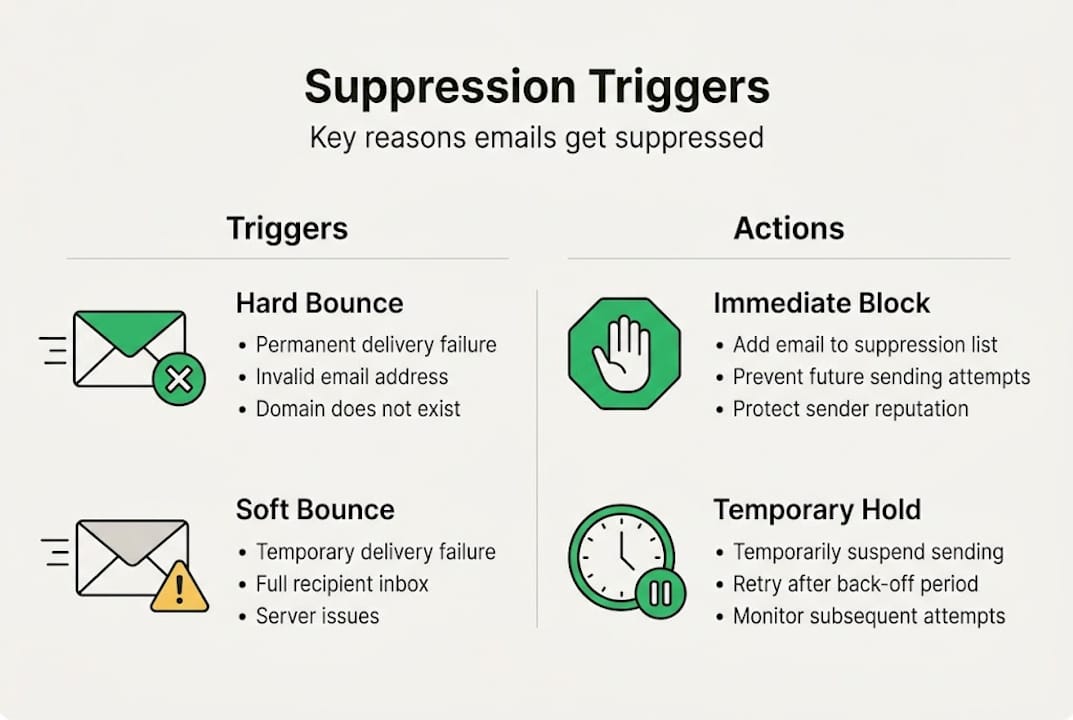
The most technically significant trigger is the hard bounce, which occurs when an email is permanently undeliverable because the address does not exist, the domain is inactive, or the server has explicitly rejected it. Hard bounces trigger immediate permanent suppression in most ESPs, and continuing to send to these addresses signals poor list hygiene to inbox providers.
Soft bounces are temporary delivery failures, often caused by a full inbox or a temporarily unavailable server. Most platforms suppress an address after a defined number of consecutive soft bounce failures, typically three to five. Understanding the difference between email bounce types is key to setting the right suppression thresholds.
Here is a quick-reference table for the most common suppression triggers:
| Trigger | Type | Suppression action |
|---|---|---|
| Hard bounce | Permanent | Immediate, permanent suppression |
| Soft bounce | Temporary | Suppress after 3 to 5 consecutive failures |
| Spam complaint | Complaint | Immediate suppression |
| Manual unsubscribe | Opt-out | Immediate, legally required |
| Inactive contact | Behavioral | Suppress after re-engagement campaign fails |
| Recent buyer (acquisition) | Strategic | Temporary suppression from specific flows |
For e-commerce and SaaS marketers, strategic suppression adds another layer. Recent buyers, for example, should typically be excluded from acquisition-focused promotional flows because they are already customers. Sending acquisition messaging to existing customers creates a disjointed experience and wastes send volume.
Automatic suppression protects your sender reputation by ensuring that the most damaging address types are removed from active sends without requiring manual intervention. Pairing automation with a clear policy for reviewing reduce bounces systematically keeps your list healthy over time.
Key behavioral signals that should inform suppression decisions include:
- No email opens or clicks within the last 90 to 180 days
- Repeated soft bounces without resolution
- Addresses flagged by your ESP's spam trap detection
- Contacts who have filed complaints across multiple campaigns
Edge cases and advanced suppression strategies
Standard suppression covers the obvious categories, but sophisticated email programs go further. Advanced suppression strategies address a set of edge cases that, if ignored, can quietly erode deliverability and damage sender reputation over time.

Role-based addresses such as info@, support@, admin@, or sales@ are not tied to individual recipients. Sending marketing emails to these addresses generates disproportionately high complaint rates because multiple people may receive and report the message. Suppressing role-based accounts from promotional flows is a straightforward way to reduce complaint risk.
Disposable email addresses are temporary accounts created specifically to bypass registration requirements. They have very short lifespans and contribute to poor engagement metrics. Integrating disposable email detection into your acquisition workflow prevents these addresses from ever entering your active list.
Spam traps are perhaps the most dangerous edge case. These are addresses maintained by inbox providers and anti-spam organizations specifically to catch senders with poor list hygiene. Sending to a spam trap can result in blacklisting, which is one of the most difficult deliverability problems to recover from.
Here is a comparison of standard versus advanced suppression management:
| Category | Standard suppression | Advanced edge case management |
|---|---|---|
| Hard bounces | Immediate permanent removal | Verified via SMTP before first send |
| Unsubscribes | Removed from all sends | Segmented by list source for compliance audit |
| Role-based accounts | Often overlooked | Proactively flagged and suppressed at acquisition |
| Disposable emails | Rarely detected | Identified and blocked at point of entry |
| Spam traps | Reactive removal | Prevented through pre-send verification |
| Competitors | Not typically considered | Manually suppressed from acquisition and promo flows |
Applying email list cleaning strategies that incorporate these edge cases reduces risk at every stage of the campaign lifecycle.
Pro Tip: Review and update your suppression logic at least once per quarter. Business needs change, compliance requirements evolve, and new edge case patterns emerge. A suppression list that was accurate six months ago may already be outdated.
Strategic suppressions, such as excluding known competitors or recent high-value buyers from specific campaign flows, also reflect a mature understanding of audience segmentation. These decisions protect both deliverability and the customer experience.
How to implement and optimize suppression lists
Building a suppression list is straightforward; maintaining and optimizing it over time requires a structured workflow. Here is a practical step-by-step approach for email marketers at e-commerce and SaaS organizations.
Configure automatic suppression rules in your ESP. Most platforms, including Salesforce Marketing Cloud, HubSpot, and Klaviyo, allow you to define suppression rules for hard bounces, spam complaints, and unsubscribes out of the box. Verify that these are activated and set to the correct thresholds before any campaign goes live.
Segment your suppression list by reason. Keeping separate suppression segments for bounces, complaints, unsubscribes, and inactives allows you to analyze patterns and adjust your acquisition strategy accordingly. A spike in hard bounces, for example, may indicate a data quality problem at the source.
Suppress recent buyers from acquisition flows. For e-commerce and SaaS, suppressing recent buyers from acquisition or promotional flows prevents messaging misalignment and reduces unsubscribe rates among your most valuable customers.
Run re-engagement campaigns before suppressing inactives. Before permanently suppressing contacts who have not engaged in 90 to 180 days, deploy a targeted email re-engagement strategies sequence. Those who still do not respond should be moved to suppression.
Audit suppression lists quarterly for compliance. Under GDPR and CCPA, you must honor unsubscribe and deletion requests within defined timeframes. Regular audits ensure your suppression data stays aligned with legal obligations and that no suppressed contact is accidentally reactivated through a data import.
Integrate suppression with email verification workflows. Coordinating your suppression data with a real-time verification tool ensures that new addresses entering your list are screened for risk before they can generate bounces or complaints. Explore email list cleaning tips to build a complete hygiene workflow.
Pro Tip: Run your full active list through an email verification platform before every major campaign send. This catches addresses that may have become invalid since your last audit, keeping your suppression list current without relying solely on reactive bounce data.
Automation is the key to scaling suppression management. Manual processes introduce lag and human error. Connecting your ESP's suppression logic directly to your verification platform creates a closed-loop system that continuously improves list quality.
Why smart suppression is the underrated multiplier for email ROI
Most conversations about email list growth focus on acquisition: more subscribers, more reach, more revenue. Suppression rarely gets the same attention, and that is a strategic blind spot.
The uncomfortable truth is that marketers who resist suppression out of fear of shrinking their audience are often the ones with the worst deliverability rates. Inbox providers evaluate your sending behavior based on engagement signals. A list of 500,000 contacts with a 10% open rate sends a far stronger positive signal than a list of 1,000,000 with a 4% open rate and elevated complaint rates.
Intentional suppression is a signal of program maturity. It tells inbox providers that you send to people who want your messages, which builds the kind of sender reputation that earns consistent inbox placement over time. Why email hygiene matters is not just a compliance question; it is a revenue question.
The most effective email programs we observe measure success by positive outcomes: revenue per email sent, click-to-conversion rate, and inbox placement rate. Not by raw list size. Suppressing more, not less, consistently moves those metrics in the right direction.
Streamline suppression with AI-powered email verification
Managing suppression lists manually is time-consuming and leaves gaps that cost you deliverability. BillionVerify offers an AI-first email verification platform built to automate the detection and suppression of risky addresses before they reach your campaigns.
BillionVerify's multi-layer verification engine identifies hard bounces, disposable emails, role-based accounts, spam traps, and catch-all domains in real time, feeding clean suppression data directly into your ESP or CRM through seamless integrations with over 20 major platforms. Whether you manage a list of 50,000 or 50 million, the platform scales to match your verification needs. Start protecting your sender reputation and improving campaign ROI today with BillionVerify.
Frequently asked questions
What is the main reason for suppressing emails in marketing?
Suppressing email lists keeps messages out of risky inboxes, boosting deliverability and sender reputation. As Adobe confirms, it directly reduces bounces and spam complaints that damage your sending standing.
How do you know which emails to suppress?
Suppress hard bounces, repeated soft bounces, unsubscribes, and spam complaints automatically through your ESP. Adobe's suppression guidelines recommend reviewing inactives and edge cases on a regular schedule as well.
What are suppression list edge cases?
Edge cases include role-based addresses, disposable emails, competitors, and recent buyers you want to exclude from specific flows. Marketing Juice identifies these as categories that require proactive rather than reactive suppression management.
Is suppression the same as deleting emails?
No. Suppression retains the contact record to preserve compliance history and analytics data, while preventing further sends. Deletion removes the record entirely, which can create compliance gaps under GDPR and CCPA.
How is suppression different for e-commerce and SaaS?
Both use the same core triggers, but e-commerce and SaaS marketers often apply strategic suppression to recent buyers and post-re-engagement inactives to maintain precise audience targeting across different campaign flows.