



You've configured SPF, DKIM, and DMARC perfectly. Your email content is polished and valuable. Yet your campaigns still land in spam folders, and engagement rates remain frustratingly low. The missing piece? True deliverability compliance extends far beyond technical authentication. It's a dynamic blend of protocol adherence, legal requirements, sender reputation management, and evolving best practices that together determine whether your messages reach the inbox or vanish into digital obscurity. This guide clarifies what deliverability compliance actually entails and shows you how to optimize every element for consistent inbox placement in e-commerce and SaaS email campaigns.
Key Takeaways
| Point | Details |
|---|---|
| Deliverability components | Deliverability depends on a blend of technical authentication legal compliance and best practices working together rather than relying on setup alone. |
| Critical protocols SPF DKIM DMARC | SPF DKIM and DMARC authenticate senders and protect message integrity. |
| Legal requirements | CAN SPAM and GDPR govern consent header information and unsubscribe rights. |
| Best practices | Regular list verification and removal of invalid addresses double opt in clear unsubscribe engagement monitoring and segmentation improve deliverability. |
| Sender reputation matters | Maintaining a clean sender reputation and healthy engagement improves inbox placement beyond mere compliance. |
Understanding the components of deliverability compliance
Deliverability compliance encompasses technical authentication protocols, legal regulations, and marketing best practices working together to ensure your emails reach subscriber inboxes rather than spam folders. Many marketers mistakenly believe that setting up authentication records alone guarantees delivery success. The reality is more nuanced.
The technical foundation starts with three critical protocols. SPF (Sender Policy Framework) authorizes specific IP addresses to send email on behalf of your domain, preventing unauthorized senders from spoofing your identity. DKIM (DomainKeys Identified Mail) adds a digital signature to each message, allowing receiving servers to verify that the content hasn't been altered in transit. DMARC (Domain-based Message Authentication, Reporting, and Conformance) builds on these by instructing mailbox providers how to handle messages that fail authentication checks.
Legal frameworks form the second pillar. CAN-SPAM governs commercial email in the United States, requiring accurate header information, clear identification of promotional content, and functional unsubscribe mechanisms. GDPR applies to any business emailing EU residents, mandating explicit consent before sending marketing messages and providing data portability rights. Violating these regulations brings substantial fines and damages sender reputation.
Best practices complete the compliance picture:
- Maintaining clean email lists through regular verification and removal of invalid addresses
- Implementing double opt-in processes to confirm subscriber intent
- Providing clear, prominent unsubscribe links in every message
- Monitoring engagement metrics to identify and suppress disengaged contacts
- Segmenting audiences to deliver relevant content that drives interaction
These elements work synergistically. Technical authentication proves you are who you claim to be. Legal compliance demonstrates respect for subscriber rights. Best practices show mailbox providers that recipients actually want your messages. Missing any component undermines the entire system, pushing emails toward spam folders regardless of how well you execute the other areas. For a comprehensive overview of these requirements, explore our email compliance guide.
Core protocols and sender reputation: the technical fundamentals
Core authentication mechanics include SPF authorizing sending IPs, DKIM providing digital signatures for message integrity, and DMARC establishing policies for failed authentication. Bulk senders exceeding 5,000 messages daily to Gmail or Yahoo must implement all three protocols or face systematic blocking. This threshold affects most e-commerce and SaaS operations running regular email campaigns.
SPF works by publishing DNS records that list authorized sending servers. When a receiving mail server gets a message claiming to be from your domain, it checks whether the sending IP appears in your SPF record. Matches pass authentication. Mismatches raise red flags. The protocol is straightforward but requires meticulous maintenance as you add new sending services or change email infrastructure.
DKIM operates differently by attaching an encrypted signature to message headers. The receiving server retrieves your public key from DNS and uses it to decrypt the signature. If the decrypted hash matches the message content, the email passes DKIM verification. This proves both sender authenticity and message integrity, confirming that no one tampered with the content during transmission.
DMARC ties everything together by defining what happens when SPF or DKIM checks fail. You start with a monitoring policy (p=none) that generates reports without affecting delivery. As you gain confidence in your authentication setup, you progress to quarantine (sending failures to spam) and eventually reject (blocking failures entirely). This graduated approach protects your domain from phishing while you refine your configuration.
Sender reputation monitoring provides ongoing visibility into how mailbox providers view your sending practices. Google Postmaster Tools reveals your domain and IP reputation scores, spam rates, and authentication success rates for Gmail delivery. Microsoft SNDS (Smart Network Data Services) offers similar insights for Outlook and Hotmail. These tools help you spot problems before they cascade into widespread deliverability failures.

Pro Tip: Implement IP and domain warmup by starting with 50-100 emails daily to your most engaged subscribers, then doubling volume every 3-4 days over 4-6 weeks until reaching your target sending volume. This gradual ramp builds positive reputation signals with mailbox providers and prevents sudden volume spikes that trigger spam filters. New IPs without warmup often face severe throttling or blocking regardless of perfect authentication. Our email compliance guide provides detailed warmup schedules for different sending volumes.
Maintaining list hygiene and optimizing content for inbox placement
Effective deliverability methodologies include IP and domain warmup through gradual volume increases over 4-6 weeks, rigorous list hygiene with verification and suppression lists, sender reputation monitoring via Postmaster Tools, and content optimization balancing HTML with plain text while providing clear unsubscribe options. These practices work together to maintain the positive sending patterns that mailbox providers reward with inbox placement.
List hygiene starts with removing invalid email addresses before they generate hard bounces. Hard bounces signal poor list quality to mailbox providers and damage sender reputation. Regular verification identifies syntax errors, non-existent domains, and invalid mailboxes before you send. Suppression lists track unsubscribes, spam complaints, and hard bounces to prevent re-engagement attempts that further harm your reputation.
Double opt-in confirmation adds an extra verification layer by requiring new subscribers to click a confirmation link before joining your list. This process filters out typos, fake addresses, and spam traps while documenting explicit consent for GDPR compliance. The slight reduction in list size is offset by dramatically higher engagement rates from genuinely interested subscribers.
A structured warmup schedule protects new sending infrastructure:
| Week | Daily volume | Recipient selection | Focus |
|---|---|---|---|
| 1 | 50-100 | Most engaged users | Establish baseline |
| 2 | 200-500 | High engagement | Build positive signals |
| 3 | 1,000-2,000 | Active subscribers | Expand gradually |
| 4 | 4,000-8,000 | Broader segments | Approach target |
| 5-6 | 15,000+ | Full list | Reach full capacity |
Content optimization influences deliverability through multiple factors. Mailbox providers analyze the ratio of images to text, looking for balance rather than image-heavy designs that spammers favor. Including a plain text version alongside HTML accommodates accessibility needs and demonstrates legitimate sender practices. Clear, prominent unsubscribe links in every message reduce spam complaints by providing an easy exit path for uninterested recipients.
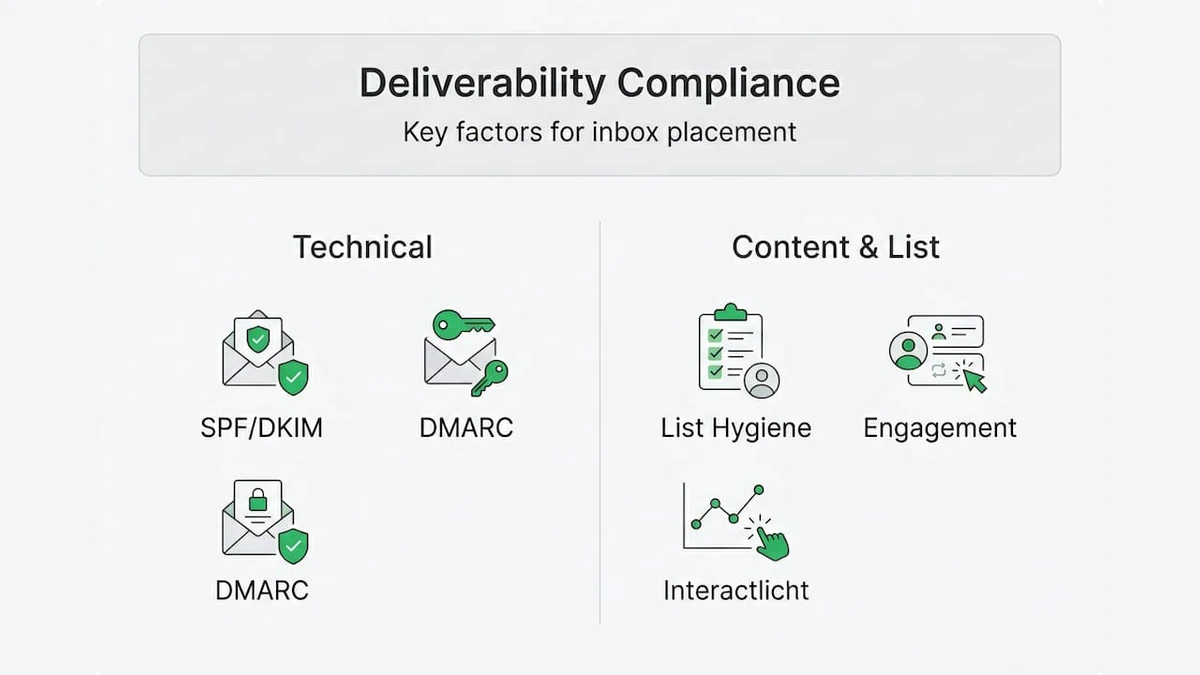
Mobile optimization has become critical as over 60% of email opens occur on mobile devices. Responsive designs that adapt to small screens, concise subject lines under 50 characters, and easily tappable call-to-action buttons improve user experience and engagement metrics. Higher engagement signals to mailbox providers that recipients value your content.
Engagement metrics matter as much as technical compliance. Mailbox providers track open rates, click rates, reply rates, and how long recipients spend reading your messages. They also monitor negative signals like deletes without opening, spam complaints, and unsubscribes. Consistently strong engagement builds sender reputation even when occasional technical issues occur.
Pro Tip: Verify your email list monthly using AI-powered validation tools that detect disposable addresses, spam traps, role-based emails, and catch-all domains that traditional verification misses. This proactive approach maintains list quality between campaigns and catches deliverability problems before they impact sender reputation. Clean lists generate the high engagement rates that keep you in the inbox. Learn more about maintaining quality lists in our guide to email list hygiene and discover actionable strategies in our email list cleaning tips better campaigns resource.
Addressing advanced nuances and evolving challenges in deliverability compliance
Advanced deliverability considerations include domain alignment requirements where From addresses must match SPF and DKIM domains, subdomain isolation separating transactional from marketing streams, new IP throttling by Microsoft affecting fresh senders, AI-driven filters prioritizing engagement over authentication alone, and tracking pixels facing ePrivacy regulation scrutiny. These nuances create additional complexity beyond basic protocol implementation.
Domain alignment has become increasingly strict. Your visible From address domain must align with either your SPF-validated domain or your DKIM-signing domain. Misalignment occurs when you send from yourcompany.com but authenticate through a third-party ESP's domain. This triggers DMARC failures even with valid SPF and DKIM records. The solution involves configuring custom DKIM signing through your ESP or using a subdomain that properly aligns.
Subdomain strategies separate different email types to protect your primary domain reputation. Many organizations send transactional emails (order confirmations, password resets) from transactional.yourcompany.com while marketing campaigns use marketing.yourcompany.com. This isolation prevents marketing issues from affecting critical transactional delivery. If a marketing campaign generates spam complaints, your transactional subdomain maintains its clean reputation.
Microsoft's IP throttling presents challenges for new senders. Outlook and Hotmail now severely limit messages from unfamiliar IPs, sometimes accepting only 10-20 emails per hour initially. This throttling can extend for weeks regardless of perfect authentication and content. The only solution is patience and gradual volume increases, starting with your most engaged Microsoft subscribers and slowly expanding as the provider builds trust in your sending patterns.
AI-driven spam filters represent a fundamental shift in how mailbox providers evaluate messages. Traditional filters focused heavily on authentication, content keywords, and sender reputation scores. Modern AI systems analyze recipient behavior patterns, measuring how quickly users open messages, whether they interact with content, and how long they engage. A perfectly authenticated email with low engagement rates may land in spam, while a message with minor technical issues but strong engagement reaches the inbox.
Tracking pixels face increasing scrutiny under ePrivacy regulations. These invisible images load when recipients open emails, allowing senders to track open rates and gather data about recipient behavior. Privacy advocates argue this constitutes surveillance without meaningful consent. Some email clients now block automatic image loading by default, rendering tracking pixels ineffective. This trend pushes marketers toward engagement metrics like clicks and replies rather than opens.
Comparing filtering approaches reveals the evolution:
| Traditional filtering | AI-driven filtering |
|---|---|
| Focuses on authentication pass/fail | Weighs engagement alongside authentication |
| Analyzes content keywords and spam phrases | Examines recipient behavior patterns |
| Applies uniform rules across all senders | Personalizes filtering per recipient preferences |
| Treats all authenticated mail similarly | Differentiates based on historical engagement |
| Responds slowly to emerging threats | Adapts in real time to new patterns |
These evolving challenges require continuous monitoring and adaptation. What worked last year may fail today as providers update algorithms and tighten requirements. Staying informed about industry changes and maintaining flexible infrastructure allows you to adjust quickly when new requirements emerge. For comprehensive guidance on navigating these complexities, review our resource on how to master email marketing compliance 2026 success.
Enhance your deliverability compliance with BillionVerify
Maintaining the clean email lists that deliverability compliance demands requires powerful verification technology. BillionVerify provides AI-first email verification that detects disposable addresses, spam traps, role-based emails, catch-all domains, and risky addresses that traditional verification misses. The platform processes millions of verifications monthly with enterprise-grade accuracy, integrating seamlessly with over 20 major email marketing systems and CRMs.
Our multi-layer verification technology protects your sender reputation by identifying problematic addresses before they generate bounces or spam complaints. Real-time API verification validates emails at the point of capture, preventing bad data from entering your system. Bulk processing handles large list cleanings efficiently, with detailed reporting that categorizes results and provides actionable insights. Key benefits include:
- Reduced bounce rates protecting domain reputation
- Lower spam complaint rates through trap detection
- Increased inbox placement from cleaner engagement metrics
- Faster verification speeds minimizing workflow delays
- Comprehensive suppression list management
Visit BillionVerify to strengthen your deliverability compliance and maximize email campaign ROI.
Frequently asked questions
What is deliverability compliance?
Deliverability compliance combines technical email authentication (SPF, DKIM, DMARC), legal requirements (CAN-SPAM, GDPR), and marketing best practices (list hygiene, engagement monitoring) to ensure messages reach subscriber inboxes. It goes beyond simple protocol setup to include sender reputation management and content optimization. Our email compliance guide provides comprehensive coverage of all compliance elements.
What is the difference between delivery and deliverability?
Delivery means the receiving server accepted your message without bouncing it back. Deliverability determines whether that accepted message lands in the inbox or spam folder. You can achieve 100% delivery while having terrible deliverability if all your messages go to spam. Mailbox providers make inbox placement decisions based on authentication, sender reputation, and recipient engagement patterns.
What are the best practices to stay compliant?
Implement all three authentication protocols (SPF, DKIM, DMARC) with proper domain alignment. Obtain explicit consent before adding subscribers and honor unsubscribe requests within 10 days. Verify your email list monthly to remove invalid addresses and spam traps. Monitor engagement metrics and suppress chronically inactive contacts. Warm up new IPs gradually over 4-6 weeks to build positive reputation signals.
How should I handle unsubscribe requests?
Process unsubscribe requests immediately, ideally within 24 hours and no longer than 10 business days as CAN-SPAM requires. Make the unsubscribe link prominent and functional in every message, requiring no more than a single click to complete. Never require login credentials or additional information to unsubscribe. Suppressing these contacts permanently protects your reputation by preventing spam complaints from unwanted continued contact.
How do I monitor sender reputation effectively?
Use Google Postmaster Tools to track your domain and IP reputation scores, spam rates, and authentication success for Gmail delivery. Microsoft SNDS provides similar insights for Outlook and Hotmail. Monitor your bounce rates, spam complaint rates, and engagement metrics through your ESP dashboard. Set up DMARC reporting to receive daily authentication failure reports. Maintaining clean lists through regular verification as outlined in our email list hygiene guide keeps these metrics healthy.