



What is Make?
Make (formerly Integromat) is the world's leading advanced visual automation platform, designed for power users, developers, and businesses that need sophisticated workflow automation beyond simple "if this, then that" scenarios. Acquired by Celonis in 2022 and rebranded from Integromat to Make, the platform has become the go-to solution for complex automation needs.
Core Capabilities:
- Visual Workflow Builder: Design complex automation scenarios with an intuitive drag-and-drop interface that shows the complete data flow
- Advanced Logic & Routing: Implement conditional branching, iterators, aggregators, and routers to handle complex business rules
- Data Transformation: Built-in tools for parsing, formatting, and transforming data between different formats (JSON, XML, CSV, text)
- Error Handling: Sophisticated error recovery with rollback, retry logic, and alternative execution paths
- HTTP & API Integration: Native HTTP modules with advanced request building, authentication, and response parsing
- Real-time Execution: Instant triggers and webhooks for real-time workflow execution
- Scheduling & Timing: Flexible scheduling with cron expressions, delays, and sleep functions
- Data Storage: Built-in data stores for temporary storage and cross-scenario data sharing
Why Power Users Choose Make Over Zapier:
Make is fundamentally different from simpler automation tools like Zapier. While Zapier excels at linear, single-step automations, Make is built for complexity:
- Visual Data Flow: See exactly how data moves through your workflow with a visual map, making debugging and optimization intuitive
- Unlimited Branches: Create as many conditional paths as needed without artificial limitations
- Advanced Operations: Use iterators to process arrays, aggregators to combine data, and routers to split execution paths
- Better Pricing: Make's operation-based pricing is typically 40-60% cheaper than Zapier for high-volume workflows
- Granular Control: Access and manipulate individual data points with a powerful mapping interface
- No "Zap" Limits: Run unlimited active scenarios on all paid plans (Zapier limits active Zaps by plan)
Popular Use Cases:
- Complex multi-step email verification workflows with conditional routing
- CRM data enrichment and validation pipelines
- E-commerce order processing with fraud detection
- Lead scoring systems with multiple data sources
- Automated data migration and synchronization
- API workflow orchestration for SaaS integrations
- Batch processing of large datasets with error handling
Who Uses Make:
- Marketing automation specialists who need complex lead routing
- SaaS companies building customer onboarding workflows
- E-commerce businesses with sophisticated order validation
- Data teams automating ETL (Extract, Transform, Load) processes
- Developers who want visual automation without coding
- Agencies managing complex client workflows
However, even the most sophisticated automation workflows depend on data quality. Invalid email addresses can cause cascading failures in complex scenarios—which is why integrating our email verification service with Make ensures your workflows operate on clean, validated data from the start.
Why Integrate BillionVerify with Make?
Make's power lies in its ability to orchestrate complex workflows—but those workflows are only as reliable as the data flowing through them. Email verification is a critical component that affects multiple downstream processes:
Without email verification, you'll encounter serious problems:
- ❌ Workflow Failures: Invalid emails cause bounces, breaking automated email sequences and customer journeys
- ❌ Data Quality Issues: Bad data propagates through multiple systems, corrupting your entire data ecosystem
- ❌ Wasted Operations: Make charges by operation—invalid emails waste operations and inflate costs
- ❌ Complex Debugging: Tracking down failures caused by invalid emails in multi-step workflows is time-consuming
- ❌ Poor ROI: Downstream marketing automation, CRM updates, and email campaigns all suffer from unverified data
The Solution
BillionVerify + Make integration enables you to:
- ✅ Verify Before Routing: Validate emails at the entry point before data flows to expensive downstream systems
- ✅ Conditional Logic: Route valid, invalid, and risky emails to different processing paths automatically
- ✅ Batch Verification: Process large datasets efficiently with Make's iterator and aggregator modules
- ✅ Real-time Validation: Verify emails instantly in webhook-triggered scenarios for real-time applications
- ✅ Error Prevention: Catch invalid emails early to prevent cascading failures in complex workflows
- ✅ Cost Optimization: Avoid wasting operations on invalid contacts across all your Make scenarios
How It Works
The integration follows this workflow architecture in Make:
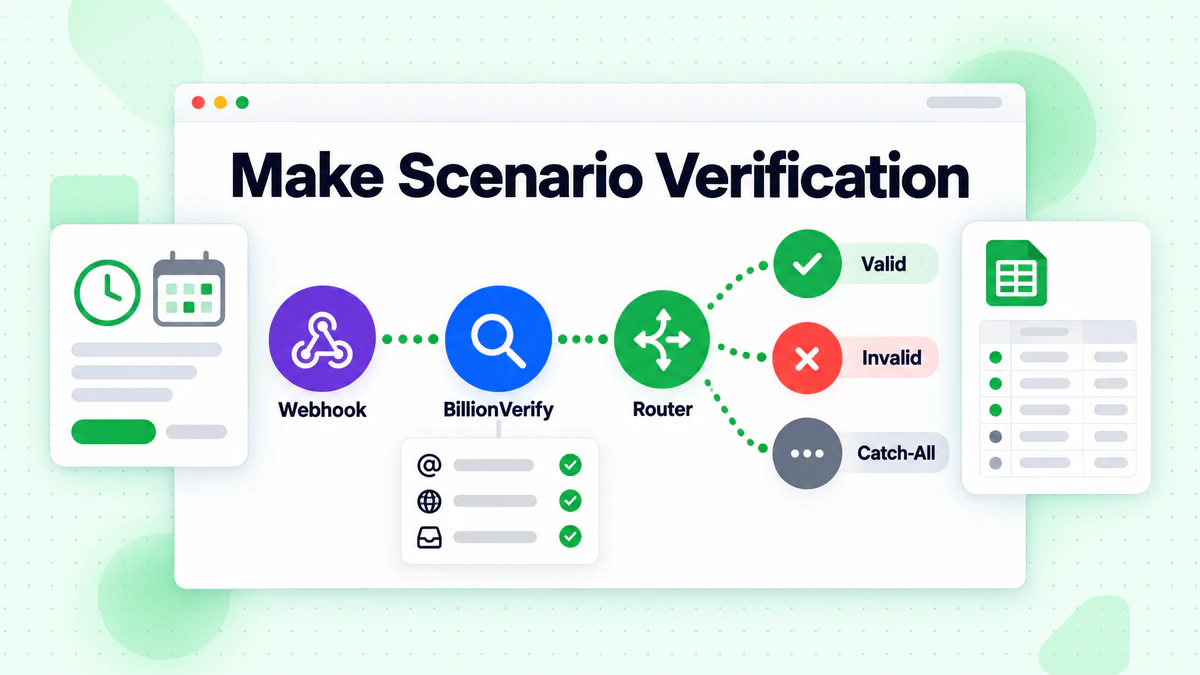
- Data Entry: Email enters your Make scenario (via webhook, API, form submission, or schedule)
- BillionVerify Module: Make sends the email to BillionVerify API for verification
- Comprehensive Validation: Our API performs multi-layered checks:
- Syntax validation (RFC 5322 compliance)
- DNS lookup (domain exists and is configured)
- MX record verification (mail server exists)
- SMTP handshake (mailbox exists and accepts mail)
- Advanced risk detection (disposable, catch-all, role-based, fraud patterns)
- Data Enrichment: BillionVerify returns detailed verification results with risk scores
- Intelligent Routing: Make's router module splits execution based on verification results:
- ✅ Valid emails (low risk): Route to CRM, email marketing, or main workflow
- ❌ Invalid emails: Route to rejection path, logging, or suppression list
- ⚠️ Risky emails: Route to manual review queue, alternate verification, or scoring system
- Downstream Processing: Each path continues with appropriate actions (update CRM, send welcome email, flag for review, etc.)
This architecture ensures clean data flows through your entire automation ecosystem.
Integration Methods
Method 1: Make Native HTTP Module (Recommended)
Use Make's built-in HTTP module to connect directly to the BillionVerify API with full control and flexibility.
Prerequisites
- BillionVerify API key (get yours here)
- Make account (Free or paid plan)
- Basic understanding of Make scenarios and modules
Architecture Overview
Make Trigger (Webhook/Schedule/Form)
      ↓
BillionVerify HTTP Module (POST Request)
      ↓
Router Module (Conditional Branching)
      ├─ Valid Branch → CRM Update / Email Send
      ├─ Invalid Branch → Suppression List / Log
      └─ Risky Branch → Manual Review Queue
Setup Steps
Step 1: Create a New Scenario
- Log in to Make (make.com)
- Click "Create a new scenario"
- Add your trigger module (e.g., Webhook, Google Sheets, Airtable, etc.)
Step 2: Add BillionVerify HTTP Module
- Click the "+" button to add a new module
- Search for "HTTP" and select "HTTP > Make a request"
- Configure the HTTP module:
- URL:
https://api.billionverify.com/v1/verify - Method:
POST - Headers:
Authorization:Bearer YOUR_BILLIONVERIFY_API_KEYContent-Type:application/json
- Body Type:
Raw - Request content:
{ "email": "{{trigger.email}}" } - Parse response:
Yes(Enable this to access response data)
- URL:
Step 3: Add Router for Conditional Logic
Add a "Router" module after the HTTP module
Create three routes with filters:
Route 1: Valid Emails
- Filter condition:
{{BillionVerify.status}}equalsvalidAND{{BillionVerify.risk_level}}equalslow - Actions: Add to CRM, send welcome email, etc.
Route 2: Invalid Emails
- Filter condition:
{{BillionVerify.status}}equalsinvalid - Actions: Add to suppression list, log to spreadsheet, send alert
Route 3: Risky Emails
- Filter condition:
{{BillionVerify.risk_level}}equalsmediumORhigh - Actions: Add to manual review queue, send to verification team
- Filter condition:
Step 4: Map Response Data
BillionVerify returns detailed information you can use in downstream modules:
{
  "email": "user@example.com",
  "status": "valid",
  "risk_level": "low",
  "is_disposable": false,
  "is_catch_all": false,
  "is_role_account": false,
  "mx_records": [...],
  "smtp_response": "250 OK",
  "verification_date": "2025-11-23T10:30:00Z"
}
Map these fields to your CRM, database, or other systems.
Step 5: Test and Activate
- Click "Run once" to test with sample data
- Verify the routing logic works correctly
- Check that valid, invalid, and risky emails flow to the right paths
- Activate the scenario to run automatically
Method 2: Bulk Verification with Iterator
For scenarios involving lists of emails (CSV uploads, database exports, CRM bulk updates), use Make's Iterator module for batch processing.
Setup Steps
Step 1: Add Data Source
- Add a trigger that provides an array of emails (Google Sheets, Airtable, CSV Parser, etc.)
Step 2: Add Iterator Module
- Add "Tools > Iterator" module
- Map the array of emails from your data source
- The iterator will process each email individually
Step 3: Add BillionVerify HTTP Module
- Inside the iterator loop, add "HTTP > Make a request"
- Configure the same way as Method 1, but use
{{iterator.email}}as the email value
Step 4: Add Aggregator (Optional)
- After verification, add "Tools > Array aggregator" to collect all results
- Group verified emails by status (valid/invalid/risky)
- Output to a spreadsheet, database, or CRM
Step 5: Rate Limiting (Important)
To avoid overwhelming the API, add a small delay:
- Add "Tools > Sleep" module after HTTP request
- Set delay to
0.1seconds (100ms) to stay within API rate limits
Method 3: Webhook-Triggered Real-Time Verification
For real-time validation (form submissions, signup flows, lead capture), use Make's webhook trigger.
Setup Steps
Step 1: Create Webhook Trigger
- Add "Webhooks > Custom webhook" as trigger
- Copy the webhook URL provided by Make
Step 2: Configure Your Form/Application
Point your form submission or application to send data to the Make webhook URL:
// Example: Form submission to Make webhook
fetch('https://hook.make.com/your-webhook-url', {
  method: 'POST',
  headers: {
    'Content-Type': 'application/json'
  },
  body: JSON.stringify({
    email: userEmail,
    name: userName,
    source: 'landing-page'
  })
});
Step 3: Add BillionVerify Verification
- Add HTTP module to verify the email from webhook data
- Use router to handle results immediately
Step 4: Return Response to Form
- Add "Webhooks > Webhook response" module
- Return validation result to your form:
- Valid:
{ "success": true, "message": "Email verified" } - Invalid:
{ "success": false, "message": "Invalid email address" }
- Valid:
Key Features
🎨 Visual Workflow Builder
Build complex verification workflows without writing code using our email verification API:
- Drag-and-drop interface for designing multi-step verification logic
- Visual data mapping between modules
- Real-time preview of data flow
- Easy debugging with execution history
Use case: Marketing teams building lead qualification workflows, sales teams routing verified leads to CRM
🔀 Conditional Routing & Branching
Route emails to different processing paths based on verification results:
- Valid emails → Main workflow (CRM, email marketing, sales pipeline)
- Invalid emails → Suppression list, logging, alert systems
- Risky emails → Manual review, secondary verification, lead scoring
Perfect for our catch-all verifier and disposable email detection features.
Use case: E-commerce fraud prevention, lead quality scoring, multi-tier customer onboarding
🔄 Batch Processing with Iterators
Process large email lists efficiently with Make's iterator and aggregator modules using our bulk email verification service:
- Verify thousands of emails in a single scenario
- Built-in rate limiting to prevent API throttling
- Aggregate results by status for reporting
- Export cleaned lists to any system
Use case: Monthly list cleaning, CRM data hygiene, database migrations
🚀 Real-Time Webhook Validation
Verify emails instantly with webhook-triggered scenarios for our email checker feature:
- Sub-second verification via instant triggers
- Return validation results to forms in real-time
- Prevent invalid emails at the point of entry
- Seamless user experience with fast API responses
Use case: Signup forms, lead capture pages, checkout flows, account creation
🛡️ Advanced Risk Detection
Leverage BillionVerify's specialized detection in Make workflows:
- Disposable email detection: Block temporary emails (mailinator.com, guerrillamail.com, temp-mail.org)
- Catch-all detection: Identify domains that accept all addresses (risk of undeliverable emails)
- Role account detection: Flag generic addresses (info@, support@, sales@, admin@)
- Fraud pattern detection: Identify suspicious patterns in bulk submissions
- Domain reputation scoring: Assess sender domain quality
Use case: Fraud prevention systems, lead quality filtering, compliance workflows
🔧 Data Transformation & Enrichment
Enhance your email data with verification results:
- Add verification status fields to CRM records
- Enrich contact profiles with risk scores
- Tag contacts based on email type (disposable, role, catch-all)
- Create custom scoring models using verification data
Use case: Lead scoring engines, customer segmentation, marketing automation personalization
⚠️ Error Handling & Recovery
Make's advanced error handling ensures your workflows don't break:
- Automatic retry logic for failed API calls
- Alternative execution paths for timeouts
- Rollback capabilities for failed operations
- Error logging and alerting
Use case: Mission-critical workflows, high-volume processing, production systems
Pricing
BillionVerify offers flexible pricing that scales with your Make automation needs:
| Plan | Credits | Price | Price per Email | Best For |
|---|---|---|---|---|
| Free Trial | 100 | $0 | Free | Testing the integration |
| Starter | 1,000 | $5 | $0.005 | Small scenarios |
| Growth | 10,000 | $40 | $0.004 | Growing automation |
| Professional | 50,000 | $175 | $0.0035 | Marketing teams |
| Business | 100,000 | $300 | $0.003 | Large workflows |
| Enterprise | Custom | Custom | From $0.002 | High-volume automation |
Special Offer for Make Users
Get started with BillionVerify and save:
- ✅ 100 free verification credits (no credit card required)
- ✅ 20% off your first month (any monthly plan)
- ✅ Free scenario setup assistance (we'll help you build your first workflow)
- ✅ Dedicated support for Make integration questions
To claim: Sign up and email support@billionverify.com with "Make Integration" in the subject. Learn more about our pricing plans.
Use Cases
Use Case 1: E-commerce Fraud Prevention Pipeline
Challenge: An online store receives 2,000 orders per day, but 12% contain fake emails used for fraudulent chargebacks. Manual review is time-consuming and inconsistent.
Solution: Build a Make scenario that verifies all order emails in real-time and routes based on risk:
- Webhook Trigger: New order from Shopify/WooCommerce
- BillionVerify Module: Verify customer email
- Router:
- Low risk → Auto-approve order, send confirmation
- Medium risk → Add to manual review queue, hold payment
- High risk (disposable/temporary email) → Flag for fraud team, cancel order
- Actions: Update order status, notify team, log to analytics
Results:
- ✅ Fraud rate reduced from 12% to 1.8%
- ✅ Chargeback rate decreased by 73%
- ✅ Manual review workload reduced by 65%
- ✅ Customer support tickets dropped by 40%
- ✅ Saved $8,500/month in fraudulent orders
Use Case 2: Multi-Tier Lead Qualification System
Challenge: A B2B SaaS company generates 1,500 leads per week from multiple sources (webinars, ads, content downloads), but only 30% are high-quality leads worth sales team attention.
Solution: Create a sophisticated Make workflow that verifies and scores leads:
- Multiple Triggers: Webhook (landing pages), Google Sheets (webinar signups), Airtable (content downloads)
- BillionVerify Module: Verify email and get risk score
- Router with Complex Logic:
- Valid + Corporate domain + No risk flags → High-quality lead (score 90+)
- Valid + Generic domain (Gmail, Yahoo) + Low risk → Medium lead (score 60-89)
- Catch-all domain OR role account → Low quality (score 30-59)
- Invalid OR disposable email → Reject (score 0)
- Downstream Actions:
- High-quality → Instant Slack alert to sales, add to priority CRM list, send personalized email
- Medium → Add to nurture campaign, schedule for follow-up in 7 days
- Low quality → Add to long-term drip campaign
- Rejected → Add to suppression list, log to analytics
Results:
- ✅ Lead quality score accuracy improved by 58%
- ✅ Sales team efficiency increased by 45% (focused on high-quality leads)
- ✅ Marketing qualified leads (MQL) to sales qualified leads (SQL) conversion up 34%
- ✅ Cost per qualified lead reduced by $23
- ✅ Sales team satisfaction increased (fewer low-quality leads)
Use Case 3: Automated CRM Data Hygiene
Challenge: A marketing agency manages 50 client CRMs with a combined 500,000 contacts. Email deliverability across all clients is dropping due to list decay (2-3% monthly).
Solution: Build a scheduled Make scenario that cleans all CRM databases weekly:
- Schedule Trigger: Every Monday at 2 AM
- Iterator: Loop through all client CRM systems (HubSpot, Salesforce, Pipedrive)
- BillionVerify Batch Module: Verify all contacts added or updated in the past 7 days
- Aggregator: Collect results by client and status
- Router:
- Invalid emails → Update CRM status to "Bounced", add to suppression list
- Catch-all emails → Tag as "Risky - Catch-all", flag for client review
- Role accounts → Tag as "Generic", move to separate segment
- Valid emails → Tag as "Verified", update verification date
- Reporting: Generate weekly report showing:
- Number of emails verified per client
- Invalid email count and percentage
- Cost savings from removed invalid contacts
- Send report via Slack and email
Results:
- ✅ Average deliverability across all clients improved from 87% to 96%
- ✅ Identified and removed 47,000 invalid emails (9.4% of total)
- ✅ Clients saved $14,000/month in wasted email sends
- ✅ Sender reputation improved for all clients
- ✅ Agency added data hygiene as a premium service ($500/client/month)
Use Case 4: Real-Time Signup Form Validation
Challenge: A SaaS company's trial signup form has a 22% fake email rate (disposable and typos), leading to low trial-to-paid conversion and support issues.
Solution: Implement webhook-triggered real-time validation with instant user feedback:
- Webhook Trigger: Form submission from website
- BillionVerify Module: Verify email in <500ms
- Router:
- Valid email → Create trial account, send welcome email, return success to form
- Invalid email (syntax/typo) → Return error to user: "Please check your email address"
- Disposable email → Return error: "Temporary email addresses are not allowed"
- Catch-all domain → Create account but flag for extra verification
- Webhook Response: Return result to form in real-time (user sees error immediately)
Results:
- ✅ Fake email signups reduced from 22% to 2%
- ✅ Trial-to-paid conversion increased by 28% (higher quality signups)
- ✅ Support tickets for "didn't receive email" dropped by 71%
- ✅ User experience improved with instant feedback
- ✅ Onboarding email deliverability increased to 98%
FAQ About Make Integration
How does BillionVerify integrate with Make?
BillionVerify integrates with Make via HTTP modules. You can use Make's built-in "HTTP > Make a request" module to call the BillionVerify API directly. The integration is native (no third-party connectors needed), giving you full control over request/response handling and advanced Make features like routing, error handling, and data transformation.
Is there a native Make app for BillionVerify?
Currently, BillionVerify integrates via Make's HTTP module, which provides maximum flexibility and control. We're working on a native Make app that will simplify setup even further. The HTTP module integration is production-ready and used by thousands of Make users.
How fast is the verification in Make scenarios?
BillionVerify's API responds in less than 1 second on average (typically 300-800ms). Make's HTTP module adds minimal overhead (~50-100ms), so total verification time is typically under 1 second. For webhook-triggered scenarios, users experience near-instant validation. For batch processing, you can verify 100+ emails per minute.
Can I verify emails in bulk with Make?
Yes! Use Make's Iterator module to process arrays of emails. You can:
- Import data from Google Sheets, Airtable, CSV files, databases, CRMs
- Iterate through each email using the Iterator module
- Verify each email with BillionVerify HTTP module
- Aggregate results using the Array aggregator
- Export cleaned data back to your source or a new destination
Pro tip: Add a 100ms sleep between requests to avoid rate limiting.
What data does BillionVerify return in Make?
BillionVerify returns detailed verification data that you can map to any Make module:
status: valid, invalid, unknownrisk_level: low, medium, highis_disposable: true/false (temporary email services)is_catch_all: true/false (accept-all domains)is_role_account: true/false (info@, support@, etc.)mx_records: array of mail server recordssmtp_response: server response code and messageverification_date: timestamp of verificationdomain_age: domain registration age (fraud indicator)free_provider: true/false (Gmail, Yahoo, etc.)
Map these fields to CRM custom fields, spreadsheet columns, or use in Make's filter/router conditions.
How do I handle errors in Make scenarios?
Make provides advanced error handling for BillionVerify integration:
Error Handler Module:
- Add an "Error handler" route to your BillionVerify HTTP module
- Choose error handling strategy:
- Retry: Automatically retry failed requests (useful for network timeouts)
- Ignore: Continue scenario execution even if verification fails
- Rollback: Undo previous operations if verification fails
- Commit: Save successful operations even if verification fails
Fallback Logic:
- Use Make's router to create an alternative path for errors
- Log errors to Google Sheets or Airtable for review
- Send Slack/email alerts for critical failures
Rate Limiting:
- If you hit API rate limits, add a "Sleep" module to slow down requests
- Use Make's "Resume" module to pause and resume scenarios
Can I use Make's advanced features with BillionVerify?
Yes! BillionVerify works seamlessly with all Make's advanced features:
- Routers: Branch execution based on verification results
- Filters: Only process emails that meet certain criteria
- Iterators: Process arrays of emails
- Aggregators: Combine verification results into reports
- Data Stores: Cache verified emails to avoid duplicate checks
- Webhooks: Real-time verification for forms and APIs
- Scheduling: Automated daily/weekly list cleaning
- Error Handlers: Robust error recovery
- Variables: Store and reuse verification data
How secure is the Make integration?
BillionVerify and Make both prioritize security:
- 🔒 HTTPS/TLS 1.3: All API calls are encrypted in transit
- 🔒 API Key Authentication: Secure API keys with rotation support
- 🔒 GDPR Compliant: Emails are not stored or shared (processed in real-time only)
- 🔒 SOC 2 Certified: Industry-standard security practices
- 🔒 Make Security: Make is ISO 27001 certified and GDPR compliant
- 🔒 No Data Retention: BillionVerify doesn't retain verification data beyond processing
- 🔒 Audit Logs: Full execution history in Make for compliance
API keys are encrypted in Make and only transmitted over secure channels.
Is there a free trial?
Yes! BillionVerify offers:
- ✅ 100 free verification credits (no credit card required)
- ✅ Full access to all features (no limitations on Make integration)
- ✅ 30-day money-back guarantee on paid plans
- ✅ Free scenario setup assistance (we'll help you build your first Make workflow)
- ✅ No Make plan required (works with Make's free tier)
How much does it cost compared to Zapier?
BillionVerify pricing is the same for both Make and Zapier, but Make itself is typically 40-60% cheaper than Zapier for high-volume workflows:
Example: Verifying 10,000 emails/month
With Zapier:
- BillionVerify: $40/month (10,000 credits)
- Zapier Professional: $73.50/month (50,000 tasks)
- Total: $113.50/month
With Make:
- BillionVerify: $40/month (10,000 credits)
- Make Core: $10.59/month (10,000 operations)
- Total: $50.59/month
Savings: $62.91/month (55% cheaper with Make)
Plus, Make offers unlimited active scenarios on all paid plans, while Zapier limits Zaps by plan tier.
Can I migrate from Zapier to Make?
Yes! Migrating from Zapier to Make is straightforward:
- Analyze your Zaps: Identify which Zaps use email verification
- Rebuild in Make: Use Make's visual builder to recreate workflows (usually takes 10-30 minutes per workflow)
- Test thoroughly: Make's execution history makes testing easy
- Activate: Switch over when ready
We offer free migration assistance: Email support@billionverify.com with your Zapier setup, and we'll help you rebuild it in Make.
Ready to Get Started?
Build advanced email verification workflows with BillionVerify and Make today:
- ✅ 99.9% verification accuracy - The highest in the industry
- ✅ Sub-second verification speed - Real-time validation for webhooks and APIs
- ✅ Visual workflow builder - No coding required, but full developer control
- ✅ Advanced routing and logic - Handle complex business rules with ease
- ✅ Flexible pricing - 40-60% cheaper than Zapier for high-volume workflows
- ✅ 24/7 support - We're here to help with your Make scenarios
Ready to supercharge your Make automation? Start your free trial today with 100 free verification credits - no credit card required. Need help building your first scenario? Email us at support@billionverify.com for free setup assistance.