


Most email deliverability advice starts in the wrong place. It obsesses over spam words, button colors, or send-time tweaks, while ignoring the two things that usually decide the outcome before your copy ever gets read: whether mailbox providers trust your domain, and whether your list contains people you should never email in the first place.
That's why teams can follow every “best practice” blog post and still watch campaigns drift into spam. Clean design doesn't rescue a bad sender reputation. A clever subject line doesn't fix broken authentication. And a large list isn't an asset if too much of it is invalid, abandoned, risky, or disengaged.
The better way to improve email deliverability is to treat it like an operational system. Fix the most impactful controls first. If you want a broader baseline checklist, Static Forms has a useful primer on master email deliverability. What matters in practice is prioritization: authenticate the domain, verify the list before sending, warm volume carefully, earn engagement, then monitor continuously.
Why Your Deliverability Strategy Needs an Upgrade
Mailbox providers don't judge email the way marketers often do. They're not asking whether your campaign looks polished. They're asking whether your identity checks out, whether recipients want the mail, and whether your sending behavior looks reliable.
That changes how you should allocate effort. The common myth is that deliverability is mostly about avoiding “spammy” language. Content still matters, but weak list quality and poor technical trust signals usually do more damage than a few awkward phrases. A sender can write excellent copy and still get filtered if too many messages go to invalid, dormant, or low-intent contacts.
Another problem is that old advice treats deliverability like a setup task. It isn't. It's closer to credit management. You build trust slowly, lose it quickly, and recover it through disciplined operations rather than hacks.
Most inbox problems aren't copy problems. They're trust problems.
A modern strategy needs a stricter order of operations:
- Prove identity first. Mailbox providers need authentication before they give your mail the benefit of the doubt.
- Control list quality next. Bad data poisons performance fast.
- Scale volume carefully. Sudden jumps create suspicion.
- Protect engagement. Your active audience matters more than your total list size.
- Watch diagnostics continuously. Deliverability drifts when nobody owns it.
Teams that improve email deliverability consistently tend to be the ones that stop chasing minor tweaks and start treating sender reputation as infrastructure.
The Unskippable Foundation of Email Authentication
If your domain isn't authenticated, everything else sits on weak ground. Mailbox providers want proof that your messages come from authorized systems and that the content wasn't altered in transit. That proof comes from SPF, DKIM, and DMARC.
SPF, DKIM, and DMARC do different jobs
Think of them as three parts of the same trust system.
- SPF tells receiving servers which sending systems are allowed to send mail for your domain.
- DKIM adds a digital signature so the receiver can validate that the message is legitimate and hasn't been tampered with.
- DMARC ties alignment and policy together. It tells receivers how to handle messages that fail authentication, and it gives you reporting visibility.
A lot of teams think “we set up SPF” means they're done. They're not. SPF alone is partial coverage. DKIM adds message integrity. DMARC adds policy and reporting. Without that full chain, you leave too much ambiguity in the hands of mailbox providers.
Practical rule: If you use multiple sending tools, audit every one of them before assuming authentication is complete.
There's also an operational reason to start here. A practical workflow is to configure SPF, DKIM, and DMARC, then remove invalid and bounced addresses, and then suppress inactive recipients before increasing volume, as outlined in Woodpecker's guidance on how to improve email deliverability.
How to roll out authentication without breaking mail
The mistake isn't just skipping DMARC. It's enforcing it too aggressively before you understand all the systems sending on your behalf.
The safer sequence is straightforward:
- Inventory senders. Include your ESP, CRM, sales engagement platform, support tool, product emails, forms, and any automation layer.
- Align SPF and DKIM. Make sure authorized platforms pass consistently.
- Start DMARC in monitor mode. That gives you visibility without blocking legitimate traffic.
- Review reports. Identify systems you forgot about, forwarding edge cases, and misaligned sources.
- Tighten policy gradually. Move from monitor to stronger enforcement only when you trust the data.
That monitor-first rollout matters because it reduces the chance of blocking valid mail during implementation. It also turns DMARC into a diagnostic tool instead of just a compliance checkbox.
Authentication is also tied to domain trust beyond a single campaign. If you're sorting out foundational setup, BillionVerify's guide to email domain verification is a useful reference for understanding how domain-level trust affects deliverability workflows.
A sender with perfect copy and weak authentication still looks suspicious. A sender with solid authentication has a base layer of legitimacy that every later optimization depends on.
Why Proactive List Verification Is Your Biggest Lever
Once authentication is stable, list quality becomes the fastest lever you can pull. In this area, many teams still operate reactively. They send first, wait for bounce reports, and clean later. That approach burns reputation before it fixes anything.
Reactive cleanup is too late
Hard bounces don't just waste sends. They tell mailbox providers you're mailing addresses that shouldn't be on your list. Inactive contacts create a different problem. They drag down engagement and make your mail look less wanted over time.
Twilio recommends removing hard bounces immediately and running a re-engagement campaign every 6–12 months for inactive subscribers before removing those who still don't respond, in its guidance on email deliverability best practices. Validity's benchmark says 85%+ is good and 98%–99% is ideal. Those numbers matter because inbox placement is won or lost on margin.
If your list is dirty, everything downstream gets noisier:
| Problem | What it does to deliverability |
|---|---|
| Invalid addresses | Increases bounce signals and damages sender trust |
| Dormant contacts | Depresses engagement and weakens reputation |
| Risky signups | Pollutes CRM data before campaigns even start |
| Role-based and disposable accounts | Adds addresses that often don't behave like real subscribers |
Where verification belongs in the workflow
List verification works best when it appears in two places, not one.
First, use bulk verification before campaigns, migrations, or outbound launches. That cleans what's already in the database.
Second, use real-time verification at capture points. Signup forms, demos, lead forms, free trials, partner imports, and manual CRM entry are where bad data usually starts. If you stop junk at the door, you don't have to keep repairing the list later.
That's the practical difference between occasional hygiene and a durable system. If you want to compare those two operating models, this breakdown of real-time vs bulk email validation is useful.
Clean after capture and you reduce damage. Clean at capture and you prevent it.
What modern verification changes
The strongest shift in deliverability operations is that verification has moved from passive filtering to active reputation protection. Tools can now identify invalid addresses, disposable domains, role accounts, and other risky records before they ever affect a campaign.
That's where a service like BillionVerify fits. It's a professional email verification service built to solve one problem: bad email data costs businesses money. In practice, that means checking lists before sends, screening addresses in real time, and using verification output to segment or suppress records before they turn into bounce or engagement problems.
The useful part isn't the existence of a tool. It's the operational behavior the tool makes possible:
- Before a send: scrub imported or aging lists instead of trusting historical CRM data.
- At signup: block obvious garbage, disposable emails, and malformed records.
- Before handoff: keep SDR, lifecycle, and product-email pipelines from inheriting bad addresses.
- During segmentation: separate active, risky, unknown, and suppress-worthy records instead of blasting everyone equally.
Modern verification also changes who should own the process. It shouldn't live only with email marketing. Sales ops, RevOps, lifecycle, and product teams all contribute list risk. If one team keeps importing bad data, the whole domain pays for it.
A lot of companies spend months tuning templates while ignoring the input quality of the database behind them. That's backwards. After authentication, proactive verification is often the cleanest way to improve email deliverability because it removes the contacts most likely to hurt sender reputation before providers score the mail.
Building and Protecting Your Sender Reputation
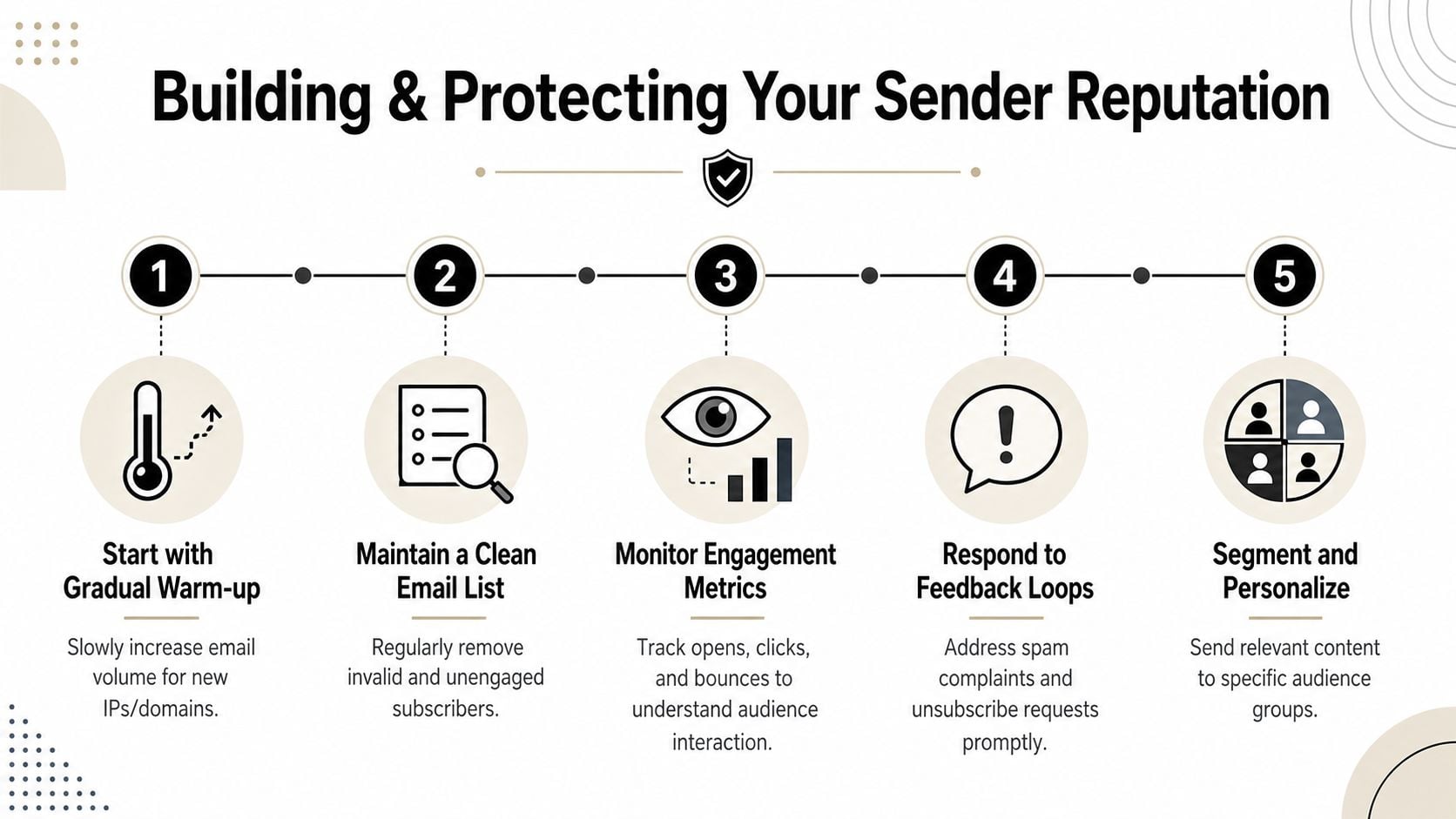
Sender reputation is the running memory mailbox providers keep about your behavior. They don't care what you intended. They care what your traffic pattern, recipient reactions, and complaint signals show over time.
Warm up like a cautious operator
New domains and new mailboxes don't get to borrow trust. They have to build it. For outbound teams, Belkins notes that a safer starting point is 10–20 emails per mailbox per day, and it also recommends splitting larger audiences into 250–300-contact segments in its guide on improving email deliverability.
That advice matters because reputation damage often comes from impatience, not volume alone. Teams connect a new mailbox, upload a large audience, and create a spike that filters instantly.
A practical warm-up pattern looks like this:
- Start small: send to the most engaged or highest-confidence recipients first.
- Hold consistency: don't send in bursts one day and disappear the next.
- Segment aggressively: isolate lists so poor performance doesn't contaminate the entire audience.
- Throttle sends: spread delivery across hours rather than compressing everything into one push.
Reputation gets built through restraint
The strongest senders are boring in the best possible way. Their volume is controlled. Their audiences are segmented. Their lists are maintained. Their unsubscribe handling is clean. Their complaints stay manageable because they don't force irrelevant mail onto weak segments.
Here's the video version of that mindset in action:
There's a simple trade-off here. Fast scaling gives you short-term reach, but it can damage the exact reputation you need for long-term inbox placement. Slow scaling feels inefficient, but it preserves trust.
A lot of deliverability failures aren't technical failures. They're governance failures. Nobody sets limits on send cadence, nobody isolates risky segments, and nobody stops a volume jump before it hurts the domain. If you need a practical breakdown of those trust signals, this guide to email sender reputation factors and deliverability maps the major ones clearly.
Crafting Content That Drives Positive Engagement
Content still affects deliverability, but not in the simplistic way it's often understood. This isn't mainly about avoiding a blacklist of words. It's about whether the right people open, click, reply, save, or ignore what you send.
Relevance beats filter-chasing
Mailbox providers increasingly interpret recipient behavior as a trust signal. That means content strategy and audience quality are inseparable. If your message reaches people who don't care, even good copy can produce weak engagement. If your segmentation is sharp and your message is timely, plain copy can outperform a polished template.
MailerLite makes the important point that deliverability is often constrained by engagement quality and mailbox-provider reputation signals, so removing inactive subscribers helps only when paired with a strategy that preserves meaningful engagement from active segments, as discussed in its article on best practices to improve email deliverability.
That changes how you should write email:
- Lead with intent clarity: recipients should immediately understand why they got the email.
- Match content to segment: a new trial user, loyal customer, and dormant subscriber should not get the same message.
- Reduce friction: one clear action beats multiple competing asks.
- Sound like a person: stiff, over-automated copy often gets ignored even when it isn't filtered.
If your team leans heavily on AI drafting, it helps to review how to craft authentic email messages so the final copy still sounds natural and audience-appropriate.
Re-engage or suppress
In this context, content strategy becomes a deliverability decision. Many teams keep mailing inactive records because they don't want to shrink the list. That's understandable, but weak segments can drag down the healthy ones if you keep forcing volume through them.
A better approach is to separate the problem into three lanes:
- Active subscribers get your core cadence and strongest offers.
- At-risk subscribers get lighter frequency and targeted relevance.
- Inactive subscribers get a re-engagement sequence, then suppression if they stay cold.
If a segment never responds, keeping it on the list isn't growth. It's reputation debt.
Subject lines matter here, but only as part of a larger engagement system. They should set expectations accurately and earn the open without sounding manipulative. For teams refining that piece, this roundup of best email subject lines for sales is helpful as a practical reference.
The goal isn't to trick inboxes. It's to create email that the right recipients consistently treat as wanted.
Monitoring Deliverability and Recovering from Issues
Deliverability gets worse subtly before it gets obvious. A campaign underperforms. Open patterns soften. Complaints rise. Inbox placement slips at one provider before the rest follow. By the time revenue drops, the problem has usually been building for weeks.
What to watch every week
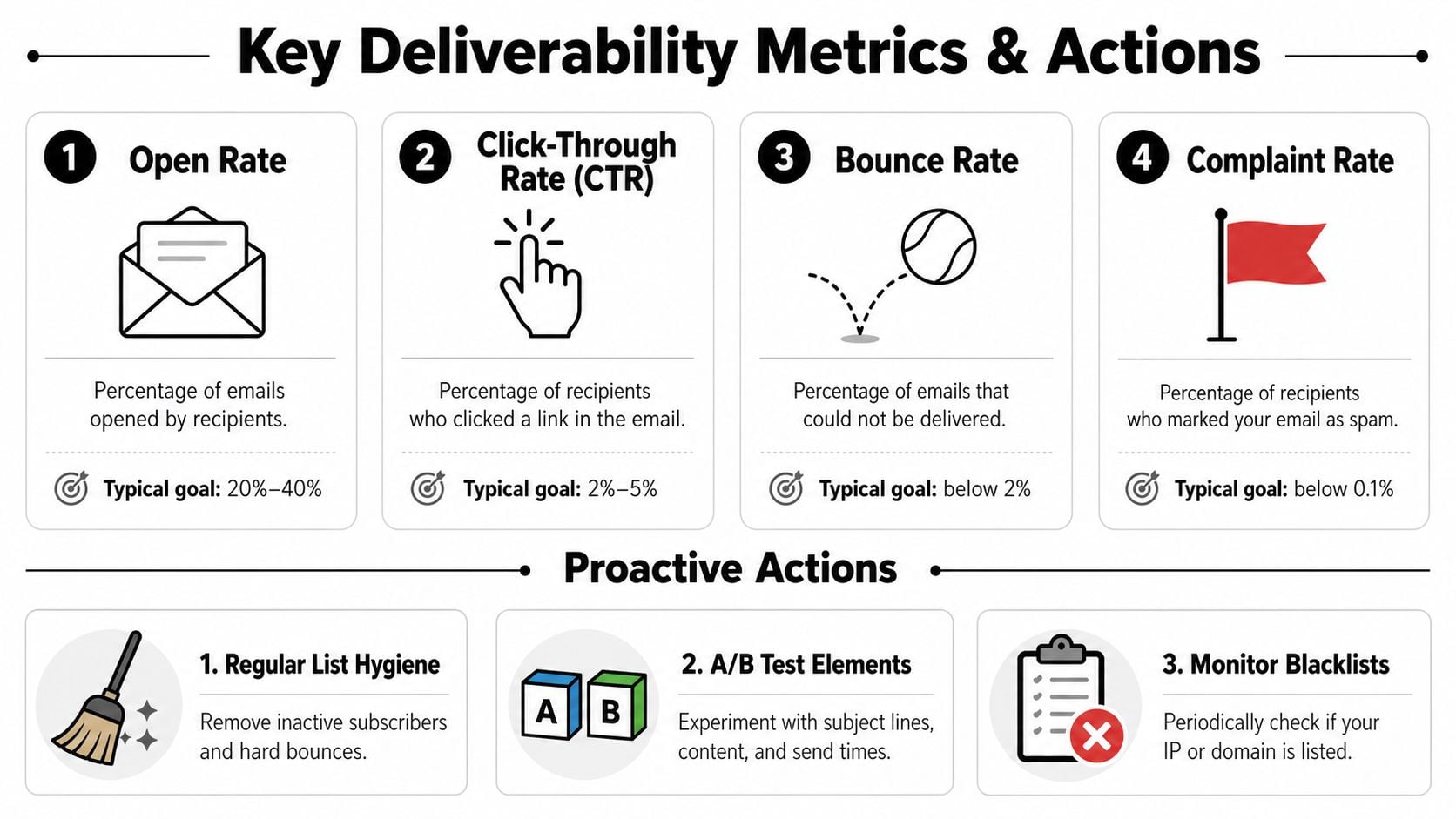
You need direct visibility from mailbox providers and campaign-level metrics from your ESP. Google Postmaster Tools and Microsoft SNDS are especially useful because they show how major providers view your sending health.
Validity notes that a widely used benchmark is at least 85% for good deliverability, 98%–99% as ideal, and below 70% as a serious warning sign in its explanation of email deliverability benchmarks. Those thresholds are useful because they force action. If your rate is slipping, you don't need more opinions. You need diagnosis.
Watch these signals together, not in isolation:
| Signal | What it may indicate |
|---|---|
| Deliverability rate | Broad inbox placement health |
| Bounce patterns | List quality or infrastructure problems |
| Spam complaints | Poor targeting, frequency, or expectation setting |
| Opens and clicks | Audience relevance and inbox visibility |
| Provider-specific issues | Reputation drift at Gmail, Microsoft, or elsewhere |
A simple recovery playbook
When performance drops suddenly, organizations often make the same mistake. They rewrite the email and send again. That's rarely the first fix.
Use this order instead:
- Check authentication first: confirm nothing changed in your sending setup, alignment, or domain configuration.
- Inspect list inputs: review recent imports, form sources, CRM syncs, and any campaign segment that introduced low-quality records.
- Reduce and isolate volume: pause broad sends, narrow to your strongest engaged audience, and stop feeding bad signals into the system.
Recovery starts by removing risk, not by increasing effort.
After that, review provider diagnostics, complaints, and recent cadence changes. If the issue appeared after a large send, a cold segment push, or a new mailbox rollout, the cause is often operational rather than creative.
This is also where teams need a written response process. Someone should know what gets paused, what gets checked, who reviews list quality, and how re-entry happens. If you need a framework for that response motion, this email deliverability troubleshooting guide is a solid starting point.
Monitoring doesn't just help you catch failures. It helps you avoid making them bigger.
Putting It All Together Your Deliverability Practice
Teams that improve email deliverability over time usually follow the same discipline. They authenticate the domain properly. They verify list quality before campaigns and at the point of capture. They warm up sending like reputation matters, because it does. They write for engagement, not tricks. And they monitor performance often enough to catch issues before the domain gets dragged down.
That's the essential playbook: authenticate, verify, warm up, engage, monitor.
Most deliverability advice gets diluted because it treats every tactic as equal. It isn't. Fix identity first. Fix data quality second. Most of the gains come from that foundation. Everything else works better once those two pieces are under control.
If bad email data keeps leaking into your CRM, forms, or outbound workflows, BillionVerify is worth evaluating as part of your deliverability stack. It's built for email verification across single checks, bulk cleaning, and real-time API workflows, which makes it useful for teams trying to stop list decay before it affects sender reputation.