



Email domain verification is the foundation of the email verification process. Before determining whether a specific mailbox exists, verification services must first confirm that the domain itself is valid and capable of receiving email. This comprehensive guide explores the technical aspects of email domain verification, from DNS lookups to MX record validation, and explains why domain-level checks are essential for maintaining healthy email lists. For foundational concepts, see our complete guide to email verification.
What Is Email Domain Verification?
Email domain verification is the process of confirming that the domain portion of an email address (the part after the @) is valid, properly configured, and capable of receiving email messages.
When you verify an email address like user@example.com, domain verification checks whether example.com:
- Exists as a registered domain
- Has proper DNS configuration
- Has MX records pointing to mail servers
- Is actively accepting email
This domain-level validation happens before any attempt to verify the specific mailbox, serving as a crucial first filter in the verification process.
Why Domain Verification Matters
Domain verification serves several critical functions:
Efficiency: Checking the domain first avoids wasting resources attempting to verify mailboxes at non-existent or misconfigured domains. If a domain doesn't exist or can't receive email, there's no point checking individual addresses.
Early Detection: Domain-level problems (expired domains, missing MX records) are easier to detect than mailbox-level issues. Domain verification catches these problems quickly and reliably.
Threat Detection: Many email threats can be identified at the domain level—known spam domains, disposable email services, and suspicious newly-registered domains.
Reduced False Negatives: Some mail servers reject individual mailbox verification attempts but domain verification still confirms the domain can receive email, reducing false negative errors.
The Technical Process of Domain Verification
Understanding how domain verification works helps you appreciate both its power and its limitations.
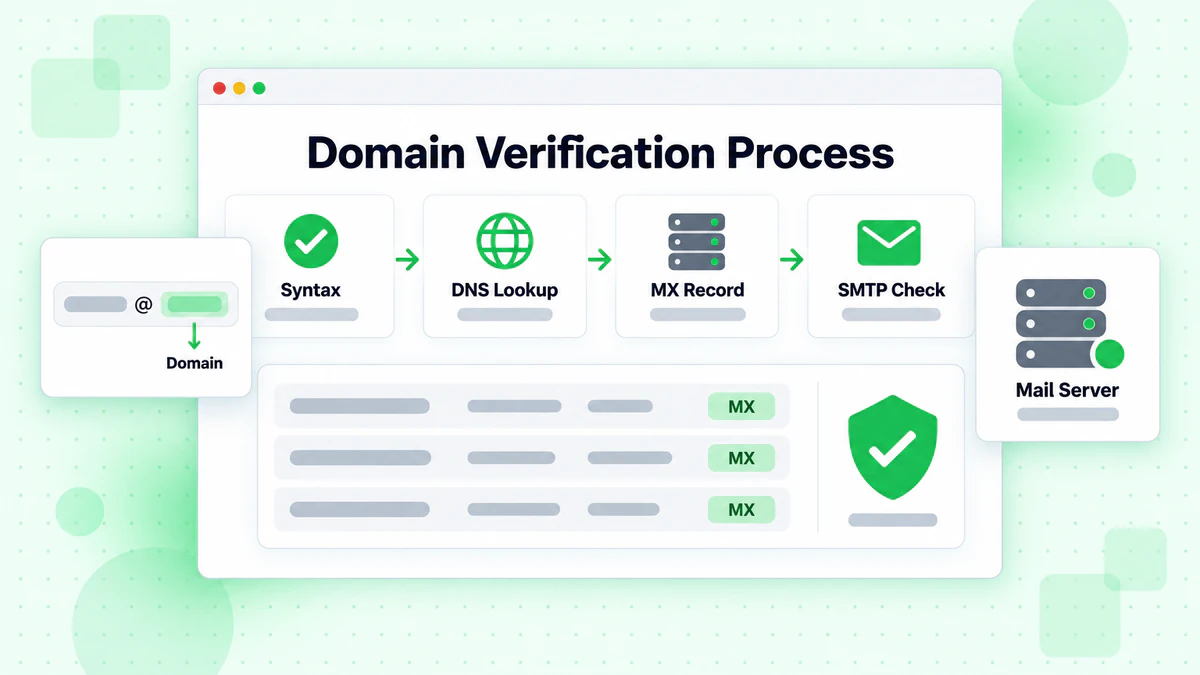
Step 1: Domain Extraction and Syntax Validation
The first step extracts the domain from the email address and validates its basic format:
Valid Domain Characteristics:
- Follows DNS naming conventions
- Contains only allowed characters (letters, numbers, hyphens)
- Proper label structure (separated by dots, no leading/trailing hyphens)
- Valid TLD (top-level domain) from recognized list
Common Syntax Issues:
- Spaces in domain name
- Invalid characters (underscores in domain, not subdomain)
- Missing or invalid TLD
- Double dots or leading/trailing dots
Most syntax errors indicate typos or intentionally fake addresses.
Step 2: DNS Lookup
Once the domain is syntactically valid, verification performs DNS lookups to confirm the domain exists and is properly configured.
A Record Check: The A record maps a domain name to an IP address. While not strictly required for email, most legitimate domains have A records for their main domain.
AAAA Record Check: Similar to A records but for IPv6 addresses. Increasingly common as IPv6 adoption grows.
NS Record Check: Name Server records indicate which servers are authoritative for the domain. Their presence confirms the domain is registered and active.
SOA Record Check: Start of Authority records contain administrative information about the domain. Missing SOA records suggest the domain may not be properly configured.
A domain that fails basic DNS lookups—no A record, no NS records, no SOA—is likely either expired, never registered, or significantly misconfigured.
Step 3: MX Record Verification
MX (Mail Exchanger) records are the most critical element for email domain verification. These records specify which mail servers handle email for the domain.
How MX Records Work:
- Each MX record contains a priority number and a mail server hostname
- Lower priority numbers indicate preferred servers
- Multiple MX records provide redundancy
- Mail servers try lower-priority MX first, then fall back to higher-priority
Example MX Record Configuration:
example.com MX 10 mail1.example.com
example.com MX 20 mail2.example.com
example.com MX 30 backupmx.example.com
In this configuration, mail1.example.com handles most email, with mail2 as backup and backupmx as a last resort.
MX Record Verification Checks:
- Do MX records exist for the domain?
- Do the MX hostnames resolve to valid IP addresses?
- Are the mail servers reachable?
- Do they respond to initial SMTP connection?
Step 4: Mail Server Connection Test
After identifying MX records, verification may attempt to connect to the mail servers to confirm they're operational.
SMTP Connection Process:
- Establish TCP connection on port 25 (or 587/465)
- Receive server greeting (220 response)
- Send EHLO/HELO command
- Observe server response
A successful connection confirms the domain's mail infrastructure is operational. Connection failures may indicate:
- Server temporarily down
- Network issues
- Firewall blocking connections
- Server misconfiguration
Understanding MX Record Verification Results
Domain verification can produce various results based on MX record status and mail server behavior.
No MX Records Found
When a domain has no MX records, email delivery follows RFC-specified fallback behavior:
RFC Fallback: If no MX records exist, mail servers attempt delivery to the A record IP address. Some domains intentionally rely on this behavior, though it's increasingly rare.
Verification Interpretation: Domains without MX records are flagged as higher risk. Email may or may not be deliverable—it depends on whether the server at the A record IP accepts SMTP connections.
MX Records Point to Non-Existent Servers
Sometimes MX records exist but the specified mail servers don't:
Causes:
- Domain migration in progress
- Configuration errors
- Intentional anti-spam measures
- Expired hosting services
Verification Result: Domain marked as unable to receive email. Any addresses at this domain would bounce.
MX Records Point to Localhost or Private IPs
Domains with MX records pointing to 127.0.0.1, 0.0.0.0, or private IP ranges cannot receive external email:
Common Patterns:
127.0.0.1- localhost, used by domains that don't want email0.0.0.0- null route, explicitly rejecting email10.x.x.x,192.168.x.x- private addresses, not routable from internet
Verification Result: Domain definitively cannot receive email from external sources. All addresses should be marked invalid.
Catch-All Domain Detection
During domain verification, services can often detect catch-all configurations:
What Is Catch-All: A domain configured to accept email for any address, even non-existent ones. Instead of rejecting unknown recipients, the server accepts all mail.
Detection Method: Send a verification request for a random, obviously non-existent address. If the server accepts it, the domain is likely catch-all configured.
Implications: Individual mailbox verification is impossible for catch-all domains. All addresses at these domains should be marked as "unverifiable" rather than "valid."
Domain-Level Threat Detection
Beyond basic deliverability, domain verification enables detection of various email threats.
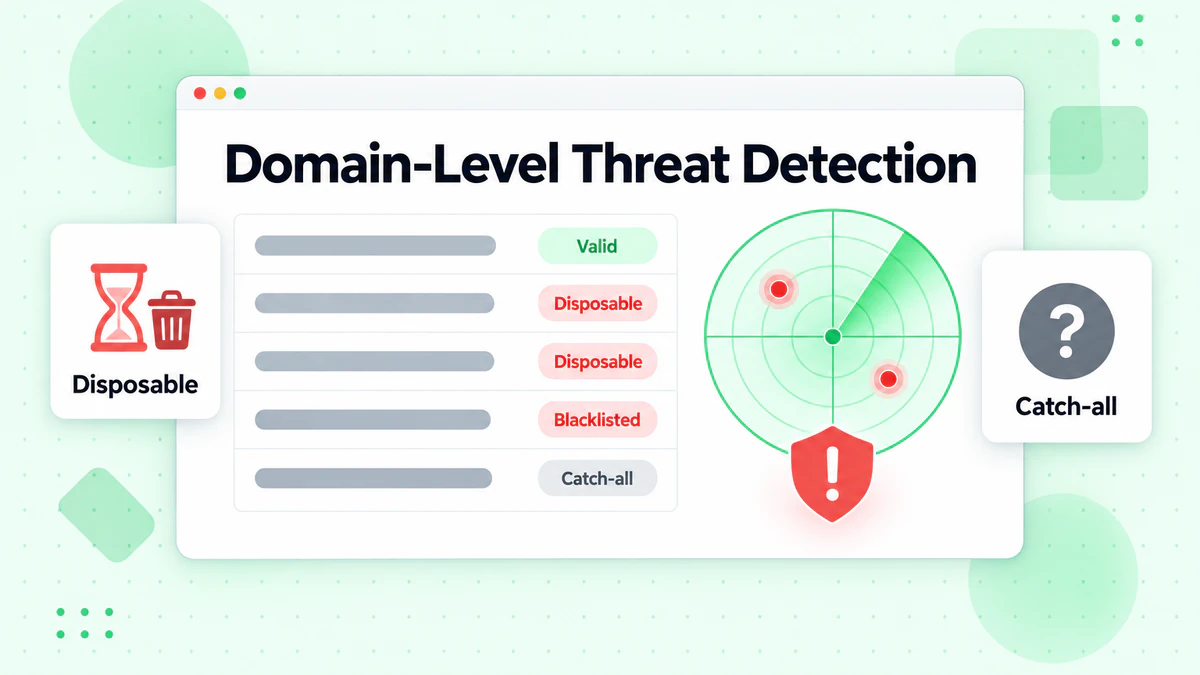
Disposable Email Domains
Disposable email services provide temporary email addresses that users create to avoid giving their real email. These addresses work briefly, then disappear.
Domain-Level Detection: BillionVerify maintains a comprehensive database of known disposable email domains. Any address at these domains is flagged immediately.
AI-Enhanced Detection: Our machine learning models identify likely disposable email domains even when they're not yet in databases—analyzing domain registration patterns, DNS configuration, and behavioral signals.
Newly Registered Domains
Domains registered within the past few weeks or months carry elevated risk:
Why New Domains Are Risky:
- Legitimate businesses rarely use brand-new domains for signups
- Fraudsters frequently register new domains for throwaway use
- Spam operations cycle through new domains to avoid blocklists
Verification Approach: Flag addresses from newly registered domains for additional scrutiny. The domain may be legitimate, but extra caution is warranted.
Parked and Inactive Domains
Some registered domains are not actively used for email:
Parked Domains: Display advertising or "for sale" pages but don't have functional email Expired Hosting: Domain is registered but hosting services have lapsed Placeholder Configuration: MX records point to placeholder or error pages
Domain verification identifies these situations, preventing bounces from addresses that look valid but can't actually receive email.
Known Spam and Phishing Domains
Threat intelligence databases track domains associated with spam, phishing, and other malicious activity:
Database Sources:
- ISP spam reports
- Security researcher findings
- Industry blocklists
- Automated honeypot detection
Verification Application: Addresses at known bad domains are flagged regardless of technical deliverability. You don't want these addresses in your list even if they could receive email.
Domain Verification for Different Email Providers
Major email providers handle domain verification differently, requiring specialized approaches.
Gmail and Google Workspace
Google operates one of the largest email infrastructures in the world:
MX Pattern: Gmail.com uses Google's standard MX servers (gmail-smtp-in.l.google.com and alternates) Verification Considerations:
- Individual mailbox verification is limited due to Google's anti-spam measures
- Domain verification confirms the address is at Gmail infrastructure
- Role-based addresses (@gmail.com) require additional validation
Microsoft 365 and Outlook.com
Microsoft's email platforms show distinct patterns:
MX Pattern: Usually *.mail.protection.outlook.com for Microsoft 365 Verification Considerations:
- Similar to Gmail in limiting mailbox verification
- Microsoft 365 custom domains show Microsoft MX infrastructure
- Consumer Outlook.com has different characteristics than business Microsoft 365
Yahoo and Other Providers
Different providers have different configurations:
Yahoo: Uses Yahoo's MX infrastructure, with some verification limitations ProtonMail: Privacy-focused provider with specific MX patterns iCloud: Apple's email service with distinctive configuration
Understanding provider-specific patterns helps verification services apply appropriate logic.
Implementing Domain Verification
Whether using an API or building internal tools, here's what effective domain verification involves.
Essential Checks
At minimum, domain verification should include:
- Syntax validation: Confirm domain follows DNS naming rules
- DNS existence check: Verify domain is registered and resolving
- MX record lookup: Check for mail exchanger records
- MX resolution: Confirm MX hostnames resolve to IPs
- Basic connectivity: Verify mail servers are reachable
Enhanced Verification
More sophisticated verification adds:
- Catch-all detection: Identify domains accepting all mail
- Disposable domain check: Flag temporary email services
- Domain age analysis: Evaluate newly registered domains
- Threat database check: Match against known bad domains
- Provider identification: Recognize major email providers
Using BillionVerify for Domain Verification
BillionVerify's API provides comprehensive domain verification as part of our email verification process:
const response = await fetch('https://api.billionverify.com/v1/verify', {
  method: 'POST',
  headers: {
    'Authorization': 'Bearer YOUR_API_KEY',
    'Content-Type': 'application/json'
  },
  body: JSON.stringify({ email: 'user@example.com' })
});

const result = await response.json();
// Result includes domain-level information:
// - domain: "example.com"
// - domain_status: "valid" | "invalid" | "disposable"
// - mx_found: true | false
// - catch_all: true | false
Our verification performs all domain checks automatically, providing detailed results about domain status alongside mailbox verification.
Common Domain Verification Challenges
Domain verification faces several technical challenges that affect accuracy.
DNS Propagation Delays
When domains change their MX records, changes don't propagate instantly:
Challenge: Recently changed domains may show old or inconsistent MX records depending on DNS resolver caching.
Mitigation: BillionVerify uses multiple DNS resolvers and checks for consistency. We also maintain our own DNS infrastructure with aggressive cache management.
Geographic DNS Variations
Some domains use GeoDNS to return different results based on requester location:
Challenge: MX records may differ by region, affecting verification results.
Mitigation: Our global infrastructure performs verification from multiple regions, identifying geographic variations.
Temporary DNS Failures
DNS infrastructure occasionally experiences temporary issues:
Challenge: Failed DNS lookup might indicate a real problem or a temporary glitch.
Mitigation: Intelligent retry logic and multiple lookup sources distinguish temporary failures from actual domain problems.
Anti-Verification Measures
Some domains implement measures to prevent or limit verification:
Techniques:
- Rate limiting DNS queries
- Blocking known verification service IPs
- Returning misleading SMTP responses
- Random failures for non-human requests
Mitigation: BillionVerify uses sophisticated techniques to handle anti-verification measures while respecting service terms.
Best Practices for Domain Verification
Maximize the value of domain verification with these practices.
Verify Domains Before Full Verification
For large lists, pre-screen by domain to improve efficiency:
- Extract unique domains from your email list
- Verify each domain once
- Immediately flag all addresses at invalid domains
- Proceed with full verification only for addresses at valid domains
This approach is faster and more cost-effective for lists with many addresses per domain.
Monitor Domain Changes
Domains you've verified can change status:
Regular Re-Verification: Domains can expire, change configuration, or become compromised. Regular verification catches these changes.
Watch for Patterns: If many addresses at a previously-valid domain start bouncing, investigate the domain's current status.
Understand Domain Quality Tiers
Not all valid domains are equally valuable:
Tier 1 - Major Providers: Gmail, Outlook, Yahoo—highest deliverability confidence Tier 2 - Business Domains: Established company domains with good reputation Tier 3 - Personal Domains: Individual domains, more variable quality Tier 4 - New/Unknown Domains: Recently registered or unfamiliar domains
Consider treating different tiers differently in your engagement strategy.
Handle Catch-All Domains Appropriately
Catch-all domains cannot be definitively verified at the mailbox level:
Options:
- Accept catch-all addresses but monitor bounce rates
- Flag for reduced sending frequency
- Require additional confirmation for high-value signups
- Reject for particularly sensitive applications
The right approach depends on your specific use case and risk tolerance.
The Future of Domain Verification
Email domain verification continues to evolve with changing email infrastructure.
DMARC, DKIM, and SPF Integration
Email authentication standards provide additional domain intelligence:
DMARC: Domain-based Message Authentication reveals how the domain owner wants failed authentication handled DKIM: DomainKeys Identified Mail configuration indicates email signing practices SPF: Sender Policy Framework shows authorized sending servers
Future verification may incorporate these signals for enhanced domain assessment.
DNS Over HTTPS (DoH)
DNS privacy technologies affect how verification services access DNS information:
Impact: DoH may change how verification services perform lookups Opportunity: More secure, authenticated DNS information may improve accuracy
Machine Learning Domain Analysis
AI increasingly contributes to domain assessment:
Applications:
- Predicting domain risk based on registration patterns
- Identifying fraudulent domains before blocklist inclusion
- Detecting coordinated domain abuse campaigns
- Improving catch-all detection accuracy
Conclusion
Email domain verification is a crucial first step in the email verification process. By confirming that domains are valid, properly configured, and capable of receiving email, domain verification efficiently filters out addresses that would definitely fail while identifying potential threats at the domain level.
Understanding how domain verification works—from DNS lookups to MX record analysis to threat detection—helps you appreciate both its capabilities and its limitations. Combined with mailbox-level verification, comprehensive domain checks ensure the highest possible accuracy for your email verification needs.
BillionVerify performs thorough domain verification as part of every email verification request. Our global DNS infrastructure, comprehensive threat databases, and intelligent handling of edge cases ensure accurate domain assessment for every address you verify. For help choosing the right solution, see our best email verification service comparison.
Start verifying with BillionVerify today—100+ free daily credits, no credit card required.
Frequently Asked Questions
What's the difference between domain verification and email verification?
Domain verification confirms that the domain portion of an email address (after the @) is valid and can receive email. Email verification goes further, confirming that the specific mailbox (before the @) exists at that domain. Domain verification is typically the first step of full email verification.
Why do some valid domains fail verification?
Valid domains may fail verification due to temporary DNS issues, mail server maintenance, or anti-verification measures. If verification fails for a domain you know is valid, try again later. Persistent failures suggest actual configuration problems.
How do MX records affect email deliverability?
MX records specify which servers handle email for a domain. Without MX records (or valid fallback A records), email cannot be delivered to the domain. Misconfigured MX records—pointing to non-existent or unreachable servers—also prevent delivery.
Can I verify email addresses at catch-all domains?
Catch-all domains accept email for any address, making it impossible to verify whether specific mailboxes exist. BillionVerify identifies catch-all domains and marks addresses appropriately, letting you decide how to handle them based on your risk tolerance.
How often do domains change their email configuration?
Most domains maintain stable email configuration, but changes occur during migrations, hosting changes, or administrative updates. Regular verification catches domains where configuration has changed. For critical lists, quarterly verification is recommended.
What domains should I be most careful about?
Newly registered domains, domains at disposable email services, and domains with unusual configuration deserve extra scrutiny. BillionVerify flags these automatically, helping you make informed decisions about which addresses to accept.