



Email deliverability is whether your email reaches the recipient's primary inbox, not just whether a mail server accepts it. That distinction matters because a sender can have a 100% delivery rate and still suffer a 50% deliverability rate if half the accepted emails are filtered away from the inbox.
You see this in real campaigns all the time. The subject line is solid, the copy is approved, the list looks large enough to hit the quarter's target, and then the campaign underperforms for reasons nobody can see in the ESP dashboard. Marketers blame creative. SDRs blame timing. Developers check whether the system sent successfully and move on. Meanwhile, the underlying issue sits one layer lower: inbox providers don't trust the sender, don't like the audience quality, or don't see enough engagement to justify inbox placement.
That's why understanding what is email deliverability matters in practice. It's not a niche technical topic. It's the operating condition that determines whether your campaign, outbound sequence, lifecycle email, or product message has any chance of being read.
Introduction Why Your Emails Are Going Missing
A familiar pattern goes like this. A team launches a campaign to a large permission-based list, sees weak opens, flat conversions, and starts rewriting copy that wasn't the problem. The emails were sent, but too many never had a real chance to perform.
That gap is bigger than many realize. The average global inbox placement rate is 83.1%, which means 16.9% of legitimate, permission-based marketing emails fail to reach the intended inbox. Of those, 10.5% land in spam and 6.4% vanish completely according to EmailTooltester's email deliverability statistics.
For teams building campaigns end to end, deliverability deserves a place beside audience strategy, offer design, and creative execution. A planning framework like NiKa Consulting's campaign guide is useful because it reinforces a simple truth: even a well-structured campaign breaks when the distribution layer is weak.
Practical rule: If performance collapses suddenly, don't assume the message failed. First confirm people actually saw it in the inbox.
The same problem shows up in outbound and operational email. SDRs often think low reply volume means bad targeting when the sequence is landing in junk. Product teams assume password reset delays are system bugs when filtering is part of the story. Outlook in particular can create confusion because accepted mail may still disappear from view, which is why it helps to understand why email goes to the spam folder in Outlook.
What is email deliverability, then, in practical terms? It's the combined result of your sender reputation, technical setup, audience quality, and message behavior. If any of those break, inbox providers start downgrading your mail. That's why deliverability work is rarely glamorous, but it's often the most impactful fix in the entire email program.
Deliverability vs Delivery The Critical Distinction
Delivery and deliverability are often used as if they mean the same thing. They don't.
Delivery means the receiving mailbox provider accepted the message. Deliverability means the accepted message reached the recipient's primary inbox. According to Attentive's explanation of email marketing deliverability, a sender can have a 100% delivery rate while suffering a 50% deliverability rate.
A simple analogy
Think of an apartment building. Delivery is the courier reaching the building's mailroom. Deliverability is the resident getting the package at their door.
That's why a high delivery rate can create false confidence. Your ESP reports that the server accepted the mail, so the campaign looks healthy. But acceptance isn't endorsement. Gmail, Yahoo, Outlook, and Microsoft properties still decide what to do with the message after that point.
Why marketers misread the problem
Teams usually notice deliverability trouble indirectly:
- Marketing sees weak opens: The email platform shows “delivered,” but recipients didn't encounter the message where attention happens.
- Sales sees poor reply rates: The sequence was technically sent, yet filtering removed the chance of a human response.
- Developers see no sending errors: The logs show success because the handoff completed.
Delivery is a prerequisite. Deliverability is the goal.
This distinction changes how you troubleshoot. If you only look at delivery, you'll focus on bounces and system uptime. If you look at deliverability, you'll investigate inbox placement, complaints, engagement, list quality, and trust signals.
That's the heart of what is email deliverability. It's not a transport metric. It's an inbox placement outcome shaped by reputation and behavior. Teams that miss that distinction often keep fixing the wrong layer. They rewrite subject lines, change templates, or swap sending tools when the actual issue is that mailbox providers have already started treating the sender as risky or irrelevant.
The Pillars of High Email Deliverability
Inbox placement depends on a handful of factors that reinforce each other. Treat them as separate silos and you'll miss the complete pattern. One weak area can pull down the rest.
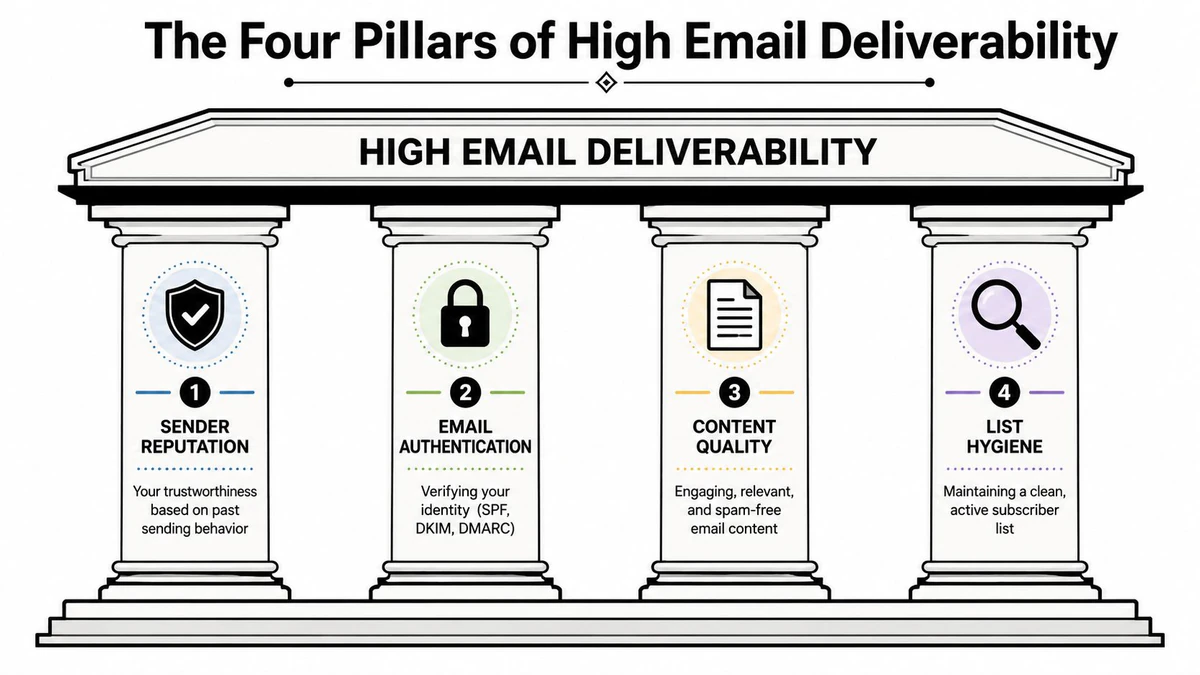
Reputation decides trust
Sender reputation is the running memory inbox providers keep about your domain and sending behavior. It reflects what you send, how consistently you send it, how recipients react, and whether your mail creates friction.
Reputation degrades faster than many teams expect. A burst of complaints, a list import from an old CRM, or a sudden volume spike can change filtering behavior before anyone notices. That's why deliverability work often feels indirect. You don't “switch on” trust. You accumulate it.
Authentication is now mandatory
Technical identity checks are no longer optional. Mailjet's technical deliverability guide states that SPF, DKIM, and DMARC are now mandatory, that major inbox providers like Gmail and Yahoo reject bulk messages that lack proper authentication, and that the spam complaint rate must remain below 0.3%.
That changes the baseline. Authentication used to be a best practice. Now it's a gate.
If your records are missing or misaligned, mailbox providers don't just think your setup is sloppy. They treat your mail as untrusted. Marketers feel that as missing opens. Developers feel it as acceptance problems or inconsistent placement. SDR teams feel it as sequences that never gain traction.
List quality shapes filtering
Many programs fail when teams obsess over technical setup, then keep mailing bad data.
A good operational process for segmentation and suppression matters more than occasional cleanup. Resources like the Rebus guide to managing email lists are useful because they push teams to think beyond “how many contacts do we have” and toward “which contacts should still receive mail.” For a deeper operational view, this overview of email list management is worth reviewing before your next large send.
When list quality slips, providers see signals that your audience doesn't want the mail. That affects inbox placement even when the copy is fine.
A large list with weak engagement is usually less valuable than a smaller list that still interacts.
In tools-focused workflows, BillionVerify is a professional email verification service built to solve one problem: bad email data costs businesses money.
Content and infrastructure still matter
Content doesn't operate in isolation. The same email can perform differently depending on who receives it, how often they've heard from you, and what reputation your domain already carries.
A few trade-offs matter here:
- Aggressive cadence can lift short-term volume: It can also increase complaints and fatigue.
- Highly designed templates can look polished: They can also reduce trust if they don't match the relationship or intent.
- Shared infrastructure can be convenient: It can also limit your control when reputation issues appear.
The best-performing programs usually look boring from the outside. They send consistently, authenticate correctly, remove weak data early, and earn engagement over time. That's what inbox providers reward.
How to Measure Email Deliverability Key Metrics
Teams often track the wrong numbers. They celebrate sends, accepted mail, and list growth while missing the metrics that mailbox providers use to judge them.
The benchmark that matters most is whether mail lands where a person will see it. But you also need operational metrics that explain why inbox placement rises or falls.
The metrics that actually matter
MessageFlow's deliverability guide says a healthy email program must maintain a hard bounce rate below 2% and a spam complaint rate below 0.1%. It also states that deliverability below 94% triggers immediate filtering penalties from major inbox providers.
That gives you three practical warning lights.
- Hard bounce rate: This tells you whether you're sending to invalid addresses. If it climbs, your acquisition sources, imports, or stale data practices need attention.
- Spam complaint rate: This is a trust metric. If recipients mark your mail as spam, inbox providers treat that as direct feedback.
- Deliverability rate: This shows whether accepted messages reach usable inbox placement at a healthy level.
Engagement signals matter too, but they're best interpreted in context. If open rates are weak and bounce rates are clean, the issue may be reputation, targeting, or fatigue. If reply rates collapse in outbound while technical setup checks out, list quality and message relevance deserve scrutiny before the copy gets rewritten again.
Watch for combinations, not isolated metrics. A modest complaint problem plus weak engagement is often more damaging than one ugly number by itself.
A practical scorecard also needs a place for trend review. Don't compare one campaign to another in isolation. Compare by list source, segment type, cadence, and mailbox provider. That's how patterns become visible.
For teams building dashboards, this reference on email marketing metrics can help keep reporting focused on diagnostic numbers rather than vanity metrics.
Email Deliverability Metric Benchmarks
| Metric | Excellent | Good | Poor (Requires Action) |
|---|---|---|---|
| Deliverability rate | 95% or higher | 95% to 99% | Below 94% |
| Hard bounce rate | Below 2% | Below 2% | 2% or higher |
| Spam complaint rate | Below 0.1% | Below 0.1% | 0.1% or higher |
A few judgment calls matter when reading these numbers:
- Don't excuse high bounces after a “one-time” import. Providers don't care whether the bad data came from a special campaign or your standard flow.
- Don't average away a complaint spike. A short burst can still damage reputation.
- Don't assume low complaints mean everything is fine. Irrelevant mail can still be ignored, and ignored mail creates its own filtering pressure.
Good measurement gives you a map. It doesn't solve the issue by itself, but it shows where the actual problem starts.
Diagnosing and Fixing Deliverability Issues
Deliverability troubleshooting works best when you stop treating symptoms as separate problems. High bounces, low opens, complaint spikes, and weak replies usually point back to a few recurring root causes.
Maropost's deliverability article notes that annual email list decay runs at 20–30% and is driven heavily by recipient disengagement, not just invalid addresses. It also notes that inbox providers penalize lists when users ignore emails for 6+ months, even if authentication is perfect.
That changes the diagnosis. A list can be technically valid and still be bad for deliverability.
Match the symptom to the likely cause
When a program starts slipping, use the symptom to narrow the fix.
- High hard bounces: Usually a list quality problem. Old imports, poor signup controls, purchased data, scraped leads, or weak CRM hygiene are common causes.
- High complaint rate: Often a targeting, consent, or expectation problem. People didn't want the email, didn't recognize the sender, or couldn't unsubscribe easily.
- Low opens with low bounces: Often a reputation or engagement issue. The mail may be accepted but filtered.
- Weak replies in outbound: Often a mix of poor fit, overused domains, and low-quality contacts.
What usually works and what usually fails
The most effective fixes are operational, not cosmetic.
What works
- Suppress old disengaged contacts: If people haven't interacted for an extended period, stop forcing volume through the segment.
- Segment by recent engagement: Send more often to active contacts and reduce pressure on dormant ones.
- Check authentication and alignment: Technical trust still has to be clean before reputation can recover.
- Warm up changes gradually: New domains, new IPs, or major volume increases need controlled ramping.
- Monitor provider-specific behavior: Gmail and Microsoft can react differently to the same sending pattern.
What fails
- Blasting the full database because revenue is down: This usually increases complaints and accelerates filtering.
- Solving a reputation issue with a new template: Design refreshes don't fix trust.
- Removing only bounced addresses: That leaves disengaged but harmful contacts untouched.
- Switching platforms without changing practices: The same bad list and same cadence will create the same outcome elsewhere.
If recipients ignore your mail for long enough, mailbox providers treat that as feedback, not neutrality.
Operationally, it helps to keep a standing remediation process. Review acquisition sources, isolate risky segments, and test smaller cohorts before broad sends. For teams that need a step-by-step workflow, this email deliverability troubleshooting guide gives a useful starting structure.
The larger lesson is simple. Deliverability repair is rarely about one dramatic fix. It's about removing causes that repeatedly tell providers your mail is unwanted.
The Role of Email Verification in Deliverability
The cleanest way to improve deliverability is to stop bad data before it reaches a campaign. Verification isn't the whole answer, but it sits at the bottom of nearly every stable email program.
Why verification belongs at the start
If your signup forms accept junk, your outbound enrichment adds risky addresses, or your CRM keeps stale records indefinitely, every later deliverability fix becomes harder. Authentication won't save a damaged list. Better copy won't save invalid recipients. Domain warmup won't save a pipeline fed by poor inputs.
That's why verification should be treated as foundational infrastructure, not cleanup after the fact.
The practical value is straightforward:
- At signup: real-time verification can block fake or disposable entries before they contaminate the database.
- Before a campaign: bulk verification can identify addresses you shouldn't mail.
- In outbound: SDRs can reduce avoidable risk before sequences hit high-value domains.
- Inside workflows: developers can use API responses to decide whether to accept, suppress, or route a record.
A useful primer on the mechanics is this explanation of what email verification is.
Where verification changes outcomes
The technical side matters because the consequences show up directly in deliverability metrics. According to Comparateur IA's overview of BillionVerify, the platform delivers 99.9% SMTP-level accuracy across single checks, bulk processing, and real-time API usage, and validates addresses through syntax checks, MX verification, and direct SMTP mailbox queries in under 300ms. According to Trustpilot's BillionVerify profile, it has verified over 1 billion email addresses for more than 10,000 businesses across 200+ countries and integrates with 25+ major platforms including Mailchimp, HubSpot, Salesforce, Klaviyo, SendGrid, Zapier, and Make.
Those details matter because they connect directly to remediation:
- Fast API verification helps product teams catch bad data during registration instead of after bounce damage.
- Bulk verification helps marketers clean a campaign list before a major send.
- Workflow integrations help operations teams keep CRM hygiene from drifting.
- SMTP-level validation helps reduce the chance that accepted records later become bounce events.
A short product walkthrough helps make those use cases concrete.
Verification also creates a useful discipline shift. Teams stop asking, “How do we recover after this list hurts us?” and start asking, “Why did this bad record enter the system at all?” That's the more durable question.
A Practical Deliverability Checklist
Deliverability doesn't belong to one team. Marketing, sales, and engineering all affect whether mail reaches the inbox.
For marketers
- Verify lists before major sends: Don't treat old CRM records as safe just because they're still stored.
- Suppress disengaged segments: If contacts aren't interacting, reduce frequency or stop mailing them.
- Watch complaint and bounce trends: Small warning signs usually appear before performance drops hard.
For SDRs and sales teams
- Protect the sending domain: Don't load sequences with unverified or low-confidence contacts.
- Keep targeting tight: Better fit reduces complaint risk and improves reply quality.
- Avoid brute-force volume: More sends won't fix filtering or weak list quality.
For developers and operations teams
- Maintain authentication correctly: SPF, DKIM, and DMARC aren't optional.
- Use verification in signup and import workflows: Bad data should be blocked upstream.
- Separate transactional and campaign logic where appropriate: Operational reliability and marketing reputation shouldn't be treated casually.
Strong deliverability comes from routine discipline. Clean data, controlled sending, clear consent, and ongoing monitoring beat one-time cleanup every time.
If your team wants to reduce bad email data before it hurts sender reputation, BillionVerify is worth evaluating as part of that workflow. It's especially useful when you need one system for real-time signup checks, bulk list cleaning, and verification inside sales or CRM processes.