


Most email list advice starts in the wrong place. It tells you to grow faster, collect more addresses, and worry about cleanup later. That approach fails because email list management isn't a janitorial task you run once a quarter. It's a revenue control system that decides whether marketing reaches buyers, whether sales sequences hit real inboxes, and whether product signups become usable customer records.
A bigger list can be worse than a smaller one if the data is weak. In a projected 2026 email environment with 4.73 billion users, 376.4 billion emails sent and received daily, and over 3.13 million emails every second according to Porch Group Media's email statistics roundup, bad data poses problems. It hurts deliverability, wastes spend, and trains mailbox providers to distrust your mail.
The teams that handle this well don't treat list health as marketing's problem alone. They build one hygiene strategy across signup forms, CRM imports, outbound prospecting, lifecycle campaigns, and re-engagement flows. That means acquisition standards, validation rules, segmentation logic, and compliance checks all work together from first capture to closed deal.
Why Your Email List Is Your Most Valuable Asset
The highest-performing email programs rarely have the biggest lists. They have the cleanest records, the clearest consent, and the fewest points where bad data can slip in.
That distinction affects more than marketing. An email list is shared revenue infrastructure. Marketing uses it to drive pipeline and retention. Sales depends on it for accurate contact records and follow-up. Developers control the forms, API checks, and sync logic that decide whether a typo, fake signup, or stale address enters the database and spreads across tools.
A healthy list protects three business assets at once:
- Revenue because reachable, interested contacts are more likely to buy than inactive or invalid records
- Brand trust because irrelevant or mistimed outreach trains people to ignore future campaigns
- Sender reputation because mailbox providers judge your domain by the behavior and quality of the recipients you mail
Practical rule: If a contact record is not reliable enough for sales to work or product to store, marketing should not send to it at scale.
I have seen the same failure pattern across teams. Marketing focuses on list growth, sales imports prospect data from multiple sources, and engineering treats email validation as a front-end formatting check instead of a data quality control. The result is predictable. One bad record gets copied into the CRM, the marketing platform, support tools, and billing systems. Then every team inherits the same problem in a different form.
Good list management fixes that upstream. The job is not just cleaning a database once a quarter. The job is stopping decay at every touchpoint, from signup form to CRM enrichment to outbound sequencing to post-purchase messaging.
Four operating disciplines determine whether that happens:
| Pillar | What it controls | What happens if you ignore it |
|---|---|---|
| Acquisition | How addresses enter your systems | Fake, mistyped, and low-intent signups pile up |
| Hygiene | Whether records stay usable over time | Bounces, traps, and dead segments spread |
| Segmentation | Whether messages match user intent | Generic campaigns drag down engagement |
| Compliance | Whether permission remains usable and defensible | Risk rises even when data looks "valid" |
The same principle applies outside standard lifecycle campaigns. The playbook behind email marketing for Kickstarter campaigns shows how quality audiences outperform sprayed outreach. Launch lists are especially unforgiving. If interest is weak or data quality is poor, the window to convert closes fast.
Growth still matters. But growth without control creates expensive noise. Teams that want a stronger acquisition engine should start with a quality-first approach to how to build an email list, then enforce the same standards across forms, imports, and sales workflows so one clean record stays clean everywhere.
How List Quality Directly Impacts Your Bottom Line
List growth gets too much credit. Revenue comes from records you can reach, trust, segment, and convert. A larger database with bad inputs usually lowers returns because marketing, sales, and ops all spend money and time on contacts that never had a real chance to buy.
Deliverability affects every campaign
Inbox placement starts long before the send. It starts at the form, the CRM sync, the enrichment job, the sales import, and the checkout flow. If marketing collects weak records, sales keeps mailing stale ones, and developers pass every input downstream without validation, sender reputation takes the hit.
Analysts at Dyspatch's email marketing statistics roundup found average email open rates around 21% and average click-through rates around 2.3%, while welcome emails average 68.59% opens. That gap reflects more than copy or timing. It reflects intent, recency, and list condition.
Poor data rarely fails loudly. Some messages bounce. Others reach spam or low-visibility tabs. Some get delivered but ignored because the contact was never a good fit or no longer uses that inbox.
Good creative cannot fix bad audience data.
Bad records create direct costs
The finance impact is easy to miss because it gets spread across teams. Marketing automation platforms charge for stored contacts and sends. SDRs spend sequence volume on dead addresses. Revenue ops inherits duplicate, stale, and conflicting records that break routing, scoring, attribution, and reporting.
That cost grows with every system that syncs the same bad record. One typo at signup can become a bad lead in the CRM, a bounced prospect in sales engagement, a failed audience match in ads, and a distorted conversion report in BI. A unified hygiene process prevents that chain reaction. Validation has to happen at entry, on sync, and before send.
A few examples show where the money goes:
- Marketing waste: invalid and inactive contacts inflate platform costs and depress engagement rates
- Sales waste: reps work accounts with unreachable buyers, false positives, or recycled addresses
- Ops waste: duplicate and stale records weaken scoring models, routing rules, and forecast accuracy
- Dev waste: teams spend time patching sync errors that started as preventable input quality problems
That is why list hygiene belongs to the whole revenue team, not just email marketing. This overview of why data cleaning is important is a useful primer because the same data quality rules affect every downstream workflow.
Clean lists convert better
Higher conversion rates usually come from sending fewer emails to better segments. Personalized emails are 6 times more likely to drive conversions, and 78% of marketers use segmentation as a campaign strategy, according to the same Dyspatch roundup cited earlier. The operational lesson is simple. Verified data lets teams target by intent instead of blasting everyone in the database.
The strongest programs share one habit. Marketing, sales, and engineering use the same record standards across forms, imports, enrichment, outbound, and lifecycle sends. That keeps one contact from changing shape every time it moves between tools.
Useful segments do not need to be complicated:
- New subscribers who need onboarding and expectation setting
- Sales-qualified leads who need fast, relevant follow-up
- Current customers who should receive product, expansion, or retention messaging
- Aging or risky records that should be reverified, suppressed, or removed
Subject lines still influence performance, especially for outbound teams. But better copy is a multiplier, not a rescue plan. Teams working on outbound can improve results with these email subject line strategies for sales professionals, but list quality has to come first or the gains stay small.
The Four Essential List Management Processes
Email list management works when teams treat it as a loop, not a cleanup event. You acquire records, validate them, segment them, monitor engagement, and revisit consent. Then you repeat.
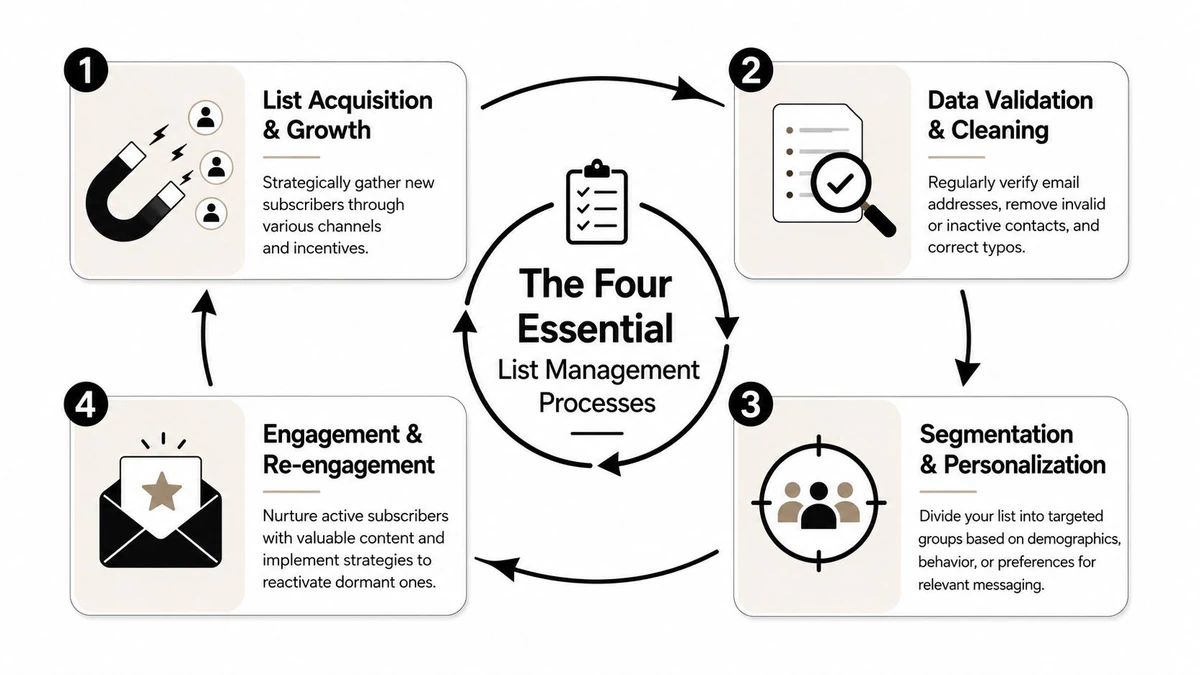
Quality acquisition
The first win is simple. Stop letting bad records enter your systems so easily.
Every signup form, lead magnet, checkout opt-in, webinar registration, and CRM import needs rules. Not heavy friction, just enough control to filter obvious junk and accidental errors before they spread. Teams usually lose list quality at the edges, where forms connect to multiple tools and nobody owns validation.
What works:
- Clear consent language so subscribers know what they're joining
- Intent-based capture where the content or offer matches the follow-up
- Form-level validation to catch errors before the record is written
- Source tracking so you know where weak records come from
What doesn't work is collecting addresses from every possible touchpoint and assuming downstream cleanup will solve the problem. It won't. Once bad data enters marketing automation, CRM, support tools, and analytics, every sync multiplies the mess.
Proactive list hygiene
List hygiene is ongoing maintenance, not a campaign-day ritual. Teams that only clean lists right before a launch usually discover problems too late.
Good hygiene means reviewing imported data, suppressing obviously unusable contacts, handling bounce-related issues quickly, and checking dormant segments before they become deliverability risks. It also means paying attention to role-based, disposable, and suspicious records that often slip through ordinary form checks.
A practical operating model looks like this:
- Verify on entry at the form or capture point.
- Review before send when importing lists or syncing external data.
- Monitor after campaigns so problem clusters get suppressed fast.
- Re-check dormant records before re-engagement or seasonal reactivation.
The cheapest bad record to fix is the one you never let into the database.
For teams that need a deeper operational checklist, an email list cleaning service guide is useful because it frames hygiene as a repeatable process rather than a one-time sweep.
Strategic segmentation
Segmentation is where list quality turns into business value. A verified database without segmentation is still blunt. You may reach the inbox, but the message can still miss the moment.
Useful segments often cut across departments, not just campaigns. Marketing cares about lifecycle stage. Sales cares about contact quality and buying readiness. Success teams care about product usage and retention signals.
A practical segmentation model might include:
| Segment | Trigger | Typical action |
|---|---|---|
| New and verified | Recent signup or import | Welcome or onboarding sequence |
| Highly engaged | Consistent opens, clicks, or replies | Priority offers or upsell motion |
| At-risk | Falling engagement or stale activity | Re-engagement sequence |
| Questionable data | Suspect quality or uncertain status | Verification, suppression, or manual review |
The key is consistency. If each team invents its own status labels and suppression rules, the same contact gets treated three different ways.
Ongoing compliance
Compliance is easy to oversimplify. Teams often reduce it to "don't send without consent" and stop there. In real operations, consent has context. Source matters. Age of record matters. Use case matters. Proof matters.
A sound compliance routine usually includes documented source capture, clear preference handling, suppression discipline, and special caution around older records or legacy imports. This isn't just legal housekeeping. It's also reputation management. Subscribers who don't remember you behave like cold contacts even if the record is technically still in your database.
When compliance and hygiene live in the same workflow, teams make better decisions. They don't just ask whether an email address is syntactically valid. They ask whether it's appropriate and safe to use now.
How to Automate List Hygiene with an API
Manual list cleaning works for very small databases and breaks fast after that. The moment your company has multiple forms, lead sources, CRM imports, outbound tools, and product-generated contacts, a spreadsheet-based process becomes reactive. Bad records enter first. The team scrambles later.
Manual cleaning breaks at scale
The biggest issue with manual hygiene isn't effort. It's timing.
If marketing uploads a CSV after a webinar, sales imports a prospect list from a data provider, and product accepts registrations directly from a signup form, then the database starts decaying at three different entry points. Cleaning once later doesn't prevent the original damage. Some campaigns have already gone out. Some reps have already sequenced bad contacts. Some automations have already fired.
That is why API-based verification matters. It turns hygiene into a gate, not a repair job.
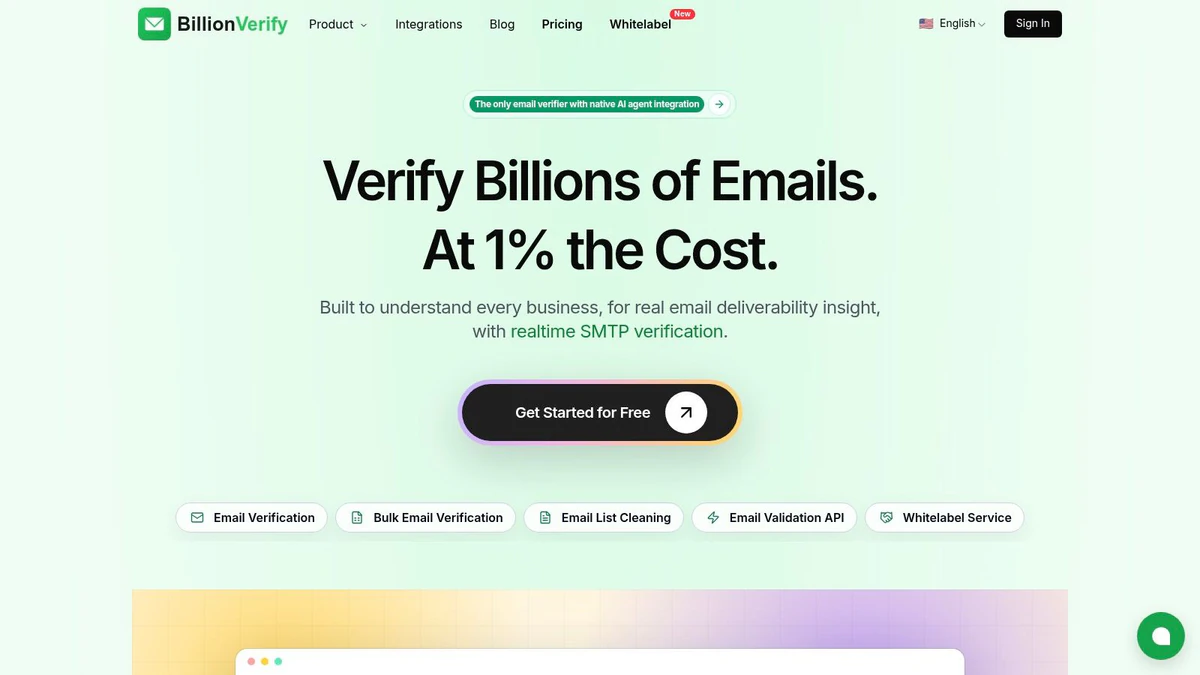
One practical example is BillionVerify, a professional email verification service built to solve one problem: bad email data costs businesses money. According to its profile on Comparateur IA, it delivers 99.9% SMTP-level accuracy across single checks, bulk CSV processing, and real-time API validation, returns structured JSON with SMTP results, MX records, catch-all scoring, and deliverability insights, and completes verification in under 300ms.
That combination matters because different teams need different workflows. Developers need real-time checks. Marketers need bulk verification before campaigns. Sales teams need list scrubbing before sequences enter the CRM.
What an API should verify in real time
A useful verification API shouldn't stop at format checks. Syntax validation catches typos. It doesn't tell you whether the mailbox can receive mail, whether the domain is temporary, or whether the record introduces risk.
The stronger approach is to inspect multiple layers before the address becomes active in your system. In practice, that means checking mailbox existence signals, looking at domain configuration status, identifying catch-all behavior, and flagging addresses that may be disposable or unsafe.
According to a published benchmark discussion about verification providers, the platform's disposable email detection covers a database of 50,000+ known disposable domains and its spam trap identification system maintains a live-updated list of 1 million+ known traps. Those are the kinds of checks that matter before records reach campaign tools.
If you're planning implementation, this email validation API guide is the right level of reference because it connects the technical integration to actual form and workflow decisions.
After the verification layer is in place, a short product walkthrough helps teams visualize the operational flow:
How revenue teams use the same verification layer
The strongest setup is shared infrastructure with team-specific outcomes.
- Marketing uses bulk verification before launches, suppresses questionable segments, and keeps lifecycle automations from firing on junk records.
- Sales checks imported lead lists and outbound prospects before enrichment and sequencing.
- Developers add real-time verification to signup forms, trial requests, waitlists, and referral flows.
- Operations uses one standard status model so every system handles risky records consistently.
One verification layer is cheaper than three separate cleanup habits.
Unified email list management moves from theory to reality: the API becomes the entry standard, the bulk tool becomes the cleanup layer, and CRM logic becomes the enforcement mechanism.
Actionable Workflows for Your Teams
A unified strategy only works when each team knows its job. Marketing, sales, development, and operations shouldn't all own everything. They should own their part of the same system.
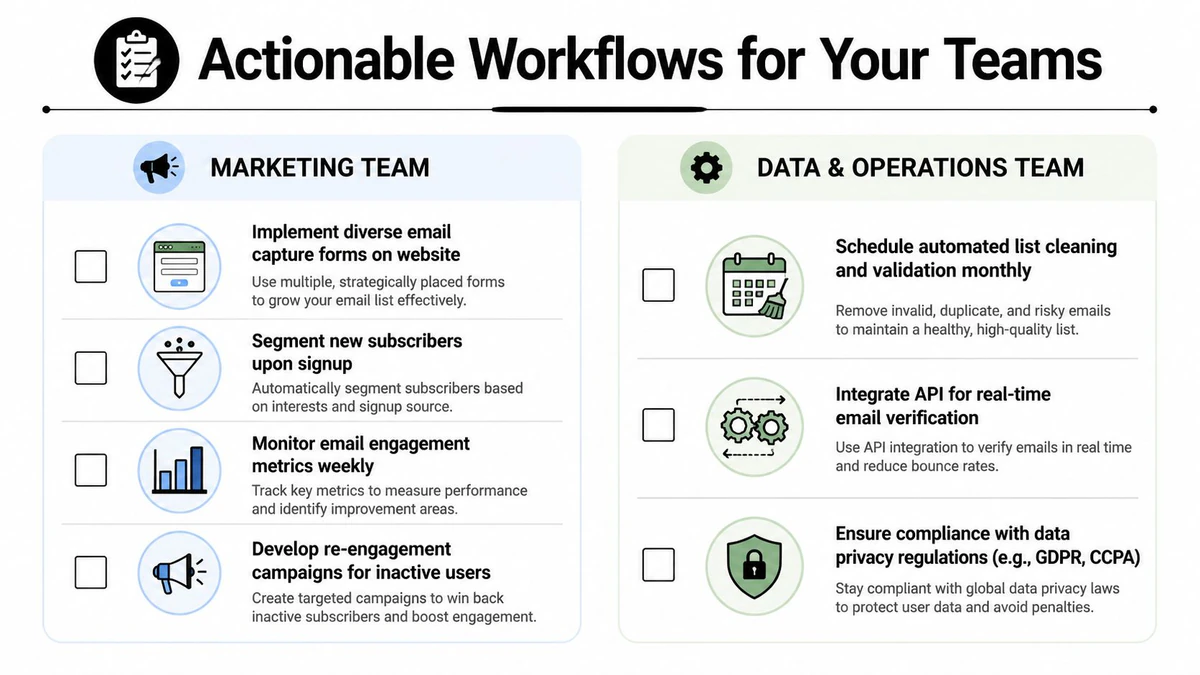
Marketing workflow
Marketing usually controls the largest send volume, so it needs the clearest pre-send discipline.
A simple workflow looks like this:
- Verify before every major send: Clean imported or recently acquired records before they enter a campaign audience.
- Segment before creative review: Build the audience first, then write the message for that segment.
- Watch engagement by source: If one capture channel produces weaker records, adjust that source instead of forcing more sends.
- Run reactivation carefully: Pull dormant contacts into a controlled workflow, not your regular promotional cadence.
Marketing should also define a universal suppression policy with operations. If campaign managers invent exceptions every month, weak records keep leaking back into active audiences.
Sales workflow
Sales teams often damage sender reputation without realizing it because prospecting systems feel separate from marketing. Mailbox providers don't care about that org chart.
A practical SDR or outbound workflow:
- Clean lists before enrichment. There's no point enriching an unusable address.
- Tag source quality in the CRM. Purchased, scraped, partner, inbound, and hand-raised contacts shouldn't be treated the same.
- Suppress risky records before sequencing. Don't let reps make case-by-case exceptions at send time.
- Feed bounce intelligence back to ops. If one source repeatedly produces poor contacts, stop buying or using it.
For teams building repeatable outbound systems, this email automation guide is useful because it ties data quality to sequence logic instead of treating automation as a volume game.
Development workflow
Developers own the earliest and cleanest intervention point. If the form accepts bad data, everyone else works harder downstream.
A sound implementation pattern usually includes front-end validation for obvious errors, server-side verification before record creation, and clear status handling when a result is questionable. The key is not to build a pass-fail cliff for every edge case. Some records should be blocked. Others should be flagged for review or routed into limited access flows.
Useful dev-side rules:
- Block obviously invalid and disposable signups
- Flag uncertain records for secondary confirmation
- Pass verification metadata into the CRM
- Log source and timestamp for consent and debugging
Agency and operations workflow
Agencies and rev-ops teams sit closest to cross-account mess, so they should standardize naming, suppression, and handoff rules.
Their checklist is less about campaign execution and more about system control:
| Team | Core responsibility | Practical output |
|---|---|---|
| Agency | Enforce list standards across client accounts | Shared intake checklist and verification requirement |
| RevOps | Keep CRM statuses consistent | Unified contact states and suppression rules |
| Lifecycle Ops | Protect automated sends | Verified audience entry conditions |
| Data team | Monitor hygiene drift | Recurring audits of source quality and inactive pools |
When this works, nobody debates list quality in the hour before launch. The rules already exist.
Advanced Compliance and Re-engagement Strategies
Most email list management guides are strong on bounce handling and weak on stale consent. That's a real gap. Some lists look compliant on paper because the contacts originally opted in, but the record is old enough that the practical permission has faded.
The stale list problem
A contact collected long ago isn't the same as a contact collected recently. The risk isn't only legal. It's reputational. People forget brands, change jobs, abandon inboxes, or stop expecting your mail. When you restart sending to old names, they often behave like cold recipients.
That blind spot shows up clearly in compliance discussions around aging lists. Constant Contact notes a critical gap in managing "stale but compliant" lists collected over 12 months ago without explicit re-confirmation, and cites Omnisend's prompt asking, "Did you collect your mailing list more than 1 year ago?" as a primary compliance issue in its email list management guidance. That's a more useful question than "Is the address still in the database?"
A legally retained record can still be an operationally unsafe record.
The wrong response is usually one of two extremes. Some teams keep mailing those contacts as if nothing changed. Others delete them immediately without trying to recover legitimate permission. Both approaches waste value.
A safer re-permission playbook
The better move is controlled re-consent.
Start by isolating older contacts into a dedicated segment with stricter rules than your normal inactive audience. Don't fold them into your regular promotional calendar. Treat them as a distinct compliance and trust problem.
A workable approach:
- Separate the segment first: Isolate records that haven't had recent interaction and were collected long enough ago that consent confidence is low.
- Use a plain re-permission message: Remind people who you are, why they're hearing from you, and what staying subscribed means.
- Offer a clear choice: Stay subscribed, update preferences, or unsubscribe.
- Suppress non-responders: If they don't actively affirm interest, stop mailing them.
The operational goal isn't to salvage every address. It's to preserve the portion of the audience that still wants the relationship while reducing risk from the rest.
At this point, compliance, hygiene, and segmentation stop being separate disciplines. The same workflow protects reputation, respects consent, and leaves you with a list that behaves more like an audience than an archive.
From List Management to Relationship Management
Good email list management doesn't end with a cleaner database. It creates the conditions for better relationships.
When acquisition is disciplined, hygiene is automated, segmentation is shared across teams, and compliance is treated as an active responsibility, email stops acting like a broadcast channel. It becomes a reliable way to reach people who expect to hear from you. That changes how marketing launches campaigns, how sales sequences prospects, and how product teams handle registrations.
The deepest shift is mental. You stop asking, "How big is our list?" and start asking, "How trustworthy is our audience?" That question leads to better decisions almost every time.
A clean list isn't just operationally safer. It's what makes personalization credible, deliverability durable, and customer communication worth opening.
Frequently Asked Questions About Email List Management
How often should you clean an email list?
There isn't one universal schedule because send volume, acquisition pace, and data sources vary. The practical rule is to verify at entry, review imported records before use, and audit dormant segments before reactivation. High-change environments need more frequent checks than stable, low-volume programs.
Should you ever buy an email list?
No, not if you care about deliverability, response quality, or compliance discipline. Bought lists usually fail the most important test in email list management: the people on them didn't form a direct, recent relationship with your brand. Even when the data looks usable, intent is weak and risk is high.
What's the difference between suppressed and unsubscribed contacts?
An unsubscribed contact actively opted out of marketing email. A suppressed contact is broader. Suppression can include unsubscribes, risky records, policy-based exclusions, stale contacts under review, or addresses your team has decided not to mail for operational reasons. Every unsubscribe should be suppressed, but not every suppressed contact unsubscribed.
What's the fastest way to improve list health?
Start at the point of entry. Fix forms, imports, and sync rules before you obsess over campaign tactics. Blocking bad records early usually creates a bigger lift than rewriting subject lines for a weak audience.
Who should own email list management?
One team should govern the standards, but multiple teams need to follow them. Marketing usually owns subscriber strategy. Sales owns prospect data quality. Developers own validation logic. Operations keeps statuses, suppressions, and sync behavior consistent.
Is removing old contacts always the right move?
Not always. If a segment is stale but still potentially compliant, a controlled re-permission workflow is often safer than sending as usual and smarter than blind deletion. The right question isn't whether the address exists. It's whether the relationship still does.
If your team wants one verification layer across forms, imports, outbound lists, and CRM workflows, BillionVerify is a practical place to start. It gives marketing, sales, and development teams a shared way to catch bad email data before it turns into deliverability problems, wasted spend, and noisy reporting.