


Poor data quality can consume a meaningful share of revenue. IBM reports that poor data quality costs the U.S. economy $3.1 trillion per year (IBM estimate on the cost of bad data). For a marketing director, that is not an abstract data governance problem. It shows up as paid media sent to invalid contacts, sales time wasted on bad leads, weaker segmentation, and attribution reports that make healthy campaigns look broken.
I have seen the same pattern in demand generation teams. A list can look large enough to hit pipeline goals while hiding duplicate records, stale emails, and formatting errors that cut response rates and push up acquisition costs. Email is usually the fastest place to see the loss, which is why clean email lists matter for campaign performance and sender reputation.
The business question is simple. What is the cost of leaving bad records in place for another quarter?
That cost lands in two places. First, there is direct waste: extra sends, higher platform costs, lower conversion from mistargeted campaigns, and SDR hours spent working records that should never have entered the system. Second, there is downstream damage to decision-making. If lead source, firmographic fields, or engagement history are wrong, the team funds the wrong channels and cuts the right ones. That is why strong data programs start with business impact, not database perfection, a point reinforced by Orbit AI data quality insights.
Data cleaning earns budget when teams treat it as revenue protection with measurable ROI, not as routine maintenance.
Data Cleaning Is a Revenue Strategy Not an IT Chore
Many organizations still talk about data cleaning as if it's administrative work. That's a mistake. When revenue teams send to invalid contacts, personalize from broken records, or segment on stale fields, they aren't dealing with a technical nuisance. They're funding underperformance.
The reason why data cleaning is important has less to do with neat databases and more to do with execution quality. Marketing can produce strong creative, smart offers, and disciplined campaign planning, then lose performance because the audience file is wrong at the moment of send. Sales can work a promising territory, then discover the CRM is full of duplicates, outdated roles, and bad email addresses. Product teams can study signup behavior, then train decisions on flawed inputs.
A lot of the strongest operational thinking in this area now treats data hygiene as a business system, not a one-time cleanup. The framing in Orbit AI data quality insights is useful because it connects data quality to operational reliability rather than treating it as an isolated database task.
Practical rule: If a field influences targeting, personalization, routing, or reporting, it's not an IT field. It's a revenue field.
That mindset shift matters because bad contact data tends to hide behind channel metrics. Teams blame subject lines, offer quality, or sales follow-up speed when the list itself is the problem. In email programs especially, list quality determines whether the campaign even gets a fair chance. That's why many teams start by tightening list hygiene and reviewing resources like why clean email lists matter before they change strategy elsewhere.
The Anatomy of Dirty Data
Dirty data creates operating risk long before anyone labels it a data quality issue. In practice, it shows up as a paid campaign sent to invalid inboxes, leads routed to the wrong rep, duplicate contacts inflating pipeline counts, or consent records that no longer match what marketing is allowed to send.
Inside CRMs, ESPs, signup forms, enrichment tools, and BI platforms, bad records rarely announce themselves. They look usable until a team tries to segment, route, personalize, report, or forecast from them. That is why dirty data is expensive. It fails at the point of use, after budget, time, and decision-making have already been committed.
Dirty data shows up in five familiar forms
These are the failure patterns that create the bulk of operational drag:
Incomplete records
Missing fields break segmentation rules, lead scoring, routing logic, and personalization. A contact without a valid email, region, or lifecycle stage can sit in the database for months and still be unusable when the campaign goes live.Inaccurate entries
Typos, fake inputs, malformed addresses, and incorrect firmographic details create false confidence. The record exists, but the team cannot rely on it.Duplicate records
Duplicates split engagement history, attribution, and ownership. Marketing may suppress one record and mail the other. Sales may call the same buyer twice. Reporting then counts activity across two profiles and misstates performance.Inconsistent formatting
The same company name, country, or job function appears in several formats. Filtering becomes unreliable, matching rules miss obvious overlaps, and teams start fixing reports manually in spreadsheets.Outdated data
People change jobs, departments merge, inboxes go dormant, and consent status changes over time. Data decay is normal. The operational mistake is treating yesterday's valid record as today's safe record.
For email teams, these issues often converge in one list. A single file can contain abandoned inboxes, role accounts, catch-all domains, duplicates, and formatting errors at the same time. A practical explanation of what list cleaning involves for email performance helps clarify why "remove a few bad contacts" is too narrow a view of the problem.
Cleaning also gets confused with collection. They are different jobs. Adding more records to a broken system usually increases the volume of errors, because the same weak validation rules, field standards, and sync problems keep producing new bad entries.
The process itself is well established. The technical overview in the data cleaning workflow reference describes core steps such as removing duplicates, handling missing values, standardizing formats, validating completeness, and checking accuracy before analysis or activation. That work sits upstream of reporting quality, automation quality, and model quality.
The principle of garbage in, garbage out is a literal description of what happens in operations. Reports reflect bad inputs. Automations trigger on the wrong conditions. Models learn from records that should never have reached production systems.
The Quantifiable Damage of Data Decay
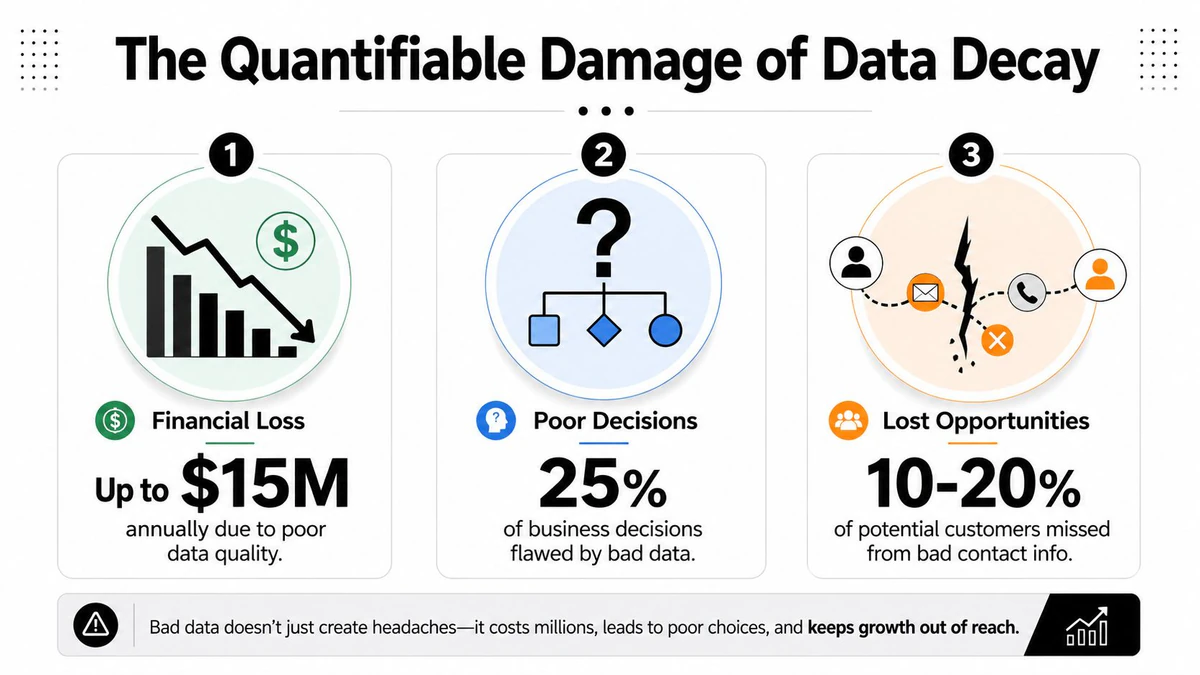
Poor data quality costs organizations an average of $12.9 million per year, according to IBM. That headline number gets attention, but the operational damage is easier to miss because it shows up in dozens of line items: wasted media spend, lower conversion rates, bad forecasts, and customer experiences that feel careless instead of coordinated (IBM via Experian).
Small list problems become large financial leaks
Email makes the cost visible fast. If 10% of a 100,000-contact list is invalid and you pay to acquire or message those contacts anyway, budget is already being burned before the campaign has a chance to perform. Then the second-order cost hits. Higher bounce rates hurt inbox placement, which cuts the value of the valid addresses you still have.
That is why deliverability teams watch bounce rate as a profit metric, not just an email metric. A practical explanation of why bounce rates matter for campaign success shows how list decay turns into sender reputation problems that affect future sends, not just the current one.
I have seen this play out in quarterly reviews. Marketing reports a creative or offer problem. The underlying issue is list quality. The team keeps optimizing copy while mailbox providers keep reducing inbox placement.
The fix starts with better inputs. Teams that verify addresses before launch and between campaigns can ensure marketing list quality and stop paying to send messages that were never deliverable.
Bad records distort decisions after the campaign ends
The larger cost often appears after the send. Dirty data corrupts attribution, audience definitions, and performance reporting. If duplicate records split engagement history across two profiles, one customer can look like two weak leads instead of one qualified buyer. If lifecycle stage or consent status is stale, the wrong audience gets counted in the wrong cohort. That changes budget decisions.
Gartner has estimated that poor data quality costs organizations an average of $12.9 million annually, and that figure helps explain why bad records create more than technical cleanup work. They produce financial mistakes at management level, because teams allocate spend, headcount, and channel mix based on reports they should not trust (Gartner, cited here).
Customer experience takes a hit too. Twilio Segment found that 56% of consumers will become repeat buyers after a personalized experience, which means inaccurate personalization carries a direct revenue penalty when the underlying data is wrong (Twilio Segment personalization report). Duplicate contacts, outdated preferences, and incorrect identifiers lead to repeated messages, irrelevant recommendations, and obvious CRM mistakes that signal the brand is not paying attention.
Here is the business pattern:
| Operational issue | Immediate effect | Business consequence |
|---|---|---|
| Invalid email addresses | Higher bounces | Wasted send budget and lower inbox placement |
| Duplicate contacts | Split histories and repeated outreach | Poor customer experience and unreliable attribution |
| Incorrect CRM fields | Faulty segmentation | Mistargeted campaigns and lost conversion opportunity |
| Stale consent or customer status | Messaging to the wrong audience | Compliance exposure and brand damage |
A few bad records do not stay small. They spread through reporting, automation, targeting, and customer touchpoints until a data hygiene problem becomes a revenue problem.
A Practical Framework for Data Cleaning
Once teams accept that data quality affects revenue, the next problem is prioritization. Most databases contain too many issues to clean all at once. The right move isn't to chase perfect data. It's to fix the records that have the highest operational blast radius.
Start with business impact not data perfection
A useful sequence looks like this:
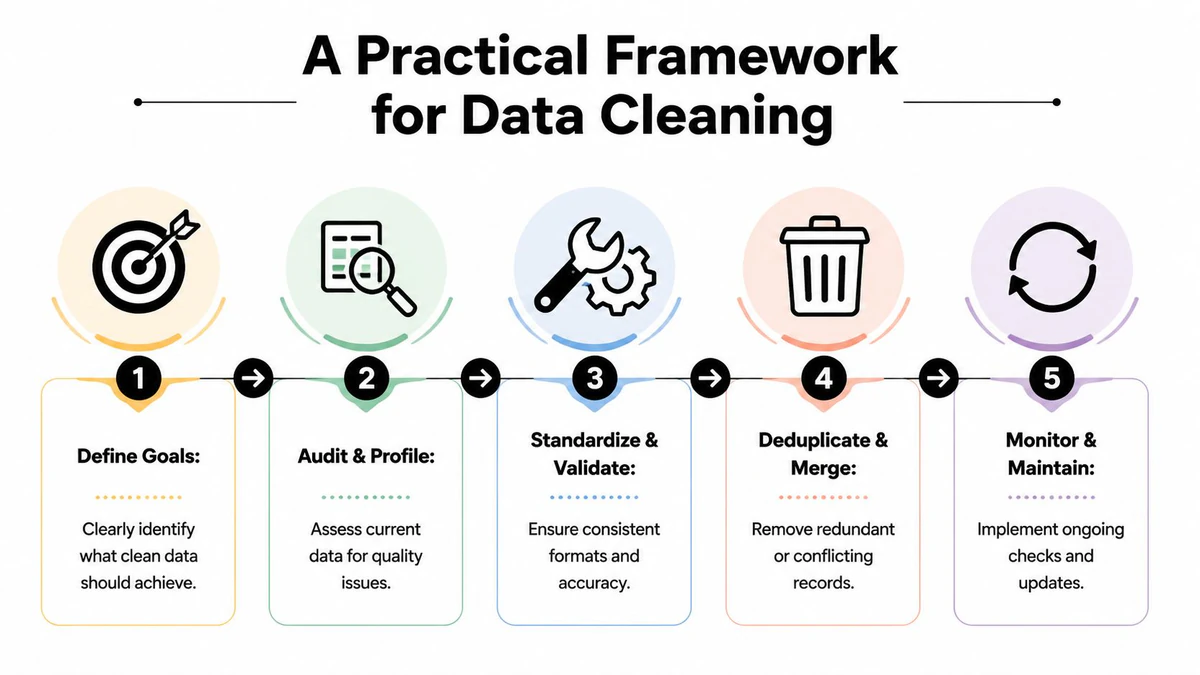
Define the business outcome
Decide what clean data must protect or improve. For marketing, that might be deliverability, segmentation accuracy, or attribution reliability. For sales, it might be routing and sequence efficiency.Profile the current state
Audit the database for duplicates, missing values, inconsistent formats, invalid emails, and stale records. This step should produce categories of failure, not just a long list of errors.Standardize what should never vary
Normalize fields like names, countries, states, phone formats, lifecycle stages, and source values. Standardization removes ambiguity before you try to analyze or automate.Deduplicate and merge carefully
Don't just delete suspected duplicates. Decide which record is the system of record and how engagement, ownership, and consent history should be merged.Validate high-risk fields before use
Customer-facing fields deserve tighter checks than low-impact metadata. Email addresses, consent indicators, and personalization fields should be validated before they trigger campaigns.
This is also where tools enter the conversation. For teams focused specifically on contact data, BillionVerify is a professional email verification service built to solve one problem: bad email data costs businesses money.
Use a simple prioritization model
An impact-versus-effort matrix keeps the work practical.
High impact, low effort
Email validation, duplicate suppression, and formatting normalization usually belong here. These fixes often improve campaign performance quickly.High impact, high effort
Cross-system identity resolution and CRM field governance fit this category. They're worth doing, but they need ownership and process discipline.Low impact, low effort
Cosmetic cleanup and field label tidying can happen later unless they block reporting.Low impact, high effort
Avoid these early. Teams often burn time cleaning obscure legacy fields that don't influence revenue activity.
A lot of marketing ops teams make the mistake of starting with broad CRM cleanup when they should begin with the records actively used in campaigns. If the email file is dirty, nothing else gets a fair test. That's one reason practical list maintenance guidance like what list cleaning means for email performance is so useful in operational planning.
Build controls before the next upload breaks things again
Cleaning without controls creates a loop of rework. The database looks better for a week, then the next import, form, sync, or manual update reintroduces the same defects.
Use controls such as:
- Entry validation for forms and imports
- Field rules for standard values
- Duplicate review logic before record creation
- Ownership rules for who can edit sensitive fields
- Scheduled audits for active campaign lists
The goal isn't a one-time cleanse. It's lower future contamination.
Solving the Email Data Problem with Verification
Email deserves separate treatment because one bad field can create an immediate financial loss. A misspelled job title may skew reporting. An invalid or risky email address wastes send volume, inflates acquisition cost, hurts deliverability, and distorts campaign results enough that teams make the wrong budget calls.
Why email needs specialized verification
Format checks catch only the obvious mistakes. They do not confirm whether a mailbox can receive mail, whether the address belongs to a disposable provider, or whether sending to it creates reputation risk.
That distinction matters in revenue programs. If a paid lead form accepts fake or temporary addresses, the problem does not stay inside the database. Marketing pays to acquire unusable records, sales follows up on dead contacts, and campaign reporting overstates list size while understating true conversion rate. I have seen teams blame creative, offer, and timing when the underlying issue was that too much of the file should never have been mailed.
A verification tool such as BillionVerify addresses that gap by checking deliverability signals in real time and flagging higher-risk addresses before they affect performance. If you're comparing approaches across vendors and processes, it helps to review how other teams ensure marketing list quality before deciding what level of verification you need.
Where verification fits in the workflow
Verification has the highest payoff in three operational points:
At the point of entry
Validate addresses during signup, lead capture, and form submission so bad records do not enter the CRM in the first place.Before major campaigns Screen the active send list before product launches, promotions, and re-engagement sends. Teams usually recover wasted volume fastest during this activity.
On a recurring hygiene schedule
Email data decays. Verification should sit inside routine list maintenance so the file does not drift back into the same failure pattern.
Teams that want the practical mechanics should start with a clear explanation of how email verification works in practice. Once the process is clear, it becomes much easier to place verification in forms, CRM syncs, and pre-send checks without slowing down execution.
Measuring the ROI of Clean Data
Poor data quality costs organizations an average of $12.9 million per year, according to Gartner. That is why ROI conversations around cleaning work better when they start in financial terms, not technical ones.
A simple model is enough to get a serious discussion started:
ROI = (Value Gained + Cost Avoided) / Investment Cost
I use this structure because it reflects how bad data hits a marketing P&L. Some losses show up as missed revenue. Others sit in wasted spend, manual rework, compliance risk, and slower decision-making.
A practical way to build the business case
Start with line items a marketing director already owns or can influence:
- Wasted campaign spend from sending to records that will never convert
- Lost revenue from weaker deliverability, poor targeting, or broken personalization
- Ops and analyst hours spent fixing preventable field errors, duplicates, and bad joins
- Compliance risk tied to weak consent records and inconsistent CRM hygiene
- Brand and customer trust costs when the wrong person gets the wrong message, more than once
The mistake I see in budget requests is that teams only count upside. Finance leaders also want to see what the company stops losing. That includes the exposure created by poor retention controls, inaccurate consent status, and incomplete contact histories. As noted earlier, data quality problems do not stay inside the ops team. They affect campaign efficiency, reporting confidence, and audit readiness at the same time.
Business case lens: Position data cleaning as a revenue protection and margin improvement initiative. That framing usually gets faster traction than a generic quality argument.
Separate upside from avoided loss
The cleanest ROI models use two buckets.
Value gained covers measurable performance improvement: more messages reaching real recipients, better conversion from cleaner audience segments, and reporting you can trust when shifting spend between channels or campaigns.
Cost avoided covers the losses that disappear: fewer wasted sends, fewer hours spent repairing records by hand, less risk of avoidable compliance trouble, and less sender reputation damage that can depress future campaign performance.
Keep the estimate grounded in workflows your team controls. If email is the highest-volume customer data stream, start there. A marketing team does not need a company-wide master data model to justify action. It needs a defensible estimate of recovered spend, protected revenue, and reduced rework. For teams building that model, this guide to calculating email verification ROI gives a useful planning structure.
From One-Time Fix to Proactive Data Strategy
The companies that handle data well don't wait for a dashboard problem or a deliverability incident to act. They build routines that prevent bad records from entering critical systems in the first place.
That usually means three habits become standard. First, validate data at the point of capture, especially for customer-facing forms and campaign lists. Second, run recurring audits on the records that feed active outreach and reporting. Third, define ownership so people know who can change fields, merge records, and approve imports.
There's also a strategic mindset shift here. Clean data isn't the end state. It's a maintenance discipline. Records change, contacts churn, inboxes expire, and handoffs between platforms create new inconsistencies. Teams that treat cleaning as a one-off project end up paying for the same mistakes twice.
Clean systems don't stay clean by accident. Someone sets the rules, someone monitors the exceptions, and someone fixes root causes instead of repeatedly cleaning symptoms.
For marketing leaders, that discipline becomes a competitive advantage. Campaigns launch with fewer surprises. Reporting gets easier to trust. Sales spends less time questioning lead quality. Compliance reviews become less painful. And email performance reflects strategy more accurately because the list isn't working against the campaign.
If email data is one of the biggest sources of waste in your funnel, BillionVerify is worth evaluating as part of a broader hygiene program. It fits the practical need many organizations face: verify addresses before sends, catch disposable and risky entries early, and reduce the operational drag that bad email data creates.