



Email lists don't fail all at once. They decay gradually, then show up as missed inboxes, wasted sends, weaker campaign reporting, and a sender reputation that's harder to repair than many expect. Verifalia estimates that email data decays at around 22% per year as people change jobs, abandon addresses, or stop using an inbox, which is why list cleaning belongs in routine operations, not an annual cleanup before a big launch (Verifalia on email list decay).
That single number changes how you should think about an email list cleaning service. This isn't a janitorial task. It's more like preventive maintenance on a revenue channel. If your team acquires leads every day, runs outbound, collects event signups, or pushes traffic into newsletter forms, bad data doesn't sit on the sidelines. It enters your CRM, gets synced into your ESP, distorts engagement reports, and turns every campaign into a deliverability gamble.
The Hidden Costs of an Unclean Email List
An unclean list creates more damage than a few bounced messages. It wastes budget on contacts that will never convert, pollutes reporting with dead records, and makes mailbox providers less willing to trust your future campaigns. Teams often notice the symptom first. Open rates soften, click performance gets noisy, and campaign results become harder to interpret. The cause is frequently upstream data quality.
The financial leak starts early. Paid traffic drives signups. Sales teams import prospect lists. Partnerships and events add contacts in bulk. If those records are flawed, every downstream system pays for it. Your CRM stores junk. Your ESP sends to junk. Your team analyzes junk.
Practical rule: Every invalid address you keep is a small tax on every campaign that follows.
Poor hygiene also weakens sender reputation. Mailbox providers don't see your intent. They see behavior. If you repeatedly send to invalid or risky addresses, your domain starts to look less disciplined. That can push even good contacts toward spam or promotions tabs, which means list quality affects subscribers who did nothing wrong.
A healthy program treats cleaning as part of deliverability operations, not a cleanup project. If you're already troubleshooting inbox placement, it helps to review broader deliverability mechanics alongside hygiene work, especially when reputation issues and bad data overlap, as discussed in this guide on improving email deliverability.
Why the cost compounds
Three things make list decay expensive:
- Waste scales automatically. The larger your list and send volume, the more bad records consume platform spend and team attention.
- Damage spreads beyond one campaign. A risky send today can make tomorrow's high-intent campaign perform worse.
- Reporting gets distorted. When dead or low-quality contacts stay in your denominator, marketers make weaker decisions about content, segmentation, and cadence.
The core mistake is treating the email database as a static asset. It isn't. It behaves more like inventory with shelf life. If you don't inspect it, stale units stay on the shelf and drag down everything around them.
What Is an Email List Cleaning Service
An email list cleaning service is a system that checks your contact database for records that are unsafe, undeliverable, low quality, or operationally risky to mail. The simplest way to think about it is quality control for contact data. Before you send a campaign or feed new leads into automation, the service screens addresses so your team isn't paying to message inboxes that don't exist or shouldn't be mailed.
That sounds similar to what an ESP already does, but the timing is different. An ESP typically reacts after a bounce happens. A cleaning service tries to stop the bad record before the send. That's the practical distinction. One tool records the problem. The other prevents it.
More than bounce handling
A proper service doesn't just spot malformed addresses. It also helps identify categories such as invalid, disposable, role-based, and catch-all records. Those labels matter because each one creates a different operational decision. Some should be removed immediately. Others belong in a separate segment with tighter sending rules.
For ecommerce teams, this matters at collection points too. If you want a practical example of how validation affects acquisition quality, this piece on how to boost Shopify sales with email validation is useful because it connects form-level data quality to downstream email performance.
A related concept that often gets blurred is email verification. Verification refers to the technical process of checking whether an address is structured correctly and appears capable of receiving mail. Cleaning is broader. It includes verification, but also suppression, deduplication, segmentation, and re-import rules. If you want the category distinction in plain language, this overview of what email verification is is a helpful reference.
What the service should feel like operationally
The right tool should fit into existing workflows instead of creating another spreadsheet ritual. That's why teams now look for bulk uploads, exportable results, and APIs that can screen new records in real time. BillionVerify is one example of a professional email verification service built to solve one problem: bad email data costs businesses money.
The real value isn't that a platform tells you an address is risky. The value is that your CRM, forms, and campaign workflows stop treating risky records as normal.
If your process still depends on someone exporting a CSV only when performance drops, you're not really running hygiene. You're running cleanup after the damage has already started.
The Technical Process Behind Email Verification
The technical side of verification sounds intimidating until you map it to the actual workflow. A strong system doesn't jump straight to one mailbox check and call it done. It works through layers, removing obvious bad records first and then validating what remains.
What happens before verification
The most reliable sequence starts earlier than many marketers think. A technically effective workflow begins with suppressing known hard bounces, then removing exact duplicates, and only after that validating the remaining contacts to flag invalid, disposable, role-based, and catch-all addresses before the cleaned list goes back into the CRM (Cleanlist.ai on workflow sequencing).
That order matters. If an address already hard bounced, you don't need to re-debate it. Suppress it. If the same address appears multiple times, dedupe before paying to verify duplicates. Verification should focus on unresolved records, not on contacts your own systems have already proven unsafe.
Many teams also use external validation before a send to improve email list hygiene when they've inherited older databases or merged records from multiple sources.
How the checks actually work
After pre-cleaning, the service moves through a series of technical checks:
Syntax and format checks
This is the basic gate. It catches malformed addresses, missing characters, and obvious formatting problems.Domain validation
The system checks whether the domain itself exists and is set up to receive email. If the domain is broken, the mailbox won't matter.Mail server checks
The verifier attempts to communicate with the receiving mail system to understand whether delivery looks possible.Mailbox-level signals At this level, the result gets more nuanced. Some servers confirm mailbox existence clearly. Others return ambiguous responses, which is why categories such as catch-all and unknown exist.
Risk classification
The service labels records based on the combined evidence. That output drives your decision to send, suppress, or segment.
A modern verification workflow is less like spellcheck and more like airport security. One checkpoint looks at the passport. Another checks whether the flight exists. Another confirms whether the passenger can board. You need all of them because any single check on its own can miss a problem.
For teams building this directly into forms and apps, the bigger shift is moving these checks from campaign prep into data intake. That's where real-time API data verification becomes operationally important. Instead of cleaning after the fact, you stop bad records at the point of entry.
Decoding Verification Statuses and Metrics
A verification report is only useful if your team knows how to act on it. The statuses aren't just technical labels. They're sending decisions. If you treat every non-invalid address as safe, you defeat the purpose of the cleanup.
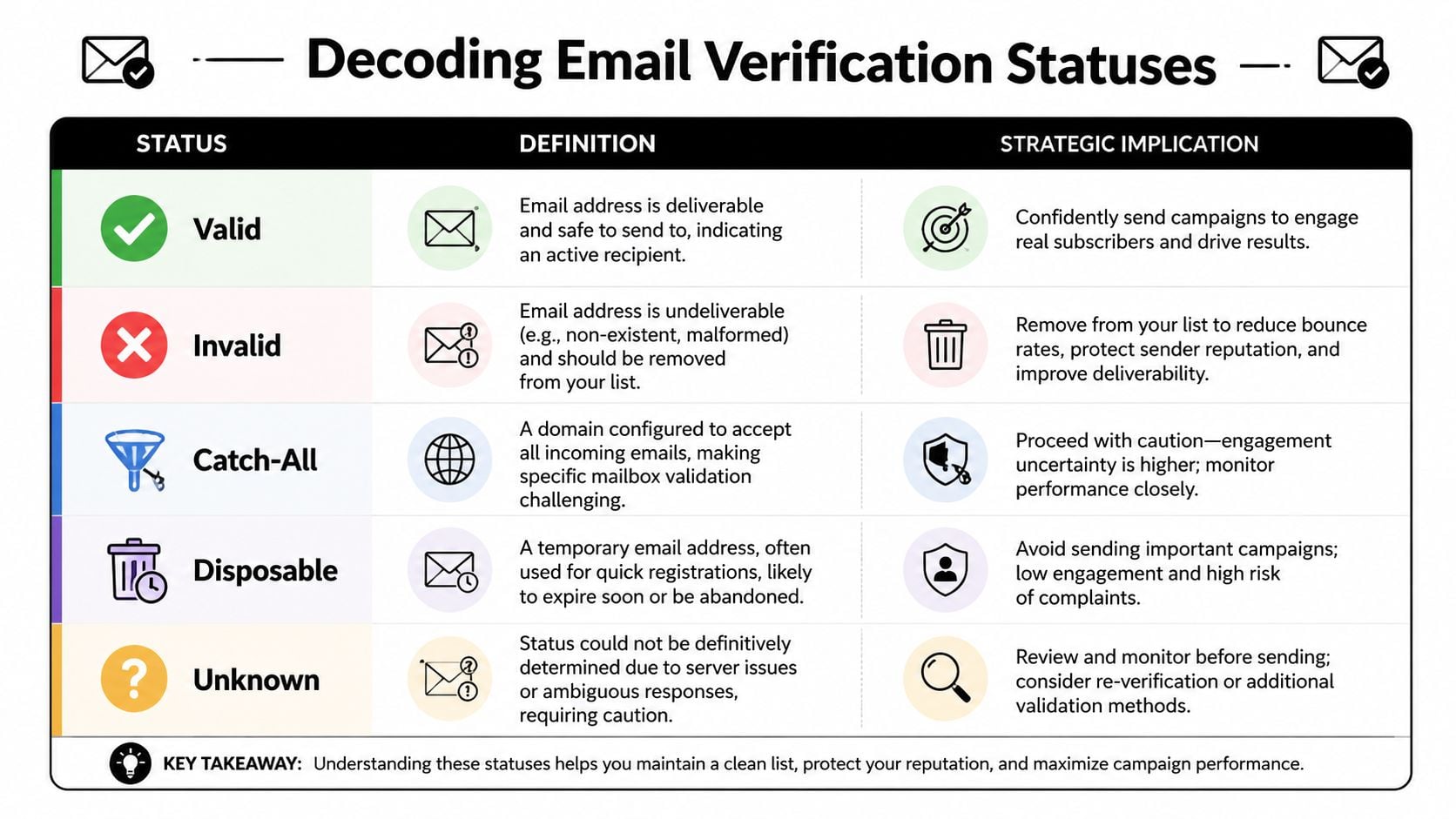
What each status means in practice
Here's the short version:
| Status | What it usually means | Recommended action |
|---|---|---|
| Valid | The address appears deliverable | Safe to include in normal sends |
| Invalid | The address is undeliverable or clearly broken | Remove or suppress |
| Catch-all | The domain accepts mail broadly, so mailbox certainty is limited | Segment and send cautiously |
| Disposable | Temporary inbox, often low-intent or short-lived | Usually exclude from core lifecycle and revenue campaigns |
| Unknown | The server didn't provide a definitive answer | Hold, retry later, or isolate in a separate segment |
| Role-based | Shared inboxes like team or department addresses | Evaluate by use case before sending |
How marketers should act on the report
Valid is straightforward. These are your safest operational records. They belong in your standard send audience, subject to your normal engagement and consent rules.
Invalid should not linger in a “maybe later” bucket. Delete or suppress them. Every extra campaign you send to known invalids is avoidable damage.
Catch-all is where many teams make expensive mistakes. Some domains are configured to accept mail for many addresses, which makes exact mailbox verification harder. That doesn't mean every catch-all address is bad. It means certainty is lower, so you should isolate those contacts and decide based on list source, engagement history, and campaign importance.
Catch-all doesn't mean “safe enough.” It means “handle with judgment.”
Disposable addresses deserve special scrutiny. They often signal low-intent signups, one-time coupon hunting, or fake registrations. In some businesses, you may keep them out of nurture flows entirely. In others, you may allow them into a limited onboarding path but not your long-term retention list.
Unknown often gets ignored because it doesn't look as definitive as invalid. That's a mistake. Unknown means unresolved risk. Treat it as a separate decision class, not as a default send segment.
Accuracy also matters at the provider level. If the status labels themselves are noisy, your segmentation gets worse. That's why teams comparing platforms usually review email verification accuracy before they trust a report enough to automate against it.
How to Choose the Best Email List Cleaning Service
Most tools in this category promise cleaner lists. That's not a useful buying filter. The better question is whether the service can operate as part of your marketing and data infrastructure. If the answer is no, you'll get a nice report once and then fall back into manual cleanup.
What separates a basic tool from an operational system
Start with economics. Email cleaning is no longer a niche or bespoke process. Kickbox reports an average cost of $0.003 to $0.01 per email for cleaning services, and MailerLite's MailerCheck pricing ranges from $0.002 per email at very high volume up to $0.01 per email at low volume (Kickbox market pricing overview). That pricing range tells you two things. First, the category is mature enough to budget for. Second, provider choice shouldn't be based on price alone because the per-record cost is only one part of the operational picture.
The more important filters are these:
Bulk processing workflow
Can your team upload a file, track progress, filter outcomes, and export clean segments without manual manipulation?Real-time API support
If your forms, product signup flow, CRM enrichment, or SDR pipeline keep generating new records, can the service validate data at intake instead of waiting for the next cleanup cycle?Actionable outputs
Status labels should map to real decisions. Valid, invalid, catch-all, disposable, role-based, and unknown are useful only if they're exposed clearly and consistently.Integration fit
A good service should fit the stack you already use. Marketers need exports and sync paths. Developers need documentation and predictable responses.Operational transparency
Hidden limits and unclear outputs create more work than they remove.
BillionVerify fits this modern model because it supports bulk list cleaning and a real-time API, returns structured verification data, and is designed for teams that want list hygiene embedded into workflows rather than treated as a one-off file cleanup.
Questions worth asking before you buy
Instead of asking vendors for marketing claims, ask operational questions:
- How does the tool handle both existing data and net-new signups?
- Can marketing and product teams use the same system, or will they need separate tools?
- Does the output support segmentation, suppression, and CRM re-import cleanly?
- Can agencies or multi-brand teams manage separate client workflows without chaos?
- Will this reduce repetitive manual work for ops, not just produce another CSV?
One more practical point matters. An email list cleaning service should help you prevent future contamination, not just clean inherited messes. If your shortlist doesn't include an API path, you're evaluating a maintenance product when you may need infrastructure.
For a broader vendor comparison lens, this guide to the best email verification service is useful because it frames evaluation around workflow fit, not just checkbox features.
Putting Your Cleaning Strategy into Action
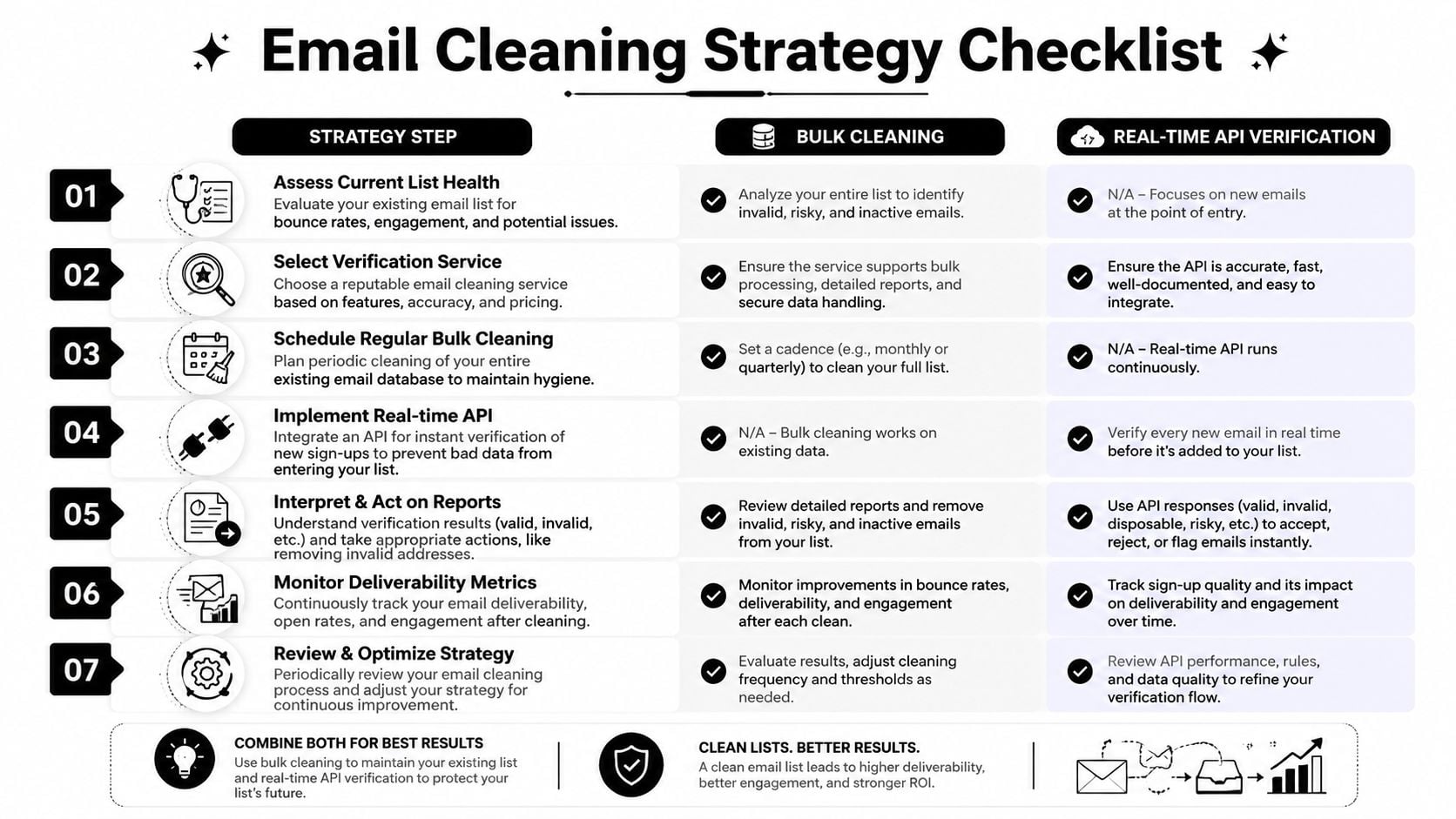
Lists decay faster than many teams expect. People change jobs, abandon inboxes, mistype addresses, or sign up with throwaway accounts. The operational answer is not occasional cleanup. It is a repeatable system that repairs old data and screens new data before it spreads across your CRM, ESP, sales tools, and reporting.
Bulk cleaning for existing databases
Bulk cleaning handles backlog. Use it for inherited lists, CRM migrations, reactivation programs, partner lead imports, and any large database that has not been verified recently.
In practice, the schedule depends on how the list is fed. A slow-growing newsletter file can be reviewed on a regular cadence. A high-volume B2B database with sales imports, webinar leads, and product signups needs closer monitoring. Once a list gets large, even a small percentage of bad records turns into real waste in send volume, rep time, and reporting noise.
A practical bulk workflow looks like this:
Export the right fields
Include the email address, source, signup date, engagement markers, and any status fields that affect suppression or segmentation.Suppress known bad records before verification
Remove prior hard bounces, unsubscribes, and do-not-email contacts first. There is no reason to pay to verify records you already know should never be mailed.Deduplicate the file
Duplicate records inflate verification costs and create downstream send errors.Run verification and sort by outcome
Separate valid, invalid, catch-all, disposable, role-based, and unknown records into different follow-up actions.Re-import with operational rules
Update contact status, write back verification results, and route risky segments into suppression or limited-use pools instead of dumping every record back into active marketing.
Teams either save money or create more work depending on their approach. If verification results stay trapped in a CSV, the list gets dirty again fast. If the outputs are written back into the systems the team already uses, cleaning starts acting like infrastructure.
Real-time verification for new data
Real-time verification protects the front door. It belongs on newsletter forms, free trial flows, lead-gen pages, sales handoff tools, and any internal process that creates contacts automatically.
Bulk cleaning works like a warehouse audit. Real-time API verification works like quality control on the loading dock. One fixes inventory that is already on the shelf. The other stops damaged items from entering the building.
When verification runs at the point of capture, teams can catch typos, malformed addresses, disposable domains, and other risky submissions before those records trigger automations or reach the ESP. That improves database quality upstream, where the cost of fixing errors is lowest.
BillionVerify fits this operating model because it supports both sides of the workflow. Bulk verification helps teams clean existing databases at scale. Its real-time API helps product, marketing, and ops teams screen new signups as they happen. Used together, those two layers turn list cleaning from a periodic project into an ongoing control process.
The strongest setup is simple. Clean the backlog in bulk. Validate every new record in real time. Then feed the results back into suppression rules, segmentation, and CRM status fields so the process keeps working without manual intervention.
Avoiding Common Pitfalls and Measuring ROI
The most common mistake is overestimating what cleaning can solve. A cleaned list can reduce bounces and protect sender reputation, but it won't repair weak acquisition habits. If your forms attract low-intent signups, your team imports poor lead sources, or your list sourcing is sloppy, an email list cleaning service is treating the symptom more than the cause. That broader point is well captured in eMercury's discussion of why cleaning should sit inside a wider hygiene workflow, not replace better list-building practices (eMercury on symptom versus cause).
Where teams get too aggressive or too passive
Some teams delete too much. They treat catch-all or unknown records as automatic trash and cut addresses that may still be useful in the right segment. Other teams go the opposite way and mail every result except the most obvious invalids. Neither approach is disciplined.
A better standard is to sort records by confidence and business context. High-confidence valid records can enter normal sends. Ambiguous records belong in a controlled segment. Known bad records should be suppressed and kept out of future imports.
What ROI looks like in the real world
The ROI isn't just “fewer bounces.” It shows up in cleaner audience quality, less wasted send volume, more trustworthy reporting, and better protection for the reputation of your domain. Marketing teams usually notice it first in operational clarity. Campaign numbers become easier to interpret because dead weight is no longer dragging performance down. Sales and ops teams notice it when fewer junk records make it into sequences and CRM workflows.
The strongest outcome is continuity. Once verification becomes part of acquisition, enrichment, and campaign prep, data quality stops being a recurring emergency.
BillionVerify fits that continuous model. It supports bulk list cleaning for existing databases and real-time verification for new signups, so teams can screen old records, block bad form entries, and keep cleaner data moving through CRM and email workflows. If you're evaluating options, BillionVerify is worth reviewing as a practical tool for turning list hygiene into an ongoing operating process instead of a periodic cleanup.