


Most advice on HTML vs plain text email starts in the wrong place. It treats format as the main decision, as if inbox placement is mostly about design choices.
It isn't.
A clean, verified list beats a clever format choice every time. If you send beautifully coded HTML to bad addresses, you still rack up bounces, hurt sender reputation, and make future campaigns harder to deliver. If you send plain text to a neglected list, simplicity won't save you either. The format debate matters, but it sits downstream from list hygiene.
That's the practical frame marketing teams need in 2026. HTML gives you layout control, branding, and better instrumentation. Plain text often feels more personal, travels with less technical baggage, and can outperform in response-driven campaigns. But neither format fixes weak data quality. That's why teams that care about ROI should decide email format only after they've handled the less glamorous work: validating addresses, removing junk, and protecting sender reputation before launch.
Here's the fast view.
| Format | Strengths | Weaknesses | Best fit |
|---|---|---|---|
| Plain text | Personal feel, low rendering complexity, fewer spam-triggering elements | Minimal branding, limited layout control, no embedded tracking pixel support | Cold outreach, relationship emails, simple lifecycle messages |
| HTML | Brand consistency, buttons, layout, richer user experience, stronger tracking support | More code, more rendering risk, easier to overdesign, can look promotional fast | Newsletters, e-commerce, product marketing, transactional messages needing structure |
| Plain-looking HTML | Keeps a simple personal feel while preserving tracked links, compliance elements, and light branding | Requires discipline to avoid slipping into newsletter design | Sales sequences, outbound, reactivation, revenue-focused lifecycle campaigns |
Rethinking the HTML vs Plain Text Debate
The usual advice says HTML is for marketing and plain text is for personal outreach. That shortcut is easy to remember, but it leads teams into bad decisions.
Format choice isn't just about how an email looks. It affects deliverability, measurement, accessibility, and how quickly a recipient classifies the message as promotional or personal. A polished template can help one campaign and hurt another. A plain note can feel authentic, or it can look low-effort if the context doesn't support it.
The sharper question is this: what job is the email doing?
If you're launching products, HTML helps you control presentation. If you're trying to start a conversation, plain text often lowers friction. If you need both measurement and a human tone, plain-looking HTML usually gives you a better operating model than either extreme.
Practical rule: Don't ask which format is better in general. Ask which format gives this campaign the best chance of reaching a valid inbox and getting the next action.
That last phrase matters. Reaching a valid inbox comes first. Teams often spend days debating buttons, logos, and layouts while ignoring the bigger deliverability risk sitting in the list itself. Invalid addresses, abandoned domains, and disposable signups can damage campaign performance before format even enters the picture.
That's why the HTML vs plain text email discussion needs a reset. Format is a lever. List quality is the foundation. Once you get that order right, the trade-offs become clearer and easier to test.
Understanding the Technical Foundations of Email
Email professionals may not need to write email code, but they still need to understand what the inbox receives. That's how you avoid false assumptions about HTML, plain text, and deliverability.
Why MIME matters to marketers
Email isn't just a block of text with a subject line. It uses a standard called MIME to package different types of content so inbox providers and email clients know how to interpret the message. That's what makes it possible to send formatted content, attachments, and multiple versions of the same email.
A marketer's practical takeaway is simple. HTML and plain text aren't always either-or. In many sends, both versions travel together inside the same message structure.
Because inboxes, devices, and security layers don't all behave the same way, a fallback text version helps when rendering fails, when images are blocked, or when a client strips formatting. It also supports accessibility and keeps your email usable in more environments. If your team wants a grounding in message infrastructure, this primer on MX record validation for deliverability troubleshooting is useful context.
What multipart alternative actually does
The common setup is multipart/alternative. That means one email contains a plain-text part and an HTML part, and the recipient's email client chooses which version to display.
For marketers, the operational benefits are straightforward:
- Better compatibility: Older or restrictive clients can still show the text version.
- Cleaner fallback: If HTML renders poorly, the message remains readable.
- Improved accessibility: Assistive tools often handle simpler content more predictably.
- Lower risk of broken experiences: Missing images or unsupported styling won't destroy the message.
BillionVerify is a professional email verification service built to solve one problem: bad email data costs businesses money.
That statement sits at the technical layer too. Email structure helps you send a message correctly. It doesn't guarantee the recipient address is real, active, or safe to contact. MIME solves packaging. Verification solves whether the package should be sent at all.
Multipart email is the standard because it reduces failure points. Teams get into trouble when they send HTML carelessly or skip the text alternative entirely.
Deliverability and Spam Filter Impact
Spam filters don't judge your campaign the way a designer does. They evaluate risk. Format affects that risk, but not in isolation.
Why plain text often gets the cleaner path
Historically, plain text has held a deliverability edge in image-heavy comparisons. One verified summary notes that plain text emails achieved a 42% higher open rate than HTML emails that include images or graphics, while approximately 45.6% of all emails are identified as spam. The same summary notes that plain text is less likely to be flagged because it lacks hidden code or scripts (Source 1).
That doesn't mean HTML is bad. It means HTML gives filters more material to inspect. Large images, bloated markup, suspicious link patterns, mismatched text-to-image balance, and poor coding can all make a message look more commercial or less trustworthy.
For teams that want a practical checklist, Tagada's guide on tips to avoid email spam filters is worth keeping in the send QA process.
A few patterns show up repeatedly in underperforming HTML sends:
- Too many visual elements: More design usually means more code, more weight, and more chances to trigger filtering.
- Aggressive link usage: Multiple tracked links, especially with poor anchor text, can make the message look synthetic.
- Template bloat: Reused blocks, hidden elements, and unnecessary wrappers create avoidable complexity.
- Image dependence: If the message makes sense only after images load, recipients and inbox providers both get a worse experience.
Sender reputation matters more than format
Even so, format is still a secondary factor compared with sender reputation. A disciplined sender with verified data, predictable volume, and clean complaint patterns can send HTML successfully every day. A sender with poor data hygiene can struggle even with plain text.
That's the part many teams miss. Every bounce, every spam trap risk, and every invalid address feeds reputation signals. Once that reputation drops, HTML often feels like the culprit because performance falls faster in visually rich campaigns. But the damage usually started earlier, at the list level.
If your team is trying to stabilize inbox placement, this guide on how to improve email deliverability is a good next read.
A simple plain-text email from a weak domain doesn't become safe just because it looks personal. Filters care about who is sending, who is receiving, and how recipients behave after delivery.
That's why the best deliverability workflow starts before copy and design. Verify the list, suppress risky records, then choose the lightest format that still supports the campaign goal.
How Format Influences Engagement and Conversions
Once an email reaches the inbox, the format decision starts to matter in a different way. The question shifts from “Will it get delivered?” to “Will someone act on it?”
What the performance data actually says
The strongest data in this debate doesn't support heavy HTML by default. In an analysis of over 1,000 global email campaigns, plain text delivered a 21% higher click-to-open rate and a 17% higher click-through rate than HTML-rich email, with existing customers generating about 60% of all conversions from plain text and prospects accounting for 49% of conversions in the same direction (Source 4).
A separate industry synthesis reports 23% higher open rates and 42% higher click rates for plain text in some campaigns, and cites one example where plain text produced a 28% open rate / 4.7% CTR versus 12% open rate / 1.3% CTR for the same content rendered as HTML (SendCheckIt comparison on plain text vs HTML).
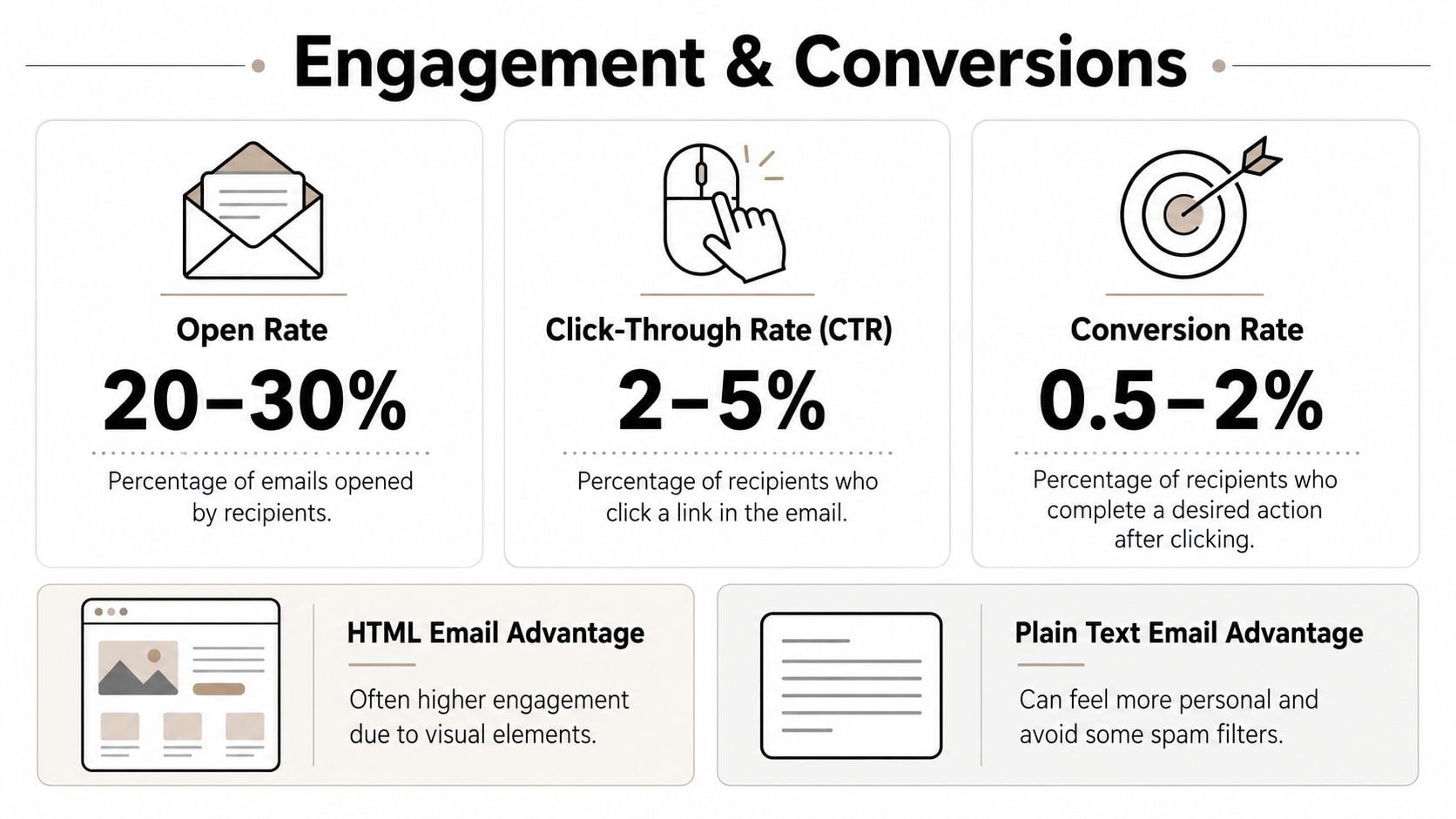
The reason isn't mysterious. Plain text often feels like direct communication. It removes visual clutter, keeps the message focused, and asks the reader to do one thing instead of scanning five modules and three buttons.
That effect is strongest in:
- B2B outreach: The recipient expects a person, not a campaign.
- Lifecycle nudges: Renewal prompts, check-ins, and reactivation messages often benefit from a simpler tone.
- Founder or executive sends: The more a message should sound like one human contacting another, the less design helps.
If your team is trying to tighten message mechanics, this breakdown of how to send a proper email is useful because small execution details shape response rates more than many marketers think.
Where HTML still wins
HTML still has real strengths. It can improve scanning, make calls to action more obvious, and support richer product presentation. In e-commerce, media, and visually led product launches, those advantages are often worth the trade.
The mistake is assuming more design always means more persuasion. In practice, high-performing HTML usually shares the same traits as high-performing plain text: one clear purpose, restrained visual hierarchy, limited links, and copy that gets to the point fast.
The winning version is often the one that removes distractions, not the one that adds polish.
If the campaign relies on seeing the product, HTML earns its place. If the campaign relies on trust, intent, or a reply, simpler usually wins.
Tracking Privacy and Modern Inboxes
For years, HTML had an easy answer to the measurement question. It could track opens with a pixel. Plain text couldn't.
That advantage still exists, but it's weaker than many dashboards imply.
The old HTML advantage is weaker now
Plain text does not support embedded tracking pixels, while HTML can include invisible pixels and tracked links to capture opens, clicks, device data, and timing (Dyspatch on HTML vs plain text tracking and accessibility).
But privacy protections changed how much confidence teams should place in that open data. A current industry explanation highlights that Apple Mail Privacy Protection can prefetch tracking pixels, which makes opens a noisy metric and shifts attention toward clicks, replies, and downstream conversions (Zoho ZeptoMail on HTML vs plain text in modern inboxes).
That changes the practical reading of HTML vs plain text email. The inability to track opens in true plain text used to look like a major handicap. Today, opens are much less reliable as a decision metric anyway.
What teams should measure instead
The stronger measurement stack now centers on actions that reflect real intent:
- Clicks: Still useful when the link structure is disciplined.
- Replies: Especially important for outbound and account-based workflows.
- Conversions: Demo bookings, purchases, signups, and activated users matter more than mailbox events.
- List-level health signals: Bounce trends and complaint patterns often tell you more than vanity engagement.
That's also why simple HTML has become more attractive than flashy HTML. It preserves tracked links and compliance features without pretending open rate is a precise proxy for interest.
If you're working through how inbox and AI changes are affecting outbound measurement, this analysis of the Gmail Gemini era and cold email impact is relevant.
Modern inbox strategy rewards teams that stop over-optimizing for opens. The better question is whether the message generated a meaningful action from a valid recipient. Both formats can support that, if the campaign is built around response quality instead of dashboard theater.
Strategic Use Cases Which Format When
The best format depends on the job, not the preference of the person building the campaign.
Email Format Decision Matrix
One of the more useful current views is the hybrid model. Guidance in this area increasingly points to plain-looking HTML as the practical middle ground, especially for cold outreach and revenue workflows, because it preserves tracking and compliance features without the newsletter feel (Mailforge on hybrid and plain-looking HTML email strategy).
That lines up with the verified case examples showing plain text can outperform heavier HTML in some campaigns, while simple HTML often beats true plain text when teams need measurement and operational controls.
| Campaign Type | Primary Goal | Recommended Format | Justification |
|---|---|---|---|
| Cold outreach | Reply or meeting | Plain-looking HTML | Keeps the human tone while supporting tracked links and basic compliance elements |
| B2B nurture | Click to resource or booked call | Plain text or plain-looking HTML | Simplicity keeps attention on the message |
| E-commerce promotion | Product discovery and purchase | HTML | Visual presentation matters when the product itself sells the click |
| Transactional confirmation | Clarity and trust | Light HTML | Structure helps readability while maintaining brand recognition |
| Re-engagement | Renew attention from inactive users | Plain-looking HTML | Less promotional design can reduce friction and increase response quality |
| Founder or executive update | Relationship and trust | Plain text | Best fit when authenticity matters more than layout |
A simple rule for choosing fast
Use this shortcut when a team is split:
- If the recipient needs to see something, choose HTML.
- If the recipient needs to trust something, start with plain text or plain-looking HTML.
- If the recipient needs to do one specific action, remove design until the CTA is unmistakable.
The biggest mistake is choosing a format based on internal taste. Design teams often prefer HTML. Sales teams often prefer plain text. Both can be right, and both can be wrong, depending on the motion.
A strong cold outbound email usually doesn't need a hero image. A product drop usually does need more than a paragraph of text. A renewal reminder might work best with minimal HTML, one link, and no visual clutter.
Use format as an operational choice. Keep it tied to the reader's task.
The Unskippable First Step Email Verification with BillionVerify
The HTML vs plain text email argument falls apart if the message never reaches a real person. Bad addresses distort every downstream metric. You can't trust engagement, can't protect sender reputation consistently, and can't evaluate format fairly when the list itself is compromised.
Why verification comes before creative decisions
Verification belongs in the workflow. Before template choice. Before copy polish. Before launch approval.
A verification layer helps teams remove invalid addresses, reduce hard-bounce exposure, screen out disposable signups, and keep risky records from contaminating campaign results. That protects sender reputation no matter what format you choose next.
In practice, the order should look like this:
- Clean the list first: Suppress bad records before they ever enter the send queue.
- Segment second: Separate colder data, risky sources, or lower-confidence cohorts.
- Choose format third: Match plain text, HTML, or plain-looking HTML to the campaign goal.
- Measure real outcomes: Look at clicks, replies, and conversions from valid recipients.
If your team wants a more technical explanation, this guide on how email verification works lays out the core logic clearly.
Where this fits in a working email program
Verification also matters outside campaign sends. Product teams use it at signup. Sales teams use it before sequence enrollment. Agencies use it before importing client lists. Operations teams use it before migrations and CRM cleanup.
That matters even more if you're automating inbox workflows elsewhere. Teams exploring operational efficiency often pair verification with process changes like automating email responses with AI, but automation only helps when the underlying contact data is trustworthy.
A useful walkthrough sits below.
The practical takeaway is straightforward. HTML and plain text are optimization choices. Verification is a risk-control choice. Optimization matters only after risk is under control.
If you want to improve inbox placement before debating template style, start with BillionVerify. Clean data gives both plain text and HTML a fair chance to perform, protects sender reputation, and makes campaign results easier to trust.