



Most advice about how to send a proper email starts too late. It starts with greetings, grammar, tone, and sign-offs.
That matters, but it misses the failure point that ruins more email than awkward phrasing ever will. A proper email is one that reaches the inbox, gets understood quickly, and gives the recipient a clear next step. If the address is bad, the list is stale, or the sending setup is sloppy, the message fails before anyone judges your wording.
Why Proper Email Means More Than Just Good Writing
“Proper” email isn't mainly about sounding polished. It's about whether your message has a fair chance to be delivered, opened, and acted on.
In 2024, more than 370 billion emails were sent and received every day, which means inboxes are crowded before your message even arrives. A well-written email is only part of the job. If the address is invalid, inactive, or poorly maintained, the message may never be seen at all, as noted in EmailChef's email marketing statistics roundup.
That changes how experienced teams think about email. They don't treat sending as a writing exercise. They treat it as an operational workflow with four parts: recipient quality, message relevance, technical readiness, and performance review.
A polite email sent to the wrong addresses is not proper. A beautifully formatted campaign from a damaged sending domain is not proper either. The market doesn't reward etiquette alone. Inbox providers reward trust, and recipients reward clarity.
Practical rule: Start judging email quality by outcomes, not by how professional the draft looks in isolation.
This is why sender reputation matters so much in practice. Your domain and sending identity build a history over time. If that history shows bounces, poor targeting, and low-quality list management, future emails face a harder path to the inbox. If you need a deeper breakdown, sender reputation in 2026 is worth understanding before you scale volume.
The common myth is that “proper” means formal. The more useful definition is narrower and tougher: a proper email goes to a real recipient, says one clear thing, works on any device, and gives you feedback you can use on the next send.
Start with a Verified List to Protect Your Reputation
Most email problems begin before the copywriter opens the draft.
Teams usually notice the problem at the end of the process. Opens are weak. Replies are thin. Campaign performance feels inconsistent. Then they look at creative, subject lines, or send times. Sometimes the issue is simpler. They're mailing bad data.
Bad addresses create expensive noise
An unverified list contains more than obvious typos. It often includes abandoned inboxes, fake signups, disposable addresses, role accounts, and catch-all domains that hide uncertainty until after the send.
That creates operational drag in several ways:
- Bounces hurt trust: Repeated sends to invalid addresses signal poor list hygiene to mailbox providers.
- Sales time gets wasted: SDRs and marketers spend effort on people who were never reachable.
- Reporting gets distorted: You can't judge copy, offer, or timing clearly when the audience itself is unreliable.
- Automation breaks unnoticed: CRM sequences and lifecycle campaigns keep firing even when the underlying record quality has slipped.
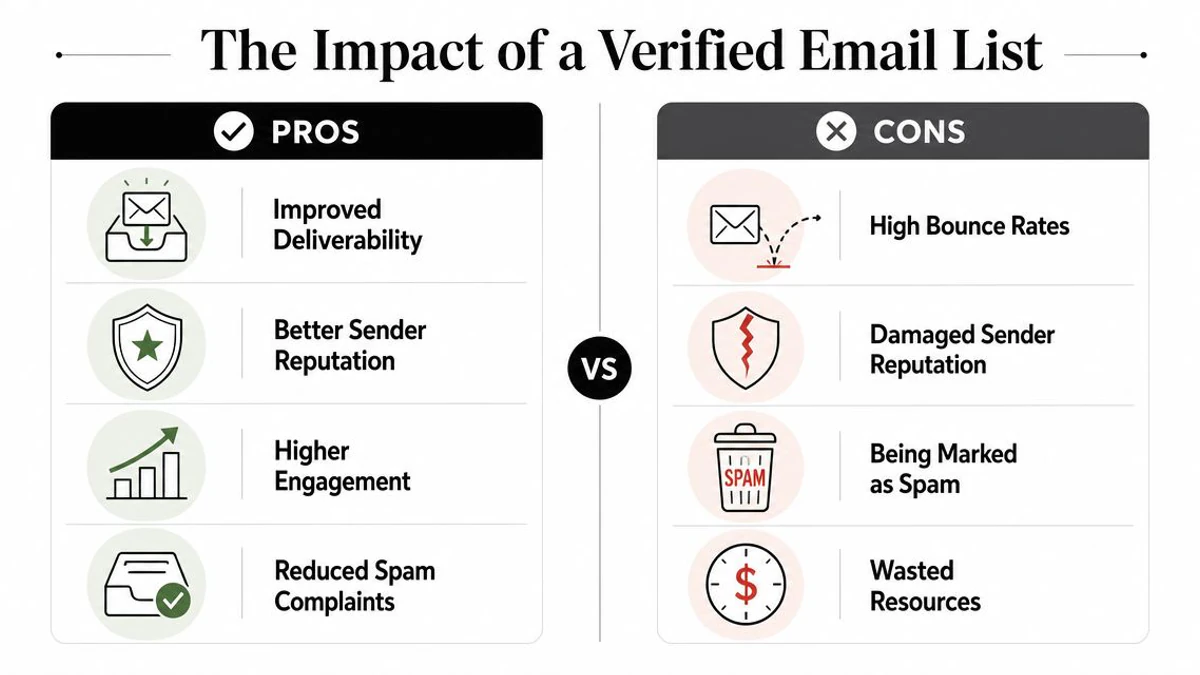
A proper email starts with a sending list that deserves to be mailed. That means permission-based collection, regular pruning, and verification before launch. If your database keeps growing from forms, imports, events, outbound enrichment, and partner sources, hygiene can't be a quarterly cleanup job. It has to be part of intake.
What verification should catch before send
A useful verification process does more than label an address “good” or “bad.” It helps teams separate safe, risky, and unusable records so they can decide how to send, whether to suppress, and where to review manually.
Look for verification workflows that can help identify:
| List issue | Why it matters |
|---|---|
| Invalid addresses | They bounce and weaken campaign quality |
| Disposable emails | They often indicate low-intent signups or short-lived inboxes |
| Role accounts | Addresses like info@ or sales@ can lower relevance and reply quality |
| Catch-all domains | They introduce uncertainty and often need careful treatment |
| Duplicates and stale entries | They waste volume and muddy reporting |
Tools become operational, not merely cosmetic, in this context. BillionVerify fits into this part of the lifecycle by checking addresses through single verification, bulk list cleaning, and a real-time API. It returns structured outputs such as status, SMTP results, MX records, catch-all scoring, and deliverability signals, which gives marketing, sales, and product teams a cleaner basis for sending decisions. For ongoing maintenance habits, email list hygiene in 2026 covers the discipline often neglected until performance drops.
Clean data does more than reduce bounces. It makes every later decision more trustworthy.
Verification should happen at entry and before campaigns
The strongest setup uses two checkpoints.
First, verify at the point of capture. If someone enters an address in a signup form, demo request, waitlist, or lead magnet flow, real-time verification helps stop junk data before it reaches your CRM.
Second, verify again before major sends. Lists decay. People change jobs. Imports bring surprises. Outreach data ages quickly. Pre-campaign cleaning catches issues that didn't exist when the record first entered the system.
For teams working on acquisition, this matters upstream too. If you want a practical outside perspective on using validation to improve lead generation with email verification, that resource is useful because it frames verification as both a quality filter and a pipeline discipline.
The trade-off is straightforward. Verification adds one more step before launch. Skipping it adds risk to every send after launch. Experienced operators choose the extra step.
Craft Subject Lines and Previews That Earn the Open
Once your list is clean, the inbox view becomes the battleground. The recipient usually sees only three things first: from name, subject line, and preview text.
Weak subject lines fail in predictable ways. They're vague, overloaded, too clever, or detached from the reader's actual context. “Quick question” and “Following up” aren't concise in a useful sense. They're lazy. They force the recipient to guess.
Keep the subject line searchable and specific
For high-reliability business email, guidance for subject lines ranges from 3 to 7 words to under 60 characters, so the topic remains searchable in inboxes, according to ZeroBounce's guidance on professional emails.
That doesn't mean every subject line should be short at any cost. It means brevity should preserve meaning.
A better test is this: could the recipient understand the topic from the lock screen of a phone?
| Weak | Stronger |
|---|---|
| Quick question | Partnership intro for Q3 newsletter |
| Following up | Following up on pricing approval |
| Meeting | Tuesday meeting agenda and decisions |
| Idea for you | Landing page test for abandoned cart emails |
Short works when it's informative. Short fails when it becomes generic.
For more examples and frameworks, subject line guide for email marketers is useful reading if your team tends to rely on instinct instead of repeatable patterns.
Preview text is not filler
Many senders waste preview text by letting the email client pull random opening copy like “View this email in your browser” or “Hi first_name.”
That's squandered attention. Preview text should complement the subject line, not repeat it. If the subject names the topic, the preview should add context, urgency, or value.
Try this structure:
- Subject line: State the topic
- Preview text: State the reason to open
Examples:
Subject: Your invoice approval needed
Preview: Please confirm by Friday so finance can process this cycle.Subject: New spring collection early access
Preview: Shop the launch before public release.Subject: Interview reschedule options
Preview: Two updated time slots inside.
Treat the subject and preview as a pair. One identifies the message. The other gives the recipient a reason to care now.
The trade-off with curiosity-driven subject lines is that they may increase opens while lowering trust if the content doesn't match the promise. In business email, relevance usually beats cleverness over time.
Compose the Email Body for Clarity and Action
Good email body copy does one job well. It helps the right recipient understand the request fast enough to act before attention drops.
That sounds like a writing issue. It is also a deliverability issue.
Low-engagement emails train mailbox providers to treat future sends with more skepticism. If recipients delete, ignore, or skim without clicking, weak body copy starts affecting inbox placement over time. Strong writing improves response rate, but it also supports the reputation you worked to protect with list verification and targeting upstream.
Write for one decision
The best business emails ask for one decision.
That decision might be approval, a reply, a meeting time, a document review, or account confirmation. The body should make that outcome easy to understand and easy to complete. Once teams start stacking requests into one message, response quality falls. The reader has to sort priorities, decide what matters, and guess what to do first.
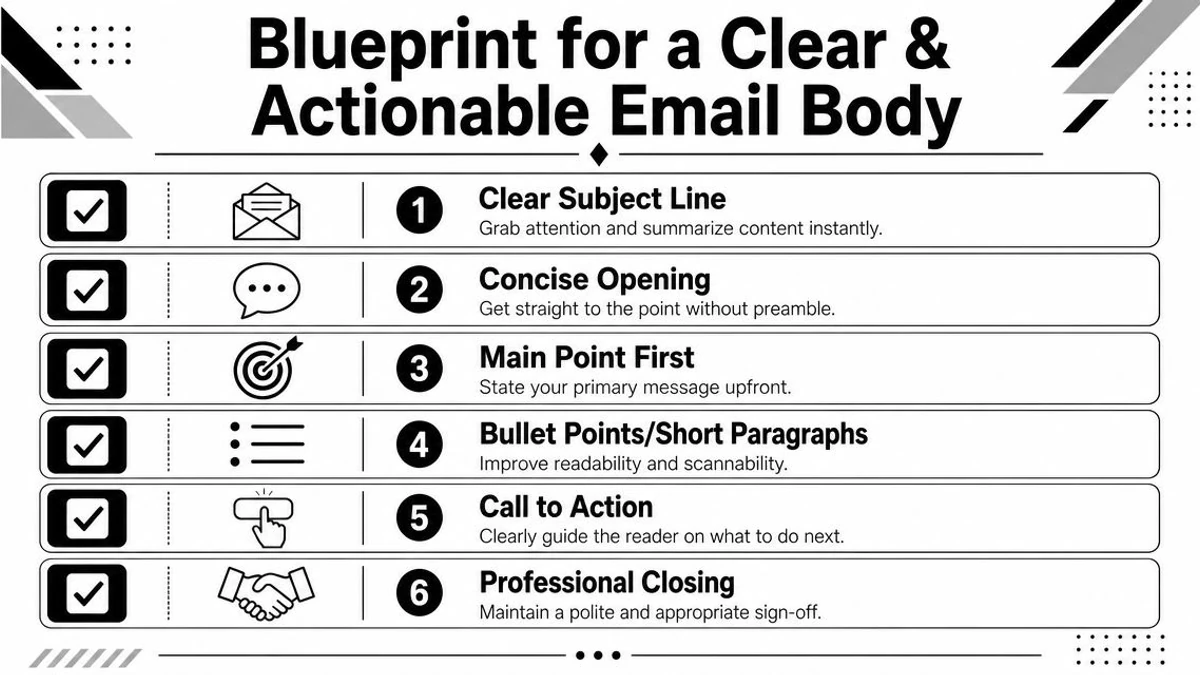
A reliable structure looks like this:
- Opening line: State the reason for the email in the first sentence.
- Context: Give only the information needed to evaluate the request.
- Action: Ask for one clear next step.
- Timing: Add a deadline or response window if the request is time-sensitive.
- Close: End with a clean sign-off and useful contact details.
The trade-off is simple. Brevity helps scanning, but too little context creates hesitation. Add enough detail to support a decision, then stop.
For teams refining this balance, this email copywriting guide for practical business sends gives useful examples.
Format for speed, not decoration
Recipients do not read email like a memo. They scan for relevance, effort, and risk.
That means formatting matters. Short paragraphs reduce friction. Bullets help when you need to present options, requirements, or next steps. Links should send readers to supporting material, not force them through three documents to answer a basic request.
Use plain language. Name the action directly. Replace soft phrases like "just checking in" or "wanted to reach out" with the actual purpose of the email.
These changes improve more than readability. They reduce confusion, cut back-and-forth replies, and increase the chance that a recipient engages with the message instead of abandoning it.
A sound workflow for professional email is consistent: choose a specific subject line, write for one main purpose, add an appropriate greeting, keep the body concise and scannable, include a clear call to action, then finish with a professional sign-off and signature. A final review should check tone, spelling, grammar, recipient fields, and attachments, as outlined in Grammarly's professional email guide.
Use personalization with restraint
Personalization works when it improves relevance. It fails when it looks automated, invasive, or careless.
Useful personalization includes the recipient's recent action, account status, product usage, or stage in the customer lifecycle. Poor personalization usually shows up as repeated first-name tokens, broken merge fields, or references to data that feel too granular for the relationship.
Good personalization:
- Reference the customer's recent action
- Mention the product category they viewed
- Tailor the ask to their account status
- Adjust the message for prospects versus existing customers
Bad personalization:
- Overusing the first name
- Referencing data that feels intrusive
- Inserting broken merge fields
- Pretending a mass email is a one-to-one note
This matters a lot in outbound programs. Cold email campaigns often fail because the sender focuses on copy tricks while ignoring relevance, targeting, and engagement signals. Teams working on outbound should review these cold outreach deliverability hacks alongside message drafting standards.
A short video can help if your team tends to overexplain instead of writing for action.
A practical template
Use this as a base for outreach, customer operations, or internal requests:
Hi [Name],
I'm reaching out about [specific topic].
[One sentence of relevant context.]
Could you [specific action] by [time or date]?
If helpful, the key points are:
- [Point one]
- [Point two]
- [Point three]
Thanks, [Your name]
[Role and contact details]
That template works because it reduces decision time. The reader knows why the email arrived, what matters, and what to do next. That is what a proper email body should accomplish.
The Pre-Send Technical and Quality Assurance Checklist
Most email mistakes don't happen during drafting. They happen in the minute before send, when someone assumes the details are fine and clicks too quickly.
That's where professional discipline matters. A final review protects reputation, prevents embarrassing errors, and catches the technical issues copy quality can't fix.
Manual checks that prevent avoidable mistakes
Start with the obvious, because obvious mistakes are still common.
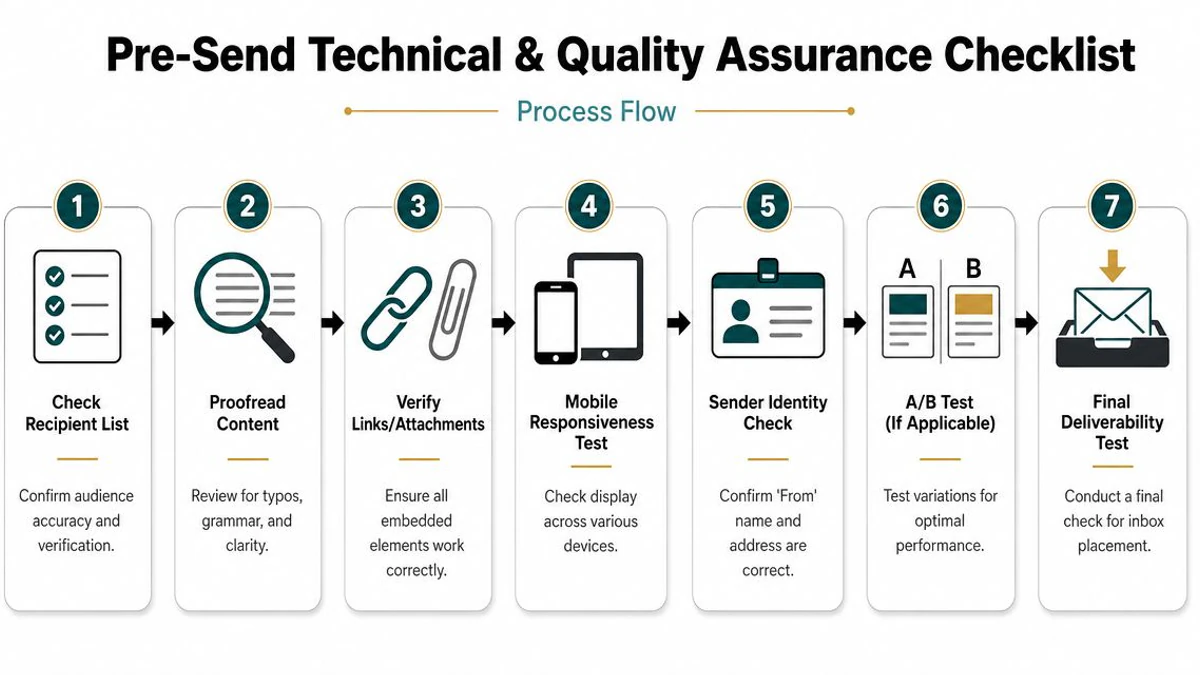
Use a pre-send pass that checks:
- Recipient fields: Confirm the right people are in To, Cc, and Bcc.
- Attachments: If the email mentions a file, make sure the file is attached.
- Links: Test every important link, especially buttons and tracked URLs.
- Names and merge fields: Look for broken personalization or wrong company names.
- Tone and clarity: Remove filler, ambiguity, and accidental harshness.
One habit matters more than people think. Draft first, address later. That reduces accidental sends while the message is still incomplete.
Technical checks that support inbox placement
Then check the sending layer, as teams often rely on IT or ESP defaults there without understanding what they're verifying.
At a practical level, your sending identity should be authenticated and consistent. SPF, DKIM, and DMARC exist to help receiving servers trust that your email is originating from an authorized sender. You don't need to become a DNS specialist to benefit from them, but you do need to know they're part of the reason legitimate mail gets treated like legitimate mail.
For teams running outbound, warm domains, or higher-risk acquisition campaigns, tactical checklists can help surface overlooked issues. One useful external reference is this guide to cold outreach deliverability hacks, especially if your problem is operational sloppiness rather than weak copy.
Accessibility and mobile checks
A proper email should also be easy to understand when read quickly, on a phone, or through assistive tech.
Many guides underexplain the format choices that improve comprehension across devices and accessibility contexts. Badsender notes that emails may be read by voice assistants and recommends explicit wording, short subject lines of around 6 to 10 words, and prominent visual cues like headings and clear calls to action in its newsletter writing guide.
That has practical consequences:
- Use explicit language: “Approve the draft by Thursday” is better than “Let me know.”
- Break up text: Whitespace, bullets, and headings help skim readers.
- Keep formatting functional: Bold important details sparingly instead of decorating everything.
- Check mobile rendering: If the message is hard to scan on a phone, it will underperform.
Emails aren't always read line by line. Some are skimmed diagonally. Some are read aloud. Write so the main point survives both.
The final check should feel boring. That's a good sign. Boring review habits prevent costly mistakes.
Sending Measuring and Improving Your Next Email
Send time is the start of evaluation, not the finish line.
A proper email program is built on feedback loops. The draft matters, but inbox placement, engagement quality, and downstream conversion decide whether the campaign produced revenue or just activity. After every send, review performance with one question in mind: which part of the workflow failed or worked well enough to repeat?
Start with the core signals and read them as operational indicators, not vanity metrics.
- Open rate points to subject line strength, preview text, from-name trust, and whether the message reached the inbox in the first place.
- Click-through rate shows whether the body made the value clear and whether the call to action felt worth taking.
- Conversion rate tests the full path, including audience fit, offer quality, and landing page friction.
- Bounce trends expose list decay, bad data capture, and weak suppression rules.
- Replies are often the clearest qualitative signal, especially in outbound and lifecycle email, because they show whether the message earned a real human response.
Those metrics only become useful when tied to a diagnosis. Low opens do not always mean weak copy. They can also point to deliverability problems, poor segmentation, or a sending pattern that trained recipients to ignore you. Low clicks are not always a design issue. In many campaigns, the actual problem is message-to-audience mismatch. As noted earlier, broad email marketing benchmarks can give context, but campaign improvement comes from reading your own numbers against your list quality, traffic source, and sending history.
Timing also deserves more discipline than it usually gets. Internal updates, newsletters, renewal reminders, and cold outbound should not share the same schedule. The right send window depends on audience behavior, geography, buying context, and how urgent the action is. Testing send time is useful, but only after list quality, targeting, and deliverability are under control. Otherwise, teams end up optimizing the clock while ignoring the underlying problem.
Good operators keep a simple cycle. Verify the list. Send with one clear goal. Review delivery, engagement, and conversion together. Change one meaningful variable, then test again. That process improves ROI because it reduces wasted volume and makes each campaign easier to diagnose. If your team needs a stronger framework for reading post-send performance, this guide to email analytics and reporting for marketers is a practical reference.
A proper email starts before the draft and keeps working after the send. If you want cleaner lists, fewer bad records entering your system, and better control over deliverability risk, BillionVerify is built for that part of the workflow through bulk verification, real-time API checks, and structured deliverability signals.