


Your inbox starts filling with Gmail failure notices. The subject lines look system-generated. The messages claim mail couldn't be delivered. You didn't send any of it.
That's the moment recipients often jump to the worst conclusion. My account is hacked. Sometimes that's true. Often, it isn't. With Gmail mail delivery subsystem spam, the more common reality is less dramatic and more annoying: someone is using your address in forged mail, and the internet's bounce machinery is sending the fallout back to you.
For marketers, this problem creates two separate risks. One is personal confusion. The other is operational blindness. Teams get so focused on whether a bounce notice is fake that they miss the larger lesson: email systems punish bad data, weak authentication, and sloppy sender controls fast. If you send campaigns, run lifecycle email, or own CRM hygiene, this is your issue too.
That Confusing Flood of Gmail Mail Delivery Subsystem Spam
A familiar pattern looks like this. A marketing manager opens Gmail in the morning and finds a stack of delivery failures for messages they never wrote. By lunch, more arrive. Some mention unknown recipients. Some look technical. A few look convincing enough to make anyone nervous.
What usually makes this worse is the mix of signals. One message looks like a normal automated bounce. The next looks like a phishing email disguised as one. Another appears to come from a delivery subsystem but references a message thread that never existed. That combination creates panic fast because the inbox gives you symptoms, not a diagnosis.
If you're dealing with this right now, check the basics before assuming the worst. Look at Sent Mail. Review filters and forwarding rules. Inspect recent account activity. If there's no unauthorized outbound mail, you're often looking at spoofing rather than an active takeover. That's also why generic advice like changing your password can be useful for account safety but won't necessarily stop forged bounce spam.
Practical rule: If Gmail shows no suspicious sent messages, treat the flood as a sender identity abuse problem first, not proof that someone has full inbox access.
There's a second trap here for email teams. People who spend time fixing inbox placement often look for guidance on how to stop email from going to spam in Gmail. That's useful, but Gmail mail delivery subsystem spam is a different class of issue. It sits at the intersection of spoofing, phishing, and bounce handling. You need to separate those before any fix will stick.
What Are Mail Delivery Subsystem Messages Really
A real mail delivery subsystem message is just an automated failure notice. One server tried to hand off mail to another. Something prevented delivery. The receiving system, or an intermediate one, generated a response to report the failure.
The normal version
In a clean scenario, this is ordinary internet plumbing. A sender transmits an email. The destination server rejects it, delays it, or can't accept it. An automated mailer-daemon message comes back with the reason.
Gmail's behavior here is rooted in standard failure notifications, but modern abuse exploits that legitimacy through spoofing. Community reporting shows recipients can receive dozens of these notices per day when their address is forged as the sender or return-path, and if no unauthorized sent mail exists, the problem is usually spoofing rather than a hacked inbox, as documented in this Gmail users discussion.
That's why these notices can feel contradictory. The mechanism is real. The context is fake.
The abused version
The most common abuse pattern is simple. A spammer sends mail using your address as the apparent sender. They don't need access to your Gmail inbox to do that. They only need a system willing to emit forged mail and a recipient ecosystem that still receives and bounces some of it.
When the forged messages fail, the bounce reports come back to you. You become the return address for mail you never touched. This is often called backscatter in deliverability circles, even though the person getting flooded usually just experiences it as chaos.
Here's the practical distinction marketers need to keep straight:
| Scenario | What it means | What to check first |
|---|---|---|
| You sent the campaign and got failures | Your mail stream has a deliverability issue | Address quality, authentication, content, reputation |
| You didn't send anything and got failures | Your address may be spoofed or used in phishing lures | Sent folder, account activity, forwarding rules |
| The message asks you to click to resolve it | Treat it as suspicious | Sender domain, embedded links, attachments |
Teams that want a stronger grounding in the policy side of inbox trust should also review deliverability compliance and why it matters. Compliance sounds abstract until your domain identity is the thing being abused.
How to Decode Bounce Notifications and Spot Fakes
A useful bounce notice contains technical clues. A fake one pushes emotion first. That's the fastest way to separate signal from bait.
What a real bounce usually contains
Legitimate bounce notifications are usually machine-written, not marketer-written. The language is dry. The formatting can look ugly. That's normal. Real systems care more about relaying failure details than sounding polished.
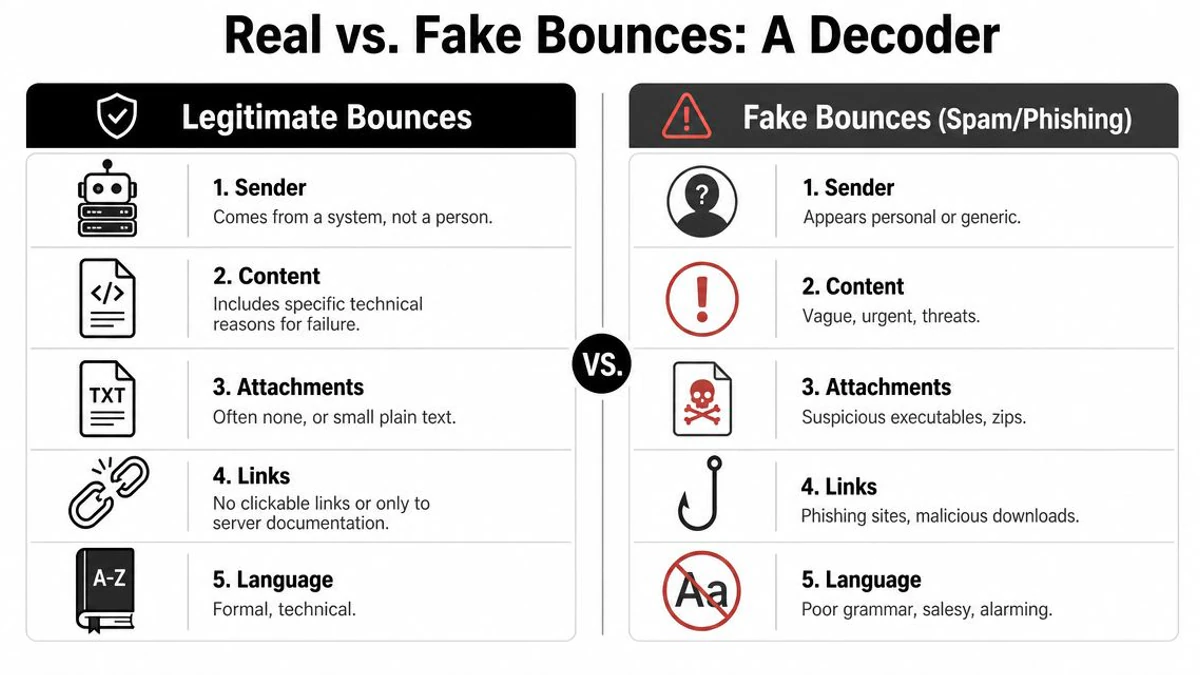
When I triage these for teams, I start with a short checklist:
- Sender identity: System messages usually come from an automated mailer address, not a personal name.
- Failure detail: Look for structured lines such as status information or a diagnostic explanation from a receiving server.
- Message context: Real bounces often include the original recipient or part of the failed message headers.
- Tone: Technical and plain is normal. Salesy, emotional, or threatening is not.
A real bounce may still be misdirected. It may still relate to spoofed mail. But it usually behaves like infrastructure, not like a scammer trying to get a click.
Red flags that point to phishing
Many mail delivery subsystem messages are phishing dressed up as delivery failures. Security analysis notes that attackers often include a “View Messages” style link that leads to a fake webmail login page, and the core control is to validate the sender domain and avoid clicking embedded links, as explained in this incident-removal analysis.
Don't investigate a suspicious bounce by clicking inside it. Investigate it by inspecting the sender and checking your account separately.
The fake versions often share a pattern:
- Generic urgency: “Your messages are pending,” “Mailbox error,” or “Immediate action required.”
- Weak sender domain: The display name says Gmail or Mail Delivery Subsystem, but the actual domain doesn't line up.
- Credential harvesting: A button or link asks you to sign in to release or review messages.
- Bad composition: Awkward grammar, generic greetings, and mismatched branding.
Use this quick decoder when you're unsure:
| Clue | More likely real | More likely fake |
|---|---|---|
| Link to review blocked mail | Rare | Common |
| Technical error detail | Common | Often vague |
| Requests login credentials | No | Yes |
| Attached office files or archives | Unusual | Risky |
If you manage campaigns, bounce parsing matters on the sender side too. Teams that need a tighter read on categories and handling logic should bookmark email bounce types explained and how to reduce bounces.
The True Root Causes of Email Delivery Failures
Gmail mail delivery subsystem spam is noisy, but it isn't the only bounce problem that matters. For senders, the business risk sits elsewhere: your own campaigns can generate legitimate failures when data quality and sender controls slip.
Recipient problem versus sender problem
A forged bounce flood is mostly something happening around you. A real campaign bounce pattern is usually something happening because of you. That distinction matters because the fixes are different.
When teams blur those together, they waste time. They tighten account passwords when the issue is a stale CRM. They blame Gmail when the sending domain lacks proper alignment. Or they keep mailing old lists and call the resulting failures “normal attrition.”
A practical primer like understanding email bounces can help marketers frame bounce behavior properly. Not every failure means the same thing. Some are temporary. Some are permanent. Some point to data decay. Others point to sender trust issues.
The four operational causes that matter
The first and most common cause is poor list hygiene. If your database includes dead inboxes, typos, abandoned addresses, disposable signups, and role accounts you never meant to prioritize, your campaign creates its own failure stream. Marketers often notice this only after a platform warning or a placement drop.
The second is spam filtering pressure. You can send to valid addresses and still fail if your domain reputation is weak, your complaint history is ugly, or your content pattern looks risky. The receiving side doesn't evaluate just the recipient. It evaluates the sender too.
Third is authentication weakness. The broader abuse problem exists because SMTP historically allowed sender-address spoofing unless downstream protections such as SPF, DKIM, and DMARC are enforced, and the longstanding advice is to avoid clicking links, verify sender domains carefully, and treat unexpected delivery-subsystem mail as suspicious until confirmed, as outlined in this mail security overview.
The fourth is reputation neglect. Teams obsess over opens and clicks, then ignore the systems that shape whether mail gets accepted in the first place. Sender reputation isn't a cosmetic metric. It affects whether a provider trusts the next message enough to place it well, defer it, or block it.
Operational takeaway: Bounces aren't just errors to suppress. They are feedback from the mailbox ecosystem about your data quality and trust posture.
A short diagnostic sequence works well here:
- Review who you mailed. Was the segment old, purchased, loosely imported, or form-filled without controls?
- Check your domain trust signals. Authentication, complaint patterns, and sending consistency all matter.
- Inspect the failure pattern. Unknown user responses point one way. Policy and reputation rejections point another.
- Decide what to remove. Some addresses should be retried later. Others should never be mailed again.
Teams that want the sender-side version of this problem mapped more directly should review why email bounces happen and how to fix them.
Your Action Plan for Email Authentication
Authentication won't stop every fake bounce from ever reaching the world, but it gives mailbox providers clearer instructions for handling mail that claims to come from your domain. That matters for brand protection and for day-to-day campaign acceptance.
Think of authentication as a three-part control system
Start with SPF. Think of it as the approved sender list. It tells receiving systems which sending sources are allowed to send using your domain identity.
Then comes DKIM. This is the integrity layer. It adds a cryptographic signature so the receiving side can check whether the message was altered in transit and whether it ties back to your domain.
Finally, DMARC sits above both. It tells receivers what policy to apply when a message fails those checks, and it gives you reporting visibility. In practice, DMARC is the part that turns authentication from passive documentation into operational instruction.
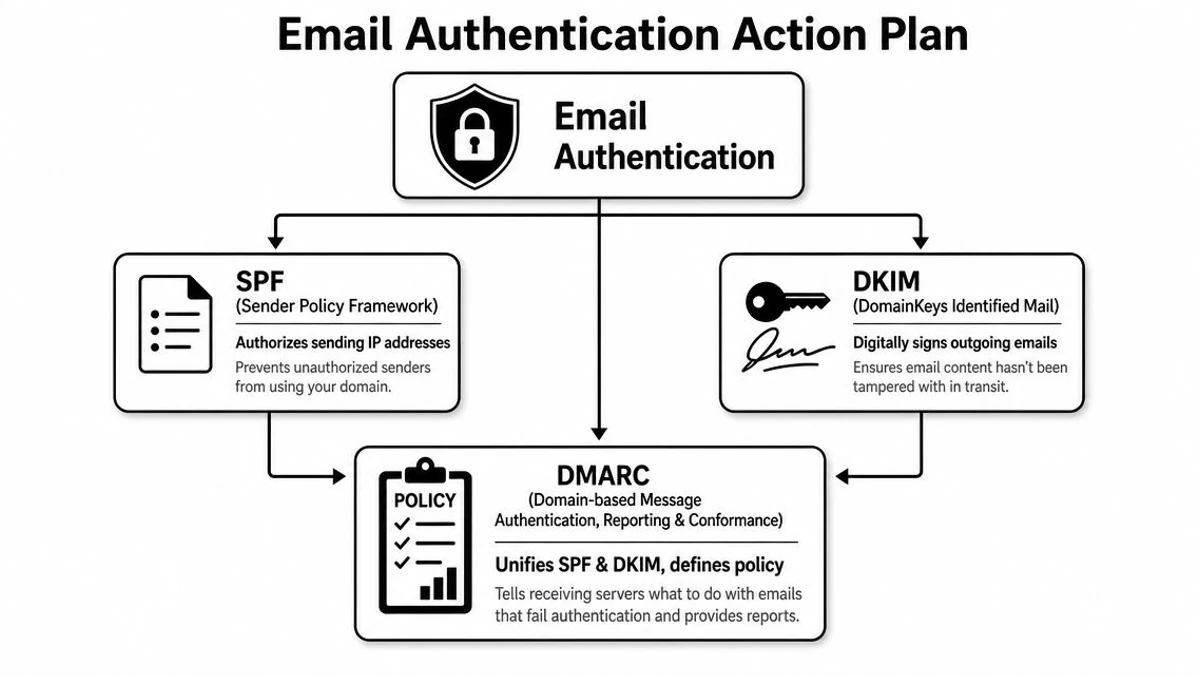
A simple mental model helps:
- SPF is who may send.
- DKIM is whether the message stayed intact.
- DMARC is what receivers should do when those checks don't line up.
What actually helps in practice
Teams often don't fail because they've never heard the acronyms. They fail because their stack is fragmented. Marketing uses one platform, lifecycle uses another, support uses another, and sales has its own outbound tool. Each system touches the domain. Each one needs to align.
That's why the useful work here is operational, not academic:
- Inventory every sender: Marketing automation, CRM workflows, customer support, outbound sales, billing, and product mail all count.
- Check alignment across tools: A single forgotten tool can create failures or make authentication look inconsistent.
- Set policy deliberately: Don't leave your domain in a vague state forever. Decide how unauthenticated mail should be handled.
- Review changes after launches: New form tools, event platforms, and outreach systems often introduce quiet trust problems.
The teams with the fewest “mystery” deliverability issues usually know exactly which tools are allowed to send as them.
Authentication also connects directly to reputation. If your brand sends mail at scale, you should treat domain trust as part of channel operations, not as a one-time technical setup. A stronger overview of the reputation side is in email sender reputation factors that affect deliverability.
Prevent Bounces and Protect Reputation with BillionVerify
Authentication protects domain identity. It does not fix bad recipient data. That's where verification changes the economics of sending.

The root lesson behind Gmail mail delivery subsystem spam is that email systems generate noise when identities and addresses can't be trusted. On the recipient side, that noise shows up as forged bounce spam. On the sender side, it shows up as preventable hard bounces, reputation drag, and campaign instability. Verification is how you cut down the sender-controlled half of that problem before mailbox providers do it for you.
Where verification changes the outcome
BillionVerify is built for the point where list hygiene becomes a deliverability control, not just a cleanup chore. Its 99.9% SMTP-level accuracy is designed to help teams remove invalid addresses before they create avoidable failures. For a marketing manager, that means fewer bad records entering a launch segment. For an SDR team, it means fewer sequences aimed at addresses that were never reachable. For product teams, it means fewer fake signups polluting onboarding flows.
The platform covers the main operational paths teams care about:
- Bulk list cleaning: Upload a CSV, review live progress, and export filtered lists before a campaign goes out.
- Single checks and API workflows: Validate addresses at the point of entry so CRM junk doesn't accumulate.
- Structured outputs: Results include status, SMTP results, MX records, catch-all scoring, and deliverability insights.
- Risk reduction filters: Teams can identify role accounts and disposable emails, then suppress or segment accordingly.
That's what makes verification useful in practice. It doesn't just label an address. It helps decide whether the address belongs in the next send, in a lower-risk segment, or nowhere in your system at all.
How teams use it before damage starts
The strongest use case isn't emergency cleanup. It's prevention.
A typical flow looks like this:
- Gate new entries at signup or lead capture with an instantaneous API.
- Clean existing CRM and newsletter lists before major campaigns or migrations.
- Segment borderline records such as catch-all results instead of treating them like guaranteed good addresses.
- Push cleaner data into your tools through integrations with platforms like Mailchimp, SendGrid, HubSpot, Salesforce, Klaviyo, Zapier, and Make.
Here's a closer look at the workflow in action:
There's also a practical agency angle. BillionVerify offers a whitelabel portal, so agencies managing client campaigns can operationalize verification without sending clients off-platform. That matters when reputation responsibility sits with the service provider, but list quality problems originate with the client database.
The larger point is simple. If forged bounce spam teaches recipients not to trust every mail failure notice, good verification teaches senders not to trust every email address they collect.
From Inbox Chaos to Deliverability Control
Gmail mail delivery subsystem spam feels like a security incident because it lands in the same place as real email problems. But the fix starts with classification. Some of these messages are fallout from spoofing. Some are phishing lures. Your own bounce patterns, meanwhile, often point to list quality, authentication, and reputation issues that your team can control.
That's the useful shift. Stop treating bounces as random inbox clutter. Treat them as signals. On the recipient side, verify before you trust. On the sender side, clean data before you send, authenticate every stream, and suppress bad records early.
If you want a tighter operational baseline for your email program, keep what bounce rate in email means and how to reduce it close at hand. It's easier to protect sender reputation before the warnings start than after mailbox providers have already made up their minds.
If you want fewer preventable bounces, cleaner CRM data, and more control over sender reputation, try BillionVerify. It gives marketing, sales, product, and agency teams a practical way to verify addresses before they damage campaign performance or pollute your pipeline.