



A user submits your signup form, waits, and starts wondering whether it worked. Your app says “check your email,” but the address they entered had a typo, a disposable domain, or a mailbox that won't accept mail. That gap between action and feedback is where a lot of product friction hides.
This is why real time API data matters in production. Not because “real time” sounds modern, but because users now expect systems to react while they're still in the flow. If a checkout updates inventory late, if a dashboard lags, or if a registration form accepts bad email addresses and fails later, the product feels unreliable.
Email verification is one of the clearest examples. It's immediate, user-facing, and tied directly to data quality, conversion, and sender reputation. Done well, it catches problems at the point of capture. Done poorly, it adds latency, cost, and operational headaches for little benefit.
Why Your Users Expect Instant Updates
Users don't separate “frontend experience” from “backend timing.” They only notice whether the product responds when they act. If they submit a form and your system takes too long to confirm the outcome, trust drops fast.
That expectation now applies far beyond chat apps or trading platforms. Real-time data has become a mainstream API use case because it supports applications that need immediate updates, from financial trading to live dashboards, and realtime APIs are described as enabling near-instantaneous data exchange, often within a few milliseconds, which makes them important for modern user experiences according to PubNub's guide to realtime APIs.
Email capture is where this becomes painfully obvious. A person enters gmal.com instead of gmail.com, clicks submit, and moves on. If you wait until a later batch job to detect the issue, the user never corrects it. Sales loses the lead, marketing inherits a dirty list, and support gets avoidable tickets.
The signup moment is the decision point
The best time to verify an email address is when the user still has the form open. That's when they can fix a typo, choose a different address, or understand why the system rejected the input.
For teams deciding between live checks and delayed cleanup, this trade-off is easier to see in practice through real-time vs bulk email validation. The core point is simple. If the user can still act, instant feedback matters more than downstream correction.
Bad data captured in real time needs a real-time response. Otherwise you're just moving the failure to a later system.
This is why real time API data isn't a niche infrastructure choice anymore. It's part of the product surface. When people interact with forms, dashboards, notifications, or operational tools, they expect the system to answer while the context is still fresh.
Understanding Real Time API Data
Real time API data is easiest to understand by comparing it to news delivery. A batch system is the morning paper. It gives you a snapshot after the fact. A real-time system is the live ticker. The event happens, and the update appears immediately.
That difference sounds abstract until you attach it to user-facing behavior. A batch process can still be perfectly correct, but if the answer arrives after the user needed it, the system feels broken.
Batch feels safe until it reaches the user
Teams often default to batch because it's familiar. Scheduled jobs are easy to reason about, logs are simpler, and load is predictable. That works for internal reporting or periodic reconciliation.
It breaks down when the application itself needs fresh answers. For live analytics and interactive products, real-time APIs are commonly defined by millisecond-level responsiveness, and one industry guide notes that user-facing analytics queries should return in 50 milliseconds or less to avoid degrading experience, as explained in Tinybird's guide to real-time analytics.
That doesn't mean every use case needs the same latency target. It means user tolerance is low once the response is part of a live interaction.
What real time means in practice
In modern systems, real time usually means data is processed and made available immediately after it is generated, often within milliseconds. The architecture behind that is event-driven rather than schedule-driven. Instead of waiting for a cron job or ETL window, the system reacts to events as they arrive.
A practical mental model looks like this:
- An event happens: A user types an email, clicks submit, or triggers a workflow.
- The API receives the request: The backend validates, enriches, or routes the event immediately.
- The product responds: The UI updates while the user is still present.
For developers working with analytics data, Trackingplan insights for GA4 data are useful because they show how freshness changes the value of the output. The same principle applies to verification. A correct answer delivered too late has lower product value.
There's also an important distinction between “API” and “real-time API data.” A normal API can return static or stale data. Real-time API data means the response reflects events that were just generated and processed. That's why product teams evaluating verification or automation flows often end up revisiting the basics of API design, not just validation logic, as covered in this email API guide.
Practical rule: If the user can still change their behavior, real-time feedback is worth considering. If they can't, batch may be enough.
Choosing Your Real Time Architecture
Teams often make the wrong architecture decision by starting with tools. They ask whether they should use WebSockets, SSE, webhooks, or gRPC before they've defined the interaction they need. That usually leads to overbuilding.
The core question is simpler. Does the client need a continuous stream, or does it only need a fresh answer at a specific moment?
Start with the user action, not the protocol
A critical decision in real time API design is choosing between continuous streaming and simple polling. Streaming gives you the lowest latency, but on-demand fetches plus smart caching can often provide adequate freshness with less engineering overhead, as discussed in API7's guide to real-time data with streaming APIs.
That trade-off matters a lot for email verification. Most signup flows do not need a permanently open bidirectional connection. They need a fast check when the user pauses typing, blurs the email field, or submits the form. That is a request-response problem with low latency requirements, not a full streaming system.
Here's the practical framing I use:
- Choose polling or on-demand fetches when the user asks for a fresh answer at a point in time.
- Choose streaming when the product must continuously push updates without repeated requests.
- Choose webhooks when one server needs to notify another server that an event happened.
If you're evaluating a verification workflow, the implementation details matter more than the label. A standard HTTPS API is often enough for email checks, and this email verification API overview is a good reference for what that request-response pattern looks like in practice.
Real-Time Protocol Comparison
| Protocol | Communication | Best For | Key Trade-off |
|---|---|---|---|
| WebSockets | Bidirectional persistent connection | Chat, collaborative apps, live trading interfaces | More connection management and state handling |
| Server-Sent Events | One-way stream from server to client | Notifications, live feeds, status updates | Client can't send on the same stream |
| Webhooks | Event-driven server-to-server push | Async workflows, background notifications, third-party integrations | Delivery reliability and signature verification need careful handling |
| gRPC | High-performance service-to-service communication | Internal microservices, low-latency backend calls | Less convenient for direct browser use |
What works for email verification
For signup forms, plain request-response HTTP usually wins. It's easier to secure, easier to observe, and easier to debounce at the edge of the user interaction. Add caching for repeated checks and async fallback for non-critical follow-up work.
What usually doesn't work is forcing a streaming architecture onto a point-check use case. A WebSocket connection to validate a single email field is unnecessary complexity. You end up managing connection lifecycle, retries, and frontend state for no user-visible benefit.
A more balanced setup looks like this:
- Client-side syntax checks first. Catch empty fields and obvious formatting problems before calling the backend.
- Debounced server verification next. Validate after the user pauses or leaves the field.
- Submission-time confirmation last. Re-check on submit so you don't rely on stale field state.
- Optional webhook follow-up. If your provider supports async updates, use them for downstream CRM or enrichment tasks, not for blocking the signup form.
Streaming is for changing state. Verification is usually a point decision.
That distinction keeps systems smaller and more reliable. It also keeps your “real time” work focused on the product moment that matters.
How to Implement Real Time Email Verification
The cleanest implementation starts before the form is submitted. You don't want to block every keystroke with a network call, and you also don't want to wait until after account creation to discover the email is unusable.
A good pattern is to validate in layers. Run lightweight checks in the browser, then make a debounced API call when the user pauses or exits the field, and finally confirm again at submit time.
Validate at the right moments
For most products, these moments work well:
- While typing: Only local format checks. Don't spam the verification API.
- On blur or short pause: Send the first real verification request.
- On submit: Confirm again before creating the account or lead.
- After submit: Trigger non-blocking downstream tasks like CRM sync or segmentation.
This is the point where a service such as BillionVerify's real-time email verification fits naturally. The useful capability is not “AI” or branding. It's the operational shape of the response: a fast API call that returns structured JSON your app can act on immediately.
A practical request flow
Here's a simple Node-style example for a server endpoint that verifies an email during signup:
import express from "express";
import fetch from "node-fetch";

const app = express();
app.use(express.json());

app.post("/signup/verify-email", async (req, res) => {
  const email = (req.body.email || "").trim().toLowerCase();

  if (!email || !email.includes("@")) {
    return res.status(400).json({
      ok: false,
      reason: "invalid_format"
    });
  }

  try {
    const response = await fetch("https://api.your-verification-provider.com/verify", {
      method: "POST",
      headers: {
        "Content-Type": "application/json",
        "Authorization": `Bearer ${process.env.EMAIL_VERIFY_API_KEY}`
      },
      body: JSON.stringify({ email })
    });

    if (!response.ok) {
      return res.status(502).json({
        ok: false,
        reason: "verification_unavailable"
      });
    }

    const result = await response.json();

    return res.json({
      ok: true,
      email,
      verification: result
    });
  } catch (err) {
    return res.status(502).json({
      ok: false,
      reason: "network_error"
    });
  }
});
The frontend should treat this endpoint as a decision service, not just a lookup. That means mapping the response to user-facing actions.
For example:
- Accept immediately when the address looks deliverable.
- Warn and allow correction when the input appears malformed, risky, or likely mistyped.
- Block account creation when the result clearly indicates the address should not be used.
- Fail open carefully if the verification provider is temporarily unavailable and the signup is business-critical.
Later in the flow, a short walkthrough helps teams align on UX and API behavior:
How to handle the response
The response format varies by provider, but the implementation approach is similar. Use fields such as status, SMTP result, MX presence, catch-all assessment, and deliverability indicators to decide what the app should do next.
A practical mapping looks like this:
| Response signal | App behavior | Why |
|---|---|---|
| Valid and deliverable | Continue signup | No extra friction |
| Typo or malformed input | Show inline correction prompt | User can fix it immediately |
| Disposable or role-based address | Warn or block based on policy | Depends on product rules |
| Temporary verification failure | Retry briefly or allow with review flag | Protect conversion during outages |
What usually fails in production is not the API call itself. It's sloppy fallback behavior. Teams either hard-block signups on any verification hiccup, or they let negative results pass unaddressed. Neither is good enough.
Treat verification as a policy decision, not just a network request.
Cache repeated checks for the same normalized email for a short period, especially during repeated form interactions. That avoids redundant calls and keeps the experience responsive without overloading your integration.
Securing and Scaling Your Real Time API
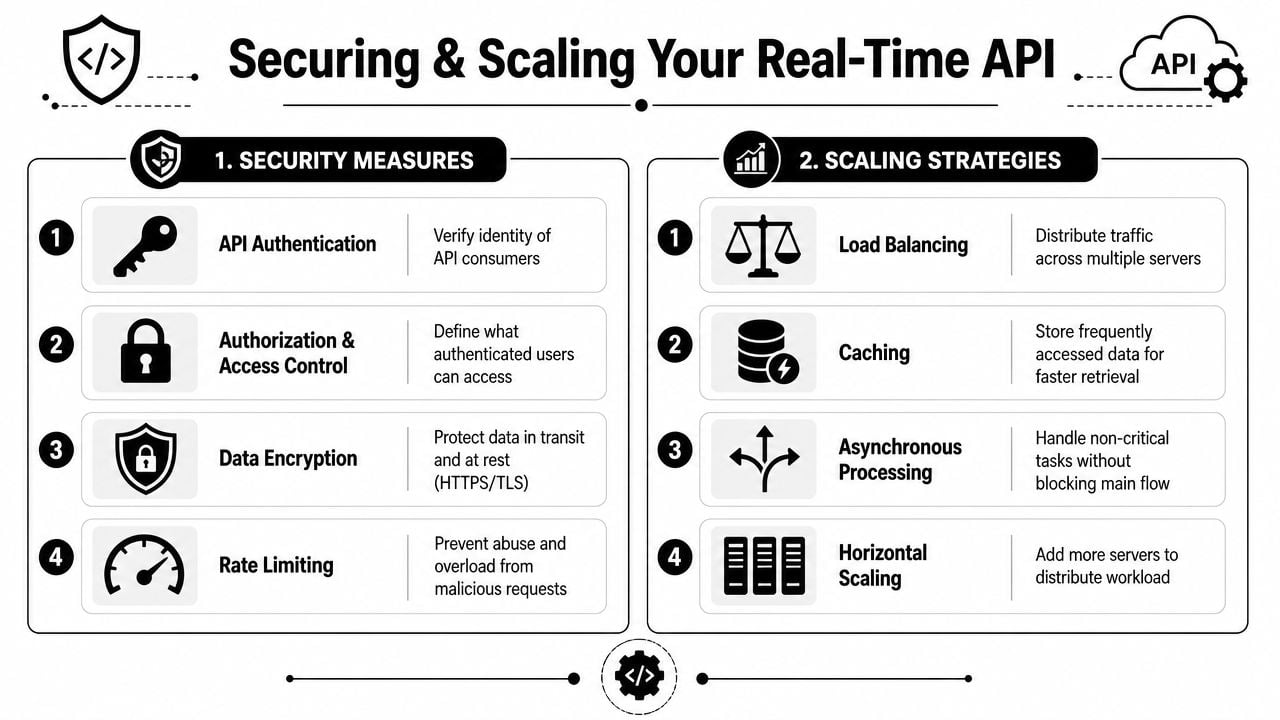
Prototype integrations fail in predictable ways. Keys leak into the client, retries become storms, webhook events get trusted without validation, and nobody notices latency drift until users complain. Real time API data adds operational pressure because delay and instability are visible immediately.
For enterprise-grade systems, the harder problem is often governance rather than raw speed. Ensuring the right user gets the right data under load requires entitlement models, access controls, and rate limiting, as described in FactSet's real-time data overview.
Security controls that matter in production
A few controls do most of the work:
- Keep API keys server-side. The browser should call your backend, not the verification provider directly.
- Validate webhook signatures. If you accept async callbacks, verify origin before processing the payload.
- Protect against replay. Use timestamps, nonce checks, or event IDs so the same event can't be reused.
- Apply authorization by context. Different teams and services shouldn't have the same ability to query or export sensitive data.
Teams that already work on security operations often recognize the same pattern from live detection systems. This write-up on a real-time threat detection program is useful because it reinforces the operational mindset. Fast pipelines are only useful if trust boundaries are clear.
Scaling without breaking freshness
Low latency at the API layer doesn't help if the upstream pipeline is stale. In high-volume systems, practical designs use buffering, stream processing, and cacheable responses so traffic spikes don't collapse freshness or availability.
That leads to a few common patterns:
- Rate limit by consumer and route. Protect expensive verification paths from abuse and bursts.
- Use asynchronous processing for non-blocking tasks. CRM sync, audit logging, and analytics events shouldn't sit on the critical path.
- Cache carefully. Repeated checks for the same input during a short window are good cache candidates.
- Load balance stateless API workers. Keep the verification edge simple so you can scale horizontally.
What to monitor continuously
You don't need a giant observability stack to catch most problems, but you do need the right signals:
- Latency percentiles: Watch tail latency, not just averages.
- Error rates by cause: Separate provider errors, timeouts, bad requests, and internal failures.
- Rate-limit events: They show both abuse and misconfigured clients.
- Webhook verification failures: These often expose either attack attempts or broken integrations.
- Connection and queue pressure: Especially important when you add async workers around the API path.
If you use asynchronous event delivery around your verification flow, email verification webhooks are worth understanding because the scaling and security concerns are different from direct request-response checks.
Key Takeaways and Your Next Steps
Real time API data isn't one technology. It's a product and architecture choice about when freshness is worth the operational cost. The strongest implementations start with the user moment that needs an answer now.
For email verification, that moment is usually form capture. A person enters an address, and your app has a short window to prevent bad data from entering the system. That's why this use case is a good starting point. It has direct business value, clear UX impact, and a narrow enough scope that teams can implement it without redesigning their entire stack.
A few principles hold up well in production:
Choose the smallest architecture that solves the user problem
For many verification workflows, a low-latency HTTPS request is enough. You don't need persistent streaming just to validate a field. Save WebSockets, SSE, and other continuous delivery patterns for interfaces that need live updates.
Design for policy, not just transport
A verification result should trigger a decision. Allow, warn, block, retry, or flag for review. Teams that define those outcomes early ship cleaner integrations and fewer user-facing surprises.
Plan for load before you need it
For higher-volume systems, the dominant architecture pattern is streaming ingest + stream processing + low-latency API, because freshness depends on the full pipeline, not only the final endpoint, as explained in Tinybird's overview of real-time data platforms. If ingest or transformation lags, the API can still respond quickly while serving stale answers, which is worse than an obvious failure.
The right real-time design is the one that preserves trust at the moment the user needs certainty.
Start with one flow that has immediate payoff. Signup email verification is usually the best candidate. It improves list quality, reduces downstream cleanup, and gives product teams a direct way to turn real time API data into a better user experience.
If you want to apply this with minimal overhead, BillionVerify is a practical place to start. It supports single-email verification, bulk list cleaning, and a fast real-time API with structured results that product, sales, and marketing teams can plug into signup forms, CRM flows, and campaign hygiene workflows.