


Most advice about the email unsubscribe message starts from the wrong premise. It treats every unsubscribe as a loss to prevent.
That mindset creates bad decisions fast. Teams shrink the footer link, bury the option behind a login, or turn the unsubscribe page into a maze of guilt, delay, and extra clicks. The short-term thinking is obvious. Keep the contact, save the list size, protect campaign volume.
In practice, that's how brands train people to hit spam.
A clean unsubscribe is healthier than a disengaged subscriber who keeps dragging down engagement, and it's far better than a frustrated user who reports your campaign. The unsubscribe flow is one of the few moments in email where compliance, deliverability, list quality, and brand trust all meet in one click. If you treat it like a defensive legal footer, you miss its real value.
Why an Unsubscribe Is Not a Failure
An unsubscribe is often the most honest feedback your list gives you. The person isn't confused. They aren't just ignoring you. They're telling you your current message, frequency, or offer no longer fits.
That's useful.
For marketing teams, the better comparison isn't “subscriber kept” versus “subscriber lost.” It's “clean opt-out” versus “ongoing disengagement or complaint.” If you need a quick primer on the basic mechanics and terminology, Breaker's guide to understanding email cessation is a solid reference because it frames unsubscribe as a normal part of permission-based email, not a catastrophe.
Why a smaller engaged audience usually wins
A bloated list can make reporting look stronger than the program is. Revenue teams see total contacts. Deliverability teams see drag. CRM owners see stale records. The inbox providers see a sender pushing mail to people who no longer care.
When that happens, “saving” unsubscribes becomes expensive in quiet ways:
- More ignored sends: You keep mailing people who already decided they're done.
- More complaint risk: If the unsubscribe path feels annoying, some users choose spam because it's faster.
- Worse diagnostics: Campaign results get harder to interpret when too many inactive contacts remain on the list.
Practical rule: If someone wants out, make leaving easier than complaining.
The unsubscribe event should also trigger a second question. Who else on this list is functionally gone, even if they haven't clicked unsubscribe yet? That's where re-engagement strategy belongs. If you need a structured way to handle inactive subscribers before they become reputation drag, this guide to email re-engagement strategies is worth reviewing with your CRM and lifecycle teams.
What a good unsubscribe signal tells you
A healthy program uses unsubscribe data as segmentation feedback. If a weekly newsletter keeps losing product-trial users, the issue may be content fit. If a sale campaign drives opt-outs from recent buyers, your suppression logic may be weak. If one content stream causes exits and another retains attention, the audience is telling you how to split the program.
The actual failure isn't the unsubscribe. It's refusing to learn from it.
The Legal Stakes of Your Unsubscribe Link
Legal compliance around unsubscribe isn't complicated, but teams still get it wrong because they optimize for friction instead of clarity. That creates risk quickly.
Under CAN-SPAM, a marketing email's unsubscribe mechanism must be clear and conspicuous, must work for at least 30 days after sending, and opt-out requests must be honored within 10 business days. The FTC also prohibits charging a fee, asking for extra personal information beyond an email address, or forcing more than a reply email or single web page visit to complete the opt-out, as explained in the FTC's CAN-SPAM compliance guide for businesses.
What CAN-SPAM actually requires
Teams often don't fail on the existence of a link. They fail on the experience around it.
A practical audit looks like this:
- Visible path: The unsubscribe link must be easy to spot in the email.
- Working path: It has to stay operational long enough after send.
- Fast suppression: The request must flow into your suppression process without delays.
- Low friction: No login wall, no survey requirement, no account creation.
- Clear identity: The recipient should know who sent the message.
If you run sends through multiple tools, this gets more important. Many brands have one newsletter platform, one sales sequencing tool, one transactional provider, and a separate CRM sync. If unsubscribe handling isn't unified, one team may suppress properly while another keeps sending.
A compliant unsubscribe process isn't just a footer link. It's a suppression workflow that every sending system respects.
For a more detailed operational breakdown, keep a reference copy of this CAN-SPAM Act guide in your team docs and use it when auditing ESP settings, forms, and preference pages.
What teams should borrow from GDPR thinking
Even when your immediate review starts with CAN-SPAM, the better design principle is broader. People should be able to withdraw consent as easily as they gave it. That's the standard smart teams use because it aligns legal safety with good UX.
That means your email unsubscribe message and landing page shouldn't punish the user for making a valid choice. If your signup took one field and one click, your opt-out shouldn't demand authentication, profile editing, or a scavenger hunt through account settings.
Here's the business reality. The teams that make unsubscribing hard don't preserve demand. They corrupt audience data, increase complaint risk, and create internal confusion about who is still marketable. Compliance isn't separate from performance. It protects it.
Designing a Helpful Unsubscribe Experience
The best unsubscribe flow feels calm, clear, and slightly boring. That's a good thing. People should know what happened, what will stop, and whether they have lighter options if they want them.

Industry guidance on unsubscribe UX is blunt about the trade-off. Preference centers and opt-down paths can preserve engagement, but hiding the unsubscribe path or adding unnecessary steps frustrates users and increases spam complaints, as noted in ActiveCampaign's piece on unsubscribe message practices.
What a good exit looks like
A useful email unsubscribe message does three jobs:
| Element | What works | What fails |
|---|---|---|
| Link copy | Plain language like “Unsubscribe” or “Manage preferences” | Cute phrasing that makes users guess |
| Confirmation page | One clear success message | Ambiguous screens that don't confirm removal |
| Tone | Respectful and neutral | Guilt, sarcasm, or pressure |
The best confirmation pages are short. “You've been unsubscribed from marketing emails.” That's enough. You can add a link to manage preferences, but the full opt-out must already be complete.
Good UX also separates actions cleanly:
- Full unsubscribe: Immediate and final for that email category.
- Preference management: Optional choices for topics or cadence.
- Pause option: Useful when subscribers are overwhelmed, not disinterested.
Where preference centers help and where they fail
Preference centers work when they reduce volume or improve relevance without blocking the exit. They fail when they become a retention trap.
A sound design usually includes options like:
- Fewer emails: Let users reduce frequency.
- Specific topics: Product updates, editorial, promotions, events.
- Pause period: A temporary break for users who still want the relationship.
What you shouldn't do is force those choices before allowing the unsubscribe. The user already clicked out. Respect that decision first.
If you want feedback, ask after the unsubscribe is complete, not before.
There's also a copywriting issue here. Many brands write an unsubscribe page like a breakup note. That's unnecessary. Neutral language performs better operationally because it confirms status, reduces confusion, and keeps support tickets down.
A simple structure works:
- Confirm the action.
- Offer optional alternatives.
- Provide a path back if the click was accidental.
That last part matters more now because mailbox interfaces can surface unsubscribe actions outside the body of the email. Users may click quickly, and some will make mistakes. Your page should make recovery easy without making opt-out difficult.
Technical Implementation and Mailbox Provider Rules
The footer link isn't enough anymore. Mailbox providers increasingly expect bulk senders to support unsubscribe at the interface level, not just inside the email body.
The Internet Society recommends including the List-Unsubscribe header in every message, and notes that Gmail and Yahoo display a top-level one-click unsubscribe option for bulk senders. That shifts unsubscribe from a legal afterthought into a deliverability control point, as described in the Internet Society's marketing unsubscribe best practices.
Why the header matters as much as the footer
When Gmail or Yahoo surfaces an unsubscribe control near the sender information, the user doesn't need to scroll, hunt, or open a footer menu. That's good for the user, and it's good for you because it gives frustrated recipients a cleaner exit than the spam button.
The technical lesson is simple. Your email unsubscribe message exists in two places:
- In the email body, where legal clarity and brand UX matter.
- In the message headers, where mailbox providers decide whether to offer one-click controls.
If your ESP supports list-unsubscribe automatically, confirm it's enabled for every commercial stream. If it doesn't, your engineering or email operations team needs to check how unsub requests route back into suppression lists and whether those requests sync across tools.
What to check in your ESP
A quick operational review should cover these points:
- Header support: Confirm your platform adds the right unsubscribe headers to marketing mail.
- Suppression sync: Verify unsubscribes flow into the correct global or list-level suppression sets.
- Page behavior: Make sure one-click header unsubscribes land in the same suppression logic as footer-link unsubscribes.
- Cross-tool consistency: Newsletter, automation, and outbound tools should all honor the same opt-out state where required.
If your team is debugging inbox placement, it also helps to understand how mailbox-side spam handling intersects with sender setup. BillionVerify's write-up on Gmail Mail Delivery Subsystem spam issues is a useful technical companion because it connects sender reputation problems with the mechanics mailbox providers enforce.
Measuring What Matters Unsubscribe Rates and KPIs
Unsubscribe rate only becomes useful when you stop looking at it as a vanity metric. On its own, it doesn't tell you whether a campaign failed. In context, it can reveal fatigue, mismatch, bad targeting, or a normal cleanup effect from a healthy list.
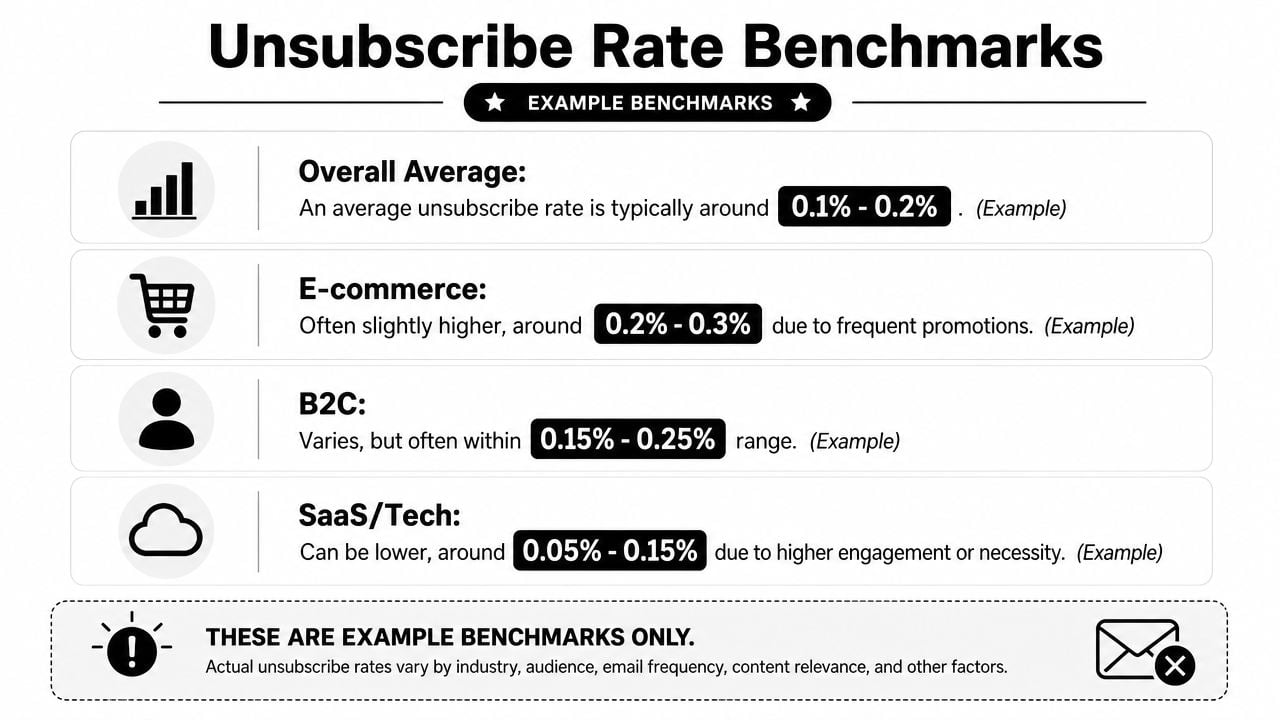
For eCommerce, a widely used benchmark is 0.20% to 0.30% per campaign, with B2C retailers reported at a median 0.29%. Rates above 0.40% are commonly flagged as engagement problems, while transactional emails typically stay below 0.05%, according to this benchmark summary from OpenSend on email unsubscribe statistics for eCommerce.
What normal looks like in eCommerce
Those ranges matter because they keep teams from overreacting to normal churn. If you send to a list of about 5,200 subscribers, the same benchmark notes that roughly 11 unsubscribes per send can still be normal at that scale in eCommerce.
That doesn't mean every campaign is fine. It means you need comparison points that match message type and audience intent.
A practical KPI view looks like this:
| KPI cut | What it helps you diagnose |
|---|---|
| By campaign | Which sends trigger opt-out behavior |
| By segment | Which audiences no longer fit the message |
| By message type | Whether promotions, newsletters, or lifecycle emails cause more exits |
| Over time | Whether fatigue is building gradually or tied to a specific change |
If you also manage outbound programs, it helps to compare expectations by context. Mailwarm's guide on what's a normal cold email unsubscribe rate is useful because cold outreach behaves differently from opted-in retail and newsletter traffic.
How to read spikes without overreacting
A spike doesn't always mean your copy got worse. Sometimes the mailbox changed.
Salesforce reported that beginning in mid-June 2025, some larger senders saw unsubscribe spikes at nearly twice their average numbers, and that multiple unsubscribe requests from a single subscriber accounted for 20% to 50%+ of daily unsub rates for some senders. Salesforce linked that change to Gmail's phased rollout of a Subscription Center feature in June/July 2025, which made it easier for users to review senders and unsubscribe in a few clicks through the mailbox interface in this Salesforce analysis of unsubscribe rate changes.
Don't diagnose unsubscribe trends in isolation. Check campaign changes, segment changes, and mailbox UX changes at the same time.
That's why unsubscribe rate is best treated as an operational signal, not a scoreboard. It tells you where to investigate.
From Unsubscribe Signal to Total List Hygiene
A subscriber who clicks unsubscribe is giving you a clean signal. Many bad records never do that. They just sit there. Some never open again. Some are invalid. Some are disposable. Some are role-based addresses that rarely behave like real engaged users. Others remain technically deliverable but commercially dead.
That's why unsubscribe handling and list hygiene belong in the same operating model. Recent deliverability guidance has raised a useful question: is unsubscribe always better than silent disengagement? Some providers can proactively suppress recipients who appear uninterested, which frames unsubscribes as part of a broader list hygiene and segmentation strategy rather than a footer-only compliance event, as discussed in this deliverability discussion on unsubscribe and suppression behavior.
Unsubscribes are only one part of list quality
A strong list is not the one with the fewest unsubscribes. It's the one where each address has a credible reason to remain on the file.
That means teams should review multiple negative signals together:
- Opt-outs: explicit loss of permission for marketing messages
- Silent disengagement: recipients who remain on-list but stop interacting
- Invalid records: addresses that shouldn't have been mailed in the first place
- Low-quality acquisition: fake signups, disposable emails, and bad imports
When those conditions mix, the unsubscribe message becomes your last visible symptom. The root issue often started earlier, at capture, import, or segmentation.
If your team is formalizing that process, this checklist for email list hygiene in 2026 is a useful planning resource because it treats suppression, validation, and engagement review as one workflow rather than separate tasks.
Where verification fits before the send
Verification belongs upstream of the unsubscribe event. It doesn't replace opt-out handling. It reduces the number of weak or risky contacts that make it into campaigns at all.
For teams cleaning acquisition funnels or large campaign lists, tools such as BillionVerify are used to verify addresses before sending, returning status data, SMTP results, MX records, catch-all scoring, and other deliverability signals through bulk cleaning, single checks, and API-based validation. That matters because list quality problems don't just show up as unsubscribes. They also surface as bounce risk, poor audience targeting, and polluted CRM segments.
Here's the operational sequence that tends to work:
- Validate new addresses at signup or import.
- Segment engaged, inactive, and risky records before each major send.
- Honor unsubscribes immediately and suppress correctly.
- Review disengaged cohorts before they become complaint sources.
The video below gives a quick product view of that verification layer in practice.
The commercial benefit is straightforward. You spend less time mailing bad or low-value records, and more time refining the audience that still wants to hear from you.
Email Unsubscribe Message Examples and Templates
Teams don't need more theory here. They need copy they can use and adapt.
Simple confirmation template
Use this when compliance and speed matter more than retention options.
Page headline: You've been unsubscribed
Body copy: You won't receive future marketing emails from us at this address. If this was a mistake, you can resubscribe at any time or update your email preferences.
This version works well for newsletters, promotional campaigns, and any program where the user intent is obvious.
Preference center template
Use this when you send multiple content types and want to preserve relevant engagement without obstructing the exit.
Page headline: Update your email preferences
Body copy: You've been removed from this email type. If you'd still like to hear from us, choose the topics that matter to you most.
Options:
- Product updates
- Weekly newsletter
- Promotions and offers
- Event announcements
- Unsubscribe from all marketing emails
This only works if the user is already unsubscribed from the stream they chose to leave.
Pause subscription template
Use this when frequency is the likely problem.
Page headline: Need a break?
Body copy: You've been unsubscribed from regular marketing emails. If you'd prefer fewer messages instead of a full stop, you can pause emails for now or switch to important updates only.
This is useful for high-frequency brands, especially when campaign bursts temporarily overwhelm subscribers.
For teams refining the wording around unsubscribe pages, footers, and preference centers, this email copywriting guide is a practical reference because copy clarity often determines whether users complete a clean opt-out or leave confused.
If your unsubscribe flow is doing its job but your list quality still isn't where it should be, review the upstream problem. BillionVerify helps teams verify email addresses before campaigns, clean bulk lists, screen risky or disposable records, and protect sender reputation with verification data that fits into CRM, automation, and signup workflows.