



Try the free tool: Before searching for an email, use BillionVerify's phone number validator to check and normalize the number. A clean input gives every lookup step a better starting point.
You have a phone number for the right person, but no email. That's a familiar gap in sales, partnerships, recruiting, and support handoffs. The contact is real, the intent is clear, and the record still isn't usable in the systems that run outreach.
That's why lookup email by phone number isn't just a neat trick. It's a data enrichment workflow. Teams use it to turn partial contact data into a record that can move through CRM, sequencing, support, and reporting without creating more mess than value.
The catch is simple. Finding an email is only step one. The key is finding an email you can trust, then verifying it before it touches a campaign.
Why Finding an Email from a Phone Number Matters
A sales rep gets a mobile number from an event list, an inbound call, or a referral. The rep can call, but can't add that person to the normal email follow-up flow because the CRM record is incomplete. That slows everything down. It also creates side work, because someone now has to manually chase missing fields instead of moving the opportunity forward.
At small volume, this feels like a one-off research task. At scale, it becomes a contact operations problem. Global email use reached 4.48 billion users in 2024 and was projected to rise to 4.73 billion in 2026, while the number of emails sent each second was estimated at more than 3.13 million in 2026, according to email usage projections collected by Porch Group Media. When email operates at that level of volume, even small matching improvements matter across lead lists, support records, and CRM cleanup work.
That's the business reason teams care about lookup email by phone number. They're not trying to play detective for fun. They're trying to convert an incomplete contact into a usable business record.
The real use case is enrichment, not curiosity
In practice, phone-to-email searching usually sits inside reverse lookup or data enrichment. You start with a known phone number, identify the person behind it, then work outward to confirm employer, role, domain, and likely work email.
The strongest use cases tend to be B2B:
- Sales prospecting: when a rep has a direct dial or mobile but no work email.
- CRM repair: when old imports contain one contact method but not the other.
- Partner and channel outreach: when a referral passes over only a phone number.
- Support escalation: when a customer record needs a verified email for follow-up.
Practical rule: A found email only has value if your team can safely use it in an outbound or support workflow.
Before spending time on reverse lookup, run the input through the free phone number verification tool. Standardizing the number and catching an invalid format early prevents wasted searches and poor enrichment matches.
What works and what doesn't
The method that works depends on what kind of phone number you have. A public-facing business number tied to a company site, directory listing, or staff page is much easier to use than a personal mobile with no public context. A number linked to a named employee at a known company is useful. A bare number with no associated identity usually isn't.
That's also why disciplined teams don't treat this as a single search. They use a staged process:
| Stage | Best use | Main trade-off |
|---|---|---|
| Manual public research | Fast first pass on one contact | Cheap, but inconsistent |
| Automated enrichment | Larger lists and repeatable workflows | Faster, but costs money |
| Verification | Final quality control before use | Adds a step, saves deliverability |
The pattern is straightforward. Start with what the open web gives you. Use automation when the record justifies the spend. Then verify before sending anything.
Starting Your Search with Public Domain Intelligence
The cheapest step is manual research. It's also the step teams often skip too quickly. That's a mistake, because public signals often give you the context that makes later enrichment more accurate.
A practical guide to reverse-phone-to-email work suggests spending 0–15 minutes on search engines, social platforms, and company-site checks before moving into paid tools, with 15–30 minutes for reverse lookup tools and 30–45 minutes for premium enrichment, as outlined in this reverse lookup workflow guide. That time-box matters. You don't want reps disappearing into research rabbit holes.
What to check first
Start with the phone number itself. Search several formatted versions because public pages often display numbers inconsistently.
Useful search patterns include:
- Exact-match phone search:
"(123) 456-7890"and"123-456-7890" - Phone plus email clue:
"(123) 456-7890" email - Phone plus company clue:
"(123) 456-7890" company - Name discovery search: if the number surfaces a name, then search that person with their company
- Profile targeting:
site:linkedin.com/in "First Last"when you have a likely name - Domain targeting:
site:company.com "123-456-7890"if you suspect the employer
Check business directories, speaker bios, press releases, contact pages, and cached versions of older staff pages. Public contact pairs often survive in places teams forget to update.
If your team is new to structured public research, this overview of how OSINT empowers service providers gives useful context on why open-source intelligence is more than casual searching.
Public data is often enough to identify the person. It's rarely enough to trust the email without another check.
How to turn clues into an email candidate
Once the number gives you a name and company, the task shifts. You're no longer trying to find a complete email by brute force. You're trying to infer the company's email pattern and match the person to it.
A practical sequence looks like this:
- Identify the person from the phone number.
- Confirm the employer from LinkedIn, bio pages, or company references.
- Find the domain the company uses for staff email.
- Look for pattern evidence such as first.last@company.com or firstinitiallastname@company.com.
- Generate one or two likely addresses only after you have enough context.
For teams that also need to pull contact data from pages at scale, a free email extractor tool for collecting visible addresses can help during this public-research stage.
What doesn't work well here? Random guessing without employer confirmation. Searching only one platform. Treating social usernames as proof of an email format. And relying on stale directory pages as if they were current HR systems.
Manual OSINT is best when the contact matters, the list is small, and context is missing. It's weak when you have volume.
Using Automated Tools for Efficient Data Enrichment
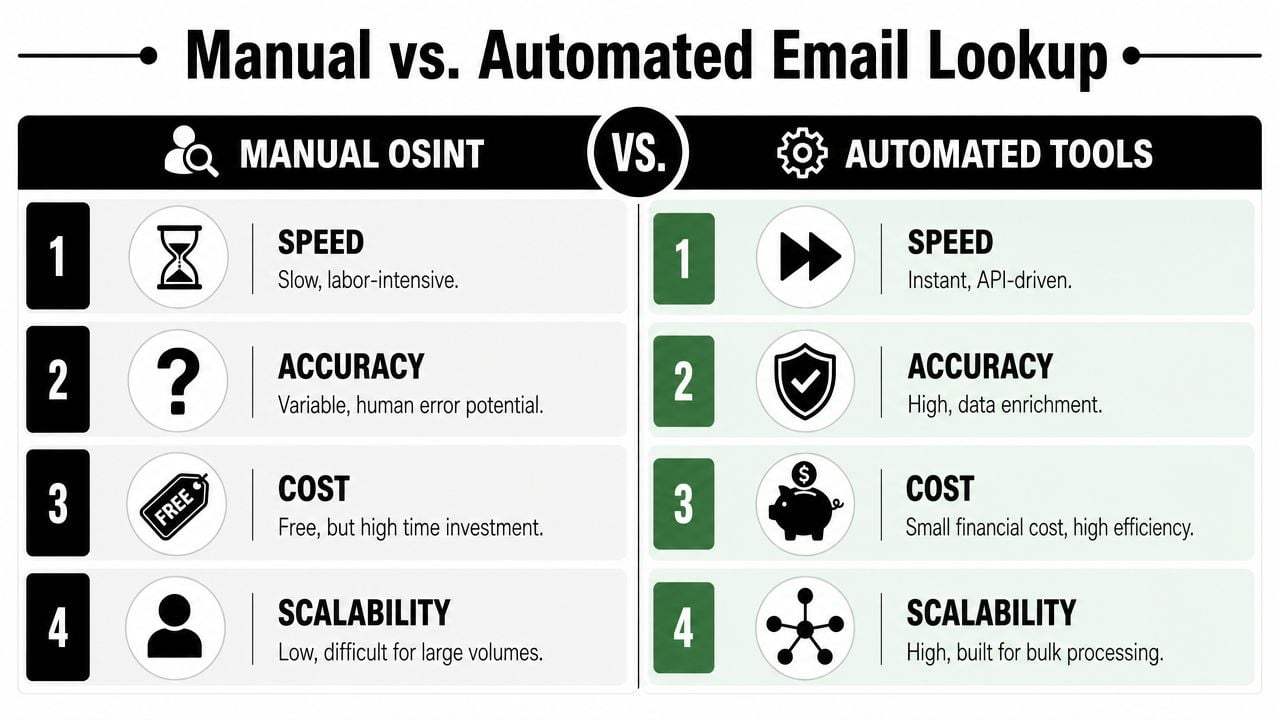
Once you move beyond a handful of records, manual lookup turns into a bottleneck. It is then that enrichment platforms earn their place. They trade some cost for speed, broader data coverage, and more consistent workflows.
The category matured when B2B platforms combined search, enrichment, and verification into one process. Some providers describe reverse phone lookup as entering a phone number to find associated information, sometimes including email addresses, and the category now operates at high throughput. One example cited in industry coverage is providers claiming to find more than 3 million verified emails and mobile phones daily, which shows how far this has moved from one-off searches to automated infrastructure, as described in Apollo's overview of reverse phone lookup and enrichment.
What automation actually changes
Automated tools aggregate public records, business data, contributed datasets, and matching logic. For a sales or ops team, the value isn't just speed. It's process control.
Manual search asks a person to think through each record. Automated enrichment asks the system to do the first pass so the person only reviews exceptions.
That's useful when you need to:
- Process batches: enrich large imports instead of one record at a time.
- Standardize output: return fields in a format your CRM can use.
- Route work: push uncertain matches to review instead of forcing reps to guess.
- Support real-time flows: enrich records as they enter forms or inbound pipelines through real-time API data workflows.
A service such as BillionVerify fits into this ecosystem on the verification side. It's a professional email verification service built to solve one problem: bad email data costs businesses money.
In an automated workflow, the phone number validator belongs at the input stage. It gives your enrichment system a normalized number before matching begins, which makes review rules easier to apply consistently.
Where automated enrichment fails
Automation can look cleaner than it really is. That's the operational trap.
Benchmark data from a large email-finder platform reports about 5 million searches per day, a 92% success rate in finding valid emails, and roughly 100 ms search response time, while also reinforcing that teams shouldn't trust a single result and should use at least two verification passes because no tool is perfect, according to Skrapp's benchmark discussion of email finder tools.
Those numbers are useful for one reason. They remind you that coverage is variable. A tool can be fast and still miss your specific contact. It can return an email and still attach the wrong person. It can identify a likely work address and still serve an outdated one.
Here's the practical comparison:
| Approach | Strength | Weakness |
|---|---|---|
| Manual OSINT | Better context on one contact | Slow and hard to scale |
| Enrichment database | Fast, repeatable, bulk-friendly | Depends on source freshness |
| API-first workflow | Fits CRM and signup flows | Can hide uncertainty if fields look complete |
If a tool returns one email for one phone number, treat it as a candidate, not a conclusion. The final decision still belongs to verification.
How to Verify Found Emails for Maximum Deliverability
Most lookup workflows break at the same point. Someone finds an address, sees a plausible domain, and pushes it straight into outreach. That's where data operations discipline matters.
A found email can be syntactically correct and still be a bad sending target. It may be stale. It may sit behind a catch-all server. It may route nowhere useful. It may belong to a disposable service. It may also be tied to the wrong person because the enrichment source made a confident-looking mistake.

Why verification is the real decision point
Verification is the step that turns a guessed or enriched email into an operationally usable record. Without it, you don't know whether the address is safe to mail, risky to mail, or unfit for your database.
The checks that matter most in practice are:
- Syntax validation: catches malformed addresses before they enter CRM.
- Domain and mailbox checks: confirms whether the destination can receive mail.
- Catch-all handling: flags domains that accept many addresses without proving the mailbox exists.
- Disposable detection: screens out addresses that shouldn't sit in long-term records.
- Role-account filtering: identifies generic addresses that may not fit outbound targeting.
If you want a second reference point for what a verifier should assess, this Email Verification Tool overview from MailAdept is a useful comparison resource.
Operational rule: Don't ask reps to decide deliverability from pattern matching. Give them a verified status and a review path.
This is where verify email addresses without sending live messages becomes important in the workflow. Verification lets teams evaluate a found address before it damages deliverability or creates noisy bounce data.
What to check before an address enters outreach
A workable standard is to treat every phone-to-email match as untrusted until it passes verification and basic relevance review. That sounds strict, but it prevents bad records from spreading into sequences, automations, and reporting.
Use this simple gate:
| Verification outcome | Recommended action |
|---|---|
| Valid and business-relevant | Allow into outreach or CRM |
| Catch-all or uncertain | Hold for manual review or alternate channel |
| Invalid, disposable, or clearly wrong | Reject from campaign use |
The value of a verification layer is that it separates “found” from “sendable.” That distinction protects sender reputation.
A later-stage review also helps with edge cases that fool enrichment systems:
- Old employee records: the person changed companies, but the old domain still appears online.
- Merged datasets: one source ties the phone to the right person, another ties the email to someone else.
- Generic inboxes: press, sales, or support aliases look valid but aren't useful for targeted outreach.
- Catch-all domains: an SMTP acceptance signal doesn't guarantee the mailbox belongs to your target.
For teams that care about list quality, verification shouldn't be a cleanup task after a campaign. It should sit before the campaign, before the CRM sync, and ideally before the first outbound step.
A quick product walkthrough can help teams understand what that verification layer looks like in practice:
The practical takeaway is simple. Lookup email by phone number is a research problem at the start, but it becomes a deliverability problem at the end. Verification is where you control the risk.
Navigating Privacy Laws and Best Practices
Just because you can find an email doesn't mean you should use it in every way available. Teams that treat reverse lookup as a pure data exercise usually create compliance problems later.
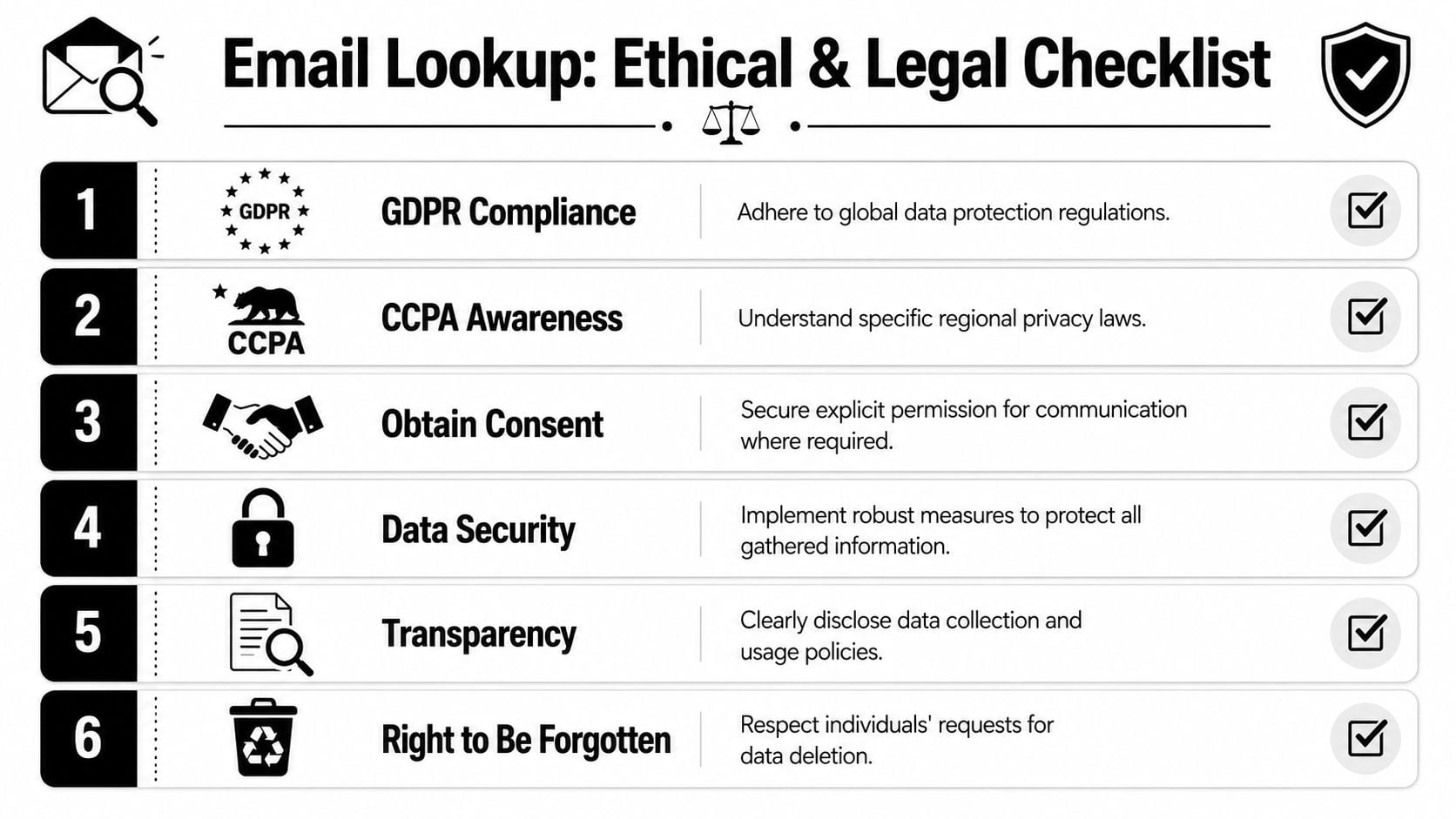
The safe standard is to separate legitimate business contact enrichment from invasive collection or misuse. A work email tied to a person's public professional presence is different from a personal address scraped from unrelated sources. A relevant B2B outreach use case is different from broad, poorly targeted blasts.
The line between prospecting and misuse
Professional teams ask a few basic questions before they use a found address:
- Is this a business contact point? Work emails are usually easier to justify than personal ones.
- Is the outreach relevant to the person's role? Relevance matters for lawful and ethical use.
- Can the team explain where the data came from? If not, the record is already risky.
- Is the contact given a clear way to opt out or object? That's a baseline operating standard.
A policy resource on GDPR and email marketing practices is worth keeping in the team playbook, especially for lists that cross regions or move between vendors.
A practical compliance checklist
You don't need a legal memo for every lookup. You do need a repeatable review standard.
Use the minimum contact data needed for a legitimate business purpose, document the source, and remove records that don't meet that standard.
A clean checklist looks like this:
- Prefer business identity signals: Use company pages, public staff references, and role-relevant sources.
- Avoid private-source shortcuts: Don't use material that appears personal, restricted, or unrelated to the business context.
- Document provenance: Keep a record of where the phone number and resulting email candidate came from.
- Limit retention: If a match is uncertain or irrelevant, delete it instead of letting it sit in the CRM.
- Respect objections: If someone asks not to be contacted or removed, enforce it across systems.
What usually gets teams in trouble isn't the lookup itself. It's weak governance after the lookup. Records get copied, synced, and reused long after anyone remembers how they were obtained.
Building a Repeatable Reverse Lookup Workflow
The teams that get value from lookup email by phone number don't rely on random tricks. They use a workflow that can survive handoffs, scale, and quality checks.
Make phone number validation the first checkpoint in the process. Once the input is clean and consistently formatted, research, enrichment, and email verification can operate on the same reliable identifier.
The workflow that holds up under volume
A durable process has three parts.
First, run manual reconnaissance. Use public search, social profiles, company pages, and directory traces to identify the person and employer behind the phone number. This gives you context, and context improves everything that follows.
Second, use automated enrichment when the record volume or business value justifies it. That's where database coverage, APIs, and CRM integrations make sense. For list operations, this stage belongs inside a documented bulk email verification workflow guide for batch processing and review, not in a rep's personal spreadsheet.
Third, apply mandatory verification before the address enters outreach, automation, or lifecycle messaging. That's the control point that protects deliverability and keeps low-confidence matches from contaminating the rest of your system.
A simple internal rule works well:
- No context, no match
- No verification, no send
- No provenance, no retention
That rule keeps lookup work practical instead of speculative.
The strongest reverse lookup workflows also assign ownership. Sales can request enrichment. Ops can define the acceptance criteria. Marketing can decide what verified records are allowed into campaigns. Without that ownership split, bad data tends to slip through because everyone assumes someone else checked it.
Lookup email by phone number is useful when it produces a contact your team can trust, use responsibly, and maintain over time. Anything less is just adding another fragile record to the pile.
If your team already finds email candidates from phone numbers, the next upgrade isn't more guessing. It's a cleaner verification layer. BillionVerify can fit into that final step by helping teams check whether found addresses are usable before they reach campaigns, automations, or CRM workflows.