



One of the most common questions developers and marketers ask is: "How can I verify an email address without actually sending an email to it?" It's a valid concern—sending verification emails to potentially invalid addresses can hurt your sender reputation, waste resources, and create a poor user experience. Fortunately, there are several proven methods to validate email addresses without triggering an actual email delivery.
In this comprehensive guide, we'll explore five different approaches to verify email addresses without sending, ranging from simple syntax validation to sophisticated SMTP handshake techniques. Whether you're a developer building a signup form or a marketer cleaning your email list, you'll find practical solutions that match your technical requirements and accuracy needs.
Understanding these email verification techniques is essential for anyone serious about maintaining email deliverability. A robust email verification strategy starts with knowing how to check email validity before your first message ever leaves your mail server. For foundational concepts, see our complete guide to email verification. Let's dive into the methods that make this possible.
Why Verify Emails Without Sending?
Before we explore the technical methods, let's understand why verifying emails without sending matters for your business:
Protect Your Sender Reputation
Every email you send affects your sender reputation score. When you send emails to invalid addresses, they bounce back, and ISPs take notice. Too many bounces signal to email providers that you might be a spammer, which can land your legitimate emails in spam folders or get your domain blacklisted entirely.
By verifying email addresses before sending, you prevent these damaging bounces from ever occurring. This proactive approach keeps your sender reputation intact and ensures your important messages reach their intended recipients.
Save Time and Resources
Sending emails costs money—whether you're paying per email through an ESP or maintaining your own email infrastructure. Why waste resources sending to addresses that will never receive your message? Pre-send verification eliminates this waste by filtering out invalid addresses before they enter your email workflow.
Additionally, dealing with bounced emails requires processing power and manual review time. By catching invalid emails upfront, you streamline your operations and let your team focus on more valuable tasks.
Improve User Experience
In signup forms, real-time email validation provides immediate feedback to users who may have mistyped their email address. This instant correction prevents the frustration of not receiving confirmation emails and reduces support tickets about "missing" verification links.
Maintain Data Quality
Your email list is a valuable business asset. Every invalid email address in your database represents noise that makes analysis harder and segmentation less effective. Verifying emails without sending helps you maintain a clean, accurate database from day one.
Now let's explore the five primary methods for achieving email verification without sending actual messages.
Method 1: Syntax Validation
Syntax validation is the first and simplest layer of email verification. It checks whether an email address follows the proper format rules defined by RFC 5321 and RFC 5322 specifications.
What Syntax Validation Checks
A valid email address must follow specific formatting rules:
- Contains exactly one @ symbol
- Has a local part (before @) that follows naming conventions
- Has a domain part (after @) with a valid structure
- Uses only permitted characters
- Respects length limitations (local part max 64 characters, total max 254 characters)
JavaScript Implementation
Here's a practical JavaScript function for email syntax validation:
function validateEmailSyntax(email) {
  // Trim whitespace
  email = email.trim();

  // Check basic length constraints
  if (email.length > 254) {
    return { valid: false, reason: 'Email address too long' };
  }

  // RFC 5322 compliant regex pattern
  const emailRegex = /^(?:[a-z0-9!#$%&'*+/=?^_`{|}~-]+(?:\.[a-z0-9!#$%&'*+/=?^_`{|}~-]+)*|"(?:[\x01-\x08\x0b\x0c\x0e-\x1f\x21\x23-\x5b\x5d-\x7f]|\\[\x01-\x09\x0b\x0c\x0e-\x7f])*")@(?:(?:[a-z0-9](?:[a-z0-9-]*[a-z0-9])?\.)+[a-z0-9](?:[a-z0-9-]*[a-z0-9])?|\[(?:(?:(2(5[0-5]|[0-4][0-9])|1[0-9][0-9]|[1-9]?[0-9]))\.){3}(?:(2(5[0-5]|[0-4][0-9])|1[0-9][0-9]|[1-9]?[0-9])|[a-z0-9-]*[a-z0-9]:(?:[\x01-\x08\x0b\x0c\x0e-\x1f\x21-\x5a\x53-\x7f]|\\[\x01-\x09\x0b\x0c\x0e-\x7f])+)\])$/i;

  if (!emailRegex.test(email)) {
    return { valid: false, reason: 'Invalid email format' };
  }

  // Extract local part and check length
  const localPart = email.split('@')[0];
  if (localPart.length > 64) {
    return { valid: false, reason: 'Local part too long' };
  }

  return { valid: true, reason: 'Syntax is valid' };
}

// Usage examples
console.log(validateEmailSyntax('user@example.com'));
// { valid: true, reason: 'Syntax is valid' }

console.log(validateEmailSyntax('invalid.email@'));
// { valid: false, reason: 'Invalid email format' }

console.log(validateEmailSyntax('user@domain'));
// { valid: false, reason: 'Invalid email format' }
Simplified Regex for Common Use Cases
While the RFC-compliant regex is comprehensive, many applications use a simpler pattern that catches the most common formatting errors:
function simpleEmailValidation(email) {
  const simpleRegex = /^[^\s@]+@[^\s@]+\.[^\s@]+$/;
  return simpleRegex.test(email.trim());
}
Limitations of Syntax Validation
Syntax validation alone cannot determine if an email address actually exists. The address definitely.fake.address@gmail.com passes syntax validation perfectly, but Gmail has no such account. For this reason, syntax validation should be your first check, not your only check.
Accuracy Level: ~30-40% (catches obvious typos and formatting errors only)
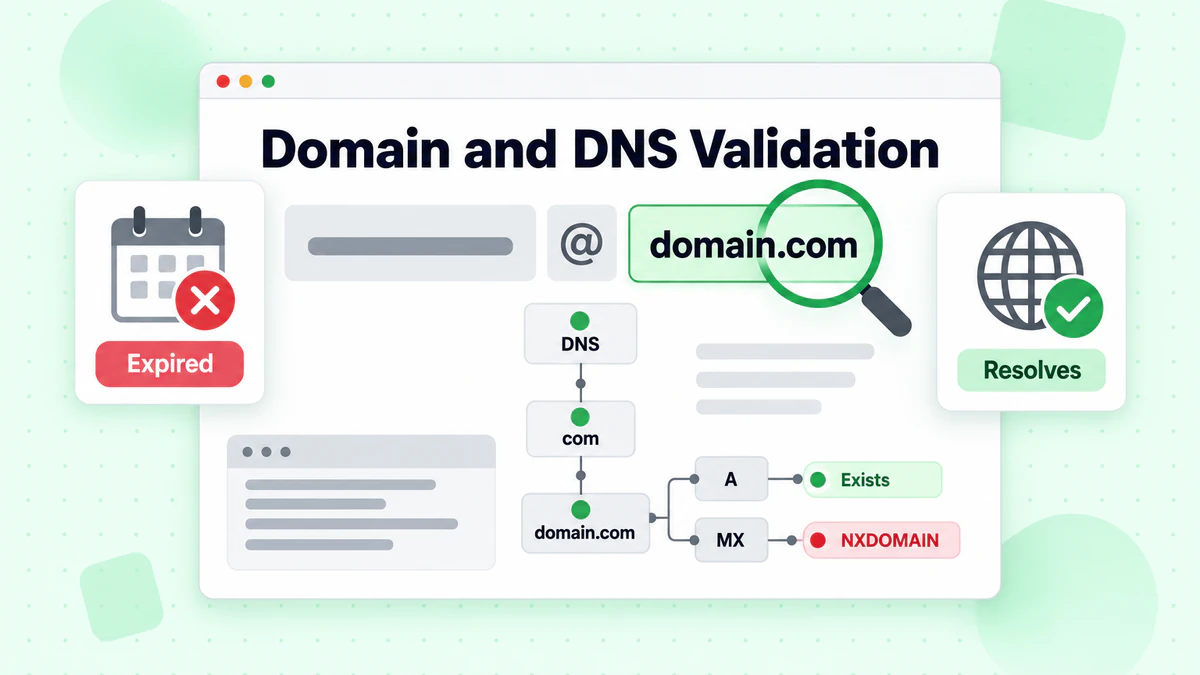
Method 2: Domain/DNS Validation
The second layer of verification checks whether the domain portion of the email address actually exists and is properly configured on the internet.
What DNS Validation Checks
Domain validation verifies that:
- The domain exists in DNS
- The domain resolves to valid records
- The domain hasn't expired or been abandoned
Node.js Implementation
Here's how to perform DNS validation in Node.js:
const dns = require('dns').promises;

async function validateDomain(email) {
  const domain = email.split('@')[1];

  if (!domain) {
    return { valid: false, reason: 'No domain found in email' };
  }

  try {
    // Try to resolve the domain's A or AAAA records
    const addresses = await dns.resolve(domain);

    if (addresses && addresses.length > 0) {
      return {
        valid: true,
        reason: 'Domain exists',
        addresses: addresses
      };
    }

    return { valid: false, reason: 'Domain has no DNS records' };
  } catch (error) {
    if (error.code === 'ENOTFOUND') {
      return { valid: false, reason: 'Domain does not exist' };
    }
    if (error.code === 'ENODATA') {
      return { valid: false, reason: 'No data for domain' };
    }
    return { valid: false, reason: `DNS error: ${error.message}` };
  }
}

// Usage
async function checkEmail(email) {
  const result = await validateDomain(email);
  console.log(`${email}: ${result.reason}`);
  return result;
}

checkEmail('user@google.com');  // Domain exists
checkEmail('user@thisisnotarealdomain12345.com');  // Domain does not exist
Python Implementation
import dns.resolver

def validate_domain(email):
    try:
        domain = email.split('@')[1]
    except IndexError:
        return {'valid': False, 'reason': 'Invalid email format'}

    try:
        # Try to resolve A records
        answers = dns.resolver.resolve(domain, 'A')
        return {
            'valid': True,
            'reason': 'Domain exists',
            'addresses': [str(rdata) for rdata in answers]
        }
    except dns.resolver.NXDOMAIN:
        return {'valid': False, 'reason': 'Domain does not exist'}
    except dns.resolver.NoAnswer:
        return {'valid': False, 'reason': 'No DNS records found'}
    except dns.exception.Timeout:
        return {'valid': False, 'reason': 'DNS query timeout'}
    except Exception as e:
        return {'valid': False, 'reason': f'DNS error: {str(e)}'}

# Usage
result = validate_domain('user@gmail.com')
print(result)
Limitations
A domain can exist without accepting email. Conversely, a valid email domain might temporarily fail DNS resolution due to network issues. Domain validation provides more confidence than syntax alone but doesn't confirm email deliverability.
Accuracy Level: ~50-60% (filters out non-existent domains)
Method 3: MX Record Validation
MX (Mail Exchange) record validation is a significant step up from basic domain checking. MX records specifically indicate which mail servers are responsible for accepting email for a domain.
What MX Records Tell Us
MX records in DNS specify:
- Which servers handle incoming email for a domain
- The priority order of multiple mail servers
- Whether a domain is configured to receive email at all
A domain without MX records might still exist but cannot receive email.
Node.js Implementation
const dns = require('dns').promises;

async function validateMXRecords(email) {
  const domain = email.split('@')[1];

  if (!domain) {
    return { valid: false, reason: 'No domain found' };
  }

  try {
    const mxRecords = await dns.resolveMx(domain);

    if (mxRecords && mxRecords.length > 0) {
      // Sort by priority (lower number = higher priority)
      mxRecords.sort((a, b) => a.priority - b.priority);

      return {
        valid: true,
        reason: 'MX records found',
        mxRecords: mxRecords.map(mx => ({
          host: mx.exchange,
          priority: mx.priority
        }))
      };
    }

    return { valid: false, reason: 'No MX records configured' };
  } catch (error) {
    if (error.code === 'ENOTFOUND') {
      return { valid: false, reason: 'Domain does not exist' };
    }
    if (error.code === 'ENODATA') {
      // Some domains use A records as fallback for email
      try {
        const aRecords = await dns.resolve(domain);
        if (aRecords && aRecords.length > 0) {
          return {
            valid: true,
            reason: 'No MX records, but A records exist (fallback)',
            fallbackAddress: aRecords[0]
          };
        }
      } catch {
        // Ignore fallback check errors
      }
      return { valid: false, reason: 'No MX records and no fallback' };
    }
    return { valid: false, reason: `Error: ${error.message}` };
  }
}

// Example usage
async function checkMX(email) {
  const result = await validateMXRecords(email);
  console.log(`\n${email}:`);
  console.log(`Valid: ${result.valid}`);
  console.log(`Reason: ${result.reason}`);
  if (result.mxRecords) {
    console.log('MX Records:');
    result.mxRecords.forEach(mx => {
      console.log(`  Priority ${mx.priority}: ${mx.host}`);
    });
  }
  return result;
}

// Test different domains
checkMX('user@gmail.com');
checkMX('user@outlook.com');
checkMX('user@fakeinvaliddomain123.com');
Python Implementation
import dns.resolver

def validate_mx_records(email):
    try:
        domain = email.split('@')[1]
    except IndexError:
        return {'valid': False, 'reason': 'Invalid email format'}

    try:
        mx_records = dns.resolver.resolve(domain, 'MX')
        records = sorted(
            [(r.preference, str(r.exchange)) for r in mx_records],
            key=lambda x: x[0]
        )
        return {
            'valid': True,
            'reason': 'MX records found',
            'mx_records': [{'priority': p, 'host': h} for p, h in records]
        }
    except dns.resolver.NXDOMAIN:
        return {'valid': False, 'reason': 'Domain does not exist'}
    except dns.resolver.NoAnswer:
        # Check for A record fallback
        try:
            a_records = dns.resolver.resolve(domain, 'A')
            return {
                'valid': True,
                'reason': 'No MX records, using A record fallback',
                'fallback': str(a_records[0])
            }
        except:
            return {'valid': False, 'reason': 'No MX records and no fallback'}
    except Exception as e:
        return {'valid': False, 'reason': f'Error: {str(e)}'}

# Example usage
emails = ['user@gmail.com', 'user@microsoft.com', 'user@nodomainhere.xyz']
for email in emails:
    result = validate_mx_records(email)
    print(f"\n{email}:")
    print(f"  Valid: {result['valid']}")
    print(f"  Reason: {result['reason']}")
    if 'mx_records' in result:
        for mx in result['mx_records']:
            print(f"  MX: {mx['priority']} - {mx['host']}")
Understanding MX Record Results
When you query MX records for major email providers, you'll see results like:
Gmail (google.com):
- Priority 5: gmail-smtp-in.l.google.com
- Priority 10: alt1.gmail-smtp-in.l.google.com
- Priority 20: alt2.gmail-smtp-in.l.google.com
Outlook (outlook.com):
- Priority 10: outlook-com.olc.protection.outlook.com
Multiple MX records provide redundancy—if one mail server is down, messages route to the backup server.
Accuracy Level: ~70-75% (confirms domain can receive email)
Method 4: SMTP Handshake Verification
SMTP handshake verification is the most sophisticated method for checking email existence without sending. It simulates the beginning of an email delivery process, stopping just before actually transmitting the message.
How SMTP Verification Works
The SMTP protocol follows a specific sequence for email delivery. SMTP verification executes the early stages:
- Connect to the mail server (typically port 25)
- HELO/EHLO - Identify yourself to the mail server
- MAIL FROM - Specify a sender address
- RCPT TO - Specify the recipient (the address you're verifying)
- Analyze response - The server's response indicates whether the recipient exists
If the mail server accepts the RCPT TO command (response code 250), the email address likely exists. A rejection (5xx response) typically means the address is invalid.
Node.js Implementation
const net = require('net');
const dns = require('dns').promises;

class SMTPVerifier {
  constructor(timeout = 10000) {
    this.timeout = timeout;
  }

  async verify(email) {
    const domain = email.split('@')[1];

    // First, get MX records
    let mxHost;
    try {
      const mxRecords = await dns.resolveMx(domain);
      mxRecords.sort((a, b) => a.priority - b.priority);
      mxHost = mxRecords[0].exchange;
    } catch (error) {
      return {
        valid: false,
        reason: 'Could not resolve MX records',
        email
      };
    }

    return new Promise((resolve) => {
      const socket = new net.Socket();
      let step = 0;
      let response = '';

      const commands = [
        null, // Initial server greeting
        'EHLO verify.local\r\n',
        'MAIL FROM:<verify@verify.local>\r\n',
        `RCPT TO:<${email}>\r\n`,
        'QUIT\r\n'
      ];

      socket.setTimeout(this.timeout);

      socket.on('connect', () => {
        console.log(`Connected to ${mxHost}`);
      });

      socket.on('data', (data) => {
        response = data.toString();
        const code = parseInt(response.substring(0, 3));

        console.log(`Step ${step}: ${response.trim()}`);

        // Handle each step
        if (step === 0) {
          // Server greeting - expect 220
          if (code === 220) {
            socket.write(commands[1]);
            step++;
          } else {
            resolve({ valid: false, reason: 'Server rejected connection', email });
            socket.destroy();
          }
        } else if (step === 1) {
          // EHLO response - expect 250
          if (code === 250) {
            socket.write(commands[2]);
            step++;
          } else {
            resolve({ valid: false, reason: 'EHLO rejected', email });
            socket.destroy();
          }
        } else if (step === 2) {
          // MAIL FROM response - expect 250
          if (code === 250) {
            socket.write(commands[3]);
            step++;
          } else {
            resolve({ valid: false, reason: 'MAIL FROM rejected', email });
            socket.destroy();
          }
        } else if (step === 3) {
          // RCPT TO response - this is the verification result
          socket.write(commands[4]);

          if (code === 250) {
            resolve({ valid: true, reason: 'Email address exists', email });
          } else if (code === 550 || code === 551 || code === 553) {
            resolve({ valid: false, reason: 'Email address does not exist', email });
          } else if (code === 452 || code === 421) {
            resolve({ valid: null, reason: 'Server temporarily unavailable', email });
          } else {
            resolve({ valid: null, reason: `Uncertain: ${response.trim()}`, email });
          }
          socket.destroy();
        }
      });

      socket.on('timeout', () => {
        resolve({ valid: null, reason: 'Connection timeout', email });
        socket.destroy();
      });

      socket.on('error', (error) => {
        resolve({ valid: null, reason: `Socket error: ${error.message}`, email });
        socket.destroy();
      });

      // Connect to mail server
      socket.connect(25, mxHost);
    });
  }
}

// Usage
async function verifyEmail(email) {
  const verifier = new SMTPVerifier();
  const result = await verifier.verify(email);
  console.log(`\nResult for ${email}:`);
  console.log(`Valid: ${result.valid}`);
  console.log(`Reason: ${result.reason}`);
  return result;
}

verifyEmail('test@example.com');
Python Implementation
import socket
import dns.resolver

class SMTPVerifier:
    def __init__(self, timeout=10):
        self.timeout = timeout

    def get_mx_host(self, domain):
        """Get the primary MX host for a domain."""
        try:
            records = dns.resolver.resolve(domain, 'MX')
            mx_records = sorted(
                [(r.preference, str(r.exchange).rstrip('.')) for r in records],
                key=lambda x: x[0]
            )
            return mx_records[0][1]
        except Exception as e:
            return None

    def verify(self, email):
        """Verify an email address via SMTP handshake."""
        try:
            domain = email.split('@')[1]
        except IndexError:
            return {'valid': False, 'reason': 'Invalid email format'}

        mx_host = self.get_mx_host(domain)
        if not mx_host:
            return {'valid': False, 'reason': 'Could not resolve MX records'}

        try:
            # Connect to mail server
            sock = socket.socket(socket.AF_INET, socket.SOCK_STREAM)
            sock.settimeout(self.timeout)
            sock.connect((mx_host, 25))

            # Receive greeting
            response = sock.recv(1024).decode()
            if not response.startswith('220'):
                return {'valid': False, 'reason': 'Server rejected connection'}

            # Send EHLO
            sock.send(b'EHLO verify.local\r\n')
            response = sock.recv(1024).decode()
            if not response.startswith('250'):
                return {'valid': False, 'reason': 'EHLO rejected'}

            # Send MAIL FROM
            sock.send(b'MAIL FROM:<verify@verify.local>\r\n')
            response = sock.recv(1024).decode()
            if not response.startswith('250'):
                return {'valid': False, 'reason': 'MAIL FROM rejected'}

            # Send RCPT TO - this is the verification
            sock.send(f'RCPT TO:<{email}>\r\n'.encode())
            response = sock.recv(1024).decode()
            code = int(response[:3])

            # Close connection
            sock.send(b'QUIT\r\n')
            sock.close()

            # Analyze response
            if code == 250:
                return {'valid': True, 'reason': 'Email address exists'}
            elif code in [550, 551, 553]:
                return {'valid': False, 'reason': 'Email address does not exist'}
            elif code in [452, 421]:
                return {'valid': None, 'reason': 'Server temporarily unavailable'}
            else:
                return {'valid': None, 'reason': f'Uncertain response: {response}'}

        except socket.timeout:
            return {'valid': None, 'reason': 'Connection timeout'}
        except socket.error as e:
            return {'valid': None, 'reason': f'Socket error: {str(e)}'}
        except Exception as e:
            return {'valid': None, 'reason': f'Error: {str(e)}'}

# Usage
verifier = SMTPVerifier()
result = verifier.verify('test@example.com')
print(f"Valid: {result['valid']}")
print(f"Reason: {result['reason']}")
SMTP Response Codes Explained
Understanding SMTP response codes is crucial for interpreting verification results:
| Code | Meaning | Interpretation |
|---|---|---|
| 250 | OK | Email address exists and accepts mail |
| 251 | User not local | Will forward to another address |
| 450 | Mailbox unavailable | Temporary issue, try again later |
| 451 | Local error | Server-side problem |
| 452 | Insufficient storage | Mailbox full |
| 550 | Mailbox not found | Email address does not exist |
| 551 | User not local | No forwarding configured |
| 553 | Mailbox name invalid | Syntax error in mailbox name |
Important Limitations
SMTP verification has several significant limitations:
Catch-All Domains: Some mail servers accept all addresses regardless of whether they exist, returning 250 for everything. These "catch-all" configurations defeat SMTP verification.
Greylisting: Servers may temporarily reject messages from unknown senders. Your verification might get a rejection that would succeed on retry.
Rate Limiting: Mail servers often limit connection attempts. High-volume verification can trigger blocks.
IP Reputation: Your verification server's IP reputation affects whether mail servers will respond honestly.
Firewall Restrictions: Many networks block outbound SMTP traffic on port 25 for security reasons.
Accuracy Level: ~85-90% (when servers respond honestly)
Method 5: Email Verification API Services
For production applications, using a professional email verification API offers the best balance of accuracy, speed, and reliability. Services like BillionVerify handle all the complexity of multi-method verification while providing additional checks that individual methods can't achieve.
Advantages of API-Based Verification
Higher Accuracy: Professional services combine all verification methods (syntax, DNS, MX, SMTP) with additional intelligence like disposable email detection, role-based address identification, and catch-all domain handling.
Better Infrastructure: API services maintain dedicated IP pools with strong reputations, distributed servers for faster global response, and direct relationships with major email providers.
No Maintenance: You don't need to maintain SMTP verification code, handle edge cases, or worry about your verification server getting blocked.
Scalability: APIs handle millions of verifications without infrastructure concerns.
BillionVerify API Integration
Here's how to integrate the BillionVerify API for email verification:
Node.js Example:
const axios = require('axios');

const BV_API_KEY = 'your_api_key_here';
const API_URL = 'https://api.billionverify.com/v1';

async function verifyEmailWithAPI(email) {
  try {
    const response = await axios.post(
      `${API_URL}/verify`,
      { email },
      {
        headers: {
          'Authorization': `Bearer ${BV_API_KEY}`,
          'Content-Type': 'application/json'
        }
      }
    );

    const result = response.data;

    return {
      email: result.email,
      valid: result.deliverable,
      status: result.status,
      details: {
        syntaxValid: result.syntax_valid,
        domainExists: result.domain_exists,
        mxRecords: result.mx_found,
        smtpCheck: result.smtp_check,
        disposable: result.is_disposable,
        roleAddress: result.is_role_address,
        catchAll: result.is_catch_all,
        freeProvider: result.is_free_provider
      },
      score: result.quality_score
    };
  } catch (error) {
    console.error('API Error:', error.response?.data || error.message);
    throw error;
  }
}

// Usage
async function main() {
  const emails = [
    'valid.user@gmail.com',
    'fake.address@company.com',
    'temp@10minutemail.com'
  ];

  for (const email of emails) {
    const result = await verifyEmailWithAPI(email);
    console.log(`\n${email}:`);
    console.log(`  Deliverable: ${result.valid}`);
    console.log(`  Status: ${result.status}`);
    console.log(`  Quality Score: ${result.score}`);
    console.log(`  Disposable: ${result.details.disposable}`);
    console.log(`  Catch-All: ${result.details.catchAll}`);
  }
}

main();
Python Example:
import requests

BV_API_KEY = 'your_api_key_here'
API_URL = 'https://api.billionverify.com/v1'

def verify_email_with_api(email):
    """Verify an email address using BillionVerify API."""
    headers = {
        'Authorization': f'Bearer {BV_API_KEY}',
        'Content-Type': 'application/json'
    }

    response = requests.post(
        f'{API_URL}/verify',
        json={'email': email},
        headers=headers
    )

    if response.status_code != 200:
        raise Exception(f'API Error: {response.text}')

    result = response.json()

    return {
        'email': result['email'],
        'valid': result['deliverable'],
        'status': result['status'],
        'details': {
            'syntax_valid': result['syntax_valid'],
            'domain_exists': result['domain_exists'],
            'mx_records': result['mx_found'],
            'smtp_check': result['smtp_check'],
            'disposable': result['is_disposable'],
            'role_address': result['is_role_address'],
            'catch_all': result['is_catch_all'],
            'free_provider': result['is_free_provider']
        },
        'score': result['quality_score']
    }

# Usage
emails = ['user@gmail.com', 'contact@company.com', 'test@tempmail.com']

for email in emails:
    try:
        result = verify_email_with_api(email)
        print(f"\n{email}:")
        print(f"  Deliverable: {result['valid']}")
        print(f"  Status: {result['status']}")
        print(f"  Quality Score: {result['score']}")
    except Exception as e:
        print(f"Error verifying {email}: {e}")
Real-Time Form Integration
For signup forms, BillionVerify offers real-time verification that can validate email addresses as users type:
// React component example
import { useState, useCallback } from 'react';
import debounce from 'lodash/debounce';

function EmailInput() {
  const [email, setEmail] = useState('');
  const [validation, setValidation] = useState(null);
  const [loading, setLoading] = useState(false);

  const verifyEmail = useCallback(
    debounce(async (emailToVerify) => {
      if (!emailToVerify || emailToVerify.length < 5) return;

      setLoading(true);
      try {
        const response = await fetch('/api/verify-email', {
          method: 'POST',
          headers: { 'Content-Type': 'application/json' },
          body: JSON.stringify({ email: emailToVerify })
        });
        const result = await response.json();
        setValidation(result);
      } catch (error) {
        console.error('Verification failed:', error);
      } finally {
        setLoading(false);
      }
    }, 500),
    []
  );

  const handleChange = (e) => {
    const newEmail = e.target.value;
    setEmail(newEmail);
    verifyEmail(newEmail);
  };

  return (
    <div className="email-input-wrapper">
      <input
        type="email"
        value={email}
        onChange={handleChange}
        placeholder="Enter your email"
        className={validation?.valid === false ? 'invalid' : ''}
      />
      {loading && <span className="loading">Verifying...</span>}
      {validation && !loading && (
        <span className={validation.valid ? 'valid' : 'invalid'}>
          {validation.valid ? '✓ Valid email' : '✗ ' + validation.reason}
        </span>
      )}
    </div>
  );
}
Accuracy Level: 97-99%+ (combines all methods with additional intelligence)
Method Comparison: Choosing the Right Approach
Here's a comprehensive comparison to help you choose the right verification method for your needs:
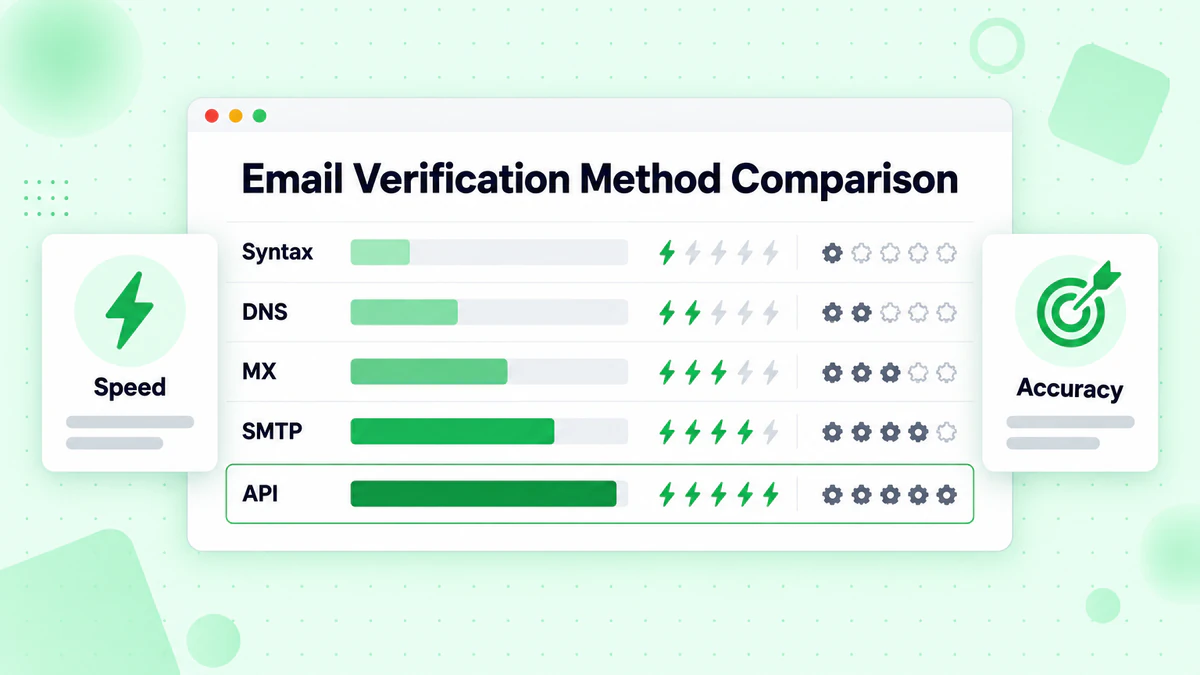
| Method | Accuracy | Speed | Complexity | Cost | Best For |
|---|---|---|---|---|---|
| Syntax Validation | 30-40% | Instant | Low | Free | First-line filtering |
| Domain/DNS Check | 50-60% | Fast | Low | Free | Quick pre-checks |
| MX Record Validation | 70-75% | Fast | Medium | Free | Form validation |
| SMTP Handshake | 85-90% | Slow | High | Infrastructure | Batch cleaning |
| API Service | 97-99% | Fast | Low | Per-query | Production systems |
Recommendations by Use Case
Signup Forms: Use a combination of client-side syntax validation for instant feedback plus API verification on submit. This provides a smooth user experience while ensuring data quality.
Email Marketing Campaigns: Use an API service for bulk verification before sending. The cost per verification is far less than the damage from high bounce rates.
Data Cleaning Projects: API services with bulk upload capability offer the best balance of accuracy and efficiency for cleaning existing lists.
Development/Testing: Syntax and MX validation provide adequate accuracy for development environments where perfect accuracy isn't critical.
Best Practices for Email Verification
Implement Multiple Layers
Don't rely on a single verification method. Implement a layered approach:
- Immediate: Syntax validation on the client side
- On Submit: MX record check for quick server-side validation
- Before Campaign: Full API verification for deliverability confirmation
Handle Edge Cases Gracefully
Some verification results are inconclusive (catch-all domains, temporary failures). Design your system to:
- Accept addresses with uncertain verification results but flag them for review
- Implement retry logic for temporary failures
- Track verification results to identify patterns
Verify at the Right Times
- Registration: Verify before account creation
- Import: Verify when importing lists from external sources
- Periodic: Re-verify dormant addresses before re-engagement campaigns
- Before Major Sends: Always verify before large campaigns
Respect Rate Limits
Whether using your own SMTP verification or an API, respect rate limits to maintain good relationships with mail servers and service providers.
Conclusion
Verifying email addresses without sending actual emails is not only possible but essential for maintaining email deliverability and sender reputation. From simple syntax checks to sophisticated API-based verification, you have multiple options depending on your accuracy requirements and technical capabilities.
For most production applications, we recommend:
- Start simple: Implement syntax validation for immediate feedback
- Add depth: Include DNS and MX checks for server-side validation
- Go professional: Use an API service like BillionVerify for production-quality verification
Ready to implement professional email verification? Check out our email checker tool to see verification in action, or explore the BillionVerify API for seamless integration into your applications.
By implementing proper email verification, you'll protect your sender reputation, improve deliverability rates, and ensure your messages reach the people who want to receive them. For help choosing the right solution, see our best email verification service comparison. Start verifying smarter today.