


Most advice on CRM data cleaning is wrong in one specific way. It treats the work like a quarterly rescue mission.
That's why teams spend a week deduplicating records, fixing field formats, deleting old contacts, and then watch the database drift back into the same mess a month later. The problem usually isn't that the cleanup was incomplete. The problem is that the system feeding the CRM is still allowed to create bad data every day.
A durable approach starts somewhere less glamorous. Audit what's broken, clean the records that affect revenue, lock down entry points, and automate the checks that humans will never perform consistently. For most marketing teams, email verification deserves special attention because it's the fastest way to reduce waste, protect deliverability, and stop obvious junk from flowing into segmentation and campaign logic.
Why Your CRM Data Gets Dirty Again After You Clean It
The usual assumption is simple. Clean the CRM thoroughly, and the problem is handled.
It isn't. The biggest reason bad data comes back is integration misalignment. When the CRM, marketing automation platform, enrichment tools, forms, and sales systems all write to the same record with different rules, your cleanup job becomes temporary. The underlying issue is the sync logic, not the spreadsheet of duplicates.
According to Default's CRM data hygiene analysis, the primary cause of re-introduced dirty data is often dysfunctional sync logic between connected tools like marketing automation and sales platforms. The same source notes that cleaning is useless if validation rules at the point of entry aren't enforced globally across all entry points.
Where teams usually lose control
A few patterns show up again and again:
- Form fields accept anything: free-text country, title, and company fields create endless variations.
- Imports bypass rules: list uploads often skip the same checks applied to web forms.
- Two-way syncs overwrite good values: one tool pushes stale data back into the CRM because field precedence was never defined.
- Sales reps create net-new records during live deal work: that's understandable operationally, but it creates duplicate risk fast.
Clean records don't stay clean when connected systems disagree on what “correct” means.
That's why I prefer to think in terms of a data immune system rather than a cleanup project. The immune system includes validation at entry, field ownership rules, duplicate controls, and alerts when connected apps start writing conflicting values.
The practical shift
Don't start with a full-database purge unless the environment is already controlled. First, map where data enters, where it syncs, and which system owns each critical field. If marketing owns lifecycle stage but the sales platform can overwrite it, you don't have a cleaning problem. You have a governance problem.
If your team is also trying to improve sync reliability between campaign systems and the CRM, this guide on CRM integration for email marketing and ROI is a useful companion read.
Establishing Your Data Quality Baseline with a CRM Audit
A CRM audit sets the cleanup order. Without one, teams spend time on visible messes and miss the records that distort routing, reporting, and outreach. In my experience, marketing and ops teams often start with duplicate removal because it is easy to spot. The bigger losses usually come from quieter problems such as missing lifecycle stages, invalid emails, stale job titles, inconsistent country values, and records that still trigger automation despite having no recent signal.
The goal is not a perfect snapshot. The goal is a baseline you can measure against after each cleaning pass, because CRM hygiene is never finished. If data keeps getting dirty, the audit needs to show where that recontamination starts and which fields degrade fastest.
Audit the database by quality dimension
A useful audit scores the database across five dimensions and ties each one to an operational consequence.
| Dimension | What to inspect | Why it matters |
|---|---|---|
| Completeness | Missing values in job title, company, lifecycle stage, owner, country | Blank fields break routing, segmentation, and personalization |
| Uniqueness | Duplicate emails, duplicate companies, fuzzy match candidates | Duplicate records distort reporting and create overlapping outreach |
| Timeliness | No recent activity, stale title, stale company info, inactive records | Old data sends reps and campaigns after people who no longer fit |
| Validity | Email formatting, date logic, allowed values, required field patterns | Bad values trigger workflow errors and wasted sends |
| Consistency | Country naming, title variants, phone formatting, field taxonomy | Inconsistent values break filters, scoring models, and dashboards |
That model also helps isolate source-system issues. If validity problems are concentrated in imported lists while consistency problems show up after enrichment syncs, the fix is different. One requires intake controls. The other requires integration and field-mapping changes.
Start with a representative sample, then expand
For a large CRM, review a sample first. Pull recent leads, active opportunity contacts, customer records, and long-unengaged contacts. That mix gives you a realistic view of both revenue risk and historical decay.
Then turn the findings into a scorecard your team can revisit monthly or quarterly:
- Critical-field null rate: Which required fields are blank most often?
- Duplicate exposure: Which records share email, domain, or similar names?
- Stale-record count: Which contacts have not engaged or been updated within your threshold?
- Field-format variance: How many versions of the same value are users and systems creating?
- Stage integrity: Does lifecycle stage still match the contact's real status and recent activity?
Audit the fields that control routing, segmentation, reporting, and outreach first. Nice-to-have enrichment can wait.
Use the audit to prioritize revenue risk
A contact tied to an open opportunity deserves a different standard than a dormant lead from three years ago. Cleaning should reflect that. If a bad record can misroute an MQL, trigger a bounced nurture email, or confuse attribution, move it to the top of the queue. If it sits in cold storage and touches nothing, it can wait for a later pass.
That trade-off matters because aggressive cleanup can disrupt sales if you treat every record the same way. I prefer an audit output that labels records by business impact, not just by error type. High-risk records get reviewed and corrected first. Lower-risk records get standardized in batches.
For teams formalizing that review process, this email marketing audit checklist for campaign and database review is a useful companion because CRM issues and email performance issues often share the same root causes.
One practical tool in this process is BillionVerify, an email verification service used to identify invalid, risky, and disposable addresses before they keep degrading CRM performance.
Your Core Cleaning Workflow Deduplication and Standardization
A clean CRM does not stay clean on its own. The audit tells you where the damage is. The workflow below determines whether the same problems show up again next month through forms, imports, syncs, and rep edits.
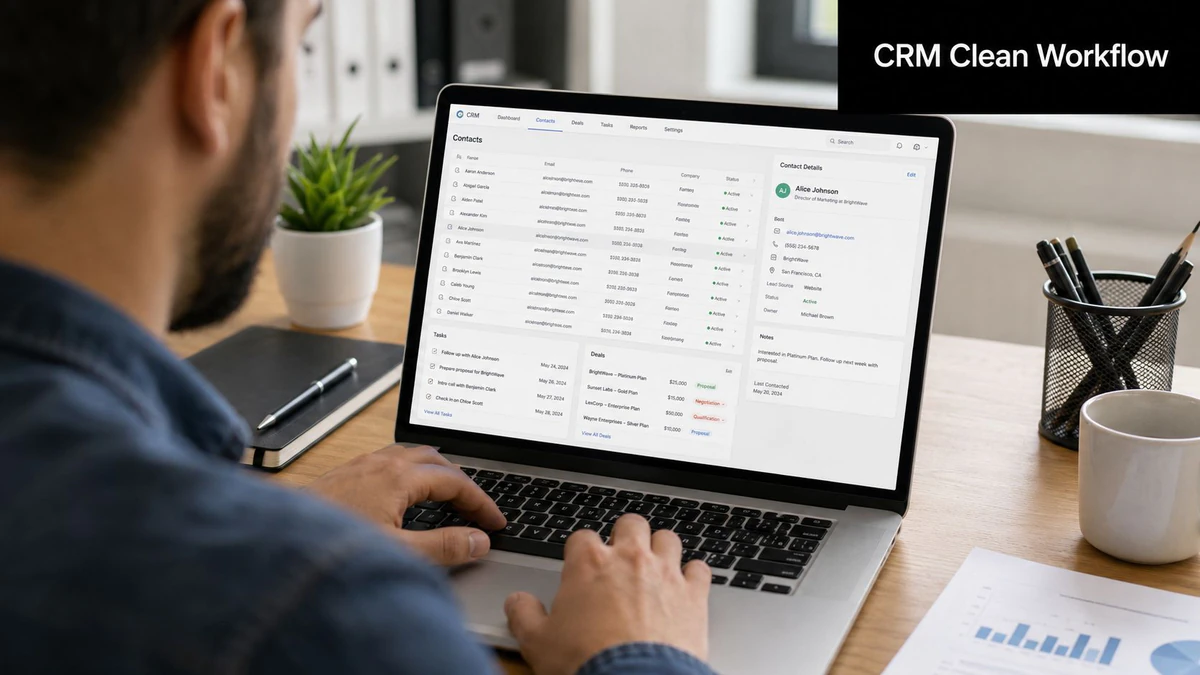
Deduplication, standardization, and normalization need to run as one operating process. If the team only merges duplicates, bad formatting and inconsistent field values create new duplicates later. If the team only standardizes fields, duplicate records still split attribution, ownership, and outreach history.
Deduplicate with caution around active revenue records
Exact-match deduplication is straightforward. Same email address, same CRM ID, same external system key. Merge or archive based on clear rules.
Fuzzy matching is where teams create avoidable problems.
“Jen Smith” and “Jennifer Smith” at the same company could be the same contact, or they could be two different people on the same buying committee. Auto-merging both into one record might save a few minutes now and cost a rep the context they need on an open deal. That is a bad trade.
A safer rule set looks like this:
- Auto-merge only exact matches on trusted identifiers.
- Route fuzzy matches to review if the record has open opportunities, recent activity, or campaign attribution attached.
- Keep the most recently verified value, rather than the newest record.
- Maintain a merge log so operations can audit changes and reverse mistakes.
This is slower than a one-time mass merge. It is also how you avoid breaking active sales motion while still reducing duplicate volume every week.
Standardize fields so segmentation works again
Standardization means one approved format per field, enforced consistently across imports, forms, integrations, and manual entry.
Examples are simple:
- Country: use either “United States” or “USA,” not both
- Job title: map “VP Marketing,” “Vice President Marketing,” and “Vice President of Marketing” into one pattern
- State or region: decide whether abbreviations are allowed
- Lifecycle stage: restrict values so users and systems cannot create near-duplicates
This work affects execution fast. If lifecycle stages drift, routing breaks. If country values vary, territory assignments and regional reporting become unreliable. If title fields sprawl, segmentation logic gets noisy and audience counts stop matching what marketing expects.
Normalize formatting for machine readability
Normalization makes values usable across systems and workflows.
Typical fixes include:
- Phone numbers: convert all entries into one structure
- Dates: align on one date format across imports and integrations
- Text case: correct all-caps names and inconsistent capitalization
- Whitespace and punctuation: remove formatting noise that interferes with matching logic
A CRM does not need perfect data. It needs data consistent enough that automation, reporting, and routing can trust it.
Missing values need rules too. Delete only when the record has little business value or is clearly unusable. Impute only when the downstream process can tolerate approximation. Flag uncertain values for review when a bad guess would create a sales or reporting problem.
The teams that keep data clean long term do not rely on quarterly spreadsheet projects. They use scheduled jobs, field rules, validation checks, and exception queues. They also clean in increments, starting with records tied to active pipeline, current campaigns, and routing logic. That approach reduces disruption and makes it easier to trace which source keeps reintroducing bad values.
If you are documenting those procedures, these email list cleaning strategies for managers connect record hygiene to campaign execution and help keep CRM cleanup tied to business outcomes, not just database maintenance.
Verifying Emails The Highest-Impact Cleaning Task
If I had to prioritize one cleaning task for a marketing team under time pressure, I'd start with email verification.
Not because the other fields don't matter. They do. But email is the field most tightly tied to campaign waste, sender reputation, and immediate execution quality. A bad title may hurt targeting. A bad email address guarantees the send can't succeed.
Why email deserves its own workflow
Email addresses are volatile. People leave companies, abandon inboxes, use temporary addresses on forms, or submit role-based inboxes that don't belong in a nurture path. When those records stay in the CRM, they affect more than the next campaign. They also distort engagement scoring, suppress valid leads behind bad audience math, and create false confidence in list size.
A dedicated verification layer matters. It's not enough to check whether an email “looks valid.” Marketing operations needs to know whether the address is deliverable, risky, disposable, catch-all, role-based, or likely to hurt sender quality.
What specialized verification solves
A verification platform should help in three places: before data enters the CRM, while lists are being prepared, and inside automated workflows.
BillionVerify's email verification workflow explainer gives a good overview of how this fits into list health and deliverability operations.
The product capabilities that matter in practice are concrete:
- Single checks: useful for manual review of high-value contacts before outreach
- Bulk list cleaning: necessary before launches, migrations, or re-engagement campaigns
- Real-time API verification: blocks low-quality data at signup, registration, or lead capture
- Structured outputs: teams need status detail, not a vague pass/fail result
BillionVerify fits that operational model. It delivers 99.9% SMTP-level accuracy across single checks, bulk list cleaning, and real-time API operations, returning structured JSON with detailed status, SMTP results, MX records, catch-all scoring, and deliverability insights, according to this BillionVerify profile.
The features that matter most in CRM hygiene
For CRM data cleaning, the most useful features are often the least flashy.
First, real-time API validation stops bad addresses before they land in the database. That changes the operating model from cleanup to prevention.
Second, bulk verification helps when marketing inherits a dirty list from events, legacy imports, partnerships, or old lead-gen systems.
Third, risk detection matters almost as much as invalid detection. BillionVerify maintains a disposable email database covering over 50,000 disposable domains and a spam trap detection database with over 1 million known traps updated in real time with ML, as described in this benchmark discussion of email verification providers.
The fastest way to improve list quality is to stop treating every syntactically correct email as equally usable.
A short product walkthrough helps clarify how verification fits into a modern stack:
Where teams get the biggest payoff
The highest-return use cases are usually straightforward:
- Inbound forms: reject disposable and malformed emails before record creation
- Outbound list prep: verify before each major send, especially older segments
- CRM imports: scan uploaded files before sync
- Sales handoff: validate high-value contacts before sequence enrollment
What doesn't work is running verification once and assuming that's enough. Email verification is strongest when paired with the continuous hygiene model covered next.
Automating Hygiene to Prevent Future Data Decay
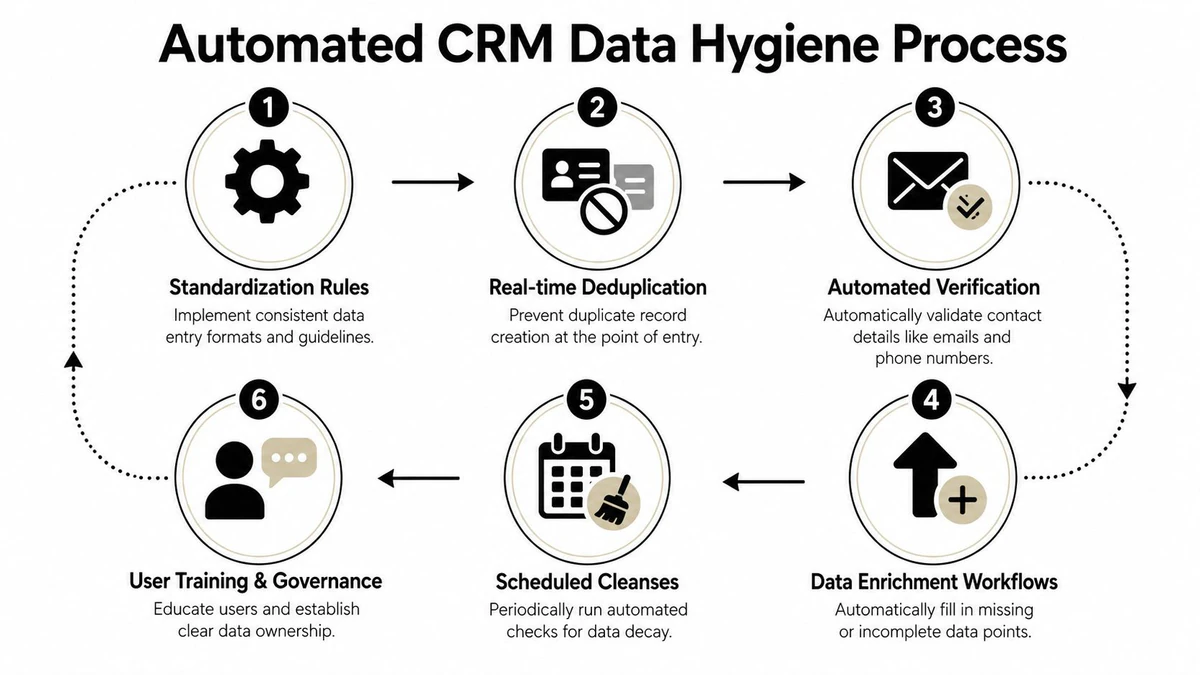
A clean CRM starts decaying the moment people change jobs, companies rebrand, and forms accept bad inputs again. That's why automation matters more than heroic cleanup sprints.
B2B contact data decays at a rate of 22% to 30% annually, which means a meaningful share of the database becomes invalid within a year without continuous monitoring and enrichment, based on the earlier Default research on CRM data hygiene.
Build controls at every entry point
The most reliable hygiene systems apply the same standards everywhere data enters:
- Web forms: validate required fields and verify emails in real time
- Manual entry: use picklists and field constraints instead of free text where possible
- CSV imports: run pre-import checks for duplicates, formatting, and invalid emails
- App integrations: define field ownership so one tool can't overwrite trusted values blindly
Many teams still struggle. They create good rules in the CRM but let event imports, integrations, or landing pages bypass them.
Use scheduled workflows for decay signals
Not every issue can be stopped at entry. Some records become stale after they've been valid for months.
That's where recurring workflows help. Common examples include:
| Workflow | Trigger | Action |
|---|---|---|
| Stale contact review | No engagement over a defined period | Flag for review, archive, or suppress from campaigns |
| Lifecycle audit | Scheduled monthly or quarterly | Check if stage still matches actual relationship |
| Duplicate watchlist | New record creation or import | Surface exact and fuzzy match candidates |
| Reverification queue | Pre-campaign or periodic batch | Recheck older contact emails before use |
Operating principle: automate detection first, then automate action only where the risk of a wrong action is low.
For example, auto-formatting phone fields is usually safe. Auto-merging fuzzy duplicate contacts tied to open pipeline is not.
Make hygiene part of daily operations
The durable model isn't “quarterly cleanse, then forget.” It's daily logging, weekly validation of new records, and monthly review of stale or conflicting records. Quarterly deep audits still matter, but they shouldn't be the only control.
A strong system also includes governance. Someone has to own field definitions, duplicate policy, lifecycle rules, and exception handling. Otherwise the CRM becomes a shared space with no referee.
When teams make this shift, CRM data cleaning stops being an exhausting project and becomes a manageable operating process.
Measuring the ROI of Your Data Cleaning Program
If you can't tie cleanup work to operating metrics, leadership will treat it like maintenance overhead. That's avoidable.
The simplest way to prove value is to compare pre-cleaning and post-cleaning performance across marketing execution, sales efficiency, and financial output. You don't need a complicated model. You need a stable set of KPIs tracked consistently.
KPIs for Measuring CRM Data Cleaning Impact
| Metric | What to Measure | Expected Outcome |
|---|---|---|
| Email bounce rate | Hard bounces and risky addresses reaching campaign sends | Fewer failed sends and healthier deliverability |
| Deliverability quality | Inbox placement trend, suppression quality, sender reputation indicators | More reliable campaign reach |
| Open and click performance | Engagement trend after invalid and low-quality records are removed | Cleaner audience signals |
| Sales connect rate | Success rate on outreach to verified contacts | Less wasted rep activity |
| Lead-to-opportunity conversion | Conversion trend for cleaner, better-routed records | More efficient qualification |
| Sales cycle friction | Delays caused by missing or conflicting contact/account data | Faster progression through handoff and follow-up |
| Customer acquisition efficiency | Effort and spend required to turn records into pipeline | Lower waste from unusable records |
| Revenue per contact | Revenue contribution relative to active, usable database size | Better yield from the CRM |
Tie the dashboard to business decisions
The strongest ROI story is usually comparative. If bounce rates drop after verification, if connect rates improve after deduplication, and if routing errors fall after standardization, the business case gets obvious quickly.
For finance and leadership audiences, I'd also keep one eye on revenue leakage. The earlier data points on accuracy gaps and lost deal opportunities already make the strategic case. Your internal dashboard should show whether the cleanup program is reversing those patterns in your own environment.
If you need a framework for quantifying verification impact specifically, this guide to email verification ROI is a practical starting point.
Clean CRM data doesn't come from one heroic cleanup. It comes from tighter entry controls, smarter automation, and regular verification of the fields that affect outreach most. If email quality is the biggest leak in your system, BillionVerify is a practical option for checking individual addresses, cleaning lists in bulk, and validating new records before they enter your CRM.