


Your signup form is working. Leads are coming in. Campaigns are shipping on time. Then the cracks show up in places that feel unrelated.
A welcome series gets an unusual number of hard bounces. Sales reps complain that sequences are hitting dead inboxes. Lifecycle reports stop making sense because “new leads” include throwaway addresses, typo-ridden signups, and role accounts no one checks.
That's usually when teams realize email quality isn't a cleanup task. It's an input problem. If bad addresses get into your CRM, ESP, product database, and outbound tools, every workflow downstream gets noisier and more expensive.
An Email Validation API fixes that at the point where data enters your systems. Instead of scrubbing lists after the damage is done, you check addresses in real time and decide what to accept, warn on, or block. To make that concrete, I'll use BillionVerify as the running example and explain both the marketing impact and the implementation side.
Why Your Email List Is Costing You Money
A familiar scene in marketing ops goes like this. The team builds a launch campaign, segments the audience, tests subject lines, and sends at peak time. Within minutes, bounce notifications start piling up. By the next meeting, nobody is talking about the copy anymore. They're talking about list quality.
One bad address rarely stays isolated. A typo at signup becomes a hard bounce in your ESP. A disposable address gets counted as a lead in paid acquisition reporting. A role inbox enters a nurture flow, never engages, and drags down performance metrics that your team uses to make budget decisions.
The direct cost is easy to see
You pay to acquire leads, store contacts, enrich records, and send messages. When an address is invalid, that spend still happened. The campaign still went out. The workflow still fired. You just didn't reach a real recipient.
The harder part is the hidden damage. Repeated sends to bad addresses can make it harder to improve email deliverability over time, because mailbox providers pay attention to bounce patterns and sender behavior.
Practical rule: Every invalid email you allow into your stack becomes someone else's problem later. Usually marketing ops, deliverability, sales ops, or support.
The indirect cost is usually larger
Bad email data also corrupts decision-making. If a lead never receives your onboarding sequence, the product team may blame activation. If a sales rep gets no reply from a dead mailbox, they may blame targeting. If newsletter engagement slips, your team may change creative when the underlying issue is list hygiene.
That's why many teams start with periodic cleanup, then realize they also need prevention. If you're already cleaning old lists, it helps to understand what a dedicated email list cleaning service does for existing databases. But cleanup alone doesn't stop tomorrow's bad signups from entering today.
An email validation API changes the sequence. Instead of fixing damage after a send, you check the address when the user types it in. That shift saves more than campaign waste. It protects reporting, routing, and follow-up across your whole revenue stack.
What Is an Email Validation API
An email validation API is a service your app can call to check whether an email address looks legitimate, reachable, and risky before you store it or send to it.
For marketers, the easiest analogy is a front-desk security check. A person arrives with an email address. The API checks whether the format makes sense, whether the domain exists, whether the mail system appears configured to receive messages, and whether the address has warning signs such as being disposable or role-based.
A simple way to think about the API
The old way was janitorial. You collected everything first, then cleaned the mess later. The API-first way is gatekeeping. You inspect addresses at the moment of entry.
That's why these tools fit naturally into signup forms, trial requests, newsletter popups, checkout flows, CRMs, and automated lead routing. They don't replace bulk hygiene work. They stop low-quality records from getting created in the first place.
Here's a visual model of that layered process.
A plain-English walkthrough also helps:
- Format check: Does the address even follow a valid email pattern?
- Domain check: Is the domain real and configured in a way that suggests email can be received?
- Mailbox and risk checks: Does the mailbox appear to exist, and does the address carry signs of low intent or poor deliverability?
If you want a broader foundation first, this overview of what email verification means is a useful companion before you start wiring an API into forms.
Why teams moved beyond list cleaning
The category matured when vendors stopped treating email verification as a one-off file cleanup task and started offering API-first infrastructure for forms, CRMs, and workflows. Mailgun says its validation API cross-references addresses against a database of over 450 billion emails and claims it can lower bounce rates by up to 21% and raise open rates by up to 65% through better targeting, while Twilio highlights real-time responses with validity scores and typo suggestions for forms and user flows, as described on Mailgun's email validation API page.
That shift matters because the best moment to handle a bad address is before it becomes a record.
Later in the stack, a weak address can trigger unnecessary automation, pollute attribution, and waste sales effort. At the form layer, the same issue is cheap to catch and easy to route. You can warn users about likely typos, reject obviously invalid entries, or tag uncertain cases for review.
For a concrete product example, BillionVerify is a professional email verification service built to solve one problem: bad email data costs businesses money.
A quick product demo makes the concept easier to visualize after the basic model is clear.
How an Email Validation API Works Under the Hood
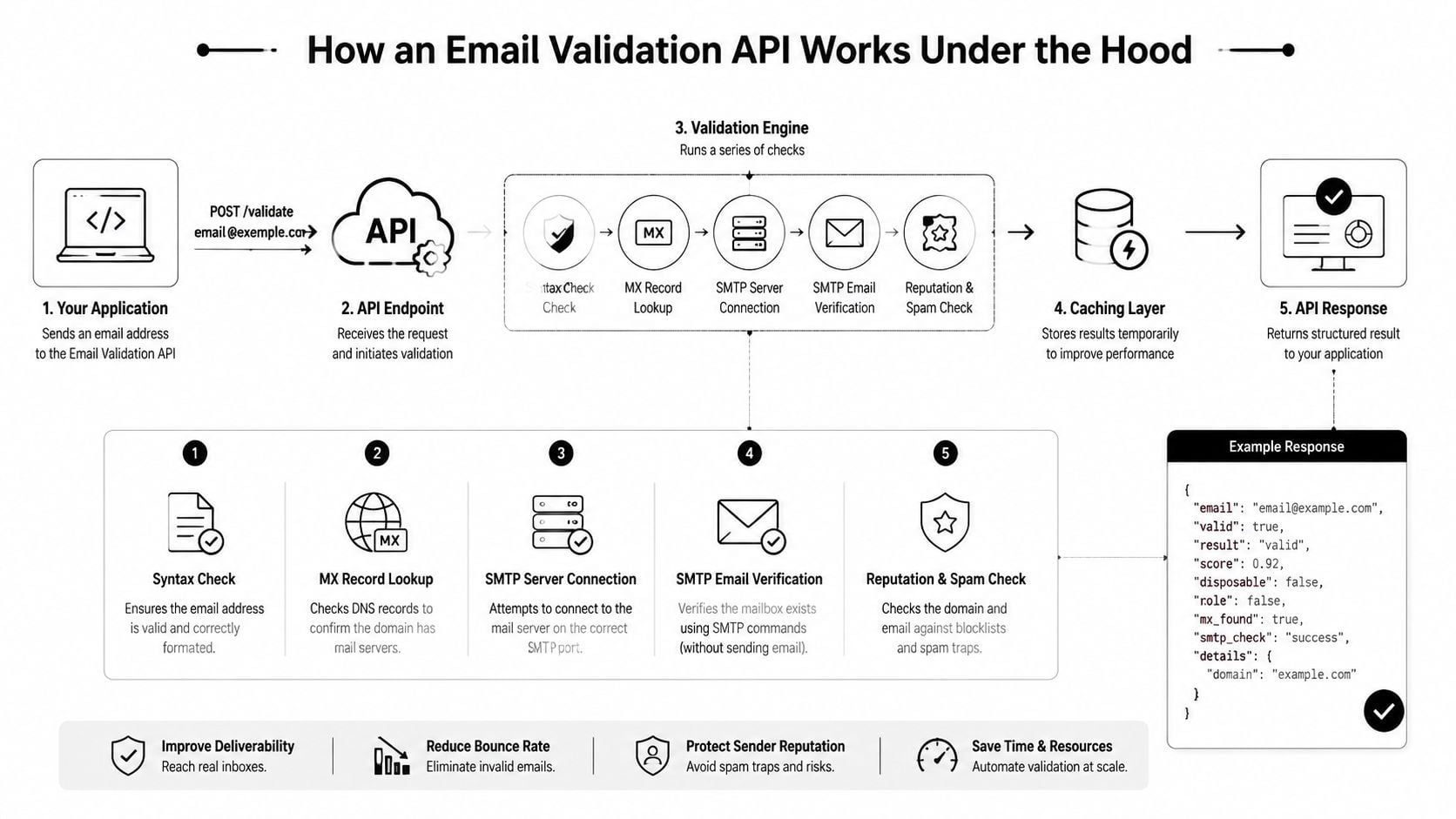
A good email validation API doesn't rely on one check. It stacks multiple checks, starting with the obvious and moving toward the uncertain. Think of it as layered security. Each layer catches a different class of problem.
The first layer checks obvious problems
The first step is syntax validation. This catches malformed entries such as missing symbols, broken domains, or impossible structures. It's fast, but it only tells you whether the text looks like an email address. It doesn't tell you whether anyone can receive mail there.
Then comes domain verification. The API checks whether the domain is present and whether its email setup appears valid. Often, teams find this step confusing. A domain can look familiar and still be unusable for email. A typo in the company name might pass a casual glance but fail at the domain layer.
The second layer checks the mail system
Next comes the MX record check, which asks whether the domain has mail exchange records that indicate where email should be delivered. If there's no usable mail infrastructure, your campaign won't reach anyone even if the address format is perfect.
If the domain passes that stage, more advanced services attempt SMTP-level verification. That means they interact with the receiving mail system to estimate whether the specific mailbox exists or can accept mail. This isn't a guarantee in every case, because some servers reveal less information than others, but it's the step that moves validation closer to actual deliverability.
If you want a deeper look at that domain-routing layer, this guide to MX record validation is worth reading alongside your implementation work.
Syntax tells you whether an email address is shaped correctly. SMTP-related checks tell you whether sending to it is likely to work.
The third layer adds risk intelligence
Mailbox existence still isn't the whole story. Some addresses are technically reachable but operationally poor.
That's where the intelligence layer comes in:
- Disposable detection: Flags temporary addresses often used for one-time signups.
- Role account detection: Identifies inboxes like support@, sales@, or info@ that may not represent a single person.
- Catch-all awareness: Notes domains that accept many addresses without clearly confirming whether a specific mailbox is real.
- Pattern risk: Detects signs such as random-string behavior that can indicate low-quality submissions.
AWS SES describes this broader approach well. Its email validation API can perform syntax validation, domain verification, mailbox existence checks, and extra risk checks, returning verdicts such as HIGH, MEDIUM, or LOW plus flags like role address, disposable domain, and random-string pattern detection on the AWS SES email validation API documentation.
For product teams, that layered output matters more than a simple yes or no. A signup flow might accept a medium-confidence address but suppress immediate sales outreach. A newsletter form might allow role accounts but exclude disposables. A trial flow might reject low-confidence submissions entirely.
That's the practical value of an API response. It gives you data to make policy decisions, not just a binary pass or fail.
Real-Time vs Bulk Validation Workflows
Organizations don't need to choose between real-time and bulk validation forever. They need to understand what each workflow is for.
Real-time validation is the gatekeeper. Bulk validation is the housekeeper. One protects the front door. The other cleans what's already inside.
When real-time validation is the right fit
Use real-time validation when the cost of admitting bad data is immediate.
Typical examples include:
- Signup forms: Block obvious typos before the account is created.
- Newsletter popups: Warn on disposable or malformed addresses before they enter your ESP.
- Demo requests and lead forms: Keep routing logic and SDR follow-up focused on usable contacts.
- Checkout and account updates: Reduce failures in order confirmations, receipts, and support communication.
Real-time workflows are especially valuable when one bad record triggers many downstream actions. A fake signup can create a CRM contact, enroll a nurture sequence, notify sales, and distort funnel reporting within seconds.
When bulk validation is the better tool
Bulk validation fits cleanup and operational reset work.
It's usually the right move when you need to:
- Scrub a legacy database before a major campaign
- Clean CRM records before a migration or integration project
- Audit dormant segments that haven't been mailed recently
- Review purchased or partner-sourced data before anyone imports it into core systems
Use real-time validation to prevent new problems. Use bulk validation to remove old ones.
Teams often get stuck because they treat these as competing approaches. They're not. If your form is collecting bad addresses every day, bulk cleaning alone won't solve the root problem. If your existing database has years of decay, real-time validation alone won't fix what's already there.
A practical operating model is simple. Validate at capture for every new record. Run bulk hygiene before important sends, migrations, or segmentation projects. That gives marketers cleaner campaigns and gives developers cleaner systems.
Integrating an Email Validation API Into Your Stack
For developers, the key question isn't whether validation is useful. It's how to wire it in without slowing forms down or complicating data flows. For marketing ops, the useful question is what the API returns and how that output maps to campaign rules.
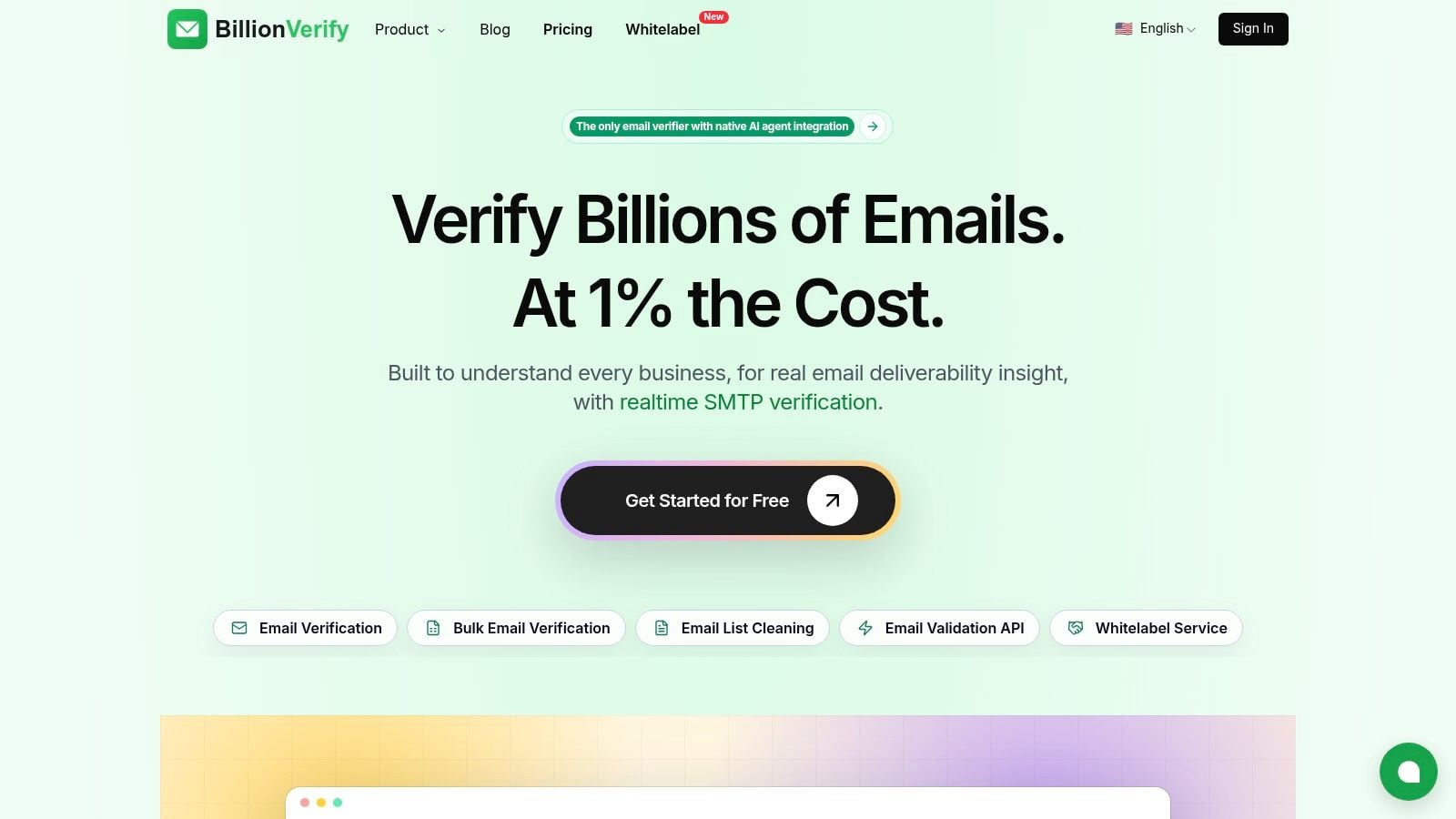
A screenshot helps make the product side concrete before getting into payloads and logic.
What a response can look like
A validation response is usually structured JSON. The exact fields vary by vendor, but the shape often looks something like this:
{ "email": "jane@example.com", "status": "valid", "result": "deliverable", "domain": "example.com", "mx_found": true, "smtp_check": "pass", "role_account": false, "disposable": false, "catch_all": false, "suggestion": null, "quality": "high" }
That output is useful because each field supports a separate decision. Your app might store the record only if status is acceptable. Your ESP sync might exclude disposable. Your sales workflow might down-prioritize catch_all. Your frontend might show a typo prompt when suggestion is present.
Here's a simple way to read that payload.
| Field | Example Value | Meaning |
|---|---|---|
| jane@example.com | The submitted address | |
| status | valid | Overall validation outcome |
| result | deliverable | Whether the address appears sendable |
| domain | example.com | The email domain being evaluated |
| mx_found | true | Whether mail exchange records were found |
| smtp_check | pass | Whether the mailbox-level check passed |
| role_account | false | Whether the address looks like a shared inbox |
| disposable | false | Whether it appears to come from a temporary provider |
| catch_all | false | Whether the domain accepts broad address patterns |
| suggestion | null | Possible typo correction if one exists |
| quality | high | A summarized confidence or risk judgment |
Common integration patterns
The most common pattern is a synchronous call during form submission. The user enters an email, your frontend or backend calls the API, and the form responds with accept, warn, or reject behavior.
Another pattern is asynchronous processing after record creation. That works well when you don't want any extra delay in the UI. A lead enters the system, then a background process validates it and updates status fields before sync or outreach begins.
A third pattern is batch processing with callbacks or webhooks. That's useful for list cleanup, nightly imports, and CRM audits. If you're evaluating event-driven workflows, this overview of email verification webhooks shows how status updates can flow back into your systems without constant polling.
The best integration pattern depends on where a bad address hurts you most. Form UX, CRM hygiene, outbound efficiency, or campaign readiness.
Implementation details that matter
Latency matters in inline form validation. Abstract says its email validation API can return full validation responses, including SMTP verification and a quality score, in under 300 ms, while Mailgun says its validation returns results in under 200 ms, according to the Abstract email verification API page. That's why teams can use these checks inside registration flows without making forms feel stalled.
Beyond speed, watch three practical details:
- Error handling: Decide what happens when the API is unavailable. A common approach is to allow submission, mark the record for later review, and avoid blocking all signups.
- Rate management: If you expect spikes, batch where possible and queue non-urgent checks.
- Data ownership: Keep the validation result in your CRM or warehouse so marketing, sales, and ops can use the same truth.
If validation data will feed larger warehouse and pipeline decisions, this enterprise data engineering guide gives useful context on how teams structure reliable data flows beyond the app itself.
For no-code teams, the same logic applies. A form tool can collect the address, an automation platform can call the API, and your CRM can branch on the returned fields. The core idea doesn't change. Treat email quality as structured data, not just a one-time check.
Best Practices for Maximizing Data Quality
Organizations often underuse validation because they treat it like a feature instead of an operating habit. The biggest gains come from deciding where email quality should be enforced, who owns the rules, and how the user experience should respond.
Validate at the moments that matter
The most important moment is point of capture. If a user enters a bad address on a form, check it there. Don't wait for a welcome email to discover the problem.
Then add validation at high-risk operational points:
- Before major sends: Clean segments before launches, seasonal campaigns, and large newsletters.
- Before migrations: Validate records before moving data between CRMs, ESPs, or warehouses.
- On a recurring schedule: Review older records because inboxes change, companies shut domains down, and stale contacts accumulate.
If your team is setting policy, these email verification best practices are a useful reference for deciding when to block, warn, suppress, or review.
Design the form experience carefully
The best validation experience is clear, fast, and calm. Don't throw generic errors at users if the API can tell you something more specific.
Good examples include:
- Typo guidance: “Did you mean gmail.com?”
- Soft warnings: “This looks like a temporary email address.”
- Direct blocks: “Please enter a valid business email.”
Bad examples are harsher than they need to be. If a catch-all result is uncertain, don't accuse the user of entering a fake address. If the issue is a likely typo, suggest the correction and let them confirm.
Treat validation messages like product UX, not system logs. The wording affects conversion as much as the rule itself.
One more operational tip matters here. Share the same validation definitions across product, sales ops, and marketing ops. If the form accepts an address that outbound later suppresses, users get in but teams can't act on them consistently. Clean data standards work best when every system uses the same flags and the same acceptance logic.
How to Choose the Right Email Validation Service
A buying decision gets easier when you ignore feature clutter and focus on the few criteria that affect real outcomes.
The criteria that actually matter
Start with accuracy, but read that word carefully. A service should tell you more than whether syntax is valid. You want layered checks that cover domain readiness, mailbox-level signals, and risk indicators that help you set policy.
Then look at speed. Fast responses matter for forms and trial flows. The category has matured well beyond basic pattern matching. Twilio's SendGrid Email Address Validation API supports both real-time and batch workflows, and Abstract says full validation responses can arrive in under 300 ms. Twilio also notes that the market is mature enough to compare providers on accuracy, scalability, and workflow support in its overview of the SendGrid email address validation API.
Also evaluate these trade-offs:
- Workflow fit: Do you need real-time checks, bulk processing, or both?
- Output clarity: Will your team understand the statuses and risk flags?
- Integration options: Can engineering, ops, or no-code teams plug it into the tools they already use?
- Data handling: Are the retention and privacy policies acceptable for your environment?
If you're comparing vendors, use your own workflows as the scorecard. Can the service help your signup form reject obvious junk, your CRM tag risky records, and your campaign team clean older segments before sending? That practical fit matters more than a long feature list.
In that context, BillionVerify is one option to evaluate based on how it fits your stack, your validation rules, and the level of detail you want in API responses.
If you're ready to turn email quality into a front-door control instead of a cleanup project, take a look at BillionVerify. It gives teams a concrete way to verify addresses in real time, clean existing lists, and use structured validation results inside product, sales, and marketing workflows.