



User signup is one of the most critical moments in the customer journey, and email verification plays a pivotal role in ensuring this experience is both secure and seamless. When implemented correctly, email verification during signup prevents fake accounts, reduces bounce rates, and builds a foundation of trust with genuine users. However, poor implementation can frustrate users, increase abandonment rates, and damage your brand reputation. This comprehensive guide explores the best practices for implementing email verification during user signup, balancing security requirements with optimal user experience. For foundational concepts, see our complete guide to email verification.
The Critical Role of Signup Email Verification
Understanding why email verification matters during signup helps teams prioritize implementation and allocate appropriate resources.
Why Verify Emails at Signup
Email verification at the point of signup serves multiple critical functions that protect both your business and your users. The primary purpose is ensuring that users provide valid, deliverable email addresses that they actually own and can access.
Without email verification, your user database quickly fills with typos, fake addresses, and abandoned accounts. Users who mistype their email address during registration lose access to password reset functionality and important notifications. Fake email addresses from bots and bad actors create security vulnerabilities and skew your analytics.
Email verification also establishes the communication channel between your application and users from the very first interaction. When users confirm their email addresses, they demonstrate intent and engagement, making them more likely to become active, valuable customers.
Impact on Business Metrics
The quality of email verification during signup directly impacts key business metrics including conversion rates, customer lifetime value, and marketing effectiveness.
Studies show that 20-30% of email addresses entered during signup contain errors or are deliberately fake. Without verification, these invalid addresses inflate your user counts while providing no actual value. Marketing campaigns sent to these addresses bounce, damaging your sender reputation and reducing deliverability to legitimate users.
Companies that implement proper email verification during signup report 40-60% reductions in bounce rates, 25-35% improvements in email engagement metrics, and significant decreases in customer support tickets related to account access issues.
Balancing Security and User Experience
The challenge of signup email verification lies in balancing thorough validation with frictionless user experience. Overly aggressive verification frustrates legitimate users and increases abandonment, while insufficient verification allows invalid addresses to enter your system.
The best implementations find this balance by using intelligent, multi-layer verification that catches obvious errors instantly while performing deeper validation asynchronously. This approach provides immediate feedback for common mistakes while not blocking users during the signup process.
Types of Signup Email Verification
Different verification approaches serve different purposes and offer varying levels of assurance about email validity.
Syntax Validation
Syntax validation is the first and fastest layer of email verification, checking that entered addresses conform to the basic format requirements of email addresses. This validation happens entirely in the browser and provides instant feedback.
Effective syntax validation catches missing @ symbols, invalid characters, incomplete domain names, and other obvious formatting errors. While syntax validation cannot verify that an address actually exists, it prevents users from submitting clearly invalid addresses.
Domain Verification
Domain verification goes beyond syntax to check that the email domain exists and can receive mail. This involves DNS lookups to verify MX records, confirming that the domain has mail servers configured to accept incoming email.
Domain verification catches typos in common email provider names like "gmial.com" instead of "gmail.com" and identifies domains that don't exist. This layer of verification requires server-side processing but can still provide relatively fast feedback.
Mailbox Verification
Mailbox verification is the most thorough form of email validation, checking whether the specific mailbox exists on the mail server. This involves SMTP communication with the recipient's mail server to verify the address is deliverable.
While mailbox verification provides the highest accuracy, it also takes the longest to complete and faces challenges like greylisting and catch-all configurations. Most signup flows perform this verification asynchronously after the user submits the form.
Email Confirmation
Email confirmation is the traditional approach where users receive an email with a verification link they must click to confirm ownership. While this provides definitive proof of access, it adds friction to the signup process and delays account activation.
Modern best practices combine real-time verification at signup with optional email confirmation for high-security applications, providing both immediate validation and verified ownership.
UX Best Practices for Signup Email Verification
User experience considerations should guide every decision in your email verification implementation.
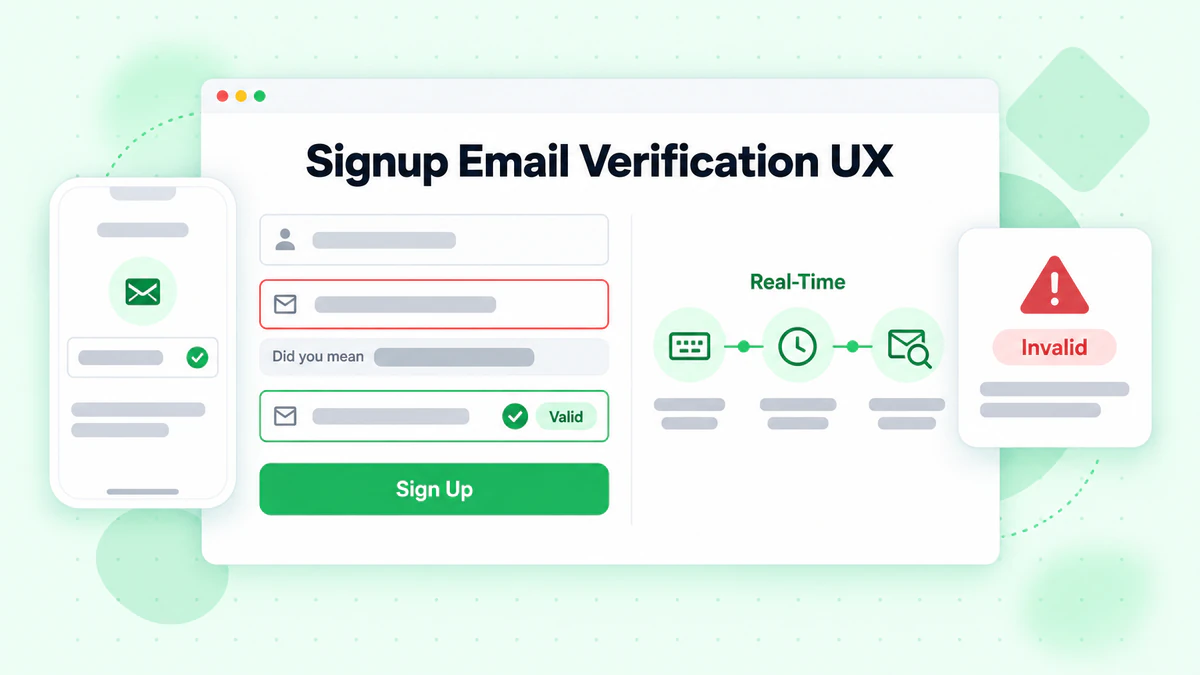
Real-Time Inline Validation
Real-time inline validation provides immediate feedback as users type, catching errors before form submission. This approach dramatically improves user experience by preventing frustrating error messages after completing the entire form.
Effective inline validation shows validation status directly next to the email field, uses clear visual indicators for valid, invalid, and validating states, and provides specific, actionable error messages that help users correct mistakes.
// React component with real-time email validation
import { useState, useCallback, useEffect } from 'react';
import debounce from 'lodash/debounce';

function SignupEmailInput({ onEmailValidated }) {
  const [email, setEmail] = useState('');
  const [status, setStatus] = useState({
    state: 'idle', // idle, validating, valid, invalid
    message: ''
  });

  // Debounced validation function
  const validateEmail = useCallback(
    debounce(async (emailValue) => {
      if (!emailValue) {
        setStatus({ state: 'idle', message: '' });
        return;
      }

      // Quick syntax check
      const syntaxValid = /^[^\s@]+@[^\s@]+\.[^\s@]+$/.test(emailValue);
      if (!syntaxValid) {
        setStatus({
          state: 'invalid',
          message: 'Please enter a valid email address'
        });
        return;
      }

      setStatus({ state: 'validating', message: 'Checking email...' });

      try {
        const response = await fetch('/api/validate-email', {
          method: 'POST',
          headers: { 'Content-Type': 'application/json' },
          body: JSON.stringify({ email: emailValue })
        });

        const result = await response.json();

        if (result.valid) {
          setStatus({ state: 'valid', message: 'Email looks good!' });
          onEmailValidated(emailValue);
        } else {
          setStatus({
            state: 'invalid',
            message: result.suggestion
              ? `Did you mean ${result.suggestion}?`
              : result.message || 'This email address is not valid'
          });
        }
      } catch (error) {
        // On error, allow submission but log the issue
        setStatus({ state: 'valid', message: '' });
        console.error('Email validation error:', error);
      }
    }, 500),
    [onEmailValidated]
  );

  useEffect(() => {
    validateEmail(email);
    return () => validateEmail.cancel();
  }, [email, validateEmail]);

  const getStatusIcon = () => {
    switch (status.state) {
      case 'validating':
        return <span className="spinner" aria-label="Validating" />;
      case 'valid':
        return <span className="check-icon" aria-label="Valid">✓</span>;
      case 'invalid':
        return <span className="error-icon" aria-label="Invalid">✗</span>;
      default:
        return null;
    }
  };

  return (
    <div className="email-input-container">
      <label htmlFor="email">Email Address</label>
      <div className="input-wrapper">
        <input
          id="email"
          type="email"
          value={email}
          onChange={(e) => setEmail(e.target.value)}
          placeholder="you@example.com"
          aria-describedby="email-status"
          className={`email-input ${status.state}`}
        />
        <span className="status-icon">{getStatusIcon()}</span>
      </div>
      {status.message && (
        <p
          id="email-status"
          className={`status-message ${status.state}`}
          role={status.state === 'invalid' ? 'alert' : 'status'}
        >
          {status.message}
        </p>
      )}
    </div>
  );
}
Typo Suggestion and Auto-Correction
One of the most user-friendly email verification features is detecting common typos and suggesting corrections. When users type "user@gmial.com", suggesting "gmail.com" as an alternative can save frustration and prevent lost accounts.
Typo detection algorithms compare entered domains against a database of common email providers and use edit distance calculations to identify likely mistakes.
// Common email domain typo suggestions
const commonDomains = {
  'gmail.com': ['gmial.com', 'gmal.com', 'gamil.com', 'gmail.co', 'gmail.om'],
  'yahoo.com': ['yaho.com', 'yahooo.com', 'yahoo.co', 'yhoo.com'],
  'hotmail.com': ['hotmal.com', 'hotmial.com', 'hotmail.co', 'hotmai.com'],
  'outlook.com': ['outlok.com', 'outloo.com', 'outlook.co'],
  'icloud.com': ['iclod.com', 'icloud.co', 'icoud.com']
};

function suggestEmailCorrection(email) {
  const [localPart, domain] = email.toLowerCase().split('@');

  if (!domain) return null;

  // Check for exact typo matches
  for (const [correctDomain, typos] of Object.entries(commonDomains)) {
    if (typos.includes(domain)) {
      return {
        suggestion: `${localPart}@${correctDomain}`,
        reason: 'typo'
      };
    }
  }

  // Check edit distance for close matches
  for (const correctDomain of Object.keys(commonDomains)) {
    if (levenshteinDistance(domain, correctDomain) <= 2) {
      return {
        suggestion: `${localPart}@${correctDomain}`,
        reason: 'similar'
      };
    }
  }

  return null;
}

function levenshteinDistance(str1, str2) {
  const matrix = Array(str2.length + 1).fill(null)
    .map(() => Array(str1.length + 1).fill(null));

  for (let i = 0; i <= str1.length; i++) matrix[0][i] = i;
  for (let j = 0; j <= str2.length; j++) matrix[j][0] = j;

  for (let j = 1; j <= str2.length; j++) {
    for (let i = 1; i <= str1.length; i++) {
      const indicator = str1[i - 1] === str2[j - 1] ? 0 : 1;
      matrix[j][i] = Math.min(
        matrix[j][i - 1] + 1,
        matrix[j - 1][i] + 1,
        matrix[j - 1][i - 1] + indicator
      );
    }
  }

  return matrix[str2.length][str1.length];
}
Clear Error Messages
Error messages should be specific, helpful, and actionable. Vague messages like "Invalid email" frustrate users who don't understand what's wrong. Instead, provide clear guidance on how to fix the issue.
Effective error messages explain the specific problem and suggest how to fix it. For example, instead of "Invalid email format", use "Email addresses need an @ symbol followed by a domain like example.com."
function getHelpfulErrorMessage(validationResult) {
  const { error, code } = validationResult;

  const errorMessages = {
    'MISSING_AT': 'Please include an @ symbol in your email address',
    'MISSING_DOMAIN': 'Please add a domain after the @ symbol (like gmail.com)',
    'INVALID_DOMAIN': 'This email domain doesn\'t appear to exist. Please check for typos',
    'DISPOSABLE_EMAIL': 'Please use a permanent email address, not a temporary one', // See: /blog/disposable-email-detection
    'ROLE_BASED': 'Please use a personal email address instead of a role-based one (like info@ or admin@)',
    'SYNTAX_ERROR': 'Please check your email address for any typos',
    'MAILBOX_NOT_FOUND': 'We couldn\'t verify this email address. Please double-check it\'s correct',
    'DOMAIN_NO_MX': 'This domain cannot receive emails. Please use a different email address'
  };

  return errorMessages[code] || 'Please enter a valid email address';
}
Progressive Disclosure of Requirements
Don't overwhelm users with all validation rules upfront. Instead, reveal requirements progressively as they become relevant. Show format hints only when users start typing, and display specific error messages only when validation fails.
This approach keeps the initial form clean and simple while still providing all necessary guidance when users need it.
Implementing Email Verification APIs
Professional email verification APIs like BillionVerify provide comprehensive validation without the complexity of building custom verification infrastructure.
Choosing the Right API
When selecting an email verification API for signup flows, consider speed, accuracy, coverage, and cost. Signup verification requires fast response times to maintain good user experience, typically under 500 milliseconds for inline validation.
BillionVerify's email verification API offers real-time validation optimized for signup flows, with comprehensive checks including syntax validation, domain verification, mailbox verification, disposable email detection, and deliverability scoring.
Integration Best Practices
Integrate email verification APIs in a way that enhances rather than hinders the signup experience. Handle API errors gracefully, implement timeouts, and have fallback strategies for when the service is unavailable.
// Express.js email validation endpoint
const express = require('express');
const rateLimit = require('express-rate-limit');

const app = express();

// Rate limiting for signup validation
const signupLimiter = rateLimit({
  windowMs: 60 * 1000,
  max: 20,
  message: { error: 'Too many requests, please try again later' }
});

app.post('/api/validate-email', signupLimiter, async (req, res) => {
  const { email } = req.body;

  if (!email) {
    return res.status(400).json({
      valid: false,
      message: 'Email is required'
    });
  }

  // Quick local validation first
  const localValidation = validateEmailLocally(email);
  if (!localValidation.valid) {
    return res.json(localValidation);
  }

  // Check for typo suggestions
  const typoSuggestion = suggestEmailCorrection(email);

  try {
    // Call BillionVerify API with timeout
    const controller = new AbortController();
    const timeout = setTimeout(() => controller.abort(), 3000);

    const response = await fetch('https://api.billionverify.com/v1/verify', {
      method: 'POST',
      headers: {
        'Authorization': `Bearer ${process.env.BV_API_KEY}`,
        'Content-Type': 'application/json'
      },
      body: JSON.stringify({ email }),
      signal: controller.signal
    });

    clearTimeout(timeout);

    const result = await response.json();

    return res.json({
      valid: result.deliverable,
      message: result.deliverable ? '' : getHelpfulErrorMessage(result),
      suggestion: typoSuggestion?.suggestion,
      details: {
        isDisposable: result.is_disposable,
        isCatchAll: result.is_catch_all,
        score: result.quality_score
      }
    });
  } catch (error) {
    // On timeout or error, allow submission with warning
    console.error('Email validation API error:', error);

    return res.json({
      valid: true,
      warning: 'Unable to fully verify email',
      suggestion: typoSuggestion?.suggestion
    });
  }
});

function validateEmailLocally(email) {
  if (!email || typeof email !== 'string') {
    return { valid: false, message: 'Email is required' };
  }

  const trimmed = email.trim();

  if (trimmed.length > 254) {
    return { valid: false, message: 'Email address is too long' };
  }

  if (!trimmed.includes('@')) {
    return { valid: false, message: 'Please include an @ symbol', code: 'MISSING_AT' };
  }

  const [localPart, domain] = trimmed.split('@');

  if (!domain || domain.length === 0) {
    return { valid: false, message: 'Please add a domain after @', code: 'MISSING_DOMAIN' };
  }

  if (!domain.includes('.')) {
    return { valid: false, message: 'Domain should include a dot (like .com)', code: 'INVALID_DOMAIN' };
  }

  const emailRegex = /^[^\s@]+@[^\s@]+\.[^\s@]+$/;
  if (!emailRegex.test(trimmed)) {
    return { valid: false, message: 'Please check the email format', code: 'SYNTAX_ERROR' };
  }

  return { valid: true };
}
Handling Edge Cases
Real-world signup flows encounter numerous edge cases that require thoughtful handling.
Plus Addressing and Subaddressing
Many email providers support plus addressing, where users can add a plus sign and additional text to their email address (user+signup@gmail.com). This is a legitimate feature that some users rely on for filtering, so your validation should accept these addresses.
However, be aware that some users abuse plus addressing to create multiple accounts with what is effectively the same email address. Consider normalizing addresses by removing plus addressing when checking for duplicate accounts.
function normalizeEmailForDuplicateCheck(email) {
  const [localPart, domain] = email.toLowerCase().split('@');

  // Remove plus addressing
  const normalizedLocal = localPart.split('+')[0];

  // Handle Gmail dot trick (dots are ignored in Gmail addresses)
  let finalLocal = normalizedLocal;
  if (domain === 'gmail.com' || domain === 'googlemail.com') {
    finalLocal = normalizedLocal.replace(/\./g, '');
  }

  return `${finalLocal}@${domain}`;
}
International Email Addresses
Email addresses can contain international characters in both the local part and domain name (IDN - Internationalized Domain Names). Your validation should properly handle these addresses to support users worldwide.
function validateInternationalEmail(email) {
  // Convert IDN to ASCII for validation
  const { toASCII } = require('punycode/');

  try {
    const [localPart, domain] = email.split('@');
    const asciiDomain = toASCII(domain);

    // Validate the ASCII version
    const asciiEmail = `${localPart}@${asciiDomain}`;
    return validateEmailLocally(asciiEmail);
  } catch (error) {
    return { valid: false, message: 'Invalid domain format' };
  }
}
Corporate and Custom Domains
Users signing up with corporate email addresses may have unusual domain configurations that cause false negatives in validation. Implement fallback strategies and consider allowing submissions when verification is inconclusive.
Email Confirmation Flow Design
For applications requiring verified email ownership, the confirmation flow design significantly impacts user activation rates.
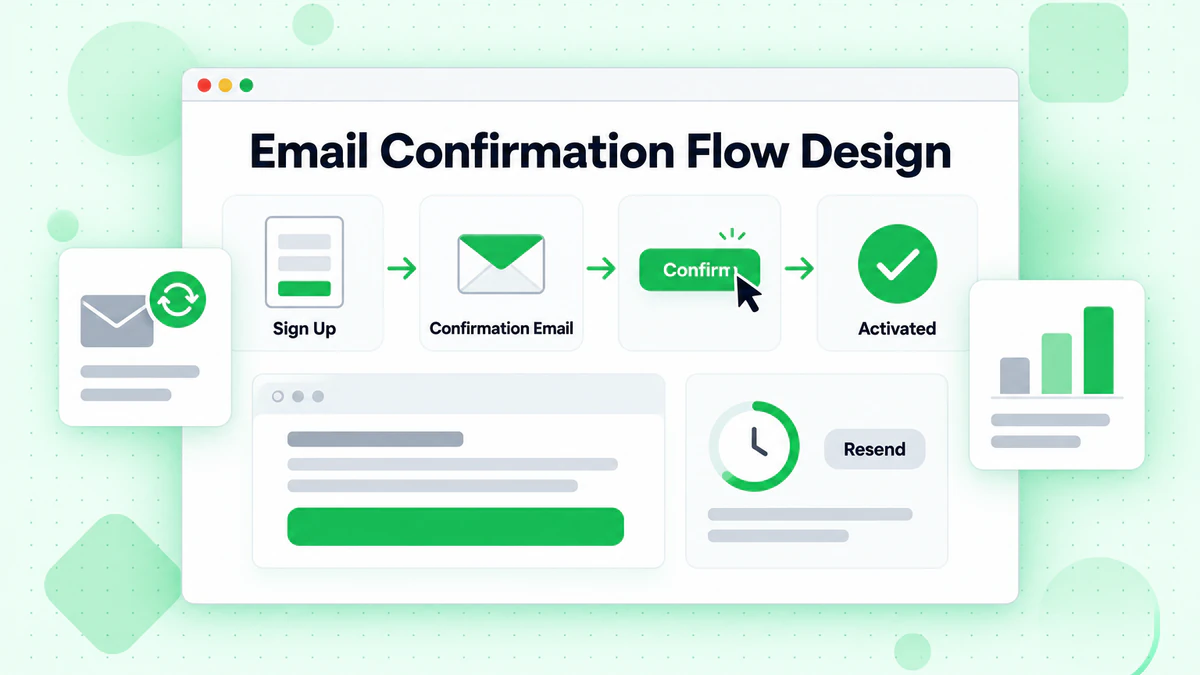
Optimizing Confirmation Email Delivery
The confirmation email should arrive quickly and be easily recognizable. Use a clear, recognizable sender name and subject line. Keep the email body simple with a prominent call-to-action button.
async function sendConfirmationEmail(user) {
  const token = generateSecureToken();
  const confirmationUrl = `${process.env.APP_URL}/confirm-email?token=${token}`;

  // Store token with expiration
  await storeConfirmationToken(user.id, token, {
    expiresIn: '24h'
  });

  await sendEmail({
    to: user.email,
    from: {
      name: 'Your App',
      email: 'noreply@yourapp.com'
    },
    subject: 'Confirm your email address',
    html: `
      <div style="max-width: 600px; margin: 0 auto; font-family: sans-serif;">
        <h1>Welcome to Your App!</h1>
        <p>Please confirm your email address to complete your registration.</p>
        <a href="${confirmationUrl}"
           style="display: inline-block; padding: 12px 24px;
                  background-color: #007bff; color: white;
                  text-decoration: none; border-radius: 4px;">
          Confirm Email Address
        </a>
        <p style="margin-top: 20px; color: #666; font-size: 14px;">
          This link expires in 24 hours. If you didn't create an account,
          you can safely ignore this email.
        </p>
      </div>
    `,
    text: `Welcome! Please confirm your email by visiting: ${confirmationUrl}`
  });
}

function generateSecureToken() {
  const crypto = require('crypto');
  return crypto.randomBytes(32).toString('hex');
}
Handling Unconfirmed Accounts
Define clear policies for unconfirmed accounts. Allow limited access to encourage users to complete confirmation while protecting sensitive features. Send reminder emails at strategic intervals.
// Middleware to check email confirmation status
function requireConfirmedEmail(options = {}) {
  const { allowGracePeriod = true, gracePeriodHours = 24 } = options;

  return async (req, res, next) => {
    const user = req.user;

    if (user.emailConfirmed) {
      return next();
    }

    // Allow grace period for new signups
    if (allowGracePeriod) {
      const signupTime = new Date(user.createdAt);
      const gracePeriodEnd = new Date(signupTime.getTime() + gracePeriodHours * 60 * 60 * 1000);

      if (new Date() < gracePeriodEnd) {
        req.emailPendingConfirmation = true;
        return next();
      }
    }

    return res.status(403).json({
      error: 'Email confirmation required',
      message: 'Please check your email and click the confirmation link',
      canResend: true
    });
  };
}
Resend Functionality
Provide clear options to resend confirmation emails, but implement rate limiting to prevent abuse.
app.post('/api/resend-confirmation', async (req, res) => {
  const user = req.user;

  if (user.emailConfirmed) {
    return res.json({ message: 'Email already confirmed' });
  }

  // Check rate limit
  const lastSent = await getLastConfirmationEmailTime(user.id);
  const minInterval = 60 * 1000; // 1 minute

  if (lastSent && Date.now() - lastSent < minInterval) {
    const waitSeconds = Math.ceil((minInterval - (Date.now() - lastSent)) / 1000);
    return res.status(429).json({
      error: 'Please wait before requesting another email',
      retryAfter: waitSeconds
    });
  }

  await sendConfirmationEmail(user);
  await updateLastConfirmationEmailTime(user.id);

  res.json({ message: 'Confirmation email sent' });
});
Mobile Signup Considerations
Mobile signup flows require special attention to email verification due to smaller screens and touch interfaces.
Mobile-Optimized Input Fields
Use appropriate input types and attributes to optimize the mobile keyboard and auto-complete experience.
<input
  type="email"
  inputmode="email"
  autocomplete="email"
  autocapitalize="none"
  autocorrect="off"
  spellcheck="false"
  placeholder="your@email.com"
/>
Touch-Friendly Error Display
Error messages on mobile should be clearly visible and not obscured by the keyboard. Consider positioning errors above the input field or using toast notifications.
Deep Links for Confirmation
Mobile confirmation emails should use deep links or universal links to open directly in your app when installed, providing a seamless experience.
function generateConfirmationUrl(token, platform) {
  const webUrl = `${process.env.WEB_URL}/confirm-email?token=${token}`;

  if (platform === 'ios') {
    return `yourapp://confirm-email?token=${token}&fallback=${encodeURIComponent(webUrl)}`;
  }

  if (platform === 'android') {
    return `intent://confirm-email?token=${token}#Intent;scheme=yourapp;package=com.yourapp;S.browser_fallback_url=${encodeURIComponent(webUrl)};end`;
  }

  return webUrl;
}
Analytics and Monitoring
Track key metrics to continuously improve your signup email verification flow.
Key Metrics to Track
Monitor these metrics to understand verification performance and identify areas for improvement:
// Analytics tracking for email verification
const analytics = {
  trackValidationAttempt(email, result) {
    track('email_validation_attempt', {
      domain: email.split('@')[1],
      result: result.valid ? 'valid' : 'invalid',
      errorCode: result.code,
      responseTime: result.duration,
      hadSuggestion: !!result.suggestion
    });
  },

  trackSuggestionAccepted(original, suggested) {
    track('email_suggestion_accepted', {
      originalDomain: original.split('@')[1],
      suggestedDomain: suggested.split('@')[1]
    });
  },

  trackSignupCompletion(user, validationHistory) {
    track('signup_completed', {
      emailDomain: user.email.split('@')[1],
      validationAttempts: validationHistory.length,
      usedSuggestion: validationHistory.some(v => v.usedSuggestion),
      totalValidationTime: validationHistory.reduce((sum, v) => sum + v.duration, 0)
    });
  },

  trackConfirmationStatus(user, status) {
    track('email_confirmation', {
      status, // sent, clicked, expired, resent
      timeSinceSignup: Date.now() - new Date(user.createdAt).getTime(),
      resendCount: user.confirmationResendCount
    });
  }
};
A/B Testing Verification Flows
Test different verification approaches to optimize conversion rates. Compare real-time validation versus on-submit validation, different error message styles, and various confirmation flow designs.
Security Considerations
Email verification during signup is a security-sensitive operation requiring careful implementation.
Preventing Enumeration Attacks
Attackers may use signup flows to determine which email addresses are already registered. Implement consistent response times and messages to prevent enumeration.
async function handleSignup(email, password) {
  const startTime = Date.now();
  const minResponseTime = 500;

  try {
    const existingUser = await findUserByEmail(email);

    if (existingUser) {
      // Don't reveal that user exists
      // Instead, send a "password reset" email to the existing user
      await sendExistingAccountNotification(existingUser);
    } else {
      const user = await createUser(email, password);
      await sendConfirmationEmail(user);
    }

    // Consistent response regardless of whether user existed
    const elapsed = Date.now() - startTime;
    const delay = Math.max(0, minResponseTime - elapsed);

    await new Promise(resolve => setTimeout(resolve, delay));

    return {
      success: true,
      message: 'Please check your email to complete registration'
    };
  } catch (error) {
    // Log error but return generic message
    console.error('Signup error:', error);
    return {
      success: false,
      message: 'Unable to complete registration. Please try again.'
    };
  }
}
Token Security
Confirmation tokens must be cryptographically secure and properly managed.
const crypto = require('crypto');

async function createConfirmationToken(userId) {
  // Generate secure random token
  const token = crypto.randomBytes(32).toString('hex');

  // Hash token for storage (don't store plaintext)
  const hashedToken = crypto
    .createHash('sha256')
    .update(token)
    .digest('hex');

  // Store with expiration
  await db.confirmationTokens.create({
    userId,
    tokenHash: hashedToken,
    expiresAt: new Date(Date.now() + 24 * 60 * 60 * 1000)
  });

  return token;
}

async function verifyConfirmationToken(token) {
  const hashedToken = crypto
    .createHash('sha256')
    .update(token)
    .digest('hex');

  const record = await db.confirmationTokens.findOne({
    where: {
      tokenHash: hashedToken,
      expiresAt: { $gt: new Date() },
      usedAt: null
    }
  });

  if (!record) {
    return { valid: false, error: 'Invalid or expired token' };
  }

  // Mark token as used
  await record.update({ usedAt: new Date() });

  return { valid: true, userId: record.userId };
}
Testing Your Implementation
Comprehensive testing ensures email verification works correctly across all scenarios.
Test Cases for Signup Verification
describe('Signup Email Verification', () => {
  describe('Syntax Validation', () => {
    it('accepts valid email formats', () => {
      const validEmails = [
        'user@example.com',
        'user.name@example.com',
        'user+tag@example.com',
        'user@subdomain.example.com',
        'user@example.co.uk'
      ];

      validEmails.forEach(email => {
        expect(validateEmailLocally(email).valid).toBe(true);
      });
    });

    it('rejects invalid email formats', () => {
      const invalidEmails = [
        'invalid',
        '@example.com',
        'user@',
        'user@@example.com',
        'user@.com'
      ];

      invalidEmails.forEach(email => {
        expect(validateEmailLocally(email).valid).toBe(false);
      });
    });
  });

  describe('Typo Suggestions', () => {
    it('suggests corrections for common typos', () => {
      const typos = [
        { input: 'user@gmial.com', expected: 'user@gmail.com' },
        { input: 'user@yaho.com', expected: 'user@yahoo.com' },
        { input: 'user@hotmal.com', expected: 'user@hotmail.com' }
      ];

      typos.forEach(({ input, expected }) => {
        const suggestion = suggestEmailCorrection(input);
        expect(suggestion?.suggestion).toBe(expected);
      });
    });
  });

  describe('API Integration', () => {
    it('handles API timeouts gracefully', async () => {
      // Mock a timeout
      jest.spyOn(global, 'fetch').mockImplementation(() =>
        new Promise((_, reject) =>
          setTimeout(() => reject(new Error('Timeout')), 100)
        )
      );

      const result = await validateEmailWithAPI('user@example.com');

      // Should allow submission on timeout
      expect(result.valid).toBe(true);
      expect(result.warning).toBeTruthy();
    });
  });
});
Conclusion
Implementing email verification during user signup requires balancing multiple concerns including user experience, security, accuracy, and performance. By following the best practices outlined in this guide, you can create signup flows that protect your application from invalid data while providing a smooth, frustration-free experience for legitimate users.
The key principles for successful signup email verification include providing real-time inline validation with helpful feedback, suggesting corrections for common typos, using progressive disclosure to avoid overwhelming users, implementing robust error handling for API failures, and tracking metrics to continuously improve the experience.
Whether you build custom verification logic or integrate professional services like BillionVerify, the techniques and patterns covered here provide a solid foundation for signup email verification that converts visitors into engaged users while maintaining data quality.
Start implementing better email verification in your signup flows today. BillionVerify's email validation API provides the speed and accuracy needed for real-time signup verification. Get started with free credits and see the difference quality email verification makes. For help choosing the right solution, see our best email verification service comparison.
See how BillionVerify compares to NeverBounce on bulk throughput and API response time for high-volume verification needs.