

HubSpot pricing starts at $0. The free tools cost nothing for up to two users, and most paid hubs come in three editions: Starter, Professional and Enterprise. Starter begins at $7 per user, Professional runs from $45 per user up to a $1,300 flat fee, and Enterprise runs from $75 per user up to $4,700.
The listed figure is only the start of the bill. Seats, paid contacts, a setup charge and extra credits all change the total. This guide walks through every plan the way HubSpot lists it, then adds up what a few realistic teams would pay.
All figures come from the vendor's own pricing pages, read in November 2026. They are in US dollars, quoted per month, and before tax. We have no connection with HubSpot, and BillionVerify is an email verification service, not a partner of the vendor.
Key facts (checked November 2026):
- HubSpot lists its entry account at $0 for up to two users, with no credit card required.
- The Marketing page starts Professional at $800 and Enterprise at $3,600 each month.
- HubSpot's Marketing FAQ says Professional and Enterprise buyers are charged for onboarding automatically.
- The bundle page prices a package of all the hubs, with six seats on Professional and eight on Enterprise.
- HubSpot's help center says only contacts marked for marketing affect the tier and the cost of a subscription.
- BillionVerify gives 20 free credits on each day you use it, so a list can be checked before it reaches the CRM.
How HubSpot Pricing Works
HubSpot sells its software in hubs. The pricing menu lists Smart CRM, Marketing, Sales, Service, Revenue, Content and Data, plus a Customer Platform page that bundles them. HubSpot pricing follows one ladder across the range: a free tier first, then three paid editions. The lower rungs suit small teams, and the upper two suit companies with several departments.
Four things set the final number: the edition, the seats, the contacts and the onboarding. Some hubs charge for each user, while others bundle a block of users into a flat fee. Contacts matter only for Marketing Hub. Onboarding is a one-time fee on the larger editions of three hubs.
Most prices on the pages show two figures. The annual option is selected by default and shows the lower one, with a higher figure struck through beside it. Starter and Professional also offer a monthly option, while Enterprise shows a single figure and a Talk to Sales button.
HubSpot Free Tools
The free tier is the entry point. Each hub lists a free column at $0, "free for up to 2 users", and no credit card is needed. A single account holds the free features from all the hubs, so a new team does not have to pick one first. For HubSpot CRM pricing, that is the answer many teams want. The HubSpot CRM cost is $0, because the CRM sits in the entry account.
The limits are real, though. Email allows 2,000 sends in a calendar month, and every message carries HubSpot branding. Email automation is capped at one action. Reporting allows 10 dashboards with 50 reports each. The content side allows a blog with up to 100 posts, 30 landing pages and 30 website pages. Sales users get three email templates and three snippets.
For a founder who wants a contact database and a simple form, that is enough to learn the product. Our guide to HubSpot email marketing covers what the email tools do in each paid edition. Anyone new to the platform can start with what is HubSpot.
HubSpot Starter Pricing
Starter is the first paid step. The pages describe it as essential software for five areas of work, and five hubs show the same line: $7 for each user, with $20 struck through. On the Marketing page, the monthly option shows $10 instead.
A banner reads "Save up to 65% on Starter". It says the special rate is for new customers only and for a limited time. The honest way to plan is to treat $20 as the standard rate and the lower figures as an offer.
HubSpot Starter keeps the free features, raises their limits and removes branding from live chat and email. It adds the Agent Hub, simple automation and CRM segments, and it lets you authenticate your own sending domain. HubSpot Starter pricing is per user, so a team of five pays $35 on the offer or $100 at the standard rate. That is the lowest paid figure on any page. In the email hub, this level gets bundled contacts and caps sending at a multiple of the contact count. The Marketing FAQ says Starter buyers need no onboarding, although paid inbound consulting is available.
HubSpot Marketing Hub Pricing
Marketing Hub holds the email tool and the contact-based bill, which makes HubSpot Marketing Hub pricing the part most buyers study first. HubSpot pricing for this hub also has the largest jump between editions.
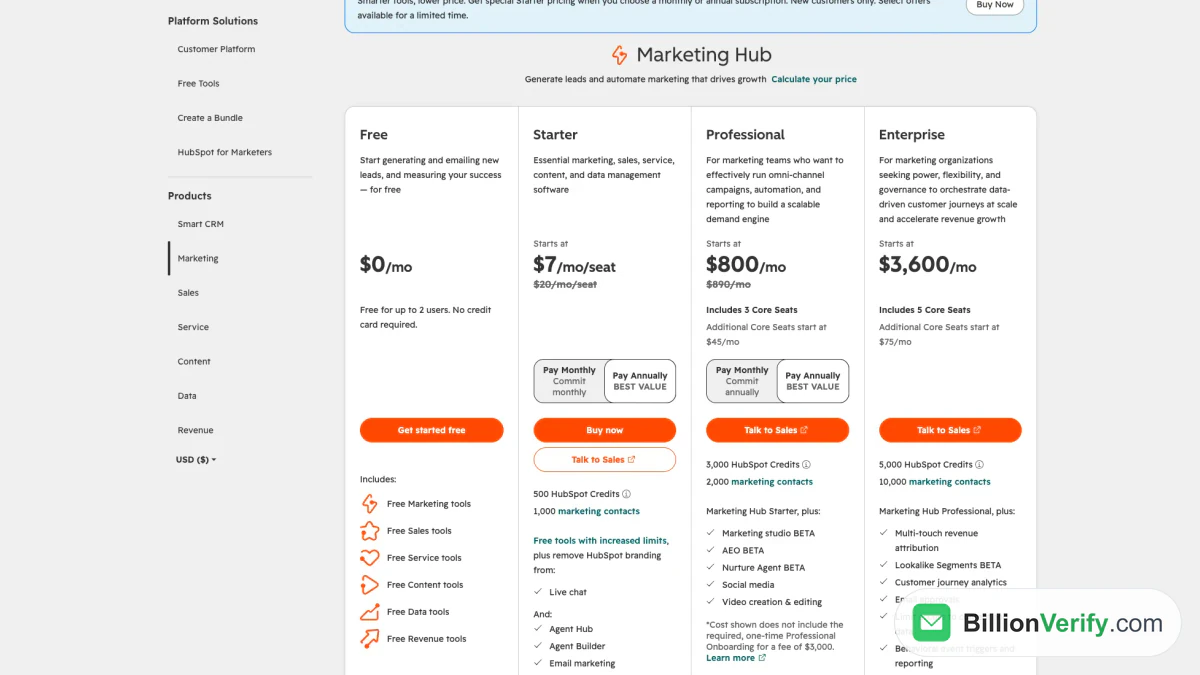
Screenshot: the four Marketing columns as shown to a new visitor.
Professional starts at $800 against a list of $890. The price covers three seats and more bundled contacts, and added seats start at $45. The email cap rises tenfold against the tier. This edition brings omni-channel automation with up to 300 workflows, social tools for 50 connected accounts, custom reporting and video creation. The page flags the Marketing studio, the AEO tool and the Nurture Agent as beta.
Enterprise starts at $3,600. It covers five seats and a bigger contact allowance, while added seats start at $75. The cap reaches twenty times the tier. Its extras are multi-touch revenue attribution, customer journey analytics, email approvals, permissions on content and data, and behavioral event triggers.
Each upper edition carries a footnote saying the price excludes a required one-time fee, $3,000 for Professional and $7,000 for Enterprise. Add the fee to year one and Professional comes to $12,600 before extra contacts, which is twelve payments of $800 with onboarding on top.
HubSpot Sales and Service Pricing
HubSpot pricing for both hubs follows the same per-user pattern, and their editions carry matching prices.
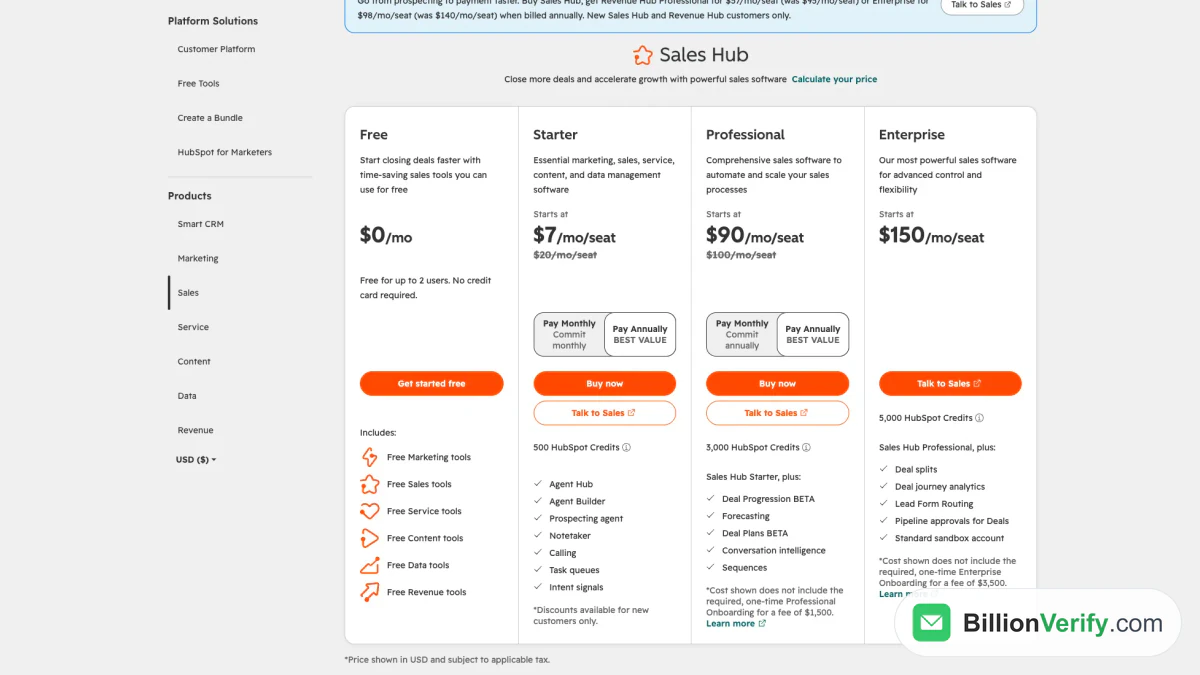
Screenshot: Sales Hub plans with the three paid editions side by side.
Professional is listed from $90 per user against $100, and Enterprise from $150. Onboarding is required on both, and the amounts sit in the onboarding section below.
On the selling side, Starter adds a prospecting agent, notetaker, calling, task queues and intent signals. Professional brings forecasting, conversation intelligence and sequences, while deal progression and deal plans are marked beta. Enterprise adds deal splits, deal journey analytics, lead form routing, pipeline approvals and a sandbox account. A banner offers new buyers a discounted Revenue Hub at $57 per user on annual billing, against a regular $95.
On the support side, Starter adds ticketing, calling and meeting scheduling. Professional brings the customer agent, a help desk workspace, a knowledge base, a customer portal and feedback surveys. Enterprise adds conditional SLAs, skill-based routing and capacity limits. A banner offers 14 days of complimentary Customer Agent access with at least one seat in either upper edition.
Because both hubs charge per user, the bill grows with headcount. Ten sales users come to $900 a month at the listed rate, and onboarding is billed once.
HubSpot Content, Data and Revenue Pricing
Content Hub prices its upper editions as flat fees. The second tier starts at $450 against $500 and includes three seats, while the top one starts at $1,500 and includes five. Both show a 14-day trial button. The second tier adds memberships, smart content, A/B testing, podcasts and video tools, and the top one adds activity logging.
Data Hub syncs and cleans records between the CRM and other apps. The middle edition starts at $720 against $800, and the highest at $2,000. Each includes a single seat, so extra users cost $45 and $75. The credit allowance is the largest of any hub. Starter lists data sync, field mappings, formatting recommendations and contact enrichment. The step up brings data quality automation and bulk duplicate management, and the highest adds warehouse integrations and custom objects.
Revenue Hub covers quotes, billing and payments. Billing and payments work on every plan, including the entry account. The first paid edition is listed at $85 per user against $95, and the last at $140. It brings AI-generated quotes, templates, e-signature, tiered pricing and automated sales tax, while the last adds advanced approvals and quote rules. Collecting money online has separate charges: the page compares HubSpot payments with Stripe and lists processing fees for each.
None of these three pages shows an onboarding charge beside its prices. HubSpot's product catalog is the place to confirm limits before a purchase.
HubSpot CRM Pricing and Smart CRM
HubSpot CRM pricing splits across two places. The CRM costs nothing at the entry level, and the paid tier is called Smart CRM, which has its own page.
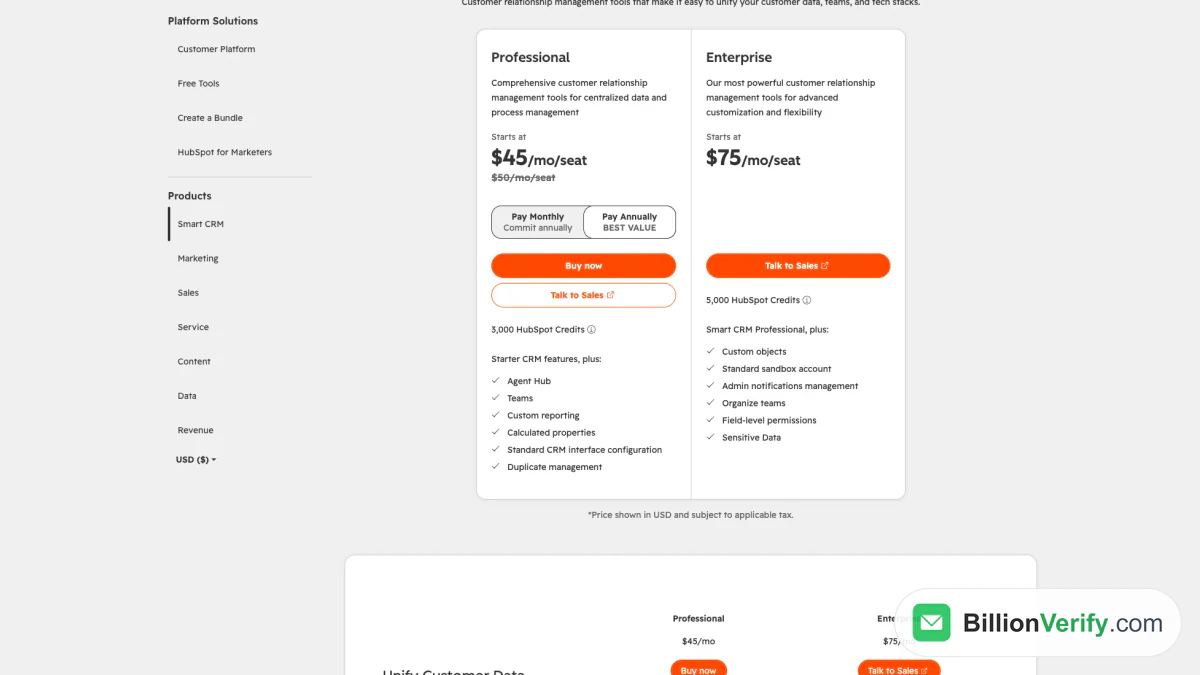
Screenshot: the two paid CRM columns with their feature lists.
The lower paid edition starts at $45 per user against $50. It adds teams, custom reporting, calculated properties, duplicate management and the Agent Hub. The upper one starts at $75 and adds custom objects, a sandbox, field-level permissions and sensitive data controls. The page shows no onboarding charge for either.
Only those two paid editions appear there, while entry-level CRM features come with the Starter plan described above. In practice HubSpot CRM pricing runs free first, Starter second, and the paid tier when a team needs permissions, custom objects or duplicate rules. The dedicated HubSpot CRM guide goes deeper into the free product.
HubSpot Customer Platform Pricing
The bundle page prices every hub as a single subscription, which suits a company that wants all its tools under one contract.
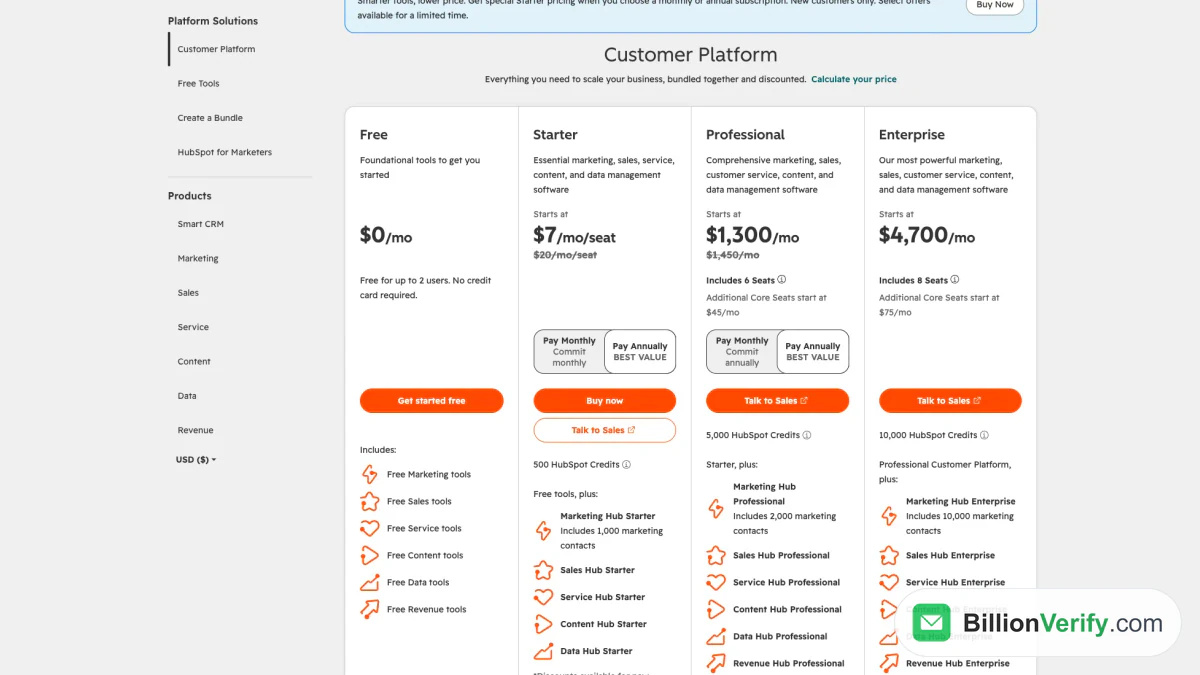
Screenshot: the bundle columns, each listing the hub editions it contains.
The entry edition is the familiar HubSpot Starter plan. The middle edition starts at $1,300 against $1,450 and includes six seats with the matching edition of all six hubs. The top edition starts at $4,700 for eight seats. Extra seats cost the same as elsewhere.
Compare that with buying hubs one at a time. Marketing at $800, Content at $450 and Data at $720 already total $1,970 before a single sales or support user. The $1,300 bundle is the lower figure for a team that needs all of them. The pricing menu also offers a Create a Bundle option and a Calculate your price link for custom combinations.
HubSpot Seats and View-only Seats
A seat is a licensed user, and HubSpot's Product and Services Catalog names two kinds. A Core Seat grants access to the purchased products, the Breeze assistant, enriched data and the CRM. A View-only Seat lets someone see the subscription without changing anything, and it costs nothing in any edition.
Two rules shape the HubSpot cost of a team. First, HubSpot pricing for Starter is per user, Marketing and Content include three or five in the flat fee, and Data includes one. Second, the FAQ says every Core Seat in an account is priced at the highest edition across all the subscriptions. A company holding Marketing Professional and Sales Enterprise pays the Enterprise rate for each added user. Plan the editions together before adding people.
HubSpot Contacts and Email Limits
Marketing Hub is the only hub that bills on contacts. The help center puts it in a single line: "Only marketing contacts count toward your contact tier and impact the cost of your subscription." A contact set as non-marketing stays in the CRM for free, up to 15 million overall, but it cannot be targeted with marketing emails or ads.
You choose a tier when you buy. Paid editions include 1,000 contacts on Starter, 2,000 on Professional and 10,000 on Enterprise, with more available at any time. A change in status takes effect at the monthly update, and a tier cannot be lowered until the contract renews. The pricing page does not print a rate for larger tiers, and it links to a Calculate your price tool instead.
Sending is tied to the same number. The monthly email limit is five times the tier on Starter, ten times on Professional and twenty on Enterprise. A Professional account at the included level can therefore send 20,000 emails. Teams that need more can raise the tier or add the Dedicated IP option, which the FAQ says allows unlimited sends.
This is why list quality matters to the bill. The count follows marketing status, and nothing on the page links it to mailbox health, so a stale import can raise the price and lower deliverability at once.
Onboarding, Credits and Discounts
Onboarding
Onboarding is the HubSpot cost most buyers miss. The Marketing, Sales and Service pages say the cost shown excludes a required charge on the two upper editions. HubSpot pricing adds it automatically at purchase, according to the FAQ. Marketing runs from $3,000 up to $7,000, while the other two cost half as much or less: $1,500 for Professional and $3,500 for Enterprise.
Credits
Credits power the AI agents and features. Every paid subscription includes a monthly allotment: 500 on Starter, 3,000 on Professional and 5,000 on Enterprise, with larger amounts in Data Hub. Allotments are not additive across products, since an account receives the highest one among its subscriptions. Extra credits cost $0.010 each, bought in packs or through pay-as-you-go, and unused credits do not roll over to the next month.
Startup and Nonprofit Discounts
HubSpot offers discounts for eligible startups and nonprofits through separate programs. The startup page advertises 90 percent off the first year for portfolio companies of partner investors and accelerators. Eligibility depends on that partner network, so check HubSpot for Startups before assuming a startup qualifies.
HubSpot Pricing at a Glance
The table gathers the starting prices from the sections above, in US dollars on the annual option. Per-seat prices are monthly and each seat is a separate charge, while flat fees include the seats shown. Starter is $7 a seat wherever it is offered.
| Hub | Professional | Enterprise |
|---|---|---|
| Smart CRM | $45 a seat | $75 a seat |
| Marketing | $800 (3 seats) | $3,600 (5 seats) |
| Sales, Service | $90 a seat | $150 a seat |
| Content | $450 (3 seats) | $1,500 (5 seats) |
| Data | $720 (1 seat) | $2,000 (1 seat) |
| Revenue | $85 a seat | $140 a seat |
| Customer Platform | $1,300 (6 seats) | $4,700 (8 seats) |
What HubSpot Cost Looks Like for a Real Team
The HubSpot cost for a team depends on size and edition, and three examples show how the rules combine. They use the listed rates, ignore tax and extra contacts, and assume the annual option.
A five-person startup that wants a CRM, email and a simple website can take the bundled HubSpot Starter plan. On the offer that is $35, and at the standard rate it is $100, with no onboarding bill. The HubSpot CRM cost is part of that figure.
A marketing team of three that needs automation and reporting should look at Marketing Professional. The $800 fee covers all three seats, so year one is $9,600 plus onboarding, or $12,600. A fourth user adds $45.
A sales team of ten on Sales Professional pays $900 a month, and onboarding adds $1,500 once, so the first year comes to $12,300.
Clean the List Before You Pay for the Contacts
The contact tier is the one part of HubSpot pricing a team controls week to week. Every address you import and mark as marketing is paid for, and the ones that bounce hurt the sending domain as well. Disposable sign-ups, typos and role mailboxes sit in the same count whenever they are marked as marketing contacts.
HubSpot's Data Hub page lists data sync, enrichment, data quality and duplicate management. It does not name mailbox-level email verification, which checks whether an address can receive mail. That is a separate step, and it belongs before the import. Before a pasted address goes in, you can run a quick check on an email address and see whether its mailbox answers.
BillionVerify checks each address by syntax, domain, MX records and a live SMTP mailbox check, and reports catch-all addresses as their own class. For one address, use the email verifier. For a spreadsheet, upload the file to bulk email verification and import only the valid rows. Valid and invalid results cost 1 credit each, and unknown results cost nothing. Free credits cap at 600 a month, and they never expire.
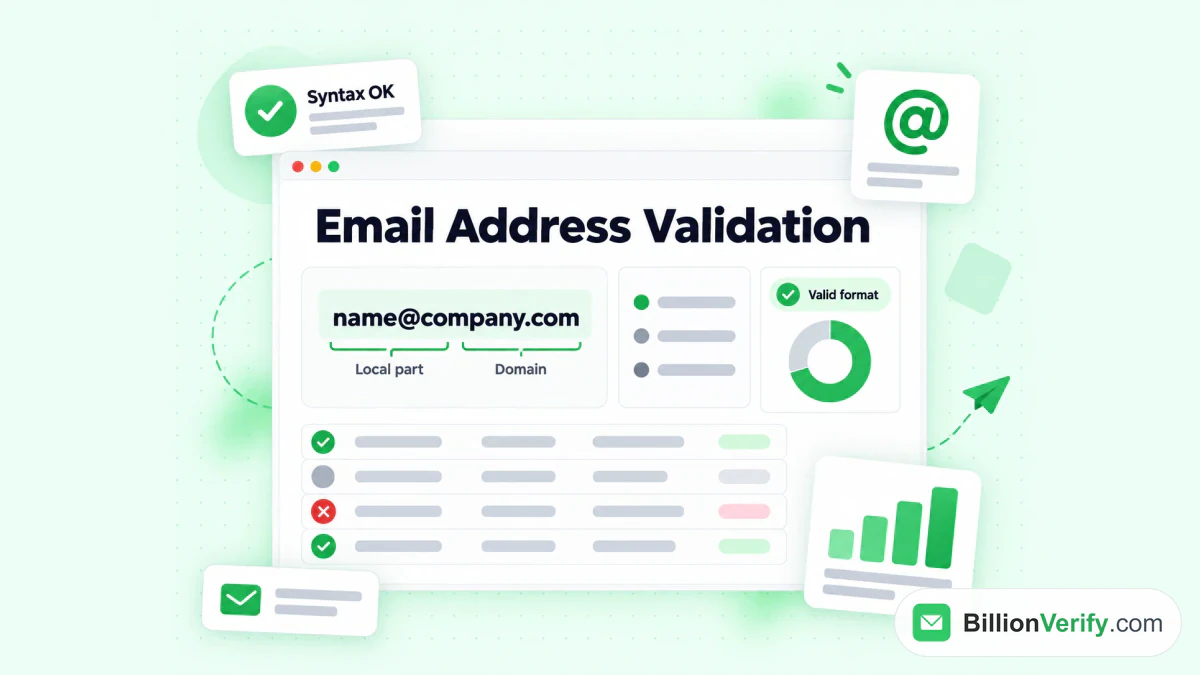
BillionVerify's address validation view: the syntax check, the two parts of an address and the result rows.
BillionVerify also has a native HubSpot integration, and the HubSpot email verification guide shows the setup. For an unknown name in a form, a free reverse email lookup reads the domain and mail routing behind an address, and a phone number validator checks the numbers that come with the same leads.
FAQs
Is HubSpot free?
Yes, up to a point. The entry account costs $0 for two users, and no card is needed. Email send caps and HubSpot branding apply until you move to a paid edition.
What is the HubSpot CRM cost?
The CRM costs $0 at the entry level, and paid CRM editions are priced per user from $45. Extra features such as custom objects sit in the top edition.
How much does HubSpot cost for a small business?
A small team usually pays between $0 and a few hundred dollars a month. Starter costs $7 a user for new customers and $20 at the standard rate, and the paid CRM tier is $45. Marketing Professional begins at $800, which is a large step up.
Is HubSpot Starter pricing the cheapest paid plan?
Yes, Starter is the cheapest paid plan. It starts at $7 on the annual option, or $10 on the monthly one, against a standard $20. The discount is for new customers and for a limited time.
Does the vendor charge extra for onboarding?
Yes, on the bigger tiers of three hubs. Marketing adds a single charge that depends on the edition, and the other two hubs add a smaller one. Starter does not require it.
How much is HubSpot Marketing Hub pricing?
The paid Marketing editions run from $800 for three seats to $3,600 for five. Starter is the entry edition, and a zero-cost account covers a very small team.
How are contacts charged?
Each edition includes some contacts for free, and you can buy more. Anyone marked as a marketing contact adds to your tier. Non-marketing contacts stay in the CRM at no charge, up to 15 million.
Can I pay monthly instead of annually?
Yes, for Starter and Professional. The pages show monthly and annual options, with the annual one marked best value. On the Marketing page, Starter reads $10 monthly and $7 annually, and Enterprise is sold through Talk to Sales.
Watch: How to Validate a Phone Number: Free Phone Number Validator
Watch: Bulk Email Verification: How to Verify an Email List From a File
