



SaaS email marketing operates under different rules than e-commerce or traditional B2B. The subscription model means you're not just acquiring customers—you're earning their continued business every month. This guide covers the unique email strategies that drive SaaS success across the entire customer lifecycle.
The SaaS Email Difference
Understanding what makes SaaS email unique.
The Subscription Reality
Key Differences:
- Revenue is recurring, not one-time
- Customer lifetime value matters most
- Churn is the enemy
- Expansion revenue is significant
- Product education is ongoing
Email's Role in SaaS: Email is the primary communication channel throughout the entire customer journey—from first touch to long-term advocacy.
The SaaS Email Lifecycle
Stages:
- Acquisition: Lead capture and nurture
- Trial/Freemium: Conversion to paid
- Onboarding: Initial success
- Adoption: Feature usage and habit building
- Retention: Preventing churn
- Expansion: Upsells and upgrades
- Advocacy: Referrals and reviews
Email Supports Every Stage: Different email types serve different purposes throughout this lifecycle.
SaaS Email Metrics
Key Metrics:
- Trial-to-paid conversion rate
- Onboarding completion rate
- Feature adoption rates
- NPS/CSAT from email touchpoints
- Churn rate impact
- Expansion revenue attributed to email
Lead Nurture for SaaS
Converting interest into trials.
The SaaS Lead Journey
Typical Flow:
Content Discovery → Lead Magnet → Email Nurture → Trial → Paid
Email's Goal: Move leads from awareness to trial signup.
Lead Nurture Sequence
Sequence Structure:
Email 1 (Immediate): Deliver the lead magnet Email 2 (Day 2): Related educational content Email 3 (Day 4): Product introduction Email 4 (Day 7): Case study/social proof Email 5 (Day 10): Trial invitation Email 6 (Day 14): Final push or different angle
Lead Nurture Content
Educational Focus:
- Solve problems (not sell features)
- Establish expertise
- Build trust
- Reference product naturally
Content Types:
- How-to guides
- Industry insights
- Best practices
- Templates and tools
- Webinar invitations
- Case studies
Segmented Lead Nurture
Segment By:
Use Case/Intent: Different sequences for different problems.
Company Size: SMB vs. enterprise messaging.
Role/Title: Technical vs. business buyer.
Engagement Level: Highly engaged leads get more aggressive trials pushes.
Trial Conversion Emails
Turning trials into paying customers.
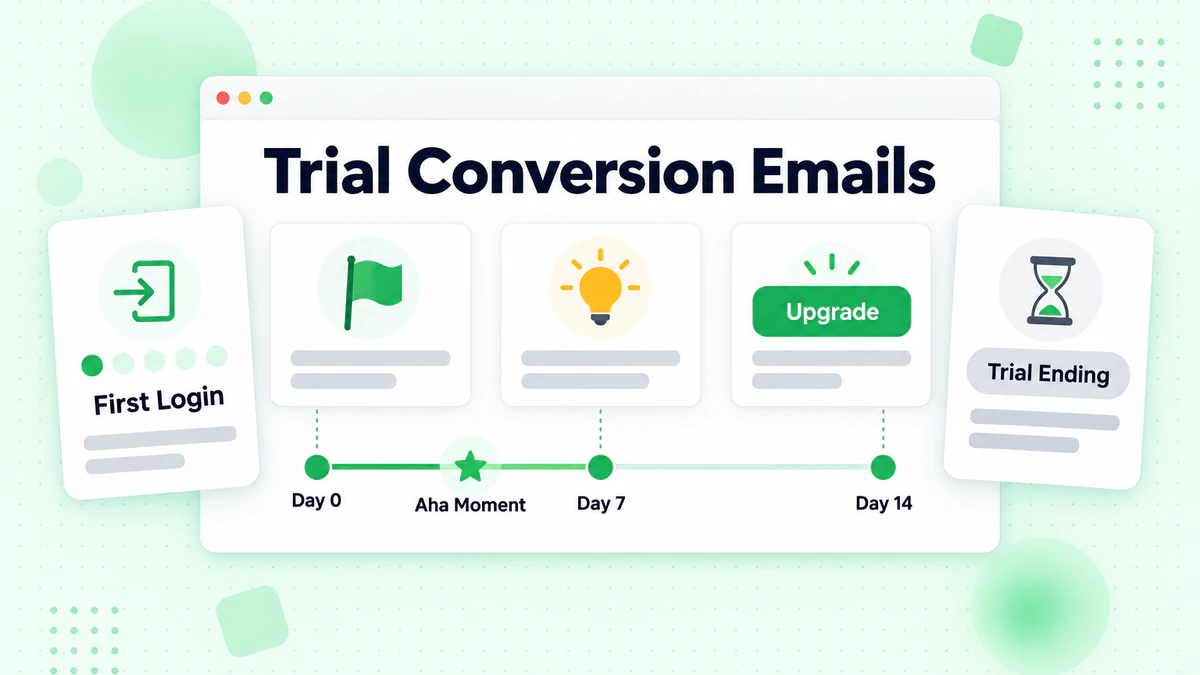
Trial Email Goals
Primary Objectives:
- Get users to log in
- Drive them to "aha moment"
- Demonstrate value
- Overcome objections
- Convert to paid
The Trial Email Sequence
Timeline (14-day trial example):
Day 0 (Signup):
- Welcome email
- Getting started guide
- First action prompt
Day 1:
- Quick win tutorial
- Support resources
Day 3:
- Feature spotlight (based on usage)
- Success story
Day 5:
- Check-in email
- Usage milestone (if achieved)
Day 7 (Midpoint):
- Progress summary
- Feature they haven't tried
Day 10:
- Upgrade preview
- Pricing information
Day 12:
- Trial ending soon
- What they'll lose
Day 13:
- Last day reminder
- Special offer (if using)
Day 14 (Trial ends):
- Trial expired
- Easy reactivation path
Day 15-21 (Post-trial):
- Win-back sequence
Trial Email Content Strategy
Early Trial (Days 0-3):
- Focus on activation
- Simple, single actions
- Remove friction
- Celebrate small wins
Mid Trial (Days 4-10):
- Feature discovery
- Value demonstration
- Social proof
- Support touchpoints
Late Trial (Days 11-14):
- Urgency creation
- Objection handling
- Pricing clarity
- Easy upgrade path
Behavioral Triggers
Trigger Emails Based On:
Login Activity:
- No login in 3 days → "Need help?"
- First login → "Great start!"
- Frequent logins → "Ready to upgrade?"
Feature Usage:
- Used Feature A → Suggest Feature B
- Haven't used key feature → Tutorial email
Progress:
- Completed onboarding → Congrats + next steps
- Stuck at step → Help email
Trial Conversion Subject Lines
Urgency:
- "3 days left on your trial"
- "Your trial ends tomorrow"
- "Don't lose access to [Feature]"
Value:
- "You've unlocked [Benefit]"
- "Here's what you've built so far"
- "Your [Product] results this week"
Help:
- "Need help getting started?"
- "Questions about [Product]?"
- "I noticed you haven't logged in"
User Onboarding Emails
Setting up new customers for success.
Onboarding Goals
Objectives:
- Activate key features
- Build usage habits
- Realize promised value
- Reduce early churn
- Set up for expansion
Onboarding Sequence Design
Week 1: Quick Wins
Day 1: Welcome and account setup Day 2: First key action tutorial Day 3: Integration/import guide Day 4: Quick win celebration Day 5: Second key feature Day 7: Week 1 recap + next steps
Week 2: Building Habits
Day 8: Advanced feature introduction Day 10: Best practices guide Day 12: Community/resource introduction Day 14: Progress check-in
Week 3-4: Depth and Breadth
Day 16: Feature they haven't tried Day 20: Power user tips Day 25: Success story relevant to their use case Day 30: 30-day milestone + next level
Onboarding Email Templates
Welcome Email:
Subject: Welcome to [Product]! Let's get you started

Hi [Name],

Welcome to [Product]! You've joined [X] companies who
use [Product] to [key benefit].

Here's your quick start plan:

Step 1: [Quick action with link]
Step 2: [Second action with link]
Step 3: [Third action with link]

Each step takes less than 5 minutes.

[Get Started button]

Need help? Reply to this email or schedule a call:
[Calendar link]

[Signature]
Feature Tutorial Email:
Subject: Try [Feature Name] - 2 minute setup

Hi [Name],

Ready to [benefit of feature]?

[Feature Name] helps you [specific outcome]. Here's
how to set it up:

1. [Step 1]
2. [Step 2]
3. [Step 3]

[Watch 2-min Tutorial button]

Already using it? Reply and tell me how it's going!

[Signature]
Onboarding Personalization
By Role: Different features matter to different users.
By Company Size: Enterprise needs differ from SMB.
By Use Case: Segment by primary problem they're solving.
By Progress: Skip tutorials for features already used.
Retention and Engagement Emails
Keeping customers active and subscribed.
The Churn Problem
Why Customers Leave:
- Don't see value
- Not using the product
- Found alternative
- Budget cuts
- Poor experience
Email's Role: Proactive communication prevents churn before it happens.
Engagement Monitoring Emails
Usage Drop Detection: When engagement decreases, trigger intervention.
If: Login frequency drops 50% from baseline
Then: Send re-engagement email
Re-Engagement Email:
Subject: We miss you, [Name]!

Hi [Name],

I noticed you haven't logged into [Product] recently.
Is everything okay?

Here's what's new since you've been away:
• [New feature 1]
• [Improvement]
• [New integration]

[Log In Now button]

If something isn't working for you, I'd love to hear
about it. Just reply to this email.

[Signature]
Regular Engagement Touchpoints
Usage Summary Emails (weekly/monthly):
- Show what they accomplished
- Highlight unused features
- Compare to benchmarks
- Celebrate milestones
Product Update Emails:
- New features
- Improvements
- Coming soon
Educational Content:
- Tips and tricks
- Best practices
- Industry insights
NPS and Feedback Emails
Timing:
- After key milestones
- Quarterly or bi-annually
- After support interactions
Simple NPS Email:
Subject: Quick question (30 seconds)

Hi [Name],

On a scale of 0-10, how likely are you to recommend
[Product] to a friend or colleague?

[0] [1] [2] [3] [4] [5] [6] [7] [8] [9] [10]

We read every response and use your feedback to
improve.

Thanks!
[Signature]
Churn Prevention Emails
Early Warning Signs:
- Decreased logins
- Credit card about to expire
- Support tickets increasing
- Key user leaves company
Pre-Churn outreach:
Subject: How can we help?

Hi [Name],

I noticed [specific behavior change]. I wanted to
check in and see if everything's okay with [Product].

Is there anything we can help with?

• Feature questions?
• Training needed?
• Technical issues?
• Something else?

I'm here to help. Just reply or book time with me:
[Calendar link]

[Signature]
Credit Card Expiration:
Subject: Action needed: Update your payment method

Hi [Name],

Your credit card ending in [XXXX] expires soon. Please
update your payment method to avoid any interruption
to your [Product] service.

[Update Payment Method button]

Current plan: [Plan Name]
Next billing date: [Date]

Questions? Reply to this email.

[Signature]
Expansion and Upsell Emails
Growing customer value.
Expansion Opportunities
Types of Expansion:
- Plan upgrades (more features)
- Seat additions (more users)
- Add-ons (complementary products)
- Usage-based increases
Identifying Upsell Timing
Signals for Upgrade:
- Hitting plan limits
- High feature usage
- Team growth
- Positive feedback/NPS
- Specific feature inquiries
Trigger-Based Upsells:
If: User hits 80% of usage limit
Then: Send upgrade email
Upsell Email Strategies
Limit Approaching:
Subject: You're almost at your [limit]

Hi [Name],

Great news—you're getting lots of value from [Product]!

You've used [X] of your [Y] monthly [units]. Here's
how our [Higher Plan] can help:

• [Higher limit]
• [Additional benefit]
• [Another benefit]

[See Upgrade Options button]

Questions about which plan is right for you?
[Schedule a Call]

[Signature]
Feature Discovery:
Subject: Unlock [Feature] with [Plan Name]

Hi [Name],

I noticed you've been using [Current Feature] heavily.
You might love [Related Feature] that's available in
our [Plan Name] plan.

With [Feature], you can:
• [Benefit 1]
• [Benefit 2]
• [Benefit 3]

[Learn More button]

Want a demo? [Book Time]

[Signature]
Annual Plan Conversion
Monthly to Annual:
Subject: Save 20% with annual billing

Hi [Name],

You've been with us for [X] months—thank you!

Switch to annual billing and save 20%:

Monthly: $[X]/month = $[Y]/year
Annual: $[Z]/year (you save $[Difference])

[Switch to Annual button]

Your subscription renews on [Date]. Switch before then
to lock in your savings.

[Signature]
Product Update Emails
Keeping customers informed and engaged.
Types of Product Emails
Major Releases: New features, significant updates.
Minor Updates: Improvements, fixes, enhancements.
Maintenance Notifications: Downtime, migrations, required actions.
Product Update Template
Subject: New: [Feature Name] is here

Hi [Name],

We're excited to announce [Feature Name]!

WHAT IT DOES
[Brief explanation of the feature]

HOW IT HELPS YOU
• [Benefit 1]
• [Benefit 2]
• [Benefit 3]

[Try It Now button]

GETTING STARTED
[Link to documentation or tutorial]

Have questions? Reply to this email.

[Signature]
Segmented Product Updates
Send To Relevant Users:
- Feature updates → Users of related features
- Integration updates → Users of that integration
- Enterprise features → Enterprise customers only
SaaS Email Best Practices
Strategies for success.
Timing and Frequency
Onboarding: Higher frequency acceptable (daily initially) Active Users: Weekly to monthly At-Risk Users: More frequent intervention Product Updates: As needed
Avoid Overwhelming: Track cumulative email volume per user.
Personalization
Beyond [Name]:
- Company name
- Product usage data
- Feature adoption
- Plan type
- Industry/vertical
Dynamic Content: Show relevant features, usage stats, recommendations.
From Name Strategy
Options:
- Company name: "[Product]"
- Founder/CEO: "John from [Product]"
- Role-based: "[Product] Support"
- Personal CSM: "Sarah, your [Product] CSM"
Personalization Impact: Personal names often get higher opens.
Plain Text vs. HTML
When to Use Plain Text:
- Personal check-ins
- Customer success emails
- High-touch moments
When to Use HTML:
- Product updates
- Usage summaries
- Marketing content
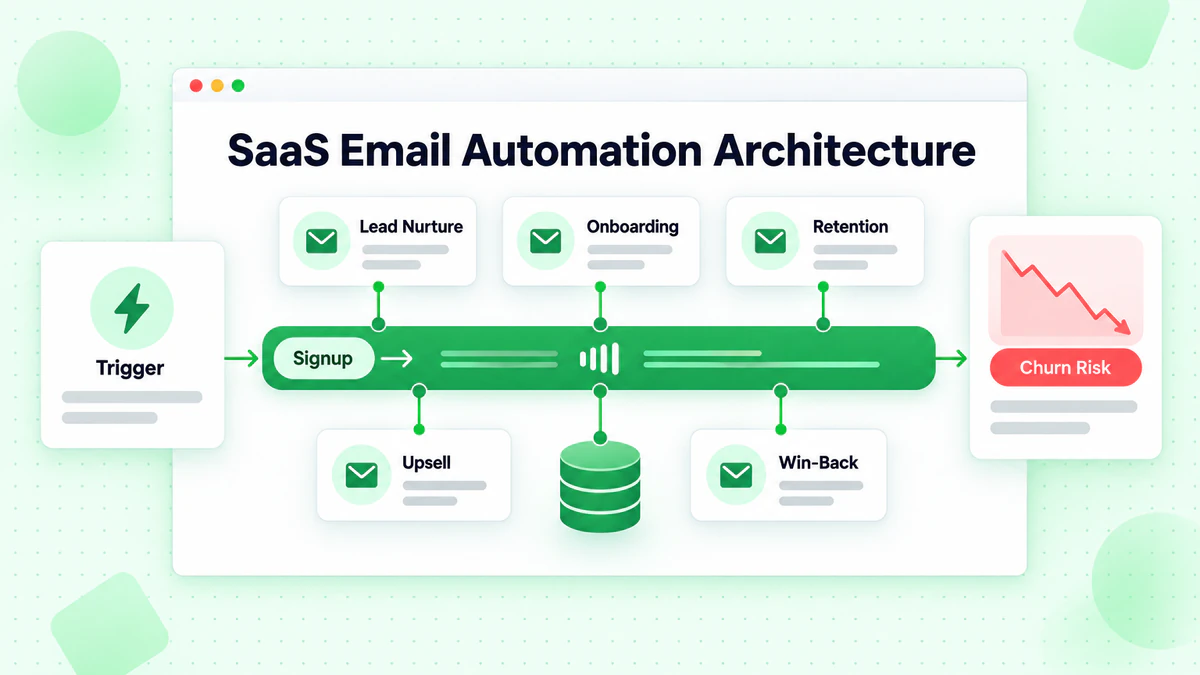
Email Automation Architecture
Building your SaaS email system.
Core Sequences
Essential Automations:
- Lead nurture
- Trial onboarding
- Customer onboarding
- Engagement/retention
- Upsell/expansion
- Churn prevention
- Win-back
Behavioral Triggers
Common Triggers:
- Signup/trial start
- First login
- Feature usage (specific actions)
- Usage milestones
- Inactivity periods
- Plan changes
- Billing events
- Support interactions
Suppression and Priority
Preventing Email Overload:
- Limit emails per user per day
- Prioritize transactional over marketing
- Pause sequences during issues
- Coordinate across teams
Integration Requirements
Data Needed:
- User events from product
- Billing status
- Plan information
- Feature usage
- Support tickets
- Health scores
Measuring SaaS Email Success
Metrics that matter.
Trial Metrics
- Trial-to-paid conversion rate
- Time to conversion
- First action completion rate
- Trial email engagement
Onboarding Metrics
- Onboarding completion rate
- Time to first value
- Feature adoption rates
- Early churn rate
Retention Metrics
- Monthly/annual retention rate
- Churn rate
- At-risk user recovery rate
- NPS trends
Expansion Metrics
- Upsell conversion rate
- Revenue per user growth
- Annual plan conversion rate
- Seat expansion rate
Common SaaS Email Mistakes
Pitfalls to avoid.
Mistake 1: Same Emails for All Users
Problem: Generic messaging ignores context. Fix: Segment by behavior, stage, and attributes.
Mistake 2: No Behavioral Triggers
Problem: Time-based only, missing key moments. Fix: Trigger emails based on actions.
Mistake 3: Ignoring At-Risk Users
Problem: No early warning system. Fix: Monitor engagement and intervene early.
Mistake 4: Too Sales-Focused
Problem: Every email pushes upgrade. Fix: Focus on value delivery.
Mistake 5: Missing the "Aha Moment"
Problem: Not guiding to core value. Fix: Design sequence around activation.
Mistake 6: No Win-Back Sequence
Problem: Lost trials disappear forever. Fix: Follow up with expired trials.
SaaS Email Checklist
Lead Nurture
- [ ] Lead magnet delivery automated
- [ ] Educational sequence built
- [ ] Trial invitation included
- [ ] Segmentation by intent
Trial Sequence
- [ ] Welcome email immediate
- [ ] Getting started guidance
- [ ] Behavioral triggers active
- [ ] Trial end reminders
- [ ] Post-trial win-back
Customer Onboarding
- [ ] Week 1 activation emails
- [ ] Feature tutorials
- [ ] Progress celebrations
- [ ] Support resources shared
Retention
- [ ] Engagement monitoring
- [ ] Re-engagement triggers
- [ ] NPS/feedback collection
- [ ] Churn prevention
Expansion
- [ ] Usage limit alerts
- [ ] Feature upsells
- [ ] Annual conversion offers
Data Quality for SaaS Email
Why verification matters in SaaS.
Trial Quality
Invalid Emails at Trial Signup:
- Can't nurture to conversion
- Wasted trial resources
- Inaccurate conversion rates
Real-Time Verification: Verify emails at signup to ensure:
- Only valid emails enter trial
- Higher trial conversion rates
- Accurate metrics
- Better email deliverability from day one
Customer Communication
Valid Emails Enable:
- Critical product updates reach users
- Billing notifications arrive
- Security alerts are received
- Retention efforts work
Conclusion
SaaS email marketing is about more than acquisition—it's about driving success throughout the entire customer lifecycle. From trial conversion to retention to expansion, email is your primary tool for customer communication.
Key SaaS email principles:
- Map the lifecycle: Different stages need different emails
- Trigger on behavior: React to what users do
- Focus on value: Help users succeed, not just buy
- Prevent churn proactively: Don't wait for cancellation
- Expand thoughtfully: Upsell when users are ready
SaaS emails only work if they reach valid addresses. Invalid emails at signup mean lost trials, failed onboarding, and preventable churn. Implementing real-time email verification at signup prevents these issues before they start.
Combine your SaaS email strategy with segmentation, personalization, and automation best practices for maximum impact. Ready to ensure your SaaS emails reach real users? Start with BillionVerify to verify emails at every touchpoint and maximize customer lifetime value.
For teams building targeted prospect lists, Apollo and Hunter.io integrate with BillionVerify for automated post-export verification.
SaaS companies building prospect lists can extract contact data from review sites like G2, Capterra, and Trustpilot—see the competitor customer prospecting guide for tactics on turning review site data into verified email lists.