


Transactional emails are automated, one-to-one emails that a person's own action or account activity triggers, such as a password reset, an order confirmation or a receipt. They differ from a newsletter because the recipient is waiting for them. US law gives the category a narrow definition, and inbox providers treat the traffic as its own stream. A failed delivery can lock a customer out of an account or a purchase. This guide covers what counts, how transactional vs marketing email differs, which types to build and how to deliver them reliably.
Every rule, price and limit below comes from an official source: statutes, regulator guidance, inbox provider documentation and vendor pricing pages, as read in November 2026. Vendors change plans often, so confirm the live page before you buy. We have no connection with any company named here. BillionVerify is a verification service for addresses, and the last section explains where checking an address fits in a transactional flow.
Key facts (checked November 2026):
- 15 U.S.C. 7702(17) sets out five purposes for relationship emails, and the FTC's CAN-SPAM guide says they may not carry misleading routing details but are otherwise exempt from most of the Act.
- 16 CFR 316.3 treats a mixed email as commercial when the subject suggests a promotion or the transactional part does not lead the body.
- Google's sender guidelines require SPF or DKIM from every sender, add DMARC above 5,000 emails a day to Gmail, and ask for one-click unsubscribe on promotional and subscribed traffic.
- Yahoo's sender best practices say bulk and promotional traffic should not share IPs with user mail, receipts and alerts.
- Free allowances differ: Resend lists 3,000 emails a month with a daily cap of 100, Mailgun lists 100 emails each day, and Postmark lists 100 each month.
- BillionVerify charges one credit for each valid or invalid result and nothing for unknown results, so a sign-up check costs nothing when the answer is unclear.
What Counts as a Transactional Email
The word has an everyday meaning and a legal meaning. In everyday use, transactional emails are any automated emails that a system fires because something happened: a sign-up, a payment, a shipment, a login from a new device. The legal meaning is stricter and sits in the CAN-SPAM Act. A message qualifies only when its main purpose fits one of five categories, and anything outside them is commercial.
The five categories in US law
Section 7702(17) of the CAN-SPAM Act lists the purposes that make an item a transactional or relationship message. The FTC's regulation in part 316 of its rules repeats them in nearly the same words. The table pairs each category with the emails that usually fall under it.
| Statutory purpose | Typical example |
|---|---|
| Facilitate, complete or confirm a deal the recipient agreed to | Order confirmation, receipt, booking confirmation |
| Warranty, product recall, safety or security information | Recall notice, security alert, new-device login warning |
| Changes to terms, features or standing in an ongoing account; periodic statements | Price change notice, plan change, monthly statement |
| Information about an employment relationship or benefit plan | Benefits enrollment notice |
| Delivery of goods or services the recipient is entitled to | Download link, license key, product update |
The statute does not name a password reset or a verification link. Both are sent to complete a sign-up or protect an account, and most senders place them in the first and second rows. That placement is a reading of the text, not a ruling, so check unusual cases with a lawyer.
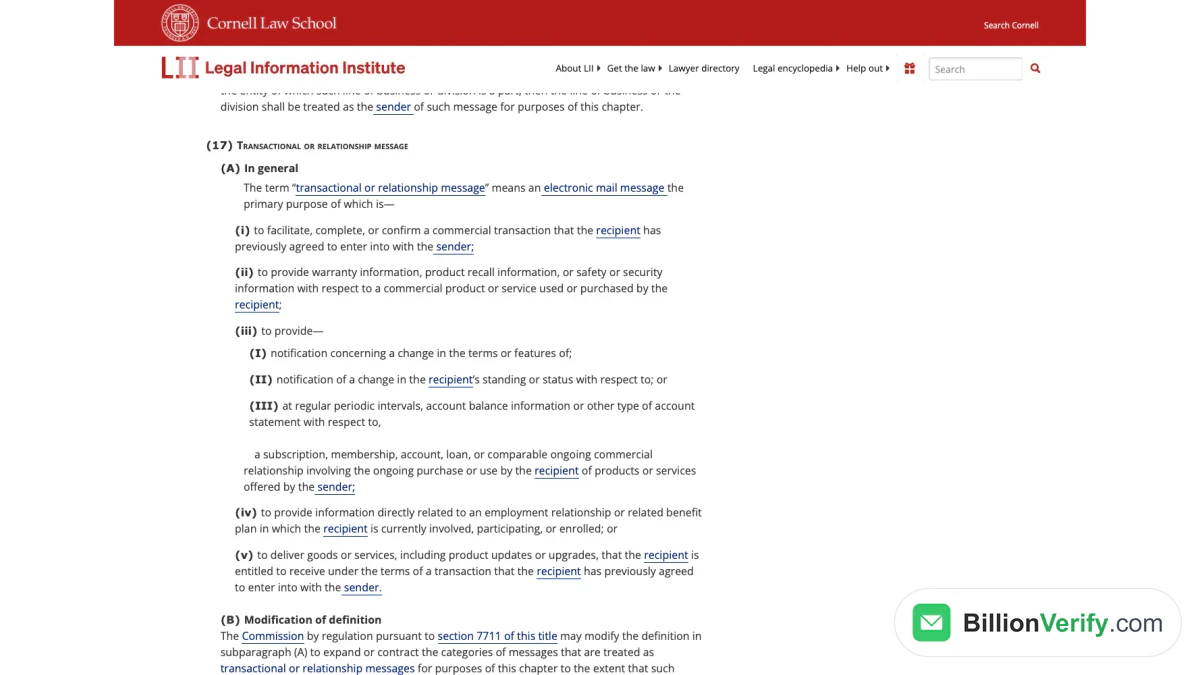
Screenshot: the Cornell Law School copy of 15 U.S.C. 7702 with the five-purpose definition in subsection 17, captured in November 2026.
Why subscriber newsletters do not qualify
The FTC warns that the law views these categories narrowly. Its guide says you should not assume that everything you mail to people with an ongoing commercial relationship, including subscribers and members, is a relationship item. The test it gives is practical. Would a reasonable consumer reading the email understand that it belongs in one of the categories? If not, the message must meet every CAN-SPAM requirement.
A cart reminder shows the edge. The statute covers a deal the recipient has already agreed to, and a cart reminder arrives before that agreement exists. The category list does not name it, so many senders treat it as marketing. Handle the same way anything that mainly points to a sale, even when a person's action triggers it.
The UK view
The UK Information Commissioner's Office uses different words for the same idea. Its guidance on electronic marketing says routine customer service communications do not count as direct marketing. Examples are information about service interruptions, delivery arrangements, product safety or changes to terms and conditions. General branding, logos or straplines do not turn such an item into marketing. Significant promotional material aimed at selling extra products or renewing a contract does, and then the marketing rules apply.
Transactional vs Marketing Email
Transactional vs marketing email is mostly a question of who starts the exchange and why. A campaign starts with the sender, goes to a list and aims to sell. A transactional message starts with the recipient's own activity and aims to inform. The difference shows up in the law, in the unsubscribe rules and in the sending setup.
Postmark's message streams page draws the line in a table. Transactional emails go to a single recipient and follow something a user does or does not do. A broadcast goes to many recipients at once and runs on the company's own schedule. Postmark lists password resets, receipts, invitations and comment notifications as transactional, and product announcements, release notes and digests as broadcast. It also notes that an opt-out link is not required on the transactional side and is required on the broadcast side.
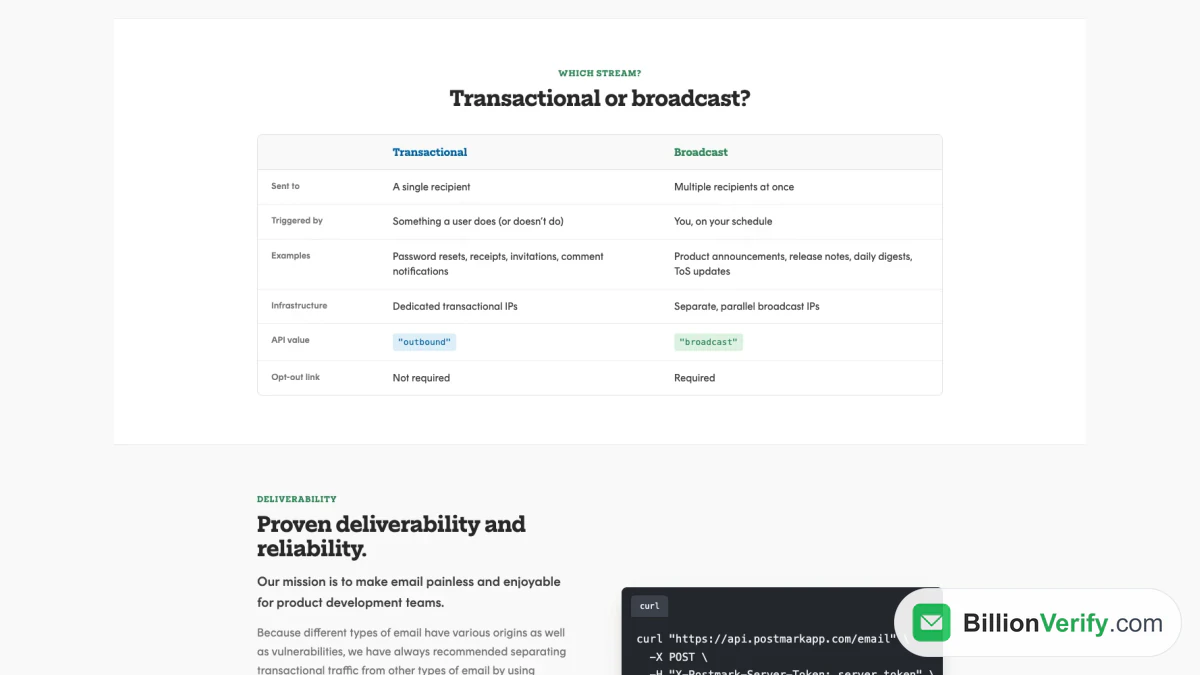
Screenshot: Postmark's comparison of its two message streams, as shown in Nov 2026.
The table below sets the practical differences side by side.
| Point | Transactional | Marketing |
|---|---|---|
| Trigger | A user action or account event | The sender's own schedule |
| Recipients | A single person | A list or segment |
| CAN-SPAM | Bans misleading headers; most other rules do not apply | Needs an opt-out, a postal address and the full rule set |
| Gmail one-click opt-out | Not named in Google's requirement | Required for bulk senders |
| Sending stream | Own IPs or domain, per Yahoo and Postmark | Separate IPs or domain |
The header ban matters, because section 7704(a)(1) of the Act applies to both kinds of traffic. A transactional message may skip the opt-out, but it may not hide who sent it. The routing data and the From line have to be accurate every time.
Types of Transactional Emails
A product usually needs far fewer templates than a library offers. Start with the transactional emails that block a customer if they never arrive, then add the rest as the product grows. The groups below follow the trigger, because the trigger decides how fast transactional emails must go out and what they must carry.
Account and security emails
These transactional emails sit at the start of the customer relationship and carry the most risk. A welcome or verification email confirms that an address belongs to the person who typed it. A password reset email proves identity so that someone can regain access. A new-device alert warns of activity the owner may not recognize.
The OWASP Forgot Password Cheat Sheet gives the technical rules for the password reset flow. Return the same answer whether or not the account exists, so an attacker cannot learn which addresses are registered. Deliver the link through a side channel such as email. Generate tokens with a cryptographically safe random source, make them long enough to resist brute force, store them securely, make them single use and let them expire after an appropriate period.
The sample below was run with Python 3.15. It creates a token, keeps only its hash, and builds the password reset email with a plain-text part first and an HTML alternative second.
import hashlib
import secrets
from datetime import datetime, timedelta, timezone
from email.message import EmailMessage

# 1. Create a single-use token and keep only its hash in the database.
token = secrets.token_urlsafe(32)
record = {
    "token_hash": hashlib.sha256(token.encode()).hexdigest(),
    "expires_at": datetime.now(timezone.utc) + timedelta(minutes=30),
    "used": False,
}

# 2. Build the email: plain text first, HTML as the alternative.
link = f"https://app.example.com/reset?token={token}"
msg = EmailMessage()
msg["From"] = "Example App <no-reply@mail.example.com>"
msg["To"] = "jane@example.net"
msg["Subject"] = "Reset your Example App password"
msg["Auto-Submitted"] = "auto-generated"
msg.set_content(
    "Use this link to reset your password. It works once and expires in 30 minutes.\n\n"
    f"{link}\n\n"
    "If you did not ask for this, ignore the email. Your password stays the same."
)
msg.add_alternative(
    f"<p>Use this link to reset your password. It works once and expires in 30 minutes.</p>"
    f'<p><a href="{link}">Reset password</a></p>'
    "<p>If you did not ask for this, ignore the email. Your password stays the same.</p>",
    subtype="html",
)

print("token length:", len(token), "characters")
print("stored hash length:", len(record["token_hash"]), "hex characters")
print("minutes to expiry:", round((record["expires_at"] - datetime.now(timezone.utc)).total_seconds() / 60))
for name in ("From", "To", "Subject", "Auto-Submitted", "Content-Type"):
    print(f"{name}: {msg[name]}")
print("parts:", [part.get_content_type() for part in msg.iter_parts()])

# token length: 43 characters
# stored hash length: 64 hex characters
# minutes to expiry: 30
# From: Example App <no-reply@mail.example.com>
# To: jane@example.net
# Subject: Reset your Example App password
# Auto-Submitted: auto-generated
# Content-Type: multipart/alternative
# parts: ['text/plain', 'text/html']
The Auto-Submitted header comes from RFC 3834. The standard says the auto-generated value should label messages created by automatic processes that are not direct replies to another message. A password reset request starts such a process, so the label fits. It also helps other systems avoid answering it with an auto-reply.
Order and payment emails
An order confirmation email completes a purchase in the buyer's mind. It has to show what was bought, what was charged and what happens next. A shipping notice follows the order confirmation email with a tracking link, and a receipt or invoice adds the amounts for the buyer's records. All three fall under the first statutory category, which covers confirming a purchase the buyer already accepted.
Payment platforms already create part of this traffic. Stripe's receipts documentation says it creates receipts for every successful payment and refund, including invoice and recurring payments, and lets customers view them online. It also says Stripe does not email every receipt it creates, so you decide whether to turn on its emails or deliver your own. If you build your own order confirmation email, treat the receipt as a record. Keep the amounts, the date and a stable order number in the body, not only in an attachment.
Notification and reminder emails
The third group tells people something changed. Examples are an appointment reminder, a usage limit warning, a renewal notice, a changed-terms notice and a shared-document alert. A change in terms or in the customer's status is the third statutory category, so these usually qualify when they stay factual.
Activity notifications such as a new comment are the gray area. A user's own action triggers them, which makes them transactional in Postmark's definition, yet they are not on the statutory list. Keep them short and let users choose which ones they get, even where no law requires an opt-out, because people mark unwanted emails as spam.
Adding Marketing Content Without Losing the Exemption
Many teams want to add a product tip or a referral offer to a receipt. The law allows it within two tests. Under 16 CFR 316.3(a)(2), an email with both promotional and transactional content is commercial if a reader of the subject would likely conclude it contains a promotion. It is also commercial if the transactional content does not appear, in whole or in substantial part, at the beginning of the body.
The FTC restates both tests in its guide. The subject comes first, and it must appear mainly at the beginning. The rule contains no percentage. An old rule of thumb said to keep 80 percent of the body transactional, but no regulator sets that number. For other mixed content, the rule looks at the placement of promotion, the share of the body it fills, and how color, graphics and type size highlight it.
The practical pattern is simple. Put the order details first, keep the subject about the order and place any offer below in a clearly separate block. If the offer becomes the point, ship it as a campaign with an opt-out, from the marketing stream. In the UK, the ICO draws the same line when an email carries significant promotional material.
Sending Transactional Emails: Infrastructure
A transactional email is only useful if it arrives within seconds. That depends on three choices: whether the stream stays separate, whether the domain is authenticated and which of the transactional email services carries the traffic. Our guide to email deliverability covers the wider picture. The sections below focus on what changes for transactional emails.
Keep the stream separate
The Yahoo guidance tells senders to segregate types by IP or DKIM domain. They say not to mail bulk or marketing email from the same IPs used for user mail, alerts and receipts, because each address and each signing domain has its own reputation. Postmark builds the idea into its product with streams that route transactional and broadcast traffic through separate IP pools, and it states that the two kinds should never mix.
For most teams this means a separate sending subdomain, for example mail.example.com for transactional emails and another for campaigns. A spike of complaints on a campaign then damages only the campaign domain, and every password reset keeps its record.
Authenticate the sending domain
Google requires every sender to set up SPF or DKIM, to keep valid forward and reverse DNS records, to use a TLS connection and to keep the spam rate reported in Postmaster Tools below 0.30%. Senders of more than 5,000 daily messages to Gmail count as bulk senders. They must also set up SPF, DKIM and DMARC, and the From domain has to align with one of the two authenticated domains. Google adds that a spam rate below 0.10% is the level to aim for.
Yahoo asks for the same from bulk senders: both SPF and DKIM, a DMARC policy of at least p=none and an aligned From domain. Microsoft's Outlook.com announcement sets those three records as requirements for domains sending over 5,000 messages a day, routes non-compliant traffic to Junk and says rejection will follow on a date still to be announced. Small senders sit below those thresholds today, but the same records are the cheapest way to keep a password reset out of spam. The free SPF checker and DKIM checker show whether your records are in place.
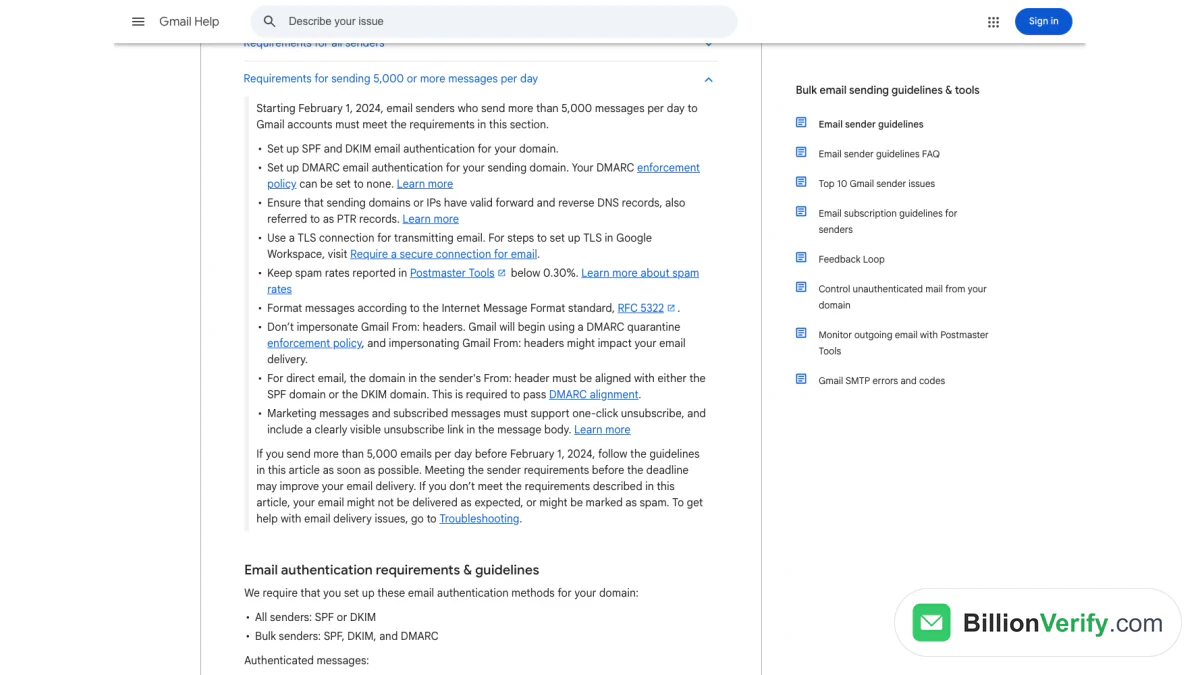
Screenshot: Google's guidelines with the bulk-sender requirements expanded, taken in Nov 2026.
Unsubscribe headers are the one place where the rules differ by type. Google asks that marketing and subscribed emails support one-click opt-out, and Yahoo words the requirement the same way. Neither page lists receipts or a password reset in that group. Add the header to campaigns, not to transactional emails.
Choose a sending provider
You can run your own server, but most teams use one of the transactional email services that offers a transactional email API and an SMTP relay and manages IP reputation. The table lists four with the prices read on their pages this month. Prices are in US dollars, and plans change often.
| Provider | Free allowance | Paid entry as listed | Note |
|---|---|---|---|
| Amazon SES | Up to $200 in AWS Free Tier credits for new accounts | $0.10 for each thousand outbound emails on à la carte pricing; $0.16 on the Essentials plan | API, SMTP interface or SDK |
| Postmark | 100 emails a month, no expiry | Basic: $15 monthly for 10,000, then $1.80 per extra thousand | Separate transactional and broadcast streams |
| Resend | 3,000 a month, 100 a day | Pro: $20 monthly for 50,000, then $0.90 per extra thousand | Transactional email API (REST) and SMTP relay |
| Mailgun | 100 emails a day | Basic: from $15 monthly (10,000 allowed); Foundation: $35 monthly (50,000 allowed) | The free plan has a single sending domain |
The free allowances of these transactional email services shape the choice for a small product. Postmark's 100 a month covers testing and a very small app. Resend's monthly allowance of 3,000, with a cap of 100 per day, covers a young product, and Mailgun's 100 per day gives about the same room spread across the month. Amazon SES prices by volume instead of plans, which suits a team that already runs on AWS and expects steady growth. Each one exposes a transactional email API, so the choice rarely depends on code.
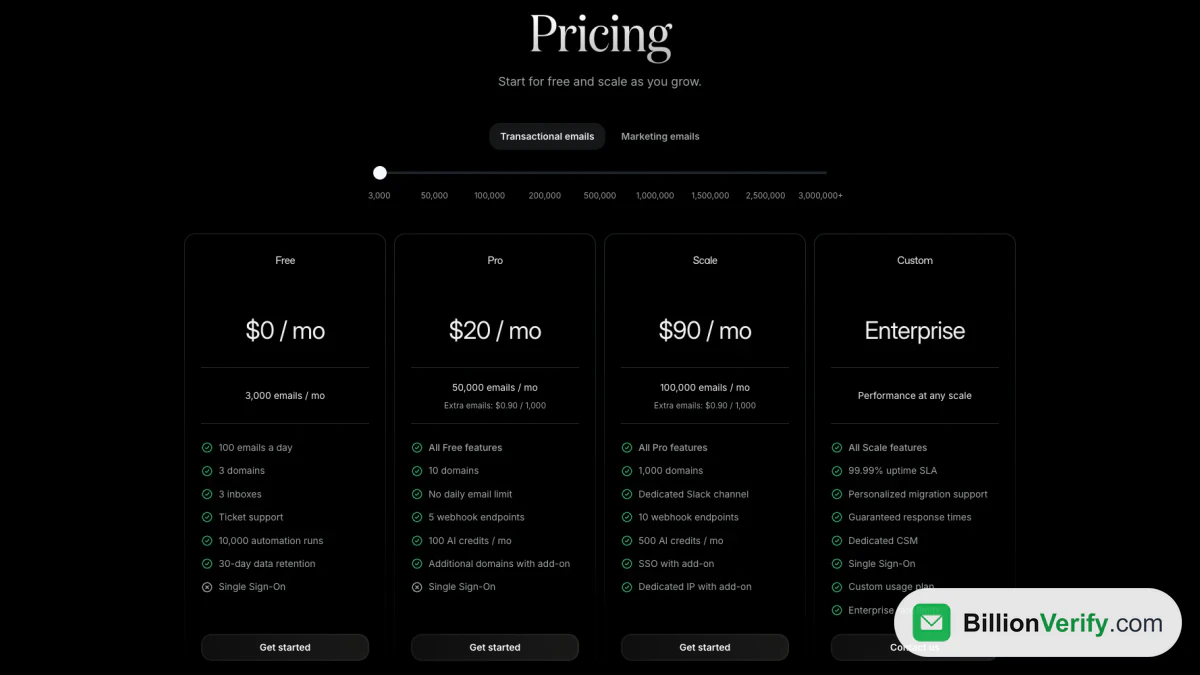
Screenshot: Resend's pricing page with the transactional plans, viewed in Nov 2026.
Check the limits that fail silently: daily caps, the number of domains and how long the vendor keeps logs. A password reset that waits behind a daily cap becomes a support ticket.
Handle bounces and suppression
A hard bounce means the mailbox does not exist, and a soft bounce means a temporary failure such as a full inbox. Amazon SES's documentation says it does not retry hard bounces except for DNS lookup failures, and strongly recommends not making repeated delivery attempts to an address that hard bounced. Only hard bounces count toward its bounce rate, and excessive bounces and complaints can lead SES to reduce your sending quota or end the account.
That is why a system that delivers transactional emails needs a suppression list: a record of addresses that bounced or complained, checked before every delivery. Most providers keep one for you. Keep your own copy too, so a bad address that bounced through a single provider is not sent through another. Our explainer on email bounces describes the codes you will see in the logs.
Writing and Measuring Transactional Emails
The content of transactional emails is simple to state: lead with what happened, show the details and give a clear next step. The subject should say what the email is, and the body should hold the order number, the amount or the link the reader came for. Skip decoration. A reader who wants a receipt is not browsing, and a long header image pushes the total below the fold on a phone. Our guide to email design covers layout and mobile rendering.
Include a plain-text part with every HTML version, as the sample above does. Both parts travel in a multipart/alternative container, so clients that block HTML still show the text, and spam filters get a text version to read. Keep the link in every password reset email on your own domain, because a link that points to a shared tracking domain borrows the reputation of every other sender on it.
Metrics that still mean something
Delivery and bounce data are reliable. Open rates are not. Apple's Mail Privacy Protection hides the recipient's IP address and, once a user turns it on, prevents senders from seeing whether a message was opened. Google says it does not track open rates and cannot verify the accuracy of opens that third parties report. Low opens are not necessarily a sign of a deliverability problem.
Track instead the share of emails delivered, the hard bounce rate, the spam rate in Postmaster Tools and the time from trigger to delivery for the emails that block a user. For a password reset, the best business metric is the share of requests that end in a successful login. If that number drops while delivery looks healthy, the email is landing late or in spam. The email marketing metrics guide explains how the standard figures are counted.
Check Addresses Before the First Email
Every transactional message depends on an address that someone typed, usually in a hurry. A typo at sign-up means the verification email goes nowhere, and a mistyped checkout address delivers the receipt to a stranger or to a dead mailbox. The customer sees an account that will not activate and a purchase with no confirmation. The cost lands on your support team and on your sender reputation, because the bounce counts against the domain behind your password resets.
BillionVerify is an email verification service. It checks syntax, DNS, MX records and the mailbox over SMTP, reports catch-all domains as their own category and charges one credit when a check returns valid or invalid, with unknown results free. A free account receives 20 credits on each day it is used, up to 600 a month, and no credit card is needed. For a single lookup, the free tool lets you check whether an email address exists before you build anything.
For a sign-up form, call the API before you create the account and tell the user right away when an address cannot receive email. The request below uses the documented /v1/verify/single path and was run against the live API, and the output is shown.
import json
import os
import urllib.request

API = "https://api.billionverify.com/v1/verify/single"

def check_before_signup(email: str) -> dict:
    """Ask BillionVerify about an address before creating the account."""
    request = urllib.request.Request(
        API,
        data=json.dumps({"email": email}).encode(),
        headers={"BV-API-KEY": os.environ["BV_API_KEY"], "Content-Type": "application/json"},
    )
    with urllib.request.urlopen(request, timeout=30) as response:
        data = json.load(response)["data"]
    return {"email": email, "status": data["status"], "reason": data.get("reason")}

for address in ["jane.doe@gmail.com", "jane.doe@gmail.con"]:
    print(check_before_signup(address))

# {'email': 'jane.doe@gmail.com', 'status': 'valid', 'reason': 'smtp_deliverable'}
# {'email': 'jane.doe@gmail.con', 'status': 'invalid', 'reason': 'no_mx_records'}
Show a hint such as "Check the spelling of your address" when the status is invalid, and let unknown results through, because the follow-up link can settle them. Our sign-up form guide walks through the design, and the article on real-time checks explains how the lookup runs. If the form also collects a mobile number for text codes, a phone number validator checks the number before the first text goes out.
When a sign-up looks odd for another reason, such as a free address with a business name, a reverse email lookup shows what is publicly attached to it. Lists that arrive in bulk, such as a customer import before you start sending receipts, go through bulk verification instead.
FAQs
What is a transactional email?
A transactional email is a message that an action or event in the recipient's own account triggers automatically, addressed to a single person. Password resets, order confirmations, receipts and shipping notices are the standard examples. US law defines the category by five purposes, and the FTC says the categories are read narrowly.
Do transactional emails need an unsubscribe link?
Not under CAN-SPAM, as long as the message is purely transactional. The FTC lets such an email skip the opt-out if its routing details stay accurate, since it is otherwise exempt from most of the Act. Once it includes promotion, the subject and placement tests decide whether it counts as commercial, and then the opt-out rules apply.
Can a receipt include a product offer?
Yes, with limits. The subject must not read like an ad, and the receipt details must come first in the body. A separate offer block below them is the safe layout. If the offer becomes the main content, treat the whole email as marketing.
Should transactional and marketing emails use separate sending infrastructure?
Yes. Yahoo advises against putting bulk or campaign traffic on the IPs behind transactional emails, since each IP carries its own reputation. A separate subdomain, or a provider with separate streams, keeps campaign complaints away from transactional emails.
What do transactional email services cost?
Entry prices as listed on the vendors' pages range from $0 to about $20 a month. Resend, Mailgun and Postmark have free plans, Postmark and Mailgun start paid plans at $15 a month, and Amazon SES bills by volume, starting at $0.10 per thousand outbound emails. Check each vendor's page for the plan you would need.
Why did a sign-up or recovery email never arrive?
The usual causes are a mistyped address, a domain without working mail servers, a sending domain missing SPF, DKIM or DMARC, or a daily cap at the provider. Check the bounce log for the code, then check the recipient itself. A verification check at sign-up removes the first two causes before delivery.
Watch: Email Verification Software Features: Full Product Tour
Watch: Email Marketing Terms Explained: Opt-In, CTR, CTOR and More
