

Instantly pricing is split into separate subscriptions. Outreach pays for sending, with unlimited senders, unlimited warmup and a monthly allowance of messages. The other pays for data, meaning prospect search, enrichment, verification and the AI agents. You can buy either alone, and many teams need both. This guide reads Instantly's pricing and help center in November 2026, explains Instantly AI pricing tier by tier, and works out what a month costs in a few typical setups. We are not affiliated with Instantly. BillionVerify is an email verification service, and we show where checking a list changes the math.
Key facts (checked November 2026):
- Outreach starts at $47, rises to $107, and tops out at $358 before custom quotes, according to Instantly's own site.
- The cheapest tier allows 1k uploaded contacts and 5k sends, and the middle one allows 25k contacts and 125k sends.
- Credit subscriptions start at $9 for 150 credits, and verifying one lead uses 0.25 of them, per the credit guide.
- The contacts limit is a fixed total across campaigns, active or paused, and it never resets.
- The free trial lasts 14 days, needs no card, and caps you at 2 senders, 250 prospects and 1k sends.
- BillionVerify bills 1 credit for each valid or invalid result, and unknown results are free.
Instantly Pricing at a Glance
The page opens on tabs for Outreach, data, bundles and VIP, with a Monthly and Yearly toggle above the cards. Instantly pricing leans on three levers: contacts, monthly sends and credits. The table shows the monthly figures. Switch to yearly and the cards drop to $37.60, $85.58 and $286.30 per month. The page does not say whether a year is charged upfront, so read the checkout screen before paying.
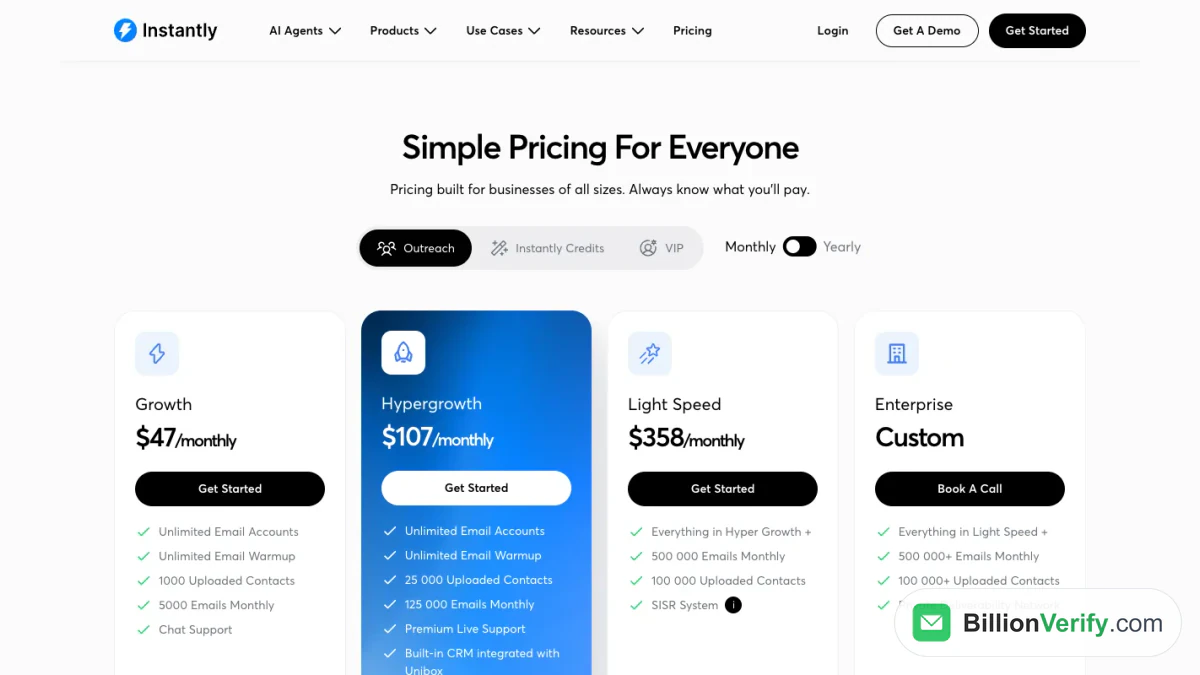
Screenshot: the Outreach tab.
| Tier | Per month | Contacts | Sends | SMTP cap in the standard pool |
|---|---|---|---|---|
| Free trial | $0 for 14 days | 250 | 1k | n/a |
| Growth | $47 | 1k | 5k | 100 |
| Hypergrowth | $107 | 25k | 125k | 500 |
| Light Speed | $358 | 100k | 500k | 1,000 |
| Enterprise | Custom | 100k+ | 500k+ | Custom |
According to the plans overview, nothing sits between the first two rows, and no subscription sells warmup alone.
Bundles
The page also sells three bundles, each pairing sending with a data allowance. The overview article describes the idea as a 10% saving "if available" and lists no amounts, so the figures below are what the cards showed at the time of writing.
| Bundle | Per month | Yearly, per month | Sends | Contacts | Credits |
|---|---|---|---|---|---|
| Starter | $94 | $85 | 5k | 1k | 1.5k |
| Scale | $194 | $175 | 100k | 25k | 5k |
| Agency | $555 | $500 | 500k | 100k | 10k |
Starter adds the lead database and a sales agent. Scale adds a reply agent, the Unibox and live support. Agency adds the SISR system.
The Outreach Plans
Paid sending has no cap on mailboxes or warmup. That is the main idea behind Instantly pricing: you pay for volume, not for each mailbox. What differs is the number of contacts, the monthly sends and a set of team features.
Growth
This entry tier allows a thousand contacts and comes with chat support. It includes API access, Zapier and other integrations, a global block list, A/Z testing, advanced warmup settings and a deliverability score. The CRM, team members, Slack, webhooks and priority support are all missing. A 5k allowance covers roughly 1,700 prospects when each receives a three-step sequence, so the contact cap bites first for most small teams.
Hypergrowth
The middle plan adds the built-in CRM that works with the Unibox, premium live support, subsequences, agency view, a second workspace, team members, and Slack plus webhooks. It also lifts the SMTP ceiling in the standard pool from 100 to 500.
Light Speed
The top package keeps everything above and adds a system Instantly calls SISR. Enterprise sits above it, with a private deliverability network, a dedicated account manager and a shared Slack channel.
Extra capacity packs
Teams on the higher plans can buy more room. Each pack costs $87 and brings 25k contacts, 125k sends and 500 more SMTP slots. They stack, and Growth cannot take them.
Instantly Email Warmup Costs Nothing Extra
Instantly email warmup is bundled into every Outreach subscription instead of being a priced line. The warmup page states no fee and no fixed countdown, because warmup keeps running next to live campaigns. What your subscription changes is the pool your senders join.
New accounts land in the Standard pool, a balanced mix of Google, Outlook and SMTP accounts. The Basic pool is mostly SMTP and brings weaker engagement. The caps in the table above apply to SMTP accounts only. Cross one and every account in the workspace, Google and Outlook included, drops to Basic. Climbing back requires an upgrade or enough packs, and changes apply daily at 12 am UTC. The help center's own example: 5,000 SMTP accounts call for a Hypergrowth subscription plus nine packs.
Warmup stops working when the subscription behind it ends. After a trial or a lapse, Instantly email warmup stays off and paused senders need an active Outbound subscription before warmup can be switched back on. Our guide to Instantly AI covers the settings and readiness rules.
Instantly AI Pricing: The Data Side
Instantly AI pricing for data runs on credits. The help center says they pay for the finder, plus enrichment, verification and several agents. Each tier gives a monthly allowance.
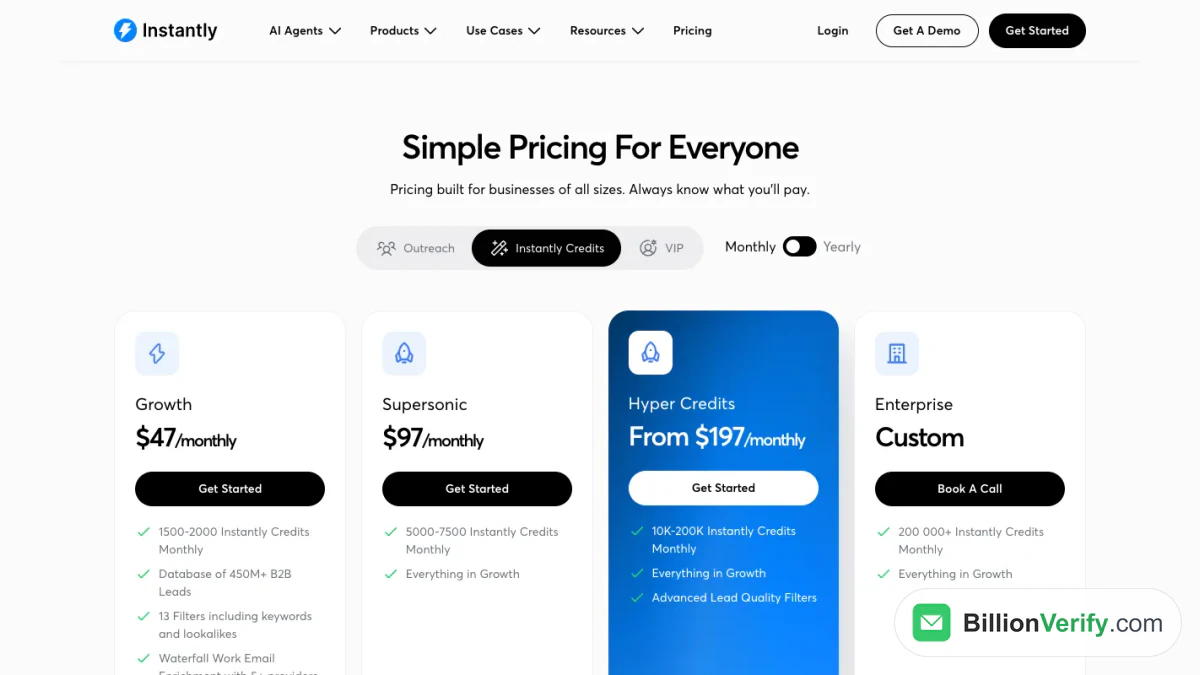
Screenshot: the credits tab.
| Credit level | Per month | Allowance |
|---|---|---|
| Nano | $9 | 150 |
| Growth | $47 | 1.5k |
| Growth 2 | $77 | 2k |
| Supersonic | $97 | 5k |
| Supersonic 2 | $147 | 7.5k |
| Hyper | $197 | 10k |
| Hyper 2 | $300 | 20k |
| Hyper 3 | $500 | 45k |
| Hyper 4 | $997 | 100k |
| Hyper 5 | $1,400 | 150k |
| Hyper 6 | $1,700 | 200k |
Paying annually takes 10% off, with the whole year delivered upfront, per the help center. A 50k top-up costs $425 and works only with the Hyper plans. A data-only account can push just 250 leads into campaigns, while an Outbound subscription lifts that cap.
What one credit buys across the AI features
The guide prices every action:
- A verified work email from the finder averages 1.5: one if Instantly located it, two if a data partner supplied it.
- A fully enriched profile runs 0.5 per lead.
- Verifying a lead takes 0.25.
- A local business email costs 2.
- Agent actions run 5 per reply written and 5 per lead the sales agent produces.
- Website Visitors cost 3 per resolved person and 2 per company-only match.
Agent usage is where spending climbs fastest. A single reply from the AI agent takes as many credits as verifying twenty leads, and a hundred AI-sourced leads draw 500, a third of the 1.5k Growth allowance.
Unused balance does not last forever. Monthly allowances vanish two months after purchase, while annual ones last twelve. An upgrade resets the billing date and grants the full new allowance without proration, per the upgrade guide.
Other Instantly Pricing Lines
Instantly sells several products beside the two main subscriptions. Each has its own charge and is cancelled separately.
- Inbox Placement: $47 buys unlimited one-time tests, and $97 adds automated ones. The tests check inbox versus spam placement, spam triggers in the copy, authentication records and 94 blacklists.
- Done-for-you domains and accounts: $15 a year per domain, plus $4 per Airmail account, $5 per done-for-you Google account, or $10 per pre-warmed Google account, billed monthly and renewed on the 15th.
A domain or account subscription covers only those assets. If Outreach lapses, sending and warmup pause too.
BillionVerify checks the DKIM record on a sending domain.
Instantly API Access
Developers ask about the Instantly API because it decides whether the tool can be wired into a CRM or a lead pipeline. The developer docs describe version 2 at api.instantly.ai/api/v2, where each request carries your key as a bearer token. A key is created with only the scopes the integration needs, and the docs warn against placing it in browser code or source control.
Around the REST endpoints the docs list webhooks for campaign, email, lead and meeting events, OAuth for connecting Google and Microsoft mailboxes, sub-workspace management from an admin workspace, a TypeScript SDK, a command-line client and an MCP integration for AI assistants. Rate limits are not published there, no separate fee appears in Instantly pricing, and the feature comparison lists API, webhooks and integrations as one row. Confirm the exact boundary in that row before building on the cheapest package.
The Free Trial
The 14-day trial starts at signup and takes no card, so nothing is charged when it ends. Expect room for two senders, 250 campaign leads and 1k messages. A welcome balance of a thousand opens a limited Lead Finder, and a pair of free placement tests plus a CRM trial of the same length come along. Keeping the CRM afterwards means moving to the middle level or higher.
Screenshot: the feature comparison.
At expiry you lose dashboard access, mailboxes and campaigns pause, and a workspace that was never upgraded is deleted. To resume, subscribe, select the paused mailboxes, unpause them, turn Instantly email warmup back on and restart the campaigns. The comparison also confirms that reputation protection and bounce detection come with every tier, trial included. A campaign pauses when bounces pass 5% after at least 200 sends.
Cancelling, Billing and Refunds
Cancelling is self-service. Open Settings and Billing & Usage, choose the tab for the subscription, and confirm. Outbound and credit subscriptions end when the billing cycle closes, a Resume button reverses a scheduled cancellation, and the cancellation guide says pausing is not offered. It does not mention refunds, so ask support before assuming one. Done-for-you and pre-warmed accounts stop at once and their warmup stops with them, while the domains stay valid for twelve months from purchase.
Each subscription is billed on its own, and every workspace needs its own. A failed payment is retried before the subscription is cancelled, and a banner appears while an invoice is past due. Deleting leads never refunds what verification already consumed.
What a Month of Instantly Pricing Looks Like
Costs add up in three ways, and the list you upload affects all of them.
A solo founder, a thousand prospects. The $47 plan covers the contact cap. A sequence of three steps means about 3k messages, inside the allowance. Finding a thousand email addresses needs about 1.5k of them, which fits the $47 credit plan. The total is $94 before domains.
A small agency, 20,000 prospects. The $107 package covers the audience and the volume. If you source the list elsewhere, the spend is zero. Three Airmail accounts add $12 a month, plus the annual domain fee, and Instantly email warmup remains unlimited.
A list you already own. Only Outreach matters. Cleaning the list pays off here, because every uploaded contact uses capacity whether or not it can receive mail. Instantly's contacts article says the limit counts active, paused, completed and draft campaigns, and a duplicate uploaded to two campaigns counts twice.
Screenshot: the questions at the bottom of the page.
Where verification fits
Instantly can verify an email address, too. Its verification page offers 25 free credits with no card, and after that each check draws 0.25. On the $9 level, 150 cover 600 leads. On the $47 tier, 1.5k cover 6,000, but they are shared with the finder and the agents.
To save the balance for finding leads, check lists before you upload them. BillionVerify reports catch-all email addresses as their own class and re-checks the same address free within 24 hours. The email verifier checks one email address at a time, and bulk email verification takes whole files. A cleaner upload means fewer wasted contact slots and fewer bounces near the pause threshold. For a handful of rows, the free email checker shows disposable, role and catch-all flags without an upload.
For people you have a name for but no verified address, our email finder returns only verified work emails, on paid accounts. A reverse email lookup helps when a sheet holds names you cannot place, and a phone number validator checks numbers before call steps.
How to Choose
Start from the limits, not the price.
- Under a thousand prospects in total: the entry plan. The contact cap is a lifetime total for the workspace.
- Several campaigns, a team or clients: the middle package, because team members, workspaces, the CRM and priority support start there.
- Heavy sending from many domains: the top level, or the middle one with packs.
- Data from Instantly: add a credit level sized to your lookups, and plan around the two-month expiry.
Our overview of cold email tools compares sending tools with data tools.
FAQs
How much does Instantly cost?
Sending costs $47, $107 or $358 depending on volume, and data begins with the Nano plan and rises to $1,700 for 200k.
Does Instantly charge per sender account?
No. Paid sending carries no mailbox cap and no warmup cap. The limits fall on uploaded contacts and monthly sends.
Is there an Instantly free plan?
There is no permanent free plan, only a two-week trial with no card. It includes 2 senders and 1k sends, plus a starter balance for Lead Finder.
Do I need both Outreach and credits?
You need Outreach to run campaigns. Credits are optional and cover the finder and the rest of the data side.
What does Instantly AI pricing include?
Instantly AI pricing covers the allowances behind searching, enriching, checking and the AI agents. Sending itself is billed through Outreach.
Do Instantly credits expire?
Yes. Monthly balances lapse at the two-month mark, and annual balances last twelve months.
Does the contact limit reset every month?
No. It is a single lifetime total spanning every campaign. To free space, delete leads or campaigns, upgrade, or buy a capacity pack on the higher packages.
What is the cheapest Instantly pricing option?
The cheapest paid sending plan is $47, and the cheapest credit plan is $9. Together they reach $56 before any domains or mailboxes.
Does the Instantly API cost extra?
The pricing screen lists no separate fee, and the docs cover version 2 with bearer keys.
Watch: How to Export Past Email Finder Results From Find History
