



Email consent management is the foundation of compliant, effective email marketing. How you collect, document, and manage subscriber consent directly impacts your legal compliance, email deliverability, and marketing performance. This comprehensive guide covers everything you need to know about email consent—from single versus double opt-in to consent record management and preference centers.
Understanding Email Consent
Before diving into implementation, let's establish what consent means in email marketing and why it matters.
What Is Email Marketing Consent?
Email consent is permission from an individual to receive marketing communications from your organization. This permission can be:
Express Consent: Explicit, affirmative agreement to receive emails. The gold standard under GDPR and CASL.
Implied Consent: Permission inferred from an existing relationship or behavior. Has limitations and may expire.
Opt-Out Consent: Under CAN-SPAM, commercial email is permitted until someone opts out. Not true "consent" in the GDPR sense.
Why Consent Management Matters
Legal Compliance:
- GDPR requires demonstrable consent for marketing emails to EU residents
- CASL requires express or valid implied consent for emails to Canadians
- Various state laws (CCPA, etc.) have consent-related requirements
Deliverability:
- Consent-based lists have lower spam complaints
- Better engagement signals improve inbox placement
- ISPs track complaint rates closely
Performance:
- People who actively consented engage more
- Lower unsubscribe rates
- Higher conversion rates
- Better ROI
Trust:
- Respecting consent builds subscriber relationships
- Transparency increases brand credibility
- Ethical marketing creates long-term value
The Consent Spectrum
Different regulations require different consent levels:
| Regulation | Consent Requirement |
|---|---|
| CAN-SPAM | Opt-out (no prior consent required) |
| CCPA | Opt-out for data sales; disclosure for collection |
| CASL | Opt-in (express or implied consent required) |
| GDPR | Opt-in (explicit consent or legitimate interest) |
Best Practice: Build consent processes that meet the strictest applicable requirement (usually GDPR or CASL).
Single Opt-In vs Double Opt-In
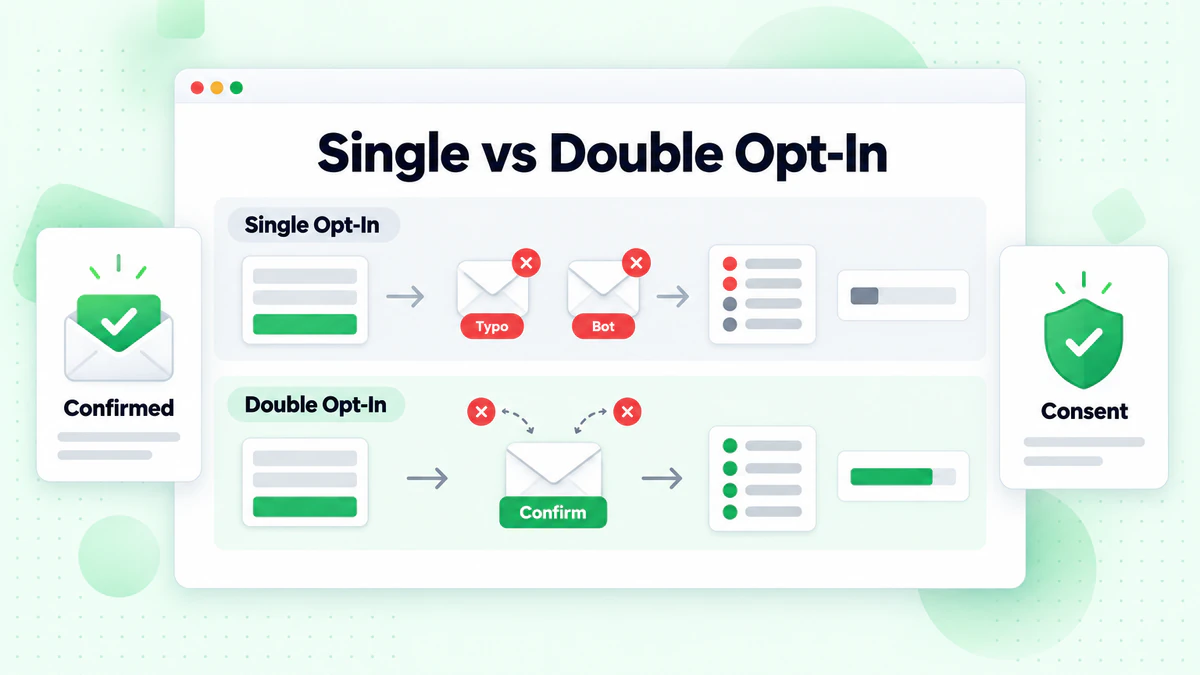
The most fundamental consent decision is whether to use single or double opt-in. Each approach has trade-offs.
What Is Single Opt-In?
Single opt-in means subscribers are added to your email list immediately after submitting their email address and checking a consent box.
Process:
- User enters email address
- User checks consent checkbox
- User clicks submit
- Subscription is immediately active
Advantages:
- Lower friction: Faster signup process
- Higher conversion rate: More signups complete
- Immediate engagement: Can start messaging right away
- Simpler implementation: Less technical complexity
Disadvantages:
- Fake signups: No verification of email ownership
- Typos persist: Misspelled addresses join the list
- Weaker consent proof: Harder to demonstrate consent
- Lower quality: May include disinterested signups
- Bot signups: More vulnerable to automated submissions
What Is Double Opt-In?
Double opt-in (also called confirmed opt-in) requires subscribers to click a confirmation link in an email before being added to your list.
Process:
- User enters email address
- User checks consent checkbox
- User clicks submit
- System sends confirmation email
- User clicks confirmation link
- Subscription becomes active
Advantages:
- Verified ownership: Confirms user controls the email address
- Stronger consent proof: Click provides additional evidence
- Higher quality list: Only engaged users complete process
- Fewer bounces: Typos and fake addresses filtered out
- Better deliverability: Cleaner lists perform better
- Bot protection: Automated signups can't complete confirmation
Disadvantages:
- Lower conversion: Some users don't complete confirmation
- Delayed engagement: Can't message until confirmed
- Email deliverability dependency: Confirmation must reach inbox
- More complex: Additional email and tracking required
Comparing Performance
Typical performance differences between single and double opt-in:
| Metric | Single Opt-In | Double Opt-In |
|---|---|---|
| Signup Completion Rate | 100% | 60-80% |
| Bounce Rate | 5-15% | 0.5-2% |
| Spam Complaint Rate | 0.2-0.5% | 0.02-0.1% |
| Open Rate | 15-25% | 25-40% |
| Click Rate | 2-4% | 4-8% |
| Unsubscribe Rate | 0.5-1% | 0.1-0.3% |
The Trade-Off: Double opt-in reduces list size but improves list quality. For most businesses, the quality improvement outweighs the quantity loss.
When to Use Each Approach
Use Single Opt-In When:
- Operating only under CAN-SPAM (US-only audience)
- Volume is critical and quality can be managed otherwise
- Using real-time email verification at signup
- Low-risk promotional content
- Very short signup windows (time-limited offers)
Use Double Opt-In When:
- Sending to EU residents (GDPR)
- Sending to Canadian residents (CASL)
- List quality is paramount
- High-value content worth protecting
- Building long-term subscriber relationships
- Operating in regulated industries
- Needing strong consent documentation
Recommendation: Default to double opt-in unless you have specific reasons not to. The quality benefits usually outweigh the conversion cost.
Implementing Double Opt-In
If you choose double opt-in (recommended), here's how to implement it effectively.
The Confirmation Email
Your confirmation email is critical—if it doesn't get opened and clicked, you lose the subscriber.
Essential Elements:
Subject Line:
- Clear and direct
- Creates urgency without clickbait
- Examples:
- "Please confirm your subscription to BillionVerify"
- "One click to complete your signup"
- "Confirm your email to get [Benefit]"
Opening:
- Thank them for signing up
- Remind them what they signed up for
- State clearly what action is needed
Confirmation Button:
- Large, prominent, and obvious
- Clear call-to-action text
- "Confirm My Subscription" or "Complete My Signup"
What They'll Receive:
- Brief description of content/frequency
- Reiterate the value proposition
If They Didn't Sign Up:
- Explain they can ignore the email
- Include option to report abuse
Example Confirmation Email:
Subject: Please confirm your subscription to BillionVerify

Hi there!

Thanks for signing up for the BillionVerify newsletter.

Before we start sending you our weekly email marketing tips
and product updates, please confirm your subscription by
clicking the button below:

      [Confirm My Subscription]

By confirming, you'll receive:
• Weekly actionable email marketing strategies
• New feature announcements
• Exclusive tips for improving email deliverability

If you didn't sign up for this list, simply ignore this email.
You won't be subscribed.

Questions? Reply to this email and we'll help.

The BillionVerify Team
Optimizing Confirmation Rates
Typical confirmation rates range from 60-80%. Here's how to push toward the higher end:
Send Immediately: Confirmation email should arrive within seconds of signup.
Make It Mobile-Friendly: Many users check email on phones first.
Test Deliverability: Ensure confirmation emails reach inbox, not spam.
Clear Value Reminder: Remind them why they signed up.
Prominent CTA: Large, colorful button that's easy to tap.
Subject Line Testing: Test different approaches to find what works.
Resend Strategy: Send reminder to non-confirmers after 24-48 hours.
Thank You Page Instruction: After signup, tell users to check their email and confirm.
Post-Confirmation Thank You Page
After clicking confirm, direct subscribers to a thank you page:
Thank You Page Elements:
- Confirmation of successful subscription
- What to expect next (when first email arrives)
- Next steps (follow on social, check resources)
- Optional: special offer or content as reward
Example:
You're confirmed!

Welcome to the BillionVerify community.

Here's what happens next:
• You'll receive your first email within 24 hours
• Weekly tips arrive every Tuesday morning

While you wait, check out our most popular resources:
[Link to popular content]

Follow us on LinkedIn for daily tips: [Link]
Consent Collection Best Practices
Whether using single or double opt-in, these practices improve consent quality.
Consent Form Design
Clear, Specific Language: Don't say: "Subscribe to our emails" Do say: "Subscribe to receive weekly email marketing tips and product updates from BillionVerify"
Unchecked Checkboxes: Consent boxes must be unchecked by default. Pre-checked boxes aren't valid under GDPR or CASL.
Separate Consents: Don't bundle marketing consent with terms of service or essential communications. Each purpose needs separate consent.
Privacy Policy Link: Link to your privacy policy from every signup form.
Easy to Read: Use readable fonts, adequate contrast, and reasonable text size.
Example Compliant Form:
<form>
  <h3>Subscribe to Our Newsletter</h3>

  <label for="email">Email Address *</label>
  <input type="email" id="email" required>

  <label for="name">First Name (optional)</label>
  <input type="text" id="name">

  <label class="consent-checkbox">
    <input type="checkbox" name="marketing_consent" required>
    <span>
      I want to receive weekly email marketing tips and product
      updates from BillionVerify. I can unsubscribe at any time.
    </span>
  </label>

  <p class="privacy-link">
    View our <a href="/privacy">Privacy Policy</a> for details
    on how we handle your data.
  </p>

  <button type="submit">Subscribe</button>
</form>
Multiple Consent Options
If you send different types of emails, consider collecting separate consents:
Approach 1: Single Comprehensive Consent
□ I want to receive emails from BillionVerify including:
  marketing tips, product updates, and promotional offers.
Approach 2: Granular Consent Options
Please select what you'd like to receive:
□ Weekly email marketing tips and strategies
□ Product updates and new feature announcements
□ Promotional offers and discounts
□ Industry news and research reports
Considerations:
- Granular options give subscribers control
- But too many options can reduce signups
- Balance control with conversion
- Can collect granular preferences in preference center later
Real-Time Email Verification
Adding email verification at signup improves list quality:
Benefits:
- Catches typos before they join your list
- Blocks disposable email addresses
- Prevents bot signups with invalid addresses
- Improves deliverability from day one
Implementation:
// On form submission, verify email before processing
const verificationResult = await emailVerify.verify(email);

if (verificationResult.isValid) {
  // Proceed with subscription
  processSubscription(email);
} else {
  // Show error and ask for correction
  showError("Please enter a valid email address");
}
BillionVerify's real-time API verifies addresses instantly during signup, preventing invalid addresses from ever joining your list.
Consent Record Management
Proper record-keeping is essential for compliance and audit defense.
What to Record
For each subscriber, document:
Essential Records:
- Email address
- Date and time consent was given
- Source of consent (which form, page, or method)
- Type of consent (express, implied, etc.)
- Exact consent text shown at time of signup
- What they consented to receive
- IP address (optional but helpful)
For Double Opt-In:
- Date/time of initial signup
- Date/time of confirmation click
- Confirmation email sent status
For Implied Consent:
- Type of relationship (purchase, inquiry, etc.)
- Date relationship established
- Consent expiration date
Consent Changes:
- Any consent modifications
- Withdrawal date if unsubscribed
- Reason for withdrawal if provided
Database Structure Example
CREATE TABLE consent_records (
  id UUID PRIMARY KEY,
  email VARCHAR(255) NOT NULL,

  -- Consent details
  consent_type VARCHAR(50),  -- 'express', 'implied_business', etc.
  consent_given_at TIMESTAMP,
  consent_source VARCHAR(255),  -- 'homepage_newsletter_form'
  consent_text TEXT,
  ip_address INET,

  -- Double opt-in tracking
  confirmation_sent_at TIMESTAMP,
  confirmation_clicked_at TIMESTAMP,
  confirmed BOOLEAN DEFAULT FALSE,

  -- For implied consent
  relationship_type VARCHAR(100),
  relationship_date DATE,
  consent_expires_at DATE,

  -- Consent changes
  updated_at TIMESTAMP,
  withdrawn_at TIMESTAMP,
  withdrawal_reason TEXT,

  -- Audit trail
  created_at TIMESTAMP DEFAULT CURRENT_TIMESTAMP
);
Record Retention
How Long to Keep Records:
- GDPR doesn't specify, but you need records as long as you rely on consent
- Keep records for at least as long as you're contacting the subscriber
- After unsubscribe, retain suppression record indefinitely
- Consult legal counsel for jurisdiction-specific requirements
Backup and Security:
- Backup consent records regularly
- Protect against unauthorized access
- Include in disaster recovery plans
- Maintain chain of custody for legal disputes
Preference Centers
Preference centers give subscribers control over their email experience, reducing unsubscribes and improving engagement.
What Is a Preference Center?
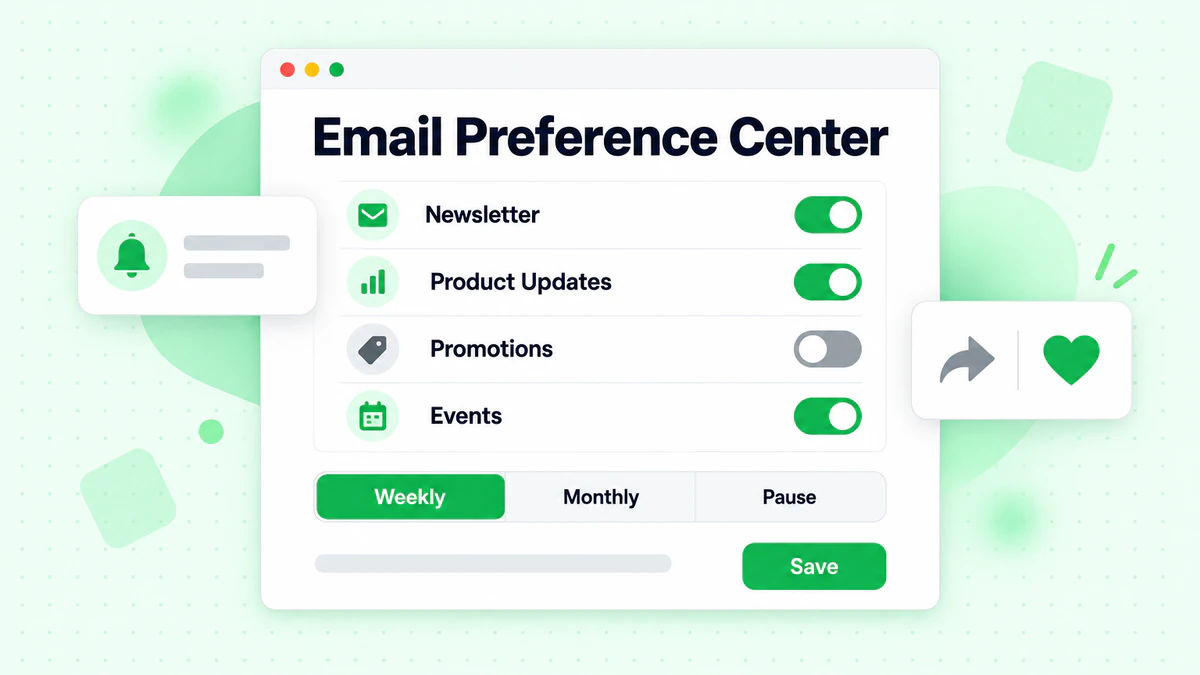
A preference center is a page where subscribers can manage their email preferences instead of simply unsubscribing.
Typical Options:
- Email frequency (daily, weekly, monthly)
- Content types (tips, news, promotions)
- Communication channels (email, SMS)
- Personal information updates
- Full unsubscribe option
Preference Center Benefits
For Subscribers:
- Control over email experience
- Alternative to full unsubscribe
- Ability to update information
For Marketers:
- Reduced unsubscribes
- Better engagement data
- Personalization opportunities
- Improved subscriber relationships
Preference Center Design
Essential Elements:
Current Settings Display: Show what they're currently subscribed to.
Easy Changes: Simple toggles or checkboxes for each option.
Save Confirmation: Clear feedback when preferences are saved.
Full Unsubscribe Option: Must include option to unsubscribe completely.
Contact Update: Ability to update email address.
Example Structure:
Email Preferences for user@example.com

CONTENT TYPES
☑ Weekly email marketing tips
☐ Product updates and announcements
☑ Industry news and research
☐ Promotional offers

FREQUENCY
○ As published (2-3 emails per week)
● Weekly digest
○ Monthly summary

[Save Preferences]

Or [Unsubscribe from all marketing emails]

Need to update your email? [Change email address]
Implementing Preference Centers
Link from Every Email: Include preference center link alongside unsubscribe link.
Pre-Populate Settings: Show current preferences when subscriber arrives.
Record Changes: Log all preference changes with timestamps.
Honor Immediately: Apply changes before next email send.
Confirmation: Send confirmation email summarizing new preferences.
Managing Consent Changes
Consent isn't static—subscribers modify and withdraw consent over time.
Processing Unsubscribes
Immediate Action:
- Stop sending marketing emails right away
- Don't wait for the legal deadline (10 days under CAN-SPAM/CASL)
- Most ESPs process automatically
Add to Suppression List:
- Maintain permanent suppression list
- Check suppression before every send
- Include in list imports and syncs
Record the Withdrawal:
- Document when consent was withdrawn
- Note the method (unsubscribe link, preference center, direct request)
- Store any reason provided
Confirmation Message: Send brief confirmation that they've been unsubscribed.
Handling Data Deletion Requests
Under GDPR, subscribers can request full data deletion:
Delete:
- Email address from marketing lists
- Personal profile information
- Engagement history (opens, clicks)
- Purchase history tied to that email
- Analytics data linked to the individual
Keep:
- Suppression list entry (prevents re-adding)
- Legal/compliance records (may be required)
- Anonymized analytics data
Process:
- Verify requestor identity
- Locate all personal data
- Delete across all systems
- Add to suppression list
- Confirm deletion to requestor
- Document the request and response
Re-Permission Campaigns
Sometimes you need to refresh consent:
When to Run Re-Permission:
- Consent records are unclear or missing
- Transitioning to stricter consent standards
- Implied consent approaching expiration
- Acquiring email list from another company
- Significant change in email program
Re-Permission Campaign Approach:
Email 1: Explanation + Ask
Subject: Please confirm your subscription

Hi [Name],

We're updating our email practices to give you more control.
To continue receiving our weekly email marketing tips, please
confirm your subscription:

[Yes, Keep Sending Me Emails]

If we don't hear from you, we'll remove you from our list on
[date]. You can always re-subscribe later.
Email 2: Reminder (5-7 days later)
Subject: Last chance to stay subscribed

[Name], we haven't heard from you yet.

If you'd like to keep receiving our emails, please confirm
before [date]:

[Confirm My Subscription]

Otherwise, this will be our last email.
After Deadline:
- Move non-responders to suppression
- Thank responders for confirming
- Document new consent records
Email Verification and Consent Quality
Email verification supports consent management by ensuring you're contacting valid addresses.
Verification at Signup
Real-time email verification during signup:
Catches Typos: Validates format and deliverability before submission completes.
Blocks Disposables: Identifies disposable email addresses that may not represent genuine subscribers.
Improves Confirmation Rates: Valid addresses receive confirmation emails, completing double opt-in.
Reduces Bounces: Prevents invalid addresses from ever joining your list.
Ongoing List Verification
Regular bulk verification maintains list quality:
Identify Degraded Addresses: Email addresses become invalid over time.
Remove Before Sending: Clean lists before campaigns to protect deliverability.
Support Accuracy: GDPR requires keeping data accurate—verification helps.
Using BillionVerify
BillionVerify supports consent quality:
At Signup: API verification catches problems immediately Before Campaigns: Bulk verification cleans existing lists Integration: Connects with popular ESPs and platforms
Maintaining clean email lists through verification supports both compliance and performance.
Conclusion
Effective consent management is the foundation of compliant, successful email marketing. By implementing proper consent collection, maintaining detailed records, and giving subscribers control through preference centers, you build lists that perform better and create fewer compliance risks.
Key Takeaways:
Choose the Right Opt-In Model: Double opt-in provides stronger consent proof and higher quality lists. Single opt-in may work for specific situations but comes with trade-offs.
Design Compliant Forms: Clear language, unchecked boxes, separate consents, and privacy policy links are essential.
Document Everything: Record when, how, and what consent was given for every subscriber.
Offer Preference Options: Preference centers reduce unsubscribes and improve engagement.
Honor Changes Promptly: Process unsubscribes and preference changes immediately.
Verify Email Addresses: Use email verification to ensure you're building lists with valid, deliverable addresses.
Review Regularly: Consent management isn't one-time—audit processes and records regularly.
Remember: subscribers who actively consent to receive your emails are more engaged, more responsive, and more valuable than those who passively accepted or were added without clear permission. Investing in proper consent management pays dividends in both compliance and marketing performance.
For comprehensive guidance on email compliance requirements, see our complete email compliance guide. Ensure your subscriber addresses are valid with BillionVerify's email verification service.